
diff options
| -rw-r--r-- | .gitignore | 1 | ||||
| -rw-r--r-- | python-atlastk.spec | 372 | ||||
| -rw-r--r-- | sources | 1 |
3 files changed, 374 insertions, 0 deletions
@@ -0,0 +1 @@ +/atlastk-0.13.2.tar.gz diff --git a/python-atlastk.spec b/python-atlastk.spec new file mode 100644 index 0000000..73b8ff1 --- /dev/null +++ b/python-atlastk.spec @@ -0,0 +1,372 @@ +%global _empty_manifest_terminate_build 0 +Name: python-atlastk +Version: 0.13.2 +Release: 1 +Summary: The quick and easy way to add versatile graphical interfaces and networking capabilities to your Python programs. Works even on your Android smartphone or tablet. +License: MIT License +URL: https://atlastk.org +Source0: https://mirrors.nju.edu.cn/pypi/web/packages/5e/0a/a0e6f34c9e28b83d55852e7efba573077073d25fad6fe16d1ed036ff439b/atlastk-0.13.2.tar.gz +BuildArch: noarch + + +%description +## A GUI with *Python* in a couple of minutes +Click the animation to see a screencast of programming this ["Hello, World!" program](https://en.wikipedia.org/wiki/%22Hello,_World!%22_program) with *Python* in a matter of minutes: +[](https://q37.info/s/rt9wr4w3) +Same video on [*Peertube*](https://en.wikipedia.org/wiki/PeerTube): <https://q37.info/s/qfcng9j4>. +Source code: +```python +import atlastk +BODY = """ +<fieldset> + <input id="Input" xdh:onevent="Submit" value="World"/> + <button xdh:onevent="Submit">Hello</button> + <hr/> + <fieldset> + <output id="Output">Greetings displayed here!</output> + </fieldset> +</fieldset> +""" +def acConnect(dom): + dom.inner("", BODY) + dom.focus("Input") +def acSubmit(dom): + name = dom.getValue("Input") + dom.begin("Output", f"<div>Hello, {name}!</div>") + dom.setValue("Input", "") + dom.focus("Input") +CALLBACKS = { + "": acConnect, + "Submit": acSubmit +} +atlastk.launch(CALLBACKS) +``` +### See for yourself right now - it's quick and easy! +#### Online, with nothing to install +To run above "Hello, World!" program directly in your browser, as seen in corresponding video, follow this link: <https://replit.com/@AtlasTK/hello-python>. +Thanks to [*Replit*](https://q37.info/s/mxmgq3qm), an [online IDE](https://q37.info/s/zzkzbdw7), you can write and run programs using the *Atlas* toolkit directly in your web browser, without having to install *Python* on your computer [](https://q37.info/s/sssznrb4). +To see more examples, like the following [*TodoMVC*](http://todomvc.com/), simply: +- go [here](https://q37.info/s/vwpsw73v) (also accessible with the [](https://q37.info/s/vwpsw73v) button at the top of this page), +- click on the green `run` button, +- choose the demonstration to launch, +- open the then displayed URL in a browser (should be clickable), +- … and, as you wish, run your own tests directly in your browser, by modifying the code of the examples or by writing your own code. +[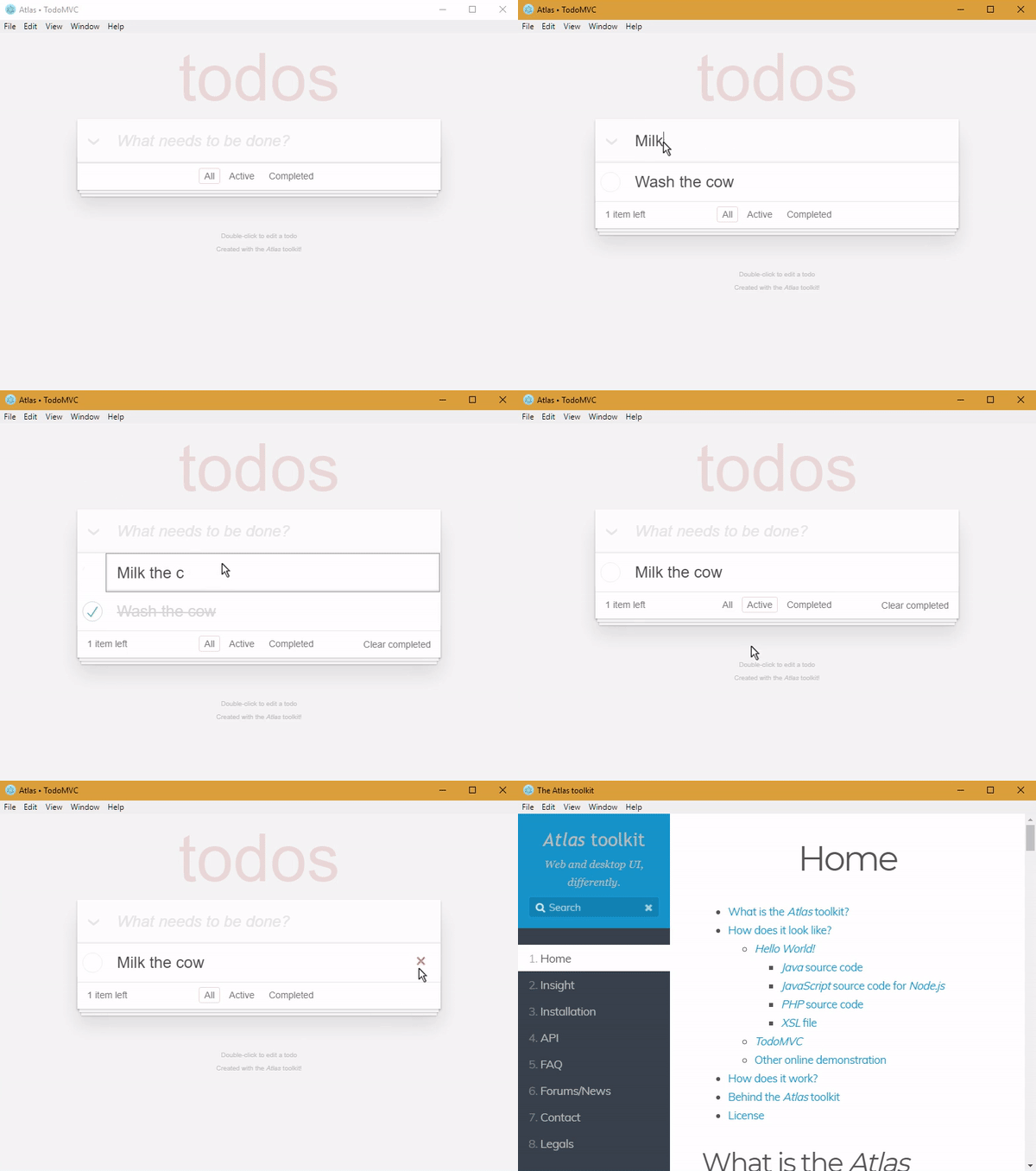](https://q37.info/s/vwpsw73v) +#### With *Python* on your computer +```shell +# You can replace 'github.com' with 'framagit.org' or 'gitlab.com'. +# DON'T copy/paste this and above line! +git clone http://github.com/epeios-q37/atlas-python +cd atlas-python/examples +python Hello/ +``` +## *Android* devices +Programs made with the *Atlas* toolkit work perfectly on your [*Android*](https://en.wikipedia.org/wiki/Android_(operating_system)) devices (smartphone or tablet) using the [*Termux*](https://termux.com/) application. Simply install (``pkg intall …``) the *git* and *python* packages. That's all! +## *Jupyter* notebooks +When using the *Atlas* toolkit in a [*Jupyter* notebook](https://en.wikipedia.org/wiki/Project_Jupyter#Jupyter_Notebook), the GUI is embedded in the notebook, as shown here: +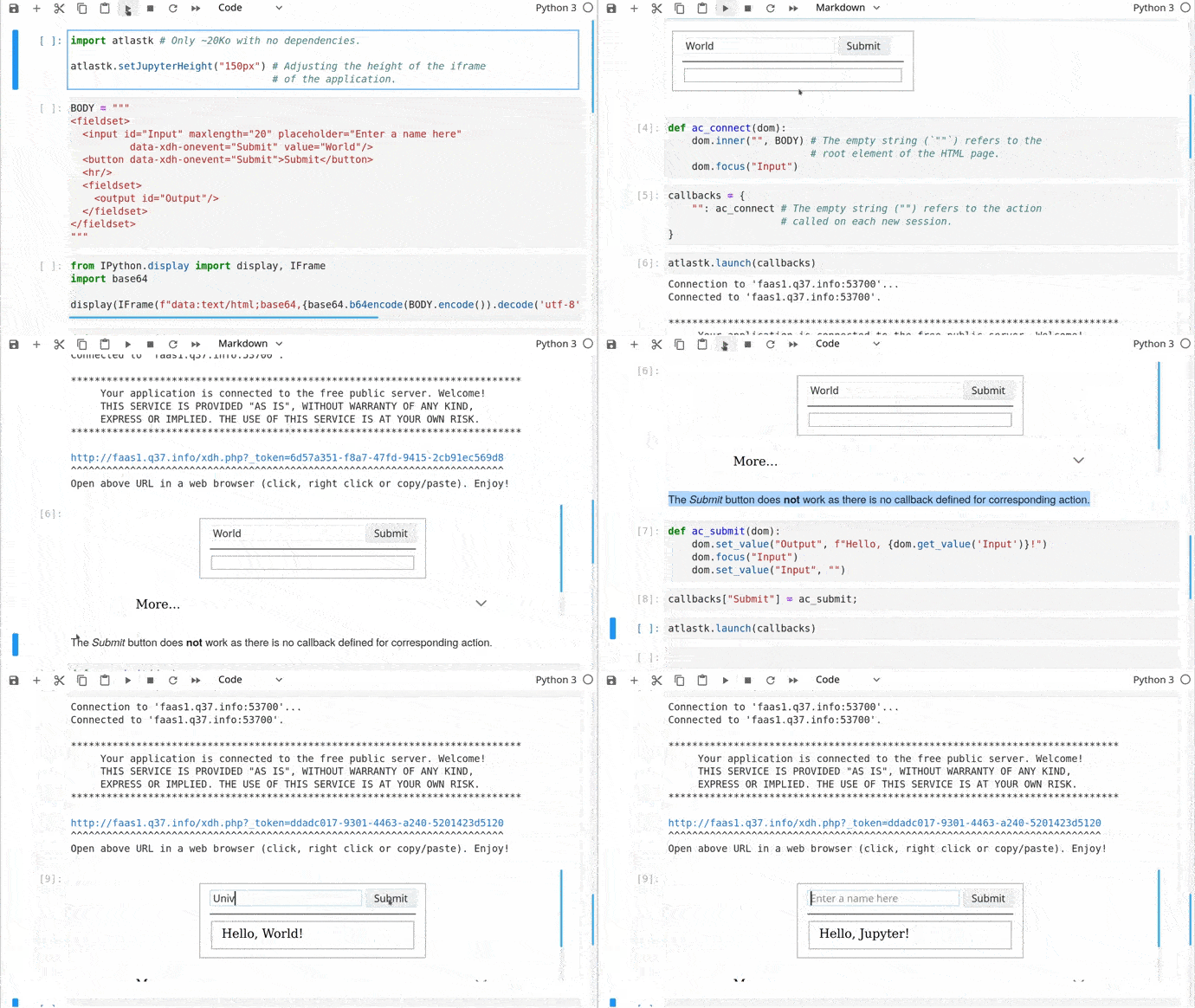 +*Jupyter* notebook examples can be found in the *tutorials* directory. +## Your turn +If you want to take your code to the next level, from [CLI](https://q37.info/s/cnh9nrw9) to [GUI](https://q37.info/s/hw9n3pjs), then you found the right toolkit. +With the [*Atlas* toolkit](http://atlastk.org/), you transform your programs in modern web applications ([*SPA*](https://q37.info/s/7sbmxd3j)) without the usual hassles: +- no *JavaScript* to write; only *HTML*(/*CSS*) and *Python*, +- no [front and back end architecture](https://q37.info/s/px7hhztd) to bother with, +- no [web server](https://q37.info/s/n3hpwsht) (*Apache*, *Nginx*…) to install, +- no need to deploy your application on a remote server, +- no incoming port to open on your internet box or routeur. +The *Atlas* toolkit is written in pure *Python*, with no native code and no dependencies, allowing the *Atlas* toolkit to be used on all environments where *Python* is available. +And simply by running them on a local computer connected to internet, applications using the *Atlas* toolkit will be accessible from the entire internet on laptops, smartphones, tablets… +The *Atlas* toolkit is particularly well suited for educational purposes, to write modern programming exercises, i.e. with a true graphical interface instead of the usual outdated textual one. More about this can be found [here](https://q37.info/s/cbms43s9). +*Python* is much more powerful then *Excel* macros to automate (boring) tasks, and you can also work with *PDF*, *Word*, *Google* files…. And with the *Atlas* toolkit, you have much more possibilities then with *VBA* forms. There are some examples [here](https://q37.info/s/97p44nh4). +There is also a stub to for this library at address <https://q37.info/s/zzcn3wnx>. +> You will also find programs from [*The Big Book of Small Python Projects*](https://inventwithpython.com/bigbookpython/) by [Al Sweigart](http://alsweigart.com) to which a graphical user interface using the *Atlas* toolkit were added in this repository: [epeios-q37/AlSweigartTheBigBookPython](https://q37.info/s/kd3bwchj). +## Content of the repository +The `atlastk` directory contains the *Python* source code of the *Atlas* toolkit, which is the directory you have to reference in `PYTHONPATH` in order to use the *Atlas* toolkit in your own program, unless you have installed the [*atlastk* package](http://q37.info/s/9srmskcm) with `pip install atlastk`. +In the `examples` directory, you will found following examples: +- `Blank`: very basic example, +- `Hello`: ["*Hello, World!*"](https://en.wikipedia.org/wiki/%22Hello,_World!%22_program), +- `Chatroom`: multi-user chatroom, +- `Notes`: note taking program, +- `TodoMVC`: [*TodoMVC*](http://todomvc.com/), +- `Hangman`: [Hangman game](http://q37.info/s/gtdtk4hp), +- `15-puzzle`: [15-puzzle game](https://q37.info/s/jn9zg3bn), +- `Contacts`: a basic address book, +- `Widgets`: some widgets handled with the *Atlas* toolkit, +- `Chatrooms` : same as above `Chatroom`, but with several rooms, +- `PigGame`: [Pig game](https://en.wikipedia.org/wiki/Pig_(dice_game)) for one or two players, +- `Reversi`: [*Reversi* game](http://q37.info/s/zz3dzmf7) for one or two players, +- `MatPlotLib` : the *Atlas* toolkit displaying some graphics made with [*matplotlib*](https://matplotlib.org/); this example needs, of course, the *matplotlib* package to be installed… +Other examples are detailed in the next section. +Except for the *ErgoJr*, *GPIO* and *RGB* applications, which are detailed in the next section, to run an example, launch, from within the repository, `python main.py`, and select the example you want to run. +You can also directly launch, from within the `examples` directory, `python <Name>/` (don't forget the final `/`), where `<Name>` is the name of the example (`Blank`, `Chatroom`…). +The *Stars* application is an example where the *Atlas* *toolkit* is used to control a [*Pygame*](https://en.wikipedia.org/wiki/Pygame) based application. Of course, *Pygame* needs to be installed. +The `tutorials` directory contains some [*Jupyter* notebooks](https://en.wikipedia.org/wiki/Project_Jupyter#Jupyter_Notebook) about the *Atlas* *toolkit*. +## *Raspberry Pi*/*ODROID-C2* +**If the applications does not work on your *Raspberry Pi*, please see this issue: <https://github.com/epeios-q37/atlas-python/issues/1>** +The *GPIO* and *RGB* applications are designed to be used on a *Raspberry Pi* or a *ODROID-C2*. +Here is how the *WebGPIO* application looks like: +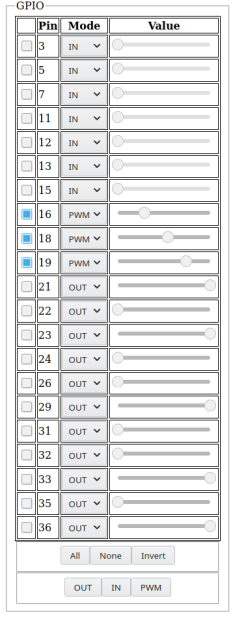 +For the *Raspberry Pi*, the `RPi.GPIO` *Python* module have to be installed (this is probably already the case). +For the *ODROID-C2*, The *Python* version of *WiringPi* must be installed, and the application has to be launched, from within the `examples` directory, with `sudo` (`sudo python GPIO/` or `sudo python RGB/`). +The *ErgoJr* application is experimental and to control a *Poppy* *Ergo Jr* robot. +The *RGB* application is dedicated to the control of a RGB led, and the *GPIO* (aka *WebGPIO*) application allows to control the basic pins. Click below picture to see a *YouTube* video on how they work (same video on [*PeerTube*](https://en.wikipedia.org/wiki/PeerTube): <https://q37.info/s/49pbmwv9>): +[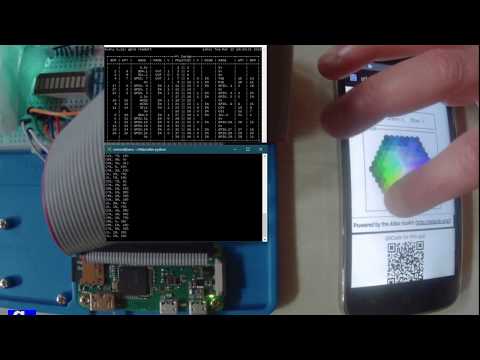](https://www.youtube.com/watch?v=C4p2iX6gc-Q) + +%package -n python3-atlastk +Summary: The quick and easy way to add versatile graphical interfaces and networking capabilities to your Python programs. Works even on your Android smartphone or tablet. +Provides: python-atlastk +BuildRequires: python3-devel +BuildRequires: python3-setuptools +BuildRequires: python3-pip +%description -n python3-atlastk +## A GUI with *Python* in a couple of minutes +Click the animation to see a screencast of programming this ["Hello, World!" program](https://en.wikipedia.org/wiki/%22Hello,_World!%22_program) with *Python* in a matter of minutes: +[](https://q37.info/s/rt9wr4w3) +Same video on [*Peertube*](https://en.wikipedia.org/wiki/PeerTube): <https://q37.info/s/qfcng9j4>. +Source code: +```python +import atlastk +BODY = """ +<fieldset> + <input id="Input" xdh:onevent="Submit" value="World"/> + <button xdh:onevent="Submit">Hello</button> + <hr/> + <fieldset> + <output id="Output">Greetings displayed here!</output> + </fieldset> +</fieldset> +""" +def acConnect(dom): + dom.inner("", BODY) + dom.focus("Input") +def acSubmit(dom): + name = dom.getValue("Input") + dom.begin("Output", f"<div>Hello, {name}!</div>") + dom.setValue("Input", "") + dom.focus("Input") +CALLBACKS = { + "": acConnect, + "Submit": acSubmit +} +atlastk.launch(CALLBACKS) +``` +### See for yourself right now - it's quick and easy! +#### Online, with nothing to install +To run above "Hello, World!" program directly in your browser, as seen in corresponding video, follow this link: <https://replit.com/@AtlasTK/hello-python>. +Thanks to [*Replit*](https://q37.info/s/mxmgq3qm), an [online IDE](https://q37.info/s/zzkzbdw7), you can write and run programs using the *Atlas* toolkit directly in your web browser, without having to install *Python* on your computer [](https://q37.info/s/sssznrb4). +To see more examples, like the following [*TodoMVC*](http://todomvc.com/), simply: +- go [here](https://q37.info/s/vwpsw73v) (also accessible with the [](https://q37.info/s/vwpsw73v) button at the top of this page), +- click on the green `run` button, +- choose the demonstration to launch, +- open the then displayed URL in a browser (should be clickable), +- … and, as you wish, run your own tests directly in your browser, by modifying the code of the examples or by writing your own code. +[](https://q37.info/s/vwpsw73v) +#### With *Python* on your computer +```shell +# You can replace 'github.com' with 'framagit.org' or 'gitlab.com'. +# DON'T copy/paste this and above line! +git clone http://github.com/epeios-q37/atlas-python +cd atlas-python/examples +python Hello/ +``` +## *Android* devices +Programs made with the *Atlas* toolkit work perfectly on your [*Android*](https://en.wikipedia.org/wiki/Android_(operating_system)) devices (smartphone or tablet) using the [*Termux*](https://termux.com/) application. Simply install (``pkg intall …``) the *git* and *python* packages. That's all! +## *Jupyter* notebooks +When using the *Atlas* toolkit in a [*Jupyter* notebook](https://en.wikipedia.org/wiki/Project_Jupyter#Jupyter_Notebook), the GUI is embedded in the notebook, as shown here: + +*Jupyter* notebook examples can be found in the *tutorials* directory. +## Your turn +If you want to take your code to the next level, from [CLI](https://q37.info/s/cnh9nrw9) to [GUI](https://q37.info/s/hw9n3pjs), then you found the right toolkit. +With the [*Atlas* toolkit](http://atlastk.org/), you transform your programs in modern web applications ([*SPA*](https://q37.info/s/7sbmxd3j)) without the usual hassles: +- no *JavaScript* to write; only *HTML*(/*CSS*) and *Python*, +- no [front and back end architecture](https://q37.info/s/px7hhztd) to bother with, +- no [web server](https://q37.info/s/n3hpwsht) (*Apache*, *Nginx*…) to install, +- no need to deploy your application on a remote server, +- no incoming port to open on your internet box or routeur. +The *Atlas* toolkit is written in pure *Python*, with no native code and no dependencies, allowing the *Atlas* toolkit to be used on all environments where *Python* is available. +And simply by running them on a local computer connected to internet, applications using the *Atlas* toolkit will be accessible from the entire internet on laptops, smartphones, tablets… +The *Atlas* toolkit is particularly well suited for educational purposes, to write modern programming exercises, i.e. with a true graphical interface instead of the usual outdated textual one. More about this can be found [here](https://q37.info/s/cbms43s9). +*Python* is much more powerful then *Excel* macros to automate (boring) tasks, and you can also work with *PDF*, *Word*, *Google* files…. And with the *Atlas* toolkit, you have much more possibilities then with *VBA* forms. There are some examples [here](https://q37.info/s/97p44nh4). +There is also a stub to for this library at address <https://q37.info/s/zzcn3wnx>. +> You will also find programs from [*The Big Book of Small Python Projects*](https://inventwithpython.com/bigbookpython/) by [Al Sweigart](http://alsweigart.com) to which a graphical user interface using the *Atlas* toolkit were added in this repository: [epeios-q37/AlSweigartTheBigBookPython](https://q37.info/s/kd3bwchj). +## Content of the repository +The `atlastk` directory contains the *Python* source code of the *Atlas* toolkit, which is the directory you have to reference in `PYTHONPATH` in order to use the *Atlas* toolkit in your own program, unless you have installed the [*atlastk* package](http://q37.info/s/9srmskcm) with `pip install atlastk`. +In the `examples` directory, you will found following examples: +- `Blank`: very basic example, +- `Hello`: ["*Hello, World!*"](https://en.wikipedia.org/wiki/%22Hello,_World!%22_program), +- `Chatroom`: multi-user chatroom, +- `Notes`: note taking program, +- `TodoMVC`: [*TodoMVC*](http://todomvc.com/), +- `Hangman`: [Hangman game](http://q37.info/s/gtdtk4hp), +- `15-puzzle`: [15-puzzle game](https://q37.info/s/jn9zg3bn), +- `Contacts`: a basic address book, +- `Widgets`: some widgets handled with the *Atlas* toolkit, +- `Chatrooms` : same as above `Chatroom`, but with several rooms, +- `PigGame`: [Pig game](https://en.wikipedia.org/wiki/Pig_(dice_game)) for one or two players, +- `Reversi`: [*Reversi* game](http://q37.info/s/zz3dzmf7) for one or two players, +- `MatPlotLib` : the *Atlas* toolkit displaying some graphics made with [*matplotlib*](https://matplotlib.org/); this example needs, of course, the *matplotlib* package to be installed… +Other examples are detailed in the next section. +Except for the *ErgoJr*, *GPIO* and *RGB* applications, which are detailed in the next section, to run an example, launch, from within the repository, `python main.py`, and select the example you want to run. +You can also directly launch, from within the `examples` directory, `python <Name>/` (don't forget the final `/`), where `<Name>` is the name of the example (`Blank`, `Chatroom`…). +The *Stars* application is an example where the *Atlas* *toolkit* is used to control a [*Pygame*](https://en.wikipedia.org/wiki/Pygame) based application. Of course, *Pygame* needs to be installed. +The `tutorials` directory contains some [*Jupyter* notebooks](https://en.wikipedia.org/wiki/Project_Jupyter#Jupyter_Notebook) about the *Atlas* *toolkit*. +## *Raspberry Pi*/*ODROID-C2* +**If the applications does not work on your *Raspberry Pi*, please see this issue: <https://github.com/epeios-q37/atlas-python/issues/1>** +The *GPIO* and *RGB* applications are designed to be used on a *Raspberry Pi* or a *ODROID-C2*. +Here is how the *WebGPIO* application looks like: + +For the *Raspberry Pi*, the `RPi.GPIO` *Python* module have to be installed (this is probably already the case). +For the *ODROID-C2*, The *Python* version of *WiringPi* must be installed, and the application has to be launched, from within the `examples` directory, with `sudo` (`sudo python GPIO/` or `sudo python RGB/`). +The *ErgoJr* application is experimental and to control a *Poppy* *Ergo Jr* robot. +The *RGB* application is dedicated to the control of a RGB led, and the *GPIO* (aka *WebGPIO*) application allows to control the basic pins. Click below picture to see a *YouTube* video on how they work (same video on [*PeerTube*](https://en.wikipedia.org/wiki/PeerTube): <https://q37.info/s/49pbmwv9>): +[](https://www.youtube.com/watch?v=C4p2iX6gc-Q) + +%package help +Summary: Development documents and examples for atlastk +Provides: python3-atlastk-doc +%description help +## A GUI with *Python* in a couple of minutes +Click the animation to see a screencast of programming this ["Hello, World!" program](https://en.wikipedia.org/wiki/%22Hello,_World!%22_program) with *Python* in a matter of minutes: +[](https://q37.info/s/rt9wr4w3) +Same video on [*Peertube*](https://en.wikipedia.org/wiki/PeerTube): <https://q37.info/s/qfcng9j4>. +Source code: +```python +import atlastk +BODY = """ +<fieldset> + <input id="Input" xdh:onevent="Submit" value="World"/> + <button xdh:onevent="Submit">Hello</button> + <hr/> + <fieldset> + <output id="Output">Greetings displayed here!</output> + </fieldset> +</fieldset> +""" +def acConnect(dom): + dom.inner("", BODY) + dom.focus("Input") +def acSubmit(dom): + name = dom.getValue("Input") + dom.begin("Output", f"<div>Hello, {name}!</div>") + dom.setValue("Input", "") + dom.focus("Input") +CALLBACKS = { + "": acConnect, + "Submit": acSubmit +} +atlastk.launch(CALLBACKS) +``` +### See for yourself right now - it's quick and easy! +#### Online, with nothing to install +To run above "Hello, World!" program directly in your browser, as seen in corresponding video, follow this link: <https://replit.com/@AtlasTK/hello-python>. +Thanks to [*Replit*](https://q37.info/s/mxmgq3qm), an [online IDE](https://q37.info/s/zzkzbdw7), you can write and run programs using the *Atlas* toolkit directly in your web browser, without having to install *Python* on your computer [](https://q37.info/s/sssznrb4). +To see more examples, like the following [*TodoMVC*](http://todomvc.com/), simply: +- go [here](https://q37.info/s/vwpsw73v) (also accessible with the [](https://q37.info/s/vwpsw73v) button at the top of this page), +- click on the green `run` button, +- choose the demonstration to launch, +- open the then displayed URL in a browser (should be clickable), +- … and, as you wish, run your own tests directly in your browser, by modifying the code of the examples or by writing your own code. +[](https://q37.info/s/vwpsw73v) +#### With *Python* on your computer +```shell +# You can replace 'github.com' with 'framagit.org' or 'gitlab.com'. +# DON'T copy/paste this and above line! +git clone http://github.com/epeios-q37/atlas-python +cd atlas-python/examples +python Hello/ +``` +## *Android* devices +Programs made with the *Atlas* toolkit work perfectly on your [*Android*](https://en.wikipedia.org/wiki/Android_(operating_system)) devices (smartphone or tablet) using the [*Termux*](https://termux.com/) application. Simply install (``pkg intall …``) the *git* and *python* packages. That's all! +## *Jupyter* notebooks +When using the *Atlas* toolkit in a [*Jupyter* notebook](https://en.wikipedia.org/wiki/Project_Jupyter#Jupyter_Notebook), the GUI is embedded in the notebook, as shown here: + +*Jupyter* notebook examples can be found in the *tutorials* directory. +## Your turn +If you want to take your code to the next level, from [CLI](https://q37.info/s/cnh9nrw9) to [GUI](https://q37.info/s/hw9n3pjs), then you found the right toolkit. +With the [*Atlas* toolkit](http://atlastk.org/), you transform your programs in modern web applications ([*SPA*](https://q37.info/s/7sbmxd3j)) without the usual hassles: +- no *JavaScript* to write; only *HTML*(/*CSS*) and *Python*, +- no [front and back end architecture](https://q37.info/s/px7hhztd) to bother with, +- no [web server](https://q37.info/s/n3hpwsht) (*Apache*, *Nginx*…) to install, +- no need to deploy your application on a remote server, +- no incoming port to open on your internet box or routeur. +The *Atlas* toolkit is written in pure *Python*, with no native code and no dependencies, allowing the *Atlas* toolkit to be used on all environments where *Python* is available. +And simply by running them on a local computer connected to internet, applications using the *Atlas* toolkit will be accessible from the entire internet on laptops, smartphones, tablets… +The *Atlas* toolkit is particularly well suited for educational purposes, to write modern programming exercises, i.e. with a true graphical interface instead of the usual outdated textual one. More about this can be found [here](https://q37.info/s/cbms43s9). +*Python* is much more powerful then *Excel* macros to automate (boring) tasks, and you can also work with *PDF*, *Word*, *Google* files…. And with the *Atlas* toolkit, you have much more possibilities then with *VBA* forms. There are some examples [here](https://q37.info/s/97p44nh4). +There is also a stub to for this library at address <https://q37.info/s/zzcn3wnx>. +> You will also find programs from [*The Big Book of Small Python Projects*](https://inventwithpython.com/bigbookpython/) by [Al Sweigart](http://alsweigart.com) to which a graphical user interface using the *Atlas* toolkit were added in this repository: [epeios-q37/AlSweigartTheBigBookPython](https://q37.info/s/kd3bwchj). +## Content of the repository +The `atlastk` directory contains the *Python* source code of the *Atlas* toolkit, which is the directory you have to reference in `PYTHONPATH` in order to use the *Atlas* toolkit in your own program, unless you have installed the [*atlastk* package](http://q37.info/s/9srmskcm) with `pip install atlastk`. +In the `examples` directory, you will found following examples: +- `Blank`: very basic example, +- `Hello`: ["*Hello, World!*"](https://en.wikipedia.org/wiki/%22Hello,_World!%22_program), +- `Chatroom`: multi-user chatroom, +- `Notes`: note taking program, +- `TodoMVC`: [*TodoMVC*](http://todomvc.com/), +- `Hangman`: [Hangman game](http://q37.info/s/gtdtk4hp), +- `15-puzzle`: [15-puzzle game](https://q37.info/s/jn9zg3bn), +- `Contacts`: a basic address book, +- `Widgets`: some widgets handled with the *Atlas* toolkit, +- `Chatrooms` : same as above `Chatroom`, but with several rooms, +- `PigGame`: [Pig game](https://en.wikipedia.org/wiki/Pig_(dice_game)) for one or two players, +- `Reversi`: [*Reversi* game](http://q37.info/s/zz3dzmf7) for one or two players, +- `MatPlotLib` : the *Atlas* toolkit displaying some graphics made with [*matplotlib*](https://matplotlib.org/); this example needs, of course, the *matplotlib* package to be installed… +Other examples are detailed in the next section. +Except for the *ErgoJr*, *GPIO* and *RGB* applications, which are detailed in the next section, to run an example, launch, from within the repository, `python main.py`, and select the example you want to run. +You can also directly launch, from within the `examples` directory, `python <Name>/` (don't forget the final `/`), where `<Name>` is the name of the example (`Blank`, `Chatroom`…). +The *Stars* application is an example where the *Atlas* *toolkit* is used to control a [*Pygame*](https://en.wikipedia.org/wiki/Pygame) based application. Of course, *Pygame* needs to be installed. +The `tutorials` directory contains some [*Jupyter* notebooks](https://en.wikipedia.org/wiki/Project_Jupyter#Jupyter_Notebook) about the *Atlas* *toolkit*. +## *Raspberry Pi*/*ODROID-C2* +**If the applications does not work on your *Raspberry Pi*, please see this issue: <https://github.com/epeios-q37/atlas-python/issues/1>** +The *GPIO* and *RGB* applications are designed to be used on a *Raspberry Pi* or a *ODROID-C2*. +Here is how the *WebGPIO* application looks like: + +For the *Raspberry Pi*, the `RPi.GPIO` *Python* module have to be installed (this is probably already the case). +For the *ODROID-C2*, The *Python* version of *WiringPi* must be installed, and the application has to be launched, from within the `examples` directory, with `sudo` (`sudo python GPIO/` or `sudo python RGB/`). +The *ErgoJr* application is experimental and to control a *Poppy* *Ergo Jr* robot. +The *RGB* application is dedicated to the control of a RGB led, and the *GPIO* (aka *WebGPIO*) application allows to control the basic pins. Click below picture to see a *YouTube* video on how they work (same video on [*PeerTube*](https://en.wikipedia.org/wiki/PeerTube): <https://q37.info/s/49pbmwv9>): +[](https://www.youtube.com/watch?v=C4p2iX6gc-Q) + +%prep +%autosetup -n atlastk-0.13.2 + +%build +%py3_build + +%install +%py3_install +install -d -m755 %{buildroot}/%{_pkgdocdir} +if [ -d doc ]; then cp -arf doc %{buildroot}/%{_pkgdocdir}; fi +if [ -d docs ]; then cp -arf docs %{buildroot}/%{_pkgdocdir}; fi +if [ -d example ]; then cp -arf example %{buildroot}/%{_pkgdocdir}; fi +if [ -d examples ]; then cp -arf examples %{buildroot}/%{_pkgdocdir}; fi +pushd %{buildroot} +if [ -d usr/lib ]; then + find usr/lib -type f -printf "/%h/%f\n" >> filelist.lst +fi +if [ -d usr/lib64 ]; then + find usr/lib64 -type f -printf "/%h/%f\n" >> filelist.lst +fi +if [ -d usr/bin ]; then + find usr/bin -type f -printf "/%h/%f\n" >> filelist.lst +fi +if [ -d usr/sbin ]; then + find usr/sbin -type f -printf "/%h/%f\n" >> filelist.lst +fi +touch doclist.lst +if [ -d usr/share/man ]; then + find usr/share/man -type f -printf "/%h/%f.gz\n" >> doclist.lst +fi +popd +mv %{buildroot}/filelist.lst . +mv %{buildroot}/doclist.lst . + +%files -n python3-atlastk -f filelist.lst +%dir %{python3_sitelib}/* + +%files help -f doclist.lst +%{_docdir}/* + +%changelog +* Wed Apr 12 2023 Python_Bot <Python_Bot@openeuler.org> - 0.13.2-1 +- Package Spec generated @@ -0,0 +1 @@ +2ac060aea17d692fa983539cff50c385 atlastk-0.13.2.tar.gz |