
diff options
| author | CoprDistGit <infra@openeuler.org> | 2023-04-10 22:36:39 +0000 |
|---|---|---|
| committer | CoprDistGit <infra@openeuler.org> | 2023-04-10 22:36:39 +0000 |
| commit | a6c0327ff773ee57d12c896327e23085c6ea13e2 (patch) | |
| tree | 264b9de89bc2e27fb32c2eadffae9071b3ef6d15 | |
| parent | 728f31d2a9111601387383f250ab1daee37d6df7 (diff) | |
automatic import of python-authy
| -rw-r--r-- | .gitignore | 1 | ||||
| -rw-r--r-- | python-authy.spec | 312 | ||||
| -rw-r--r-- | sources | 1 |
3 files changed, 314 insertions, 0 deletions
@@ -0,0 +1 @@ +/authy-2.2.6.tar.gz diff --git a/python-authy.spec b/python-authy.spec new file mode 100644 index 0000000..55f6fe8 --- /dev/null +++ b/python-authy.spec @@ -0,0 +1,312 @@ +%global _empty_manifest_terminate_build 0 +Name: python-authy +Version: 2.2.6 +Release: 1 +Summary: Authy API Client +License: MIT License +URL: http://github.com/authy/authy-python +Source0: https://mirrors.nju.edu.cn/pypi/web/packages/23/47/d9ac2aefe1281135ad8b9d22a3e60ceedbd4c3b0445288d9a343204bde1c/authy-2.2.6.tar.gz +BuildArch: noarch + + +%description +[](https://pypi.org/project/authy/) [](https://travis-ci.org/authy/authy-python) + +# Python Client for Twilio Authy Two-Factor Authentication (2FA) API + +Documentation for Python usage of the Authy API lives in the [official Twilio documentation](https://www.twilio.com/docs/authy/api/). + +The Authy API supports multiple channels of 2FA: +* One-time passwords via SMS and voice. +* Soft token ([TOTP](https://www.twilio.com/docs/glossary/totp) via the Authy App) +* Push authentication via the Authy App + +If you only need SMS and Voice support for one-time passwords, we recommend using the [Twilio Verify API](https://www.twilio.com/docs/verify/api) instead. + +[More on how to choose between Authy and Verify here.](https://www.twilio.com/docs/verify/authy-vs-verify) + +### Authy Quickstart + +For a full tutorial, check out either of the Python Authy Quickstarts in our docs: +* [Python/Django Authy Quickstart](https://www.twilio.com/docs/authy/quickstart/two-factor-authentication-python-django) +* [Python/Flask Authy Quickstart](https://www.twilio.com/docs/authy/quickstart/two-factor-authentication-python-flask) + +## Authy Python Installation + +Install with [pip](https://www.twilio.com/docs/usage/quickstart/devenvironment-python#how-to-install-pip): + + $ pip install authy + +**OR** + +Download the [source code](https://github.com/twilio/authy-python/archive/master.zip) and run the following command from your terminal: + + $ python setup.py install + +_Note that you may need admin permissions to run the above commands._ + +## Usage + +To use the Authy client, import AuthyApiClient and initialize it with your production API Key found in the [Twilio Console](https://www.twilio.com/console/authy/applications/): + +```python +from authy.api import AuthyApiClient +authy_api = AuthyApiClient('your_api_key') +``` + +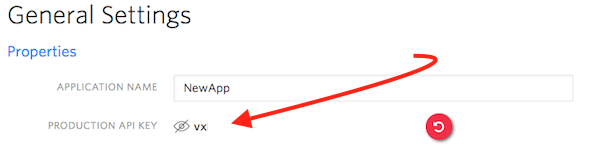 + +## 2FA Workflow + +1. [Create a user](https://www.twilio.com/docs/authy/api/users#enabling-new-user) +2. [Send a one-time password](https://www.twilio.com/docs/authy/api/one-time-passwords) +3. [Verify a one-time password](https://www.twilio.com/docs/authy/api/one-time-passwords#verify-a-one-time-password) + +**OR** + +1. [Create a user](https://www.twilio.com/docs/authy/api/users#enabling-new-user) +2. [Send a push authentication](https://www.twilio.com/docs/authy/api/push-authentications) +3. [Check a push authentication status](https://www.twilio.com/docs/authy/api/push-authentications#check-approval-request-status) + + +## <a name="phone-verification"></a>Phone Verification + +[Phone verification now lives in the Twilio API](https://www.twilio.com/docs/verify/api) and has [Python support through the official Twilio helper libraries](https://www.twilio.com/docs/libraries/python). + +[Legacy (V1) documentation here.](verify-legacy-v1.md) **Verify V1 is not recommended for new development. Please consider using [Verify V2](https://www.twilio.com/docs/verify/api)**. + +## Contributing + +Install development dependencies with pip: + + sudo pip install -r requirements.txt + +To run tests: + + make test +or + + make testfile tests/<test_case_file> + +## Copyright + +Copyright (c) 2011-2020 Authy Inc. See [LICENSE](https://github.com/twilio/authy-python/blob/master/LICENSE) for further details. + +%package -n python3-authy +Summary: Authy API Client +Provides: python-authy +BuildRequires: python3-devel +BuildRequires: python3-setuptools +BuildRequires: python3-pip +%description -n python3-authy +[](https://pypi.org/project/authy/) [](https://travis-ci.org/authy/authy-python) + +# Python Client for Twilio Authy Two-Factor Authentication (2FA) API + +Documentation for Python usage of the Authy API lives in the [official Twilio documentation](https://www.twilio.com/docs/authy/api/). + +The Authy API supports multiple channels of 2FA: +* One-time passwords via SMS and voice. +* Soft token ([TOTP](https://www.twilio.com/docs/glossary/totp) via the Authy App) +* Push authentication via the Authy App + +If you only need SMS and Voice support for one-time passwords, we recommend using the [Twilio Verify API](https://www.twilio.com/docs/verify/api) instead. + +[More on how to choose between Authy and Verify here.](https://www.twilio.com/docs/verify/authy-vs-verify) + +### Authy Quickstart + +For a full tutorial, check out either of the Python Authy Quickstarts in our docs: +* [Python/Django Authy Quickstart](https://www.twilio.com/docs/authy/quickstart/two-factor-authentication-python-django) +* [Python/Flask Authy Quickstart](https://www.twilio.com/docs/authy/quickstart/two-factor-authentication-python-flask) + +## Authy Python Installation + +Install with [pip](https://www.twilio.com/docs/usage/quickstart/devenvironment-python#how-to-install-pip): + + $ pip install authy + +**OR** + +Download the [source code](https://github.com/twilio/authy-python/archive/master.zip) and run the following command from your terminal: + + $ python setup.py install + +_Note that you may need admin permissions to run the above commands._ + +## Usage + +To use the Authy client, import AuthyApiClient and initialize it with your production API Key found in the [Twilio Console](https://www.twilio.com/console/authy/applications/): + +```python +from authy.api import AuthyApiClient +authy_api = AuthyApiClient('your_api_key') +``` + + + +## 2FA Workflow + +1. [Create a user](https://www.twilio.com/docs/authy/api/users#enabling-new-user) +2. [Send a one-time password](https://www.twilio.com/docs/authy/api/one-time-passwords) +3. [Verify a one-time password](https://www.twilio.com/docs/authy/api/one-time-passwords#verify-a-one-time-password) + +**OR** + +1. [Create a user](https://www.twilio.com/docs/authy/api/users#enabling-new-user) +2. [Send a push authentication](https://www.twilio.com/docs/authy/api/push-authentications) +3. [Check a push authentication status](https://www.twilio.com/docs/authy/api/push-authentications#check-approval-request-status) + + +## <a name="phone-verification"></a>Phone Verification + +[Phone verification now lives in the Twilio API](https://www.twilio.com/docs/verify/api) and has [Python support through the official Twilio helper libraries](https://www.twilio.com/docs/libraries/python). + +[Legacy (V1) documentation here.](verify-legacy-v1.md) **Verify V1 is not recommended for new development. Please consider using [Verify V2](https://www.twilio.com/docs/verify/api)**. + +## Contributing + +Install development dependencies with pip: + + sudo pip install -r requirements.txt + +To run tests: + + make test +or + + make testfile tests/<test_case_file> + +## Copyright + +Copyright (c) 2011-2020 Authy Inc. See [LICENSE](https://github.com/twilio/authy-python/blob/master/LICENSE) for further details. + +%package help +Summary: Development documents and examples for authy +Provides: python3-authy-doc +%description help +[](https://pypi.org/project/authy/) [](https://travis-ci.org/authy/authy-python) + +# Python Client for Twilio Authy Two-Factor Authentication (2FA) API + +Documentation for Python usage of the Authy API lives in the [official Twilio documentation](https://www.twilio.com/docs/authy/api/). + +The Authy API supports multiple channels of 2FA: +* One-time passwords via SMS and voice. +* Soft token ([TOTP](https://www.twilio.com/docs/glossary/totp) via the Authy App) +* Push authentication via the Authy App + +If you only need SMS and Voice support for one-time passwords, we recommend using the [Twilio Verify API](https://www.twilio.com/docs/verify/api) instead. + +[More on how to choose between Authy and Verify here.](https://www.twilio.com/docs/verify/authy-vs-verify) + +### Authy Quickstart + +For a full tutorial, check out either of the Python Authy Quickstarts in our docs: +* [Python/Django Authy Quickstart](https://www.twilio.com/docs/authy/quickstart/two-factor-authentication-python-django) +* [Python/Flask Authy Quickstart](https://www.twilio.com/docs/authy/quickstart/two-factor-authentication-python-flask) + +## Authy Python Installation + +Install with [pip](https://www.twilio.com/docs/usage/quickstart/devenvironment-python#how-to-install-pip): + + $ pip install authy + +**OR** + +Download the [source code](https://github.com/twilio/authy-python/archive/master.zip) and run the following command from your terminal: + + $ python setup.py install + +_Note that you may need admin permissions to run the above commands._ + +## Usage + +To use the Authy client, import AuthyApiClient and initialize it with your production API Key found in the [Twilio Console](https://www.twilio.com/console/authy/applications/): + +```python +from authy.api import AuthyApiClient +authy_api = AuthyApiClient('your_api_key') +``` + + + +## 2FA Workflow + +1. [Create a user](https://www.twilio.com/docs/authy/api/users#enabling-new-user) +2. [Send a one-time password](https://www.twilio.com/docs/authy/api/one-time-passwords) +3. [Verify a one-time password](https://www.twilio.com/docs/authy/api/one-time-passwords#verify-a-one-time-password) + +**OR** + +1. [Create a user](https://www.twilio.com/docs/authy/api/users#enabling-new-user) +2. [Send a push authentication](https://www.twilio.com/docs/authy/api/push-authentications) +3. [Check a push authentication status](https://www.twilio.com/docs/authy/api/push-authentications#check-approval-request-status) + + +## <a name="phone-verification"></a>Phone Verification + +[Phone verification now lives in the Twilio API](https://www.twilio.com/docs/verify/api) and has [Python support through the official Twilio helper libraries](https://www.twilio.com/docs/libraries/python). + +[Legacy (V1) documentation here.](verify-legacy-v1.md) **Verify V1 is not recommended for new development. Please consider using [Verify V2](https://www.twilio.com/docs/verify/api)**. + +## Contributing + +Install development dependencies with pip: + + sudo pip install -r requirements.txt + +To run tests: + + make test +or + + make testfile tests/<test_case_file> + +## Copyright + +Copyright (c) 2011-2020 Authy Inc. See [LICENSE](https://github.com/twilio/authy-python/blob/master/LICENSE) for further details. + +%prep +%autosetup -n authy-2.2.6 + +%build +%py3_build + +%install +%py3_install +install -d -m755 %{buildroot}/%{_pkgdocdir} +if [ -d doc ]; then cp -arf doc %{buildroot}/%{_pkgdocdir}; fi +if [ -d docs ]; then cp -arf docs %{buildroot}/%{_pkgdocdir}; fi +if [ -d example ]; then cp -arf example %{buildroot}/%{_pkgdocdir}; fi +if [ -d examples ]; then cp -arf examples %{buildroot}/%{_pkgdocdir}; fi +pushd %{buildroot} +if [ -d usr/lib ]; then + find usr/lib -type f -printf "/%h/%f\n" >> filelist.lst +fi +if [ -d usr/lib64 ]; then + find usr/lib64 -type f -printf "/%h/%f\n" >> filelist.lst +fi +if [ -d usr/bin ]; then + find usr/bin -type f -printf "/%h/%f\n" >> filelist.lst +fi +if [ -d usr/sbin ]; then + find usr/sbin -type f -printf "/%h/%f\n" >> filelist.lst +fi +touch doclist.lst +if [ -d usr/share/man ]; then + find usr/share/man -type f -printf "/%h/%f.gz\n" >> doclist.lst +fi +popd +mv %{buildroot}/filelist.lst . +mv %{buildroot}/doclist.lst . + +%files -n python3-authy -f filelist.lst +%dir %{python3_sitelib}/* + +%files help -f doclist.lst +%{_docdir}/* + +%changelog +* Mon Apr 10 2023 Python_Bot <Python_Bot@openeuler.org> - 2.2.6-1 +- Package Spec generated @@ -0,0 +1 @@ +f4540e55344912b355f8d6de6b3e1243 authy-2.2.6.tar.gz |