
diff options
Diffstat (limited to 'python-bardolph.spec')
| -rw-r--r-- | python-bardolph.spec | 385 |
1 files changed, 385 insertions, 0 deletions
diff --git a/python-bardolph.spec b/python-bardolph.spec new file mode 100644 index 0000000..f13e187 --- /dev/null +++ b/python-bardolph.spec @@ -0,0 +1,385 @@ +%global _empty_manifest_terminate_build 0 +Name: python-bardolph +Version: 0.1.5 +Release: 1 +Summary: Simple scripting language for LIFX lights +License: Apache License 2.0 +URL: http://www.bardolph.org +Source0: https://mirrors.nju.edu.cn/pypi/web/packages/b9/2a/c2e607e7dbf1c3d40dea5fbf8c75391976630fe26b9b3fcd39d903bace39/bardolph-0.1.5.tar.gz +BuildArch: noarch + +Requires: python3-lifxlan + +%description + +https://www.bardolph.org + +# Bardolph Project + +Al Fontes - [bardolph@fontes.org](mailto:bardolph@fontes.org) + +**Bardolph** is a facility for controlling LIFX (https://www.lifx.com) lights +through a simple scripting language. It is targeted at people who would like +to control or experiment with their lights in an automated way, using a minimal +amount of coding. + +Using their names, you can control individual lights, groups or locations. Or, +just pick a color for all the lights on your network. If you have any multi-zone +lights, the language allows you to set colors for specific zones. + +The program does not use the Internet to access the bulbs, and no login is +required; all of its communication occurs over the local WiFi network. You +can edit scripts with a basic text editor and run them from the command line. + +The language may be missing some constructs you might expect, such as loops and +arithmetic expressons, as it's still under development. However, it is also +very simple, and should be usable by non-programmers. + +## Quick Examples +Here is a script, named `all_on.ls`, that will turn on all your lights: +``` +duration 1.5 on all +``` +You run it with: +``` +lsrun all_on.ls +``` +In this case, `lsrun` is a bash shell script that become available after you +install Bardolph. + +The `duration` parameter says to slowly shut off the +lights over a period of 1.5 seconds, which is a much nicer experience than +abruptly turning them off with no dimming. + +Another example, `red.ls`, sets all the lights to a deep shade of red: +``` +duration 1.5 hue 350 saturation 80 brightness 80 kelvin 2700 +set all +``` +To run it: +``` +lsrun red.ls +``` +The application executes in the foreground as long as a script is running. In this +example, the application will run for 5 minutes. + +As a convenience, you can pass a script as a command-line parameter using +`lsrun -s`, followed by the script code in a quoted string. For example, to +turn off all the lights from the keyboard: + +``` +lsrun -s 'off all' +``` + +## Web Server +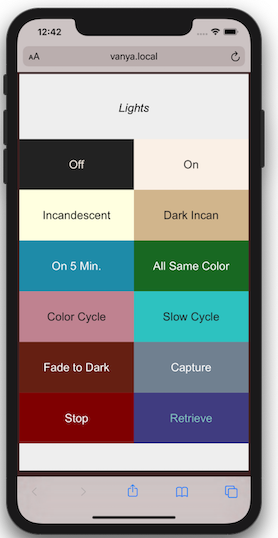 + +The web server component makes scripts available in a user-friendly manner. +It implements a simple web page that lists available scripts and provides a +1:1 mapping betwen scripts and URL's. The server is designed to run locally, +on your WiFi network. + +For example, if have a machine with the hostname +`myserver.local`, you could launch the `all_on.ls` script by going to +`http://myserver.local/all-on` with any browser on your WiFi network. +Because scripts can run over a long period of time, even indefinitely, +a cheap, dedicated device like a Raspberry Pi is an ideal way to host the +web server. + +## Python API +I've attempted to make it easy to use Bardolph scripts in your Python code. +For some uses, this may be significantly easier than learning and using a +full-purpose Python library. For example, here's a complete program that +waits 5 seconds, turns all the lights off, and turns them on again after +another 5 seconds: + +``` +from bardolph.controller import ls_module + +ls_module.configure() +ls_module.queue_script('time 5 off all on all') +``` + +## System Requirements +The program has been tested on Python versions at or above 3.7. + +Because I haven't done any stress testing, I don't know the limits on +script size. Note that the application loads the encoded script into memory +before executing it. + +I've tested the program on MacOS Monterey 12.0.1, a Raspberry Pi Zero W +controlling 6 devices, a Raspberry Pi 3 and Raspberry Pi 4. + +## Go Try It +For full documentation and download options, please see +[the main website](http://www.bardolph.org). + + + + +%package -n python3-bardolph +Summary: Simple scripting language for LIFX lights +Provides: python-bardolph +BuildRequires: python3-devel +BuildRequires: python3-setuptools +BuildRequires: python3-pip +%description -n python3-bardolph + +https://www.bardolph.org + +# Bardolph Project + +Al Fontes - [bardolph@fontes.org](mailto:bardolph@fontes.org) + +**Bardolph** is a facility for controlling LIFX (https://www.lifx.com) lights +through a simple scripting language. It is targeted at people who would like +to control or experiment with their lights in an automated way, using a minimal +amount of coding. + +Using their names, you can control individual lights, groups or locations. Or, +just pick a color for all the lights on your network. If you have any multi-zone +lights, the language allows you to set colors for specific zones. + +The program does not use the Internet to access the bulbs, and no login is +required; all of its communication occurs over the local WiFi network. You +can edit scripts with a basic text editor and run them from the command line. + +The language may be missing some constructs you might expect, such as loops and +arithmetic expressons, as it's still under development. However, it is also +very simple, and should be usable by non-programmers. + +## Quick Examples +Here is a script, named `all_on.ls`, that will turn on all your lights: +``` +duration 1.5 on all +``` +You run it with: +``` +lsrun all_on.ls +``` +In this case, `lsrun` is a bash shell script that become available after you +install Bardolph. + +The `duration` parameter says to slowly shut off the +lights over a period of 1.5 seconds, which is a much nicer experience than +abruptly turning them off with no dimming. + +Another example, `red.ls`, sets all the lights to a deep shade of red: +``` +duration 1.5 hue 350 saturation 80 brightness 80 kelvin 2700 +set all +``` +To run it: +``` +lsrun red.ls +``` +The application executes in the foreground as long as a script is running. In this +example, the application will run for 5 minutes. + +As a convenience, you can pass a script as a command-line parameter using +`lsrun -s`, followed by the script code in a quoted string. For example, to +turn off all the lights from the keyboard: + +``` +lsrun -s 'off all' +``` + +## Web Server + + +The web server component makes scripts available in a user-friendly manner. +It implements a simple web page that lists available scripts and provides a +1:1 mapping betwen scripts and URL's. The server is designed to run locally, +on your WiFi network. + +For example, if have a machine with the hostname +`myserver.local`, you could launch the `all_on.ls` script by going to +`http://myserver.local/all-on` with any browser on your WiFi network. +Because scripts can run over a long period of time, even indefinitely, +a cheap, dedicated device like a Raspberry Pi is an ideal way to host the +web server. + +## Python API +I've attempted to make it easy to use Bardolph scripts in your Python code. +For some uses, this may be significantly easier than learning and using a +full-purpose Python library. For example, here's a complete program that +waits 5 seconds, turns all the lights off, and turns them on again after +another 5 seconds: + +``` +from bardolph.controller import ls_module + +ls_module.configure() +ls_module.queue_script('time 5 off all on all') +``` + +## System Requirements +The program has been tested on Python versions at or above 3.7. + +Because I haven't done any stress testing, I don't know the limits on +script size. Note that the application loads the encoded script into memory +before executing it. + +I've tested the program on MacOS Monterey 12.0.1, a Raspberry Pi Zero W +controlling 6 devices, a Raspberry Pi 3 and Raspberry Pi 4. + +## Go Try It +For full documentation and download options, please see +[the main website](http://www.bardolph.org). + + + + +%package help +Summary: Development documents and examples for bardolph +Provides: python3-bardolph-doc +%description help + +https://www.bardolph.org + +# Bardolph Project + +Al Fontes - [bardolph@fontes.org](mailto:bardolph@fontes.org) + +**Bardolph** is a facility for controlling LIFX (https://www.lifx.com) lights +through a simple scripting language. It is targeted at people who would like +to control or experiment with their lights in an automated way, using a minimal +amount of coding. + +Using their names, you can control individual lights, groups or locations. Or, +just pick a color for all the lights on your network. If you have any multi-zone +lights, the language allows you to set colors for specific zones. + +The program does not use the Internet to access the bulbs, and no login is +required; all of its communication occurs over the local WiFi network. You +can edit scripts with a basic text editor and run them from the command line. + +The language may be missing some constructs you might expect, such as loops and +arithmetic expressons, as it's still under development. However, it is also +very simple, and should be usable by non-programmers. + +## Quick Examples +Here is a script, named `all_on.ls`, that will turn on all your lights: +``` +duration 1.5 on all +``` +You run it with: +``` +lsrun all_on.ls +``` +In this case, `lsrun` is a bash shell script that become available after you +install Bardolph. + +The `duration` parameter says to slowly shut off the +lights over a period of 1.5 seconds, which is a much nicer experience than +abruptly turning them off with no dimming. + +Another example, `red.ls`, sets all the lights to a deep shade of red: +``` +duration 1.5 hue 350 saturation 80 brightness 80 kelvin 2700 +set all +``` +To run it: +``` +lsrun red.ls +``` +The application executes in the foreground as long as a script is running. In this +example, the application will run for 5 minutes. + +As a convenience, you can pass a script as a command-line parameter using +`lsrun -s`, followed by the script code in a quoted string. For example, to +turn off all the lights from the keyboard: + +``` +lsrun -s 'off all' +``` + +## Web Server + + +The web server component makes scripts available in a user-friendly manner. +It implements a simple web page that lists available scripts and provides a +1:1 mapping betwen scripts and URL's. The server is designed to run locally, +on your WiFi network. + +For example, if have a machine with the hostname +`myserver.local`, you could launch the `all_on.ls` script by going to +`http://myserver.local/all-on` with any browser on your WiFi network. +Because scripts can run over a long period of time, even indefinitely, +a cheap, dedicated device like a Raspberry Pi is an ideal way to host the +web server. + +## Python API +I've attempted to make it easy to use Bardolph scripts in your Python code. +For some uses, this may be significantly easier than learning and using a +full-purpose Python library. For example, here's a complete program that +waits 5 seconds, turns all the lights off, and turns them on again after +another 5 seconds: + +``` +from bardolph.controller import ls_module + +ls_module.configure() +ls_module.queue_script('time 5 off all on all') +``` + +## System Requirements +The program has been tested on Python versions at or above 3.7. + +Because I haven't done any stress testing, I don't know the limits on +script size. Note that the application loads the encoded script into memory +before executing it. + +I've tested the program on MacOS Monterey 12.0.1, a Raspberry Pi Zero W +controlling 6 devices, a Raspberry Pi 3 and Raspberry Pi 4. + +## Go Try It +For full documentation and download options, please see +[the main website](http://www.bardolph.org). + + + + +%prep +%autosetup -n bardolph-0.1.5 + +%build +%py3_build + +%install +%py3_install +install -d -m755 %{buildroot}/%{_pkgdocdir} +if [ -d doc ]; then cp -arf doc %{buildroot}/%{_pkgdocdir}; fi +if [ -d docs ]; then cp -arf docs %{buildroot}/%{_pkgdocdir}; fi +if [ -d example ]; then cp -arf example %{buildroot}/%{_pkgdocdir}; fi +if [ -d examples ]; then cp -arf examples %{buildroot}/%{_pkgdocdir}; fi +pushd %{buildroot} +if [ -d usr/lib ]; then + find usr/lib -type f -printf "/%h/%f\n" >> filelist.lst +fi +if [ -d usr/lib64 ]; then + find usr/lib64 -type f -printf "/%h/%f\n" >> filelist.lst +fi +if [ -d usr/bin ]; then + find usr/bin -type f -printf "/%h/%f\n" >> filelist.lst +fi +if [ -d usr/sbin ]; then + find usr/sbin -type f -printf "/%h/%f\n" >> filelist.lst +fi +touch doclist.lst +if [ -d usr/share/man ]; then + find usr/share/man -type f -printf "/%h/%f.gz\n" >> doclist.lst +fi +popd +mv %{buildroot}/filelist.lst . +mv %{buildroot}/doclist.lst . + +%files -n python3-bardolph -f filelist.lst +%dir %{python3_sitelib}/* + +%files help -f doclist.lst +%{_docdir}/* + +%changelog +* Wed May 10 2023 Python_Bot <Python_Bot@openeuler.org> - 0.1.5-1 +- Package Spec generated |