1
2
3
4
5
6
7
8
9
10
11
12
13
14
15
16
17
18
19
20
21
22
23
24
25
26
27
28
29
30
31
32
33
34
35
36
37
38
39
40
41
42
43
44
45
46
47
48
49
50
51
52
53
54
55
56
57
58
59
60
61
62
63
64
65
66
67
68
69
70
71
72
73
74
75
76
77
78
79
80
81
82
83
84
85
86
87
88
89
90
91
92
93
94
95
96
97
98
99
100
101
102
103
104
105
106
107
108
109
110
111
112
113
114
115
116
117
118
119
120
121
122
123
124
125
126
127
128
129
130
131
132
133
134
135
136
137
138
139
140
141
142
143
144
145
146
147
148
149
150
151
152
153
154
155
156
157
158
159
160
161
162
163
164
165
166
167
168
169
170
171
172
173
174
175
176
177
178
179
180
181
182
183
184
185
186
187
188
189
190
191
192
193
194
195
196
197
198
199
200
201
202
203
204
205
206
207
208
209
210
211
212
213
214
215
216
217
218
219
220
221
222
223
224
225
226
227
228
229
230
231
232
233
234
235
236
237
238
239
240
241
242
243
244
245
246
247
248
249
250
251
252
253
254
255
256
257
258
259
260
261
262
263
264
265
266
267
268
269
270
271
272
273
274
275
276
277
278
279
280
281
282
283
284
285
286
287
288
289
290
291
292
293
294
295
296
297
298
299
300
301
302
303
304
305
306
307
308
309
310
311
312
313
314
315
316
317
318
319
320
321
322
323
324
325
326
327
328
329
330
331
332
333
334
335
336
337
338
339
340
341
342
343
344
345
346
347
348
349
350
351
352
353
354
355
356
357
358
359
360
361
362
363
364
365
366
367
368
369
370
371
372
373
374
375
376
377
378
379
380
381
382
383
384
385
|
%global _empty_manifest_terminate_build 0
Name: python-bardolph
Version: 0.1.5
Release: 1
Summary: Simple scripting language for LIFX lights
License: Apache License 2.0
URL: http://www.bardolph.org
Source0: https://mirrors.nju.edu.cn/pypi/web/packages/b9/2a/c2e607e7dbf1c3d40dea5fbf8c75391976630fe26b9b3fcd39d903bace39/bardolph-0.1.5.tar.gz
BuildArch: noarch
Requires: python3-lifxlan
%description

https://www.bardolph.org
# Bardolph Project
Al Fontes - [bardolph@fontes.org](mailto:bardolph@fontes.org)
**Bardolph** is a facility for controlling LIFX (https://www.lifx.com) lights
through a simple scripting language. It is targeted at people who would like
to control or experiment with their lights in an automated way, using a minimal
amount of coding.
Using their names, you can control individual lights, groups or locations. Or,
just pick a color for all the lights on your network. If you have any multi-zone
lights, the language allows you to set colors for specific zones.
The program does not use the Internet to access the bulbs, and no login is
required; all of its communication occurs over the local WiFi network. You
can edit scripts with a basic text editor and run them from the command line.
The language may be missing some constructs you might expect, such as loops and
arithmetic expressons, as it's still under development. However, it is also
very simple, and should be usable by non-programmers.
## Quick Examples
Here is a script, named `all_on.ls`, that will turn on all your lights:
```
duration 1.5 on all
```
You run it with:
```
lsrun all_on.ls
```
In this case, `lsrun` is a bash shell script that become available after you
install Bardolph.
The `duration` parameter says to slowly shut off the
lights over a period of 1.5 seconds, which is a much nicer experience than
abruptly turning them off with no dimming.
Another example, `red.ls`, sets all the lights to a deep shade of red:
```
duration 1.5 hue 350 saturation 80 brightness 80 kelvin 2700
set all
```
To run it:
```
lsrun red.ls
```
The application executes in the foreground as long as a script is running. In this
example, the application will run for 5 minutes.
As a convenience, you can pass a script as a command-line parameter using
`lsrun -s`, followed by the script code in a quoted string. For example, to
turn off all the lights from the keyboard:
```
lsrun -s 'off all'
```
## Web Server
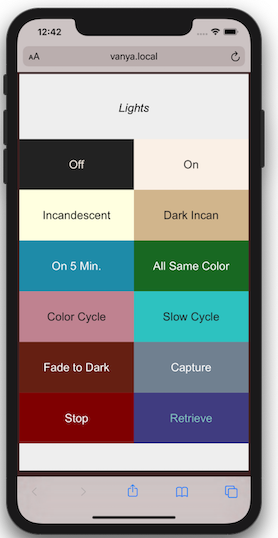
The web server component makes scripts available in a user-friendly manner.
It implements a simple web page that lists available scripts and provides a
1:1 mapping betwen scripts and URL's. The server is designed to run locally,
on your WiFi network.
For example, if have a machine with the hostname
`myserver.local`, you could launch the `all_on.ls` script by going to
`http://myserver.local/all-on` with any browser on your WiFi network.
Because scripts can run over a long period of time, even indefinitely,
a cheap, dedicated device like a Raspberry Pi is an ideal way to host the
web server.
## Python API
I've attempted to make it easy to use Bardolph scripts in your Python code.
For some uses, this may be significantly easier than learning and using a
full-purpose Python library. For example, here's a complete program that
waits 5 seconds, turns all the lights off, and turns them on again after
another 5 seconds:
```
from bardolph.controller import ls_module
ls_module.configure()
ls_module.queue_script('time 5 off all on all')
```
## System Requirements
The program has been tested on Python versions at or above 3.7.
Because I haven't done any stress testing, I don't know the limits on
script size. Note that the application loads the encoded script into memory
before executing it.
I've tested the program on MacOS Monterey 12.0.1, a Raspberry Pi Zero W
controlling 6 devices, a Raspberry Pi 3 and Raspberry Pi 4.
## Go Try It
For full documentation and download options, please see
[the main website](http://www.bardolph.org).
%package -n python3-bardolph
Summary: Simple scripting language for LIFX lights
Provides: python-bardolph
BuildRequires: python3-devel
BuildRequires: python3-setuptools
BuildRequires: python3-pip
%description -n python3-bardolph

https://www.bardolph.org
# Bardolph Project
Al Fontes - [bardolph@fontes.org](mailto:bardolph@fontes.org)
**Bardolph** is a facility for controlling LIFX (https://www.lifx.com) lights
through a simple scripting language. It is targeted at people who would like
to control or experiment with their lights in an automated way, using a minimal
amount of coding.
Using their names, you can control individual lights, groups or locations. Or,
just pick a color for all the lights on your network. If you have any multi-zone
lights, the language allows you to set colors for specific zones.
The program does not use the Internet to access the bulbs, and no login is
required; all of its communication occurs over the local WiFi network. You
can edit scripts with a basic text editor and run them from the command line.
The language may be missing some constructs you might expect, such as loops and
arithmetic expressons, as it's still under development. However, it is also
very simple, and should be usable by non-programmers.
## Quick Examples
Here is a script, named `all_on.ls`, that will turn on all your lights:
```
duration 1.5 on all
```
You run it with:
```
lsrun all_on.ls
```
In this case, `lsrun` is a bash shell script that become available after you
install Bardolph.
The `duration` parameter says to slowly shut off the
lights over a period of 1.5 seconds, which is a much nicer experience than
abruptly turning them off with no dimming.
Another example, `red.ls`, sets all the lights to a deep shade of red:
```
duration 1.5 hue 350 saturation 80 brightness 80 kelvin 2700
set all
```
To run it:
```
lsrun red.ls
```
The application executes in the foreground as long as a script is running. In this
example, the application will run for 5 minutes.
As a convenience, you can pass a script as a command-line parameter using
`lsrun -s`, followed by the script code in a quoted string. For example, to
turn off all the lights from the keyboard:
```
lsrun -s 'off all'
```
## Web Server

The web server component makes scripts available in a user-friendly manner.
It implements a simple web page that lists available scripts and provides a
1:1 mapping betwen scripts and URL's. The server is designed to run locally,
on your WiFi network.
For example, if have a machine with the hostname
`myserver.local`, you could launch the `all_on.ls` script by going to
`http://myserver.local/all-on` with any browser on your WiFi network.
Because scripts can run over a long period of time, even indefinitely,
a cheap, dedicated device like a Raspberry Pi is an ideal way to host the
web server.
## Python API
I've attempted to make it easy to use Bardolph scripts in your Python code.
For some uses, this may be significantly easier than learning and using a
full-purpose Python library. For example, here's a complete program that
waits 5 seconds, turns all the lights off, and turns them on again after
another 5 seconds:
```
from bardolph.controller import ls_module
ls_module.configure()
ls_module.queue_script('time 5 off all on all')
```
## System Requirements
The program has been tested on Python versions at or above 3.7.
Because I haven't done any stress testing, I don't know the limits on
script size. Note that the application loads the encoded script into memory
before executing it.
I've tested the program on MacOS Monterey 12.0.1, a Raspberry Pi Zero W
controlling 6 devices, a Raspberry Pi 3 and Raspberry Pi 4.
## Go Try It
For full documentation and download options, please see
[the main website](http://www.bardolph.org).
%package help
Summary: Development documents and examples for bardolph
Provides: python3-bardolph-doc
%description help

https://www.bardolph.org
# Bardolph Project
Al Fontes - [bardolph@fontes.org](mailto:bardolph@fontes.org)
**Bardolph** is a facility for controlling LIFX (https://www.lifx.com) lights
through a simple scripting language. It is targeted at people who would like
to control or experiment with their lights in an automated way, using a minimal
amount of coding.
Using their names, you can control individual lights, groups or locations. Or,
just pick a color for all the lights on your network. If you have any multi-zone
lights, the language allows you to set colors for specific zones.
The program does not use the Internet to access the bulbs, and no login is
required; all of its communication occurs over the local WiFi network. You
can edit scripts with a basic text editor and run them from the command line.
The language may be missing some constructs you might expect, such as loops and
arithmetic expressons, as it's still under development. However, it is also
very simple, and should be usable by non-programmers.
## Quick Examples
Here is a script, named `all_on.ls`, that will turn on all your lights:
```
duration 1.5 on all
```
You run it with:
```
lsrun all_on.ls
```
In this case, `lsrun` is a bash shell script that become available after you
install Bardolph.
The `duration` parameter says to slowly shut off the
lights over a period of 1.5 seconds, which is a much nicer experience than
abruptly turning them off with no dimming.
Another example, `red.ls`, sets all the lights to a deep shade of red:
```
duration 1.5 hue 350 saturation 80 brightness 80 kelvin 2700
set all
```
To run it:
```
lsrun red.ls
```
The application executes in the foreground as long as a script is running. In this
example, the application will run for 5 minutes.
As a convenience, you can pass a script as a command-line parameter using
`lsrun -s`, followed by the script code in a quoted string. For example, to
turn off all the lights from the keyboard:
```
lsrun -s 'off all'
```
## Web Server

The web server component makes scripts available in a user-friendly manner.
It implements a simple web page that lists available scripts and provides a
1:1 mapping betwen scripts and URL's. The server is designed to run locally,
on your WiFi network.
For example, if have a machine with the hostname
`myserver.local`, you could launch the `all_on.ls` script by going to
`http://myserver.local/all-on` with any browser on your WiFi network.
Because scripts can run over a long period of time, even indefinitely,
a cheap, dedicated device like a Raspberry Pi is an ideal way to host the
web server.
## Python API
I've attempted to make it easy to use Bardolph scripts in your Python code.
For some uses, this may be significantly easier than learning and using a
full-purpose Python library. For example, here's a complete program that
waits 5 seconds, turns all the lights off, and turns them on again after
another 5 seconds:
```
from bardolph.controller import ls_module
ls_module.configure()
ls_module.queue_script('time 5 off all on all')
```
## System Requirements
The program has been tested on Python versions at or above 3.7.
Because I haven't done any stress testing, I don't know the limits on
script size. Note that the application loads the encoded script into memory
before executing it.
I've tested the program on MacOS Monterey 12.0.1, a Raspberry Pi Zero W
controlling 6 devices, a Raspberry Pi 3 and Raspberry Pi 4.
## Go Try It
For full documentation and download options, please see
[the main website](http://www.bardolph.org).
%prep
%autosetup -n bardolph-0.1.5
%build
%py3_build
%install
%py3_install
install -d -m755 %{buildroot}/%{_pkgdocdir}
if [ -d doc ]; then cp -arf doc %{buildroot}/%{_pkgdocdir}; fi
if [ -d docs ]; then cp -arf docs %{buildroot}/%{_pkgdocdir}; fi
if [ -d example ]; then cp -arf example %{buildroot}/%{_pkgdocdir}; fi
if [ -d examples ]; then cp -arf examples %{buildroot}/%{_pkgdocdir}; fi
pushd %{buildroot}
if [ -d usr/lib ]; then
find usr/lib -type f -printf "/%h/%f\n" >> filelist.lst
fi
if [ -d usr/lib64 ]; then
find usr/lib64 -type f -printf "/%h/%f\n" >> filelist.lst
fi
if [ -d usr/bin ]; then
find usr/bin -type f -printf "/%h/%f\n" >> filelist.lst
fi
if [ -d usr/sbin ]; then
find usr/sbin -type f -printf "/%h/%f\n" >> filelist.lst
fi
touch doclist.lst
if [ -d usr/share/man ]; then
find usr/share/man -type f -printf "/%h/%f.gz\n" >> doclist.lst
fi
popd
mv %{buildroot}/filelist.lst .
mv %{buildroot}/doclist.lst .
%files -n python3-bardolph -f filelist.lst
%dir %{python3_sitelib}/*
%files help -f doclist.lst
%{_docdir}/*
%changelog
* Tue May 30 2023 Python_Bot <Python_Bot@openeuler.org> - 0.1.5-1
- Package Spec generated
|
