
diff options
Diffstat (limited to 'python-bitmapist.spec')
| -rw-r--r-- | python-bitmapist.spec | 1171 |
1 files changed, 1171 insertions, 0 deletions
diff --git a/python-bitmapist.spec b/python-bitmapist.spec new file mode 100644 index 0000000..a684fdb --- /dev/null +++ b/python-bitmapist.spec @@ -0,0 +1,1171 @@ +%global _empty_manifest_terminate_build 0 +Name: python-bitmapist +Version: 3.111 +Release: 1 +Summary: Implements a powerful analytics library using Redis bitmaps. +License: BSD +URL: https://github.com/Doist/bitmapist +Source0: https://mirrors.nju.edu.cn/pypi/web/packages/41/a3/f006c058d2d33d2d8bd9b953dff010c48e5cd36d019953a63df93c1ea58b/bitmapist-3.111.tar.gz +BuildArch: noarch + +Requires: python3-redis +Requires: python3-dateutil +Requires: python3-future +Requires: python3-Mako + +%description + + + +[](https://travis-ci.org/Doist/bitmapist) + +**NEW!** Try out our new standalone [bitmapist-server](https://github.com/Doist/bitmapist-server), which improves memory efficiency 443 times and makes your setup much cheaper to run (and more scaleable). It's fully compatiable with bitmapist that runs on Redis. + +# bitmapist: a powerful analytics library for Redis + +This Python library makes it possible to implement real-time, highly scalable analytics that can answer following questions: + +* Has user 123 been online today? This week? This month? +* Has user 123 performed action "X"? +* How many users have been active this month? This hour? +* How many unique users have performed action "X" this week? +* How many % of users that were active last week are still active? +* How many % of users that were active last month are still active this month? +* What users performed action "X"? + +This library is very easy to use and enables you to create your own reports easily. + +Using Redis bitmaps you can store events for millions of users in a very little amount of memory (megabytes). +You should be careful about using huge ids as this could require larger amounts of memory. Ids should be in range [0, 2^32). + +Additionally bitmapist can generate cohort graphs that can do following: +* Cohort over user retention +* How many % of users that were active last [days, weeks, months] are still active? +* How many % of users that performed action X also performed action Y (and this over time) +* And a lot of other things! + +If you want to read more about bitmaps please read following: + +* http://blog.getspool.com/2011/11/29/fast-easy-realtime-metrics-using-redis-bitmaps/ +* http://redis.io/commands/setbit +* http://en.wikipedia.org/wiki/Bit_array +* http://www.slideshare.net/crashlytics/crashlytics-on-redis-analytics + + + +# Installation + +Can be installed very easily via: + + $ pip install bitmapist + + +# Ports + +* PHP port: https://github.com/jeremyFreeAgent/Bitter + + +# Examples + +Setting things up: + +```python +from datetime import datetime, timedelta +from bitmapist import setup_redis, delete_all_events, mark_event,\ + MonthEvents, WeekEvents, DayEvents, HourEvents,\ + BitOpAnd, BitOpOr + +now = datetime.utcnow() +last_month = datetime.utcnow() - timedelta(days=30) +``` + +Mark user 123 as active and has played a song: + +```python +mark_event('active', 123) +mark_event('song:played', 123) +``` + +Answer if user 123 has been active this month: + +```python +assert 123 in MonthEvents('active', now.year, now.month) +assert 123 in MonthEvents('song:played', now.year, now.month) +assert MonthEvents('active', now.year, now.month).has_events_marked() == True +``` + + +How many users have been active this week?: + +```python +print(len(WeekEvents('active', now.year, now.isocalendar()[1]))) +``` + +Iterate over all users active this week: + +```python +for uid in WeekEvents('active'): + print(uid) +``` + + +If you're interested in "current events", you can omit extra `now.whatever` +arguments. Events will be populated with current time automatically. + +For example, these two calls are equivalent: + +```python + +MonthEvents('active') == MonthEvents('active', now.year, now.month) + +``` + +Additionally, for the sake of uniformity, you can create an event from +any datetime object with a `from_date` static method. + +```python + +MonthEvents('active').from_date(now) == MonthEvents('active', now.year, now.month) + +``` + +Get the list of these users (user ids): + +```python +print(list(WeekEvents('active', now.year, now.isocalendar()[1]))) +``` + +There are special methods `prev` and `next` returning "sibling" events and +allowing you to walk through events in time without any sophisticated +iterators. A `delta` method allows you to "jump" forward or backward for +more than one step. Uniform API allows you to use all types of base events +(from hour to year) with the same code. + +```python + +current_month = MonthEvents() +prev_month = current_month.prev() +next_month = current_month.next() +year_ago = current_month.delta(-12) + +``` + +Every event object has `period_start` and `period_end` methods to find a +time span of the event. This can be useful for caching values when the caching +of "events in future" is not desirable: + +```python + +ev = MonthEvent('active', dt) +if ev.period_end() < now: + cache.set('active_users_<...>', len(ev)) + +``` + + +As something new tracking hourly is disabled (to save memory!) To enable it as default do:: + +```python +import bitmapist +bitmapist.TRACK_HOURLY = True +``` + +Additionally you can supply an extra argument to `mark_event` to bypass the default value:: + +```python +mark_event('active', 123, track_hourly=False) +``` + + +### Unique events + +Sometimes the date of the event makes little or no sense, for example, +to filter out your premium accounts, or in A/B testing. There is a +`UniqueEvents` model for this purpose. The model creates only one +Redis key and doesn't depend on the date. + +You can combine unique events with other types of events. + +A/B testing example: + +```python + +active_today = DailyEvents('active') +a = UniqueEvents('signup_form:classic') +b = UniqueEvents('signup_form:new') + +print("Active users, signed up with classic form", len(active & a)) +print("Active users, signed up with new form", len(active & b)) +``` + +Generic filter example + +```python + +def premium_up(uid): + # called when user promoted to premium + ... + mark_unique('premium', uid) + + +def premium_down(uid): + # called when user loses the premium status + ... + unmark_unique('premium', uid) + +active_today = DailyEvents('active') +premium = UniqueEvents('premium') + +# Add extra Karma for all premium users active today, +# just because today is a special day +for uid in premium & active_today: + add_extra_karma(uid) +``` + +To get the best of two worlds you can mark unique event and regular +bitmapist events at the same time. + + +```python +def premium_up(uid): + # called when user promoted to premium + ... + mark_event('premium', uid, track_unique=True) + +``` + + +### Perform bit operations + +How many users that have been active last month are still active this month? + +```python +active_2_months = BitOpAnd( + MonthEvents('active', last_month.year, last_month.month), + MonthEvents('active', now.year, now.month) +) +print(len(active_2_months)) + +# Is 123 active for 2 months? +assert 123 in active_2_months +``` + +Alternatively, you can use standard Python syntax for bitwise operations. + + +```python +last_month_event = MonthEvents('active', last_month.year, last_month.month) +this_month_event = MonthEvents('active', now.year, now.month) +active_two_months = last_month_event & this_month_event +``` +Operators `&`, `|`, `^` and `~` supported. + +Work with nested bit operations (imagine what you can do with this ;-))! + +```python +active_2_months = BitOpAnd( + BitOpAnd( + MonthEvents('active', last_month.year, last_month.month), + MonthEvents('active', now.year, now.month) + ), + MonthEvents('active', now.year, now.month) +) +print(len(active_2_months)) +assert 123 in active_2_months + +# Delete the temporary AND operation +active_2_months.delete() +``` + + +### Deleting + +If you want to permanently remove marked events for any time period you can use the `delete()` method: +```python +last_month_event = MonthEvents('active', last_month.year, last_month.month) +last_month_event.delete() +``` + +If you want to remove all bitmapist events use: +```python +bitmapist.delete_all_events() +``` + +When using Bit Operations (ie `BitOpAnd`) you can (and probably should) delete the results unless you want them cached. There are different ways to go about this: +```python +active_2_months = BitOpAnd( + MonthEvents('active', last_month.year, last_month.month), + MonthEvents('active', now.year, now.month) +) +# Delete the temporary AND operation +active_2_months.delete() + +# delete all bit operations created in runtime up to this point +bitmapist.delete_runtime_bitop_keys() + +# delete all bit operations (slow if you have many millions of keys in Redis) +bitmapist.delete_temporary_bitop_keys() +``` + + +# bitmapist cohort + +With bitmapist cohort you can get a form and a table rendering of the data you keep in bitmapist. If this sounds confusing [please look at Mixpanel](https://mixpanel.com/retention/). + +Here's a simple example of how to generate a form and a rendering of the data you have inside bitmapist: +```python +from bitmapist import cohort + +html_form = cohort.render_html_form( + action_url='/_Cohort', + selections1=[ ('Are Active', 'user:active'), ], + selections2=[ ('Task completed', 'task:complete'), ] +) +print(html_form) + +dates_data = cohort.get_dates_data(select1='user:active', + select2='task:complete', + time_group='days') + +html_data = cohort.render_html_data(dates_data, + time_group='days') + +print(html_data) + +# All the arguments should come from the FORM element (html_form) +# but to make things more clear I have filled them in directly +``` + +This will render something similar to this: + +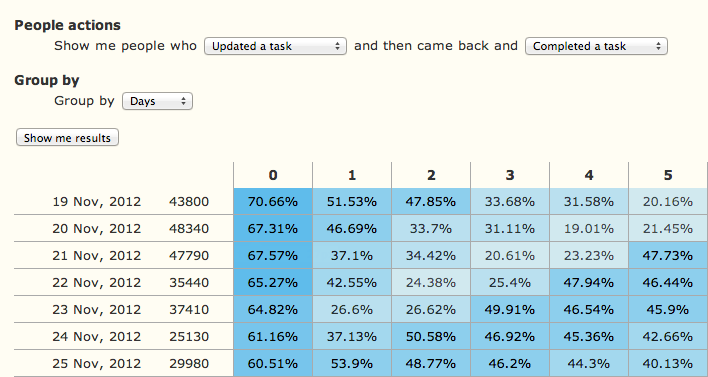 + + +## Contributing + +Please see our guide [here](./CONTRIBUTING.md) + +## Local Development + +We use Poetry for dependency management & packaging. Please see [here for setup instructions](https://python-poetry.org/docs/#installation). + +Once you have Poetry installed, you can run the following to install the dependencies in a virtual environment: + +```bash +poetry install +``` + +## Testing + +To run our tests will need to ensure a local redis server is installed. + +We use pytest to run unittests which you can run in a poetry shell with + +```bash +poetry run pytest +``` + +## Releasing new versions + +- Bump version in `pyproject.toml` +- Update the CHANGELOG +- Commit the changes with a commit message "Version X.X.X" +- Tag the current commit with `vX.X.X` +- Create a new release on GitHub named `vX.X.X` +- GitHub Actions will publish the new version to PIP for you + +## Legal + +Copyright: 2012 by Doist Ltd. + +License: BSD + + +%package -n python3-bitmapist +Summary: Implements a powerful analytics library using Redis bitmaps. +Provides: python-bitmapist +BuildRequires: python3-devel +BuildRequires: python3-setuptools +BuildRequires: python3-pip +%description -n python3-bitmapist + + + +[](https://travis-ci.org/Doist/bitmapist) + +**NEW!** Try out our new standalone [bitmapist-server](https://github.com/Doist/bitmapist-server), which improves memory efficiency 443 times and makes your setup much cheaper to run (and more scaleable). It's fully compatiable with bitmapist that runs on Redis. + +# bitmapist: a powerful analytics library for Redis + +This Python library makes it possible to implement real-time, highly scalable analytics that can answer following questions: + +* Has user 123 been online today? This week? This month? +* Has user 123 performed action "X"? +* How many users have been active this month? This hour? +* How many unique users have performed action "X" this week? +* How many % of users that were active last week are still active? +* How many % of users that were active last month are still active this month? +* What users performed action "X"? + +This library is very easy to use and enables you to create your own reports easily. + +Using Redis bitmaps you can store events for millions of users in a very little amount of memory (megabytes). +You should be careful about using huge ids as this could require larger amounts of memory. Ids should be in range [0, 2^32). + +Additionally bitmapist can generate cohort graphs that can do following: +* Cohort over user retention +* How many % of users that were active last [days, weeks, months] are still active? +* How many % of users that performed action X also performed action Y (and this over time) +* And a lot of other things! + +If you want to read more about bitmaps please read following: + +* http://blog.getspool.com/2011/11/29/fast-easy-realtime-metrics-using-redis-bitmaps/ +* http://redis.io/commands/setbit +* http://en.wikipedia.org/wiki/Bit_array +* http://www.slideshare.net/crashlytics/crashlytics-on-redis-analytics + + + +# Installation + +Can be installed very easily via: + + $ pip install bitmapist + + +# Ports + +* PHP port: https://github.com/jeremyFreeAgent/Bitter + + +# Examples + +Setting things up: + +```python +from datetime import datetime, timedelta +from bitmapist import setup_redis, delete_all_events, mark_event,\ + MonthEvents, WeekEvents, DayEvents, HourEvents,\ + BitOpAnd, BitOpOr + +now = datetime.utcnow() +last_month = datetime.utcnow() - timedelta(days=30) +``` + +Mark user 123 as active and has played a song: + +```python +mark_event('active', 123) +mark_event('song:played', 123) +``` + +Answer if user 123 has been active this month: + +```python +assert 123 in MonthEvents('active', now.year, now.month) +assert 123 in MonthEvents('song:played', now.year, now.month) +assert MonthEvents('active', now.year, now.month).has_events_marked() == True +``` + + +How many users have been active this week?: + +```python +print(len(WeekEvents('active', now.year, now.isocalendar()[1]))) +``` + +Iterate over all users active this week: + +```python +for uid in WeekEvents('active'): + print(uid) +``` + + +If you're interested in "current events", you can omit extra `now.whatever` +arguments. Events will be populated with current time automatically. + +For example, these two calls are equivalent: + +```python + +MonthEvents('active') == MonthEvents('active', now.year, now.month) + +``` + +Additionally, for the sake of uniformity, you can create an event from +any datetime object with a `from_date` static method. + +```python + +MonthEvents('active').from_date(now) == MonthEvents('active', now.year, now.month) + +``` + +Get the list of these users (user ids): + +```python +print(list(WeekEvents('active', now.year, now.isocalendar()[1]))) +``` + +There are special methods `prev` and `next` returning "sibling" events and +allowing you to walk through events in time without any sophisticated +iterators. A `delta` method allows you to "jump" forward or backward for +more than one step. Uniform API allows you to use all types of base events +(from hour to year) with the same code. + +```python + +current_month = MonthEvents() +prev_month = current_month.prev() +next_month = current_month.next() +year_ago = current_month.delta(-12) + +``` + +Every event object has `period_start` and `period_end` methods to find a +time span of the event. This can be useful for caching values when the caching +of "events in future" is not desirable: + +```python + +ev = MonthEvent('active', dt) +if ev.period_end() < now: + cache.set('active_users_<...>', len(ev)) + +``` + + +As something new tracking hourly is disabled (to save memory!) To enable it as default do:: + +```python +import bitmapist +bitmapist.TRACK_HOURLY = True +``` + +Additionally you can supply an extra argument to `mark_event` to bypass the default value:: + +```python +mark_event('active', 123, track_hourly=False) +``` + + +### Unique events + +Sometimes the date of the event makes little or no sense, for example, +to filter out your premium accounts, or in A/B testing. There is a +`UniqueEvents` model for this purpose. The model creates only one +Redis key and doesn't depend on the date. + +You can combine unique events with other types of events. + +A/B testing example: + +```python + +active_today = DailyEvents('active') +a = UniqueEvents('signup_form:classic') +b = UniqueEvents('signup_form:new') + +print("Active users, signed up with classic form", len(active & a)) +print("Active users, signed up with new form", len(active & b)) +``` + +Generic filter example + +```python + +def premium_up(uid): + # called when user promoted to premium + ... + mark_unique('premium', uid) + + +def premium_down(uid): + # called when user loses the premium status + ... + unmark_unique('premium', uid) + +active_today = DailyEvents('active') +premium = UniqueEvents('premium') + +# Add extra Karma for all premium users active today, +# just because today is a special day +for uid in premium & active_today: + add_extra_karma(uid) +``` + +To get the best of two worlds you can mark unique event and regular +bitmapist events at the same time. + + +```python +def premium_up(uid): + # called when user promoted to premium + ... + mark_event('premium', uid, track_unique=True) + +``` + + +### Perform bit operations + +How many users that have been active last month are still active this month? + +```python +active_2_months = BitOpAnd( + MonthEvents('active', last_month.year, last_month.month), + MonthEvents('active', now.year, now.month) +) +print(len(active_2_months)) + +# Is 123 active for 2 months? +assert 123 in active_2_months +``` + +Alternatively, you can use standard Python syntax for bitwise operations. + + +```python +last_month_event = MonthEvents('active', last_month.year, last_month.month) +this_month_event = MonthEvents('active', now.year, now.month) +active_two_months = last_month_event & this_month_event +``` +Operators `&`, `|`, `^` and `~` supported. + +Work with nested bit operations (imagine what you can do with this ;-))! + +```python +active_2_months = BitOpAnd( + BitOpAnd( + MonthEvents('active', last_month.year, last_month.month), + MonthEvents('active', now.year, now.month) + ), + MonthEvents('active', now.year, now.month) +) +print(len(active_2_months)) +assert 123 in active_2_months + +# Delete the temporary AND operation +active_2_months.delete() +``` + + +### Deleting + +If you want to permanently remove marked events for any time period you can use the `delete()` method: +```python +last_month_event = MonthEvents('active', last_month.year, last_month.month) +last_month_event.delete() +``` + +If you want to remove all bitmapist events use: +```python +bitmapist.delete_all_events() +``` + +When using Bit Operations (ie `BitOpAnd`) you can (and probably should) delete the results unless you want them cached. There are different ways to go about this: +```python +active_2_months = BitOpAnd( + MonthEvents('active', last_month.year, last_month.month), + MonthEvents('active', now.year, now.month) +) +# Delete the temporary AND operation +active_2_months.delete() + +# delete all bit operations created in runtime up to this point +bitmapist.delete_runtime_bitop_keys() + +# delete all bit operations (slow if you have many millions of keys in Redis) +bitmapist.delete_temporary_bitop_keys() +``` + + +# bitmapist cohort + +With bitmapist cohort you can get a form and a table rendering of the data you keep in bitmapist. If this sounds confusing [please look at Mixpanel](https://mixpanel.com/retention/). + +Here's a simple example of how to generate a form and a rendering of the data you have inside bitmapist: +```python +from bitmapist import cohort + +html_form = cohort.render_html_form( + action_url='/_Cohort', + selections1=[ ('Are Active', 'user:active'), ], + selections2=[ ('Task completed', 'task:complete'), ] +) +print(html_form) + +dates_data = cohort.get_dates_data(select1='user:active', + select2='task:complete', + time_group='days') + +html_data = cohort.render_html_data(dates_data, + time_group='days') + +print(html_data) + +# All the arguments should come from the FORM element (html_form) +# but to make things more clear I have filled them in directly +``` + +This will render something similar to this: + + + + +## Contributing + +Please see our guide [here](./CONTRIBUTING.md) + +## Local Development + +We use Poetry for dependency management & packaging. Please see [here for setup instructions](https://python-poetry.org/docs/#installation). + +Once you have Poetry installed, you can run the following to install the dependencies in a virtual environment: + +```bash +poetry install +``` + +## Testing + +To run our tests will need to ensure a local redis server is installed. + +We use pytest to run unittests which you can run in a poetry shell with + +```bash +poetry run pytest +``` + +## Releasing new versions + +- Bump version in `pyproject.toml` +- Update the CHANGELOG +- Commit the changes with a commit message "Version X.X.X" +- Tag the current commit with `vX.X.X` +- Create a new release on GitHub named `vX.X.X` +- GitHub Actions will publish the new version to PIP for you + +## Legal + +Copyright: 2012 by Doist Ltd. + +License: BSD + + +%package help +Summary: Development documents and examples for bitmapist +Provides: python3-bitmapist-doc +%description help + + + +[](https://travis-ci.org/Doist/bitmapist) + +**NEW!** Try out our new standalone [bitmapist-server](https://github.com/Doist/bitmapist-server), which improves memory efficiency 443 times and makes your setup much cheaper to run (and more scaleable). It's fully compatiable with bitmapist that runs on Redis. + +# bitmapist: a powerful analytics library for Redis + +This Python library makes it possible to implement real-time, highly scalable analytics that can answer following questions: + +* Has user 123 been online today? This week? This month? +* Has user 123 performed action "X"? +* How many users have been active this month? This hour? +* How many unique users have performed action "X" this week? +* How many % of users that were active last week are still active? +* How many % of users that were active last month are still active this month? +* What users performed action "X"? + +This library is very easy to use and enables you to create your own reports easily. + +Using Redis bitmaps you can store events for millions of users in a very little amount of memory (megabytes). +You should be careful about using huge ids as this could require larger amounts of memory. Ids should be in range [0, 2^32). + +Additionally bitmapist can generate cohort graphs that can do following: +* Cohort over user retention +* How many % of users that were active last [days, weeks, months] are still active? +* How many % of users that performed action X also performed action Y (and this over time) +* And a lot of other things! + +If you want to read more about bitmaps please read following: + +* http://blog.getspool.com/2011/11/29/fast-easy-realtime-metrics-using-redis-bitmaps/ +* http://redis.io/commands/setbit +* http://en.wikipedia.org/wiki/Bit_array +* http://www.slideshare.net/crashlytics/crashlytics-on-redis-analytics + + + +# Installation + +Can be installed very easily via: + + $ pip install bitmapist + + +# Ports + +* PHP port: https://github.com/jeremyFreeAgent/Bitter + + +# Examples + +Setting things up: + +```python +from datetime import datetime, timedelta +from bitmapist import setup_redis, delete_all_events, mark_event,\ + MonthEvents, WeekEvents, DayEvents, HourEvents,\ + BitOpAnd, BitOpOr + +now = datetime.utcnow() +last_month = datetime.utcnow() - timedelta(days=30) +``` + +Mark user 123 as active and has played a song: + +```python +mark_event('active', 123) +mark_event('song:played', 123) +``` + +Answer if user 123 has been active this month: + +```python +assert 123 in MonthEvents('active', now.year, now.month) +assert 123 in MonthEvents('song:played', now.year, now.month) +assert MonthEvents('active', now.year, now.month).has_events_marked() == True +``` + + +How many users have been active this week?: + +```python +print(len(WeekEvents('active', now.year, now.isocalendar()[1]))) +``` + +Iterate over all users active this week: + +```python +for uid in WeekEvents('active'): + print(uid) +``` + + +If you're interested in "current events", you can omit extra `now.whatever` +arguments. Events will be populated with current time automatically. + +For example, these two calls are equivalent: + +```python + +MonthEvents('active') == MonthEvents('active', now.year, now.month) + +``` + +Additionally, for the sake of uniformity, you can create an event from +any datetime object with a `from_date` static method. + +```python + +MonthEvents('active').from_date(now) == MonthEvents('active', now.year, now.month) + +``` + +Get the list of these users (user ids): + +```python +print(list(WeekEvents('active', now.year, now.isocalendar()[1]))) +``` + +There are special methods `prev` and `next` returning "sibling" events and +allowing you to walk through events in time without any sophisticated +iterators. A `delta` method allows you to "jump" forward or backward for +more than one step. Uniform API allows you to use all types of base events +(from hour to year) with the same code. + +```python + +current_month = MonthEvents() +prev_month = current_month.prev() +next_month = current_month.next() +year_ago = current_month.delta(-12) + +``` + +Every event object has `period_start` and `period_end` methods to find a +time span of the event. This can be useful for caching values when the caching +of "events in future" is not desirable: + +```python + +ev = MonthEvent('active', dt) +if ev.period_end() < now: + cache.set('active_users_<...>', len(ev)) + +``` + + +As something new tracking hourly is disabled (to save memory!) To enable it as default do:: + +```python +import bitmapist +bitmapist.TRACK_HOURLY = True +``` + +Additionally you can supply an extra argument to `mark_event` to bypass the default value:: + +```python +mark_event('active', 123, track_hourly=False) +``` + + +### Unique events + +Sometimes the date of the event makes little or no sense, for example, +to filter out your premium accounts, or in A/B testing. There is a +`UniqueEvents` model for this purpose. The model creates only one +Redis key and doesn't depend on the date. + +You can combine unique events with other types of events. + +A/B testing example: + +```python + +active_today = DailyEvents('active') +a = UniqueEvents('signup_form:classic') +b = UniqueEvents('signup_form:new') + +print("Active users, signed up with classic form", len(active & a)) +print("Active users, signed up with new form", len(active & b)) +``` + +Generic filter example + +```python + +def premium_up(uid): + # called when user promoted to premium + ... + mark_unique('premium', uid) + + +def premium_down(uid): + # called when user loses the premium status + ... + unmark_unique('premium', uid) + +active_today = DailyEvents('active') +premium = UniqueEvents('premium') + +# Add extra Karma for all premium users active today, +# just because today is a special day +for uid in premium & active_today: + add_extra_karma(uid) +``` + +To get the best of two worlds you can mark unique event and regular +bitmapist events at the same time. + + +```python +def premium_up(uid): + # called when user promoted to premium + ... + mark_event('premium', uid, track_unique=True) + +``` + + +### Perform bit operations + +How many users that have been active last month are still active this month? + +```python +active_2_months = BitOpAnd( + MonthEvents('active', last_month.year, last_month.month), + MonthEvents('active', now.year, now.month) +) +print(len(active_2_months)) + +# Is 123 active for 2 months? +assert 123 in active_2_months +``` + +Alternatively, you can use standard Python syntax for bitwise operations. + + +```python +last_month_event = MonthEvents('active', last_month.year, last_month.month) +this_month_event = MonthEvents('active', now.year, now.month) +active_two_months = last_month_event & this_month_event +``` +Operators `&`, `|`, `^` and `~` supported. + +Work with nested bit operations (imagine what you can do with this ;-))! + +```python +active_2_months = BitOpAnd( + BitOpAnd( + MonthEvents('active', last_month.year, last_month.month), + MonthEvents('active', now.year, now.month) + ), + MonthEvents('active', now.year, now.month) +) +print(len(active_2_months)) +assert 123 in active_2_months + +# Delete the temporary AND operation +active_2_months.delete() +``` + + +### Deleting + +If you want to permanently remove marked events for any time period you can use the `delete()` method: +```python +last_month_event = MonthEvents('active', last_month.year, last_month.month) +last_month_event.delete() +``` + +If you want to remove all bitmapist events use: +```python +bitmapist.delete_all_events() +``` + +When using Bit Operations (ie `BitOpAnd`) you can (and probably should) delete the results unless you want them cached. There are different ways to go about this: +```python +active_2_months = BitOpAnd( + MonthEvents('active', last_month.year, last_month.month), + MonthEvents('active', now.year, now.month) +) +# Delete the temporary AND operation +active_2_months.delete() + +# delete all bit operations created in runtime up to this point +bitmapist.delete_runtime_bitop_keys() + +# delete all bit operations (slow if you have many millions of keys in Redis) +bitmapist.delete_temporary_bitop_keys() +``` + + +# bitmapist cohort + +With bitmapist cohort you can get a form and a table rendering of the data you keep in bitmapist. If this sounds confusing [please look at Mixpanel](https://mixpanel.com/retention/). + +Here's a simple example of how to generate a form and a rendering of the data you have inside bitmapist: +```python +from bitmapist import cohort + +html_form = cohort.render_html_form( + action_url='/_Cohort', + selections1=[ ('Are Active', 'user:active'), ], + selections2=[ ('Task completed', 'task:complete'), ] +) +print(html_form) + +dates_data = cohort.get_dates_data(select1='user:active', + select2='task:complete', + time_group='days') + +html_data = cohort.render_html_data(dates_data, + time_group='days') + +print(html_data) + +# All the arguments should come from the FORM element (html_form) +# but to make things more clear I have filled them in directly +``` + +This will render something similar to this: + + + + +## Contributing + +Please see our guide [here](./CONTRIBUTING.md) + +## Local Development + +We use Poetry for dependency management & packaging. Please see [here for setup instructions](https://python-poetry.org/docs/#installation). + +Once you have Poetry installed, you can run the following to install the dependencies in a virtual environment: + +```bash +poetry install +``` + +## Testing + +To run our tests will need to ensure a local redis server is installed. + +We use pytest to run unittests which you can run in a poetry shell with + +```bash +poetry run pytest +``` + +## Releasing new versions + +- Bump version in `pyproject.toml` +- Update the CHANGELOG +- Commit the changes with a commit message "Version X.X.X" +- Tag the current commit with `vX.X.X` +- Create a new release on GitHub named `vX.X.X` +- GitHub Actions will publish the new version to PIP for you + +## Legal + +Copyright: 2012 by Doist Ltd. + +License: BSD + + +%prep +%autosetup -n bitmapist-3.111 + +%build +%py3_build + +%install +%py3_install +install -d -m755 %{buildroot}/%{_pkgdocdir} +if [ -d doc ]; then cp -arf doc %{buildroot}/%{_pkgdocdir}; fi +if [ -d docs ]; then cp -arf docs %{buildroot}/%{_pkgdocdir}; fi +if [ -d example ]; then cp -arf example %{buildroot}/%{_pkgdocdir}; fi +if [ -d examples ]; then cp -arf examples %{buildroot}/%{_pkgdocdir}; fi +pushd %{buildroot} +if [ -d usr/lib ]; then + find usr/lib -type f -printf "/%h/%f\n" >> filelist.lst +fi +if [ -d usr/lib64 ]; then + find usr/lib64 -type f -printf "/%h/%f\n" >> filelist.lst +fi +if [ -d usr/bin ]; then + find usr/bin -type f -printf "/%h/%f\n" >> filelist.lst +fi +if [ -d usr/sbin ]; then + find usr/sbin -type f -printf "/%h/%f\n" >> filelist.lst +fi +touch doclist.lst +if [ -d usr/share/man ]; then + find usr/share/man -type f -printf "/%h/%f.gz\n" >> doclist.lst +fi +popd +mv %{buildroot}/filelist.lst . +mv %{buildroot}/doclist.lst . + +%files -n python3-bitmapist -f filelist.lst +%dir %{python3_sitelib}/* + +%files help -f doclist.lst +%{_docdir}/* + +%changelog +* Mon May 15 2023 Python_Bot <Python_Bot@openeuler.org> - 3.111-1 +- Package Spec generated |