
diff options
Diffstat (limited to 'python-cdk-eksdistro.spec')
| -rw-r--r-- | python-cdk-eksdistro.spec | 278 |
1 files changed, 278 insertions, 0 deletions
diff --git a/python-cdk-eksdistro.spec b/python-cdk-eksdistro.spec new file mode 100644 index 0000000..61ac646 --- /dev/null +++ b/python-cdk-eksdistro.spec @@ -0,0 +1,278 @@ +%global _empty_manifest_terminate_build 0 +Name: python-cdk-eksdistro +Version: 2.0.13 +Release: 1 +Summary: AWS CDK construct library for Amazon EKS Distro +License: Apache-2.0 +URL: https://github.com/pahud/cdk-eksdistro.git +Source0: https://mirrors.nju.edu.cn/pypi/web/packages/56/69/441511c80a217e2a872c83a85c3149119c3e90880da16e140761349b657d/cdk-eksdistro-2.0.13.tar.gz +BuildArch: noarch + +Requires: python3-aws-cdk-lib +Requires: python3-cdk-ec2spot +Requires: python3-constructs +Requires: python3-jsii +Requires: python3-publication + +%description +[](https://badge.fury.io/js/cdk-eksdistro) +[](https://badge.fury.io/py/cdk-eksdistro) + + +# `cdk-eksdistro` + +CDK construct library that allows you to create [Amazon EKS Distro](https://distro.eks.amazonaws.com/) on Amaozn EC2 instance(s). + +# How it works + +Under the hood, `cdk-eksdistro` creates an Amazon Auto Scaling Group with single Amazon EC2 instance running Ubuntu Linux LTS `20.04` and installs the [eks snap](https://snapcraft.io/eks) from the `UserData`. + +# Install + +Use the npm dist tag to opt in CDKv1 or CDKv2: + +```sh +// for CDKv2 +npm install cdk-eksdistro +or +npm install cdk-eksdistro@latest + +// for CDKv1 +npm install cdk-eksdistro@cdkv1 +``` + +# Sample + +```python +imoprt { Cluster } from 'cdk-eksdistro'; + +const app = new cdk.App(); + +const env = { + region: process.env.CDK_DEFAULT_REGION, + account: process.env.CDK_DEFAULT_ACCOUNT, +}; + +const stack = new cdk.Stack(app, 'eksdistro-stack', { env }); + +new Cluster(stack, 'Cluster'); +``` + +## Spot Instance + +To create Amazon EC2 Spot instance instead of on-demand, use the `spot` property: + +```python +new Cluster(stack, 'Cluster', { spot: true }); +``` + +# Validate the cluster + +By default, the `Cluster` construct creates a single-node EKS-D cluster on AWS EC2 with the latest Ubuntu Linux LTS AMI. To validate the cluster, open the EC2 console, select the instance and click the **Connect** button and select **session manager**. + +Run the following commands to execute `kubectl` in the cluster. + +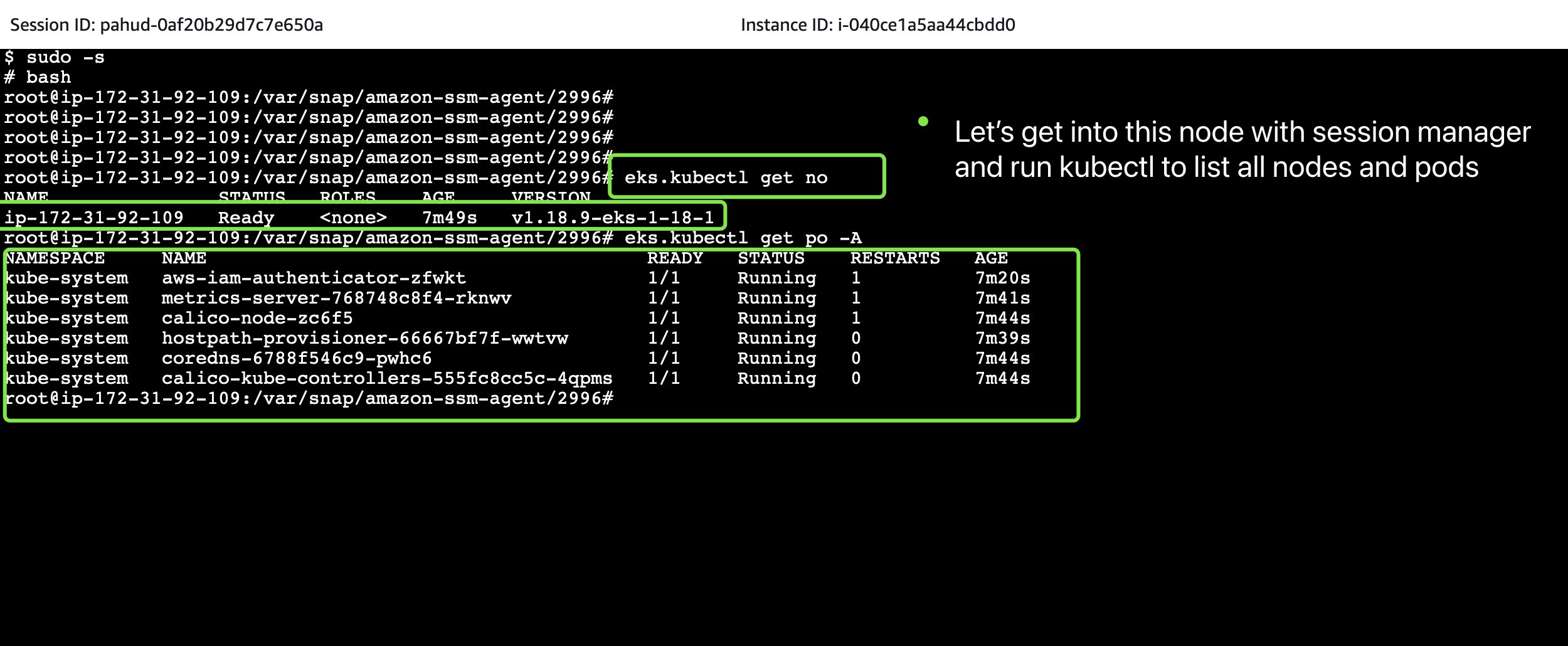 + +# Reference + +* https://aws.amazon.com/blogs/opensource/introducing-amazon-eks-distro/ +* https://ubuntu.com/blog/install-amazon-eks-distro-anywhere +* https://microk8s.io/ +* https://snapcraft.io/microk8s + + + + +%package -n python3-cdk-eksdistro +Summary: AWS CDK construct library for Amazon EKS Distro +Provides: python-cdk-eksdistro +BuildRequires: python3-devel +BuildRequires: python3-setuptools +BuildRequires: python3-pip +%description -n python3-cdk-eksdistro +[](https://badge.fury.io/js/cdk-eksdistro) +[](https://badge.fury.io/py/cdk-eksdistro) + + +# `cdk-eksdistro` + +CDK construct library that allows you to create [Amazon EKS Distro](https://distro.eks.amazonaws.com/) on Amaozn EC2 instance(s). + +# How it works + +Under the hood, `cdk-eksdistro` creates an Amazon Auto Scaling Group with single Amazon EC2 instance running Ubuntu Linux LTS `20.04` and installs the [eks snap](https://snapcraft.io/eks) from the `UserData`. + +# Install + +Use the npm dist tag to opt in CDKv1 or CDKv2: + +```sh +// for CDKv2 +npm install cdk-eksdistro +or +npm install cdk-eksdistro@latest + +// for CDKv1 +npm install cdk-eksdistro@cdkv1 +``` + +# Sample + +```python +imoprt { Cluster } from 'cdk-eksdistro'; + +const app = new cdk.App(); + +const env = { + region: process.env.CDK_DEFAULT_REGION, + account: process.env.CDK_DEFAULT_ACCOUNT, +}; + +const stack = new cdk.Stack(app, 'eksdistro-stack', { env }); + +new Cluster(stack, 'Cluster'); +``` + +## Spot Instance + +To create Amazon EC2 Spot instance instead of on-demand, use the `spot` property: + +```python +new Cluster(stack, 'Cluster', { spot: true }); +``` + +# Validate the cluster + +By default, the `Cluster` construct creates a single-node EKS-D cluster on AWS EC2 with the latest Ubuntu Linux LTS AMI. To validate the cluster, open the EC2 console, select the instance and click the **Connect** button and select **session manager**. + +Run the following commands to execute `kubectl` in the cluster. + + + +# Reference + +* https://aws.amazon.com/blogs/opensource/introducing-amazon-eks-distro/ +* https://ubuntu.com/blog/install-amazon-eks-distro-anywhere +* https://microk8s.io/ +* https://snapcraft.io/microk8s + + + + +%package help +Summary: Development documents and examples for cdk-eksdistro +Provides: python3-cdk-eksdistro-doc +%description help +[](https://badge.fury.io/js/cdk-eksdistro) +[](https://badge.fury.io/py/cdk-eksdistro) + + +# `cdk-eksdistro` + +CDK construct library that allows you to create [Amazon EKS Distro](https://distro.eks.amazonaws.com/) on Amaozn EC2 instance(s). + +# How it works + +Under the hood, `cdk-eksdistro` creates an Amazon Auto Scaling Group with single Amazon EC2 instance running Ubuntu Linux LTS `20.04` and installs the [eks snap](https://snapcraft.io/eks) from the `UserData`. + +# Install + +Use the npm dist tag to opt in CDKv1 or CDKv2: + +```sh +// for CDKv2 +npm install cdk-eksdistro +or +npm install cdk-eksdistro@latest + +// for CDKv1 +npm install cdk-eksdistro@cdkv1 +``` + +# Sample + +```python +imoprt { Cluster } from 'cdk-eksdistro'; + +const app = new cdk.App(); + +const env = { + region: process.env.CDK_DEFAULT_REGION, + account: process.env.CDK_DEFAULT_ACCOUNT, +}; + +const stack = new cdk.Stack(app, 'eksdistro-stack', { env }); + +new Cluster(stack, 'Cluster'); +``` + +## Spot Instance + +To create Amazon EC2 Spot instance instead of on-demand, use the `spot` property: + +```python +new Cluster(stack, 'Cluster', { spot: true }); +``` + +# Validate the cluster + +By default, the `Cluster` construct creates a single-node EKS-D cluster on AWS EC2 with the latest Ubuntu Linux LTS AMI. To validate the cluster, open the EC2 console, select the instance and click the **Connect** button and select **session manager**. + +Run the following commands to execute `kubectl` in the cluster. + + + +# Reference + +* https://aws.amazon.com/blogs/opensource/introducing-amazon-eks-distro/ +* https://ubuntu.com/blog/install-amazon-eks-distro-anywhere +* https://microk8s.io/ +* https://snapcraft.io/microk8s + + + + +%prep +%autosetup -n cdk-eksdistro-2.0.13 + +%build +%py3_build + +%install +%py3_install +install -d -m755 %{buildroot}/%{_pkgdocdir} +if [ -d doc ]; then cp -arf doc %{buildroot}/%{_pkgdocdir}; fi +if [ -d docs ]; then cp -arf docs %{buildroot}/%{_pkgdocdir}; fi +if [ -d example ]; then cp -arf example %{buildroot}/%{_pkgdocdir}; fi +if [ -d examples ]; then cp -arf examples %{buildroot}/%{_pkgdocdir}; fi +pushd %{buildroot} +if [ -d usr/lib ]; then + find usr/lib -type f -printf "/%h/%f\n" >> filelist.lst +fi +if [ -d usr/lib64 ]; then + find usr/lib64 -type f -printf "/%h/%f\n" >> filelist.lst +fi +if [ -d usr/bin ]; then + find usr/bin -type f -printf "/%h/%f\n" >> filelist.lst +fi +if [ -d usr/sbin ]; then + find usr/sbin -type f -printf "/%h/%f\n" >> filelist.lst +fi +touch doclist.lst +if [ -d usr/share/man ]; then + find usr/share/man -type f -printf "/%h/%f.gz\n" >> doclist.lst +fi +popd +mv %{buildroot}/filelist.lst . +mv %{buildroot}/doclist.lst . + +%files -n python3-cdk-eksdistro -f filelist.lst +%dir %{python3_sitelib}/* + +%files help -f doclist.lst +%{_docdir}/* + +%changelog +* Tue Apr 11 2023 Python_Bot <Python_Bot@openeuler.org> - 2.0.13-1 +- Package Spec generated |