
diff options
Diffstat (limited to 'python-cdk-lambda-bash.spec')
| -rw-r--r-- | python-cdk-lambda-bash.spec | 611 |
1 files changed, 611 insertions, 0 deletions
diff --git a/python-cdk-lambda-bash.spec b/python-cdk-lambda-bash.spec new file mode 100644 index 0000000..3904425 --- /dev/null +++ b/python-cdk-lambda-bash.spec @@ -0,0 +1,611 @@ +%global _empty_manifest_terminate_build 0 +Name: python-cdk-lambda-bash +Version: 2.0.326 +Release: 1 +Summary: Deploy Bash Lambda Functions with AWS CDK +License: Apache-2.0 +URL: https://github.com/pahud/cdk-lambda-bash.git +Source0: https://mirrors.nju.edu.cn/pypi/web/packages/94/1d/d52d1277619c296986d8f8ca7b92645fecc80048e041e4d4c373a50d2b69/cdk-lambda-bash-2.0.326.tar.gz +BuildArch: noarch + +Requires: python3-aws-cdk-lib +Requires: python3-constructs +Requires: python3-jsii +Requires: python3-publication +Requires: python3-typeguard + +%description +[](https://badge.fury.io/js/cdk-lambda-bash) +[](https://badge.fury.io/py/cdk-lambda-bash) +[](https://github.com/pahud/cdk-lambda-bash/actions/workflows/release.yml) + +# cdk-lambda-bash + +Deploy Bash Lambda Functions with AWS CDK + +# Why + +AWS Lambda has the [docker container image support](https://aws.amazon.com/tw/blogs/aws/new-for-aws-lambda-container-image-support/) since AWS re:Invent 2020 which allows you to run your Lambda code in a custom container image. Inspired by [nikovirtala/cdk-eks-experiment](https://github.com/nikovirtala/cdk-eks-experiment/), `cdk-lambda-bash` allows you to specify a local shell script and bundle it up as a custom resource in your cdk stack. On cdk deployment, your shell script will be executed in a Lambda container environment. + +# BashExecFunction + +At this moment, we are offering `BashExecFunction` construct class which is a high-level abstraction of `lambda.Function`. By defining the `script` property which poins to your local shell script, on `cdk deploy`, this script will be bundled into a custom docker image and published as a `lambda.DockerImageFunction`. + +If you `fn.run()`, a custom resource will be created and the `lambda.DockerImageFunction` will be executed on deployment. + +# Install + +Use the npm dist tag to opt in CDKv1 or CDKv2: + +```sh +// for CDKv2 +npm install cdk-lambda-bash +or +npm install cdk-lambda-bash@latest + +// for CDKv1 +npm install cdk-lambda-bash@cdkv1 +``` + +# Sample + +```python +const app = new cdk.App(); + +const stack = new cdk.Stack(app, 'my-stack'); + +// bundle your Lambda function to execute the local demo.sh in container +const fn = new BashExecFunction(stack, 'Demo', { + script: path.join(__dirname, '../demo.sh'), +}) + +// run it as custom resource on deployment +fn.run(); +``` + +## Re-execution on assets update + +By default, if you update your shell script or Dockerfile and re-deploy your CDK application, the `BashExecFunction` +will not be re-executed. Use `runOnUpdate` to enable the re-execution on update. + +```python +fn.run({ runOnUpdate: true }); +``` + +## Custom Dockerfile + +In some cases, you may customize your own `Dockerfile`, for instances: + +1. You need extra tools or utilities such as `kubectl` or `helm` +2. You need build from your own base image + +In these cases, create a custom `Dockerfile` as below and add extra utilities i.e. `kubectl`: + +<details><summary>click and view custom Dockerfile sample</summary> + +```bash +FROM public.ecr.aws/lambda/provided:al2 + +RUN yum install -y unzip jq + +# install aws-cli v2 +RUN curl "https://awscli.amazonaws.com/awscli-exe-linux-x86_64.zip" -o "awscliv2.zip" && \ + unzip awscliv2.zip && \ + ./aws/install + +# install kubectl +RUN curl -o kubectl https://amazon-eks.s3.us-west-2.amazonaws.com/1.19.6/2021-01-05/bin/linux/amd64/kubectl && \ + chmod +x kubectl && \ + mv kubectl /usr/local/bin/kubectl + +COPY bootstrap /var/runtime/bootstrap +COPY function.sh /var/task/function.sh +COPY main.sh /var/task/main.sh +RUN chmod +x /var/runtime/bootstrap /var/task/function.sh /var/task/main.sh + +WORKDIR /var/task +CMD [ "function.sh.handler" ] +``` + +</details> + +Specify your own `Dockerfile` with the `dockerfile` property. + +```python +new BashExecFunction(stack, 'Demo', { + script: path.join(__dirname, '../demo.sh'), + dockerfile: path.join(__dirname, '../Dockerfile'), +}); +``` + +# Conditional Execution + +In the user script(e.g. `demo.sh`), you are allowed to determine the event type and act accordingly. + +For example + +```python + +const installArgoCD = new BashExecFunction(...) + +installArgoCD.run({runOnUpdate: true}); +``` + +When you run this sample, `demo.sh` will receive `onCreate` event and you can run your custom logic to "install ArgoCD" like `kubectl apply -f URL`. However, if you comment it off and deploy again: + +```python +const installArgoCD = new BashExecFunction(...) + +//installArgoCD.run({runOnUpdate: true}); +``` + +Under the hood, `demo.sh` will receive `onDelete` event and you can run your custom logic to "uninstall ArgoCD" +like `kubectl delete -f URL`. + +Check the full sample code below: + +<details><summary>Click and view the sample code</summary> + +```sh +#!/bin/bash + +# implement your business logic below +function onCreate() { + echo "running kubectl apply -f ..." +} + +function onUpdate() { + echo "do nothing on update" +} + +function onDelete() { + echo "running kubectl delete -f ..." +} + +function getRequestType() { + echo $1 | jq -r .RequestType +} + +function conditionalExec() { + requestType=$(getRequestType $EVENT_DATA) + + # determine the original request type + case $requestType in + 'Create') onCreate $1 ;; + 'Update') onUpdate $1 ;; + 'Delete') onDelete $1 ;; + esac +} + +echo "Hello cdk lambda bash!!" + +conditionalExec + +exit 0 +``` + +</details> + +# In Action + +See this [tweet](https://twitter.com/pahudnet/status/1370301964836241408) + +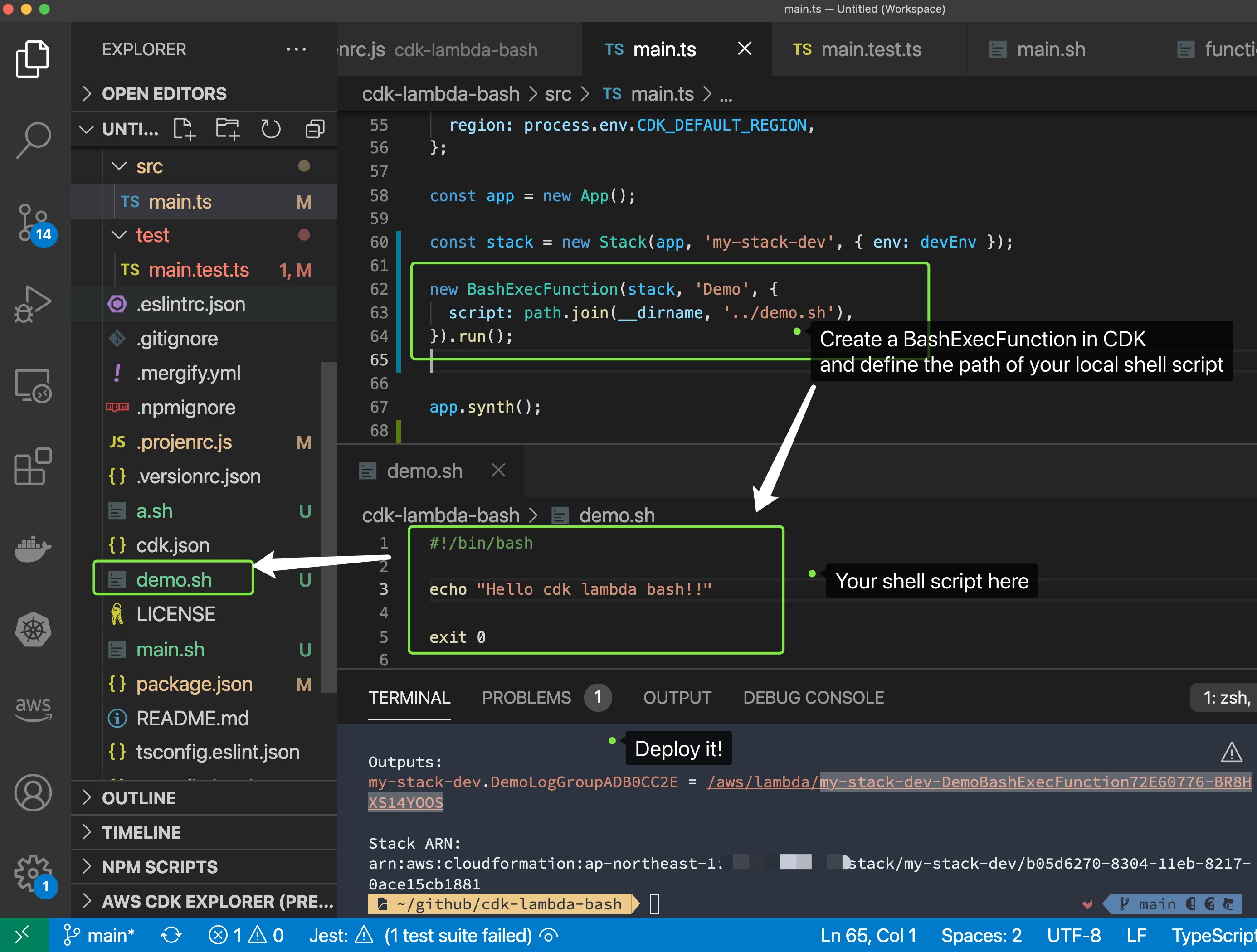 + +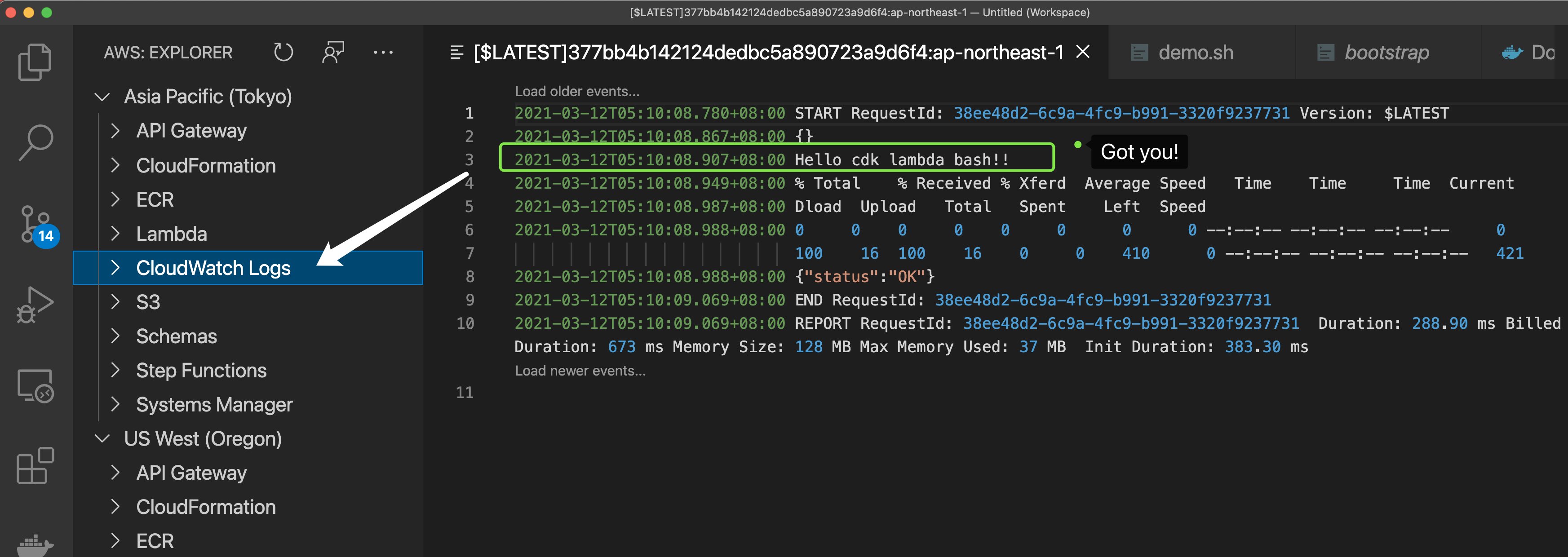 + + +%package -n python3-cdk-lambda-bash +Summary: Deploy Bash Lambda Functions with AWS CDK +Provides: python-cdk-lambda-bash +BuildRequires: python3-devel +BuildRequires: python3-setuptools +BuildRequires: python3-pip +%description -n python3-cdk-lambda-bash +[](https://badge.fury.io/js/cdk-lambda-bash) +[](https://badge.fury.io/py/cdk-lambda-bash) +[](https://github.com/pahud/cdk-lambda-bash/actions/workflows/release.yml) + +# cdk-lambda-bash + +Deploy Bash Lambda Functions with AWS CDK + +# Why + +AWS Lambda has the [docker container image support](https://aws.amazon.com/tw/blogs/aws/new-for-aws-lambda-container-image-support/) since AWS re:Invent 2020 which allows you to run your Lambda code in a custom container image. Inspired by [nikovirtala/cdk-eks-experiment](https://github.com/nikovirtala/cdk-eks-experiment/), `cdk-lambda-bash` allows you to specify a local shell script and bundle it up as a custom resource in your cdk stack. On cdk deployment, your shell script will be executed in a Lambda container environment. + +# BashExecFunction + +At this moment, we are offering `BashExecFunction` construct class which is a high-level abstraction of `lambda.Function`. By defining the `script` property which poins to your local shell script, on `cdk deploy`, this script will be bundled into a custom docker image and published as a `lambda.DockerImageFunction`. + +If you `fn.run()`, a custom resource will be created and the `lambda.DockerImageFunction` will be executed on deployment. + +# Install + +Use the npm dist tag to opt in CDKv1 or CDKv2: + +```sh +// for CDKv2 +npm install cdk-lambda-bash +or +npm install cdk-lambda-bash@latest + +// for CDKv1 +npm install cdk-lambda-bash@cdkv1 +``` + +# Sample + +```python +const app = new cdk.App(); + +const stack = new cdk.Stack(app, 'my-stack'); + +// bundle your Lambda function to execute the local demo.sh in container +const fn = new BashExecFunction(stack, 'Demo', { + script: path.join(__dirname, '../demo.sh'), +}) + +// run it as custom resource on deployment +fn.run(); +``` + +## Re-execution on assets update + +By default, if you update your shell script or Dockerfile and re-deploy your CDK application, the `BashExecFunction` +will not be re-executed. Use `runOnUpdate` to enable the re-execution on update. + +```python +fn.run({ runOnUpdate: true }); +``` + +## Custom Dockerfile + +In some cases, you may customize your own `Dockerfile`, for instances: + +1. You need extra tools or utilities such as `kubectl` or `helm` +2. You need build from your own base image + +In these cases, create a custom `Dockerfile` as below and add extra utilities i.e. `kubectl`: + +<details><summary>click and view custom Dockerfile sample</summary> + +```bash +FROM public.ecr.aws/lambda/provided:al2 + +RUN yum install -y unzip jq + +# install aws-cli v2 +RUN curl "https://awscli.amazonaws.com/awscli-exe-linux-x86_64.zip" -o "awscliv2.zip" && \ + unzip awscliv2.zip && \ + ./aws/install + +# install kubectl +RUN curl -o kubectl https://amazon-eks.s3.us-west-2.amazonaws.com/1.19.6/2021-01-05/bin/linux/amd64/kubectl && \ + chmod +x kubectl && \ + mv kubectl /usr/local/bin/kubectl + +COPY bootstrap /var/runtime/bootstrap +COPY function.sh /var/task/function.sh +COPY main.sh /var/task/main.sh +RUN chmod +x /var/runtime/bootstrap /var/task/function.sh /var/task/main.sh + +WORKDIR /var/task +CMD [ "function.sh.handler" ] +``` + +</details> + +Specify your own `Dockerfile` with the `dockerfile` property. + +```python +new BashExecFunction(stack, 'Demo', { + script: path.join(__dirname, '../demo.sh'), + dockerfile: path.join(__dirname, '../Dockerfile'), +}); +``` + +# Conditional Execution + +In the user script(e.g. `demo.sh`), you are allowed to determine the event type and act accordingly. + +For example + +```python + +const installArgoCD = new BashExecFunction(...) + +installArgoCD.run({runOnUpdate: true}); +``` + +When you run this sample, `demo.sh` will receive `onCreate` event and you can run your custom logic to "install ArgoCD" like `kubectl apply -f URL`. However, if you comment it off and deploy again: + +```python +const installArgoCD = new BashExecFunction(...) + +//installArgoCD.run({runOnUpdate: true}); +``` + +Under the hood, `demo.sh` will receive `onDelete` event and you can run your custom logic to "uninstall ArgoCD" +like `kubectl delete -f URL`. + +Check the full sample code below: + +<details><summary>Click and view the sample code</summary> + +```sh +#!/bin/bash + +# implement your business logic below +function onCreate() { + echo "running kubectl apply -f ..." +} + +function onUpdate() { + echo "do nothing on update" +} + +function onDelete() { + echo "running kubectl delete -f ..." +} + +function getRequestType() { + echo $1 | jq -r .RequestType +} + +function conditionalExec() { + requestType=$(getRequestType $EVENT_DATA) + + # determine the original request type + case $requestType in + 'Create') onCreate $1 ;; + 'Update') onUpdate $1 ;; + 'Delete') onDelete $1 ;; + esac +} + +echo "Hello cdk lambda bash!!" + +conditionalExec + +exit 0 +``` + +</details> + +# In Action + +See this [tweet](https://twitter.com/pahudnet/status/1370301964836241408) + + + + + + +%package help +Summary: Development documents and examples for cdk-lambda-bash +Provides: python3-cdk-lambda-bash-doc +%description help +[](https://badge.fury.io/js/cdk-lambda-bash) +[](https://badge.fury.io/py/cdk-lambda-bash) +[](https://github.com/pahud/cdk-lambda-bash/actions/workflows/release.yml) + +# cdk-lambda-bash + +Deploy Bash Lambda Functions with AWS CDK + +# Why + +AWS Lambda has the [docker container image support](https://aws.amazon.com/tw/blogs/aws/new-for-aws-lambda-container-image-support/) since AWS re:Invent 2020 which allows you to run your Lambda code in a custom container image. Inspired by [nikovirtala/cdk-eks-experiment](https://github.com/nikovirtala/cdk-eks-experiment/), `cdk-lambda-bash` allows you to specify a local shell script and bundle it up as a custom resource in your cdk stack. On cdk deployment, your shell script will be executed in a Lambda container environment. + +# BashExecFunction + +At this moment, we are offering `BashExecFunction` construct class which is a high-level abstraction of `lambda.Function`. By defining the `script` property which poins to your local shell script, on `cdk deploy`, this script will be bundled into a custom docker image and published as a `lambda.DockerImageFunction`. + +If you `fn.run()`, a custom resource will be created and the `lambda.DockerImageFunction` will be executed on deployment. + +# Install + +Use the npm dist tag to opt in CDKv1 or CDKv2: + +```sh +// for CDKv2 +npm install cdk-lambda-bash +or +npm install cdk-lambda-bash@latest + +// for CDKv1 +npm install cdk-lambda-bash@cdkv1 +``` + +# Sample + +```python +const app = new cdk.App(); + +const stack = new cdk.Stack(app, 'my-stack'); + +// bundle your Lambda function to execute the local demo.sh in container +const fn = new BashExecFunction(stack, 'Demo', { + script: path.join(__dirname, '../demo.sh'), +}) + +// run it as custom resource on deployment +fn.run(); +``` + +## Re-execution on assets update + +By default, if you update your shell script or Dockerfile and re-deploy your CDK application, the `BashExecFunction` +will not be re-executed. Use `runOnUpdate` to enable the re-execution on update. + +```python +fn.run({ runOnUpdate: true }); +``` + +## Custom Dockerfile + +In some cases, you may customize your own `Dockerfile`, for instances: + +1. You need extra tools or utilities such as `kubectl` or `helm` +2. You need build from your own base image + +In these cases, create a custom `Dockerfile` as below and add extra utilities i.e. `kubectl`: + +<details><summary>click and view custom Dockerfile sample</summary> + +```bash +FROM public.ecr.aws/lambda/provided:al2 + +RUN yum install -y unzip jq + +# install aws-cli v2 +RUN curl "https://awscli.amazonaws.com/awscli-exe-linux-x86_64.zip" -o "awscliv2.zip" && \ + unzip awscliv2.zip && \ + ./aws/install + +# install kubectl +RUN curl -o kubectl https://amazon-eks.s3.us-west-2.amazonaws.com/1.19.6/2021-01-05/bin/linux/amd64/kubectl && \ + chmod +x kubectl && \ + mv kubectl /usr/local/bin/kubectl + +COPY bootstrap /var/runtime/bootstrap +COPY function.sh /var/task/function.sh +COPY main.sh /var/task/main.sh +RUN chmod +x /var/runtime/bootstrap /var/task/function.sh /var/task/main.sh + +WORKDIR /var/task +CMD [ "function.sh.handler" ] +``` + +</details> + +Specify your own `Dockerfile` with the `dockerfile` property. + +```python +new BashExecFunction(stack, 'Demo', { + script: path.join(__dirname, '../demo.sh'), + dockerfile: path.join(__dirname, '../Dockerfile'), +}); +``` + +# Conditional Execution + +In the user script(e.g. `demo.sh`), you are allowed to determine the event type and act accordingly. + +For example + +```python + +const installArgoCD = new BashExecFunction(...) + +installArgoCD.run({runOnUpdate: true}); +``` + +When you run this sample, `demo.sh` will receive `onCreate` event and you can run your custom logic to "install ArgoCD" like `kubectl apply -f URL`. However, if you comment it off and deploy again: + +```python +const installArgoCD = new BashExecFunction(...) + +//installArgoCD.run({runOnUpdate: true}); +``` + +Under the hood, `demo.sh` will receive `onDelete` event and you can run your custom logic to "uninstall ArgoCD" +like `kubectl delete -f URL`. + +Check the full sample code below: + +<details><summary>Click and view the sample code</summary> + +```sh +#!/bin/bash + +# implement your business logic below +function onCreate() { + echo "running kubectl apply -f ..." +} + +function onUpdate() { + echo "do nothing on update" +} + +function onDelete() { + echo "running kubectl delete -f ..." +} + +function getRequestType() { + echo $1 | jq -r .RequestType +} + +function conditionalExec() { + requestType=$(getRequestType $EVENT_DATA) + + # determine the original request type + case $requestType in + 'Create') onCreate $1 ;; + 'Update') onUpdate $1 ;; + 'Delete') onDelete $1 ;; + esac +} + +echo "Hello cdk lambda bash!!" + +conditionalExec + +exit 0 +``` + +</details> + +# In Action + +See this [tweet](https://twitter.com/pahudnet/status/1370301964836241408) + + + + + + +%prep +%autosetup -n cdk-lambda-bash-2.0.326 + +%build +%py3_build + +%install +%py3_install +install -d -m755 %{buildroot}/%{_pkgdocdir} +if [ -d doc ]; then cp -arf doc %{buildroot}/%{_pkgdocdir}; fi +if [ -d docs ]; then cp -arf docs %{buildroot}/%{_pkgdocdir}; fi +if [ -d example ]; then cp -arf example %{buildroot}/%{_pkgdocdir}; fi +if [ -d examples ]; then cp -arf examples %{buildroot}/%{_pkgdocdir}; fi +pushd %{buildroot} +if [ -d usr/lib ]; then + find usr/lib -type f -printf "/%h/%f\n" >> filelist.lst +fi +if [ -d usr/lib64 ]; then + find usr/lib64 -type f -printf "/%h/%f\n" >> filelist.lst +fi +if [ -d usr/bin ]; then + find usr/bin -type f -printf "/%h/%f\n" >> filelist.lst +fi +if [ -d usr/sbin ]; then + find usr/sbin -type f -printf "/%h/%f\n" >> filelist.lst +fi +touch doclist.lst +if [ -d usr/share/man ]; then + find usr/share/man -type f -printf "/%h/%f.gz\n" >> doclist.lst +fi +popd +mv %{buildroot}/filelist.lst . +mv %{buildroot}/doclist.lst . + +%files -n python3-cdk-lambda-bash -f filelist.lst +%dir %{python3_sitelib}/* + +%files help -f doclist.lst +%{_docdir}/* + +%changelog +* Tue Apr 11 2023 Python_Bot <Python_Bot@openeuler.org> - 2.0.326-1 +- Package Spec generated |