
diff options
| -rw-r--r-- | .gitignore | 1 | ||||
| -rw-r--r-- | python-datasette.spec | 375 | ||||
| -rw-r--r-- | sources | 1 |
3 files changed, 377 insertions, 0 deletions
@@ -0,0 +1 @@ +/datasette-0.64.2.tar.gz diff --git a/python-datasette.spec b/python-datasette.spec new file mode 100644 index 0000000..2cda18e --- /dev/null +++ b/python-datasette.spec @@ -0,0 +1,375 @@ +%global _empty_manifest_terminate_build 0 +Name: python-datasette +Version: 0.64.2 +Release: 1 +Summary: An open source multi-tool for exploring and publishing data +License: Apache License, Version 2.0 +URL: https://datasette.io/ +Source0: https://mirrors.nju.edu.cn/pypi/web/packages/63/57/255eec3f6e51f8662c758df7c58b8456596a3919369dd543b5445321a8b3/datasette-0.64.2.tar.gz +BuildArch: noarch + +Requires: python3-asgiref +Requires: python3-click +Requires: python3-click-default-group-wheel +Requires: python3-Jinja2 +Requires: python3-hupper +Requires: python3-httpx +Requires: python3-pint +Requires: python3-pluggy +Requires: python3-uvicorn +Requires: python3-aiofiles +Requires: python3-janus +Requires: python3-asgi-csrf +Requires: python3-PyYAML +Requires: python3-mergedeep +Requires: python3-itsdangerous +Requires: python3-furo +Requires: python3-sphinx-autobuild +Requires: python3-codespell +Requires: python3-blacken-docs +Requires: python3-sphinx-copybutton +Requires: python3-rich +Requires: python3-pytest +Requires: python3-pytest-xdist +Requires: python3-pytest-asyncio +Requires: python3-beautifulsoup4 +Requires: python3-black +Requires: python3-blacken-docs +Requires: python3-pytest-timeout +Requires: python3-trustme +Requires: python3-cogapp + +%description +<img src="https://datasette.io/static/datasette-logo.svg" alt="Datasette"> + +[](https://pypi.org/project/datasette/) +[](https://docs.datasette.io/en/stable/changelog.html) +[](https://pypi.org/project/datasette/) +[](https://github.com/simonw/datasette/actions?query=workflow%3ATest) +[](https://docs.datasette.io/en/latest/?badge=latest) +[](https://github.com/simonw/datasette/blob/main/LICENSE) +[](https://hub.docker.com/r/datasetteproject/datasette) +[](https://discord.gg/ktd74dm5mw) + +*An open source multi-tool for exploring and publishing data* + +Datasette is a tool for exploring and publishing data. It helps people take data of any shape or size and publish that as an interactive, explorable website and accompanying API. + +Datasette is aimed at data journalists, museum curators, archivists, local governments, scientists, researchers and anyone else who has data that they wish to share with the world. + +[Explore a demo](https://global-power-plants.datasettes.com/global-power-plants/global-power-plants), watch [a video about the project](https://simonwillison.net/2021/Feb/7/video/) or try it out by [uploading and publishing your own CSV data](https://docs.datasette.io/en/stable/getting_started.html#try-datasette-without-installing-anything-using-glitch). + +* [datasette.io](https://datasette.io/) is the official project website +* Latest [Datasette News](https://datasette.io/news) +* Comprehensive documentation: https://docs.datasette.io/ +* Examples: https://datasette.io/examples +* Live demo of current `main` branch: https://latest.datasette.io/ +* Questions, feedback or want to talk about the project? Join our [Discord](https://discord.gg/ktd74dm5mw) + +Want to stay up-to-date with the project? Subscribe to the [Datasette newsletter](https://datasette.substack.com/) for tips, tricks and news on what's new in the Datasette ecosystem. + +## Installation + +If you are on a Mac, [Homebrew](https://brew.sh/) is the easiest way to install Datasette: + + brew install datasette + +You can also install it using `pip` or `pipx`: + + pip install datasette + +Datasette requires Python 3.7 or higher. We also have [detailed installation instructions](https://docs.datasette.io/en/stable/installation.html) covering other options such as Docker. + +## Basic usage + + datasette serve path/to/database.db + +This will start a web server on port 8001 - visit http://localhost:8001/ to access the web interface. + +`serve` is the default subcommand, you can omit it if you like. + +Use Chrome on OS X? You can run datasette against your browser history like so: + + datasette ~/Library/Application\ Support/Google/Chrome/Default/History --nolock + +Now visiting http://localhost:8001/History/downloads will show you a web interface to browse your downloads data: + +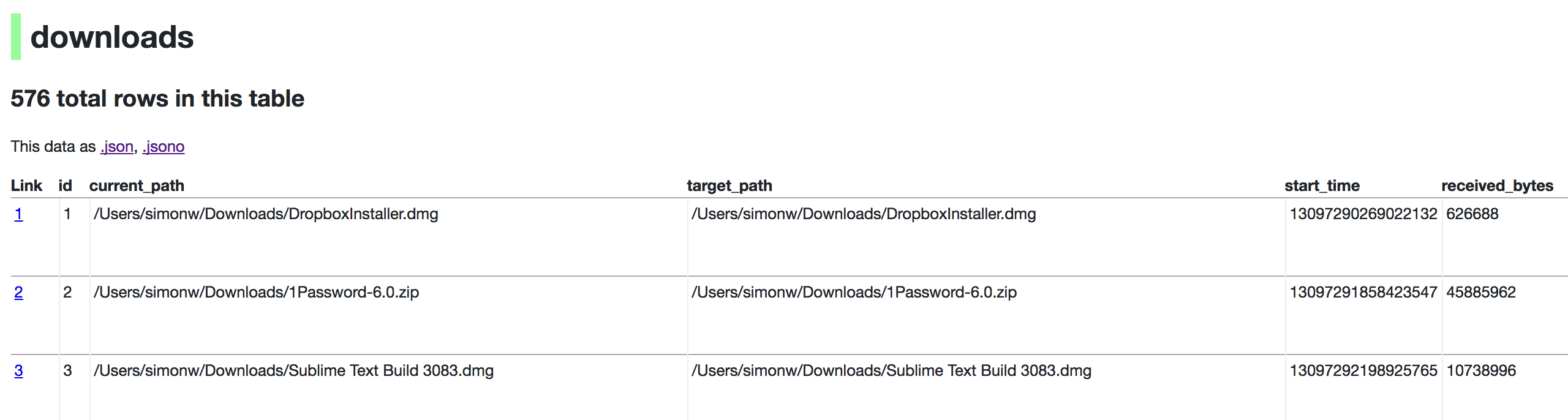 + +## metadata.json + +If you want to include licensing and source information in the generated datasette website you can do so using a JSON file that looks something like this: + + { + "title": "Five Thirty Eight", + "license": "CC Attribution 4.0 License", + "license_url": "http://creativecommons.org/licenses/by/4.0/", + "source": "fivethirtyeight/data on GitHub", + "source_url": "https://github.com/fivethirtyeight/data" + } + +Save this in `metadata.json` and run Datasette like so: + + datasette serve fivethirtyeight.db -m metadata.json + +The license and source information will be displayed on the index page and in the footer. They will also be included in the JSON produced by the API. + +## datasette publish + +If you have [Heroku](https://heroku.com/) or [Google Cloud Run](https://cloud.google.com/run/) configured, Datasette can deploy one or more SQLite databases to the internet with a single command: + + datasette publish heroku database.db + +Or: + + datasette publish cloudrun database.db + +This will create a docker image containing both the datasette application and the specified SQLite database files. It will then deploy that image to Heroku or Cloud Run and give you a URL to access the resulting website and API. + +See [Publishing data](https://docs.datasette.io/en/stable/publish.html) in the documentation for more details. + +## Datasette Lite + +[Datasette Lite](https://lite.datasette.io/) is Datasette packaged using WebAssembly so that it runs entirely in your browser, no Python web application server required. Read more about that in the [Datasette Lite documentation](https://github.com/simonw/datasette-lite/blob/main/README.md). + + +%package -n python3-datasette +Summary: An open source multi-tool for exploring and publishing data +Provides: python-datasette +BuildRequires: python3-devel +BuildRequires: python3-setuptools +BuildRequires: python3-pip +%description -n python3-datasette +<img src="https://datasette.io/static/datasette-logo.svg" alt="Datasette"> + +[](https://pypi.org/project/datasette/) +[](https://docs.datasette.io/en/stable/changelog.html) +[](https://pypi.org/project/datasette/) +[](https://github.com/simonw/datasette/actions?query=workflow%3ATest) +[](https://docs.datasette.io/en/latest/?badge=latest) +[](https://github.com/simonw/datasette/blob/main/LICENSE) +[](https://hub.docker.com/r/datasetteproject/datasette) +[](https://discord.gg/ktd74dm5mw) + +*An open source multi-tool for exploring and publishing data* + +Datasette is a tool for exploring and publishing data. It helps people take data of any shape or size and publish that as an interactive, explorable website and accompanying API. + +Datasette is aimed at data journalists, museum curators, archivists, local governments, scientists, researchers and anyone else who has data that they wish to share with the world. + +[Explore a demo](https://global-power-plants.datasettes.com/global-power-plants/global-power-plants), watch [a video about the project](https://simonwillison.net/2021/Feb/7/video/) or try it out by [uploading and publishing your own CSV data](https://docs.datasette.io/en/stable/getting_started.html#try-datasette-without-installing-anything-using-glitch). + +* [datasette.io](https://datasette.io/) is the official project website +* Latest [Datasette News](https://datasette.io/news) +* Comprehensive documentation: https://docs.datasette.io/ +* Examples: https://datasette.io/examples +* Live demo of current `main` branch: https://latest.datasette.io/ +* Questions, feedback or want to talk about the project? Join our [Discord](https://discord.gg/ktd74dm5mw) + +Want to stay up-to-date with the project? Subscribe to the [Datasette newsletter](https://datasette.substack.com/) for tips, tricks and news on what's new in the Datasette ecosystem. + +## Installation + +If you are on a Mac, [Homebrew](https://brew.sh/) is the easiest way to install Datasette: + + brew install datasette + +You can also install it using `pip` or `pipx`: + + pip install datasette + +Datasette requires Python 3.7 or higher. We also have [detailed installation instructions](https://docs.datasette.io/en/stable/installation.html) covering other options such as Docker. + +## Basic usage + + datasette serve path/to/database.db + +This will start a web server on port 8001 - visit http://localhost:8001/ to access the web interface. + +`serve` is the default subcommand, you can omit it if you like. + +Use Chrome on OS X? You can run datasette against your browser history like so: + + datasette ~/Library/Application\ Support/Google/Chrome/Default/History --nolock + +Now visiting http://localhost:8001/History/downloads will show you a web interface to browse your downloads data: + + + +## metadata.json + +If you want to include licensing and source information in the generated datasette website you can do so using a JSON file that looks something like this: + + { + "title": "Five Thirty Eight", + "license": "CC Attribution 4.0 License", + "license_url": "http://creativecommons.org/licenses/by/4.0/", + "source": "fivethirtyeight/data on GitHub", + "source_url": "https://github.com/fivethirtyeight/data" + } + +Save this in `metadata.json` and run Datasette like so: + + datasette serve fivethirtyeight.db -m metadata.json + +The license and source information will be displayed on the index page and in the footer. They will also be included in the JSON produced by the API. + +## datasette publish + +If you have [Heroku](https://heroku.com/) or [Google Cloud Run](https://cloud.google.com/run/) configured, Datasette can deploy one or more SQLite databases to the internet with a single command: + + datasette publish heroku database.db + +Or: + + datasette publish cloudrun database.db + +This will create a docker image containing both the datasette application and the specified SQLite database files. It will then deploy that image to Heroku or Cloud Run and give you a URL to access the resulting website and API. + +See [Publishing data](https://docs.datasette.io/en/stable/publish.html) in the documentation for more details. + +## Datasette Lite + +[Datasette Lite](https://lite.datasette.io/) is Datasette packaged using WebAssembly so that it runs entirely in your browser, no Python web application server required. Read more about that in the [Datasette Lite documentation](https://github.com/simonw/datasette-lite/blob/main/README.md). + + +%package help +Summary: Development documents and examples for datasette +Provides: python3-datasette-doc +%description help +<img src="https://datasette.io/static/datasette-logo.svg" alt="Datasette"> + +[](https://pypi.org/project/datasette/) +[](https://docs.datasette.io/en/stable/changelog.html) +[](https://pypi.org/project/datasette/) +[](https://github.com/simonw/datasette/actions?query=workflow%3ATest) +[](https://docs.datasette.io/en/latest/?badge=latest) +[](https://github.com/simonw/datasette/blob/main/LICENSE) +[](https://hub.docker.com/r/datasetteproject/datasette) +[](https://discord.gg/ktd74dm5mw) + +*An open source multi-tool for exploring and publishing data* + +Datasette is a tool for exploring and publishing data. It helps people take data of any shape or size and publish that as an interactive, explorable website and accompanying API. + +Datasette is aimed at data journalists, museum curators, archivists, local governments, scientists, researchers and anyone else who has data that they wish to share with the world. + +[Explore a demo](https://global-power-plants.datasettes.com/global-power-plants/global-power-plants), watch [a video about the project](https://simonwillison.net/2021/Feb/7/video/) or try it out by [uploading and publishing your own CSV data](https://docs.datasette.io/en/stable/getting_started.html#try-datasette-without-installing-anything-using-glitch). + +* [datasette.io](https://datasette.io/) is the official project website +* Latest [Datasette News](https://datasette.io/news) +* Comprehensive documentation: https://docs.datasette.io/ +* Examples: https://datasette.io/examples +* Live demo of current `main` branch: https://latest.datasette.io/ +* Questions, feedback or want to talk about the project? Join our [Discord](https://discord.gg/ktd74dm5mw) + +Want to stay up-to-date with the project? Subscribe to the [Datasette newsletter](https://datasette.substack.com/) for tips, tricks and news on what's new in the Datasette ecosystem. + +## Installation + +If you are on a Mac, [Homebrew](https://brew.sh/) is the easiest way to install Datasette: + + brew install datasette + +You can also install it using `pip` or `pipx`: + + pip install datasette + +Datasette requires Python 3.7 or higher. We also have [detailed installation instructions](https://docs.datasette.io/en/stable/installation.html) covering other options such as Docker. + +## Basic usage + + datasette serve path/to/database.db + +This will start a web server on port 8001 - visit http://localhost:8001/ to access the web interface. + +`serve` is the default subcommand, you can omit it if you like. + +Use Chrome on OS X? You can run datasette against your browser history like so: + + datasette ~/Library/Application\ Support/Google/Chrome/Default/History --nolock + +Now visiting http://localhost:8001/History/downloads will show you a web interface to browse your downloads data: + + + +## metadata.json + +If you want to include licensing and source information in the generated datasette website you can do so using a JSON file that looks something like this: + + { + "title": "Five Thirty Eight", + "license": "CC Attribution 4.0 License", + "license_url": "http://creativecommons.org/licenses/by/4.0/", + "source": "fivethirtyeight/data on GitHub", + "source_url": "https://github.com/fivethirtyeight/data" + } + +Save this in `metadata.json` and run Datasette like so: + + datasette serve fivethirtyeight.db -m metadata.json + +The license and source information will be displayed on the index page and in the footer. They will also be included in the JSON produced by the API. + +## datasette publish + +If you have [Heroku](https://heroku.com/) or [Google Cloud Run](https://cloud.google.com/run/) configured, Datasette can deploy one or more SQLite databases to the internet with a single command: + + datasette publish heroku database.db + +Or: + + datasette publish cloudrun database.db + +This will create a docker image containing both the datasette application and the specified SQLite database files. It will then deploy that image to Heroku or Cloud Run and give you a URL to access the resulting website and API. + +See [Publishing data](https://docs.datasette.io/en/stable/publish.html) in the documentation for more details. + +## Datasette Lite + +[Datasette Lite](https://lite.datasette.io/) is Datasette packaged using WebAssembly so that it runs entirely in your browser, no Python web application server required. Read more about that in the [Datasette Lite documentation](https://github.com/simonw/datasette-lite/blob/main/README.md). + + +%prep +%autosetup -n datasette-0.64.2 + +%build +%py3_build + +%install +%py3_install +install -d -m755 %{buildroot}/%{_pkgdocdir} +if [ -d doc ]; then cp -arf doc %{buildroot}/%{_pkgdocdir}; fi +if [ -d docs ]; then cp -arf docs %{buildroot}/%{_pkgdocdir}; fi +if [ -d example ]; then cp -arf example %{buildroot}/%{_pkgdocdir}; fi +if [ -d examples ]; then cp -arf examples %{buildroot}/%{_pkgdocdir}; fi +pushd %{buildroot} +if [ -d usr/lib ]; then + find usr/lib -type f -printf "/%h/%f\n" >> filelist.lst +fi +if [ -d usr/lib64 ]; then + find usr/lib64 -type f -printf "/%h/%f\n" >> filelist.lst +fi +if [ -d usr/bin ]; then + find usr/bin -type f -printf "/%h/%f\n" >> filelist.lst +fi +if [ -d usr/sbin ]; then + find usr/sbin -type f -printf "/%h/%f\n" >> filelist.lst +fi +touch doclist.lst +if [ -d usr/share/man ]; then + find usr/share/man -type f -printf "/%h/%f.gz\n" >> doclist.lst +fi +popd +mv %{buildroot}/filelist.lst . +mv %{buildroot}/doclist.lst . + +%files -n python3-datasette -f filelist.lst +%dir %{python3_sitelib}/* + +%files help -f doclist.lst +%{_docdir}/* + +%changelog +* Mon Apr 10 2023 Python_Bot <Python_Bot@openeuler.org> - 0.64.2-1 +- Package Spec generated @@ -0,0 +1 @@ +7e3e7c4ef28cba75eef139662c74f205 datasette-0.64.2.tar.gz |