
diff options
| author | CoprDistGit <infra@openeuler.org> | 2023-04-11 00:18:59 +0000 |
|---|---|---|
| committer | CoprDistGit <infra@openeuler.org> | 2023-04-11 00:18:59 +0000 |
| commit | f32499267f162c5197e1ecbbef7c90f2d548a554 (patch) | |
| tree | b051a44b0935b3577fe075fb83e34f6bd222421f /python-diagrams.spec | |
| parent | 489eb10af58fa27bf93dfda0b821d38f1af48213 (diff) | |
automatic import of python-diagrams
Diffstat (limited to 'python-diagrams.spec')
| -rw-r--r-- | python-diagrams.spec | 349 |
1 files changed, 349 insertions, 0 deletions
diff --git a/python-diagrams.spec b/python-diagrams.spec new file mode 100644 index 0000000..1e1e320 --- /dev/null +++ b/python-diagrams.spec @@ -0,0 +1,349 @@ +%global _empty_manifest_terminate_build 0 +Name: python-diagrams +Version: 0.23.3 +Release: 1 +Summary: Diagram as Code +License: MIT +URL: https://diagrams.mingrammer.com +Source0: https://mirrors.nju.edu.cn/pypi/web/packages/1b/ee/3070e64c5e468d1f3a0a04c2863cff633b2263b33265a82df1f1e8c82a36/diagrams-0.23.3.tar.gz +BuildArch: noarch + +Requires: python3-graphviz +Requires: python3-jinja2 +Requires: python3-contextvars +Requires: python3-typed-ast + +%description + + +# Diagrams + +[](/LICENSE) +[](https://badge.fury.io/py/diagrams) + + +[](https://www.tickgit.com/browse?repo=github.com/mingrammer/diagrams) + + +<a href="https://www.buymeacoffee.com/mingrammer" target="_blank"><img src="https://www.buymeacoffee.com/assets/img/custom_images/orange_img.png" alt="Buy Me A Coffee" style="height: 41px !important;width: 174px !important;box-shadow: 0px 3px 2px 0px rgba(190, 190, 190, 0.5) !important;" ></a> + +**Diagram as Code**. + +Diagrams lets you draw the cloud system architecture **in Python code**. It was born for **prototyping** a new system architecture design without any design tools. You can also describe or visualize the existing system architecture as well. Diagrams currently supports main major providers including: `AWS`, `Azure`, `GCP`, `Kubernetes`, `Alibaba Cloud`, `Oracle Cloud` etc... It also supports `On-Premise` nodes, `SaaS` and major `Programming` frameworks and languages. + +**Diagram as Code** also allows you to **track** the architecture diagram changes in any **version control** system. + +> NOTE: It does not control any actual cloud resources nor does it generate cloud formation or terraform code. It is just for drawing the cloud system architecture diagrams. + +## Providers + + + + + + + + + + + + + + + + + + + +## Getting Started + +It requires **Python 3.6** or higher, check your Python version first. + +It uses [Graphviz](https://www.graphviz.org/) to render the diagram, so you need to [install Graphviz](https://graphviz.gitlab.io/download/) to use **diagrams**. After installing graphviz (or already have it), install the **diagrams**. + +> macOS users can download the Graphviz via `brew install graphviz` if you're using [Homebrew](https://brew.sh). + +```shell +# using pip (pip3) +$ pip install diagrams + +# using pipenv +$ pipenv install diagrams + +# using poetry +$ poetry add diagrams +``` + +You can start with [quick start](https://diagrams.mingrammer.com/docs/getting-started/installation#quick-start). Check out [guides](https://diagrams.mingrammer.com/docs/guides/diagram) for more details, and you can find all available nodes list in [here](https://diagrams.mingrammer.com/docs/nodes/aws). + +## Examples + +| Event Processing | Stateful Architecture | Advanced Web Service | +| ------------------------------------------------------------ | ------------------------------------------------------------ | ------------------------------------------------------------ | +| 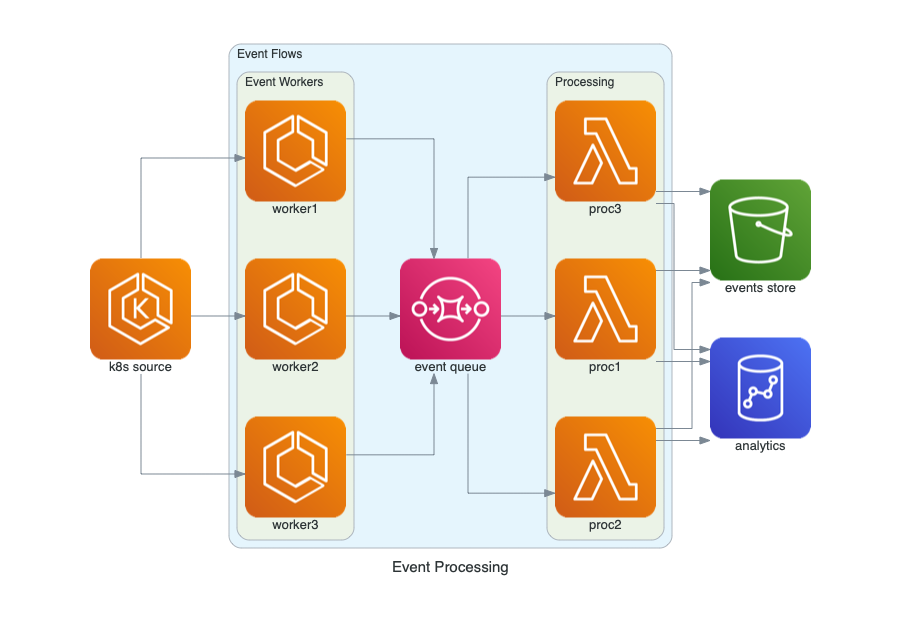 | 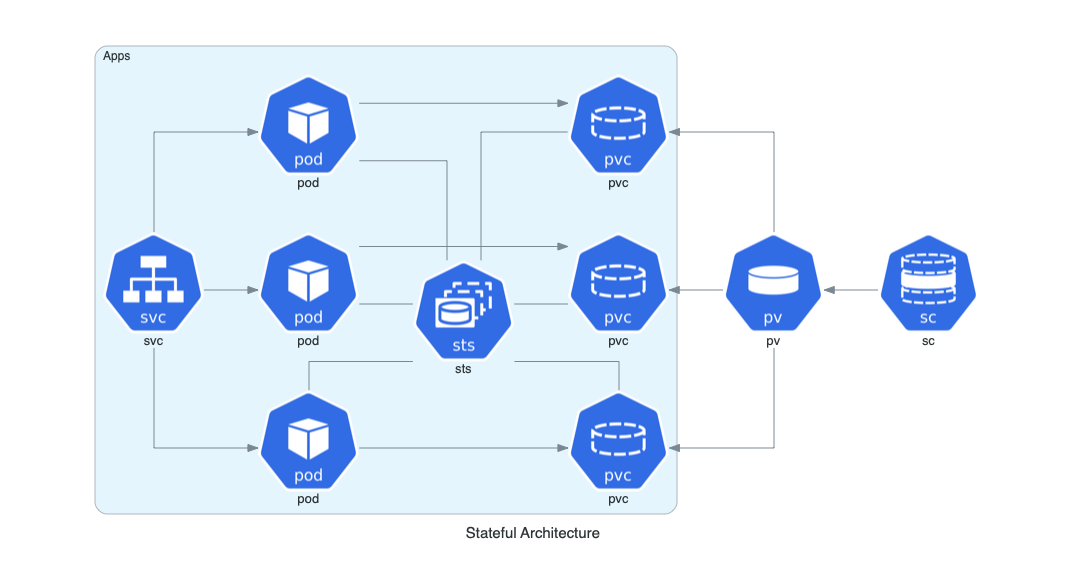 | 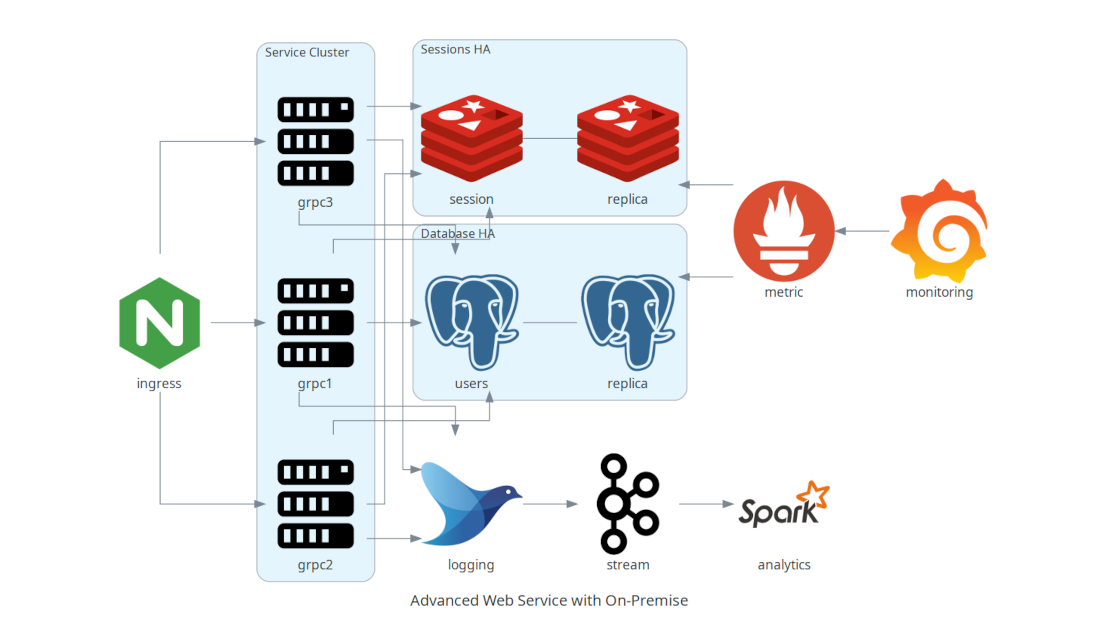 | + +You can find all the examples on the [examples](https://diagrams.mingrammer.com/docs/getting-started/examples) page. + +## Contributing + +To contribute to diagram, check out [contribution guidelines](CONTRIBUTING.md). + +> Let me know if you are using diagrams! I'll add you in showcase page. (I'm working on it!) :) + +## Who uses it? + +[GitPitch](https://gitpitch.github.io/gitpitch) is the perfect slide deck solution for Tech Conferences, Training, Developer Advocates, and Educators. Diagrams is now available as a dedicated [Cloud Diagram Markdown Widget](https://gitpitch.github.io/gitpitch/#/diagrams/cloud-architecture) so you can use Diagrams directly on any slide for conferences, meetups, and training. + +[Cloudiscovery](https://github.com/Cloud-Architects/cloudiscovery) helps you to analyze resources in your cloud (AWS/GCP/Azure/Alibaba/IBM) account. It allows you to create a diagram of analyzed cloud resource map based on this Diagrams library, so you can draw your existing cloud infrastructure with Cloudiscovery. + +[Airflow Diagrams](https://github.com/feluelle/airflow-diagrams) is an Airflow plugin that aims to easily visualise your Airflow DAGs on service level from providers like AWS, GCP, Azure, etc. via diagrams. + +## Other languages + +- If you are familiar with Go, you can use [go-diagrams](https://github.com/blushft/go-diagrams) as well. + +## License + +[MIT](LICENSE) + + +%package -n python3-diagrams +Summary: Diagram as Code +Provides: python-diagrams +BuildRequires: python3-devel +BuildRequires: python3-setuptools +BuildRequires: python3-pip +%description -n python3-diagrams + + +# Diagrams + +[](/LICENSE) +[](https://badge.fury.io/py/diagrams) + + +[](https://www.tickgit.com/browse?repo=github.com/mingrammer/diagrams) + + +<a href="https://www.buymeacoffee.com/mingrammer" target="_blank"><img src="https://www.buymeacoffee.com/assets/img/custom_images/orange_img.png" alt="Buy Me A Coffee" style="height: 41px !important;width: 174px !important;box-shadow: 0px 3px 2px 0px rgba(190, 190, 190, 0.5) !important;" ></a> + +**Diagram as Code**. + +Diagrams lets you draw the cloud system architecture **in Python code**. It was born for **prototyping** a new system architecture design without any design tools. You can also describe or visualize the existing system architecture as well. Diagrams currently supports main major providers including: `AWS`, `Azure`, `GCP`, `Kubernetes`, `Alibaba Cloud`, `Oracle Cloud` etc... It also supports `On-Premise` nodes, `SaaS` and major `Programming` frameworks and languages. + +**Diagram as Code** also allows you to **track** the architecture diagram changes in any **version control** system. + +> NOTE: It does not control any actual cloud resources nor does it generate cloud formation or terraform code. It is just for drawing the cloud system architecture diagrams. + +## Providers + + + + + + + + + + + + + + + + + + + +## Getting Started + +It requires **Python 3.6** or higher, check your Python version first. + +It uses [Graphviz](https://www.graphviz.org/) to render the diagram, so you need to [install Graphviz](https://graphviz.gitlab.io/download/) to use **diagrams**. After installing graphviz (or already have it), install the **diagrams**. + +> macOS users can download the Graphviz via `brew install graphviz` if you're using [Homebrew](https://brew.sh). + +```shell +# using pip (pip3) +$ pip install diagrams + +# using pipenv +$ pipenv install diagrams + +# using poetry +$ poetry add diagrams +``` + +You can start with [quick start](https://diagrams.mingrammer.com/docs/getting-started/installation#quick-start). Check out [guides](https://diagrams.mingrammer.com/docs/guides/diagram) for more details, and you can find all available nodes list in [here](https://diagrams.mingrammer.com/docs/nodes/aws). + +## Examples + +| Event Processing | Stateful Architecture | Advanced Web Service | +| ------------------------------------------------------------ | ------------------------------------------------------------ | ------------------------------------------------------------ | +|  |  |  | + +You can find all the examples on the [examples](https://diagrams.mingrammer.com/docs/getting-started/examples) page. + +## Contributing + +To contribute to diagram, check out [contribution guidelines](CONTRIBUTING.md). + +> Let me know if you are using diagrams! I'll add you in showcase page. (I'm working on it!) :) + +## Who uses it? + +[GitPitch](https://gitpitch.github.io/gitpitch) is the perfect slide deck solution for Tech Conferences, Training, Developer Advocates, and Educators. Diagrams is now available as a dedicated [Cloud Diagram Markdown Widget](https://gitpitch.github.io/gitpitch/#/diagrams/cloud-architecture) so you can use Diagrams directly on any slide for conferences, meetups, and training. + +[Cloudiscovery](https://github.com/Cloud-Architects/cloudiscovery) helps you to analyze resources in your cloud (AWS/GCP/Azure/Alibaba/IBM) account. It allows you to create a diagram of analyzed cloud resource map based on this Diagrams library, so you can draw your existing cloud infrastructure with Cloudiscovery. + +[Airflow Diagrams](https://github.com/feluelle/airflow-diagrams) is an Airflow plugin that aims to easily visualise your Airflow DAGs on service level from providers like AWS, GCP, Azure, etc. via diagrams. + +## Other languages + +- If you are familiar with Go, you can use [go-diagrams](https://github.com/blushft/go-diagrams) as well. + +## License + +[MIT](LICENSE) + + +%package help +Summary: Development documents and examples for diagrams +Provides: python3-diagrams-doc +%description help + + +# Diagrams + +[](/LICENSE) +[](https://badge.fury.io/py/diagrams) + + +[](https://www.tickgit.com/browse?repo=github.com/mingrammer/diagrams) + + +<a href="https://www.buymeacoffee.com/mingrammer" target="_blank"><img src="https://www.buymeacoffee.com/assets/img/custom_images/orange_img.png" alt="Buy Me A Coffee" style="height: 41px !important;width: 174px !important;box-shadow: 0px 3px 2px 0px rgba(190, 190, 190, 0.5) !important;" ></a> + +**Diagram as Code**. + +Diagrams lets you draw the cloud system architecture **in Python code**. It was born for **prototyping** a new system architecture design without any design tools. You can also describe or visualize the existing system architecture as well. Diagrams currently supports main major providers including: `AWS`, `Azure`, `GCP`, `Kubernetes`, `Alibaba Cloud`, `Oracle Cloud` etc... It also supports `On-Premise` nodes, `SaaS` and major `Programming` frameworks and languages. + +**Diagram as Code** also allows you to **track** the architecture diagram changes in any **version control** system. + +> NOTE: It does not control any actual cloud resources nor does it generate cloud formation or terraform code. It is just for drawing the cloud system architecture diagrams. + +## Providers + + + + + + + + + + + + + + + + + + + +## Getting Started + +It requires **Python 3.6** or higher, check your Python version first. + +It uses [Graphviz](https://www.graphviz.org/) to render the diagram, so you need to [install Graphviz](https://graphviz.gitlab.io/download/) to use **diagrams**. After installing graphviz (or already have it), install the **diagrams**. + +> macOS users can download the Graphviz via `brew install graphviz` if you're using [Homebrew](https://brew.sh). + +```shell +# using pip (pip3) +$ pip install diagrams + +# using pipenv +$ pipenv install diagrams + +# using poetry +$ poetry add diagrams +``` + +You can start with [quick start](https://diagrams.mingrammer.com/docs/getting-started/installation#quick-start). Check out [guides](https://diagrams.mingrammer.com/docs/guides/diagram) for more details, and you can find all available nodes list in [here](https://diagrams.mingrammer.com/docs/nodes/aws). + +## Examples + +| Event Processing | Stateful Architecture | Advanced Web Service | +| ------------------------------------------------------------ | ------------------------------------------------------------ | ------------------------------------------------------------ | +|  |  |  | + +You can find all the examples on the [examples](https://diagrams.mingrammer.com/docs/getting-started/examples) page. + +## Contributing + +To contribute to diagram, check out [contribution guidelines](CONTRIBUTING.md). + +> Let me know if you are using diagrams! I'll add you in showcase page. (I'm working on it!) :) + +## Who uses it? + +[GitPitch](https://gitpitch.github.io/gitpitch) is the perfect slide deck solution for Tech Conferences, Training, Developer Advocates, and Educators. Diagrams is now available as a dedicated [Cloud Diagram Markdown Widget](https://gitpitch.github.io/gitpitch/#/diagrams/cloud-architecture) so you can use Diagrams directly on any slide for conferences, meetups, and training. + +[Cloudiscovery](https://github.com/Cloud-Architects/cloudiscovery) helps you to analyze resources in your cloud (AWS/GCP/Azure/Alibaba/IBM) account. It allows you to create a diagram of analyzed cloud resource map based on this Diagrams library, so you can draw your existing cloud infrastructure with Cloudiscovery. + +[Airflow Diagrams](https://github.com/feluelle/airflow-diagrams) is an Airflow plugin that aims to easily visualise your Airflow DAGs on service level from providers like AWS, GCP, Azure, etc. via diagrams. + +## Other languages + +- If you are familiar with Go, you can use [go-diagrams](https://github.com/blushft/go-diagrams) as well. + +## License + +[MIT](LICENSE) + + +%prep +%autosetup -n diagrams-0.23.3 + +%build +%py3_build + +%install +%py3_install +install -d -m755 %{buildroot}/%{_pkgdocdir} +if [ -d doc ]; then cp -arf doc %{buildroot}/%{_pkgdocdir}; fi +if [ -d docs ]; then cp -arf docs %{buildroot}/%{_pkgdocdir}; fi +if [ -d example ]; then cp -arf example %{buildroot}/%{_pkgdocdir}; fi +if [ -d examples ]; then cp -arf examples %{buildroot}/%{_pkgdocdir}; fi +pushd %{buildroot} +if [ -d usr/lib ]; then + find usr/lib -type f -printf "/%h/%f\n" >> filelist.lst +fi +if [ -d usr/lib64 ]; then + find usr/lib64 -type f -printf "/%h/%f\n" >> filelist.lst +fi +if [ -d usr/bin ]; then + find usr/bin -type f -printf "/%h/%f\n" >> filelist.lst +fi +if [ -d usr/sbin ]; then + find usr/sbin -type f -printf "/%h/%f\n" >> filelist.lst +fi +touch doclist.lst +if [ -d usr/share/man ]; then + find usr/share/man -type f -printf "/%h/%f.gz\n" >> doclist.lst +fi +popd +mv %{buildroot}/filelist.lst . +mv %{buildroot}/doclist.lst . + +%files -n python3-diagrams -f filelist.lst +%dir %{python3_sitelib}/* + +%files help -f doclist.lst +%{_docdir}/* + +%changelog +* Tue Apr 11 2023 Python_Bot <Python_Bot@openeuler.org> - 0.23.3-1 +- Package Spec generated |