
diff options
| author | CoprDistGit <infra@openeuler.org> | 2023-05-18 05:46:12 +0000 |
|---|---|---|
| committer | CoprDistGit <infra@openeuler.org> | 2023-05-18 05:46:12 +0000 |
| commit | ef1abaa35355dce166cc1e4903f53c82354c07d0 (patch) | |
| tree | 6230e8582eec41be95230ac2bd1051878166b08b | |
| parent | d7cdbff620d80f09f01bde1f66dafbafef1e4cf4 (diff) | |
automatic import of python-directory-tree
| -rw-r--r-- | .gitignore | 1 | ||||
| -rw-r--r-- | python-directory-tree.spec | 478 | ||||
| -rw-r--r-- | sources | 1 |
3 files changed, 480 insertions, 0 deletions
@@ -0,0 +1 @@ +/directory_tree-0.0.3.1.tar.gz diff --git a/python-directory-tree.spec b/python-directory-tree.spec new file mode 100644 index 0000000..801a42c --- /dev/null +++ b/python-directory-tree.spec @@ -0,0 +1,478 @@ +%global _empty_manifest_terminate_build 0 +Name: python-directory-tree +Version: 0.0.3.1 +Release: 1 +Summary: Utility Package that Displays out the Tree Structure of a Particular Directory. +License: GNU General Public License v3 (GPLv3) +URL: https://github.com/rahulbordoloi/Directory-Tree/ +Source0: https://mirrors.nju.edu.cn/pypi/web/packages/49/1d/7d000d73fa05c5875e19ed1c3b40da4d8fc8820efaaa8b5479a97465e85a/directory_tree-0.0.3.1.tar.gz +BuildArch: noarch + +Requires: python3-pytest + +%description +# Directory Tree Package + +[](https://gitpod.io/from-referrer/) + + +[](https://badge.fury.io/py/directory-tree) + +[](https://github.com/ellerbrock/open-source-badges/) + + +## About + +Want to Display your Project/Current Working Directory as a Neat Tree? No Worries! + +`Directory Tree` is a simple python utility package that displays out the Tree Structure of a User Defined Directory. + +<b><i> Currently Available for All Platforms. </i></b> + +## Installation + +Run the Following Command on your Terminal to Install `directory_tree`: + +1 . Installing the Package using `pip`: +```bash +pip install directory_tree +``` +OR + +```bash +pip3 install directory_tree +``` + +2 . Cloning the Repository: + +```bash +git clone https://github.com/rahulbordoloi/Directory-Tree/ +cd Directory-Tree +pip install -e . +``` + +## Usage + +<h4> Function Signature </h4> + +```python +display_tree(dir_path: str = '', string_rep: bool = False, header: bool = False, max_depth: float = float("inf"), show_hidden: bool = False) +``` + +<h4> Arguments Description </h4> + +| __Parameters__ | __Description__ | +| --- |-----------------------------------------------------------------------------------------------------------------| +| __dir_path__ | Root Path of Operation. By Default, Refers to the Current Working Directory. | +| __string_rep__ | Boolean Flag for Direct Console Output or a String Return of the Same. By Default, It Gives out Console Output. | +| __header__ | Boolean Flag for Displaying [OS & Directory Path] Info in the Console. Not Applicable if `string_rep=True`. | +| __max_depth__ | Max Depth of the Directory Tree. By Default, It goes upto the Deepest Directory/File. | +| __show_hidden__ | Boolean Flag for Returning/Displaying Hidden Files/Directories if Value Set to `True`. | + + +Run this Script in Order to Print out the Tree Structure of a User-Defined Directory `DirectoryPath`! + +```python +# Importing Libraries +from directory_tree import display_tree + +# Main Method +if __name__ == '__main__': + display_tree(DirectoryPath) +``` + +* Here by default, the `DirectoryPath` is the current working directory (CWD) unless specified by the user. + +## Output Examples + +Sample Directory Tree - + +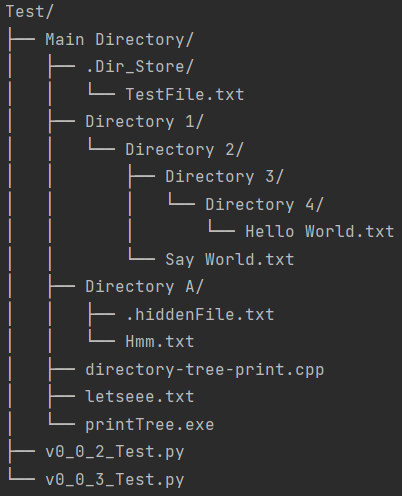 + +NOTE - Here, `letseee.txt` (File) and `Directory 4/` (Directory) are **HIDDEN** in Nature. + +1. For <i>Current Working Directory</i> with Argument [Header Info = `False`] + +```python +from directory_tree import display_tree +display_tree(header=True) +``` + + + +2. For <i>User Specified Directory</i> with Arguments [String Representation = `True`, Show Hidden Entities = `True`] + +```python +from directory_tree import display_tree +customPath = 'D:\Work\Python Packages Maintainence\Directory-Tree\Test\Main Directory' +stringRepresentation = display_tree(customPath, string_rep=True, show_hidden=True) +print(stringRepresentation) +``` + +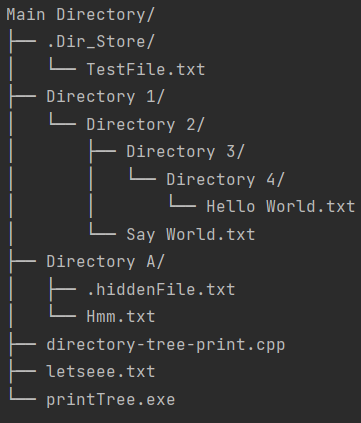 + +3. For <i>Current Working Directory</i> with Argument [Max Depth = `2`] + +```python +from directory_tree import display_tree +display_tree(max_depth=2) +``` + + + + +## Developing `Directory Tree` + +To install `directory_tree`, along with the tools you need to develop and run tests, and execute the following in your virtualenv: + +```bash +$ pip install -e .[dev] +``` + +## Security & Probable Bugs + +* `Directory Tree` uses recursion. It will raise a `RecursionError` on really deep directory trees. +* As the tree is lazily evaluated, it should behave well on really wide directory trees. Immediate children of a given directory are not lazily evaluated, though. It would be prompted to the last. +* If you're a Windows user, it is always advised to use `\\` instead of `\` in the address as using `\` might catchup escape sequences and corrupt the address string. + +## Contact Author + +Name : __Rahul Bordoloi__ <br> +Website : https://rahulbordoloi.me <br> +Email : rahulbordoloi24@gmail.com <br> + +[](https://www.python.org/) +[](https://github.com/rahulbordoloi/) + + + + + +%package -n python3-directory-tree +Summary: Utility Package that Displays out the Tree Structure of a Particular Directory. +Provides: python-directory-tree +BuildRequires: python3-devel +BuildRequires: python3-setuptools +BuildRequires: python3-pip +%description -n python3-directory-tree +# Directory Tree Package + +[](https://gitpod.io/from-referrer/) + + +[](https://badge.fury.io/py/directory-tree) + +[](https://github.com/ellerbrock/open-source-badges/) + + +## About + +Want to Display your Project/Current Working Directory as a Neat Tree? No Worries! + +`Directory Tree` is a simple python utility package that displays out the Tree Structure of a User Defined Directory. + +<b><i> Currently Available for All Platforms. </i></b> + +## Installation + +Run the Following Command on your Terminal to Install `directory_tree`: + +1 . Installing the Package using `pip`: +```bash +pip install directory_tree +``` +OR + +```bash +pip3 install directory_tree +``` + +2 . Cloning the Repository: + +```bash +git clone https://github.com/rahulbordoloi/Directory-Tree/ +cd Directory-Tree +pip install -e . +``` + +## Usage + +<h4> Function Signature </h4> + +```python +display_tree(dir_path: str = '', string_rep: bool = False, header: bool = False, max_depth: float = float("inf"), show_hidden: bool = False) +``` + +<h4> Arguments Description </h4> + +| __Parameters__ | __Description__ | +| --- |-----------------------------------------------------------------------------------------------------------------| +| __dir_path__ | Root Path of Operation. By Default, Refers to the Current Working Directory. | +| __string_rep__ | Boolean Flag for Direct Console Output or a String Return of the Same. By Default, It Gives out Console Output. | +| __header__ | Boolean Flag for Displaying [OS & Directory Path] Info in the Console. Not Applicable if `string_rep=True`. | +| __max_depth__ | Max Depth of the Directory Tree. By Default, It goes upto the Deepest Directory/File. | +| __show_hidden__ | Boolean Flag for Returning/Displaying Hidden Files/Directories if Value Set to `True`. | + + +Run this Script in Order to Print out the Tree Structure of a User-Defined Directory `DirectoryPath`! + +```python +# Importing Libraries +from directory_tree import display_tree + +# Main Method +if __name__ == '__main__': + display_tree(DirectoryPath) +``` + +* Here by default, the `DirectoryPath` is the current working directory (CWD) unless specified by the user. + +## Output Examples + +Sample Directory Tree - + + + +NOTE - Here, `letseee.txt` (File) and `Directory 4/` (Directory) are **HIDDEN** in Nature. + +1. For <i>Current Working Directory</i> with Argument [Header Info = `False`] + +```python +from directory_tree import display_tree +display_tree(header=True) +``` + + + +2. For <i>User Specified Directory</i> with Arguments [String Representation = `True`, Show Hidden Entities = `True`] + +```python +from directory_tree import display_tree +customPath = 'D:\Work\Python Packages Maintainence\Directory-Tree\Test\Main Directory' +stringRepresentation = display_tree(customPath, string_rep=True, show_hidden=True) +print(stringRepresentation) +``` + + + +3. For <i>Current Working Directory</i> with Argument [Max Depth = `2`] + +```python +from directory_tree import display_tree +display_tree(max_depth=2) +``` + + + + +## Developing `Directory Tree` + +To install `directory_tree`, along with the tools you need to develop and run tests, and execute the following in your virtualenv: + +```bash +$ pip install -e .[dev] +``` + +## Security & Probable Bugs + +* `Directory Tree` uses recursion. It will raise a `RecursionError` on really deep directory trees. +* As the tree is lazily evaluated, it should behave well on really wide directory trees. Immediate children of a given directory are not lazily evaluated, though. It would be prompted to the last. +* If you're a Windows user, it is always advised to use `\\` instead of `\` in the address as using `\` might catchup escape sequences and corrupt the address string. + +## Contact Author + +Name : __Rahul Bordoloi__ <br> +Website : https://rahulbordoloi.me <br> +Email : rahulbordoloi24@gmail.com <br> + +[](https://www.python.org/) +[](https://github.com/rahulbordoloi/) + + + + + +%package help +Summary: Development documents and examples for directory-tree +Provides: python3-directory-tree-doc +%description help +# Directory Tree Package + +[](https://gitpod.io/from-referrer/) + + +[](https://badge.fury.io/py/directory-tree) + +[](https://github.com/ellerbrock/open-source-badges/) + + +## About + +Want to Display your Project/Current Working Directory as a Neat Tree? No Worries! + +`Directory Tree` is a simple python utility package that displays out the Tree Structure of a User Defined Directory. + +<b><i> Currently Available for All Platforms. </i></b> + +## Installation + +Run the Following Command on your Terminal to Install `directory_tree`: + +1 . Installing the Package using `pip`: +```bash +pip install directory_tree +``` +OR + +```bash +pip3 install directory_tree +``` + +2 . Cloning the Repository: + +```bash +git clone https://github.com/rahulbordoloi/Directory-Tree/ +cd Directory-Tree +pip install -e . +``` + +## Usage + +<h4> Function Signature </h4> + +```python +display_tree(dir_path: str = '', string_rep: bool = False, header: bool = False, max_depth: float = float("inf"), show_hidden: bool = False) +``` + +<h4> Arguments Description </h4> + +| __Parameters__ | __Description__ | +| --- |-----------------------------------------------------------------------------------------------------------------| +| __dir_path__ | Root Path of Operation. By Default, Refers to the Current Working Directory. | +| __string_rep__ | Boolean Flag for Direct Console Output or a String Return of the Same. By Default, It Gives out Console Output. | +| __header__ | Boolean Flag for Displaying [OS & Directory Path] Info in the Console. Not Applicable if `string_rep=True`. | +| __max_depth__ | Max Depth of the Directory Tree. By Default, It goes upto the Deepest Directory/File. | +| __show_hidden__ | Boolean Flag for Returning/Displaying Hidden Files/Directories if Value Set to `True`. | + + +Run this Script in Order to Print out the Tree Structure of a User-Defined Directory `DirectoryPath`! + +```python +# Importing Libraries +from directory_tree import display_tree + +# Main Method +if __name__ == '__main__': + display_tree(DirectoryPath) +``` + +* Here by default, the `DirectoryPath` is the current working directory (CWD) unless specified by the user. + +## Output Examples + +Sample Directory Tree - + + + +NOTE - Here, `letseee.txt` (File) and `Directory 4/` (Directory) are **HIDDEN** in Nature. + +1. For <i>Current Working Directory</i> with Argument [Header Info = `False`] + +```python +from directory_tree import display_tree +display_tree(header=True) +``` + + + +2. For <i>User Specified Directory</i> with Arguments [String Representation = `True`, Show Hidden Entities = `True`] + +```python +from directory_tree import display_tree +customPath = 'D:\Work\Python Packages Maintainence\Directory-Tree\Test\Main Directory' +stringRepresentation = display_tree(customPath, string_rep=True, show_hidden=True) +print(stringRepresentation) +``` + + + +3. For <i>Current Working Directory</i> with Argument [Max Depth = `2`] + +```python +from directory_tree import display_tree +display_tree(max_depth=2) +``` + + + + +## Developing `Directory Tree` + +To install `directory_tree`, along with the tools you need to develop and run tests, and execute the following in your virtualenv: + +```bash +$ pip install -e .[dev] +``` + +## Security & Probable Bugs + +* `Directory Tree` uses recursion. It will raise a `RecursionError` on really deep directory trees. +* As the tree is lazily evaluated, it should behave well on really wide directory trees. Immediate children of a given directory are not lazily evaluated, though. It would be prompted to the last. +* If you're a Windows user, it is always advised to use `\\` instead of `\` in the address as using `\` might catchup escape sequences and corrupt the address string. + +## Contact Author + +Name : __Rahul Bordoloi__ <br> +Website : https://rahulbordoloi.me <br> +Email : rahulbordoloi24@gmail.com <br> + +[](https://www.python.org/) +[](https://github.com/rahulbordoloi/) + + + + + +%prep +%autosetup -n directory-tree-0.0.3.1 + +%build +%py3_build + +%install +%py3_install +install -d -m755 %{buildroot}/%{_pkgdocdir} +if [ -d doc ]; then cp -arf doc %{buildroot}/%{_pkgdocdir}; fi +if [ -d docs ]; then cp -arf docs %{buildroot}/%{_pkgdocdir}; fi +if [ -d example ]; then cp -arf example %{buildroot}/%{_pkgdocdir}; fi +if [ -d examples ]; then cp -arf examples %{buildroot}/%{_pkgdocdir}; fi +pushd %{buildroot} +if [ -d usr/lib ]; then + find usr/lib -type f -printf "/%h/%f\n" >> filelist.lst +fi +if [ -d usr/lib64 ]; then + find usr/lib64 -type f -printf "/%h/%f\n" >> filelist.lst +fi +if [ -d usr/bin ]; then + find usr/bin -type f -printf "/%h/%f\n" >> filelist.lst +fi +if [ -d usr/sbin ]; then + find usr/sbin -type f -printf "/%h/%f\n" >> filelist.lst +fi +touch doclist.lst +if [ -d usr/share/man ]; then + find usr/share/man -type f -printf "/%h/%f.gz\n" >> doclist.lst +fi +popd +mv %{buildroot}/filelist.lst . +mv %{buildroot}/doclist.lst . + +%files -n python3-directory-tree -f filelist.lst +%dir %{python3_sitelib}/* + +%files help -f doclist.lst +%{_docdir}/* + +%changelog +* Thu May 18 2023 Python_Bot <Python_Bot@openeuler.org> - 0.0.3.1-1 +- Package Spec generated @@ -0,0 +1 @@ +d0fcc0409c38fb1f2c9cd3275c815308 directory_tree-0.0.3.1.tar.gz |