
diff options
| author | CoprDistGit <infra@openeuler.org> | 2023-05-29 09:33:25 +0000 |
|---|---|---|
| committer | CoprDistGit <infra@openeuler.org> | 2023-05-29 09:33:25 +0000 |
| commit | d905b1e939561fd29cfd3c8480b8a01ce8eacbf6 (patch) | |
| tree | 1b8f237c43b0b8a587f8263f1e9f623a4474c005 | |
| parent | 3232ebcde43a1fa5a63782a827e42cb8477d4aca (diff) | |
automatic import of python-doccano
| -rw-r--r-- | .gitignore | 1 | ||||
| -rw-r--r-- | python-doccano.spec | 682 | ||||
| -rw-r--r-- | sources | 1 |
3 files changed, 684 insertions, 0 deletions
@@ -0,0 +1 @@ +/doccano-1.8.3.tar.gz diff --git a/python-doccano.spec b/python-doccano.spec new file mode 100644 index 0000000..7e9f017 --- /dev/null +++ b/python-doccano.spec @@ -0,0 +1,682 @@ +%global _empty_manifest_terminate_build 0 +Name: python-doccano +Version: 1.8.3 +Release: 1 +Summary: doccano, text annotation tool for machine learning practitioners +License: MIT +URL: https://doccano.github.io/doccano/ +Source0: https://mirrors.nju.edu.cn/pypi/web/packages/8c/6b/893bd1163663829af1b41908137c609dff14de0a4d53d98fdeba0f2941f3/doccano-1.8.3.tar.gz +BuildArch: noarch + +Requires: python3-Django +Requires: python3-SQLAlchemy +Requires: python3-auto-labeling-pipeline +Requires: python3-celery +Requires: python3-chardet +Requires: python3-dj-database-url +Requires: python3-dj-rest-auth[with-social] +Requires: python3-django-allauth +Requires: python3-django-celery-results +Requires: python3-django-cleanup +Requires: python3-django-cors-headers +Requires: python3-django-drf-filepond +Requires: python3-django-filter +Requires: python3-django-health-check +Requires: python3-django-polymorphic +Requires: python3-django-rest-polymorphic +Requires: python3-django-storages[google] +Requires: python3-djangorestframework +Requires: python3-djangorestframework-xml +Requires: python3-drf-yasg +Requires: python3-environs +Requires: python3-filetype +Requires: python3-flower +Requires: python3-furl +Requires: python3-gunicorn +Requires: python3-pandas +Requires: python3-pyexcel +Requires: python3-pyexcel-xlsx +Requires: python3-seqeval +Requires: python3-waitress +Requires: python3-whitenoise + +%description +<div align="center"> + <img src="https://raw.githubusercontent.com/doccano/doccano/master/docs/images/logo/doccano.png"> +</div> + +# doccano + +[](https://www.codacy.com/gh/doccano/doccano/dashboard?utm_source=github.com&utm_medium=referral&utm_content=doccano/doccano&utm_campaign=Badge_Grade) +[](https://github.com/doccano/doccano/actions/workflows/ci.yml) + +doccano is an open source text annotation tool for humans. It provides annotation features for text classification, sequence labeling and sequence to sequence tasks. So, you can create labeled data for sentiment analysis, named entity recognition, text summarization and so on. Just create a project, upload data and start annotating. You can build a dataset in hours. + +## Demo + +You can try the [annotation demo](http://doccano.herokuapp.com). + +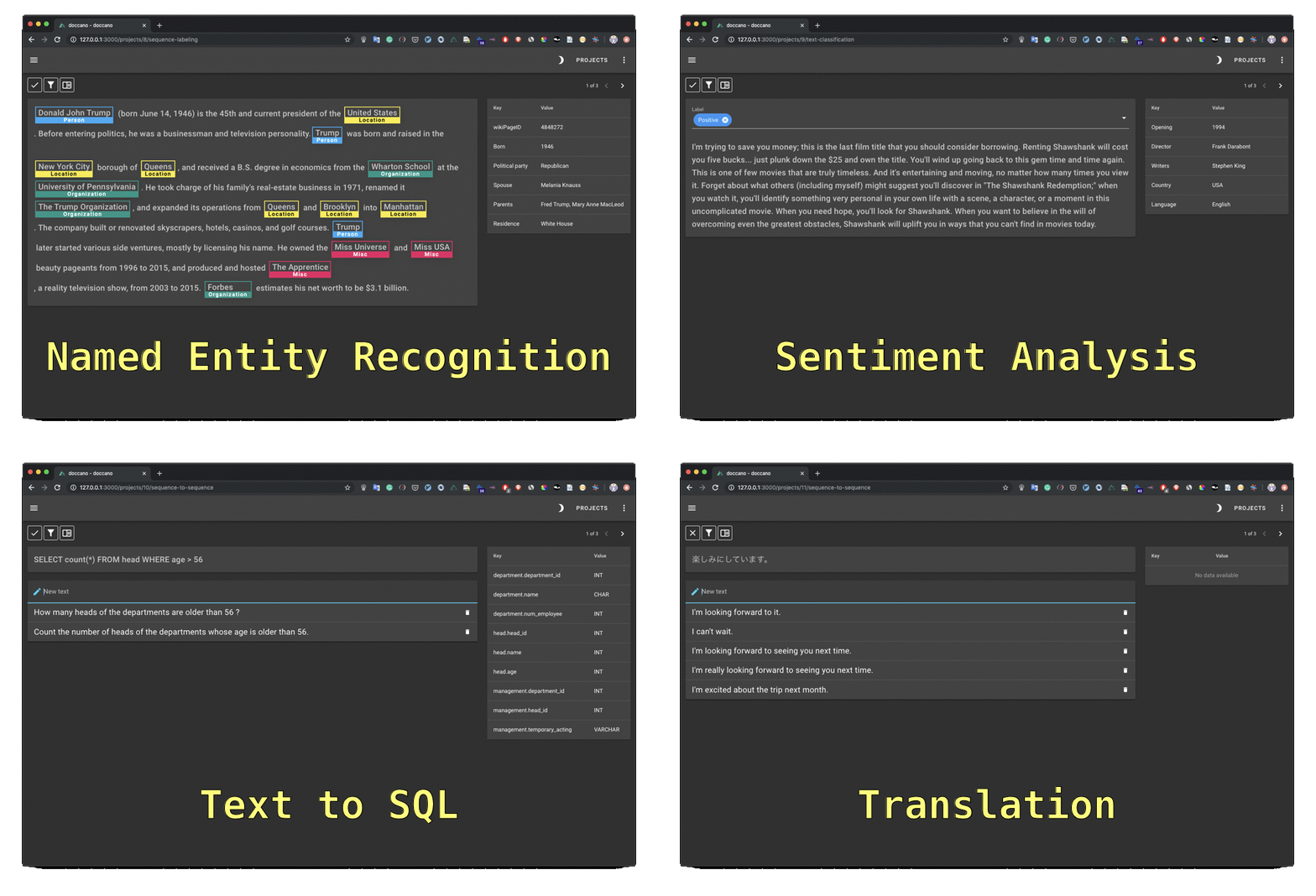 + +## Documentation + +Read the documentation at the <https://doccano.github.io/doccano/>. + +## Features + +- Collaborative annotation +- Multi-language support +- Mobile support +- Emoji :smile: support +- Dark theme +- RESTful API + +## Usage + +Three options to run doccano: + +- pip (Python 3.8+) +- Docker +- Docker Compose + +### pip + +To install doccano, simply run: + +```bash +pip install doccano +``` + +By default, SQLite 3 is used for the default database. If you want to use PostgreSQL, install the additional dependencies: + +```bash +pip install 'doccano[postgresql]' +``` + +and set `DATABASE_URL` environment variable according to your PostgreSQL credentials: + +```bash +DATABASE_URL="postgres://${POSTGRES_USER}:${POSTGRES_PASSWORD}@${POSTGRES_HOST}:${POSTGRES_PORT}/${POSTGRES_DB}?sslmode=disable" +``` + +After installation, run the following commands: + +```bash +# Initialize database. +doccano init +# Create a super user. +doccano createuser --username admin --password pass +# Start a web server. +doccano webserver --port 8000 +``` + +In another terminal, run the following command: + +```bash +# Start the task queue to handle file upload/download. +doccano task +``` + +Go to <http://127.0.0.1:8000/>. + +### Docker + +As a one-time setup, create a Docker container as follows: + +```bash +docker pull doccano/doccano +docker container create --name doccano \ + -e "ADMIN_USERNAME=admin" \ + -e "ADMIN_EMAIL=admin@example.com" \ + -e "ADMIN_PASSWORD=password" \ + -v doccano-db:/data \ + -p 8000:8000 doccano/doccano +``` + +Next, start doccano by running the container: + +```bash +docker container start doccano +``` + +Go to <http://127.0.0.1:8000/>. + +To stop the container, run `docker container stop doccano -t 5`. All data created in the container will persist across restarts. + +If you want to use the latest features, please specify `nightly` tag: + +```bash +docker pull doccano/doccano:nightly +``` + +### Docker Compose + +You need to install Git and to clone the repository: + +```bash +git clone https://github.com/doccano/doccano.git +cd doccano +``` + +_Note for Windows developers:_ Be sure to configure git to correctly handle line endings or you may encounter `status code 127` errors while running the services in future steps. Running with the git config options below will ensure your git directory correctly handles line endings. + +```bash +git clone https://github.com/doccano/doccano.git --config core.autocrlf=input +``` + +Then, create an `.env` file with variables in the following format (see [./docker/.env.example](https://github.com/doccano/doccano/blob/master/docker/.env.example)): + +```plain +# platform settings +ADMIN_USERNAME=admin +ADMIN_PASSWORD=password +ADMIN_EMAIL=admin@example.com + +# rabbit mq settings +RABBITMQ_DEFAULT_USER=doccano +RABBITMQ_DEFAULT_PASS=doccano + +# database settings +POSTGRES_USER=doccano +POSTGRES_PASSWORD=doccano +POSTGRES_DB=doccano +``` + +After running the following command, access <http://127.0.0.1/>. + +```bash +docker-compose -f docker/docker-compose.prod.yml --env-file .env up +``` + +### One-click Deployment + +| Service | Button | +|---------|---| +| AWS[^1] | [](https://console.aws.amazon.com/cloudformation/home?#/stacks/new?stackName=doccano&templateURL=https://doccano.s3.amazonaws.com/public/cloudformation/template.aws.yaml) | +| Heroku | [](https://dashboard.heroku.com/new?template=https%3A%2F%2Fgithub.com%2Fdoccano%2Fdoccano) | +<!-- | GCP[^2] | [](https://console.cloud.google.com/cloudshell/editor?shellonly=true&cloudshell_image=gcr.io/cloudrun/button&cloudshell_git_repo=https://github.com/doccano/doccano.git&cloudshell_git_branch=CloudRunButton) | --> + +> [^1]: (1) EC2 KeyPair cannot be created automatically, so make sure you have an existing EC2 KeyPair in one region. Or [create one yourself](https://docs.aws.amazon.com/AWSEC2/latest/UserGuide/ec2-key-pairs.html#having-ec2-create-your-key-pair). (2) If you want to access doccano via HTTPS in AWS, here is an [instruction](https://github.com/doccano/doccano/wiki/HTTPS-setting-for-doccano-in-AWS). +<!-- > [^2]: Although this is a very cheap option, it is only suitable for very small teams (up to 80 concurrent requests). Read more on [Cloud Run docs](https://cloud.google.com/run/docs/concepts). --> + +## FAQ + +- [How to create a user](https://doccano.github.io/doccano/faq/#how-to-create-a-user) +- [How to add a user to your project](https://doccano.github.io/doccano/faq/#how-to-add-a-user-to-your-project) +- [How to change the password](https://doccano.github.io/doccano/faq/#how-to-change-the-password) + +See the [documentation](https://doccano.github.io/doccano/) for details. + +## Contribution + +As with any software, doccano is under continuous development. If you have requests for features, please file an issue describing your request. Also, if you want to see work towards a specific feature, feel free to contribute by working towards it. The standard procedure is to fork the repository, add a feature, fix a bug, then file a pull request that your changes are to be merged into the main repository and included in the next release. + +Here are some tips might be helpful. [How to Contribute to Doccano Project](https://github.com/doccano/doccano/wiki/How-to-Contribute-to-Doccano-Project) + +## Citation + +```tex +@misc{doccano, + title={{doccano}: Text Annotation Tool for Human}, + url={https://github.com/doccano/doccano}, + note={Software available from https://github.com/doccano/doccano}, + author={ + Hiroki Nakayama and + Takahiro Kubo and + Junya Kamura and + Yasufumi Taniguchi and + Xu Liang}, + year={2018}, +} +``` + +## Contact + +For help and feedback, please feel free to contact [the author](https://github.com/Hironsan). + + + +%package -n python3-doccano +Summary: doccano, text annotation tool for machine learning practitioners +Provides: python-doccano +BuildRequires: python3-devel +BuildRequires: python3-setuptools +BuildRequires: python3-pip +%description -n python3-doccano +<div align="center"> + <img src="https://raw.githubusercontent.com/doccano/doccano/master/docs/images/logo/doccano.png"> +</div> + +# doccano + +[](https://www.codacy.com/gh/doccano/doccano/dashboard?utm_source=github.com&utm_medium=referral&utm_content=doccano/doccano&utm_campaign=Badge_Grade) +[](https://github.com/doccano/doccano/actions/workflows/ci.yml) + +doccano is an open source text annotation tool for humans. It provides annotation features for text classification, sequence labeling and sequence to sequence tasks. So, you can create labeled data for sentiment analysis, named entity recognition, text summarization and so on. Just create a project, upload data and start annotating. You can build a dataset in hours. + +## Demo + +You can try the [annotation demo](http://doccano.herokuapp.com). + + + +## Documentation + +Read the documentation at the <https://doccano.github.io/doccano/>. + +## Features + +- Collaborative annotation +- Multi-language support +- Mobile support +- Emoji :smile: support +- Dark theme +- RESTful API + +## Usage + +Three options to run doccano: + +- pip (Python 3.8+) +- Docker +- Docker Compose + +### pip + +To install doccano, simply run: + +```bash +pip install doccano +``` + +By default, SQLite 3 is used for the default database. If you want to use PostgreSQL, install the additional dependencies: + +```bash +pip install 'doccano[postgresql]' +``` + +and set `DATABASE_URL` environment variable according to your PostgreSQL credentials: + +```bash +DATABASE_URL="postgres://${POSTGRES_USER}:${POSTGRES_PASSWORD}@${POSTGRES_HOST}:${POSTGRES_PORT}/${POSTGRES_DB}?sslmode=disable" +``` + +After installation, run the following commands: + +```bash +# Initialize database. +doccano init +# Create a super user. +doccano createuser --username admin --password pass +# Start a web server. +doccano webserver --port 8000 +``` + +In another terminal, run the following command: + +```bash +# Start the task queue to handle file upload/download. +doccano task +``` + +Go to <http://127.0.0.1:8000/>. + +### Docker + +As a one-time setup, create a Docker container as follows: + +```bash +docker pull doccano/doccano +docker container create --name doccano \ + -e "ADMIN_USERNAME=admin" \ + -e "ADMIN_EMAIL=admin@example.com" \ + -e "ADMIN_PASSWORD=password" \ + -v doccano-db:/data \ + -p 8000:8000 doccano/doccano +``` + +Next, start doccano by running the container: + +```bash +docker container start doccano +``` + +Go to <http://127.0.0.1:8000/>. + +To stop the container, run `docker container stop doccano -t 5`. All data created in the container will persist across restarts. + +If you want to use the latest features, please specify `nightly` tag: + +```bash +docker pull doccano/doccano:nightly +``` + +### Docker Compose + +You need to install Git and to clone the repository: + +```bash +git clone https://github.com/doccano/doccano.git +cd doccano +``` + +_Note for Windows developers:_ Be sure to configure git to correctly handle line endings or you may encounter `status code 127` errors while running the services in future steps. Running with the git config options below will ensure your git directory correctly handles line endings. + +```bash +git clone https://github.com/doccano/doccano.git --config core.autocrlf=input +``` + +Then, create an `.env` file with variables in the following format (see [./docker/.env.example](https://github.com/doccano/doccano/blob/master/docker/.env.example)): + +```plain +# platform settings +ADMIN_USERNAME=admin +ADMIN_PASSWORD=password +ADMIN_EMAIL=admin@example.com + +# rabbit mq settings +RABBITMQ_DEFAULT_USER=doccano +RABBITMQ_DEFAULT_PASS=doccano + +# database settings +POSTGRES_USER=doccano +POSTGRES_PASSWORD=doccano +POSTGRES_DB=doccano +``` + +After running the following command, access <http://127.0.0.1/>. + +```bash +docker-compose -f docker/docker-compose.prod.yml --env-file .env up +``` + +### One-click Deployment + +| Service | Button | +|---------|---| +| AWS[^1] | [](https://console.aws.amazon.com/cloudformation/home?#/stacks/new?stackName=doccano&templateURL=https://doccano.s3.amazonaws.com/public/cloudformation/template.aws.yaml) | +| Heroku | [](https://dashboard.heroku.com/new?template=https%3A%2F%2Fgithub.com%2Fdoccano%2Fdoccano) | +<!-- | GCP[^2] | [](https://console.cloud.google.com/cloudshell/editor?shellonly=true&cloudshell_image=gcr.io/cloudrun/button&cloudshell_git_repo=https://github.com/doccano/doccano.git&cloudshell_git_branch=CloudRunButton) | --> + +> [^1]: (1) EC2 KeyPair cannot be created automatically, so make sure you have an existing EC2 KeyPair in one region. Or [create one yourself](https://docs.aws.amazon.com/AWSEC2/latest/UserGuide/ec2-key-pairs.html#having-ec2-create-your-key-pair). (2) If you want to access doccano via HTTPS in AWS, here is an [instruction](https://github.com/doccano/doccano/wiki/HTTPS-setting-for-doccano-in-AWS). +<!-- > [^2]: Although this is a very cheap option, it is only suitable for very small teams (up to 80 concurrent requests). Read more on [Cloud Run docs](https://cloud.google.com/run/docs/concepts). --> + +## FAQ + +- [How to create a user](https://doccano.github.io/doccano/faq/#how-to-create-a-user) +- [How to add a user to your project](https://doccano.github.io/doccano/faq/#how-to-add-a-user-to-your-project) +- [How to change the password](https://doccano.github.io/doccano/faq/#how-to-change-the-password) + +See the [documentation](https://doccano.github.io/doccano/) for details. + +## Contribution + +As with any software, doccano is under continuous development. If you have requests for features, please file an issue describing your request. Also, if you want to see work towards a specific feature, feel free to contribute by working towards it. The standard procedure is to fork the repository, add a feature, fix a bug, then file a pull request that your changes are to be merged into the main repository and included in the next release. + +Here are some tips might be helpful. [How to Contribute to Doccano Project](https://github.com/doccano/doccano/wiki/How-to-Contribute-to-Doccano-Project) + +## Citation + +```tex +@misc{doccano, + title={{doccano}: Text Annotation Tool for Human}, + url={https://github.com/doccano/doccano}, + note={Software available from https://github.com/doccano/doccano}, + author={ + Hiroki Nakayama and + Takahiro Kubo and + Junya Kamura and + Yasufumi Taniguchi and + Xu Liang}, + year={2018}, +} +``` + +## Contact + +For help and feedback, please feel free to contact [the author](https://github.com/Hironsan). + + + +%package help +Summary: Development documents and examples for doccano +Provides: python3-doccano-doc +%description help +<div align="center"> + <img src="https://raw.githubusercontent.com/doccano/doccano/master/docs/images/logo/doccano.png"> +</div> + +# doccano + +[](https://www.codacy.com/gh/doccano/doccano/dashboard?utm_source=github.com&utm_medium=referral&utm_content=doccano/doccano&utm_campaign=Badge_Grade) +[](https://github.com/doccano/doccano/actions/workflows/ci.yml) + +doccano is an open source text annotation tool for humans. It provides annotation features for text classification, sequence labeling and sequence to sequence tasks. So, you can create labeled data for sentiment analysis, named entity recognition, text summarization and so on. Just create a project, upload data and start annotating. You can build a dataset in hours. + +## Demo + +You can try the [annotation demo](http://doccano.herokuapp.com). + + + +## Documentation + +Read the documentation at the <https://doccano.github.io/doccano/>. + +## Features + +- Collaborative annotation +- Multi-language support +- Mobile support +- Emoji :smile: support +- Dark theme +- RESTful API + +## Usage + +Three options to run doccano: + +- pip (Python 3.8+) +- Docker +- Docker Compose + +### pip + +To install doccano, simply run: + +```bash +pip install doccano +``` + +By default, SQLite 3 is used for the default database. If you want to use PostgreSQL, install the additional dependencies: + +```bash +pip install 'doccano[postgresql]' +``` + +and set `DATABASE_URL` environment variable according to your PostgreSQL credentials: + +```bash +DATABASE_URL="postgres://${POSTGRES_USER}:${POSTGRES_PASSWORD}@${POSTGRES_HOST}:${POSTGRES_PORT}/${POSTGRES_DB}?sslmode=disable" +``` + +After installation, run the following commands: + +```bash +# Initialize database. +doccano init +# Create a super user. +doccano createuser --username admin --password pass +# Start a web server. +doccano webserver --port 8000 +``` + +In another terminal, run the following command: + +```bash +# Start the task queue to handle file upload/download. +doccano task +``` + +Go to <http://127.0.0.1:8000/>. + +### Docker + +As a one-time setup, create a Docker container as follows: + +```bash +docker pull doccano/doccano +docker container create --name doccano \ + -e "ADMIN_USERNAME=admin" \ + -e "ADMIN_EMAIL=admin@example.com" \ + -e "ADMIN_PASSWORD=password" \ + -v doccano-db:/data \ + -p 8000:8000 doccano/doccano +``` + +Next, start doccano by running the container: + +```bash +docker container start doccano +``` + +Go to <http://127.0.0.1:8000/>. + +To stop the container, run `docker container stop doccano -t 5`. All data created in the container will persist across restarts. + +If you want to use the latest features, please specify `nightly` tag: + +```bash +docker pull doccano/doccano:nightly +``` + +### Docker Compose + +You need to install Git and to clone the repository: + +```bash +git clone https://github.com/doccano/doccano.git +cd doccano +``` + +_Note for Windows developers:_ Be sure to configure git to correctly handle line endings or you may encounter `status code 127` errors while running the services in future steps. Running with the git config options below will ensure your git directory correctly handles line endings. + +```bash +git clone https://github.com/doccano/doccano.git --config core.autocrlf=input +``` + +Then, create an `.env` file with variables in the following format (see [./docker/.env.example](https://github.com/doccano/doccano/blob/master/docker/.env.example)): + +```plain +# platform settings +ADMIN_USERNAME=admin +ADMIN_PASSWORD=password +ADMIN_EMAIL=admin@example.com + +# rabbit mq settings +RABBITMQ_DEFAULT_USER=doccano +RABBITMQ_DEFAULT_PASS=doccano + +# database settings +POSTGRES_USER=doccano +POSTGRES_PASSWORD=doccano +POSTGRES_DB=doccano +``` + +After running the following command, access <http://127.0.0.1/>. + +```bash +docker-compose -f docker/docker-compose.prod.yml --env-file .env up +``` + +### One-click Deployment + +| Service | Button | +|---------|---| +| AWS[^1] | [](https://console.aws.amazon.com/cloudformation/home?#/stacks/new?stackName=doccano&templateURL=https://doccano.s3.amazonaws.com/public/cloudformation/template.aws.yaml) | +| Heroku | [](https://dashboard.heroku.com/new?template=https%3A%2F%2Fgithub.com%2Fdoccano%2Fdoccano) | +<!-- | GCP[^2] | [](https://console.cloud.google.com/cloudshell/editor?shellonly=true&cloudshell_image=gcr.io/cloudrun/button&cloudshell_git_repo=https://github.com/doccano/doccano.git&cloudshell_git_branch=CloudRunButton) | --> + +> [^1]: (1) EC2 KeyPair cannot be created automatically, so make sure you have an existing EC2 KeyPair in one region. Or [create one yourself](https://docs.aws.amazon.com/AWSEC2/latest/UserGuide/ec2-key-pairs.html#having-ec2-create-your-key-pair). (2) If you want to access doccano via HTTPS in AWS, here is an [instruction](https://github.com/doccano/doccano/wiki/HTTPS-setting-for-doccano-in-AWS). +<!-- > [^2]: Although this is a very cheap option, it is only suitable for very small teams (up to 80 concurrent requests). Read more on [Cloud Run docs](https://cloud.google.com/run/docs/concepts). --> + +## FAQ + +- [How to create a user](https://doccano.github.io/doccano/faq/#how-to-create-a-user) +- [How to add a user to your project](https://doccano.github.io/doccano/faq/#how-to-add-a-user-to-your-project) +- [How to change the password](https://doccano.github.io/doccano/faq/#how-to-change-the-password) + +See the [documentation](https://doccano.github.io/doccano/) for details. + +## Contribution + +As with any software, doccano is under continuous development. If you have requests for features, please file an issue describing your request. Also, if you want to see work towards a specific feature, feel free to contribute by working towards it. The standard procedure is to fork the repository, add a feature, fix a bug, then file a pull request that your changes are to be merged into the main repository and included in the next release. + +Here are some tips might be helpful. [How to Contribute to Doccano Project](https://github.com/doccano/doccano/wiki/How-to-Contribute-to-Doccano-Project) + +## Citation + +```tex +@misc{doccano, + title={{doccano}: Text Annotation Tool for Human}, + url={https://github.com/doccano/doccano}, + note={Software available from https://github.com/doccano/doccano}, + author={ + Hiroki Nakayama and + Takahiro Kubo and + Junya Kamura and + Yasufumi Taniguchi and + Xu Liang}, + year={2018}, +} +``` + +## Contact + +For help and feedback, please feel free to contact [the author](https://github.com/Hironsan). + + + +%prep +%autosetup -n doccano-1.8.3 + +%build +%py3_build + +%install +%py3_install +install -d -m755 %{buildroot}/%{_pkgdocdir} +if [ -d doc ]; then cp -arf doc %{buildroot}/%{_pkgdocdir}; fi +if [ -d docs ]; then cp -arf docs %{buildroot}/%{_pkgdocdir}; fi +if [ -d example ]; then cp -arf example %{buildroot}/%{_pkgdocdir}; fi +if [ -d examples ]; then cp -arf examples %{buildroot}/%{_pkgdocdir}; fi +pushd %{buildroot} +if [ -d usr/lib ]; then + find usr/lib -type f -printf "/%h/%f\n" >> filelist.lst +fi +if [ -d usr/lib64 ]; then + find usr/lib64 -type f -printf "/%h/%f\n" >> filelist.lst +fi +if [ -d usr/bin ]; then + find usr/bin -type f -printf "/%h/%f\n" >> filelist.lst +fi +if [ -d usr/sbin ]; then + find usr/sbin -type f -printf "/%h/%f\n" >> filelist.lst +fi +touch doclist.lst +if [ -d usr/share/man ]; then + find usr/share/man -type f -printf "/%h/%f.gz\n" >> doclist.lst +fi +popd +mv %{buildroot}/filelist.lst . +mv %{buildroot}/doclist.lst . + +%files -n python3-doccano -f filelist.lst +%dir %{python3_sitelib}/* + +%files help -f doclist.lst +%{_docdir}/* + +%changelog +* Mon May 29 2023 Python_Bot <Python_Bot@openeuler.org> - 1.8.3-1 +- Package Spec generated @@ -0,0 +1 @@ +86844781f8951dc94d2c3333d5cf5dbb doccano-1.8.3.tar.gz |