
diff options
| author | CoprDistGit <infra@openeuler.org> | 2023-05-10 08:39:04 +0000 |
|---|---|---|
| committer | CoprDistGit <infra@openeuler.org> | 2023-05-10 08:39:04 +0000 |
| commit | 7c96db22693c9cecaa7c6bd68e658e53e6bae3cb (patch) | |
| tree | a6ecc4c2ac2b6489409644fd6722e0b388cf3dda | |
| parent | e73ad9448f2cf3a106ebf5d484b6871620a0fd40 (diff) | |
automatic import of python-dramatiq-dashboard
| -rw-r--r-- | .gitignore | 1 | ||||
| -rw-r--r-- | python-dramatiq-dashboard.spec | 313 | ||||
| -rw-r--r-- | sources | 1 |
3 files changed, 315 insertions, 0 deletions
@@ -0,0 +1 @@ +/dramatiq_dashboard-0.4.0.tar.gz diff --git a/python-dramatiq-dashboard.spec b/python-dramatiq-dashboard.spec new file mode 100644 index 0000000..f828bac --- /dev/null +++ b/python-dramatiq-dashboard.spec @@ -0,0 +1,313 @@ +%global _empty_manifest_terminate_build 0 +Name: python-dramatiq-dashboard +Version: 0.4.0 +Release: 1 +Summary: A dashboard for Dramatiq (Redis-only!). +License: GNU Lesser General Public License v3 or later (LGPLv3+) +URL: https://pypi.org/project/dramatiq-dashboard/ +Source0: https://mirrors.nju.edu.cn/pypi/web/packages/3e/23/6735768b891416cfc1ccacb800f445640755819d68fad0f5a3b89403b187/dramatiq_dashboard-0.4.0.tar.gz +BuildArch: noarch + +Requires: python3-dramatiq[redis] +Requires: python3-jinja2 +Requires: python3-redis +Requires: python3-dataclasses +Requires: python3-alabaster +Requires: python3-sphinx +Requires: python3-sphinxcontrib-napoleon +Requires: python3-flake8 +Requires: python3-flake8-bugbear +Requires: python3-flake8-quotes +Requires: python3-isort +Requires: python3-bumpversion +Requires: python3-hiredis +Requires: python3-twine +Requires: python3-wheel +Requires: python3-pytest +Requires: python3-pytest-benchmark[histogram] +Requires: python3-pytest-cov +Requires: python3-tox + +%description +# dramatiq_dashboard + +A dashboard for [dramatiq], specific to its Redis broker (sorry +RabbitMQ users!). Very alpha stuff. + +It comes in the form of a WSGI middleware, with as few dependencies as +possible (`dramatiq`, `jinja2` and `redis`) so it's super easy to plug +into whatever web application you have. + +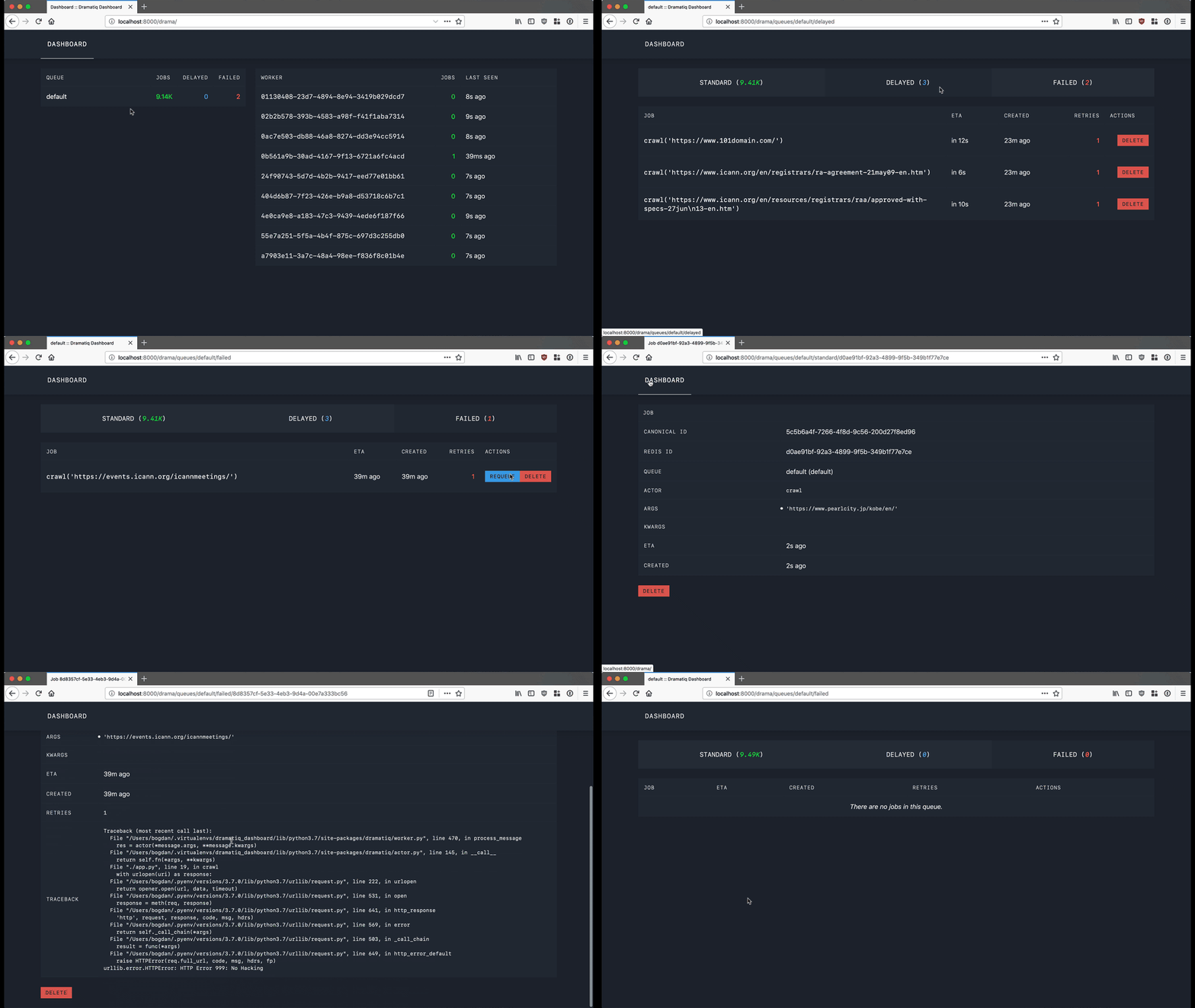 + +## Installation + + pip install dramatiq_dashboard + +## Quickstart + +#### Run the dashboard on top of an existing WSGI app + +```python +# Assuming at some point you instantiate your app. +app = create_wsgi_application() + +# Import the library, create the middleware and wrap your app with it. +import dramatiq_dashboard + +dashboard_middleware = dramatiq_dashboard.make_wsgi_middleware("/drama") +app = dashboard_middleware(app) +``` + +Run your app, visit `/drama` and you should see the dashboard. + +#### Run the dashboard as a standalone webserver + +If you don't want to wrap an existing WSGI app, you can also run the +dashboard as a standalone server. Install the WSGI server of your +choice (e.g. uWSGi, gunicorn, bjoern, etc), setup the Redis broker, +and then start `DashboardApp` directly. + +For example, to serve the dashboard on `http://127.0.0.1:8080` using +the `bjoern` WSGI server and a redis server on `17.0.0.1:6379`, run +the following: + +```python +import bjoern +import dramatiq +from dramatiq.brokers.redis import RedisBroker +from dramatiq_dashboard import DashboardApp + +broker = RedisBroker(host="127.0.0.1", port=6379) +broker.declare_queue("default") +dramatiq.set_broker(broker) +app = DashboardApp(broker=broker, prefix="") +bjoern.run(app, "127.0.0.1", 8080) +``` + +Then visit http://127.0.0.1:8080/ to see the running dashboard. + +*Note that if you use custom queues in your application, they won't be +discovered using this approach. You'll have to either add each one of +them manually to your broker or import and pass your application's +broker to `DashboardApp`.* + +## License + +dramatiq_dashboard is licensed under the LGPL. Please see [COPYING] +and [COPYING.LESSER] for licensing details. + + +[COPYING.LESSER]: https://github.com/Bogdanp/dramatiq_dashboard/blob/master/COPYING.LESSER +[COPYING]: https://github.com/Bogdanp/dramatiq_dashboard/blob/master/COPYING +[dramatiq]: https://dramatiq.io + + + + +%package -n python3-dramatiq-dashboard +Summary: A dashboard for Dramatiq (Redis-only!). +Provides: python-dramatiq-dashboard +BuildRequires: python3-devel +BuildRequires: python3-setuptools +BuildRequires: python3-pip +%description -n python3-dramatiq-dashboard +# dramatiq_dashboard + +A dashboard for [dramatiq], specific to its Redis broker (sorry +RabbitMQ users!). Very alpha stuff. + +It comes in the form of a WSGI middleware, with as few dependencies as +possible (`dramatiq`, `jinja2` and `redis`) so it's super easy to plug +into whatever web application you have. + + + +## Installation + + pip install dramatiq_dashboard + +## Quickstart + +#### Run the dashboard on top of an existing WSGI app + +```python +# Assuming at some point you instantiate your app. +app = create_wsgi_application() + +# Import the library, create the middleware and wrap your app with it. +import dramatiq_dashboard + +dashboard_middleware = dramatiq_dashboard.make_wsgi_middleware("/drama") +app = dashboard_middleware(app) +``` + +Run your app, visit `/drama` and you should see the dashboard. + +#### Run the dashboard as a standalone webserver + +If you don't want to wrap an existing WSGI app, you can also run the +dashboard as a standalone server. Install the WSGI server of your +choice (e.g. uWSGi, gunicorn, bjoern, etc), setup the Redis broker, +and then start `DashboardApp` directly. + +For example, to serve the dashboard on `http://127.0.0.1:8080` using +the `bjoern` WSGI server and a redis server on `17.0.0.1:6379`, run +the following: + +```python +import bjoern +import dramatiq +from dramatiq.brokers.redis import RedisBroker +from dramatiq_dashboard import DashboardApp + +broker = RedisBroker(host="127.0.0.1", port=6379) +broker.declare_queue("default") +dramatiq.set_broker(broker) +app = DashboardApp(broker=broker, prefix="") +bjoern.run(app, "127.0.0.1", 8080) +``` + +Then visit http://127.0.0.1:8080/ to see the running dashboard. + +*Note that if you use custom queues in your application, they won't be +discovered using this approach. You'll have to either add each one of +them manually to your broker or import and pass your application's +broker to `DashboardApp`.* + +## License + +dramatiq_dashboard is licensed under the LGPL. Please see [COPYING] +and [COPYING.LESSER] for licensing details. + + +[COPYING.LESSER]: https://github.com/Bogdanp/dramatiq_dashboard/blob/master/COPYING.LESSER +[COPYING]: https://github.com/Bogdanp/dramatiq_dashboard/blob/master/COPYING +[dramatiq]: https://dramatiq.io + + + + +%package help +Summary: Development documents and examples for dramatiq-dashboard +Provides: python3-dramatiq-dashboard-doc +%description help +# dramatiq_dashboard + +A dashboard for [dramatiq], specific to its Redis broker (sorry +RabbitMQ users!). Very alpha stuff. + +It comes in the form of a WSGI middleware, with as few dependencies as +possible (`dramatiq`, `jinja2` and `redis`) so it's super easy to plug +into whatever web application you have. + + + +## Installation + + pip install dramatiq_dashboard + +## Quickstart + +#### Run the dashboard on top of an existing WSGI app + +```python +# Assuming at some point you instantiate your app. +app = create_wsgi_application() + +# Import the library, create the middleware and wrap your app with it. +import dramatiq_dashboard + +dashboard_middleware = dramatiq_dashboard.make_wsgi_middleware("/drama") +app = dashboard_middleware(app) +``` + +Run your app, visit `/drama` and you should see the dashboard. + +#### Run the dashboard as a standalone webserver + +If you don't want to wrap an existing WSGI app, you can also run the +dashboard as a standalone server. Install the WSGI server of your +choice (e.g. uWSGi, gunicorn, bjoern, etc), setup the Redis broker, +and then start `DashboardApp` directly. + +For example, to serve the dashboard on `http://127.0.0.1:8080` using +the `bjoern` WSGI server and a redis server on `17.0.0.1:6379`, run +the following: + +```python +import bjoern +import dramatiq +from dramatiq.brokers.redis import RedisBroker +from dramatiq_dashboard import DashboardApp + +broker = RedisBroker(host="127.0.0.1", port=6379) +broker.declare_queue("default") +dramatiq.set_broker(broker) +app = DashboardApp(broker=broker, prefix="") +bjoern.run(app, "127.0.0.1", 8080) +``` + +Then visit http://127.0.0.1:8080/ to see the running dashboard. + +*Note that if you use custom queues in your application, they won't be +discovered using this approach. You'll have to either add each one of +them manually to your broker or import and pass your application's +broker to `DashboardApp`.* + +## License + +dramatiq_dashboard is licensed under the LGPL. Please see [COPYING] +and [COPYING.LESSER] for licensing details. + + +[COPYING.LESSER]: https://github.com/Bogdanp/dramatiq_dashboard/blob/master/COPYING.LESSER +[COPYING]: https://github.com/Bogdanp/dramatiq_dashboard/blob/master/COPYING +[dramatiq]: https://dramatiq.io + + + + +%prep +%autosetup -n dramatiq-dashboard-0.4.0 + +%build +%py3_build + +%install +%py3_install +install -d -m755 %{buildroot}/%{_pkgdocdir} +if [ -d doc ]; then cp -arf doc %{buildroot}/%{_pkgdocdir}; fi +if [ -d docs ]; then cp -arf docs %{buildroot}/%{_pkgdocdir}; fi +if [ -d example ]; then cp -arf example %{buildroot}/%{_pkgdocdir}; fi +if [ -d examples ]; then cp -arf examples %{buildroot}/%{_pkgdocdir}; fi +pushd %{buildroot} +if [ -d usr/lib ]; then + find usr/lib -type f -printf "/%h/%f\n" >> filelist.lst +fi +if [ -d usr/lib64 ]; then + find usr/lib64 -type f -printf "/%h/%f\n" >> filelist.lst +fi +if [ -d usr/bin ]; then + find usr/bin -type f -printf "/%h/%f\n" >> filelist.lst +fi +if [ -d usr/sbin ]; then + find usr/sbin -type f -printf "/%h/%f\n" >> filelist.lst +fi +touch doclist.lst +if [ -d usr/share/man ]; then + find usr/share/man -type f -printf "/%h/%f.gz\n" >> doclist.lst +fi +popd +mv %{buildroot}/filelist.lst . +mv %{buildroot}/doclist.lst . + +%files -n python3-dramatiq-dashboard -f filelist.lst +%dir %{python3_sitelib}/* + +%files help -f doclist.lst +%{_docdir}/* + +%changelog +* Wed May 10 2023 Python_Bot <Python_Bot@openeuler.org> - 0.4.0-1 +- Package Spec generated @@ -0,0 +1 @@ +4d57614e8bc70c3e945bbed1218231ff dramatiq_dashboard-0.4.0.tar.gz |