
diff options
Diffstat (limited to 'python-drf-api-logger.spec')
| -rw-r--r-- | python-drf-api-logger.spec | 924 |
1 files changed, 924 insertions, 0 deletions
diff --git a/python-drf-api-logger.spec b/python-drf-api-logger.spec new file mode 100644 index 0000000..96e3b7f --- /dev/null +++ b/python-drf-api-logger.spec @@ -0,0 +1,924 @@ +%global _empty_manifest_terminate_build 0 +Name: python-drf-api-logger +Version: 1.1.12 +Release: 1 +Summary: An API Logger for your Django Rest Framework project. +License: MIT +URL: https://github.com/vishalanandl177/DRF-API-Logger +Source0: https://mirrors.nju.edu.cn/pypi/web/packages/a4/53/57e7fc9a687ee1d1d49a12b2723460631fc9c8131e7309c9242470ec4286/drf_api_logger-1.1.12.tar.gz +BuildArch: noarch + + +%description +# DRF API Logger
+
+[](http://pepy.tech/project/drf-api-logger)
+[](https://pepy.tech/project/drf-api-logger)
+[](https://pepy.tech/project/drf-api-logger)
+[](https://opensource.org/)
+[](https://paypal.me/chynybekov)
+
+<a href="https://discord.gg/eeYansFDCT"><img src="https://img.shields.io/badge/Discord-7289DA?style=for-the-badge&logo=discord&logoColor=white" alt="Join Community Badge"/></a>
+<a href="https://www.instagram.com/coderssecret/"><img src="https://img.shields.io/badge/Instagram-E4405F?style=for-the-badge&logo=instagram&logoColor=white" alt="Join Instagram"/></a>
+<a href="https://github.com/vishalanandl177"><img src="https://img.shields.io/badge/GitHub-100000?style=for-the-badge&logo=github&logoColor=white" alt="GitHub"/></a>
+
+
+
+An API Logger for your Django Rest Framework project.
+
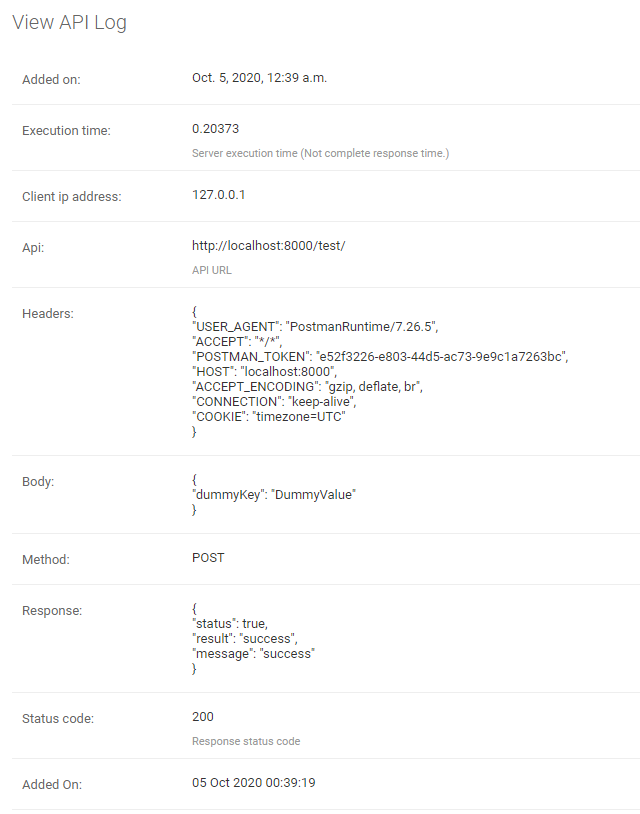
+It logs all the API information for content type "application/json".
+1. URL
+2. Request Body
+3. Request Headers
+4. Request Method
+5. API Response
+6. Status Code
+7. API Call Time
+8. Server Execution Time
+9. Client IP Address
+
+
+You can log API information into the database or listen to the logger signals for different use-cases, or you can do both.
+
+* The logger usage a separate thread to run, so it won't affect your API response time.
+
+## Installation
+
+Install or add drf-api-logger.
+```shell script
+pip install drf-api-logger
+```
+
+Add in INSTALLED_APPS
+```python
+INSTALLED_APPS = [
+ 'django.contrib.admin',
+ 'django.contrib.auth',
+ 'django.contrib.contenttypes',
+ 'django.contrib.sessions',
+ 'django.contrib.messages',
+ 'django.contrib.staticfiles',
+
+ 'drf_api_logger', # Add here
+]
+```
+
+Add in MIDDLEWARE
+```python
+MIDDLEWARE = [
+ 'django.middleware.security.SecurityMiddleware',
+ 'django.contrib.sessions.middleware.SessionMiddleware',
+ 'django.middleware.common.CommonMiddleware',
+ 'django.middleware.csrf.CsrfViewMiddleware',
+ 'django.contrib.auth.middleware.AuthenticationMiddleware',
+ 'django.contrib.messages.middleware.MessageMiddleware',
+ 'django.middleware.clickjacking.XFrameOptionsMiddleware',
+
+ 'drf_api_logger.middleware.api_logger_middleware.APILoggerMiddleware', # Add here
+]
+```
+
+
+#### * Add these lines in Django Rest Framework settings file.
+
+## Store logs into the database
+Log every request into the database.
+```python
+DRF_API_LOGGER_DATABASE = True # Default to False
+```
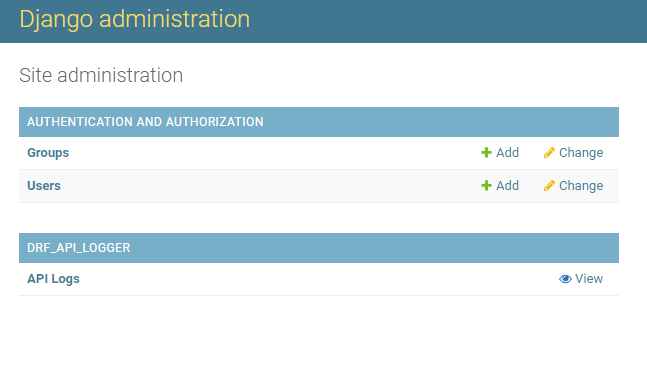
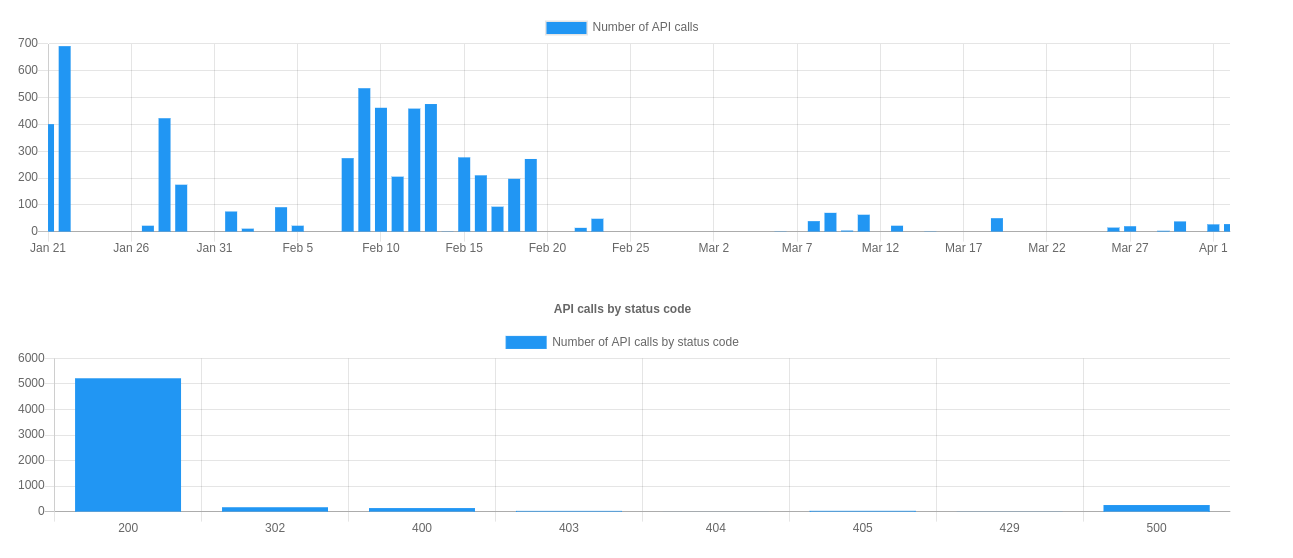
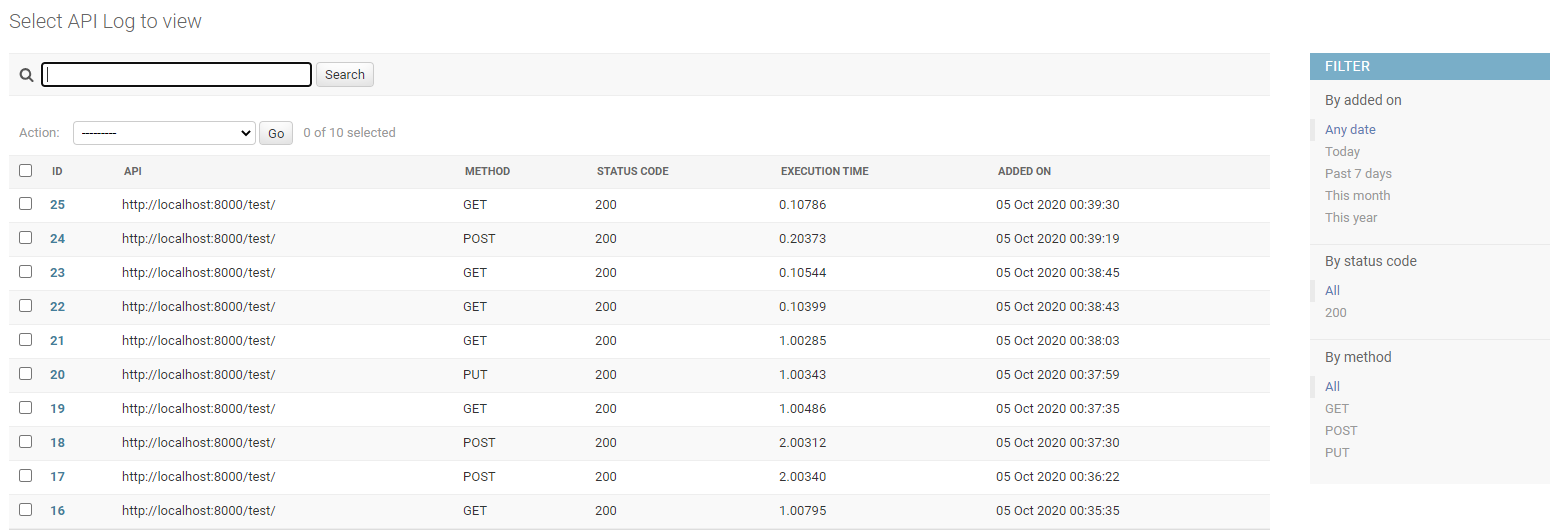
+* Logs will be available in Django Admin Panel.
+
+* The search bar will search in Request Body, Response, Headers and API URL.
+
+* You can also filter the logs based on the "added_on" date, Status Code and Request Methods.
+
+
+
+
+
+
+
+
+
+Note: Make sure to migrate. It will create a table for logger if "DRF_API_LOGGER_DATABASE" is True else if already exists, it will delete the table.
+
+## To listen for the logger signals.
+Listen to the signal as soon as any API is called. So you can log the API data into a file or for different use-cases.
+```python
+DRF_API_LOGGER_SIGNAL = True # Default to False
+```
+Example code to listen to the API Logger Signal.
+```python
+"""
+Import API_LOGGER_SIGNAL
+"""
+from drf_api_logger import API_LOGGER_SIGNAL
+
+
+"""
+Create a function that is going to listen to the API logger signals.
+"""
+def listener_one(**kwargs):
+ print(kwargs)
+
+def listener_two(**kwargs):
+ print(kwargs)
+
+"""
+It will listen to all the API logs whenever an API is called.
+You can also listen signals in multiple functions.
+"""
+API_LOGGER_SIGNAL.listen += listener_one
+API_LOGGER_SIGNAL.listen += listener_two
+
+"""
+Unsubscribe to signals.
+"""
+
+API_LOGGER_SIGNAL.listen -= listener_one
+```
+
+### Queue
+
+DRF API Logger usage queue to hold the logs before inserting into the database. Once queue is full, it bulk inserts into the database.
+
+Specify the queue size.
+```python
+DRF_LOGGER_QUEUE_MAX_SIZE = 50 # Default to 50 if not specified.
+```
+
+### Interval
+
+DRF API Logger also waits for a period of time. If queue is not full and there are some logs to be inserted, it inserts after interval ends.
+
+Specify an interval (In Seconds).
+```python
+DRF_LOGGER_INTERVAL = 10 # In Seconds, Default to 10 seconds if not specified.
+```
+Note: The API call time (added_on) is a timezone aware datetime object. It is actual time of API call irrespective of interval value or queue size.
+### Skip namespace
+You can skip the entire app to be logged into the database by specifying namespace of the app as list.
+```python
+DRF_API_LOGGER_SKIP_NAMESPACE = ['APP_NAMESPACE1', 'APP_NAMESPACE2']
+```
+
+### Skip URL Name
+You can also skip any API to be logged by using url_name of the API.
+```python
+DRF_API_LOGGER_SKIP_URL_NAME = ['url_name1', 'url_name2']
+```
+
+Note: It does not log Django Admin Panel API calls.
+
+### Hide Sensitive Data From Logs
+You may wish to hide sensitive information from being exposed in the logs.
+You do this by setting `DRF_API_LOGGER_EXCLUDE_KEYS` in settings.py to a list of your desired sensitive keys.
+The default is
+```python
+DRF_API_LOGGER_EXCLUDE_KEYS = ['password', 'token', 'access', 'refresh']
+# Sensitive data will be replaced with "***FILTERED***".
+```
+
+### Change default database to store API logs
+```python
+DRF_API_LOGGER_DEFAULT_DATABASE = 'default' # Default to "default" if not specified
+"""
+Make sure to migrate the database specified in DRF_API_LOGGER_DEFAULT_DATABASE.
+"""
+```
+
+### Want to identify slow APIs? (Optional)
+You can also identify slow APIs by specifying `DRF_API_LOGGER_SLOW_API_ABOVE` in settings.py.
+
+A new filter (By API Performance) will be visible, and you can choose slow or fast API.
+```python
+DRF_API_LOGGER_SLOW_API_ABOVE = 200 # Default to None
+# Specify in milli-seconds.
+```
+
+### Want to log only selected request methods? (Optional)
+You can log only selected methods by specifying `DRF_API_LOGGER_METHODS` in settings.py.
+```python
+DRF_API_LOGGER_METHODS = ['GET', 'POST', 'DELETE', 'PUT'] # Default to empty list (Log all the requests).
+```
+
+### Want to log only selected response status codes? (Optional)
+You can log only selected responses by specifying `DRF_API_LOGGER_STATUS_CODES` in settings.py.
+```python
+DRF_API_LOGGER_STATUS_CODES = ['200', '400', '404', '500'] # Default to empty list (Log all responses).
+```
+
+### Want to see the API information in local timezone? (Optional)
+You can also change the timezone by specifying `DRF_API_LOGGER_TIMEDELTA` in settings.py.
+It won't change the Database timezone. It will still remain UTC or the timezone you have defined.
+```python
+DRF_API_LOGGER_TIMEDELTA = 330 # UTC + 330 Minutes = IST (5:Hours, 30:Minutes ahead from UTC)
+# Specify in minutes.
+```
+```python
+# Yoc can specify negative values for the countries behind the UTC timezone.
+DRF_API_LOGGER_TIMEDELTA = -30 # Example
+```
+
+### API with or without Host
+You can specify an endpoint of API should have absolute URI or not by setting this variable in DRF settings.py file.
+```python
+DRF_API_LOGGER_PATH_TYPE = 'ABSOLUTE' # Default to ABSOLUTE if not specified
+# Possible values are ABSOLUTE, FULL_PATH or RAW_URI
+```
+
+Considering we are accessing the following URL: http://127.0.0.1:8000/api/v1/?page=123
+DRF_API_LOGGER_PATH_TYPE possible values are:
+1. ABSOLUTE (Default) :
+
+ Function used ```request.build_absolute_uri()```
+
+ Output: ```http://127.0.0.1:8000/api/v1/?page=123```
+
+2. FULL_PATH
+
+ Function used ```request.get_full_path()```
+
+ Output: ```/api/v1/?page=123```
+
+3. RAW_URI
+
+ Function used ```request.get_raw_uri()```
+
+ Output: ```http://127.0.0.1:8000/api/v1/?page=123```
+
+ Note: Similar to ABSOLUTE but skip allowed hosts protection, so may return an insecure URI.
+
+
+### Use DRF API Logger Model to query
+You can use the DRF API Logger Model to query some information.
+
+Note: Make sure to set "DRF_API_LOGGER_DATABASE = True" in settings.py file.
+```
+from drf_api_logger.models import APILogsModel
+
+"""
+Example:
+Select records for status_code 200.
+"""
+result_for_200_status_code = APILogsModel.objects.filter(status_code=200)
+```
+
+DRF API Logger Model:
+```
+class APILogsModel(Model):
+ id = models.BigAutoField(primary_key=True)
+ api = models.CharField(max_length=1024, help_text='API URL')
+ headers = models.TextField()
+ body = models.TextField()
+ method = models.CharField(max_length=10, db_index=True)
+ client_ip_address = models.CharField(max_length=50)
+ response = models.TextField()
+ status_code = models.PositiveSmallIntegerField(help_text='Response status code', db_index=True)
+ execution_time = models.DecimalField(decimal_places=5, max_digits=8,
+ help_text='Server execution time (Not complete response time.)')
+ added_on = models.DateTimeField()
+
+ def __str__(self):
+ return self.api
+
+ class Meta:
+ db_table = 'drf_api_logs'
+ verbose_name = 'API Log'
+ verbose_name_plural = 'API Logs'
+
+```
+
+### Note:
+After sometime, there will be too many data in the database. Searching and filter may get slower.
+If you want, you can delete or archive the older data.
+To improve the searching or filtering, try to add indexes in the 'drf_api_logs' table.
+
+ + +%package -n python3-drf-api-logger +Summary: An API Logger for your Django Rest Framework project. +Provides: python-drf-api-logger +BuildRequires: python3-devel +BuildRequires: python3-setuptools +BuildRequires: python3-pip +%description -n python3-drf-api-logger +# DRF API Logger
+
+[](http://pepy.tech/project/drf-api-logger)
+[](https://pepy.tech/project/drf-api-logger)
+[](https://pepy.tech/project/drf-api-logger)
+[](https://opensource.org/)
+[](https://paypal.me/chynybekov)
+
+<a href="https://discord.gg/eeYansFDCT"><img src="https://img.shields.io/badge/Discord-7289DA?style=for-the-badge&logo=discord&logoColor=white" alt="Join Community Badge"/></a>
+<a href="https://www.instagram.com/coderssecret/"><img src="https://img.shields.io/badge/Instagram-E4405F?style=for-the-badge&logo=instagram&logoColor=white" alt="Join Instagram"/></a>
+<a href="https://github.com/vishalanandl177"><img src="https://img.shields.io/badge/GitHub-100000?style=for-the-badge&logo=github&logoColor=white" alt="GitHub"/></a>
+
+
+
+An API Logger for your Django Rest Framework project.
+
+It logs all the API information for content type "application/json".
+1. URL
+2. Request Body
+3. Request Headers
+4. Request Method
+5. API Response
+6. Status Code
+7. API Call Time
+8. Server Execution Time
+9. Client IP Address
+
+
+You can log API information into the database or listen to the logger signals for different use-cases, or you can do both.
+
+* The logger usage a separate thread to run, so it won't affect your API response time.
+
+## Installation
+
+Install or add drf-api-logger.
+```shell script
+pip install drf-api-logger
+```
+
+Add in INSTALLED_APPS
+```python
+INSTALLED_APPS = [
+ 'django.contrib.admin',
+ 'django.contrib.auth',
+ 'django.contrib.contenttypes',
+ 'django.contrib.sessions',
+ 'django.contrib.messages',
+ 'django.contrib.staticfiles',
+
+ 'drf_api_logger', # Add here
+]
+```
+
+Add in MIDDLEWARE
+```python
+MIDDLEWARE = [
+ 'django.middleware.security.SecurityMiddleware',
+ 'django.contrib.sessions.middleware.SessionMiddleware',
+ 'django.middleware.common.CommonMiddleware',
+ 'django.middleware.csrf.CsrfViewMiddleware',
+ 'django.contrib.auth.middleware.AuthenticationMiddleware',
+ 'django.contrib.messages.middleware.MessageMiddleware',
+ 'django.middleware.clickjacking.XFrameOptionsMiddleware',
+
+ 'drf_api_logger.middleware.api_logger_middleware.APILoggerMiddleware', # Add here
+]
+```
+
+
+#### * Add these lines in Django Rest Framework settings file.
+
+## Store logs into the database
+Log every request into the database.
+```python
+DRF_API_LOGGER_DATABASE = True # Default to False
+```
+* Logs will be available in Django Admin Panel.
+
+* The search bar will search in Request Body, Response, Headers and API URL.
+
+* You can also filter the logs based on the "added_on" date, Status Code and Request Methods.
+
+
+
+
+
+
+
+
+
+Note: Make sure to migrate. It will create a table for logger if "DRF_API_LOGGER_DATABASE" is True else if already exists, it will delete the table.
+
+## To listen for the logger signals.
+Listen to the signal as soon as any API is called. So you can log the API data into a file or for different use-cases.
+```python
+DRF_API_LOGGER_SIGNAL = True # Default to False
+```
+Example code to listen to the API Logger Signal.
+```python
+"""
+Import API_LOGGER_SIGNAL
+"""
+from drf_api_logger import API_LOGGER_SIGNAL
+
+
+"""
+Create a function that is going to listen to the API logger signals.
+"""
+def listener_one(**kwargs):
+ print(kwargs)
+
+def listener_two(**kwargs):
+ print(kwargs)
+
+"""
+It will listen to all the API logs whenever an API is called.
+You can also listen signals in multiple functions.
+"""
+API_LOGGER_SIGNAL.listen += listener_one
+API_LOGGER_SIGNAL.listen += listener_two
+
+"""
+Unsubscribe to signals.
+"""
+
+API_LOGGER_SIGNAL.listen -= listener_one
+```
+
+### Queue
+
+DRF API Logger usage queue to hold the logs before inserting into the database. Once queue is full, it bulk inserts into the database.
+
+Specify the queue size.
+```python
+DRF_LOGGER_QUEUE_MAX_SIZE = 50 # Default to 50 if not specified.
+```
+
+### Interval
+
+DRF API Logger also waits for a period of time. If queue is not full and there are some logs to be inserted, it inserts after interval ends.
+
+Specify an interval (In Seconds).
+```python
+DRF_LOGGER_INTERVAL = 10 # In Seconds, Default to 10 seconds if not specified.
+```
+Note: The API call time (added_on) is a timezone aware datetime object. It is actual time of API call irrespective of interval value or queue size.
+### Skip namespace
+You can skip the entire app to be logged into the database by specifying namespace of the app as list.
+```python
+DRF_API_LOGGER_SKIP_NAMESPACE = ['APP_NAMESPACE1', 'APP_NAMESPACE2']
+```
+
+### Skip URL Name
+You can also skip any API to be logged by using url_name of the API.
+```python
+DRF_API_LOGGER_SKIP_URL_NAME = ['url_name1', 'url_name2']
+```
+
+Note: It does not log Django Admin Panel API calls.
+
+### Hide Sensitive Data From Logs
+You may wish to hide sensitive information from being exposed in the logs.
+You do this by setting `DRF_API_LOGGER_EXCLUDE_KEYS` in settings.py to a list of your desired sensitive keys.
+The default is
+```python
+DRF_API_LOGGER_EXCLUDE_KEYS = ['password', 'token', 'access', 'refresh']
+# Sensitive data will be replaced with "***FILTERED***".
+```
+
+### Change default database to store API logs
+```python
+DRF_API_LOGGER_DEFAULT_DATABASE = 'default' # Default to "default" if not specified
+"""
+Make sure to migrate the database specified in DRF_API_LOGGER_DEFAULT_DATABASE.
+"""
+```
+
+### Want to identify slow APIs? (Optional)
+You can also identify slow APIs by specifying `DRF_API_LOGGER_SLOW_API_ABOVE` in settings.py.
+
+A new filter (By API Performance) will be visible, and you can choose slow or fast API.
+```python
+DRF_API_LOGGER_SLOW_API_ABOVE = 200 # Default to None
+# Specify in milli-seconds.
+```
+
+### Want to log only selected request methods? (Optional)
+You can log only selected methods by specifying `DRF_API_LOGGER_METHODS` in settings.py.
+```python
+DRF_API_LOGGER_METHODS = ['GET', 'POST', 'DELETE', 'PUT'] # Default to empty list (Log all the requests).
+```
+
+### Want to log only selected response status codes? (Optional)
+You can log only selected responses by specifying `DRF_API_LOGGER_STATUS_CODES` in settings.py.
+```python
+DRF_API_LOGGER_STATUS_CODES = ['200', '400', '404', '500'] # Default to empty list (Log all responses).
+```
+
+### Want to see the API information in local timezone? (Optional)
+You can also change the timezone by specifying `DRF_API_LOGGER_TIMEDELTA` in settings.py.
+It won't change the Database timezone. It will still remain UTC or the timezone you have defined.
+```python
+DRF_API_LOGGER_TIMEDELTA = 330 # UTC + 330 Minutes = IST (5:Hours, 30:Minutes ahead from UTC)
+# Specify in minutes.
+```
+```python
+# Yoc can specify negative values for the countries behind the UTC timezone.
+DRF_API_LOGGER_TIMEDELTA = -30 # Example
+```
+
+### API with or without Host
+You can specify an endpoint of API should have absolute URI or not by setting this variable in DRF settings.py file.
+```python
+DRF_API_LOGGER_PATH_TYPE = 'ABSOLUTE' # Default to ABSOLUTE if not specified
+# Possible values are ABSOLUTE, FULL_PATH or RAW_URI
+```
+
+Considering we are accessing the following URL: http://127.0.0.1:8000/api/v1/?page=123
+DRF_API_LOGGER_PATH_TYPE possible values are:
+1. ABSOLUTE (Default) :
+
+ Function used ```request.build_absolute_uri()```
+
+ Output: ```http://127.0.0.1:8000/api/v1/?page=123```
+
+2. FULL_PATH
+
+ Function used ```request.get_full_path()```
+
+ Output: ```/api/v1/?page=123```
+
+3. RAW_URI
+
+ Function used ```request.get_raw_uri()```
+
+ Output: ```http://127.0.0.1:8000/api/v1/?page=123```
+
+ Note: Similar to ABSOLUTE but skip allowed hosts protection, so may return an insecure URI.
+
+
+### Use DRF API Logger Model to query
+You can use the DRF API Logger Model to query some information.
+
+Note: Make sure to set "DRF_API_LOGGER_DATABASE = True" in settings.py file.
+```
+from drf_api_logger.models import APILogsModel
+
+"""
+Example:
+Select records for status_code 200.
+"""
+result_for_200_status_code = APILogsModel.objects.filter(status_code=200)
+```
+
+DRF API Logger Model:
+```
+class APILogsModel(Model):
+ id = models.BigAutoField(primary_key=True)
+ api = models.CharField(max_length=1024, help_text='API URL')
+ headers = models.TextField()
+ body = models.TextField()
+ method = models.CharField(max_length=10, db_index=True)
+ client_ip_address = models.CharField(max_length=50)
+ response = models.TextField()
+ status_code = models.PositiveSmallIntegerField(help_text='Response status code', db_index=True)
+ execution_time = models.DecimalField(decimal_places=5, max_digits=8,
+ help_text='Server execution time (Not complete response time.)')
+ added_on = models.DateTimeField()
+
+ def __str__(self):
+ return self.api
+
+ class Meta:
+ db_table = 'drf_api_logs'
+ verbose_name = 'API Log'
+ verbose_name_plural = 'API Logs'
+
+```
+
+### Note:
+After sometime, there will be too many data in the database. Searching and filter may get slower.
+If you want, you can delete or archive the older data.
+To improve the searching or filtering, try to add indexes in the 'drf_api_logs' table.
+
+ + +%package help +Summary: Development documents and examples for drf-api-logger +Provides: python3-drf-api-logger-doc +%description help +# DRF API Logger
+
+[](http://pepy.tech/project/drf-api-logger)
+[](https://pepy.tech/project/drf-api-logger)
+[](https://pepy.tech/project/drf-api-logger)
+[](https://opensource.org/)
+[](https://paypal.me/chynybekov)
+
+<a href="https://discord.gg/eeYansFDCT"><img src="https://img.shields.io/badge/Discord-7289DA?style=for-the-badge&logo=discord&logoColor=white" alt="Join Community Badge"/></a>
+<a href="https://www.instagram.com/coderssecret/"><img src="https://img.shields.io/badge/Instagram-E4405F?style=for-the-badge&logo=instagram&logoColor=white" alt="Join Instagram"/></a>
+<a href="https://github.com/vishalanandl177"><img src="https://img.shields.io/badge/GitHub-100000?style=for-the-badge&logo=github&logoColor=white" alt="GitHub"/></a>
+
+
+
+An API Logger for your Django Rest Framework project.
+
+It logs all the API information for content type "application/json".
+1. URL
+2. Request Body
+3. Request Headers
+4. Request Method
+5. API Response
+6. Status Code
+7. API Call Time
+8. Server Execution Time
+9. Client IP Address
+
+
+You can log API information into the database or listen to the logger signals for different use-cases, or you can do both.
+
+* The logger usage a separate thread to run, so it won't affect your API response time.
+
+## Installation
+
+Install or add drf-api-logger.
+```shell script
+pip install drf-api-logger
+```
+
+Add in INSTALLED_APPS
+```python
+INSTALLED_APPS = [
+ 'django.contrib.admin',
+ 'django.contrib.auth',
+ 'django.contrib.contenttypes',
+ 'django.contrib.sessions',
+ 'django.contrib.messages',
+ 'django.contrib.staticfiles',
+
+ 'drf_api_logger', # Add here
+]
+```
+
+Add in MIDDLEWARE
+```python
+MIDDLEWARE = [
+ 'django.middleware.security.SecurityMiddleware',
+ 'django.contrib.sessions.middleware.SessionMiddleware',
+ 'django.middleware.common.CommonMiddleware',
+ 'django.middleware.csrf.CsrfViewMiddleware',
+ 'django.contrib.auth.middleware.AuthenticationMiddleware',
+ 'django.contrib.messages.middleware.MessageMiddleware',
+ 'django.middleware.clickjacking.XFrameOptionsMiddleware',
+
+ 'drf_api_logger.middleware.api_logger_middleware.APILoggerMiddleware', # Add here
+]
+```
+
+
+#### * Add these lines in Django Rest Framework settings file.
+
+## Store logs into the database
+Log every request into the database.
+```python
+DRF_API_LOGGER_DATABASE = True # Default to False
+```
+* Logs will be available in Django Admin Panel.
+
+* The search bar will search in Request Body, Response, Headers and API URL.
+
+* You can also filter the logs based on the "added_on" date, Status Code and Request Methods.
+
+
+
+
+
+
+
+
+
+Note: Make sure to migrate. It will create a table for logger if "DRF_API_LOGGER_DATABASE" is True else if already exists, it will delete the table.
+
+## To listen for the logger signals.
+Listen to the signal as soon as any API is called. So you can log the API data into a file or for different use-cases.
+```python
+DRF_API_LOGGER_SIGNAL = True # Default to False
+```
+Example code to listen to the API Logger Signal.
+```python
+"""
+Import API_LOGGER_SIGNAL
+"""
+from drf_api_logger import API_LOGGER_SIGNAL
+
+
+"""
+Create a function that is going to listen to the API logger signals.
+"""
+def listener_one(**kwargs):
+ print(kwargs)
+
+def listener_two(**kwargs):
+ print(kwargs)
+
+"""
+It will listen to all the API logs whenever an API is called.
+You can also listen signals in multiple functions.
+"""
+API_LOGGER_SIGNAL.listen += listener_one
+API_LOGGER_SIGNAL.listen += listener_two
+
+"""
+Unsubscribe to signals.
+"""
+
+API_LOGGER_SIGNAL.listen -= listener_one
+```
+
+### Queue
+
+DRF API Logger usage queue to hold the logs before inserting into the database. Once queue is full, it bulk inserts into the database.
+
+Specify the queue size.
+```python
+DRF_LOGGER_QUEUE_MAX_SIZE = 50 # Default to 50 if not specified.
+```
+
+### Interval
+
+DRF API Logger also waits for a period of time. If queue is not full and there are some logs to be inserted, it inserts after interval ends.
+
+Specify an interval (In Seconds).
+```python
+DRF_LOGGER_INTERVAL = 10 # In Seconds, Default to 10 seconds if not specified.
+```
+Note: The API call time (added_on) is a timezone aware datetime object. It is actual time of API call irrespective of interval value or queue size.
+### Skip namespace
+You can skip the entire app to be logged into the database by specifying namespace of the app as list.
+```python
+DRF_API_LOGGER_SKIP_NAMESPACE = ['APP_NAMESPACE1', 'APP_NAMESPACE2']
+```
+
+### Skip URL Name
+You can also skip any API to be logged by using url_name of the API.
+```python
+DRF_API_LOGGER_SKIP_URL_NAME = ['url_name1', 'url_name2']
+```
+
+Note: It does not log Django Admin Panel API calls.
+
+### Hide Sensitive Data From Logs
+You may wish to hide sensitive information from being exposed in the logs.
+You do this by setting `DRF_API_LOGGER_EXCLUDE_KEYS` in settings.py to a list of your desired sensitive keys.
+The default is
+```python
+DRF_API_LOGGER_EXCLUDE_KEYS = ['password', 'token', 'access', 'refresh']
+# Sensitive data will be replaced with "***FILTERED***".
+```
+
+### Change default database to store API logs
+```python
+DRF_API_LOGGER_DEFAULT_DATABASE = 'default' # Default to "default" if not specified
+"""
+Make sure to migrate the database specified in DRF_API_LOGGER_DEFAULT_DATABASE.
+"""
+```
+
+### Want to identify slow APIs? (Optional)
+You can also identify slow APIs by specifying `DRF_API_LOGGER_SLOW_API_ABOVE` in settings.py.
+
+A new filter (By API Performance) will be visible, and you can choose slow or fast API.
+```python
+DRF_API_LOGGER_SLOW_API_ABOVE = 200 # Default to None
+# Specify in milli-seconds.
+```
+
+### Want to log only selected request methods? (Optional)
+You can log only selected methods by specifying `DRF_API_LOGGER_METHODS` in settings.py.
+```python
+DRF_API_LOGGER_METHODS = ['GET', 'POST', 'DELETE', 'PUT'] # Default to empty list (Log all the requests).
+```
+
+### Want to log only selected response status codes? (Optional)
+You can log only selected responses by specifying `DRF_API_LOGGER_STATUS_CODES` in settings.py.
+```python
+DRF_API_LOGGER_STATUS_CODES = ['200', '400', '404', '500'] # Default to empty list (Log all responses).
+```
+
+### Want to see the API information in local timezone? (Optional)
+You can also change the timezone by specifying `DRF_API_LOGGER_TIMEDELTA` in settings.py.
+It won't change the Database timezone. It will still remain UTC or the timezone you have defined.
+```python
+DRF_API_LOGGER_TIMEDELTA = 330 # UTC + 330 Minutes = IST (5:Hours, 30:Minutes ahead from UTC)
+# Specify in minutes.
+```
+```python
+# Yoc can specify negative values for the countries behind the UTC timezone.
+DRF_API_LOGGER_TIMEDELTA = -30 # Example
+```
+
+### API with or without Host
+You can specify an endpoint of API should have absolute URI or not by setting this variable in DRF settings.py file.
+```python
+DRF_API_LOGGER_PATH_TYPE = 'ABSOLUTE' # Default to ABSOLUTE if not specified
+# Possible values are ABSOLUTE, FULL_PATH or RAW_URI
+```
+
+Considering we are accessing the following URL: http://127.0.0.1:8000/api/v1/?page=123
+DRF_API_LOGGER_PATH_TYPE possible values are:
+1. ABSOLUTE (Default) :
+
+ Function used ```request.build_absolute_uri()```
+
+ Output: ```http://127.0.0.1:8000/api/v1/?page=123```
+
+2. FULL_PATH
+
+ Function used ```request.get_full_path()```
+
+ Output: ```/api/v1/?page=123```
+
+3. RAW_URI
+
+ Function used ```request.get_raw_uri()```
+
+ Output: ```http://127.0.0.1:8000/api/v1/?page=123```
+
+ Note: Similar to ABSOLUTE but skip allowed hosts protection, so may return an insecure URI.
+
+
+### Use DRF API Logger Model to query
+You can use the DRF API Logger Model to query some information.
+
+Note: Make sure to set "DRF_API_LOGGER_DATABASE = True" in settings.py file.
+```
+from drf_api_logger.models import APILogsModel
+
+"""
+Example:
+Select records for status_code 200.
+"""
+result_for_200_status_code = APILogsModel.objects.filter(status_code=200)
+```
+
+DRF API Logger Model:
+```
+class APILogsModel(Model):
+ id = models.BigAutoField(primary_key=True)
+ api = models.CharField(max_length=1024, help_text='API URL')
+ headers = models.TextField()
+ body = models.TextField()
+ method = models.CharField(max_length=10, db_index=True)
+ client_ip_address = models.CharField(max_length=50)
+ response = models.TextField()
+ status_code = models.PositiveSmallIntegerField(help_text='Response status code', db_index=True)
+ execution_time = models.DecimalField(decimal_places=5, max_digits=8,
+ help_text='Server execution time (Not complete response time.)')
+ added_on = models.DateTimeField()
+
+ def __str__(self):
+ return self.api
+
+ class Meta:
+ db_table = 'drf_api_logs'
+ verbose_name = 'API Log'
+ verbose_name_plural = 'API Logs'
+
+```
+
+### Note:
+After sometime, there will be too many data in the database. Searching and filter may get slower.
+If you want, you can delete or archive the older data.
+To improve the searching or filtering, try to add indexes in the 'drf_api_logs' table.
+
+ + +%prep +%autosetup -n drf-api-logger-1.1.12 + +%build +%py3_build + +%install +%py3_install +install -d -m755 %{buildroot}/%{_pkgdocdir} +if [ -d doc ]; then cp -arf doc %{buildroot}/%{_pkgdocdir}; fi +if [ -d docs ]; then cp -arf docs %{buildroot}/%{_pkgdocdir}; fi +if [ -d example ]; then cp -arf example %{buildroot}/%{_pkgdocdir}; fi +if [ -d examples ]; then cp -arf examples %{buildroot}/%{_pkgdocdir}; fi +pushd %{buildroot} +if [ -d usr/lib ]; then + find usr/lib -type f -printf "/%h/%f\n" >> filelist.lst +fi +if [ -d usr/lib64 ]; then + find usr/lib64 -type f -printf "/%h/%f\n" >> filelist.lst +fi +if [ -d usr/bin ]; then + find usr/bin -type f -printf "/%h/%f\n" >> filelist.lst +fi +if [ -d usr/sbin ]; then + find usr/sbin -type f -printf "/%h/%f\n" >> filelist.lst +fi +touch doclist.lst +if [ -d usr/share/man ]; then + find usr/share/man -type f -printf "/%h/%f.gz\n" >> doclist.lst +fi +popd +mv %{buildroot}/filelist.lst . +mv %{buildroot}/doclist.lst . + +%files -n python3-drf-api-logger -f filelist.lst +%dir %{python3_sitelib}/* + +%files help -f doclist.lst +%{_docdir}/* + +%changelog +* Fri May 05 2023 Python_Bot <Python_Bot@openeuler.org> - 1.1.12-1 +- Package Spec generated |