
diff options
| -rw-r--r-- | .gitignore | 1 | ||||
| -rw-r--r-- | python-geobeam.spec | 723 | ||||
| -rw-r--r-- | sources | 1 |
3 files changed, 725 insertions, 0 deletions
@@ -0,0 +1 @@ +/geobeam-1.1.2.tar.gz diff --git a/python-geobeam.spec b/python-geobeam.spec new file mode 100644 index 0000000..7778ccf --- /dev/null +++ b/python-geobeam.spec @@ -0,0 +1,723 @@ +%global _empty_manifest_terminate_build 0 +Name: python-geobeam +Version: 1.1.2 +Release: 1 +Summary: geobeam adds GIS capabilities to your Apache Beam pipelines +License: Apache Software License +URL: https://pypi.org/project/geobeam/ +Source0: https://mirrors.aliyun.com/pypi/web/packages/e7/fe/dd14332f3e5e5cfef654d9f21e791fa11bcf890df431f757b70cc9dfa965/geobeam-1.1.2.tar.gz +BuildArch: noarch + +Requires: python3-apache-beam[gcp] +Requires: python3-fiona +Requires: python3-shapely +Requires: python3-rasterio +Requires: python3-google-cloud-storage +Requires: python3-esridump + +%description +geobeam adds GIS capabilities to your Apache Beam pipelines. + +## What does geobeam do? + +`geobeam` enables you to ingest and analyze massive amounts of geospatial data in parallel using [Dataflow](https://cloud.google.com/dataflow). +geobeam provides a set of [FileBasedSource](https://beam.apache.org/releases/pydoc/2.41.0/apache_beam.io.filebasedsource.html) +classes that make it easy to read, process, and write geospatial data, and provides a set of helpful +Apache Beam transforms and utilities that make it easier to process GIS data in your Dataflow pipelines. + +See the [Full Documentation](https://storage.googleapis.com/geobeam/docs/all.pdf) for complete API specification. + +### Requirements +- Apache Beam 2.46+ +- Python 3.8+ + +> Note: Make sure the Python version used to run the pipeline matches the version in the built container. + +### Supported input types + +| **File format** | **Data type** | **Geobeam class** | +|:----------------|:--------------|:-------------------| +| `tiff` | raster | `RasterBlockSource` and `RasterPolygonSource` +| `shp` | vector | `ShapefileSource` +| `gdb` | vector | `GeodatabaseSource` +| `json` | vector | `GeoJSONSource` +| URL | vector | `ESRIServerSource` + +### Included libraries + +`geobeam` includes several python modules that allow you to perform a wide variety of operations and analyses on your geospatial data. + +| **Module** | **Version** | **Description** | +|:----------------|:------------|:----------------| +| [gdal](https://pypi.org/project/GDAL/) | 3.5.2 | python bindings for GDAL +| [rasterio](https://pypi.org/project/rasterio/) | 1.3.2 | reads and writes geospatial raster data +| [fiona](https://pypi.org/project/Fiona/) | 1.8.21 | reads and writes geospatial vector data +| [shapely](https://pypi.org/project/Shapely/) | 1.8.4 | manipulation and analysis of geometric objects in the cartesian plane +| [esridump](https://pypi.org/project/esridump/) | 1.11.0 | read layer from ESRI server + + +## How to Use + +### 1. Install the module +``` +pip install geobeam +``` + +### 2. Write your pipeline + +Write a normal Apache Beam pipeline using one of `geobeam`s file sources. +See [`geobeam/examples`](https://github.com/GoogleCloudPlatform/dataflow-geobeam/tree/main/geobeam/examples) for inspiration. + +### 3. Run + +#### Run locally + +``` +python -m geobeam.examples.geotiff_dem \ + --gcs_url gs://geobeam/examples/dem-clipped-test.tif \ + --dataset examples \ + --table dem \ + --band_column elev \ + --runner DirectRunner \ + --temp_location <temp gs://> \ + --project <project_id> +``` + +> Note: Some of the provided examples may take a very long time to run locally... + +#### Run in Dataflow + +##### Write a Dockerfile + +This will run in Dataflow as a [custom container](https://cloud.google.com/dataflow/docs/guides/using-custom-containers) based on the [`dataflow-geobeam/base`](Dockerfile) image. +It is recommended that you publish your own container based on the Dockerfile in this repository and store it in your project's GCR registry. + + +```dockerfile +FROM gcr.io/dataflow-geobeam/base + +RUN pip install geobeam + +COPY requirements.txt . +RUN pip install -r requirements.txt + +COPY . . +``` + +```bash +# build locally with docker +docker build -t gcr.io/<project_id>/geobeam +docker push gcr.io/<project_id>/geobeam + +# or build with Cloud Build +gcloud builds submit --timeout 3600s --worker_machine_type n1-highcpu-8 +``` + +#### Start the Dataflow job + +``` +# run the geotiff_soilgrid example in dataflow +python -m geobeam.examples.geotiff_soilgrid \ + --gcs_url gs://geobeam/examples/AWCh3_M_sl1_250m_ll.tif \ + --dataset examples \ + --table soilgrid \ + --band_column h3 \ + --runner DataflowRunner \ + --sdk_container_image gcr.io/dataflow-geobeam/base \ + --temp_location <temp bucket> \ + --service_account_email <service account> \ + --region us-central1 \ + --max_num_workers 2 \ + --worker_machine_type c2-standard-30 \ +``` + + +## Examples + +#### Read Raster as Blocks +```py +def run(options): + from geobeam.io import RasterBlockSource + from geobeam.fn import format_rasterblock_record + + with beam.Pipeline(options) as p: + (p | 'ReadRaster' >> beam.io.Read(RasterBlockSource(gcs_url)) + | 'FormatRecord' >> beam.Map(format_rasterblock_record) + | 'WriteToBigquery' >> beam.io.WriteToBigQuery('geo.dem')) +``` + +#### Validate and Simplify Shapefile + +```py +def run(options): + from geobeam.io import ShapefileSource + from geobeam.fn import make_valid, filter_invalid, format_record + + with beam.Pipeline(options) as p: + (p | 'ReadShapefile' >> beam.io.Read(ShapefileSource(gcs_url)) + | 'Validate' >> beam.Map(make_valid) + | 'FilterInvalid' >> beam.Filter(filter_invalid) + | 'FormatRecord' >> beam.Map(format_record) + | 'WriteToBigquery' >> beam.io.WriteToBigQuery('geo.parcel')) +``` + +See `geobeam/examples/` for complete examples. + +A number of example pipelines are available in the `geobeam/examples/` folder. +To run them in your Google Cloud project, run the included [terraform](https://www.terraform.io) file to set up the Bigquery dataset and tables used by the example pipelines. + +Open up Bigquery GeoViz to visualize your data. + +### Shapefile Example + +The National Flood Hazard Layer loaded from a shapefile. Example pipeline at [`geobeam/examples/shapefile_nfhl.py`](https://github.com/GoogleCloudPlatform/dataflow-geobeam/blob/main/geobeam/examples/shapefile_nfhl.py) + +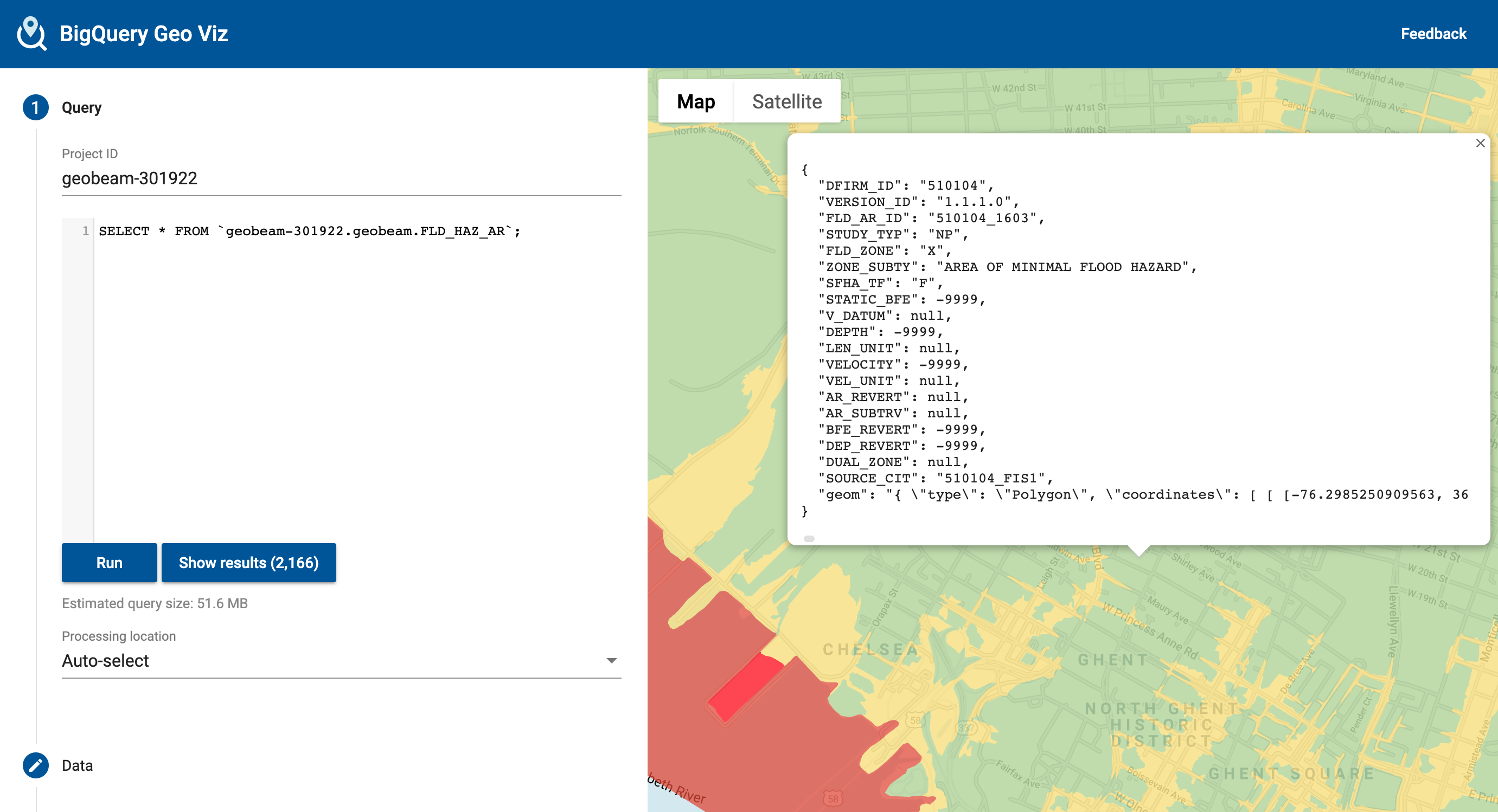 + +### Raster Example + +The Digital Elevation Model is a high-resolution model of elevation measurements at 1-meter resolution. (Values converted to centimeters). Example pipeline: [`geobeam/examples/geotiff_dem.py`](https://github.com/GoogleCloudPlatform/dataflow-geobeam/blob/main/geobeam/examples/geotiff_dem.py). + +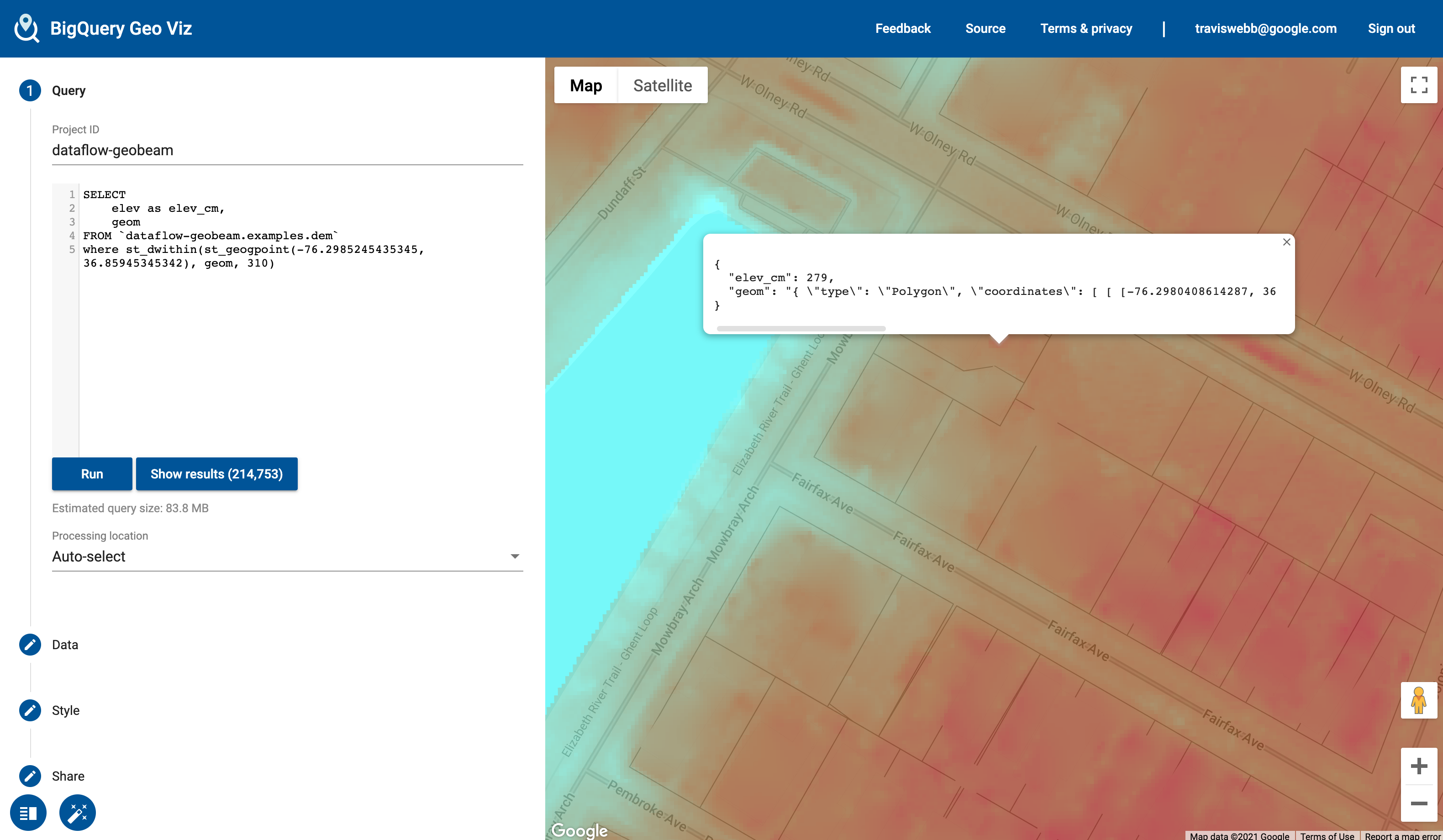 + +## Included Transforms + +The `geobeam.fn` module includes several [Beam Transforms](https://beam.apache.org/documentation/programming-guide/#transforms) that you can use in your pipelines. + +| **Module** | **Description** +|:----------------|:------------| +| `geobeam.fn.make_valid` | Attempt to make all geometries valid. +| `geobeam.fn.filter_invalid` | Filter out invalid geometries that cannot be made valid +| `geobeam.fn.format_record` | Format the (props, geom) tuple received from a vector source into a `dict` that can be inserted into the destination table +| `geobeam.fn.format_rasterblock_record` | Format the output record for blocks read from `RasterBlockSource` +| `geobeam.fn.format_rasterpolygon_record` | Format the output record for blocks read from `RasterPolygonSource` + + +## Execution parameters + +Each FileSource accepts several parameters that you can use to configure how your data is loaded and processed. +These can be parsed as pipeline arguments and passed into the respective FileSources as seen in the examples pipelines. + +| **Parameter** | **Input type** | **Description** | **Default** | **Required?** +|:-------------------|:---------------|:----------------|:------------|---------------| +| `skip_reproject` | All | True to skip reprojection during read | `False` | No +| `in_epsg` | All | An [EPSG integer](https://en.wikipedia.org/wiki/EPSG_Geodetic_Parameter_Dataset) to override the input source CRS to reproject from | | No +| `in_proj` | All | A [PROJ string](https://proj.org/usage/quickstart.html) to override the input source CRS | | No +| `band_number` | Raster | The raster band to read from | `1` | No +| `include_nodata` | Raster | True to include `nodata` values | `False` | No +| `return_block_transform` | Raster | True to include rasterio `transform` object with each block to use with `geobeam.fn.format_rasterpixel_record` | `False` | No +| `layer_name` | Vector | Name of layer to read | | Yes, for shapefiles +| `gdb_name` | Vector | Name of geodatabase directory in a gdb zip archive | | Yes, for GDB files + + +## License + +This is not an officially supported Google product, though support will be provided on a best-effort basis. + +``` +Copyright 2023 Google LLC + +Licensed under the Apache License, Version 2.0 (the "License"); +you may not use this file except in compliance with the License. +You may obtain a copy of the License at + + https://www.apache.org/licenses/LICENSE-2.0 + +Unless required by applicable law or agreed to in writing, software +distributed under the License is distributed on an "AS IS" BASIS, +WITHOUT WARRANTIES OR CONDITIONS OF ANY KIND, either express or implied. +See the License for the specific language governing permissions and +limitations under the License. +``` + + + + +%package -n python3-geobeam +Summary: geobeam adds GIS capabilities to your Apache Beam pipelines +Provides: python-geobeam +BuildRequires: python3-devel +BuildRequires: python3-setuptools +BuildRequires: python3-pip +%description -n python3-geobeam +geobeam adds GIS capabilities to your Apache Beam pipelines. + +## What does geobeam do? + +`geobeam` enables you to ingest and analyze massive amounts of geospatial data in parallel using [Dataflow](https://cloud.google.com/dataflow). +geobeam provides a set of [FileBasedSource](https://beam.apache.org/releases/pydoc/2.41.0/apache_beam.io.filebasedsource.html) +classes that make it easy to read, process, and write geospatial data, and provides a set of helpful +Apache Beam transforms and utilities that make it easier to process GIS data in your Dataflow pipelines. + +See the [Full Documentation](https://storage.googleapis.com/geobeam/docs/all.pdf) for complete API specification. + +### Requirements +- Apache Beam 2.46+ +- Python 3.8+ + +> Note: Make sure the Python version used to run the pipeline matches the version in the built container. + +### Supported input types + +| **File format** | **Data type** | **Geobeam class** | +|:----------------|:--------------|:-------------------| +| `tiff` | raster | `RasterBlockSource` and `RasterPolygonSource` +| `shp` | vector | `ShapefileSource` +| `gdb` | vector | `GeodatabaseSource` +| `json` | vector | `GeoJSONSource` +| URL | vector | `ESRIServerSource` + +### Included libraries + +`geobeam` includes several python modules that allow you to perform a wide variety of operations and analyses on your geospatial data. + +| **Module** | **Version** | **Description** | +|:----------------|:------------|:----------------| +| [gdal](https://pypi.org/project/GDAL/) | 3.5.2 | python bindings for GDAL +| [rasterio](https://pypi.org/project/rasterio/) | 1.3.2 | reads and writes geospatial raster data +| [fiona](https://pypi.org/project/Fiona/) | 1.8.21 | reads and writes geospatial vector data +| [shapely](https://pypi.org/project/Shapely/) | 1.8.4 | manipulation and analysis of geometric objects in the cartesian plane +| [esridump](https://pypi.org/project/esridump/) | 1.11.0 | read layer from ESRI server + + +## How to Use + +### 1. Install the module +``` +pip install geobeam +``` + +### 2. Write your pipeline + +Write a normal Apache Beam pipeline using one of `geobeam`s file sources. +See [`geobeam/examples`](https://github.com/GoogleCloudPlatform/dataflow-geobeam/tree/main/geobeam/examples) for inspiration. + +### 3. Run + +#### Run locally + +``` +python -m geobeam.examples.geotiff_dem \ + --gcs_url gs://geobeam/examples/dem-clipped-test.tif \ + --dataset examples \ + --table dem \ + --band_column elev \ + --runner DirectRunner \ + --temp_location <temp gs://> \ + --project <project_id> +``` + +> Note: Some of the provided examples may take a very long time to run locally... + +#### Run in Dataflow + +##### Write a Dockerfile + +This will run in Dataflow as a [custom container](https://cloud.google.com/dataflow/docs/guides/using-custom-containers) based on the [`dataflow-geobeam/base`](Dockerfile) image. +It is recommended that you publish your own container based on the Dockerfile in this repository and store it in your project's GCR registry. + + +```dockerfile +FROM gcr.io/dataflow-geobeam/base + +RUN pip install geobeam + +COPY requirements.txt . +RUN pip install -r requirements.txt + +COPY . . +``` + +```bash +# build locally with docker +docker build -t gcr.io/<project_id>/geobeam +docker push gcr.io/<project_id>/geobeam + +# or build with Cloud Build +gcloud builds submit --timeout 3600s --worker_machine_type n1-highcpu-8 +``` + +#### Start the Dataflow job + +``` +# run the geotiff_soilgrid example in dataflow +python -m geobeam.examples.geotiff_soilgrid \ + --gcs_url gs://geobeam/examples/AWCh3_M_sl1_250m_ll.tif \ + --dataset examples \ + --table soilgrid \ + --band_column h3 \ + --runner DataflowRunner \ + --sdk_container_image gcr.io/dataflow-geobeam/base \ + --temp_location <temp bucket> \ + --service_account_email <service account> \ + --region us-central1 \ + --max_num_workers 2 \ + --worker_machine_type c2-standard-30 \ +``` + + +## Examples + +#### Read Raster as Blocks +```py +def run(options): + from geobeam.io import RasterBlockSource + from geobeam.fn import format_rasterblock_record + + with beam.Pipeline(options) as p: + (p | 'ReadRaster' >> beam.io.Read(RasterBlockSource(gcs_url)) + | 'FormatRecord' >> beam.Map(format_rasterblock_record) + | 'WriteToBigquery' >> beam.io.WriteToBigQuery('geo.dem')) +``` + +#### Validate and Simplify Shapefile + +```py +def run(options): + from geobeam.io import ShapefileSource + from geobeam.fn import make_valid, filter_invalid, format_record + + with beam.Pipeline(options) as p: + (p | 'ReadShapefile' >> beam.io.Read(ShapefileSource(gcs_url)) + | 'Validate' >> beam.Map(make_valid) + | 'FilterInvalid' >> beam.Filter(filter_invalid) + | 'FormatRecord' >> beam.Map(format_record) + | 'WriteToBigquery' >> beam.io.WriteToBigQuery('geo.parcel')) +``` + +See `geobeam/examples/` for complete examples. + +A number of example pipelines are available in the `geobeam/examples/` folder. +To run them in your Google Cloud project, run the included [terraform](https://www.terraform.io) file to set up the Bigquery dataset and tables used by the example pipelines. + +Open up Bigquery GeoViz to visualize your data. + +### Shapefile Example + +The National Flood Hazard Layer loaded from a shapefile. Example pipeline at [`geobeam/examples/shapefile_nfhl.py`](https://github.com/GoogleCloudPlatform/dataflow-geobeam/blob/main/geobeam/examples/shapefile_nfhl.py) + + + +### Raster Example + +The Digital Elevation Model is a high-resolution model of elevation measurements at 1-meter resolution. (Values converted to centimeters). Example pipeline: [`geobeam/examples/geotiff_dem.py`](https://github.com/GoogleCloudPlatform/dataflow-geobeam/blob/main/geobeam/examples/geotiff_dem.py). + + + +## Included Transforms + +The `geobeam.fn` module includes several [Beam Transforms](https://beam.apache.org/documentation/programming-guide/#transforms) that you can use in your pipelines. + +| **Module** | **Description** +|:----------------|:------------| +| `geobeam.fn.make_valid` | Attempt to make all geometries valid. +| `geobeam.fn.filter_invalid` | Filter out invalid geometries that cannot be made valid +| `geobeam.fn.format_record` | Format the (props, geom) tuple received from a vector source into a `dict` that can be inserted into the destination table +| `geobeam.fn.format_rasterblock_record` | Format the output record for blocks read from `RasterBlockSource` +| `geobeam.fn.format_rasterpolygon_record` | Format the output record for blocks read from `RasterPolygonSource` + + +## Execution parameters + +Each FileSource accepts several parameters that you can use to configure how your data is loaded and processed. +These can be parsed as pipeline arguments and passed into the respective FileSources as seen in the examples pipelines. + +| **Parameter** | **Input type** | **Description** | **Default** | **Required?** +|:-------------------|:---------------|:----------------|:------------|---------------| +| `skip_reproject` | All | True to skip reprojection during read | `False` | No +| `in_epsg` | All | An [EPSG integer](https://en.wikipedia.org/wiki/EPSG_Geodetic_Parameter_Dataset) to override the input source CRS to reproject from | | No +| `in_proj` | All | A [PROJ string](https://proj.org/usage/quickstart.html) to override the input source CRS | | No +| `band_number` | Raster | The raster band to read from | `1` | No +| `include_nodata` | Raster | True to include `nodata` values | `False` | No +| `return_block_transform` | Raster | True to include rasterio `transform` object with each block to use with `geobeam.fn.format_rasterpixel_record` | `False` | No +| `layer_name` | Vector | Name of layer to read | | Yes, for shapefiles +| `gdb_name` | Vector | Name of geodatabase directory in a gdb zip archive | | Yes, for GDB files + + +## License + +This is not an officially supported Google product, though support will be provided on a best-effort basis. + +``` +Copyright 2023 Google LLC + +Licensed under the Apache License, Version 2.0 (the "License"); +you may not use this file except in compliance with the License. +You may obtain a copy of the License at + + https://www.apache.org/licenses/LICENSE-2.0 + +Unless required by applicable law or agreed to in writing, software +distributed under the License is distributed on an "AS IS" BASIS, +WITHOUT WARRANTIES OR CONDITIONS OF ANY KIND, either express or implied. +See the License for the specific language governing permissions and +limitations under the License. +``` + + + + +%package help +Summary: Development documents and examples for geobeam +Provides: python3-geobeam-doc +%description help +geobeam adds GIS capabilities to your Apache Beam pipelines. + +## What does geobeam do? + +`geobeam` enables you to ingest and analyze massive amounts of geospatial data in parallel using [Dataflow](https://cloud.google.com/dataflow). +geobeam provides a set of [FileBasedSource](https://beam.apache.org/releases/pydoc/2.41.0/apache_beam.io.filebasedsource.html) +classes that make it easy to read, process, and write geospatial data, and provides a set of helpful +Apache Beam transforms and utilities that make it easier to process GIS data in your Dataflow pipelines. + +See the [Full Documentation](https://storage.googleapis.com/geobeam/docs/all.pdf) for complete API specification. + +### Requirements +- Apache Beam 2.46+ +- Python 3.8+ + +> Note: Make sure the Python version used to run the pipeline matches the version in the built container. + +### Supported input types + +| **File format** | **Data type** | **Geobeam class** | +|:----------------|:--------------|:-------------------| +| `tiff` | raster | `RasterBlockSource` and `RasterPolygonSource` +| `shp` | vector | `ShapefileSource` +| `gdb` | vector | `GeodatabaseSource` +| `json` | vector | `GeoJSONSource` +| URL | vector | `ESRIServerSource` + +### Included libraries + +`geobeam` includes several python modules that allow you to perform a wide variety of operations and analyses on your geospatial data. + +| **Module** | **Version** | **Description** | +|:----------------|:------------|:----------------| +| [gdal](https://pypi.org/project/GDAL/) | 3.5.2 | python bindings for GDAL +| [rasterio](https://pypi.org/project/rasterio/) | 1.3.2 | reads and writes geospatial raster data +| [fiona](https://pypi.org/project/Fiona/) | 1.8.21 | reads and writes geospatial vector data +| [shapely](https://pypi.org/project/Shapely/) | 1.8.4 | manipulation and analysis of geometric objects in the cartesian plane +| [esridump](https://pypi.org/project/esridump/) | 1.11.0 | read layer from ESRI server + + +## How to Use + +### 1. Install the module +``` +pip install geobeam +``` + +### 2. Write your pipeline + +Write a normal Apache Beam pipeline using one of `geobeam`s file sources. +See [`geobeam/examples`](https://github.com/GoogleCloudPlatform/dataflow-geobeam/tree/main/geobeam/examples) for inspiration. + +### 3. Run + +#### Run locally + +``` +python -m geobeam.examples.geotiff_dem \ + --gcs_url gs://geobeam/examples/dem-clipped-test.tif \ + --dataset examples \ + --table dem \ + --band_column elev \ + --runner DirectRunner \ + --temp_location <temp gs://> \ + --project <project_id> +``` + +> Note: Some of the provided examples may take a very long time to run locally... + +#### Run in Dataflow + +##### Write a Dockerfile + +This will run in Dataflow as a [custom container](https://cloud.google.com/dataflow/docs/guides/using-custom-containers) based on the [`dataflow-geobeam/base`](Dockerfile) image. +It is recommended that you publish your own container based on the Dockerfile in this repository and store it in your project's GCR registry. + + +```dockerfile +FROM gcr.io/dataflow-geobeam/base + +RUN pip install geobeam + +COPY requirements.txt . +RUN pip install -r requirements.txt + +COPY . . +``` + +```bash +# build locally with docker +docker build -t gcr.io/<project_id>/geobeam +docker push gcr.io/<project_id>/geobeam + +# or build with Cloud Build +gcloud builds submit --timeout 3600s --worker_machine_type n1-highcpu-8 +``` + +#### Start the Dataflow job + +``` +# run the geotiff_soilgrid example in dataflow +python -m geobeam.examples.geotiff_soilgrid \ + --gcs_url gs://geobeam/examples/AWCh3_M_sl1_250m_ll.tif \ + --dataset examples \ + --table soilgrid \ + --band_column h3 \ + --runner DataflowRunner \ + --sdk_container_image gcr.io/dataflow-geobeam/base \ + --temp_location <temp bucket> \ + --service_account_email <service account> \ + --region us-central1 \ + --max_num_workers 2 \ + --worker_machine_type c2-standard-30 \ +``` + + +## Examples + +#### Read Raster as Blocks +```py +def run(options): + from geobeam.io import RasterBlockSource + from geobeam.fn import format_rasterblock_record + + with beam.Pipeline(options) as p: + (p | 'ReadRaster' >> beam.io.Read(RasterBlockSource(gcs_url)) + | 'FormatRecord' >> beam.Map(format_rasterblock_record) + | 'WriteToBigquery' >> beam.io.WriteToBigQuery('geo.dem')) +``` + +#### Validate and Simplify Shapefile + +```py +def run(options): + from geobeam.io import ShapefileSource + from geobeam.fn import make_valid, filter_invalid, format_record + + with beam.Pipeline(options) as p: + (p | 'ReadShapefile' >> beam.io.Read(ShapefileSource(gcs_url)) + | 'Validate' >> beam.Map(make_valid) + | 'FilterInvalid' >> beam.Filter(filter_invalid) + | 'FormatRecord' >> beam.Map(format_record) + | 'WriteToBigquery' >> beam.io.WriteToBigQuery('geo.parcel')) +``` + +See `geobeam/examples/` for complete examples. + +A number of example pipelines are available in the `geobeam/examples/` folder. +To run them in your Google Cloud project, run the included [terraform](https://www.terraform.io) file to set up the Bigquery dataset and tables used by the example pipelines. + +Open up Bigquery GeoViz to visualize your data. + +### Shapefile Example + +The National Flood Hazard Layer loaded from a shapefile. Example pipeline at [`geobeam/examples/shapefile_nfhl.py`](https://github.com/GoogleCloudPlatform/dataflow-geobeam/blob/main/geobeam/examples/shapefile_nfhl.py) + + + +### Raster Example + +The Digital Elevation Model is a high-resolution model of elevation measurements at 1-meter resolution. (Values converted to centimeters). Example pipeline: [`geobeam/examples/geotiff_dem.py`](https://github.com/GoogleCloudPlatform/dataflow-geobeam/blob/main/geobeam/examples/geotiff_dem.py). + + + +## Included Transforms + +The `geobeam.fn` module includes several [Beam Transforms](https://beam.apache.org/documentation/programming-guide/#transforms) that you can use in your pipelines. + +| **Module** | **Description** +|:----------------|:------------| +| `geobeam.fn.make_valid` | Attempt to make all geometries valid. +| `geobeam.fn.filter_invalid` | Filter out invalid geometries that cannot be made valid +| `geobeam.fn.format_record` | Format the (props, geom) tuple received from a vector source into a `dict` that can be inserted into the destination table +| `geobeam.fn.format_rasterblock_record` | Format the output record for blocks read from `RasterBlockSource` +| `geobeam.fn.format_rasterpolygon_record` | Format the output record for blocks read from `RasterPolygonSource` + + +## Execution parameters + +Each FileSource accepts several parameters that you can use to configure how your data is loaded and processed. +These can be parsed as pipeline arguments and passed into the respective FileSources as seen in the examples pipelines. + +| **Parameter** | **Input type** | **Description** | **Default** | **Required?** +|:-------------------|:---------------|:----------------|:------------|---------------| +| `skip_reproject` | All | True to skip reprojection during read | `False` | No +| `in_epsg` | All | An [EPSG integer](https://en.wikipedia.org/wiki/EPSG_Geodetic_Parameter_Dataset) to override the input source CRS to reproject from | | No +| `in_proj` | All | A [PROJ string](https://proj.org/usage/quickstart.html) to override the input source CRS | | No +| `band_number` | Raster | The raster band to read from | `1` | No +| `include_nodata` | Raster | True to include `nodata` values | `False` | No +| `return_block_transform` | Raster | True to include rasterio `transform` object with each block to use with `geobeam.fn.format_rasterpixel_record` | `False` | No +| `layer_name` | Vector | Name of layer to read | | Yes, for shapefiles +| `gdb_name` | Vector | Name of geodatabase directory in a gdb zip archive | | Yes, for GDB files + + +## License + +This is not an officially supported Google product, though support will be provided on a best-effort basis. + +``` +Copyright 2023 Google LLC + +Licensed under the Apache License, Version 2.0 (the "License"); +you may not use this file except in compliance with the License. +You may obtain a copy of the License at + + https://www.apache.org/licenses/LICENSE-2.0 + +Unless required by applicable law or agreed to in writing, software +distributed under the License is distributed on an "AS IS" BASIS, +WITHOUT WARRANTIES OR CONDITIONS OF ANY KIND, either express or implied. +See the License for the specific language governing permissions and +limitations under the License. +``` + + + + +%prep +%autosetup -n geobeam-1.1.2 + +%build +%py3_build + +%install +%py3_install +install -d -m755 %{buildroot}/%{_pkgdocdir} +if [ -d doc ]; then cp -arf doc %{buildroot}/%{_pkgdocdir}; fi +if [ -d docs ]; then cp -arf docs %{buildroot}/%{_pkgdocdir}; fi +if [ -d example ]; then cp -arf example %{buildroot}/%{_pkgdocdir}; fi +if [ -d examples ]; then cp -arf examples %{buildroot}/%{_pkgdocdir}; fi +pushd %{buildroot} +if [ -d usr/lib ]; then + find usr/lib -type f -printf "\"/%h/%f\"\n" >> filelist.lst +fi +if [ -d usr/lib64 ]; then + find usr/lib64 -type f -printf "\"/%h/%f\"\n" >> filelist.lst +fi +if [ -d usr/bin ]; then + find usr/bin -type f -printf "\"/%h/%f\"\n" >> filelist.lst +fi +if [ -d usr/sbin ]; then + find usr/sbin -type f -printf "\"/%h/%f\"\n" >> filelist.lst +fi +touch doclist.lst +if [ -d usr/share/man ]; then + find usr/share/man -type f -printf "\"/%h/%f.gz\"\n" >> doclist.lst +fi +popd +mv %{buildroot}/filelist.lst . +mv %{buildroot}/doclist.lst . + +%files -n python3-geobeam -f filelist.lst +%dir %{python3_sitelib}/* + +%files help -f doclist.lst +%{_docdir}/* + +%changelog +* Thu Jun 08 2023 Python_Bot <Python_Bot@openeuler.org> - 1.1.2-1 +- Package Spec generated @@ -0,0 +1 @@ +534dbd6eec1537d3a7b626d3bdf8b215 geobeam-1.1.2.tar.gz |