
diff options
| author | CoprDistGit <infra@openeuler.org> | 2023-04-11 02:10:17 +0000 |
|---|---|---|
| committer | CoprDistGit <infra@openeuler.org> | 2023-04-11 02:10:17 +0000 |
| commit | 86fed19b021eabaede1edd3a6122a096e84c4e5b (patch) | |
| tree | c788ae5d6e01a907e95442c286e10520ba9af4df | |
| parent | 2a25f0321b7f03f3d8e607520c74b1131cad35da (diff) | |
automatic import of python-jupyterlab-spellchecker
| -rw-r--r-- | .gitignore | 1 | ||||
| -rw-r--r-- | python-jupyterlab-spellchecker.spec | 593 | ||||
| -rw-r--r-- | sources | 1 |
3 files changed, 595 insertions, 0 deletions
@@ -0,0 +1 @@ +/jupyterlab-spellchecker-0.7.3.tar.gz diff --git a/python-jupyterlab-spellchecker.spec b/python-jupyterlab-spellchecker.spec new file mode 100644 index 0000000..3a3ba03 --- /dev/null +++ b/python-jupyterlab-spellchecker.spec @@ -0,0 +1,593 @@ +%global _empty_manifest_terminate_build 0 +Name: python-jupyterlab-spellchecker +Version: 0.7.3 +Release: 1 +Summary: A spell checker for JupyterLab. +License: BSD-3-Clause +URL: https://github.com/jupyterlab-contrib/spellchecker +Source0: https://mirrors.nju.edu.cn/pypi/web/packages/24/46/68255d72a27633e1c66efcf48e19f573a1294ebc9bb472576690718772ab/jupyterlab-spellchecker-0.7.3.tar.gz +BuildArch: noarch + +Requires: python3-babel +Requires: python3-jupyterlab + +%description +# jupyterlab-spellchecker + +[](https://jupyterlab-contrib.github.io/) +[](https://github.com/jupyterlab-contrib/spellchecker/actions) +[](https://mybinder.org/v2/gh/jupyterlab-contrib/spellchecker/master?urlpath=lab) +[](https://pypi.org/project/jupyterlab-spellchecker/) +[](https://anaconda.org/conda-forge/jupyterlab-spellchecker) + +A JupyterLab extension highlighting misspelled words in markdown cells within notebooks and in the text files. + +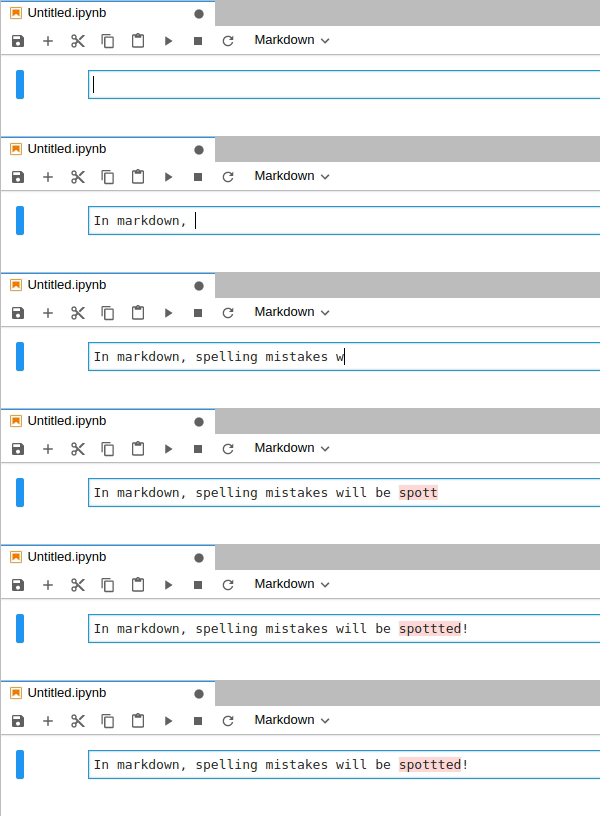 + +The JupyterLab extension is based on [the spellchecker Jupyter Notebook extension](https://github.com/ipython-contrib/jupyter_contrib_nbextensions/tree/master/src/jupyter_contrib_nbextensions/nbextensions/spellchecker) and relies on [Typo.js](https://github.com/cfinke/Typo.js) for the actual spell checking. +Spellchecker suggestions are available from the context menu. The style of the highlights can be customized in the *Advanced Settings Editor*. + +The extension provides (Hunspell) [SCOWL](http://wordlist.aspell.net/) dictionaries for: +- American, British, Canadian, and Australian English +- French, +- German (Germany, Austria, Switzerland) +- Portuguese, +- Spanish + +and will also use the Hunspell dictionaries installed in [known paths](https://github.com/jupyterlab-contrib/spellchecker/search?q=OS_SPECIFIC_PATHS) which vary by operating systems. +If you use JupyterLab in a browser running on a different computer than the jupyter server, please note that the dictionaries need to be installed on the server machine. + +You can add custom dictionary by placing Hunspell files it in `dictionaries` folder in one of the `data` locations as returned by: + +```bash +jupyter --paths +``` + +You should place two files with extensions `.aff` and `.dic`, and name following [BCP 47](https://datatracker.ietf.org/doc/html/rfc5646#section-2.1) standards. +For more details, please see the [example](#adding-dictionaries---example) below. + +## JupyterLab Version +The extension has been tested up to JupyterLab version 3.0. + +## Installation + +For JupyterLab 3.x: + +```bash +pip install jupyterlab-spellchecker +``` + +or + +```bash +conda install -c conda-forge jupyterlab-spellchecker +``` + +For JupyterLab 2.x: + +```bash +jupyter labextension install @ijmbarr/jupyterlab_spellchecker +``` + +### Adding dictionaries - example + +If `jupyter --paths` looks like: + +``` +config: + /home/your_name/.jupyter + /usr/local/etc/jupyter + /etc/jupyter +data: + /home/your_name/.local/share/jupyter + /usr/local/share/jupyter + /usr/share/jupyter +runtime: + /home/your_name/.local/share/jupyter/runtime +``` + +and you want to add Polish language, you would put `pl_PL.aff` and `pl_PL.dic` in `/home/your_name/.local/share/jupyter/dictionaries` (you will need to create this folder), so that the final structure looks similar to: + +``` +/home/your_name/.local/share/jupyter +├── dictionaries +│ ├── pl_PL.aff +│ └── pl_PL.dic +├── kernels +│ └── julia-1.5 +│ ├── kernel.json +│ ├── logo-32x32.png +│ └── logo-64x64.png +├── nbconvert +│ └── templates +│ ├── html +│ └── latex +├── nbsignatures.db +├── notebook_secret +└── runtime +``` + +#### Where to get the dictionaries from? + +Some good sources of dictionaries include: +- [LibreOffice/dictionaries](https://github.com/LibreOffice/dictionaries) GitHub repository +- [Chromium](https://chromium.googlesource.com/chromium/deps/hunspell_dictionaries/+/master) repository +- (if you know of any other quality resources please send a PR to add them here) + +#### Using online dictionaries + +An alternative to saving the dictionary on your own disk (or more accurately on the disk where jupyter-server is set up) +is fetching the dictionaries from a remote URL. This requires an Internet connection to load the dictionary +(each time when you open JupyterLab or change the dictionary), and might be useful if you are not able +to save dictionaries on disk (e.g. when using JupyterLab on JupyterHub configured by someone else). + +To configure the online dictionaries go to *Advanced Settings Editor* → *Spellchecker* +and set `onlineDictionaries` to an array of JSON objects like in the example below: + +```json +[ + { + "id": "en_US-online", + "aff": "https://cdn.jsdelivr.net/codemirror.spell-checker/latest/en_US.aff", + "dic": "https://cdn.jsdelivr.net/codemirror.spell-checker/latest/en_US.dic", + "name": "My favorite variant of English" + } +] +``` + +## Contributing + +### Development install + +Note: You will need NodeJS to build the extension package. + +The `jlpm` command is JupyterLab's pinned version of +[yarn](https://yarnpkg.com/) that is installed with JupyterLab. You may use +`yarn` or `npm` in lieu of `jlpm` below. + +```bash +# Clone the repo to your local environment +# Change directory to the jupyterlab_spellchecker directory +# Install package in development mode +pip install -e . +# Link your development version of the extension with JupyterLab +jupyter labextension develop . --overwrite +# Rebuild extension Typescript source after making changes +jlpm run build +pip install pytest +``` + +You can watch the source directory and run JupyterLab at the same time in different terminals to watch for changes in the extension's source and automatically rebuild the extension. + +```bash +# Watch the source directory in one terminal, automatically rebuilding when needed +jlpm run watch +# Run JupyterLab in another terminal +jupyter lab +``` + +### Before commit + +Make sure that eslint passes: + +```bash +jlpm run eslint:check +``` + +If there are any issues it might be possible to autofix them with: + +```bash +jlpm run eslint +``` + +Run tests: + +```bash +python -m pytest +``` + + +%package -n python3-jupyterlab-spellchecker +Summary: A spell checker for JupyterLab. +Provides: python-jupyterlab-spellchecker +BuildRequires: python3-devel +BuildRequires: python3-setuptools +BuildRequires: python3-pip +%description -n python3-jupyterlab-spellchecker +# jupyterlab-spellchecker + +[](https://jupyterlab-contrib.github.io/) +[](https://github.com/jupyterlab-contrib/spellchecker/actions) +[](https://mybinder.org/v2/gh/jupyterlab-contrib/spellchecker/master?urlpath=lab) +[](https://pypi.org/project/jupyterlab-spellchecker/) +[](https://anaconda.org/conda-forge/jupyterlab-spellchecker) + +A JupyterLab extension highlighting misspelled words in markdown cells within notebooks and in the text files. + + + +The JupyterLab extension is based on [the spellchecker Jupyter Notebook extension](https://github.com/ipython-contrib/jupyter_contrib_nbextensions/tree/master/src/jupyter_contrib_nbextensions/nbextensions/spellchecker) and relies on [Typo.js](https://github.com/cfinke/Typo.js) for the actual spell checking. +Spellchecker suggestions are available from the context menu. The style of the highlights can be customized in the *Advanced Settings Editor*. + +The extension provides (Hunspell) [SCOWL](http://wordlist.aspell.net/) dictionaries for: +- American, British, Canadian, and Australian English +- French, +- German (Germany, Austria, Switzerland) +- Portuguese, +- Spanish + +and will also use the Hunspell dictionaries installed in [known paths](https://github.com/jupyterlab-contrib/spellchecker/search?q=OS_SPECIFIC_PATHS) which vary by operating systems. +If you use JupyterLab in a browser running on a different computer than the jupyter server, please note that the dictionaries need to be installed on the server machine. + +You can add custom dictionary by placing Hunspell files it in `dictionaries` folder in one of the `data` locations as returned by: + +```bash +jupyter --paths +``` + +You should place two files with extensions `.aff` and `.dic`, and name following [BCP 47](https://datatracker.ietf.org/doc/html/rfc5646#section-2.1) standards. +For more details, please see the [example](#adding-dictionaries---example) below. + +## JupyterLab Version +The extension has been tested up to JupyterLab version 3.0. + +## Installation + +For JupyterLab 3.x: + +```bash +pip install jupyterlab-spellchecker +``` + +or + +```bash +conda install -c conda-forge jupyterlab-spellchecker +``` + +For JupyterLab 2.x: + +```bash +jupyter labextension install @ijmbarr/jupyterlab_spellchecker +``` + +### Adding dictionaries - example + +If `jupyter --paths` looks like: + +``` +config: + /home/your_name/.jupyter + /usr/local/etc/jupyter + /etc/jupyter +data: + /home/your_name/.local/share/jupyter + /usr/local/share/jupyter + /usr/share/jupyter +runtime: + /home/your_name/.local/share/jupyter/runtime +``` + +and you want to add Polish language, you would put `pl_PL.aff` and `pl_PL.dic` in `/home/your_name/.local/share/jupyter/dictionaries` (you will need to create this folder), so that the final structure looks similar to: + +``` +/home/your_name/.local/share/jupyter +├── dictionaries +│ ├── pl_PL.aff +│ └── pl_PL.dic +├── kernels +│ └── julia-1.5 +│ ├── kernel.json +│ ├── logo-32x32.png +│ └── logo-64x64.png +├── nbconvert +│ └── templates +│ ├── html +│ └── latex +├── nbsignatures.db +├── notebook_secret +└── runtime +``` + +#### Where to get the dictionaries from? + +Some good sources of dictionaries include: +- [LibreOffice/dictionaries](https://github.com/LibreOffice/dictionaries) GitHub repository +- [Chromium](https://chromium.googlesource.com/chromium/deps/hunspell_dictionaries/+/master) repository +- (if you know of any other quality resources please send a PR to add them here) + +#### Using online dictionaries + +An alternative to saving the dictionary on your own disk (or more accurately on the disk where jupyter-server is set up) +is fetching the dictionaries from a remote URL. This requires an Internet connection to load the dictionary +(each time when you open JupyterLab or change the dictionary), and might be useful if you are not able +to save dictionaries on disk (e.g. when using JupyterLab on JupyterHub configured by someone else). + +To configure the online dictionaries go to *Advanced Settings Editor* → *Spellchecker* +and set `onlineDictionaries` to an array of JSON objects like in the example below: + +```json +[ + { + "id": "en_US-online", + "aff": "https://cdn.jsdelivr.net/codemirror.spell-checker/latest/en_US.aff", + "dic": "https://cdn.jsdelivr.net/codemirror.spell-checker/latest/en_US.dic", + "name": "My favorite variant of English" + } +] +``` + +## Contributing + +### Development install + +Note: You will need NodeJS to build the extension package. + +The `jlpm` command is JupyterLab's pinned version of +[yarn](https://yarnpkg.com/) that is installed with JupyterLab. You may use +`yarn` or `npm` in lieu of `jlpm` below. + +```bash +# Clone the repo to your local environment +# Change directory to the jupyterlab_spellchecker directory +# Install package in development mode +pip install -e . +# Link your development version of the extension with JupyterLab +jupyter labextension develop . --overwrite +# Rebuild extension Typescript source after making changes +jlpm run build +pip install pytest +``` + +You can watch the source directory and run JupyterLab at the same time in different terminals to watch for changes in the extension's source and automatically rebuild the extension. + +```bash +# Watch the source directory in one terminal, automatically rebuilding when needed +jlpm run watch +# Run JupyterLab in another terminal +jupyter lab +``` + +### Before commit + +Make sure that eslint passes: + +```bash +jlpm run eslint:check +``` + +If there are any issues it might be possible to autofix them with: + +```bash +jlpm run eslint +``` + +Run tests: + +```bash +python -m pytest +``` + + +%package help +Summary: Development documents and examples for jupyterlab-spellchecker +Provides: python3-jupyterlab-spellchecker-doc +%description help +# jupyterlab-spellchecker + +[](https://jupyterlab-contrib.github.io/) +[](https://github.com/jupyterlab-contrib/spellchecker/actions) +[](https://mybinder.org/v2/gh/jupyterlab-contrib/spellchecker/master?urlpath=lab) +[](https://pypi.org/project/jupyterlab-spellchecker/) +[](https://anaconda.org/conda-forge/jupyterlab-spellchecker) + +A JupyterLab extension highlighting misspelled words in markdown cells within notebooks and in the text files. + + + +The JupyterLab extension is based on [the spellchecker Jupyter Notebook extension](https://github.com/ipython-contrib/jupyter_contrib_nbextensions/tree/master/src/jupyter_contrib_nbextensions/nbextensions/spellchecker) and relies on [Typo.js](https://github.com/cfinke/Typo.js) for the actual spell checking. +Spellchecker suggestions are available from the context menu. The style of the highlights can be customized in the *Advanced Settings Editor*. + +The extension provides (Hunspell) [SCOWL](http://wordlist.aspell.net/) dictionaries for: +- American, British, Canadian, and Australian English +- French, +- German (Germany, Austria, Switzerland) +- Portuguese, +- Spanish + +and will also use the Hunspell dictionaries installed in [known paths](https://github.com/jupyterlab-contrib/spellchecker/search?q=OS_SPECIFIC_PATHS) which vary by operating systems. +If you use JupyterLab in a browser running on a different computer than the jupyter server, please note that the dictionaries need to be installed on the server machine. + +You can add custom dictionary by placing Hunspell files it in `dictionaries` folder in one of the `data` locations as returned by: + +```bash +jupyter --paths +``` + +You should place two files with extensions `.aff` and `.dic`, and name following [BCP 47](https://datatracker.ietf.org/doc/html/rfc5646#section-2.1) standards. +For more details, please see the [example](#adding-dictionaries---example) below. + +## JupyterLab Version +The extension has been tested up to JupyterLab version 3.0. + +## Installation + +For JupyterLab 3.x: + +```bash +pip install jupyterlab-spellchecker +``` + +or + +```bash +conda install -c conda-forge jupyterlab-spellchecker +``` + +For JupyterLab 2.x: + +```bash +jupyter labextension install @ijmbarr/jupyterlab_spellchecker +``` + +### Adding dictionaries - example + +If `jupyter --paths` looks like: + +``` +config: + /home/your_name/.jupyter + /usr/local/etc/jupyter + /etc/jupyter +data: + /home/your_name/.local/share/jupyter + /usr/local/share/jupyter + /usr/share/jupyter +runtime: + /home/your_name/.local/share/jupyter/runtime +``` + +and you want to add Polish language, you would put `pl_PL.aff` and `pl_PL.dic` in `/home/your_name/.local/share/jupyter/dictionaries` (you will need to create this folder), so that the final structure looks similar to: + +``` +/home/your_name/.local/share/jupyter +├── dictionaries +│ ├── pl_PL.aff +│ └── pl_PL.dic +├── kernels +│ └── julia-1.5 +│ ├── kernel.json +│ ├── logo-32x32.png +│ └── logo-64x64.png +├── nbconvert +│ └── templates +│ ├── html +│ └── latex +├── nbsignatures.db +├── notebook_secret +└── runtime +``` + +#### Where to get the dictionaries from? + +Some good sources of dictionaries include: +- [LibreOffice/dictionaries](https://github.com/LibreOffice/dictionaries) GitHub repository +- [Chromium](https://chromium.googlesource.com/chromium/deps/hunspell_dictionaries/+/master) repository +- (if you know of any other quality resources please send a PR to add them here) + +#### Using online dictionaries + +An alternative to saving the dictionary on your own disk (or more accurately on the disk where jupyter-server is set up) +is fetching the dictionaries from a remote URL. This requires an Internet connection to load the dictionary +(each time when you open JupyterLab or change the dictionary), and might be useful if you are not able +to save dictionaries on disk (e.g. when using JupyterLab on JupyterHub configured by someone else). + +To configure the online dictionaries go to *Advanced Settings Editor* → *Spellchecker* +and set `onlineDictionaries` to an array of JSON objects like in the example below: + +```json +[ + { + "id": "en_US-online", + "aff": "https://cdn.jsdelivr.net/codemirror.spell-checker/latest/en_US.aff", + "dic": "https://cdn.jsdelivr.net/codemirror.spell-checker/latest/en_US.dic", + "name": "My favorite variant of English" + } +] +``` + +## Contributing + +### Development install + +Note: You will need NodeJS to build the extension package. + +The `jlpm` command is JupyterLab's pinned version of +[yarn](https://yarnpkg.com/) that is installed with JupyterLab. You may use +`yarn` or `npm` in lieu of `jlpm` below. + +```bash +# Clone the repo to your local environment +# Change directory to the jupyterlab_spellchecker directory +# Install package in development mode +pip install -e . +# Link your development version of the extension with JupyterLab +jupyter labextension develop . --overwrite +# Rebuild extension Typescript source after making changes +jlpm run build +pip install pytest +``` + +You can watch the source directory and run JupyterLab at the same time in different terminals to watch for changes in the extension's source and automatically rebuild the extension. + +```bash +# Watch the source directory in one terminal, automatically rebuilding when needed +jlpm run watch +# Run JupyterLab in another terminal +jupyter lab +``` + +### Before commit + +Make sure that eslint passes: + +```bash +jlpm run eslint:check +``` + +If there are any issues it might be possible to autofix them with: + +```bash +jlpm run eslint +``` + +Run tests: + +```bash +python -m pytest +``` + + +%prep +%autosetup -n jupyterlab-spellchecker-0.7.3 + +%build +%py3_build + +%install +%py3_install +install -d -m755 %{buildroot}/%{_pkgdocdir} +if [ -d doc ]; then cp -arf doc %{buildroot}/%{_pkgdocdir}; fi +if [ -d docs ]; then cp -arf docs %{buildroot}/%{_pkgdocdir}; fi +if [ -d example ]; then cp -arf example %{buildroot}/%{_pkgdocdir}; fi +if [ -d examples ]; then cp -arf examples %{buildroot}/%{_pkgdocdir}; fi +pushd %{buildroot} +if [ -d usr/lib ]; then + find usr/lib -type f -printf "/%h/%f\n" >> filelist.lst +fi +if [ -d usr/lib64 ]; then + find usr/lib64 -type f -printf "/%h/%f\n" >> filelist.lst +fi +if [ -d usr/bin ]; then + find usr/bin -type f -printf "/%h/%f\n" >> filelist.lst +fi +if [ -d usr/sbin ]; then + find usr/sbin -type f -printf "/%h/%f\n" >> filelist.lst +fi +touch doclist.lst +if [ -d usr/share/man ]; then + find usr/share/man -type f -printf "/%h/%f.gz\n" >> doclist.lst +fi +popd +mv %{buildroot}/filelist.lst . +mv %{buildroot}/doclist.lst . + +%files -n python3-jupyterlab-spellchecker -f filelist.lst +%dir %{python3_sitelib}/* + +%files help -f doclist.lst +%{_docdir}/* + +%changelog +* Tue Apr 11 2023 Python_Bot <Python_Bot@openeuler.org> - 0.7.3-1 +- Package Spec generated @@ -0,0 +1 @@ +120d74c477661b86e892609d9b053ec5 jupyterlab-spellchecker-0.7.3.tar.gz |