
diff options
| -rw-r--r-- | .gitignore | 1 | ||||
| -rw-r--r-- | python-kikit.spec | 375 | ||||
| -rw-r--r-- | sources | 1 |
3 files changed, 377 insertions, 0 deletions
@@ -0,0 +1 @@ +/KiKit-1.3.0.tar.gz diff --git a/python-kikit.spec b/python-kikit.spec new file mode 100644 index 0000000..d2dc0ce --- /dev/null +++ b/python-kikit.spec @@ -0,0 +1,375 @@ +%global _empty_manifest_terminate_build 0 +Name: python-KiKit +Version: 1.3.0 +Release: 1 +Summary: Automation for KiCAD boards +License: MIT License +URL: https://github.com/yaqwsx/KiKit +Source0: https://mirrors.nju.edu.cn/pypi/web/packages/f0/d9/61bdccbeafdfe0fb35afb6039563c285986d61859c9eb0be49a3c3a7c087/KiKit-1.3.0.tar.gz +BuildArch: noarch + +Requires: python3-click +Requires: python3-commentjson +Requires: python3-markdown2 +Requires: python3-numpy +Requires: python3-pcbnewTransition +Requires: python3-pybars3 +Requires: python3-shapely +Requires: python3-solidpython +Requires: python3-pytest + +%description +# KiKit – Automation for KiCAD + + + +KiKit is a Python library, KiCAD plugin and a CLI tool to automate several +tasks in a standard KiCAD workflow like: + +- panelization of both, regular and oddly shaped, boards (see + [examples](https://yaqwsx.github.io/KiKit/latest/panelization/examples/)) +- automated exporting manufacturing data based on manufacturer presets +- multi-board project in KiCAD +- building board presentation pages (see [an example presentation page generated + by KiKit](https://roboticsbrno.github.io/RB0002-BatteryPack)) + +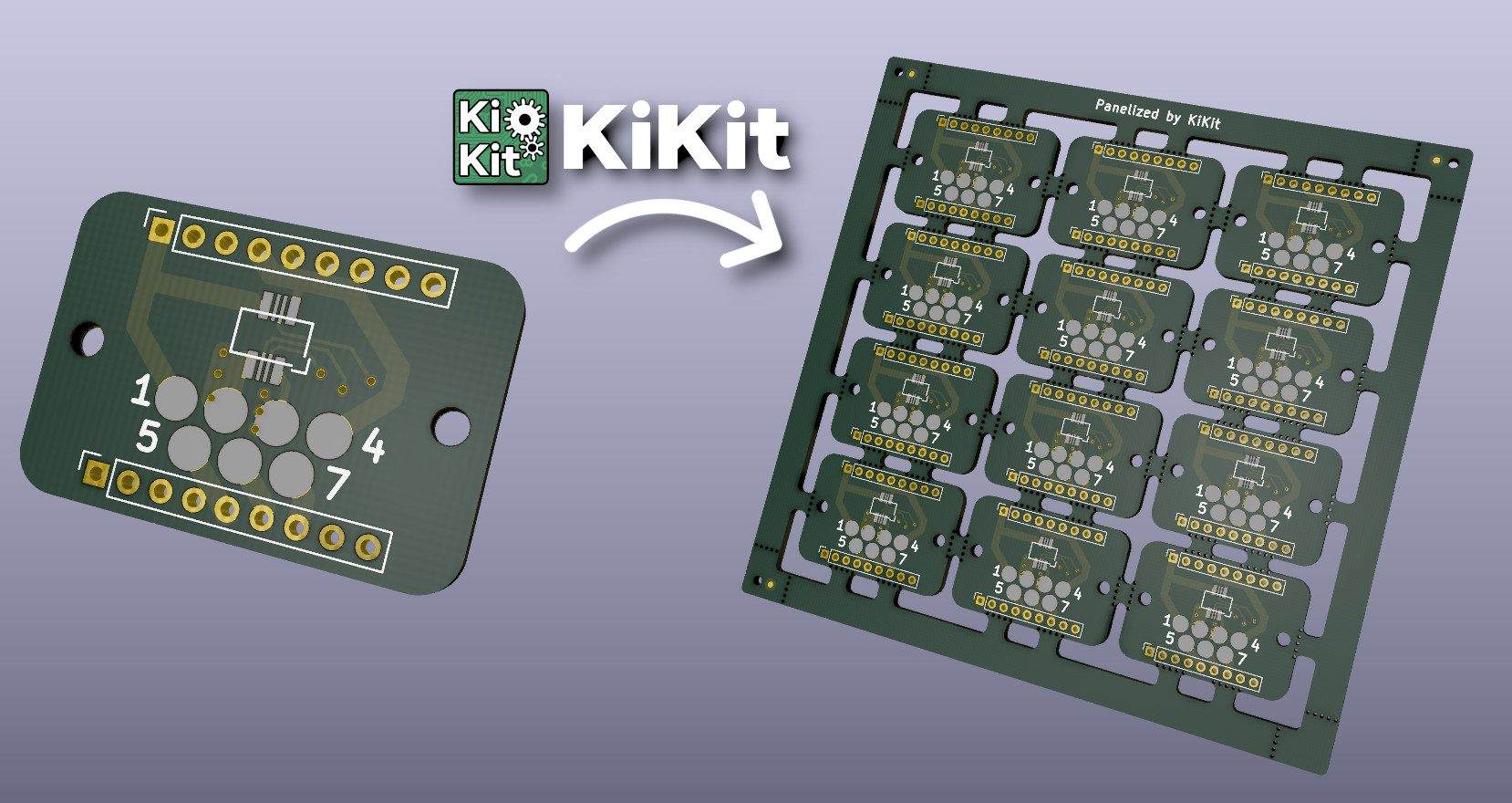 + +## Do You Enjoy KiKit or Does It Save You Time? + +Then definitely consider: + +- [**supporting me on GitHub Sponsors**](https://github.com/sponsors/yaqwsx) +- or become my [Patreon](https://patreon.com/yaqwsx), +- or buy me a coffee: [](https://ko-fi.com/E1E2181LU) + +Your support will allow me to allocate time to properly maintain my projects +like this. + +PS: Be sure to check out my other KiCAD & PCB related projects: + +- [Pinion](https://github.com/yaqwsx/Pinion/) +- [PcbDraw](https://github.com/yaqwsx/PcbDraw/) +- [JlcParts](https://github.com/yaqwsx/jlcparts) + +## Installation + +KiKit is available as a [PyPi package](https://pypi.org/project/KiKit/), +therefore, you can install it via pip: + +``` +pip3 install kikit +``` + +Then you can install the Pcbnew action plugins via KiCAD's PCM. + +For more detailed instructions with steps to enable GUI plugins, please see the +[installation guide](https://yaqwsx.github.io/KiKit/latest/installation/intro/). + +## Why Should I Use It? + +Everything KiKit does, can also be done via Pcbnew in KiCAD. However, you have +to do it manually. One of the common scenarios is the creation of panels. Most +of the tutorials on the internet guide you to use the "append board" +functionality of Pcbnew. However, this approach is labour-intensive, error-prone +and whenever, you change the board, you have to do it again. + +With KiKit you just call a CLI command if you have a simple layout (e.g., a +grid) or write few Python instructions like "place board here", "add bridge +here", "separate boards via mouse bites/v-cuts" and you are done. The process is +repeatable and actually much simpler than hand-drawing the panels. KiKit also +allows you to easily export all the Gerbers in a single step. + +You can then write a Makefile and simply call `make` to get all your +manufacturing data and board presentation pages. + +## Feature List + +- create panels by appending boards and pieces of substrate (bridges) +- supports board with arbitrary shapes +- easily create mouse-bites/V-CUTS +- compared to hand-creation of panels, your panels will pass DRC (as tracks from + different instances of the same board have distinct nets when using KiKit) +- if you have multiple boards in a single file, you can split them +- simplifying [multi-board project in KiCAD](https://yaqwsx.github.io/KiKit/latest/multiboard/) +- [automated export of gerbers and assembly data](https://yaqwsx.github.io/KiKit/latest/fabrication/intro/) +- [3D printed self-registering solder paste stencils](https://yaqwsx.github.io/KiKit/upstream/latest/#3d-printed-stencils) +- [steel stencils with alignment jig](https://yaqwsx.github.io/KiKit/latest/stencil/#steel-stencils) +- create powerfull shell scrips or Makefiles which automates your workflow... +- ...or invoke the functionality via [GUI in KiCAD](https://yaqwsx.github.io/KiKit/latest/panelization/gui/). + +## How To Use It? + +Read the [CLI documentation](https://yaqwsx.github.io/KiKit/latest/panelization/cli/) and the [panelize +documentation](doc/panelization.md). Also don't miss the +[examples](https://yaqwsx.github.io/KiKit/examples/panelization/examples/). There is also a quick not on how to use +[panelization action plugin](https://yaqwsx.github.io/KiKit/latest/panelization/gui/). If you are interested in +generating solder paste stencils, see [Stencil documentation](https://yaqwsx.github.io/KiKit/latest/stencil/) + +## KiKit Is Broken or Does Not Work as Expected + +Please, first check [FAQ](https://yaqwsx.github.io/KiKit/latest/faq/). If you have not found answer for your +problem there, feel free to open an issue on GitHub. + +If you would like to have a feature in KiKit that is currently not on a roadmap, +or if you need to prepare custom panelization script (e.g., multi-design panels, +panels with specific arrangement), you can consider hiring me to do the job. +Just reach out to me via e-mail and we can discuss further details. + + + + +%package -n python3-KiKit +Summary: Automation for KiCAD boards +Provides: python-KiKit +BuildRequires: python3-devel +BuildRequires: python3-setuptools +BuildRequires: python3-pip +%description -n python3-KiKit +# KiKit – Automation for KiCAD + + + +KiKit is a Python library, KiCAD plugin and a CLI tool to automate several +tasks in a standard KiCAD workflow like: + +- panelization of both, regular and oddly shaped, boards (see + [examples](https://yaqwsx.github.io/KiKit/latest/panelization/examples/)) +- automated exporting manufacturing data based on manufacturer presets +- multi-board project in KiCAD +- building board presentation pages (see [an example presentation page generated + by KiKit](https://roboticsbrno.github.io/RB0002-BatteryPack)) + + + +## Do You Enjoy KiKit or Does It Save You Time? + +Then definitely consider: + +- [**supporting me on GitHub Sponsors**](https://github.com/sponsors/yaqwsx) +- or become my [Patreon](https://patreon.com/yaqwsx), +- or buy me a coffee: [](https://ko-fi.com/E1E2181LU) + +Your support will allow me to allocate time to properly maintain my projects +like this. + +PS: Be sure to check out my other KiCAD & PCB related projects: + +- [Pinion](https://github.com/yaqwsx/Pinion/) +- [PcbDraw](https://github.com/yaqwsx/PcbDraw/) +- [JlcParts](https://github.com/yaqwsx/jlcparts) + +## Installation + +KiKit is available as a [PyPi package](https://pypi.org/project/KiKit/), +therefore, you can install it via pip: + +``` +pip3 install kikit +``` + +Then you can install the Pcbnew action plugins via KiCAD's PCM. + +For more detailed instructions with steps to enable GUI plugins, please see the +[installation guide](https://yaqwsx.github.io/KiKit/latest/installation/intro/). + +## Why Should I Use It? + +Everything KiKit does, can also be done via Pcbnew in KiCAD. However, you have +to do it manually. One of the common scenarios is the creation of panels. Most +of the tutorials on the internet guide you to use the "append board" +functionality of Pcbnew. However, this approach is labour-intensive, error-prone +and whenever, you change the board, you have to do it again. + +With KiKit you just call a CLI command if you have a simple layout (e.g., a +grid) or write few Python instructions like "place board here", "add bridge +here", "separate boards via mouse bites/v-cuts" and you are done. The process is +repeatable and actually much simpler than hand-drawing the panels. KiKit also +allows you to easily export all the Gerbers in a single step. + +You can then write a Makefile and simply call `make` to get all your +manufacturing data and board presentation pages. + +## Feature List + +- create panels by appending boards and pieces of substrate (bridges) +- supports board with arbitrary shapes +- easily create mouse-bites/V-CUTS +- compared to hand-creation of panels, your panels will pass DRC (as tracks from + different instances of the same board have distinct nets when using KiKit) +- if you have multiple boards in a single file, you can split them +- simplifying [multi-board project in KiCAD](https://yaqwsx.github.io/KiKit/latest/multiboard/) +- [automated export of gerbers and assembly data](https://yaqwsx.github.io/KiKit/latest/fabrication/intro/) +- [3D printed self-registering solder paste stencils](https://yaqwsx.github.io/KiKit/upstream/latest/#3d-printed-stencils) +- [steel stencils with alignment jig](https://yaqwsx.github.io/KiKit/latest/stencil/#steel-stencils) +- create powerfull shell scrips or Makefiles which automates your workflow... +- ...or invoke the functionality via [GUI in KiCAD](https://yaqwsx.github.io/KiKit/latest/panelization/gui/). + +## How To Use It? + +Read the [CLI documentation](https://yaqwsx.github.io/KiKit/latest/panelization/cli/) and the [panelize +documentation](doc/panelization.md). Also don't miss the +[examples](https://yaqwsx.github.io/KiKit/examples/panelization/examples/). There is also a quick not on how to use +[panelization action plugin](https://yaqwsx.github.io/KiKit/latest/panelization/gui/). If you are interested in +generating solder paste stencils, see [Stencil documentation](https://yaqwsx.github.io/KiKit/latest/stencil/) + +## KiKit Is Broken or Does Not Work as Expected + +Please, first check [FAQ](https://yaqwsx.github.io/KiKit/latest/faq/). If you have not found answer for your +problem there, feel free to open an issue on GitHub. + +If you would like to have a feature in KiKit that is currently not on a roadmap, +or if you need to prepare custom panelization script (e.g., multi-design panels, +panels with specific arrangement), you can consider hiring me to do the job. +Just reach out to me via e-mail and we can discuss further details. + + + + +%package help +Summary: Development documents and examples for KiKit +Provides: python3-KiKit-doc +%description help +# KiKit – Automation for KiCAD + + + +KiKit is a Python library, KiCAD plugin and a CLI tool to automate several +tasks in a standard KiCAD workflow like: + +- panelization of both, regular and oddly shaped, boards (see + [examples](https://yaqwsx.github.io/KiKit/latest/panelization/examples/)) +- automated exporting manufacturing data based on manufacturer presets +- multi-board project in KiCAD +- building board presentation pages (see [an example presentation page generated + by KiKit](https://roboticsbrno.github.io/RB0002-BatteryPack)) + + + +## Do You Enjoy KiKit or Does It Save You Time? + +Then definitely consider: + +- [**supporting me on GitHub Sponsors**](https://github.com/sponsors/yaqwsx) +- or become my [Patreon](https://patreon.com/yaqwsx), +- or buy me a coffee: [](https://ko-fi.com/E1E2181LU) + +Your support will allow me to allocate time to properly maintain my projects +like this. + +PS: Be sure to check out my other KiCAD & PCB related projects: + +- [Pinion](https://github.com/yaqwsx/Pinion/) +- [PcbDraw](https://github.com/yaqwsx/PcbDraw/) +- [JlcParts](https://github.com/yaqwsx/jlcparts) + +## Installation + +KiKit is available as a [PyPi package](https://pypi.org/project/KiKit/), +therefore, you can install it via pip: + +``` +pip3 install kikit +``` + +Then you can install the Pcbnew action plugins via KiCAD's PCM. + +For more detailed instructions with steps to enable GUI plugins, please see the +[installation guide](https://yaqwsx.github.io/KiKit/latest/installation/intro/). + +## Why Should I Use It? + +Everything KiKit does, can also be done via Pcbnew in KiCAD. However, you have +to do it manually. One of the common scenarios is the creation of panels. Most +of the tutorials on the internet guide you to use the "append board" +functionality of Pcbnew. However, this approach is labour-intensive, error-prone +and whenever, you change the board, you have to do it again. + +With KiKit you just call a CLI command if you have a simple layout (e.g., a +grid) or write few Python instructions like "place board here", "add bridge +here", "separate boards via mouse bites/v-cuts" and you are done. The process is +repeatable and actually much simpler than hand-drawing the panels. KiKit also +allows you to easily export all the Gerbers in a single step. + +You can then write a Makefile and simply call `make` to get all your +manufacturing data and board presentation pages. + +## Feature List + +- create panels by appending boards and pieces of substrate (bridges) +- supports board with arbitrary shapes +- easily create mouse-bites/V-CUTS +- compared to hand-creation of panels, your panels will pass DRC (as tracks from + different instances of the same board have distinct nets when using KiKit) +- if you have multiple boards in a single file, you can split them +- simplifying [multi-board project in KiCAD](https://yaqwsx.github.io/KiKit/latest/multiboard/) +- [automated export of gerbers and assembly data](https://yaqwsx.github.io/KiKit/latest/fabrication/intro/) +- [3D printed self-registering solder paste stencils](https://yaqwsx.github.io/KiKit/upstream/latest/#3d-printed-stencils) +- [steel stencils with alignment jig](https://yaqwsx.github.io/KiKit/latest/stencil/#steel-stencils) +- create powerfull shell scrips or Makefiles which automates your workflow... +- ...or invoke the functionality via [GUI in KiCAD](https://yaqwsx.github.io/KiKit/latest/panelization/gui/). + +## How To Use It? + +Read the [CLI documentation](https://yaqwsx.github.io/KiKit/latest/panelization/cli/) and the [panelize +documentation](doc/panelization.md). Also don't miss the +[examples](https://yaqwsx.github.io/KiKit/examples/panelization/examples/). There is also a quick not on how to use +[panelization action plugin](https://yaqwsx.github.io/KiKit/latest/panelization/gui/). If you are interested in +generating solder paste stencils, see [Stencil documentation](https://yaqwsx.github.io/KiKit/latest/stencil/) + +## KiKit Is Broken or Does Not Work as Expected + +Please, first check [FAQ](https://yaqwsx.github.io/KiKit/latest/faq/). If you have not found answer for your +problem there, feel free to open an issue on GitHub. + +If you would like to have a feature in KiKit that is currently not on a roadmap, +or if you need to prepare custom panelization script (e.g., multi-design panels, +panels with specific arrangement), you can consider hiring me to do the job. +Just reach out to me via e-mail and we can discuss further details. + + + + +%prep +%autosetup -n KiKit-1.3.0 + +%build +%py3_build + +%install +%py3_install +install -d -m755 %{buildroot}/%{_pkgdocdir} +if [ -d doc ]; then cp -arf doc %{buildroot}/%{_pkgdocdir}; fi +if [ -d docs ]; then cp -arf docs %{buildroot}/%{_pkgdocdir}; fi +if [ -d example ]; then cp -arf example %{buildroot}/%{_pkgdocdir}; fi +if [ -d examples ]; then cp -arf examples %{buildroot}/%{_pkgdocdir}; fi +pushd %{buildroot} +if [ -d usr/lib ]; then + find usr/lib -type f -printf "/%h/%f\n" >> filelist.lst +fi +if [ -d usr/lib64 ]; then + find usr/lib64 -type f -printf "/%h/%f\n" >> filelist.lst +fi +if [ -d usr/bin ]; then + find usr/bin -type f -printf "/%h/%f\n" >> filelist.lst +fi +if [ -d usr/sbin ]; then + find usr/sbin -type f -printf "/%h/%f\n" >> filelist.lst +fi +touch doclist.lst +if [ -d usr/share/man ]; then + find usr/share/man -type f -printf "/%h/%f.gz\n" >> doclist.lst +fi +popd +mv %{buildroot}/filelist.lst . +mv %{buildroot}/doclist.lst . + +%files -n python3-KiKit -f filelist.lst +%dir %{python3_sitelib}/* + +%files help -f doclist.lst +%{_docdir}/* + +%changelog +* Wed May 31 2023 Python_Bot <Python_Bot@openeuler.org> - 1.3.0-1 +- Package Spec generated @@ -0,0 +1 @@ +06b66d621120c086b7995423d74d31a3 KiKit-1.3.0.tar.gz |