1
2
3
4
5
6
7
8
9
10
11
12
13
14
15
16
17
18
19
20
21
22
23
24
25
26
27
28
29
30
31
32
33
34
35
36
37
38
39
40
41
42
43
44
45
46
47
48
49
50
51
52
53
54
55
56
57
58
59
60
61
62
63
64
65
66
67
68
69
70
71
72
73
74
75
76
77
78
79
80
81
82
83
84
85
86
87
88
89
90
91
92
93
94
95
96
97
98
99
100
101
102
103
104
105
106
107
108
109
110
111
112
113
114
115
116
117
118
119
120
121
122
123
124
125
126
127
128
129
130
131
132
133
134
135
136
137
138
139
140
141
142
143
144
145
146
147
148
149
150
151
152
153
154
155
156
157
158
159
160
161
162
163
164
165
166
167
168
169
170
171
172
173
174
175
176
177
178
179
180
181
182
183
184
185
186
187
188
189
190
191
192
193
194
195
196
197
198
199
200
201
202
203
204
205
206
207
208
209
210
211
212
213
214
215
216
217
218
219
220
221
222
223
224
225
226
227
228
229
230
231
232
233
234
235
236
237
238
239
240
241
242
243
244
245
246
247
248
249
250
251
252
253
254
255
256
257
258
259
260
261
262
263
264
265
266
267
268
269
270
271
272
273
274
275
276
277
278
279
280
281
282
283
284
285
286
287
288
289
290
291
292
293
294
295
296
297
298
299
300
301
302
303
304
305
306
307
308
309
310
311
312
313
314
315
316
317
318
319
320
321
322
323
324
325
326
327
328
329
330
331
332
333
334
335
336
337
338
339
340
341
342
343
344
345
346
347
348
349
350
351
352
353
354
355
356
357
358
359
360
361
362
363
364
365
366
367
368
369
370
371
372
373
374
375
|
%global _empty_manifest_terminate_build 0
Name: python-KiKit
Version: 1.3.0
Release: 1
Summary: Automation for KiCAD boards
License: MIT License
URL: https://github.com/yaqwsx/KiKit
Source0: https://mirrors.nju.edu.cn/pypi/web/packages/f0/d9/61bdccbeafdfe0fb35afb6039563c285986d61859c9eb0be49a3c3a7c087/KiKit-1.3.0.tar.gz
BuildArch: noarch
Requires: python3-click
Requires: python3-commentjson
Requires: python3-markdown2
Requires: python3-numpy
Requires: python3-pcbnewTransition
Requires: python3-pybars3
Requires: python3-shapely
Requires: python3-solidpython
Requires: python3-pytest
%description
# KiKit – Automation for KiCAD

KiKit is a Python library, KiCAD plugin and a CLI tool to automate several
tasks in a standard KiCAD workflow like:
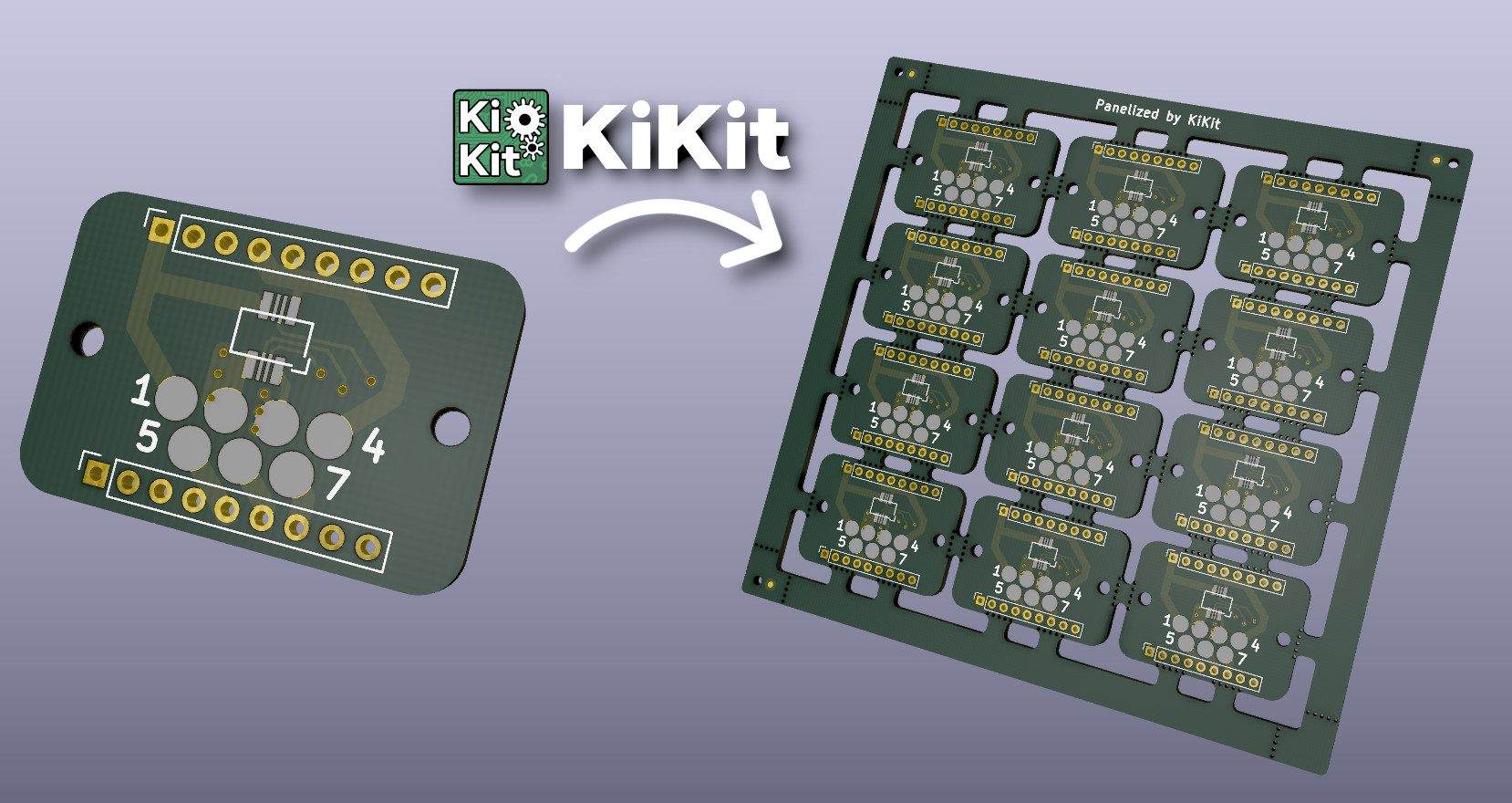
- panelization of both, regular and oddly shaped, boards (see
[examples](https://yaqwsx.github.io/KiKit/latest/panelization/examples/))
- automated exporting manufacturing data based on manufacturer presets
- multi-board project in KiCAD
- building board presentation pages (see [an example presentation page generated
by KiKit](https://roboticsbrno.github.io/RB0002-BatteryPack))
## Do You Enjoy KiKit or Does It Save You Time?
Then definitely consider:
- [**supporting me on GitHub Sponsors**](https://github.com/sponsors/yaqwsx)
- or become my [Patreon](https://patreon.com/yaqwsx),
- or buy me a coffee: [](https://ko-fi.com/E1E2181LU)
Your support will allow me to allocate time to properly maintain my projects
like this.
PS: Be sure to check out my other KiCAD & PCB related projects:
- [Pinion](https://github.com/yaqwsx/Pinion/)
- [PcbDraw](https://github.com/yaqwsx/PcbDraw/)
- [JlcParts](https://github.com/yaqwsx/jlcparts)
## Installation
KiKit is available as a [PyPi package](https://pypi.org/project/KiKit/),
therefore, you can install it via pip:
```
pip3 install kikit
```
Then you can install the Pcbnew action plugins via KiCAD's PCM.
For more detailed instructions with steps to enable GUI plugins, please see the
[installation guide](https://yaqwsx.github.io/KiKit/latest/installation/intro/).
## Why Should I Use It?
Everything KiKit does, can also be done via Pcbnew in KiCAD. However, you have
to do it manually. One of the common scenarios is the creation of panels. Most
of the tutorials on the internet guide you to use the "append board"
functionality of Pcbnew. However, this approach is labour-intensive, error-prone
and whenever, you change the board, you have to do it again.
With KiKit you just call a CLI command if you have a simple layout (e.g., a
grid) or write few Python instructions like "place board here", "add bridge
here", "separate boards via mouse bites/v-cuts" and you are done. The process is
repeatable and actually much simpler than hand-drawing the panels. KiKit also
allows you to easily export all the Gerbers in a single step.
You can then write a Makefile and simply call `make` to get all your
manufacturing data and board presentation pages.
## Feature List
- create panels by appending boards and pieces of substrate (bridges)
- supports board with arbitrary shapes
- easily create mouse-bites/V-CUTS
- compared to hand-creation of panels, your panels will pass DRC (as tracks from
different instances of the same board have distinct nets when using KiKit)
- if you have multiple boards in a single file, you can split them
- simplifying [multi-board project in KiCAD](https://yaqwsx.github.io/KiKit/latest/multiboard/)
- [automated export of gerbers and assembly data](https://yaqwsx.github.io/KiKit/latest/fabrication/intro/)
- [3D printed self-registering solder paste stencils](https://yaqwsx.github.io/KiKit/upstream/latest/#3d-printed-stencils)
- [steel stencils with alignment jig](https://yaqwsx.github.io/KiKit/latest/stencil/#steel-stencils)
- create powerfull shell scrips or Makefiles which automates your workflow...
- ...or invoke the functionality via [GUI in KiCAD](https://yaqwsx.github.io/KiKit/latest/panelization/gui/).
## How To Use It?
Read the [CLI documentation](https://yaqwsx.github.io/KiKit/latest/panelization/cli/) and the [panelize
documentation](doc/panelization.md). Also don't miss the
[examples](https://yaqwsx.github.io/KiKit/examples/panelization/examples/). There is also a quick not on how to use
[panelization action plugin](https://yaqwsx.github.io/KiKit/latest/panelization/gui/). If you are interested in
generating solder paste stencils, see [Stencil documentation](https://yaqwsx.github.io/KiKit/latest/stencil/)
## KiKit Is Broken or Does Not Work as Expected
Please, first check [FAQ](https://yaqwsx.github.io/KiKit/latest/faq/). If you have not found answer for your
problem there, feel free to open an issue on GitHub.
If you would like to have a feature in KiKit that is currently not on a roadmap,
or if you need to prepare custom panelization script (e.g., multi-design panels,
panels with specific arrangement), you can consider hiring me to do the job.
Just reach out to me via e-mail and we can discuss further details.
%package -n python3-KiKit
Summary: Automation for KiCAD boards
Provides: python-KiKit
BuildRequires: python3-devel
BuildRequires: python3-setuptools
BuildRequires: python3-pip
%description -n python3-KiKit
# KiKit – Automation for KiCAD

KiKit is a Python library, KiCAD plugin and a CLI tool to automate several
tasks in a standard KiCAD workflow like:
- panelization of both, regular and oddly shaped, boards (see
[examples](https://yaqwsx.github.io/KiKit/latest/panelization/examples/))
- automated exporting manufacturing data based on manufacturer presets
- multi-board project in KiCAD
- building board presentation pages (see [an example presentation page generated
by KiKit](https://roboticsbrno.github.io/RB0002-BatteryPack))

## Do You Enjoy KiKit or Does It Save You Time?
Then definitely consider:
- [**supporting me on GitHub Sponsors**](https://github.com/sponsors/yaqwsx)
- or become my [Patreon](https://patreon.com/yaqwsx),
- or buy me a coffee: [](https://ko-fi.com/E1E2181LU)
Your support will allow me to allocate time to properly maintain my projects
like this.
PS: Be sure to check out my other KiCAD & PCB related projects:
- [Pinion](https://github.com/yaqwsx/Pinion/)
- [PcbDraw](https://github.com/yaqwsx/PcbDraw/)
- [JlcParts](https://github.com/yaqwsx/jlcparts)
## Installation
KiKit is available as a [PyPi package](https://pypi.org/project/KiKit/),
therefore, you can install it via pip:
```
pip3 install kikit
```
Then you can install the Pcbnew action plugins via KiCAD's PCM.
For more detailed instructions with steps to enable GUI plugins, please see the
[installation guide](https://yaqwsx.github.io/KiKit/latest/installation/intro/).
## Why Should I Use It?
Everything KiKit does, can also be done via Pcbnew in KiCAD. However, you have
to do it manually. One of the common scenarios is the creation of panels. Most
of the tutorials on the internet guide you to use the "append board"
functionality of Pcbnew. However, this approach is labour-intensive, error-prone
and whenever, you change the board, you have to do it again.
With KiKit you just call a CLI command if you have a simple layout (e.g., a
grid) or write few Python instructions like "place board here", "add bridge
here", "separate boards via mouse bites/v-cuts" and you are done. The process is
repeatable and actually much simpler than hand-drawing the panels. KiKit also
allows you to easily export all the Gerbers in a single step.
You can then write a Makefile and simply call `make` to get all your
manufacturing data and board presentation pages.
## Feature List
- create panels by appending boards and pieces of substrate (bridges)
- supports board with arbitrary shapes
- easily create mouse-bites/V-CUTS
- compared to hand-creation of panels, your panels will pass DRC (as tracks from
different instances of the same board have distinct nets when using KiKit)
- if you have multiple boards in a single file, you can split them
- simplifying [multi-board project in KiCAD](https://yaqwsx.github.io/KiKit/latest/multiboard/)
- [automated export of gerbers and assembly data](https://yaqwsx.github.io/KiKit/latest/fabrication/intro/)
- [3D printed self-registering solder paste stencils](https://yaqwsx.github.io/KiKit/upstream/latest/#3d-printed-stencils)
- [steel stencils with alignment jig](https://yaqwsx.github.io/KiKit/latest/stencil/#steel-stencils)
- create powerfull shell scrips or Makefiles which automates your workflow...
- ...or invoke the functionality via [GUI in KiCAD](https://yaqwsx.github.io/KiKit/latest/panelization/gui/).
## How To Use It?
Read the [CLI documentation](https://yaqwsx.github.io/KiKit/latest/panelization/cli/) and the [panelize
documentation](doc/panelization.md). Also don't miss the
[examples](https://yaqwsx.github.io/KiKit/examples/panelization/examples/). There is also a quick not on how to use
[panelization action plugin](https://yaqwsx.github.io/KiKit/latest/panelization/gui/). If you are interested in
generating solder paste stencils, see [Stencil documentation](https://yaqwsx.github.io/KiKit/latest/stencil/)
## KiKit Is Broken or Does Not Work as Expected
Please, first check [FAQ](https://yaqwsx.github.io/KiKit/latest/faq/). If you have not found answer for your
problem there, feel free to open an issue on GitHub.
If you would like to have a feature in KiKit that is currently not on a roadmap,
or if you need to prepare custom panelization script (e.g., multi-design panels,
panels with specific arrangement), you can consider hiring me to do the job.
Just reach out to me via e-mail and we can discuss further details.
%package help
Summary: Development documents and examples for KiKit
Provides: python3-KiKit-doc
%description help
# KiKit – Automation for KiCAD

KiKit is a Python library, KiCAD plugin and a CLI tool to automate several
tasks in a standard KiCAD workflow like:
- panelization of both, regular and oddly shaped, boards (see
[examples](https://yaqwsx.github.io/KiKit/latest/panelization/examples/))
- automated exporting manufacturing data based on manufacturer presets
- multi-board project in KiCAD
- building board presentation pages (see [an example presentation page generated
by KiKit](https://roboticsbrno.github.io/RB0002-BatteryPack))

## Do You Enjoy KiKit or Does It Save You Time?
Then definitely consider:
- [**supporting me on GitHub Sponsors**](https://github.com/sponsors/yaqwsx)
- or become my [Patreon](https://patreon.com/yaqwsx),
- or buy me a coffee: [](https://ko-fi.com/E1E2181LU)
Your support will allow me to allocate time to properly maintain my projects
like this.
PS: Be sure to check out my other KiCAD & PCB related projects:
- [Pinion](https://github.com/yaqwsx/Pinion/)
- [PcbDraw](https://github.com/yaqwsx/PcbDraw/)
- [JlcParts](https://github.com/yaqwsx/jlcparts)
## Installation
KiKit is available as a [PyPi package](https://pypi.org/project/KiKit/),
therefore, you can install it via pip:
```
pip3 install kikit
```
Then you can install the Pcbnew action plugins via KiCAD's PCM.
For more detailed instructions with steps to enable GUI plugins, please see the
[installation guide](https://yaqwsx.github.io/KiKit/latest/installation/intro/).
## Why Should I Use It?
Everything KiKit does, can also be done via Pcbnew in KiCAD. However, you have
to do it manually. One of the common scenarios is the creation of panels. Most
of the tutorials on the internet guide you to use the "append board"
functionality of Pcbnew. However, this approach is labour-intensive, error-prone
and whenever, you change the board, you have to do it again.
With KiKit you just call a CLI command if you have a simple layout (e.g., a
grid) or write few Python instructions like "place board here", "add bridge
here", "separate boards via mouse bites/v-cuts" and you are done. The process is
repeatable and actually much simpler than hand-drawing the panels. KiKit also
allows you to easily export all the Gerbers in a single step.
You can then write a Makefile and simply call `make` to get all your
manufacturing data and board presentation pages.
## Feature List
- create panels by appending boards and pieces of substrate (bridges)
- supports board with arbitrary shapes
- easily create mouse-bites/V-CUTS
- compared to hand-creation of panels, your panels will pass DRC (as tracks from
different instances of the same board have distinct nets when using KiKit)
- if you have multiple boards in a single file, you can split them
- simplifying [multi-board project in KiCAD](https://yaqwsx.github.io/KiKit/latest/multiboard/)
- [automated export of gerbers and assembly data](https://yaqwsx.github.io/KiKit/latest/fabrication/intro/)
- [3D printed self-registering solder paste stencils](https://yaqwsx.github.io/KiKit/upstream/latest/#3d-printed-stencils)
- [steel stencils with alignment jig](https://yaqwsx.github.io/KiKit/latest/stencil/#steel-stencils)
- create powerfull shell scrips or Makefiles which automates your workflow...
- ...or invoke the functionality via [GUI in KiCAD](https://yaqwsx.github.io/KiKit/latest/panelization/gui/).
## How To Use It?
Read the [CLI documentation](https://yaqwsx.github.io/KiKit/latest/panelization/cli/) and the [panelize
documentation](doc/panelization.md). Also don't miss the
[examples](https://yaqwsx.github.io/KiKit/examples/panelization/examples/). There is also a quick not on how to use
[panelization action plugin](https://yaqwsx.github.io/KiKit/latest/panelization/gui/). If you are interested in
generating solder paste stencils, see [Stencil documentation](https://yaqwsx.github.io/KiKit/latest/stencil/)
## KiKit Is Broken or Does Not Work as Expected
Please, first check [FAQ](https://yaqwsx.github.io/KiKit/latest/faq/). If you have not found answer for your
problem there, feel free to open an issue on GitHub.
If you would like to have a feature in KiKit that is currently not on a roadmap,
or if you need to prepare custom panelization script (e.g., multi-design panels,
panels with specific arrangement), you can consider hiring me to do the job.
Just reach out to me via e-mail and we can discuss further details.
%prep
%autosetup -n KiKit-1.3.0
%build
%py3_build
%install
%py3_install
install -d -m755 %{buildroot}/%{_pkgdocdir}
if [ -d doc ]; then cp -arf doc %{buildroot}/%{_pkgdocdir}; fi
if [ -d docs ]; then cp -arf docs %{buildroot}/%{_pkgdocdir}; fi
if [ -d example ]; then cp -arf example %{buildroot}/%{_pkgdocdir}; fi
if [ -d examples ]; then cp -arf examples %{buildroot}/%{_pkgdocdir}; fi
pushd %{buildroot}
if [ -d usr/lib ]; then
find usr/lib -type f -printf "/%h/%f\n" >> filelist.lst
fi
if [ -d usr/lib64 ]; then
find usr/lib64 -type f -printf "/%h/%f\n" >> filelist.lst
fi
if [ -d usr/bin ]; then
find usr/bin -type f -printf "/%h/%f\n" >> filelist.lst
fi
if [ -d usr/sbin ]; then
find usr/sbin -type f -printf "/%h/%f\n" >> filelist.lst
fi
touch doclist.lst
if [ -d usr/share/man ]; then
find usr/share/man -type f -printf "/%h/%f.gz\n" >> doclist.lst
fi
popd
mv %{buildroot}/filelist.lst .
mv %{buildroot}/doclist.lst .
%files -n python3-KiKit -f filelist.lst
%dir %{python3_sitelib}/*
%files help -f doclist.lst
%{_docdir}/*
%changelog
* Wed May 31 2023 Python_Bot <Python_Bot@openeuler.org> - 1.3.0-1
- Package Spec generated
|
