1
2
3
4
5
6
7
8
9
10
11
12
13
14
15
16
17
18
19
20
21
22
23
24
25
26
27
28
29
30
31
32
33
34
35
36
37
38
39
40
41
42
43
44
45
46
47
48
49
50
51
52
53
54
55
56
57
58
59
60
61
62
63
64
65
66
67
68
69
70
71
72
73
74
75
76
77
78
79
80
81
82
83
84
85
86
87
88
89
90
91
92
93
94
95
96
97
98
99
100
101
102
103
104
105
106
107
108
109
110
111
112
113
114
115
116
117
118
119
120
121
122
123
124
125
126
127
128
129
130
131
132
133
134
135
136
137
138
139
140
141
142
143
144
145
146
147
148
149
150
151
152
153
154
155
156
157
158
159
160
161
162
163
164
165
166
167
168
169
170
171
172
173
174
175
176
177
178
179
180
181
182
183
184
185
186
187
188
189
190
191
192
193
194
195
196
197
198
199
200
201
202
203
204
205
206
207
208
209
210
211
212
213
214
215
216
217
218
219
220
221
222
223
224
225
226
227
228
229
230
231
232
233
234
235
236
237
238
239
240
241
242
243
244
245
246
247
248
249
250
251
252
253
254
255
256
257
258
259
260
261
262
263
264
265
266
267
268
269
270
271
272
273
274
275
276
277
278
279
280
281
282
283
284
285
286
287
288
289
290
291
292
293
294
295
296
297
298
299
300
301
302
303
304
305
306
307
308
309
310
311
312
313
314
315
316
317
318
319
320
321
322
323
324
325
326
327
328
329
330
331
332
333
334
335
336
337
338
339
340
341
342
343
344
345
346
347
348
349
350
351
352
353
354
355
356
357
358
359
360
361
362
363
364
365
366
367
368
369
370
371
372
373
374
375
376
377
378
379
380
381
382
383
384
385
386
387
388
389
390
391
392
393
394
395
396
397
398
399
400
401
402
403
404
405
|
%global _empty_manifest_terminate_build 0
Name: python-leafmap
Version: 0.21.3
Release: 1
Summary: A Python package for geospatial analysis and interactive mapping in a Jupyter environment.
License: MIT license
URL: https://github.com/opengeos/leafmap
Source0: https://mirrors.aliyun.com/pypi/web/packages/dd/30/8313d816d468adc7a87682b890ea355b57bc4f0843c23027da76419763a2/leafmap-0.21.3.tar.gz
BuildArch: noarch
Requires: python3-ipyvtklink
Requires: python3-bqplot
Requires: python3-colour
Requires: python3-folium
Requires: python3-gdown
Requires: python3-geojson
Requires: python3-ipyevents
Requires: python3-ipyfilechooser
Requires: python3-ipyleaflet
Requires: python3-ipywidgets
Requires: python3-matplotlib
Requires: python3-numpy
Requires: python3-pandas
Requires: python3-pyshp
Requires: python3-pystac-client
Requires: python3-box
Requires: python3-scooby
Requires: python3-whiteboxgui
Requires: python3-xyzservices
Requires: python3-black
Requires: python3-black[jupyter]
Requires: python3-bokeh
Requires: python3-boto3
Requires: python3-codespell
Requires: python3-cogeo-mosaic
Requires: python3-datapane
Requires: python3-deadlink
Requires: python3-ffmpeg-python
Requires: python3-geopandas
Requires: python3-googledrivedownloader
Requires: python3-gradio
Requires: python3-jupyter-bokeh
Requires: python3-jupyterlab
Requires: python3-keplergl
Requires: python3-ipygany
Requires: python3-ipysheet
Requires: python3-ipyvtklink
Requires: python3-laspy
Requires: python3-localtileserver
Requires: python3-mapclassify
Requires: python3-mss
Requires: python3-netcdf4
Requires: python3-osmnx
Requires: python3-owslib
Requires: python3-palettable
Requires: python3-panel
Requires: python3-plotly
Requires: python3-psycopg2
Requires: python3-pycrs
Requires: python3-pydeck
Requires: python3-pyntcloud[las]
Requires: python3-pyvista-xarray
Requires: python3-rasterio
Requires: python3-rasterstats
Requires: python3-rio-cogeo
Requires: python3-rioxarray
Requires: python3-sqlalchemy
Requires: python3-streamlit-folium
Requires: python3-xarray-leaflet
Requires: python3-streamlit-folium
Requires: python3-voila
Requires: python3-bokeh
Requires: python3-keplergl
Requires: python3-pydeck
Requires: python3-plotly
Requires: python3-here-map-widget-for-jupyter
Requires: python3-ipygany
Requires: python3-laspy
Requires: python3-panel
Requires: python3-pyntcloud[las]
Requires: python3-pyvista
Requires: python3-localtileserver
Requires: python3-rio-cogeo
Requires: python3-rioxarray
Requires: python3-netcdf4
Requires: python3-pynhd
Requires: python3-py3dep
Requires: python3-psycopg2
Requires: python3-sqlalchemy
Requires: python3-geopandas
Requires: python3-osmnx
%description
# Welcome to leafmap
[](https://demo.leafmap.org)
[](https://studiolab.sagemaker.aws/import/github/opengeos/leafmap/blob/master/examples/notebooks/00_key_features.ipynb)
[](https://pccompute.westeurope.cloudapp.azure.com/compute/hub/user-redirect/git-pull?repo=https://github.com/opengeos/leafmap&urlpath=lab/tree/leafmap/examples/notebooks/00_key_features.ipynb&branch=master)
[](https://gishub.org/leafmap-colab)
[](https://gishub.org/leafmap-binder)
[](https://pypi.python.org/pypi/leafmap)
[](https://anaconda.org/conda-forge/leafmap)
[](https://pepy.tech/project/leafmap)
[](https://leafmap.org)
[](https://github.com/opengeos/leafmap/actions)
[](https://opensource.org/licenses/MIT)
[](https://youtube.com/@giswqs)
[](https://doi.org/10.21105/joss.03414)
[](https://github.com/opengeos/leafmap/blob/master/docs/assets/logo.png)
**A Python package for geospatial analysis and interactive mapping in a Jupyter environment.**
- GitHub repo: <https://github.com/opengeos/leafmap>
- Documentation: <https://leafmap.org>
- PyPI: <https://pypi.org/project/leafmap>
- Conda-forge: <https://anaconda.org/conda-forge/leafmap>
- Leafmap tutorials on YouTube: <https://youtube.com/@giswqs>
- Free software: [MIT license](https://opensource.org/licenses/MIT)
## Introduction
**Leafmap** is a Python package for interactive mapping and geospatial analysis with minimal coding in a Jupyter environment. It is a spin-off project of the [geemap](https://geemap.org) Python package, which was designed specifically to work with [Google Earth Engine](https://earthengine.google.com) (GEE). However, not everyone in the geospatial community has access to the GEE cloud computing platform. Leafmap is designed to fill this gap for non-GEE users. It is a free and open-source Python package that enables users to analyze and visualize geospatial data with minimal coding in a Jupyter environment, such as Google Colab, Jupyter Notebook, and JupyterLab. Leafmap is built upon several open-source packages, such as [folium](https://github.com/python-visualization/folium) and [ipyleaflet](https://github.com/jupyter-widgets/ipyleaflet) (for creating interactive maps), [WhiteboxTools](https://github.com/jblindsay/whitebox-tools) and [whiteboxgui](https://github.com/opengeos/whiteboxgui) (for analyzing geospatial data), and [ipywidgets](https://github.com/jupyter-widgets/ipywidgets) (for designing interactive graphical user interface [GUI]). Leafmap has a toolset with various interactive tools that allow users to load vector and raster data onto the map without coding. In addition, users can use the powerful analytical backend (i.e., WhiteboxTools) to perform geospatial analysis directly within the leafmap user interface without writing a single line of code. The WhiteboxTools library currently contains **500+** tools for advanced geospatial analysis, such as [GIS Analysis](https://jblindsay.github.io/wbt_book/available_tools/gis_analysis.html), [Geomorphometric Analysis](https://jblindsay.github.io/wbt_book/available_tools/geomorphometric_analysis.html), [Hydrological Analysis](https://jblindsay.github.io/wbt_book/available_tools/hydrological_analysis.html), [LiDAR Data Analysis](https://jblindsay.github.io/wbt_book/available_tools/lidar_tools.html), [Mathematical and Statistical Analysis](https://jblindsay.github.io/wbt_book/available_tools/mathand_stats_tools.html), and [Stream Network Analysis](https://jblindsay.github.io/wbt_book/available_tools/stream_network_analysis.html).
## Statement of Need
There are a plethora of Python packages for geospatial analysis, such as [geopandas](https://github.com/geopandas/geopandas) for vector data analysis and [xarray](https://github.com/pydata/xarray) for raster data analysis. However, few Python packages provide interactive GUIs for loading geospatial data in a Jupyter environment. It might take many lines to code to load and display geospatial data with various file formats on an interactive map, which can be a challenging task for novice users with limited coding skills. There are also some notable Python packages for visualizing geospatial data in a Jupyter environment, such as [plotly](https://github.com/plotly/plotly.py) and [kepler.gl](https://docs.kepler.gl/docs/keplergl-jupyter). However, plotly is designed for displaying static data, which lacks bidirectional communication between the front-end and the backend. Kepler.gl provides unique 3D functionality for visualizing large-scale geospatial datasets, but it lacks tools for performing geospatial analysis, such as hydrological analysis and LiDAR data analysis. In contrast, leafmap provides many convenient functions for loading and visualizing geospatial datasets with only one line of code. Users can also use the interactive GUI to load geospatial datasets without coding. Leafmap is intended for anyone who would like to analyze and visualize geospatial data interactively in a Jupyter environment. It is particularly suited for novice users with limited programming skills. Advanced programmers can also find leafmap a useful tool for analyzing geospatial data and building interactive web apps.
Launch the interactive notebook tutorial for the **leafmap** Python package with JupyterLite, Google Colab, Binder, or Amazon Sagemaker Studio Lab now:
[](https://demo.leafmap.org)
[](https://gishub.org/leafmap-colab)
[](https://gishub.org/leafmap-binder)
[](https://studiolab.sagemaker.aws/import/github/opengeos/leafmap/blob/master/examples/notebooks/00_key_features.ipynb)
Check out this excellent article on Medium - [Leafmap a new Python Package for Geospatial data science](https://link.medium.com/HRRKDcynYgb)
To learn more about leafmap, check out the leafmap documentation website - <https://leafmap.org>

## Key Features
Below is a partial list of features available for the leafmap package. Please check the [examples](https://github.com/opengeos/leafmap/tree/master/examples) page for notebook examples, GIF animations, and video tutorials.
- Create an interactive map with only one-line of code.
- Select from a variety of basemaps interactively without coding.
- Add XYZ, WMS, and vector tile services to the map.
- Convert CSV to points and display points as a marker cluster.
- Add local vector data (e.g., shapefile, GeoJSON, KML) to the map without coding.
- Add local raster data (e.g., GeoTIFF) to the map without coding.
- Add Cloud Optimized GeoTIFF (COG) and SpatialTemporal Asset Catalog (STAC) to the map.
- Add OpenStreetMap data to the map with a single line of code.
- Add a GeoPandas GeoDataFrame to the map with a single line of code.
- Add a point layer with popup attributes to the map.
- Add data from a PostGIS database to the map.
- Add custom legends and colorbars to the map.
- Perform geospatial analysis using WhiteboxTools and whiteboxgui.
- Create split-panel map and linked maps.
- Publish interactive maps with a single line of code.
- Download and display OpenStreetMap data with a single line of code.
## Citations
If you find **leafmap** useful in your research, please consider citing the following paper to support my work. Thank you for your support.
- Wu, Q. (2021). Leafmap: A Python package for interactive mapping and geospatial analysis with minimal coding in a Jupyter environment. _Journal of Open Source Software_, 6(63), 3414. <https://doi.org/10.21105/joss.03414>
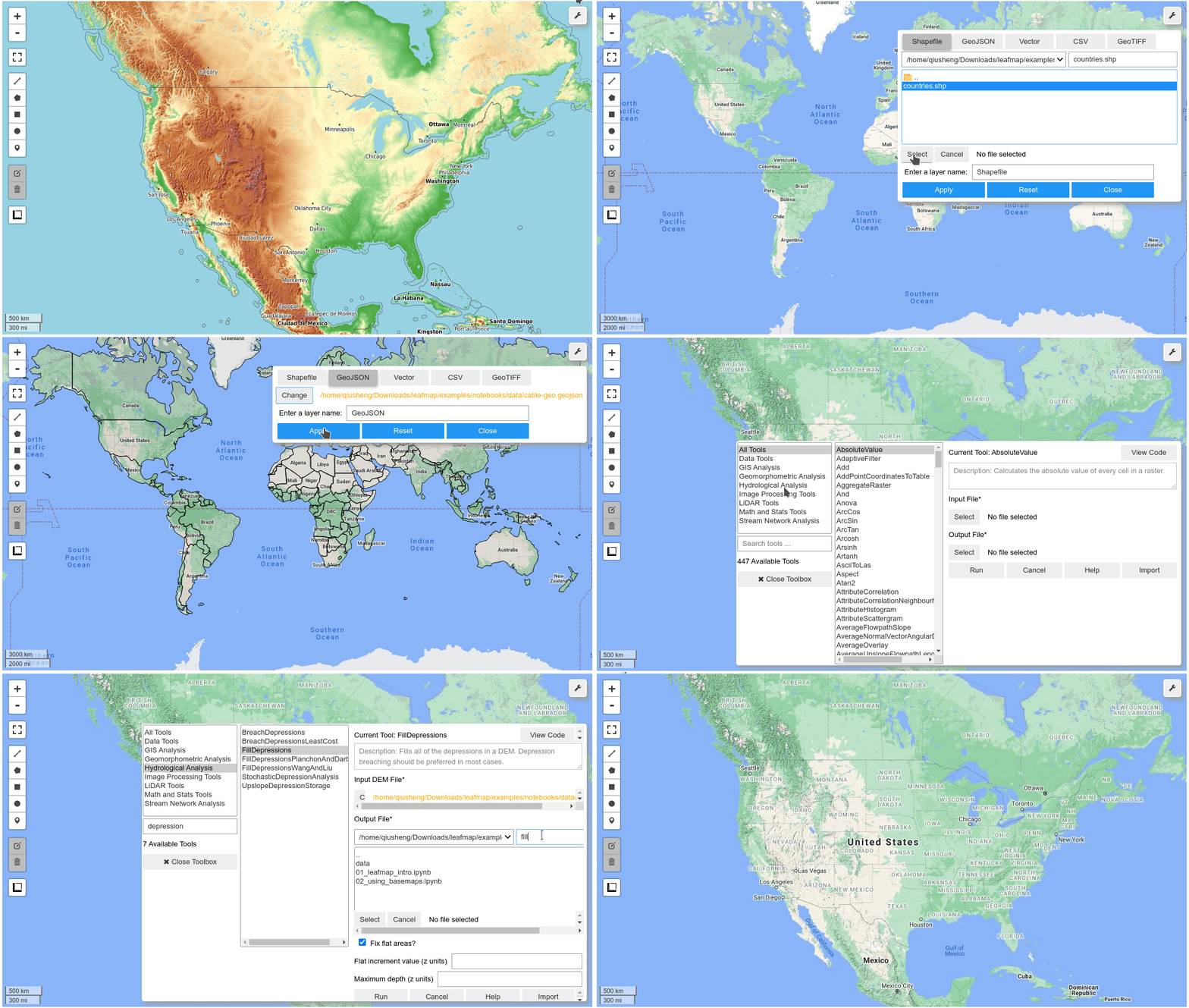
## Demo
## YouTube Channel
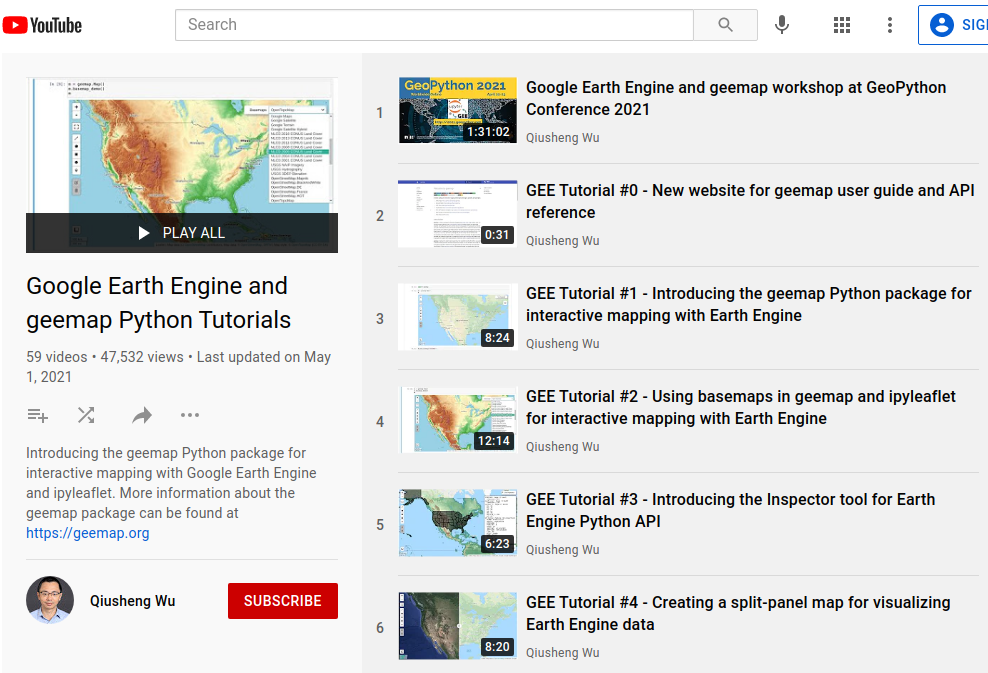
I have created a [YouTube Channel](https://youtube.com/@giswqs) for sharing geospatial tutorials. You can subscribe to my channel for regular updates. If there is any specific tutorial you would like to see, please submit a feature request [here](https://github.com/opengeos/leafmap/issues).
[](https://youtube.com/@giswqs)
%package -n python3-leafmap
Summary: A Python package for geospatial analysis and interactive mapping in a Jupyter environment.
Provides: python-leafmap
BuildRequires: python3-devel
BuildRequires: python3-setuptools
BuildRequires: python3-pip
%description -n python3-leafmap
# Welcome to leafmap
[](https://demo.leafmap.org)
[](https://studiolab.sagemaker.aws/import/github/opengeos/leafmap/blob/master/examples/notebooks/00_key_features.ipynb)
[](https://pccompute.westeurope.cloudapp.azure.com/compute/hub/user-redirect/git-pull?repo=https://github.com/opengeos/leafmap&urlpath=lab/tree/leafmap/examples/notebooks/00_key_features.ipynb&branch=master)
[](https://gishub.org/leafmap-colab)
[](https://gishub.org/leafmap-binder)
[](https://pypi.python.org/pypi/leafmap)
[](https://anaconda.org/conda-forge/leafmap)
[](https://pepy.tech/project/leafmap)
[](https://leafmap.org)
[](https://github.com/opengeos/leafmap/actions)
[](https://opensource.org/licenses/MIT)
[](https://youtube.com/@giswqs)
[](https://doi.org/10.21105/joss.03414)
[](https://github.com/opengeos/leafmap/blob/master/docs/assets/logo.png)
**A Python package for geospatial analysis and interactive mapping in a Jupyter environment.**
- GitHub repo: <https://github.com/opengeos/leafmap>
- Documentation: <https://leafmap.org>
- PyPI: <https://pypi.org/project/leafmap>
- Conda-forge: <https://anaconda.org/conda-forge/leafmap>
- Leafmap tutorials on YouTube: <https://youtube.com/@giswqs>
- Free software: [MIT license](https://opensource.org/licenses/MIT)
## Introduction
**Leafmap** is a Python package for interactive mapping and geospatial analysis with minimal coding in a Jupyter environment. It is a spin-off project of the [geemap](https://geemap.org) Python package, which was designed specifically to work with [Google Earth Engine](https://earthengine.google.com) (GEE). However, not everyone in the geospatial community has access to the GEE cloud computing platform. Leafmap is designed to fill this gap for non-GEE users. It is a free and open-source Python package that enables users to analyze and visualize geospatial data with minimal coding in a Jupyter environment, such as Google Colab, Jupyter Notebook, and JupyterLab. Leafmap is built upon several open-source packages, such as [folium](https://github.com/python-visualization/folium) and [ipyleaflet](https://github.com/jupyter-widgets/ipyleaflet) (for creating interactive maps), [WhiteboxTools](https://github.com/jblindsay/whitebox-tools) and [whiteboxgui](https://github.com/opengeos/whiteboxgui) (for analyzing geospatial data), and [ipywidgets](https://github.com/jupyter-widgets/ipywidgets) (for designing interactive graphical user interface [GUI]). Leafmap has a toolset with various interactive tools that allow users to load vector and raster data onto the map without coding. In addition, users can use the powerful analytical backend (i.e., WhiteboxTools) to perform geospatial analysis directly within the leafmap user interface without writing a single line of code. The WhiteboxTools library currently contains **500+** tools for advanced geospatial analysis, such as [GIS Analysis](https://jblindsay.github.io/wbt_book/available_tools/gis_analysis.html), [Geomorphometric Analysis](https://jblindsay.github.io/wbt_book/available_tools/geomorphometric_analysis.html), [Hydrological Analysis](https://jblindsay.github.io/wbt_book/available_tools/hydrological_analysis.html), [LiDAR Data Analysis](https://jblindsay.github.io/wbt_book/available_tools/lidar_tools.html), [Mathematical and Statistical Analysis](https://jblindsay.github.io/wbt_book/available_tools/mathand_stats_tools.html), and [Stream Network Analysis](https://jblindsay.github.io/wbt_book/available_tools/stream_network_analysis.html).
## Statement of Need
There are a plethora of Python packages for geospatial analysis, such as [geopandas](https://github.com/geopandas/geopandas) for vector data analysis and [xarray](https://github.com/pydata/xarray) for raster data analysis. However, few Python packages provide interactive GUIs for loading geospatial data in a Jupyter environment. It might take many lines to code to load and display geospatial data with various file formats on an interactive map, which can be a challenging task for novice users with limited coding skills. There are also some notable Python packages for visualizing geospatial data in a Jupyter environment, such as [plotly](https://github.com/plotly/plotly.py) and [kepler.gl](https://docs.kepler.gl/docs/keplergl-jupyter). However, plotly is designed for displaying static data, which lacks bidirectional communication between the front-end and the backend. Kepler.gl provides unique 3D functionality for visualizing large-scale geospatial datasets, but it lacks tools for performing geospatial analysis, such as hydrological analysis and LiDAR data analysis. In contrast, leafmap provides many convenient functions for loading and visualizing geospatial datasets with only one line of code. Users can also use the interactive GUI to load geospatial datasets without coding. Leafmap is intended for anyone who would like to analyze and visualize geospatial data interactively in a Jupyter environment. It is particularly suited for novice users with limited programming skills. Advanced programmers can also find leafmap a useful tool for analyzing geospatial data and building interactive web apps.
Launch the interactive notebook tutorial for the **leafmap** Python package with JupyterLite, Google Colab, Binder, or Amazon Sagemaker Studio Lab now:
[](https://demo.leafmap.org)
[](https://gishub.org/leafmap-colab)
[](https://gishub.org/leafmap-binder)
[](https://studiolab.sagemaker.aws/import/github/opengeos/leafmap/blob/master/examples/notebooks/00_key_features.ipynb)
Check out this excellent article on Medium - [Leafmap a new Python Package for Geospatial data science](https://link.medium.com/HRRKDcynYgb)
To learn more about leafmap, check out the leafmap documentation website - <https://leafmap.org>

## Key Features
Below is a partial list of features available for the leafmap package. Please check the [examples](https://github.com/opengeos/leafmap/tree/master/examples) page for notebook examples, GIF animations, and video tutorials.
- Create an interactive map with only one-line of code.
- Select from a variety of basemaps interactively without coding.
- Add XYZ, WMS, and vector tile services to the map.
- Convert CSV to points and display points as a marker cluster.
- Add local vector data (e.g., shapefile, GeoJSON, KML) to the map without coding.
- Add local raster data (e.g., GeoTIFF) to the map without coding.
- Add Cloud Optimized GeoTIFF (COG) and SpatialTemporal Asset Catalog (STAC) to the map.
- Add OpenStreetMap data to the map with a single line of code.
- Add a GeoPandas GeoDataFrame to the map with a single line of code.
- Add a point layer with popup attributes to the map.
- Add data from a PostGIS database to the map.
- Add custom legends and colorbars to the map.
- Perform geospatial analysis using WhiteboxTools and whiteboxgui.
- Create split-panel map and linked maps.
- Publish interactive maps with a single line of code.
- Download and display OpenStreetMap data with a single line of code.
## Citations
If you find **leafmap** useful in your research, please consider citing the following paper to support my work. Thank you for your support.
- Wu, Q. (2021). Leafmap: A Python package for interactive mapping and geospatial analysis with minimal coding in a Jupyter environment. _Journal of Open Source Software_, 6(63), 3414. <https://doi.org/10.21105/joss.03414>
## Demo

## YouTube Channel
I have created a [YouTube Channel](https://youtube.com/@giswqs) for sharing geospatial tutorials. You can subscribe to my channel for regular updates. If there is any specific tutorial you would like to see, please submit a feature request [here](https://github.com/opengeos/leafmap/issues).
[](https://youtube.com/@giswqs)
%package help
Summary: Development documents and examples for leafmap
Provides: python3-leafmap-doc
%description help
# Welcome to leafmap
[](https://demo.leafmap.org)
[](https://studiolab.sagemaker.aws/import/github/opengeos/leafmap/blob/master/examples/notebooks/00_key_features.ipynb)
[](https://pccompute.westeurope.cloudapp.azure.com/compute/hub/user-redirect/git-pull?repo=https://github.com/opengeos/leafmap&urlpath=lab/tree/leafmap/examples/notebooks/00_key_features.ipynb&branch=master)
[](https://gishub.org/leafmap-colab)
[](https://gishub.org/leafmap-binder)
[](https://pypi.python.org/pypi/leafmap)
[](https://anaconda.org/conda-forge/leafmap)
[](https://pepy.tech/project/leafmap)
[](https://leafmap.org)
[](https://github.com/opengeos/leafmap/actions)
[](https://opensource.org/licenses/MIT)
[](https://youtube.com/@giswqs)
[](https://doi.org/10.21105/joss.03414)
[](https://github.com/opengeos/leafmap/blob/master/docs/assets/logo.png)
**A Python package for geospatial analysis and interactive mapping in a Jupyter environment.**
- GitHub repo: <https://github.com/opengeos/leafmap>
- Documentation: <https://leafmap.org>
- PyPI: <https://pypi.org/project/leafmap>
- Conda-forge: <https://anaconda.org/conda-forge/leafmap>
- Leafmap tutorials on YouTube: <https://youtube.com/@giswqs>
- Free software: [MIT license](https://opensource.org/licenses/MIT)
## Introduction
**Leafmap** is a Python package for interactive mapping and geospatial analysis with minimal coding in a Jupyter environment. It is a spin-off project of the [geemap](https://geemap.org) Python package, which was designed specifically to work with [Google Earth Engine](https://earthengine.google.com) (GEE). However, not everyone in the geospatial community has access to the GEE cloud computing platform. Leafmap is designed to fill this gap for non-GEE users. It is a free and open-source Python package that enables users to analyze and visualize geospatial data with minimal coding in a Jupyter environment, such as Google Colab, Jupyter Notebook, and JupyterLab. Leafmap is built upon several open-source packages, such as [folium](https://github.com/python-visualization/folium) and [ipyleaflet](https://github.com/jupyter-widgets/ipyleaflet) (for creating interactive maps), [WhiteboxTools](https://github.com/jblindsay/whitebox-tools) and [whiteboxgui](https://github.com/opengeos/whiteboxgui) (for analyzing geospatial data), and [ipywidgets](https://github.com/jupyter-widgets/ipywidgets) (for designing interactive graphical user interface [GUI]). Leafmap has a toolset with various interactive tools that allow users to load vector and raster data onto the map without coding. In addition, users can use the powerful analytical backend (i.e., WhiteboxTools) to perform geospatial analysis directly within the leafmap user interface without writing a single line of code. The WhiteboxTools library currently contains **500+** tools for advanced geospatial analysis, such as [GIS Analysis](https://jblindsay.github.io/wbt_book/available_tools/gis_analysis.html), [Geomorphometric Analysis](https://jblindsay.github.io/wbt_book/available_tools/geomorphometric_analysis.html), [Hydrological Analysis](https://jblindsay.github.io/wbt_book/available_tools/hydrological_analysis.html), [LiDAR Data Analysis](https://jblindsay.github.io/wbt_book/available_tools/lidar_tools.html), [Mathematical and Statistical Analysis](https://jblindsay.github.io/wbt_book/available_tools/mathand_stats_tools.html), and [Stream Network Analysis](https://jblindsay.github.io/wbt_book/available_tools/stream_network_analysis.html).
## Statement of Need
There are a plethora of Python packages for geospatial analysis, such as [geopandas](https://github.com/geopandas/geopandas) for vector data analysis and [xarray](https://github.com/pydata/xarray) for raster data analysis. However, few Python packages provide interactive GUIs for loading geospatial data in a Jupyter environment. It might take many lines to code to load and display geospatial data with various file formats on an interactive map, which can be a challenging task for novice users with limited coding skills. There are also some notable Python packages for visualizing geospatial data in a Jupyter environment, such as [plotly](https://github.com/plotly/plotly.py) and [kepler.gl](https://docs.kepler.gl/docs/keplergl-jupyter). However, plotly is designed for displaying static data, which lacks bidirectional communication between the front-end and the backend. Kepler.gl provides unique 3D functionality for visualizing large-scale geospatial datasets, but it lacks tools for performing geospatial analysis, such as hydrological analysis and LiDAR data analysis. In contrast, leafmap provides many convenient functions for loading and visualizing geospatial datasets with only one line of code. Users can also use the interactive GUI to load geospatial datasets without coding. Leafmap is intended for anyone who would like to analyze and visualize geospatial data interactively in a Jupyter environment. It is particularly suited for novice users with limited programming skills. Advanced programmers can also find leafmap a useful tool for analyzing geospatial data and building interactive web apps.
Launch the interactive notebook tutorial for the **leafmap** Python package with JupyterLite, Google Colab, Binder, or Amazon Sagemaker Studio Lab now:
[](https://demo.leafmap.org)
[](https://gishub.org/leafmap-colab)
[](https://gishub.org/leafmap-binder)
[](https://studiolab.sagemaker.aws/import/github/opengeos/leafmap/blob/master/examples/notebooks/00_key_features.ipynb)
Check out this excellent article on Medium - [Leafmap a new Python Package for Geospatial data science](https://link.medium.com/HRRKDcynYgb)
To learn more about leafmap, check out the leafmap documentation website - <https://leafmap.org>

## Key Features
Below is a partial list of features available for the leafmap package. Please check the [examples](https://github.com/opengeos/leafmap/tree/master/examples) page for notebook examples, GIF animations, and video tutorials.
- Create an interactive map with only one-line of code.
- Select from a variety of basemaps interactively without coding.
- Add XYZ, WMS, and vector tile services to the map.
- Convert CSV to points and display points as a marker cluster.
- Add local vector data (e.g., shapefile, GeoJSON, KML) to the map without coding.
- Add local raster data (e.g., GeoTIFF) to the map without coding.
- Add Cloud Optimized GeoTIFF (COG) and SpatialTemporal Asset Catalog (STAC) to the map.
- Add OpenStreetMap data to the map with a single line of code.
- Add a GeoPandas GeoDataFrame to the map with a single line of code.
- Add a point layer with popup attributes to the map.
- Add data from a PostGIS database to the map.
- Add custom legends and colorbars to the map.
- Perform geospatial analysis using WhiteboxTools and whiteboxgui.
- Create split-panel map and linked maps.
- Publish interactive maps with a single line of code.
- Download and display OpenStreetMap data with a single line of code.
## Citations
If you find **leafmap** useful in your research, please consider citing the following paper to support my work. Thank you for your support.
- Wu, Q. (2021). Leafmap: A Python package for interactive mapping and geospatial analysis with minimal coding in a Jupyter environment. _Journal of Open Source Software_, 6(63), 3414. <https://doi.org/10.21105/joss.03414>
## Demo

## YouTube Channel
I have created a [YouTube Channel](https://youtube.com/@giswqs) for sharing geospatial tutorials. You can subscribe to my channel for regular updates. If there is any specific tutorial you would like to see, please submit a feature request [here](https://github.com/opengeos/leafmap/issues).
[](https://youtube.com/@giswqs)
%prep
%autosetup -n leafmap-0.21.3
%build
%py3_build
%install
%py3_install
install -d -m755 %{buildroot}/%{_pkgdocdir}
if [ -d doc ]; then cp -arf doc %{buildroot}/%{_pkgdocdir}; fi
if [ -d docs ]; then cp -arf docs %{buildroot}/%{_pkgdocdir}; fi
if [ -d example ]; then cp -arf example %{buildroot}/%{_pkgdocdir}; fi
if [ -d examples ]; then cp -arf examples %{buildroot}/%{_pkgdocdir}; fi
pushd %{buildroot}
if [ -d usr/lib ]; then
find usr/lib -type f -printf "\"/%h/%f\"\n" >> filelist.lst
fi
if [ -d usr/lib64 ]; then
find usr/lib64 -type f -printf "\"/%h/%f\"\n" >> filelist.lst
fi
if [ -d usr/bin ]; then
find usr/bin -type f -printf "\"/%h/%f\"\n" >> filelist.lst
fi
if [ -d usr/sbin ]; then
find usr/sbin -type f -printf "\"/%h/%f\"\n" >> filelist.lst
fi
touch doclist.lst
if [ -d usr/share/man ]; then
find usr/share/man -type f -printf "\"/%h/%f.gz\"\n" >> doclist.lst
fi
popd
mv %{buildroot}/filelist.lst .
mv %{buildroot}/doclist.lst .
%files -n python3-leafmap -f filelist.lst
%dir %{python3_sitelib}/*
%files help -f doclist.lst
%{_docdir}/*
%changelog
* Thu Jun 08 2023 Python_Bot <Python_Bot@openeuler.org> - 0.21.3-1
- Package Spec generated
|
