
diff options
| author | CoprDistGit <infra@openeuler.org> | 2023-04-11 21:55:23 +0000 |
|---|---|---|
| committer | CoprDistGit <infra@openeuler.org> | 2023-04-11 21:55:23 +0000 |
| commit | 9cff28701500d7828a4585677dce012edfc6d7f5 (patch) | |
| tree | 1a7a55dd6ee6ec05be89cdf1669c4814e033d540 /python-octoprint.spec | |
| parent | ccdfcdeab34771508f2e017c406f0433fed692e6 (diff) | |
automatic import of python-octoprint
Diffstat (limited to 'python-octoprint.spec')
| -rw-r--r-- | python-octoprint.spec | 588 |
1 files changed, 588 insertions, 0 deletions
diff --git a/python-octoprint.spec b/python-octoprint.spec new file mode 100644 index 0000000..de03c7b --- /dev/null +++ b/python-octoprint.spec @@ -0,0 +1,588 @@ +%global _empty_manifest_terminate_build 0 +Name: python-OctoPrint +Version: 1.8.7 +Release: 1 +Summary: The snappy web interface for your 3D printer +License: GNU Affero General Public License v3 +URL: https://octoprint.org +Source0: https://mirrors.nju.edu.cn/pypi/web/packages/df/96/f7f1adcb12a15eba2a4f81678a096cbcb8cc5f9ff5a5fd77a1c9cde9a146/OctoPrint-1.8.7.tar.gz +BuildArch: noarch + +Requires: python3-OctoPrint-FileCheck +Requires: python3-OctoPrint-FirmwareCheck +Requires: python3-OctoPrint-PiSupport +Requires: python3-argon2-cffi +Requires: python3-cachelib +Requires: python3-Click +Requires: python3-colorlog +Requires: python3-emoji +Requires: python3-feedparser +Requires: python3-filetype +Requires: python3-Flask-Assets +Requires: python3-Flask-Babel +Requires: python3-Flask-Login +Requires: python3-Flask-Limiter +Requires: python3-flask +Requires: python3-frozendict +Requires: python3-future +Requires: python3-markdown +Requires: python3-netaddr +Requires: python3-netifaces +Requires: python3-passlib +Requires: python3-pathvalidate +Requires: python3-pkginfo +Requires: python3-psutil +Requires: python3-pylru +Requires: python3-pyserial +Requires: python3-PyYAML +Requires: python3-requests +Requires: python3-sarge +Requires: python3-semantic-version +Requires: python3-sentry-sdk +Requires: python3-tornado +Requires: python3-watchdog +Requires: python3-websocket-client +Requires: python3-werkzeug +Requires: python3-wrapt +Requires: python3-zeroconf +Requires: python3-zipstream-ng +Requires: python3-blinker +Requires: python3-regex +Requires: python3-unidecode +Requires: python3-appdirs +Requires: python3-ddt +Requires: python3-mock +Requires: python3-pytest-doctest-custom +Requires: python3-pytest +Requires: python3-pre-commit +Requires: python3-pyinstrument +Requires: python3-readthedocs-sphinx-ext +Requires: python3-sphinx-rtd-theme +Requires: python3-sphinx +Requires: python3-sphinxcontrib-httpdomain +Requires: python3-sphinxcontrib-mermaid +Requires: python3-cookiecutter + +%description +<p align="center"><img src="https://octoprint.org/assets/img/logo.png" alt="OctoPrint's logo" /></p> + +<h1 align="center">OctoPrint</h1> + +<p align="center"> + <img src="https://img.shields.io/github/v/release/OctoPrint/OctoPrint?logo=github&logoColor=white" alt="GitHub release"/> + <img src="https://img.shields.io/pypi/v/OctoPrint?logo=python&logoColor=white" alt="PyPI"/> + <img src="https://img.shields.io/github/actions/workflow/status/OctoPrint/OctoPrint/build.yml?branch=master" alt="Build status"/> + <a href="https://community.octoprint.org"><img src="https://img.shields.io/discourse/users?label=forum&logo=discourse&logoColor=white&server=https%3A%2F%2Fcommunity.octoprint.org" alt="Community Forum"/></a> + <a href="https://discord.octoprint.org"><img src="https://img.shields.io/discord/704958479194128507?label=discord&logo=discord&logoColor=white" alt="Discord"/></a> + <a href="https://octoprint.org/conduct/"><img src="https://img.shields.io/badge/Contributor%20Covenant-v2.0%20adopted-ff69b4.svg" alt="Contributor Covenant"/></a> + <a href="https://github.com/psf/black"><img src="https://img.shields.io/badge/code%20style-black-000000.svg" alt="Code style: black"/></a> + <a href="https://github.com/prettier/prettier"><img src="https://img.shields.io/badge/code_style-prettier-ff69b4.svg?style=flat-square" alt="Code style: prettier"/></a> + <a href="https://pycqa.github.io/isort/"><img src="https://img.shields.io/badge/%20imports-isort-%231674b1" alt="Imports: isort"/></a> + <a href="https://github.com/pre-commit/pre-commit"><img src="https://img.shields.io/badge/pre--commit-enabled-brightgreen?logo=pre-commit&logoColor=white" alt="pre-commit"/></a> +</p> + +OctoPrint provides a snappy web interface for controlling consumer 3D printers. It is Free Software +and released under the [GNU Affero General Public License V3](https://www.gnu.org/licenses/agpl-3.0.html). + +Its website can be found at [octoprint.org](https://octoprint.org/?utm_source=github&utm_medium=readme). + +The community forum is available at [community.octoprint.org](https://community.octoprint.org/?utm_source=github&utm_medium=readme). It also serves as a central knowledge base. + +An invite to the Discord server can be found at [discord.octoprint.org](https://discord.octoprint.org). + +The FAQ can be accessed by following [faq.octoprint.org](https://faq.octoprint.org/?utm_source=github&utm_medium=readme). + +The documentation is located at [docs.octoprint.org](https://docs.octoprint.org). + +The official plugin repository can be reached at [plugins.octoprint.org](https://plugins.octoprint.org/?utm_source=github&utm_medium=readme). + +**OctoPrint's development wouldn't be possible without the [financial support by its community](https://octoprint.org/support-octoprint/?utm_source=github&utm_medium=readme). +If you enjoy OctoPrint, please consider becoming a regular supporter!** + +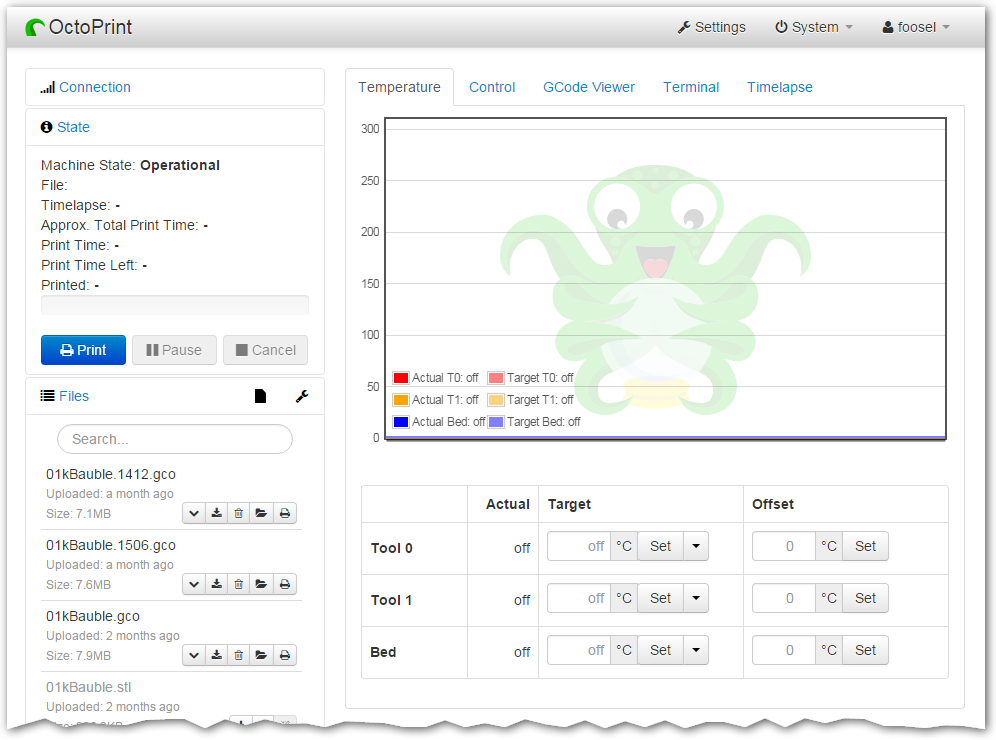 + +You are currently looking at the source code repository of OctoPrint. If you already installed it +(e.g. by using the Raspberry Pi targeted distribution [OctoPi](https://github.com/guysoft/OctoPi)) and only +want to find out how to use it, [the documentation](https://docs.octoprint.org/) might be of more interest for you. You might also want to subscribe to join +[the community forum at community.octoprint.org](https://community.octoprint.org) where there are other active users who might be +able to help you with any questions you might have. + +## Contributing + +Contributions of all kinds are welcome, not only in the form of code but also with regards to the +[official documentation](https://docs.octoprint.org/), debugging help +in the [bug tracker](https://github.com/OctoPrint/OctoPrint/issues), support of other users on +[the community forum at community.octoprint.org](https://community.octoprint.org) or +[the official discord at discord.octoprint.org](https://discord.octoprint.org) +and also [financially](https://octoprint.org/support-octoprint/?utm_source=github&utm_medium=readme). + +If you think something is bad about OctoPrint or its documentation the way it is, please help +in any way to make it better instead of just complaining about it -- this is an Open Source Project +after all :) + +For information about how to go about submitting bug reports or pull requests, please see the project's +[Contribution Guidelines](https://github.com/OctoPrint/OctoPrint/blob/master/CONTRIBUTING.md). + +## Installation + +Installation instructions for installing from source for different operating +systems can be found [on the forum](https://community.octoprint.org/tags/c/support/guides/15/setup). + +If you want to run OctoPrint on a Raspberry Pi, you really should take a look at [OctoPi](https://github.com/guysoft/OctoPi) +which is a custom SD card image that includes OctoPrint plus dependencies. + +The generic steps that should basically be done regardless of operating system +and runtime environment are the following (as *regular +user*, please keep your hands *off* of the `sudo` command here!) - this assumes +you already have Python 3.7+, pip and virtualenv and their dependencies set up on your system: + +1. Create a user-owned virtual environment therein: `virtualenv venv`. If you want to specify a specific python + to use instead of whatever version your system defaults to, you can also explicitly require that via the `--python` + parameter, e.g. `virtualenv --python=python3 venv`. +2. Install OctoPrint *into that virtual environment*: `./venv/bin/pip install OctoPrint` + +You may then start the OctoPrint server via `/path/to/OctoPrint/venv/bin/octoprint`, see [Usage](#usage) +for details. + +After installation, please make sure you follow the first-run wizard and set up +access control as necessary. + +## Dependencies + +OctoPrint depends on a few python modules to do its job. Those are automatically installed when installing +OctoPrint via `pip`. + +OctoPrint currently supports Python 3.7, 3.8, 3.9 and 3.10. + +## Usage + +Running the pip install via + + pip install OctoPrint + +installs the `octoprint` script in your Python installation's scripts folder +(which, depending on whether you installed OctoPrint globally or into a virtual env, will be in your `PATH` or not). The +following usage examples assume that the `octoprint` script is on your `PATH`. + +You can start the server via + + octoprint serve + +By default it binds to all interfaces on port 5000 (so pointing your browser to `http://127.0.0.1:5000` +will do the trick). If you want to change that, use the additional command line parameters `host` and `port`, +which accept the host ip to bind to and the numeric port number respectively. If for example you want the server +to only listen on the local interface on port 8080, the command line would be + + octoprint serve --host=127.0.0.1 --port=8080 + +Alternatively, the host and port on which to bind can be defined via the config file. + +If you want to run OctoPrint as a daemon (only supported on Linux), use + + octoprint daemon {start|stop|restart} [--pid PIDFILE] + +If you do not supply a custom pidfile location via `--pid PIDFILE`, it will be created at `/tmp/octoprint.pid`. + +You can also specify the config file or the base directory (for basing off the `uploads`, `timelapse` and `logs` folders), +e.g.: + + octoprint serve --config /path/to/another/config.yaml --basedir /path/to/my/basedir + +To start OctoPrint in safe mode - which disables all third party plugins that do not come bundled with OctoPrint - use +the ``--safe`` flag: + + octoprint serve --safe + +See `octoprint --help` for more information on the available command line parameters. + +OctoPrint also ships with a `run` script in its source directory. You can invoke it to start the server. It +takes the same command line arguments as the `octoprint` script. + +## Configuration + +If not specified via the command line, the config file `config.yaml` for OctoPrint is expected in the settings folder, +which is located at `~/.octoprint` on Linux, at `%APPDATA%/OctoPrint` on Windows and +at `~/Library/Application Support/OctoPrint` on MacOS. + +A comprehensive overview of all available configuration settings can be found +[in the docs](https://docs.octoprint.org/en/master/configuration/config_yaml.html). +Please note that the most commonly used configuration settings can also easily +be edited from OctoPrint's settings dialog. + +## Special Thanks + +Cross-browser testing services are kindly provided by [BrowserStack](https://www.browserstack.com/). + +Profiling is done with the help of [PyVmMonitor](https://www.pyvmmonitor.com). + +Error tracking is powered and sponsored by [Sentry](https://sentry.io). + + + + +%package -n python3-OctoPrint +Summary: The snappy web interface for your 3D printer +Provides: python-OctoPrint +BuildRequires: python3-devel +BuildRequires: python3-setuptools +BuildRequires: python3-pip +%description -n python3-OctoPrint +<p align="center"><img src="https://octoprint.org/assets/img/logo.png" alt="OctoPrint's logo" /></p> + +<h1 align="center">OctoPrint</h1> + +<p align="center"> + <img src="https://img.shields.io/github/v/release/OctoPrint/OctoPrint?logo=github&logoColor=white" alt="GitHub release"/> + <img src="https://img.shields.io/pypi/v/OctoPrint?logo=python&logoColor=white" alt="PyPI"/> + <img src="https://img.shields.io/github/actions/workflow/status/OctoPrint/OctoPrint/build.yml?branch=master" alt="Build status"/> + <a href="https://community.octoprint.org"><img src="https://img.shields.io/discourse/users?label=forum&logo=discourse&logoColor=white&server=https%3A%2F%2Fcommunity.octoprint.org" alt="Community Forum"/></a> + <a href="https://discord.octoprint.org"><img src="https://img.shields.io/discord/704958479194128507?label=discord&logo=discord&logoColor=white" alt="Discord"/></a> + <a href="https://octoprint.org/conduct/"><img src="https://img.shields.io/badge/Contributor%20Covenant-v2.0%20adopted-ff69b4.svg" alt="Contributor Covenant"/></a> + <a href="https://github.com/psf/black"><img src="https://img.shields.io/badge/code%20style-black-000000.svg" alt="Code style: black"/></a> + <a href="https://github.com/prettier/prettier"><img src="https://img.shields.io/badge/code_style-prettier-ff69b4.svg?style=flat-square" alt="Code style: prettier"/></a> + <a href="https://pycqa.github.io/isort/"><img src="https://img.shields.io/badge/%20imports-isort-%231674b1" alt="Imports: isort"/></a> + <a href="https://github.com/pre-commit/pre-commit"><img src="https://img.shields.io/badge/pre--commit-enabled-brightgreen?logo=pre-commit&logoColor=white" alt="pre-commit"/></a> +</p> + +OctoPrint provides a snappy web interface for controlling consumer 3D printers. It is Free Software +and released under the [GNU Affero General Public License V3](https://www.gnu.org/licenses/agpl-3.0.html). + +Its website can be found at [octoprint.org](https://octoprint.org/?utm_source=github&utm_medium=readme). + +The community forum is available at [community.octoprint.org](https://community.octoprint.org/?utm_source=github&utm_medium=readme). It also serves as a central knowledge base. + +An invite to the Discord server can be found at [discord.octoprint.org](https://discord.octoprint.org). + +The FAQ can be accessed by following [faq.octoprint.org](https://faq.octoprint.org/?utm_source=github&utm_medium=readme). + +The documentation is located at [docs.octoprint.org](https://docs.octoprint.org). + +The official plugin repository can be reached at [plugins.octoprint.org](https://plugins.octoprint.org/?utm_source=github&utm_medium=readme). + +**OctoPrint's development wouldn't be possible without the [financial support by its community](https://octoprint.org/support-octoprint/?utm_source=github&utm_medium=readme). +If you enjoy OctoPrint, please consider becoming a regular supporter!** + + + +You are currently looking at the source code repository of OctoPrint. If you already installed it +(e.g. by using the Raspberry Pi targeted distribution [OctoPi](https://github.com/guysoft/OctoPi)) and only +want to find out how to use it, [the documentation](https://docs.octoprint.org/) might be of more interest for you. You might also want to subscribe to join +[the community forum at community.octoprint.org](https://community.octoprint.org) where there are other active users who might be +able to help you with any questions you might have. + +## Contributing + +Contributions of all kinds are welcome, not only in the form of code but also with regards to the +[official documentation](https://docs.octoprint.org/), debugging help +in the [bug tracker](https://github.com/OctoPrint/OctoPrint/issues), support of other users on +[the community forum at community.octoprint.org](https://community.octoprint.org) or +[the official discord at discord.octoprint.org](https://discord.octoprint.org) +and also [financially](https://octoprint.org/support-octoprint/?utm_source=github&utm_medium=readme). + +If you think something is bad about OctoPrint or its documentation the way it is, please help +in any way to make it better instead of just complaining about it -- this is an Open Source Project +after all :) + +For information about how to go about submitting bug reports or pull requests, please see the project's +[Contribution Guidelines](https://github.com/OctoPrint/OctoPrint/blob/master/CONTRIBUTING.md). + +## Installation + +Installation instructions for installing from source for different operating +systems can be found [on the forum](https://community.octoprint.org/tags/c/support/guides/15/setup). + +If you want to run OctoPrint on a Raspberry Pi, you really should take a look at [OctoPi](https://github.com/guysoft/OctoPi) +which is a custom SD card image that includes OctoPrint plus dependencies. + +The generic steps that should basically be done regardless of operating system +and runtime environment are the following (as *regular +user*, please keep your hands *off* of the `sudo` command here!) - this assumes +you already have Python 3.7+, pip and virtualenv and their dependencies set up on your system: + +1. Create a user-owned virtual environment therein: `virtualenv venv`. If you want to specify a specific python + to use instead of whatever version your system defaults to, you can also explicitly require that via the `--python` + parameter, e.g. `virtualenv --python=python3 venv`. +2. Install OctoPrint *into that virtual environment*: `./venv/bin/pip install OctoPrint` + +You may then start the OctoPrint server via `/path/to/OctoPrint/venv/bin/octoprint`, see [Usage](#usage) +for details. + +After installation, please make sure you follow the first-run wizard and set up +access control as necessary. + +## Dependencies + +OctoPrint depends on a few python modules to do its job. Those are automatically installed when installing +OctoPrint via `pip`. + +OctoPrint currently supports Python 3.7, 3.8, 3.9 and 3.10. + +## Usage + +Running the pip install via + + pip install OctoPrint + +installs the `octoprint` script in your Python installation's scripts folder +(which, depending on whether you installed OctoPrint globally or into a virtual env, will be in your `PATH` or not). The +following usage examples assume that the `octoprint` script is on your `PATH`. + +You can start the server via + + octoprint serve + +By default it binds to all interfaces on port 5000 (so pointing your browser to `http://127.0.0.1:5000` +will do the trick). If you want to change that, use the additional command line parameters `host` and `port`, +which accept the host ip to bind to and the numeric port number respectively. If for example you want the server +to only listen on the local interface on port 8080, the command line would be + + octoprint serve --host=127.0.0.1 --port=8080 + +Alternatively, the host and port on which to bind can be defined via the config file. + +If you want to run OctoPrint as a daemon (only supported on Linux), use + + octoprint daemon {start|stop|restart} [--pid PIDFILE] + +If you do not supply a custom pidfile location via `--pid PIDFILE`, it will be created at `/tmp/octoprint.pid`. + +You can also specify the config file or the base directory (for basing off the `uploads`, `timelapse` and `logs` folders), +e.g.: + + octoprint serve --config /path/to/another/config.yaml --basedir /path/to/my/basedir + +To start OctoPrint in safe mode - which disables all third party plugins that do not come bundled with OctoPrint - use +the ``--safe`` flag: + + octoprint serve --safe + +See `octoprint --help` for more information on the available command line parameters. + +OctoPrint also ships with a `run` script in its source directory. You can invoke it to start the server. It +takes the same command line arguments as the `octoprint` script. + +## Configuration + +If not specified via the command line, the config file `config.yaml` for OctoPrint is expected in the settings folder, +which is located at `~/.octoprint` on Linux, at `%APPDATA%/OctoPrint` on Windows and +at `~/Library/Application Support/OctoPrint` on MacOS. + +A comprehensive overview of all available configuration settings can be found +[in the docs](https://docs.octoprint.org/en/master/configuration/config_yaml.html). +Please note that the most commonly used configuration settings can also easily +be edited from OctoPrint's settings dialog. + +## Special Thanks + +Cross-browser testing services are kindly provided by [BrowserStack](https://www.browserstack.com/). + +Profiling is done with the help of [PyVmMonitor](https://www.pyvmmonitor.com). + +Error tracking is powered and sponsored by [Sentry](https://sentry.io). + + + + +%package help +Summary: Development documents and examples for OctoPrint +Provides: python3-OctoPrint-doc +%description help +<p align="center"><img src="https://octoprint.org/assets/img/logo.png" alt="OctoPrint's logo" /></p> + +<h1 align="center">OctoPrint</h1> + +<p align="center"> + <img src="https://img.shields.io/github/v/release/OctoPrint/OctoPrint?logo=github&logoColor=white" alt="GitHub release"/> + <img src="https://img.shields.io/pypi/v/OctoPrint?logo=python&logoColor=white" alt="PyPI"/> + <img src="https://img.shields.io/github/actions/workflow/status/OctoPrint/OctoPrint/build.yml?branch=master" alt="Build status"/> + <a href="https://community.octoprint.org"><img src="https://img.shields.io/discourse/users?label=forum&logo=discourse&logoColor=white&server=https%3A%2F%2Fcommunity.octoprint.org" alt="Community Forum"/></a> + <a href="https://discord.octoprint.org"><img src="https://img.shields.io/discord/704958479194128507?label=discord&logo=discord&logoColor=white" alt="Discord"/></a> + <a href="https://octoprint.org/conduct/"><img src="https://img.shields.io/badge/Contributor%20Covenant-v2.0%20adopted-ff69b4.svg" alt="Contributor Covenant"/></a> + <a href="https://github.com/psf/black"><img src="https://img.shields.io/badge/code%20style-black-000000.svg" alt="Code style: black"/></a> + <a href="https://github.com/prettier/prettier"><img src="https://img.shields.io/badge/code_style-prettier-ff69b4.svg?style=flat-square" alt="Code style: prettier"/></a> + <a href="https://pycqa.github.io/isort/"><img src="https://img.shields.io/badge/%20imports-isort-%231674b1" alt="Imports: isort"/></a> + <a href="https://github.com/pre-commit/pre-commit"><img src="https://img.shields.io/badge/pre--commit-enabled-brightgreen?logo=pre-commit&logoColor=white" alt="pre-commit"/></a> +</p> + +OctoPrint provides a snappy web interface for controlling consumer 3D printers. It is Free Software +and released under the [GNU Affero General Public License V3](https://www.gnu.org/licenses/agpl-3.0.html). + +Its website can be found at [octoprint.org](https://octoprint.org/?utm_source=github&utm_medium=readme). + +The community forum is available at [community.octoprint.org](https://community.octoprint.org/?utm_source=github&utm_medium=readme). It also serves as a central knowledge base. + +An invite to the Discord server can be found at [discord.octoprint.org](https://discord.octoprint.org). + +The FAQ can be accessed by following [faq.octoprint.org](https://faq.octoprint.org/?utm_source=github&utm_medium=readme). + +The documentation is located at [docs.octoprint.org](https://docs.octoprint.org). + +The official plugin repository can be reached at [plugins.octoprint.org](https://plugins.octoprint.org/?utm_source=github&utm_medium=readme). + +**OctoPrint's development wouldn't be possible without the [financial support by its community](https://octoprint.org/support-octoprint/?utm_source=github&utm_medium=readme). +If you enjoy OctoPrint, please consider becoming a regular supporter!** + + + +You are currently looking at the source code repository of OctoPrint. If you already installed it +(e.g. by using the Raspberry Pi targeted distribution [OctoPi](https://github.com/guysoft/OctoPi)) and only +want to find out how to use it, [the documentation](https://docs.octoprint.org/) might be of more interest for you. You might also want to subscribe to join +[the community forum at community.octoprint.org](https://community.octoprint.org) where there are other active users who might be +able to help you with any questions you might have. + +## Contributing + +Contributions of all kinds are welcome, not only in the form of code but also with regards to the +[official documentation](https://docs.octoprint.org/), debugging help +in the [bug tracker](https://github.com/OctoPrint/OctoPrint/issues), support of other users on +[the community forum at community.octoprint.org](https://community.octoprint.org) or +[the official discord at discord.octoprint.org](https://discord.octoprint.org) +and also [financially](https://octoprint.org/support-octoprint/?utm_source=github&utm_medium=readme). + +If you think something is bad about OctoPrint or its documentation the way it is, please help +in any way to make it better instead of just complaining about it -- this is an Open Source Project +after all :) + +For information about how to go about submitting bug reports or pull requests, please see the project's +[Contribution Guidelines](https://github.com/OctoPrint/OctoPrint/blob/master/CONTRIBUTING.md). + +## Installation + +Installation instructions for installing from source for different operating +systems can be found [on the forum](https://community.octoprint.org/tags/c/support/guides/15/setup). + +If you want to run OctoPrint on a Raspberry Pi, you really should take a look at [OctoPi](https://github.com/guysoft/OctoPi) +which is a custom SD card image that includes OctoPrint plus dependencies. + +The generic steps that should basically be done regardless of operating system +and runtime environment are the following (as *regular +user*, please keep your hands *off* of the `sudo` command here!) - this assumes +you already have Python 3.7+, pip and virtualenv and their dependencies set up on your system: + +1. Create a user-owned virtual environment therein: `virtualenv venv`. If you want to specify a specific python + to use instead of whatever version your system defaults to, you can also explicitly require that via the `--python` + parameter, e.g. `virtualenv --python=python3 venv`. +2. Install OctoPrint *into that virtual environment*: `./venv/bin/pip install OctoPrint` + +You may then start the OctoPrint server via `/path/to/OctoPrint/venv/bin/octoprint`, see [Usage](#usage) +for details. + +After installation, please make sure you follow the first-run wizard and set up +access control as necessary. + +## Dependencies + +OctoPrint depends on a few python modules to do its job. Those are automatically installed when installing +OctoPrint via `pip`. + +OctoPrint currently supports Python 3.7, 3.8, 3.9 and 3.10. + +## Usage + +Running the pip install via + + pip install OctoPrint + +installs the `octoprint` script in your Python installation's scripts folder +(which, depending on whether you installed OctoPrint globally or into a virtual env, will be in your `PATH` or not). The +following usage examples assume that the `octoprint` script is on your `PATH`. + +You can start the server via + + octoprint serve + +By default it binds to all interfaces on port 5000 (so pointing your browser to `http://127.0.0.1:5000` +will do the trick). If you want to change that, use the additional command line parameters `host` and `port`, +which accept the host ip to bind to and the numeric port number respectively. If for example you want the server +to only listen on the local interface on port 8080, the command line would be + + octoprint serve --host=127.0.0.1 --port=8080 + +Alternatively, the host and port on which to bind can be defined via the config file. + +If you want to run OctoPrint as a daemon (only supported on Linux), use + + octoprint daemon {start|stop|restart} [--pid PIDFILE] + +If you do not supply a custom pidfile location via `--pid PIDFILE`, it will be created at `/tmp/octoprint.pid`. + +You can also specify the config file or the base directory (for basing off the `uploads`, `timelapse` and `logs` folders), +e.g.: + + octoprint serve --config /path/to/another/config.yaml --basedir /path/to/my/basedir + +To start OctoPrint in safe mode - which disables all third party plugins that do not come bundled with OctoPrint - use +the ``--safe`` flag: + + octoprint serve --safe + +See `octoprint --help` for more information on the available command line parameters. + +OctoPrint also ships with a `run` script in its source directory. You can invoke it to start the server. It +takes the same command line arguments as the `octoprint` script. + +## Configuration + +If not specified via the command line, the config file `config.yaml` for OctoPrint is expected in the settings folder, +which is located at `~/.octoprint` on Linux, at `%APPDATA%/OctoPrint` on Windows and +at `~/Library/Application Support/OctoPrint` on MacOS. + +A comprehensive overview of all available configuration settings can be found +[in the docs](https://docs.octoprint.org/en/master/configuration/config_yaml.html). +Please note that the most commonly used configuration settings can also easily +be edited from OctoPrint's settings dialog. + +## Special Thanks + +Cross-browser testing services are kindly provided by [BrowserStack](https://www.browserstack.com/). + +Profiling is done with the help of [PyVmMonitor](https://www.pyvmmonitor.com). + +Error tracking is powered and sponsored by [Sentry](https://sentry.io). + + + + +%prep +%autosetup -n OctoPrint-1.8.7 + +%build +%py3_build + +%install +%py3_install +install -d -m755 %{buildroot}/%{_pkgdocdir} +if [ -d doc ]; then cp -arf doc %{buildroot}/%{_pkgdocdir}; fi +if [ -d docs ]; then cp -arf docs %{buildroot}/%{_pkgdocdir}; fi +if [ -d example ]; then cp -arf example %{buildroot}/%{_pkgdocdir}; fi +if [ -d examples ]; then cp -arf examples %{buildroot}/%{_pkgdocdir}; fi +pushd %{buildroot} +if [ -d usr/lib ]; then + find usr/lib -type f -printf "/%h/%f\n" >> filelist.lst +fi +if [ -d usr/lib64 ]; then + find usr/lib64 -type f -printf "/%h/%f\n" >> filelist.lst +fi +if [ -d usr/bin ]; then + find usr/bin -type f -printf "/%h/%f\n" >> filelist.lst +fi +if [ -d usr/sbin ]; then + find usr/sbin -type f -printf "/%h/%f\n" >> filelist.lst +fi +touch doclist.lst +if [ -d usr/share/man ]; then + find usr/share/man -type f -printf "/%h/%f.gz\n" >> doclist.lst +fi +popd +mv %{buildroot}/filelist.lst . +mv %{buildroot}/doclist.lst . + +%files -n python3-OctoPrint -f filelist.lst +%dir %{python3_sitelib}/* + +%files help -f doclist.lst +%{_docdir}/* + +%changelog +* Tue Apr 11 2023 Python_Bot <Python_Bot@openeuler.org> - 1.8.7-1 +- Package Spec generated |