
diff options
| author | CoprDistGit <infra@openeuler.org> | 2023-05-15 09:18:24 +0000 |
|---|---|---|
| committer | CoprDistGit <infra@openeuler.org> | 2023-05-15 09:18:24 +0000 |
| commit | ee44e0f476988e65cbf4a985eefab082cd24ee8a (patch) | |
| tree | b95ba1c93f392a2939d41834cd512a55b35914f0 | |
| parent | 3da337af894bf4ce9ace32a822c8ed1134659e45 (diff) | |
automatic import of python-paper2remarkable
| -rw-r--r-- | .gitignore | 1 | ||||
| -rw-r--r-- | python-paper2remarkable.spec | 1135 | ||||
| -rw-r--r-- | sources | 1 |
3 files changed, 1137 insertions, 0 deletions
@@ -0,0 +1 @@ +/paper2remarkable-0.9.11.tar.gz diff --git a/python-paper2remarkable.spec b/python-paper2remarkable.spec new file mode 100644 index 0000000..9674150 --- /dev/null +++ b/python-paper2remarkable.spec @@ -0,0 +1,1135 @@ +%global _empty_manifest_terminate_build 0 +Name: python-paper2remarkable +Version: 0.9.11 +Release: 1 +Summary: Easily download an academic paper and send it to the reMarkable +License: MIT +URL: https://github.com/GjjvdBurg/paper2remarkable +Source0: https://mirrors.nju.edu.cn/pypi/web/packages/d1/9c/ca473dd51dd18bf044144f60e420b002e1342f9f80e305095904b90f3b1a/paper2remarkable-0.9.11.tar.gz +BuildArch: noarch + +Requires: python3-beautifulsoup4 +Requires: python3-cloudscraper +Requires: python3-html2text +Requires: python3-markdown +Requires: python3-pdfplumber +Requires: python3-pikepdf +Requires: python3-pycryptodome +Requires: python3-pyyaml +Requires: python3-readability-lxml +Requires: python3-regex +Requires: python3-requests +Requires: python3-titlecase +Requires: python3-unidecode +Requires: python3-weasyprint +Requires: python3-green +Requires: python3-readabilipy +Requires: python3-readabilipy +Requires: python3-green +Requires: python3-readabilipy + +%description + +# paper2remarkable + +[](https://pypi.org/project/paper2remarkable) +[](https://github.com/GjjvdBurg/paper2remarkable/actions) +[](https://pepy.tech/project/paper2remarkable) + +<p align="center"> + <img src="https://raw.githubusercontent.com/GjjvdBurg/paper2remarkable/master/.github/illustration.png" height="300"> +</p> + +``paper2remarkable`` is a command line program for quickly and easily +transferring an academic paper to your [reMarkable](https://remarkable.com/): + +``` +$ p2r https://arxiv.org/abs/1811.11242 +``` + +There is also support for transferring an article from a website: + +``` +$ p2r https://hbr.org/2019/11/getting-your-team-to-do-more-than-meet-deadlines +``` + +The script can be run through the ``p2r`` command line program or via Docker +(see below). If you're using MacOS, you might be interested in the [Alfred +workflow](#alfred-workflow) or [Printing to p2r](#printing). On Linux, a +background terminal such as [Guake](http://guake-project.org/) can be very +handy. Note that even without a reMarkable, this program can make downloading +papers easier (just use the `-n` flag). + +## Introduction + +``paper2remarkable`` makes it as easy as possible to get a PDF on your +reMarkable from any of the following sources: + +* [arXiv](https://arxiv.org/) +* [ACL Web](https://www.aclweb.org/anthology/) +* [ACM Digital Library](https://dl.acm.org/dl.cfm) +* [CiteSeerX](http://citeseerx.ist.psu.edu/index) +* [CVF](https://openaccess.thecvf.com/menu) +* [ECCC](https://eccc.weizmann.ac.il/reports/menu/) +* [IACR](https://eprint.iacr.org/) +* [JMLR](http://jmlr.org) +* [Nature](https://www.nature.com) +* [NBER](https://www.nber.org) +* [NeurIPS](https://papers.nips.cc/) +* [OpenReview](https://openreview.net/) +* [PMLR](http://proceedings.mlr.press/) +* [PubMed Central](https://www.ncbi.nlm.nih.gov/pmc/) +* [SagePub](https://journals.sagepub.com/) +* [ScienceDirect](https://www.sciencedirect.com/) +* [SemanticScholar](https://www.semanticscholar.org/) +* [SpringerLink](https://link.springer.com/) +* [Taylor & Francis](https://www.tandfonline.com/) +* A generic URL to a PDF file +* A local PDF file +* Any article on a website + +The program aims to be flexible to the exact source URL, so for many of the +academic sources you can either provide a URL to the abstract page or to the +PDF file. If you have a source that you would like to see added to the list, +let me know! + +``paper2remarkable`` takes the source URL and: + +1. Downloads the pdf +2. Removes the arXiv timestamp (for arXiv sources) +3. Crops the pdf to remove unnecessary borders +4. Shrinks the pdf file to reduce the filesize +5. Generates a nice filename based on author/title/year of the paper +6. Uploads it to your reMarkable using + [rMapi](https://github.com/juruen/rmapi). + +Optionally, you can: + +- Download a paper but not upload to the reMarkable using the ``-n`` switch. +- Insert a blank page after each page using the ``-b`` switch (useful for note + taking!) +- Center (``-c``) or right-align (``-r``) the pdf on the reMarkable (default + is left-aligned), or disable cropping altogether (``-k``). +- Provide an explicit filename using the ``--filename`` parameter +- Specify the location on the reMarkable to place the file (default ``/``) + +Here's an example with verbose mode enabled that shows everything the script +does by default: + +``` +$ p2r -v https://arxiv.org/abs/1811.11242 +2019-05-30 00:38:27 - INFO - Starting ArxivProvider +2019-05-30 00:38:27 - INFO - Getting paper info from arXiv +2019-05-30 00:38:27 - INFO - Downloading url: https://arxiv.org/abs/1811.11242 +2019-05-30 00:38:27 - INFO - Generating output filename +2019-05-30 00:38:27 - INFO - Created filename: Burg_Nazabal_Sutton_-_Wrangling_Messy_CSV_Files_by_Detecting_Row_and_Type_Patterns_2018.pdf +2019-05-30 00:38:27 - INFO - Downloading file at url: https://arxiv.org/pdf/1811.11242.pdf +2019-05-30 00:38:32 - INFO - Downloading url: https://arxiv.org/pdf/1811.11242.pdf +2019-05-30 00:38:32 - INFO - Removing arXiv timestamp +2019-05-30 00:38:34 - INFO - Cropping pdf file +2019-05-30 00:38:37 - INFO - Shrinking pdf file +2019-05-30 00:38:38 - INFO - Starting upload to reMarkable +2019-05-30 00:38:42 - INFO - Upload successful. +``` + +## Installation + +*For ArchLinux, paper2remarkable can be installed through the [Arch User +Repository](https://aur.archlinux.org/packages/paper2remarkable/).* + +The script requires the following external programs to be available: + +- [pdftk](https://www.pdflabs.com/tools/pdftk-the-pdf-toolkit/), + [qpdf](http://qpdf.sourceforge.net/), or + [pdftk-java](https://gitlab.com/pdftk-java/pdftk), whichever your package + manager provides. +- [GhostScript](https://www.ghostscript.com/) +- [rMAPI](https://github.com/juruen/rmapi) + +Specifically: + +1. First install [rMAPI](https://github.com/juruen/rmapi), using + ``` + $ go get -u github.com/juruen/rmapi + ``` + +2. Then install system dependencies: + - **Arch Linux:** ``pacman -S pdftk ghostscript poppler`` + - **Ubuntu:** ``apt-get install pdftk ghostscript poppler-utils``. Replace + ``pdftk`` with ``qpdf`` if your distribution doesn't package ``pdftk``. + - **MacOS:** ``brew install pdftk-java ghostscript poppler`` (using [HomeBrew](https://brew.sh/)). + - **Windows:** Installers or executables are available for + [qpdf](https://github.com/qpdf/qpdf/releases) (for instance the mingw + binary executables) and + [GhostScript](https://www.ghostscript.com/download/gsdnld.html). + Importantly, Windows support is untested and these are generic + instructions, so we welcome clarifications where needed. The Docker + instructions below may be more convenient on Windows. + +3. Finally, install ``paper2remarkable``: + ``` + $ pip install paper2remarkable + ``` + this installs the ``p2r`` command line program. + +**Optionally**, you can install: + +- [pdftoppm](https://linux.die.net/man/1/pdftoppm) (recommended for speed). + Usually part of a [Poppler](https://poppler.freedesktop.org/) installation. + +- the [ReadabiliPy](https://github.com/alan-turing-institute/ReadabiliPy) + package with Node.js support, to allow using + [Readability.js](https://github.com/mozilla/readability) for HTML articles. + This is known to improve the output of certain web articles. + +If any of the dependencies (such as rmapi or ghostscript) are not available on +the ``PATH`` variable, you can supply them with the relevant options to the +script (for instance ``p2r --rmapi /path/to/rmapi``). If you run into trouble +with the installation, please let me know by opening an issue [on +Github][github-url]. + +## Usage + +The full help of the script is as follows. Hopefully the various command line +flags are self-explanatory, but if you'd like more information see the [man +page](docs/man.md) (``man p2r``) or open an issue [on GitHub][github-url]. + +``` +usage: p2r [-h] [-b] [-c] [-d] [-e] [-n] [-p REMARKABLE_DIR] [-r] [-k] [-v] + [-V] [-f FILENAME] [--gs GS] [--pdftoppm PDFTOPPM] [--pdftk PDFTK] + [--qpdf QPDF] [--rmapi RMAPI] [--css CSS] [--font-urls FONT_URLS] + [-C CONFIG] input [input ...] + +Paper2reMarkable version 0.9.4 + +positional arguments: + input One or more URLs to a paper or paths to local PDF + files + +optional arguments: + -h, --help show this help message and exit + -b, --blank Add a blank page after every page of the PDF + -c, --center Center the PDF on the page, instead of left align + -d, --debug debug mode, doesn't upload to reMarkable + -e, --experimental enable experimental features + -n, --no-upload don't upload to reMarkable, save the output in current + directory + -p REMARKABLE_DIR, --remarkable-path REMARKABLE_DIR + directory on reMarkable to put the file (created if + missing, default: /) + -r, --right Right align so the menu doesn't cover it + -k, --no-crop Don't crop the pdf file + -v, --verbose be verbose + -V, --version Show version and exit + -f FILENAME, --filename FILENAME + Filename to use for the file on reMarkable + --gs GS path to gs executable (default: gs) + --pdftoppm PDFTOPPM path to pdftoppm executable (default: pdftoppm) + --pdftk PDFTK path to pdftk executable (default: pdftk) + --qpdf QPDF path to qpdf executable (default: qpdf) + --rmapi RMAPI path to rmapi executable (default: rmapi) + --css CSS path to custom CSS file for HTML output + --font-urls FONT_URLS + path to custom font urls file for HTML output + -C CONFIG, --config CONFIG + path to config file (default: ~/.paper2remarkable.yml) +``` + +By default ``paper2remarkable`` makes a PDF fit better on the reMarkable by +changing the page size and removing unnecessary whitespace. Some tools for +exporting a PDF with annotations do not handle different page sizes properly, +causing annotations to be misplaced (see +[discussion](https://github.com/GjjvdBurg/paper2remarkable/issues/77)). If +this is an issue for you, you can disable cropping using the +``-k``/``--no-crop`` option to ``p2r``. + +For HTML sources (i.e. web articles) you can specify custom styling using the +``--css`` and ``--font-urls`` options. The default style in the [HTML +provider](https://github.com/GjjvdBurg/paper2remarkable/blob/a6e50d07748c842f1f0a09e4b173c87850c6ddee/paper2remarkable/providers/html.py#L36) +can serve as a starting point. + +A configuration file can be used to provide commonly-used command line +options. By default the configuration file at ``~/.paper2remarkable.yml`` is +used if it exists, but an alternative location can be provided with the +``-C/--config`` flag. Command line flags override the settings in the +configuration file. See the [config.example.yml](./config.example.yml) file +for an example configuration file and an overview of supported options. + +## Alfred Workflow + +On MacOS, you can optionally install [this Alfred workflow][workflow]. Alfred +is [a launcher for MacOS](https://www.alfredapp.com/). + +Once installed, you can then use `rm` command and `rmb` (for the `--blank` +pages to insert blank pages between pages for notes) with a URL passed. The +global shortcut `Alt-P` will send the current selection to `p2r`. Note that by +default `--right` is passed and `p2r` is executed in your `bash` environment. +You can edit the Workflow in Alfred if this doesn't work for your setup. + +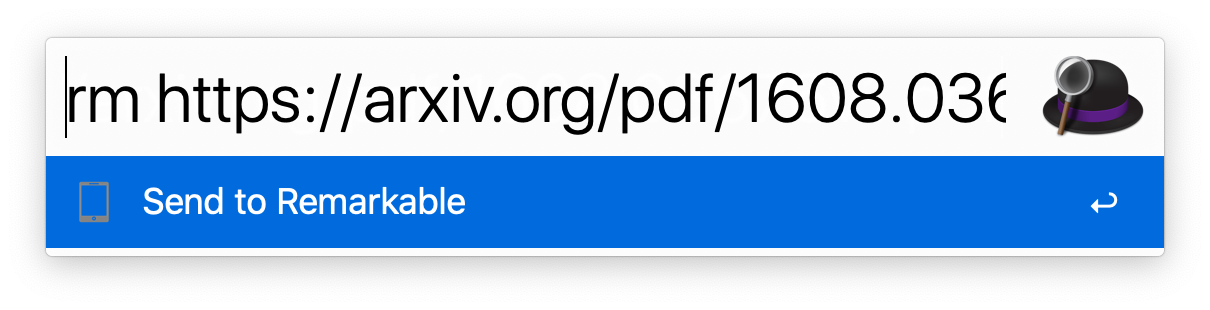 + +[workflow]: https://github.com/GjjvdBurg/paper2remarkable/blob/master/Remarkable.alfredworkflow?raw=true + +## Printing + +Printing to `p2r` allows printing prompts to save directly to your reMarkable +tablet, passing through `p2r` for processing. + +For MacOS, you can follow [the guide][print-guide] for printing with `rmapi`, +but for the bash script, instead use this script: + +``` +for f in "$@" +do + bash -c -l "p2r --right '$f'" +done +``` + +[print-guide]: https://github.com/juruen/rmapi/blob/master/docs/tutorial-print-macosx.md + +## Docker + +If you'd like to avoid installing the dependencies directly on your machine, +you can use the Dockerfile. To make this work you will need ``git`` and +``docker`` installed. + +First clone this repository with `git clone` and `cd` inside of it, then build +the container: + +```bash +docker build -t p2r . +``` + +### Authorization + +``paper2remarkable`` uses [rMapi](https://github.com/juruen/rmapi) to sync +documents to the reMarkable. The first time you run ``paper2remarkable`` you +will have to authenticate rMapi using a one-time code provided by reMarkable. +By default, rMapi uses the ``${HOME}/.rmapi`` file as a configuration file to +store the credentials, and so this is the location we will use in the commands +below. If you'd like to use a different location for the configuration (for +instance, ``${HOME}/.config/rmapi/rmapi.conf``), make sure to change the +commands below accordingly. + +If you already have a `~/.rmapi` file with the authentication details, you can +skip this section. Otherwise we'll create it and run ``rmapi`` in the docker +container for authentication: + +```bash +$ touch ${HOME}/.rmapi +$ docker run --rm -i -t -v "${HOME}/.rmapi:/home/user/.rmapi:rw" --entrypoint=rmapi p2r version +``` + +This command will print a link where you can obtain a one-time code to +authenticate rMapi and afterwards print the rMapi version (the version number +may be different): + +```bash +ReMarkable Cloud API Shell +rmapi version: 0.0.12 +``` + +### Usage + +Use the container by replacing `p2r` with `docker run --rm -v +"${HOME}/.rmapi:/home/user/.rmapi:rw" p2r`, e.g. + +``` +# print help and exit +docker run --rm -v "${HOME}/.rmapi:/home/user/.rmapi:rw" p2r --help + +# equivalent to above usage +docker run --rm -v "${HOME}/.rmapi:/home/user/.rmapi:rw" p2r -v https://arxiv.org/abs/1811.11242 + +# to transfer a local file in the current directory +docker run --rm -v "${HOME}/.rmapi:/home/user/.rmapi:rw" -v "$(pwd):/home/user:ro" p2r -v localfile.pdf +``` + +For transferring local files using the Docker image, you may find [this helper +function](https://github.com/GjjvdBurg/paper2remarkable/issues/34#issuecomment-610852258) +useful. + +You can also create an [alias](http://tldp.org/LDP/abs/html/aliases.html) in +your ``~/.bashrc`` file to abstract away the Docker commands: + +```bash +# in ~/.bashrc + +alias p2r="docker run --rm -v \"${HOME}/.rmapi:/home/user/.rmapi:rw\" p2r" +``` + +After running ``source ~/.bashrc`` to activate the alias, you can then use +``paper2remarkable`` through Docker by calling ``p2r`` from the command line. + +# Notes + +License: MIT + +If you find a problem or want to suggest a feature, please open an issue [on +Github][github-url]. You're helping to make this project better for everyone! + +Thanks to all the +[contributors](https://github.com/GjjvdBurg/paper2remarkable/graphs/contributors) +who've helped to support the project. + +[](https://www.buymeacoffee.com/GjjvdBurg) + +[github-url]: https://github.com/GjjvdBurg/paper2remarkable + + + + +%package -n python3-paper2remarkable +Summary: Easily download an academic paper and send it to the reMarkable +Provides: python-paper2remarkable +BuildRequires: python3-devel +BuildRequires: python3-setuptools +BuildRequires: python3-pip +%description -n python3-paper2remarkable + +# paper2remarkable + +[](https://pypi.org/project/paper2remarkable) +[](https://github.com/GjjvdBurg/paper2remarkable/actions) +[](https://pepy.tech/project/paper2remarkable) + +<p align="center"> + <img src="https://raw.githubusercontent.com/GjjvdBurg/paper2remarkable/master/.github/illustration.png" height="300"> +</p> + +``paper2remarkable`` is a command line program for quickly and easily +transferring an academic paper to your [reMarkable](https://remarkable.com/): + +``` +$ p2r https://arxiv.org/abs/1811.11242 +``` + +There is also support for transferring an article from a website: + +``` +$ p2r https://hbr.org/2019/11/getting-your-team-to-do-more-than-meet-deadlines +``` + +The script can be run through the ``p2r`` command line program or via Docker +(see below). If you're using MacOS, you might be interested in the [Alfred +workflow](#alfred-workflow) or [Printing to p2r](#printing). On Linux, a +background terminal such as [Guake](http://guake-project.org/) can be very +handy. Note that even without a reMarkable, this program can make downloading +papers easier (just use the `-n` flag). + +## Introduction + +``paper2remarkable`` makes it as easy as possible to get a PDF on your +reMarkable from any of the following sources: + +* [arXiv](https://arxiv.org/) +* [ACL Web](https://www.aclweb.org/anthology/) +* [ACM Digital Library](https://dl.acm.org/dl.cfm) +* [CiteSeerX](http://citeseerx.ist.psu.edu/index) +* [CVF](https://openaccess.thecvf.com/menu) +* [ECCC](https://eccc.weizmann.ac.il/reports/menu/) +* [IACR](https://eprint.iacr.org/) +* [JMLR](http://jmlr.org) +* [Nature](https://www.nature.com) +* [NBER](https://www.nber.org) +* [NeurIPS](https://papers.nips.cc/) +* [OpenReview](https://openreview.net/) +* [PMLR](http://proceedings.mlr.press/) +* [PubMed Central](https://www.ncbi.nlm.nih.gov/pmc/) +* [SagePub](https://journals.sagepub.com/) +* [ScienceDirect](https://www.sciencedirect.com/) +* [SemanticScholar](https://www.semanticscholar.org/) +* [SpringerLink](https://link.springer.com/) +* [Taylor & Francis](https://www.tandfonline.com/) +* A generic URL to a PDF file +* A local PDF file +* Any article on a website + +The program aims to be flexible to the exact source URL, so for many of the +academic sources you can either provide a URL to the abstract page or to the +PDF file. If you have a source that you would like to see added to the list, +let me know! + +``paper2remarkable`` takes the source URL and: + +1. Downloads the pdf +2. Removes the arXiv timestamp (for arXiv sources) +3. Crops the pdf to remove unnecessary borders +4. Shrinks the pdf file to reduce the filesize +5. Generates a nice filename based on author/title/year of the paper +6. Uploads it to your reMarkable using + [rMapi](https://github.com/juruen/rmapi). + +Optionally, you can: + +- Download a paper but not upload to the reMarkable using the ``-n`` switch. +- Insert a blank page after each page using the ``-b`` switch (useful for note + taking!) +- Center (``-c``) or right-align (``-r``) the pdf on the reMarkable (default + is left-aligned), or disable cropping altogether (``-k``). +- Provide an explicit filename using the ``--filename`` parameter +- Specify the location on the reMarkable to place the file (default ``/``) + +Here's an example with verbose mode enabled that shows everything the script +does by default: + +``` +$ p2r -v https://arxiv.org/abs/1811.11242 +2019-05-30 00:38:27 - INFO - Starting ArxivProvider +2019-05-30 00:38:27 - INFO - Getting paper info from arXiv +2019-05-30 00:38:27 - INFO - Downloading url: https://arxiv.org/abs/1811.11242 +2019-05-30 00:38:27 - INFO - Generating output filename +2019-05-30 00:38:27 - INFO - Created filename: Burg_Nazabal_Sutton_-_Wrangling_Messy_CSV_Files_by_Detecting_Row_and_Type_Patterns_2018.pdf +2019-05-30 00:38:27 - INFO - Downloading file at url: https://arxiv.org/pdf/1811.11242.pdf +2019-05-30 00:38:32 - INFO - Downloading url: https://arxiv.org/pdf/1811.11242.pdf +2019-05-30 00:38:32 - INFO - Removing arXiv timestamp +2019-05-30 00:38:34 - INFO - Cropping pdf file +2019-05-30 00:38:37 - INFO - Shrinking pdf file +2019-05-30 00:38:38 - INFO - Starting upload to reMarkable +2019-05-30 00:38:42 - INFO - Upload successful. +``` + +## Installation + +*For ArchLinux, paper2remarkable can be installed through the [Arch User +Repository](https://aur.archlinux.org/packages/paper2remarkable/).* + +The script requires the following external programs to be available: + +- [pdftk](https://www.pdflabs.com/tools/pdftk-the-pdf-toolkit/), + [qpdf](http://qpdf.sourceforge.net/), or + [pdftk-java](https://gitlab.com/pdftk-java/pdftk), whichever your package + manager provides. +- [GhostScript](https://www.ghostscript.com/) +- [rMAPI](https://github.com/juruen/rmapi) + +Specifically: + +1. First install [rMAPI](https://github.com/juruen/rmapi), using + ``` + $ go get -u github.com/juruen/rmapi + ``` + +2. Then install system dependencies: + - **Arch Linux:** ``pacman -S pdftk ghostscript poppler`` + - **Ubuntu:** ``apt-get install pdftk ghostscript poppler-utils``. Replace + ``pdftk`` with ``qpdf`` if your distribution doesn't package ``pdftk``. + - **MacOS:** ``brew install pdftk-java ghostscript poppler`` (using [HomeBrew](https://brew.sh/)). + - **Windows:** Installers or executables are available for + [qpdf](https://github.com/qpdf/qpdf/releases) (for instance the mingw + binary executables) and + [GhostScript](https://www.ghostscript.com/download/gsdnld.html). + Importantly, Windows support is untested and these are generic + instructions, so we welcome clarifications where needed. The Docker + instructions below may be more convenient on Windows. + +3. Finally, install ``paper2remarkable``: + ``` + $ pip install paper2remarkable + ``` + this installs the ``p2r`` command line program. + +**Optionally**, you can install: + +- [pdftoppm](https://linux.die.net/man/1/pdftoppm) (recommended for speed). + Usually part of a [Poppler](https://poppler.freedesktop.org/) installation. + +- the [ReadabiliPy](https://github.com/alan-turing-institute/ReadabiliPy) + package with Node.js support, to allow using + [Readability.js](https://github.com/mozilla/readability) for HTML articles. + This is known to improve the output of certain web articles. + +If any of the dependencies (such as rmapi or ghostscript) are not available on +the ``PATH`` variable, you can supply them with the relevant options to the +script (for instance ``p2r --rmapi /path/to/rmapi``). If you run into trouble +with the installation, please let me know by opening an issue [on +Github][github-url]. + +## Usage + +The full help of the script is as follows. Hopefully the various command line +flags are self-explanatory, but if you'd like more information see the [man +page](docs/man.md) (``man p2r``) or open an issue [on GitHub][github-url]. + +``` +usage: p2r [-h] [-b] [-c] [-d] [-e] [-n] [-p REMARKABLE_DIR] [-r] [-k] [-v] + [-V] [-f FILENAME] [--gs GS] [--pdftoppm PDFTOPPM] [--pdftk PDFTK] + [--qpdf QPDF] [--rmapi RMAPI] [--css CSS] [--font-urls FONT_URLS] + [-C CONFIG] input [input ...] + +Paper2reMarkable version 0.9.4 + +positional arguments: + input One or more URLs to a paper or paths to local PDF + files + +optional arguments: + -h, --help show this help message and exit + -b, --blank Add a blank page after every page of the PDF + -c, --center Center the PDF on the page, instead of left align + -d, --debug debug mode, doesn't upload to reMarkable + -e, --experimental enable experimental features + -n, --no-upload don't upload to reMarkable, save the output in current + directory + -p REMARKABLE_DIR, --remarkable-path REMARKABLE_DIR + directory on reMarkable to put the file (created if + missing, default: /) + -r, --right Right align so the menu doesn't cover it + -k, --no-crop Don't crop the pdf file + -v, --verbose be verbose + -V, --version Show version and exit + -f FILENAME, --filename FILENAME + Filename to use for the file on reMarkable + --gs GS path to gs executable (default: gs) + --pdftoppm PDFTOPPM path to pdftoppm executable (default: pdftoppm) + --pdftk PDFTK path to pdftk executable (default: pdftk) + --qpdf QPDF path to qpdf executable (default: qpdf) + --rmapi RMAPI path to rmapi executable (default: rmapi) + --css CSS path to custom CSS file for HTML output + --font-urls FONT_URLS + path to custom font urls file for HTML output + -C CONFIG, --config CONFIG + path to config file (default: ~/.paper2remarkable.yml) +``` + +By default ``paper2remarkable`` makes a PDF fit better on the reMarkable by +changing the page size and removing unnecessary whitespace. Some tools for +exporting a PDF with annotations do not handle different page sizes properly, +causing annotations to be misplaced (see +[discussion](https://github.com/GjjvdBurg/paper2remarkable/issues/77)). If +this is an issue for you, you can disable cropping using the +``-k``/``--no-crop`` option to ``p2r``. + +For HTML sources (i.e. web articles) you can specify custom styling using the +``--css`` and ``--font-urls`` options. The default style in the [HTML +provider](https://github.com/GjjvdBurg/paper2remarkable/blob/a6e50d07748c842f1f0a09e4b173c87850c6ddee/paper2remarkable/providers/html.py#L36) +can serve as a starting point. + +A configuration file can be used to provide commonly-used command line +options. By default the configuration file at ``~/.paper2remarkable.yml`` is +used if it exists, but an alternative location can be provided with the +``-C/--config`` flag. Command line flags override the settings in the +configuration file. See the [config.example.yml](./config.example.yml) file +for an example configuration file and an overview of supported options. + +## Alfred Workflow + +On MacOS, you can optionally install [this Alfred workflow][workflow]. Alfred +is [a launcher for MacOS](https://www.alfredapp.com/). + +Once installed, you can then use `rm` command and `rmb` (for the `--blank` +pages to insert blank pages between pages for notes) with a URL passed. The +global shortcut `Alt-P` will send the current selection to `p2r`. Note that by +default `--right` is passed and `p2r` is executed in your `bash` environment. +You can edit the Workflow in Alfred if this doesn't work for your setup. + + + +[workflow]: https://github.com/GjjvdBurg/paper2remarkable/blob/master/Remarkable.alfredworkflow?raw=true + +## Printing + +Printing to `p2r` allows printing prompts to save directly to your reMarkable +tablet, passing through `p2r` for processing. + +For MacOS, you can follow [the guide][print-guide] for printing with `rmapi`, +but for the bash script, instead use this script: + +``` +for f in "$@" +do + bash -c -l "p2r --right '$f'" +done +``` + +[print-guide]: https://github.com/juruen/rmapi/blob/master/docs/tutorial-print-macosx.md + +## Docker + +If you'd like to avoid installing the dependencies directly on your machine, +you can use the Dockerfile. To make this work you will need ``git`` and +``docker`` installed. + +First clone this repository with `git clone` and `cd` inside of it, then build +the container: + +```bash +docker build -t p2r . +``` + +### Authorization + +``paper2remarkable`` uses [rMapi](https://github.com/juruen/rmapi) to sync +documents to the reMarkable. The first time you run ``paper2remarkable`` you +will have to authenticate rMapi using a one-time code provided by reMarkable. +By default, rMapi uses the ``${HOME}/.rmapi`` file as a configuration file to +store the credentials, and so this is the location we will use in the commands +below. If you'd like to use a different location for the configuration (for +instance, ``${HOME}/.config/rmapi/rmapi.conf``), make sure to change the +commands below accordingly. + +If you already have a `~/.rmapi` file with the authentication details, you can +skip this section. Otherwise we'll create it and run ``rmapi`` in the docker +container for authentication: + +```bash +$ touch ${HOME}/.rmapi +$ docker run --rm -i -t -v "${HOME}/.rmapi:/home/user/.rmapi:rw" --entrypoint=rmapi p2r version +``` + +This command will print a link where you can obtain a one-time code to +authenticate rMapi and afterwards print the rMapi version (the version number +may be different): + +```bash +ReMarkable Cloud API Shell +rmapi version: 0.0.12 +``` + +### Usage + +Use the container by replacing `p2r` with `docker run --rm -v +"${HOME}/.rmapi:/home/user/.rmapi:rw" p2r`, e.g. + +``` +# print help and exit +docker run --rm -v "${HOME}/.rmapi:/home/user/.rmapi:rw" p2r --help + +# equivalent to above usage +docker run --rm -v "${HOME}/.rmapi:/home/user/.rmapi:rw" p2r -v https://arxiv.org/abs/1811.11242 + +# to transfer a local file in the current directory +docker run --rm -v "${HOME}/.rmapi:/home/user/.rmapi:rw" -v "$(pwd):/home/user:ro" p2r -v localfile.pdf +``` + +For transferring local files using the Docker image, you may find [this helper +function](https://github.com/GjjvdBurg/paper2remarkable/issues/34#issuecomment-610852258) +useful. + +You can also create an [alias](http://tldp.org/LDP/abs/html/aliases.html) in +your ``~/.bashrc`` file to abstract away the Docker commands: + +```bash +# in ~/.bashrc + +alias p2r="docker run --rm -v \"${HOME}/.rmapi:/home/user/.rmapi:rw\" p2r" +``` + +After running ``source ~/.bashrc`` to activate the alias, you can then use +``paper2remarkable`` through Docker by calling ``p2r`` from the command line. + +# Notes + +License: MIT + +If you find a problem or want to suggest a feature, please open an issue [on +Github][github-url]. You're helping to make this project better for everyone! + +Thanks to all the +[contributors](https://github.com/GjjvdBurg/paper2remarkable/graphs/contributors) +who've helped to support the project. + +[](https://www.buymeacoffee.com/GjjvdBurg) + +[github-url]: https://github.com/GjjvdBurg/paper2remarkable + + + + +%package help +Summary: Development documents and examples for paper2remarkable +Provides: python3-paper2remarkable-doc +%description help + +# paper2remarkable + +[](https://pypi.org/project/paper2remarkable) +[](https://github.com/GjjvdBurg/paper2remarkable/actions) +[](https://pepy.tech/project/paper2remarkable) + +<p align="center"> + <img src="https://raw.githubusercontent.com/GjjvdBurg/paper2remarkable/master/.github/illustration.png" height="300"> +</p> + +``paper2remarkable`` is a command line program for quickly and easily +transferring an academic paper to your [reMarkable](https://remarkable.com/): + +``` +$ p2r https://arxiv.org/abs/1811.11242 +``` + +There is also support for transferring an article from a website: + +``` +$ p2r https://hbr.org/2019/11/getting-your-team-to-do-more-than-meet-deadlines +``` + +The script can be run through the ``p2r`` command line program or via Docker +(see below). If you're using MacOS, you might be interested in the [Alfred +workflow](#alfred-workflow) or [Printing to p2r](#printing). On Linux, a +background terminal such as [Guake](http://guake-project.org/) can be very +handy. Note that even without a reMarkable, this program can make downloading +papers easier (just use the `-n` flag). + +## Introduction + +``paper2remarkable`` makes it as easy as possible to get a PDF on your +reMarkable from any of the following sources: + +* [arXiv](https://arxiv.org/) +* [ACL Web](https://www.aclweb.org/anthology/) +* [ACM Digital Library](https://dl.acm.org/dl.cfm) +* [CiteSeerX](http://citeseerx.ist.psu.edu/index) +* [CVF](https://openaccess.thecvf.com/menu) +* [ECCC](https://eccc.weizmann.ac.il/reports/menu/) +* [IACR](https://eprint.iacr.org/) +* [JMLR](http://jmlr.org) +* [Nature](https://www.nature.com) +* [NBER](https://www.nber.org) +* [NeurIPS](https://papers.nips.cc/) +* [OpenReview](https://openreview.net/) +* [PMLR](http://proceedings.mlr.press/) +* [PubMed Central](https://www.ncbi.nlm.nih.gov/pmc/) +* [SagePub](https://journals.sagepub.com/) +* [ScienceDirect](https://www.sciencedirect.com/) +* [SemanticScholar](https://www.semanticscholar.org/) +* [SpringerLink](https://link.springer.com/) +* [Taylor & Francis](https://www.tandfonline.com/) +* A generic URL to a PDF file +* A local PDF file +* Any article on a website + +The program aims to be flexible to the exact source URL, so for many of the +academic sources you can either provide a URL to the abstract page or to the +PDF file. If you have a source that you would like to see added to the list, +let me know! + +``paper2remarkable`` takes the source URL and: + +1. Downloads the pdf +2. Removes the arXiv timestamp (for arXiv sources) +3. Crops the pdf to remove unnecessary borders +4. Shrinks the pdf file to reduce the filesize +5. Generates a nice filename based on author/title/year of the paper +6. Uploads it to your reMarkable using + [rMapi](https://github.com/juruen/rmapi). + +Optionally, you can: + +- Download a paper but not upload to the reMarkable using the ``-n`` switch. +- Insert a blank page after each page using the ``-b`` switch (useful for note + taking!) +- Center (``-c``) or right-align (``-r``) the pdf on the reMarkable (default + is left-aligned), or disable cropping altogether (``-k``). +- Provide an explicit filename using the ``--filename`` parameter +- Specify the location on the reMarkable to place the file (default ``/``) + +Here's an example with verbose mode enabled that shows everything the script +does by default: + +``` +$ p2r -v https://arxiv.org/abs/1811.11242 +2019-05-30 00:38:27 - INFO - Starting ArxivProvider +2019-05-30 00:38:27 - INFO - Getting paper info from arXiv +2019-05-30 00:38:27 - INFO - Downloading url: https://arxiv.org/abs/1811.11242 +2019-05-30 00:38:27 - INFO - Generating output filename +2019-05-30 00:38:27 - INFO - Created filename: Burg_Nazabal_Sutton_-_Wrangling_Messy_CSV_Files_by_Detecting_Row_and_Type_Patterns_2018.pdf +2019-05-30 00:38:27 - INFO - Downloading file at url: https://arxiv.org/pdf/1811.11242.pdf +2019-05-30 00:38:32 - INFO - Downloading url: https://arxiv.org/pdf/1811.11242.pdf +2019-05-30 00:38:32 - INFO - Removing arXiv timestamp +2019-05-30 00:38:34 - INFO - Cropping pdf file +2019-05-30 00:38:37 - INFO - Shrinking pdf file +2019-05-30 00:38:38 - INFO - Starting upload to reMarkable +2019-05-30 00:38:42 - INFO - Upload successful. +``` + +## Installation + +*For ArchLinux, paper2remarkable can be installed through the [Arch User +Repository](https://aur.archlinux.org/packages/paper2remarkable/).* + +The script requires the following external programs to be available: + +- [pdftk](https://www.pdflabs.com/tools/pdftk-the-pdf-toolkit/), + [qpdf](http://qpdf.sourceforge.net/), or + [pdftk-java](https://gitlab.com/pdftk-java/pdftk), whichever your package + manager provides. +- [GhostScript](https://www.ghostscript.com/) +- [rMAPI](https://github.com/juruen/rmapi) + +Specifically: + +1. First install [rMAPI](https://github.com/juruen/rmapi), using + ``` + $ go get -u github.com/juruen/rmapi + ``` + +2. Then install system dependencies: + - **Arch Linux:** ``pacman -S pdftk ghostscript poppler`` + - **Ubuntu:** ``apt-get install pdftk ghostscript poppler-utils``. Replace + ``pdftk`` with ``qpdf`` if your distribution doesn't package ``pdftk``. + - **MacOS:** ``brew install pdftk-java ghostscript poppler`` (using [HomeBrew](https://brew.sh/)). + - **Windows:** Installers or executables are available for + [qpdf](https://github.com/qpdf/qpdf/releases) (for instance the mingw + binary executables) and + [GhostScript](https://www.ghostscript.com/download/gsdnld.html). + Importantly, Windows support is untested and these are generic + instructions, so we welcome clarifications where needed. The Docker + instructions below may be more convenient on Windows. + +3. Finally, install ``paper2remarkable``: + ``` + $ pip install paper2remarkable + ``` + this installs the ``p2r`` command line program. + +**Optionally**, you can install: + +- [pdftoppm](https://linux.die.net/man/1/pdftoppm) (recommended for speed). + Usually part of a [Poppler](https://poppler.freedesktop.org/) installation. + +- the [ReadabiliPy](https://github.com/alan-turing-institute/ReadabiliPy) + package with Node.js support, to allow using + [Readability.js](https://github.com/mozilla/readability) for HTML articles. + This is known to improve the output of certain web articles. + +If any of the dependencies (such as rmapi or ghostscript) are not available on +the ``PATH`` variable, you can supply them with the relevant options to the +script (for instance ``p2r --rmapi /path/to/rmapi``). If you run into trouble +with the installation, please let me know by opening an issue [on +Github][github-url]. + +## Usage + +The full help of the script is as follows. Hopefully the various command line +flags are self-explanatory, but if you'd like more information see the [man +page](docs/man.md) (``man p2r``) or open an issue [on GitHub][github-url]. + +``` +usage: p2r [-h] [-b] [-c] [-d] [-e] [-n] [-p REMARKABLE_DIR] [-r] [-k] [-v] + [-V] [-f FILENAME] [--gs GS] [--pdftoppm PDFTOPPM] [--pdftk PDFTK] + [--qpdf QPDF] [--rmapi RMAPI] [--css CSS] [--font-urls FONT_URLS] + [-C CONFIG] input [input ...] + +Paper2reMarkable version 0.9.4 + +positional arguments: + input One or more URLs to a paper or paths to local PDF + files + +optional arguments: + -h, --help show this help message and exit + -b, --blank Add a blank page after every page of the PDF + -c, --center Center the PDF on the page, instead of left align + -d, --debug debug mode, doesn't upload to reMarkable + -e, --experimental enable experimental features + -n, --no-upload don't upload to reMarkable, save the output in current + directory + -p REMARKABLE_DIR, --remarkable-path REMARKABLE_DIR + directory on reMarkable to put the file (created if + missing, default: /) + -r, --right Right align so the menu doesn't cover it + -k, --no-crop Don't crop the pdf file + -v, --verbose be verbose + -V, --version Show version and exit + -f FILENAME, --filename FILENAME + Filename to use for the file on reMarkable + --gs GS path to gs executable (default: gs) + --pdftoppm PDFTOPPM path to pdftoppm executable (default: pdftoppm) + --pdftk PDFTK path to pdftk executable (default: pdftk) + --qpdf QPDF path to qpdf executable (default: qpdf) + --rmapi RMAPI path to rmapi executable (default: rmapi) + --css CSS path to custom CSS file for HTML output + --font-urls FONT_URLS + path to custom font urls file for HTML output + -C CONFIG, --config CONFIG + path to config file (default: ~/.paper2remarkable.yml) +``` + +By default ``paper2remarkable`` makes a PDF fit better on the reMarkable by +changing the page size and removing unnecessary whitespace. Some tools for +exporting a PDF with annotations do not handle different page sizes properly, +causing annotations to be misplaced (see +[discussion](https://github.com/GjjvdBurg/paper2remarkable/issues/77)). If +this is an issue for you, you can disable cropping using the +``-k``/``--no-crop`` option to ``p2r``. + +For HTML sources (i.e. web articles) you can specify custom styling using the +``--css`` and ``--font-urls`` options. The default style in the [HTML +provider](https://github.com/GjjvdBurg/paper2remarkable/blob/a6e50d07748c842f1f0a09e4b173c87850c6ddee/paper2remarkable/providers/html.py#L36) +can serve as a starting point. + +A configuration file can be used to provide commonly-used command line +options. By default the configuration file at ``~/.paper2remarkable.yml`` is +used if it exists, but an alternative location can be provided with the +``-C/--config`` flag. Command line flags override the settings in the +configuration file. See the [config.example.yml](./config.example.yml) file +for an example configuration file and an overview of supported options. + +## Alfred Workflow + +On MacOS, you can optionally install [this Alfred workflow][workflow]. Alfred +is [a launcher for MacOS](https://www.alfredapp.com/). + +Once installed, you can then use `rm` command and `rmb` (for the `--blank` +pages to insert blank pages between pages for notes) with a URL passed. The +global shortcut `Alt-P` will send the current selection to `p2r`. Note that by +default `--right` is passed and `p2r` is executed in your `bash` environment. +You can edit the Workflow in Alfred if this doesn't work for your setup. + + + +[workflow]: https://github.com/GjjvdBurg/paper2remarkable/blob/master/Remarkable.alfredworkflow?raw=true + +## Printing + +Printing to `p2r` allows printing prompts to save directly to your reMarkable +tablet, passing through `p2r` for processing. + +For MacOS, you can follow [the guide][print-guide] for printing with `rmapi`, +but for the bash script, instead use this script: + +``` +for f in "$@" +do + bash -c -l "p2r --right '$f'" +done +``` + +[print-guide]: https://github.com/juruen/rmapi/blob/master/docs/tutorial-print-macosx.md + +## Docker + +If you'd like to avoid installing the dependencies directly on your machine, +you can use the Dockerfile. To make this work you will need ``git`` and +``docker`` installed. + +First clone this repository with `git clone` and `cd` inside of it, then build +the container: + +```bash +docker build -t p2r . +``` + +### Authorization + +``paper2remarkable`` uses [rMapi](https://github.com/juruen/rmapi) to sync +documents to the reMarkable. The first time you run ``paper2remarkable`` you +will have to authenticate rMapi using a one-time code provided by reMarkable. +By default, rMapi uses the ``${HOME}/.rmapi`` file as a configuration file to +store the credentials, and so this is the location we will use in the commands +below. If you'd like to use a different location for the configuration (for +instance, ``${HOME}/.config/rmapi/rmapi.conf``), make sure to change the +commands below accordingly. + +If you already have a `~/.rmapi` file with the authentication details, you can +skip this section. Otherwise we'll create it and run ``rmapi`` in the docker +container for authentication: + +```bash +$ touch ${HOME}/.rmapi +$ docker run --rm -i -t -v "${HOME}/.rmapi:/home/user/.rmapi:rw" --entrypoint=rmapi p2r version +``` + +This command will print a link where you can obtain a one-time code to +authenticate rMapi and afterwards print the rMapi version (the version number +may be different): + +```bash +ReMarkable Cloud API Shell +rmapi version: 0.0.12 +``` + +### Usage + +Use the container by replacing `p2r` with `docker run --rm -v +"${HOME}/.rmapi:/home/user/.rmapi:rw" p2r`, e.g. + +``` +# print help and exit +docker run --rm -v "${HOME}/.rmapi:/home/user/.rmapi:rw" p2r --help + +# equivalent to above usage +docker run --rm -v "${HOME}/.rmapi:/home/user/.rmapi:rw" p2r -v https://arxiv.org/abs/1811.11242 + +# to transfer a local file in the current directory +docker run --rm -v "${HOME}/.rmapi:/home/user/.rmapi:rw" -v "$(pwd):/home/user:ro" p2r -v localfile.pdf +``` + +For transferring local files using the Docker image, you may find [this helper +function](https://github.com/GjjvdBurg/paper2remarkable/issues/34#issuecomment-610852258) +useful. + +You can also create an [alias](http://tldp.org/LDP/abs/html/aliases.html) in +your ``~/.bashrc`` file to abstract away the Docker commands: + +```bash +# in ~/.bashrc + +alias p2r="docker run --rm -v \"${HOME}/.rmapi:/home/user/.rmapi:rw\" p2r" +``` + +After running ``source ~/.bashrc`` to activate the alias, you can then use +``paper2remarkable`` through Docker by calling ``p2r`` from the command line. + +# Notes + +License: MIT + +If you find a problem or want to suggest a feature, please open an issue [on +Github][github-url]. You're helping to make this project better for everyone! + +Thanks to all the +[contributors](https://github.com/GjjvdBurg/paper2remarkable/graphs/contributors) +who've helped to support the project. + +[](https://www.buymeacoffee.com/GjjvdBurg) + +[github-url]: https://github.com/GjjvdBurg/paper2remarkable + + + + +%prep +%autosetup -n paper2remarkable-0.9.11 + +%build +%py3_build + +%install +%py3_install +install -d -m755 %{buildroot}/%{_pkgdocdir} +if [ -d doc ]; then cp -arf doc %{buildroot}/%{_pkgdocdir}; fi +if [ -d docs ]; then cp -arf docs %{buildroot}/%{_pkgdocdir}; fi +if [ -d example ]; then cp -arf example %{buildroot}/%{_pkgdocdir}; fi +if [ -d examples ]; then cp -arf examples %{buildroot}/%{_pkgdocdir}; fi +pushd %{buildroot} +if [ -d usr/lib ]; then + find usr/lib -type f -printf "/%h/%f\n" >> filelist.lst +fi +if [ -d usr/lib64 ]; then + find usr/lib64 -type f -printf "/%h/%f\n" >> filelist.lst +fi +if [ -d usr/bin ]; then + find usr/bin -type f -printf "/%h/%f\n" >> filelist.lst +fi +if [ -d usr/sbin ]; then + find usr/sbin -type f -printf "/%h/%f\n" >> filelist.lst +fi +touch doclist.lst +if [ -d usr/share/man ]; then + find usr/share/man -type f -printf "/%h/%f.gz\n" >> doclist.lst +fi +popd +mv %{buildroot}/filelist.lst . +mv %{buildroot}/doclist.lst . + +%files -n python3-paper2remarkable -f filelist.lst +%dir %{python3_sitelib}/* + +%files help -f doclist.lst +%{_docdir}/* + +%changelog +* Mon May 15 2023 Python_Bot <Python_Bot@openeuler.org> - 0.9.11-1 +- Package Spec generated @@ -0,0 +1 @@ +64f1f3d6a3274bcae5886c474953edf3 paper2remarkable-0.9.11.tar.gz |