
diff options
| author | CoprDistGit <infra@openeuler.org> | 2023-05-18 07:37:40 +0000 |
|---|---|---|
| committer | CoprDistGit <infra@openeuler.org> | 2023-05-18 07:37:40 +0000 |
| commit | 75893d2c37ff1b9d5e5a3564a130b99ae962d02c (patch) | |
| tree | 14a7d350285f5e9b6e450e107dc51f2f0eb2ad67 | |
| parent | 779a3ee8464588fd63322650f07ad8d55c4f222c (diff) | |
automatic import of python-ppdyn
| -rw-r--r-- | .gitignore | 1 | ||||
| -rw-r--r-- | python-ppdyn.spec | 471 | ||||
| -rw-r--r-- | sources | 1 |
3 files changed, 473 insertions, 0 deletions
@@ -0,0 +1 @@ +/PPDyn-1.0.8.tar.gz diff --git a/python-ppdyn.spec b/python-ppdyn.spec new file mode 100644 index 0000000..495a228 --- /dev/null +++ b/python-ppdyn.spec @@ -0,0 +1,471 @@ +%global _empty_manifest_terminate_build 0 +Name: python-PPDyn +Version: 1.0.8 +Release: 1 +Summary: A python package to simulate plasma particles using Molecular Dynamics Algorithm. +License: MIT +URL: https://github.com/sayanadhikari/PPDyn +Source0: https://mirrors.nju.edu.cn/pypi/web/packages/47/32/888222ac9d0fb72b0dfb47a9cec03b33ba39c6b062a456edf1af85be62c2/PPDyn-1.0.8.tar.gz +BuildArch: noarch + +Requires: python3-numpy +Requires: python3-scipy +Requires: python3-ini-parser +Requires: python3-numba +Requires: python3-h5py +Requires: python3-matplotlib + +%description +# PPDyn (Plasma Particle Dynamics) +[](https://github.com/sayanadhikari/PPDyn/actions/workflows/main.yml) +[](https://github.com/sayanadhikari/PPDyn/actions/workflows/make.yml) +[](https://zenodo.org/badge/latestdoi/349242730) +[](https://ppdyn.readthedocs.io/en/latest/?badge=latest) +[](https://pypi.org/project/PPDyn/) + +A python code to simulate plasma particles using Molecular Dynamics Algorithm. [Numba JIT compiler](https://numba.pydata.org/) for Python has been implemented for faster performance. + +A detailed documentation can be found at https://ppdyn.readthedocs.io/. + +<!-- <video src="assets/videos/Plasma Particle Dynamics using Molecular Dynamics Method.mp4" poster="assets/images/ppdyn_poster.png" width="320" height="200" controls preload></video> --> + +Example: +<!--[![PPDyn Example]()](https://user-images.githubusercontent.com/11753189/114286735-b5f26900-9a61-11eb-86ba-76ee295d6448.mp4)--> + + +[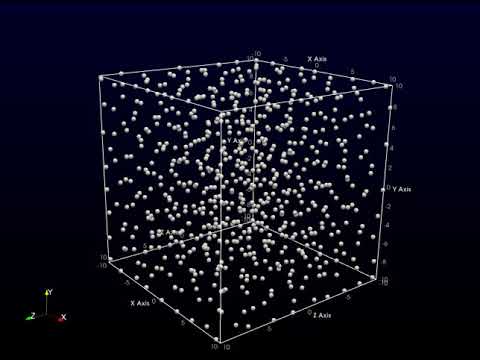](https://www.youtube.com/embed/qvQRUX-rSrQ) + + +## Problem +<!--Rayleigh Problem = gas between 2 plates ([Alexander & Garcia, 1997](https://doi.org/10.1063/1.168619)) --> + +## Contributors +- [Sayan Adhikari](https://github.com/sayanadhikari), UiO, Norway. [@sayanadhikari](https://twitter.com/sayanadhikari) +- [Rupak Mukherjee](https://github.com/RupakMukherjee), PPPL, USA. + +## Installation +### Prerequisites +1. [GNU Make](https://www.gnu.org/software/make/) +2. [python3 or higher](https://www.python.org/download/releases/3.0/) +3. [git](https://git-scm.com/) + +### Procedure +#### Using PyPI +```bash +pip install PPDyn +``` +*Usage* + +Download the input template to your working directory +```shell +wget https://raw.githubusercontent.com/sayanadhikari/PPDyn/main/input.ini +``` +Now, either create a python script in your working directory or use your python console +```python +from PPDyn import ppdyn +from PPDyn.ppdplot import animate +import time + +start = time.time() +ppdyn(input) +end = time.time() +print("Elapsed (after compilation) = %s"%(end - start)+" seconds") +animate() +``` +#### Using GNU Make +First make a clone of the master branch using the following command +```shell +git clone https://github.com/sayanadhikari/PPDyn.git +``` +Then enter inside the *PPDyn* directory +```shell +cd PPDyn +``` +Now complile and built the *PPDyn* code +```shell +make all +``` +*Usage* + +Upon successful compilation, run the code using following command +```shell +ppdyn -i input.ini +``` +## Parameter Setup +Edit the _input.ini_ and run the code again. The basic structure of _input.ini_ is provided below, +```ini +; +; @file input.ini +; @brief PPDyn inputfile. +; +scope = default + +[simbox] +Lx = 10.0 ; System length in X +Ly = 10.0 ; System length in Y +Lz = 10.0 ; System length in Z + +[particles] +N = 700 ; Number of particles +Vxmax = 1.0 ; Maximum velocity in X +Vymax = 1.0 ; Maximum velocity in Y +Vzmax = 1.0 ; Maximum velocity in Z +Temp = 0.01 ; + +[screening] +k = 1.0 + +[boundary] +btype = reflecting ; Type of boundary Options: periodic, reflecting + +[time] +tmax = 1000.0 ; Final time +dt = 0.010 ; time step size + +[diagnostics] +dumpPeriod = 50 ; Data dump period +dumpData = True +vtkData = False + +[options] +parallelMode = True ;set to false to disable parallel +``` +## Visualization +For visualization, user either can use the python scripts available inside ``scripts`` directory or can write their own. After successful run the data will be available under ``data`` directory. Two different data formats are available at present. The complete dataset will available under the name particle.hdf5. For vtk visualization users can use ``.vtu`` files inside ``data/vtkdata``. [Paraview](https://www.paraview.org/) can be used to animate particle dynamics very easily. A sample video can be found [here](https://www.youtube.com/embed/qvQRUX-rSrQ). + + +## Contributing +We welcome contributions to this project. + +1. Fork it. +2. Create your feature branch (```git checkout -b my-new-feature```). +3. Commit your changes (```git commit -am 'Add some feature'```). +4. Push to the branch (```git push origin my-new-feature```). +5. Create new Pull Request. + +## License +Released under the [MIT license](LICENSE). + + + + +%package -n python3-PPDyn +Summary: A python package to simulate plasma particles using Molecular Dynamics Algorithm. +Provides: python-PPDyn +BuildRequires: python3-devel +BuildRequires: python3-setuptools +BuildRequires: python3-pip +%description -n python3-PPDyn +# PPDyn (Plasma Particle Dynamics) +[](https://github.com/sayanadhikari/PPDyn/actions/workflows/main.yml) +[](https://github.com/sayanadhikari/PPDyn/actions/workflows/make.yml) +[](https://zenodo.org/badge/latestdoi/349242730) +[](https://ppdyn.readthedocs.io/en/latest/?badge=latest) +[](https://pypi.org/project/PPDyn/) + +A python code to simulate plasma particles using Molecular Dynamics Algorithm. [Numba JIT compiler](https://numba.pydata.org/) for Python has been implemented for faster performance. + +A detailed documentation can be found at https://ppdyn.readthedocs.io/. + +<!-- <video src="assets/videos/Plasma Particle Dynamics using Molecular Dynamics Method.mp4" poster="assets/images/ppdyn_poster.png" width="320" height="200" controls preload></video> --> + +Example: +<!--[![PPDyn Example]()](https://user-images.githubusercontent.com/11753189/114286735-b5f26900-9a61-11eb-86ba-76ee295d6448.mp4)--> + + +[](https://www.youtube.com/embed/qvQRUX-rSrQ) + + +## Problem +<!--Rayleigh Problem = gas between 2 plates ([Alexander & Garcia, 1997](https://doi.org/10.1063/1.168619)) --> + +## Contributors +- [Sayan Adhikari](https://github.com/sayanadhikari), UiO, Norway. [@sayanadhikari](https://twitter.com/sayanadhikari) +- [Rupak Mukherjee](https://github.com/RupakMukherjee), PPPL, USA. + +## Installation +### Prerequisites +1. [GNU Make](https://www.gnu.org/software/make/) +2. [python3 or higher](https://www.python.org/download/releases/3.0/) +3. [git](https://git-scm.com/) + +### Procedure +#### Using PyPI +```bash +pip install PPDyn +``` +*Usage* + +Download the input template to your working directory +```shell +wget https://raw.githubusercontent.com/sayanadhikari/PPDyn/main/input.ini +``` +Now, either create a python script in your working directory or use your python console +```python +from PPDyn import ppdyn +from PPDyn.ppdplot import animate +import time + +start = time.time() +ppdyn(input) +end = time.time() +print("Elapsed (after compilation) = %s"%(end - start)+" seconds") +animate() +``` +#### Using GNU Make +First make a clone of the master branch using the following command +```shell +git clone https://github.com/sayanadhikari/PPDyn.git +``` +Then enter inside the *PPDyn* directory +```shell +cd PPDyn +``` +Now complile and built the *PPDyn* code +```shell +make all +``` +*Usage* + +Upon successful compilation, run the code using following command +```shell +ppdyn -i input.ini +``` +## Parameter Setup +Edit the _input.ini_ and run the code again. The basic structure of _input.ini_ is provided below, +```ini +; +; @file input.ini +; @brief PPDyn inputfile. +; +scope = default + +[simbox] +Lx = 10.0 ; System length in X +Ly = 10.0 ; System length in Y +Lz = 10.0 ; System length in Z + +[particles] +N = 700 ; Number of particles +Vxmax = 1.0 ; Maximum velocity in X +Vymax = 1.0 ; Maximum velocity in Y +Vzmax = 1.0 ; Maximum velocity in Z +Temp = 0.01 ; + +[screening] +k = 1.0 + +[boundary] +btype = reflecting ; Type of boundary Options: periodic, reflecting + +[time] +tmax = 1000.0 ; Final time +dt = 0.010 ; time step size + +[diagnostics] +dumpPeriod = 50 ; Data dump period +dumpData = True +vtkData = False + +[options] +parallelMode = True ;set to false to disable parallel +``` +## Visualization +For visualization, user either can use the python scripts available inside ``scripts`` directory or can write their own. After successful run the data will be available under ``data`` directory. Two different data formats are available at present. The complete dataset will available under the name particle.hdf5. For vtk visualization users can use ``.vtu`` files inside ``data/vtkdata``. [Paraview](https://www.paraview.org/) can be used to animate particle dynamics very easily. A sample video can be found [here](https://www.youtube.com/embed/qvQRUX-rSrQ). + + +## Contributing +We welcome contributions to this project. + +1. Fork it. +2. Create your feature branch (```git checkout -b my-new-feature```). +3. Commit your changes (```git commit -am 'Add some feature'```). +4. Push to the branch (```git push origin my-new-feature```). +5. Create new Pull Request. + +## License +Released under the [MIT license](LICENSE). + + + + +%package help +Summary: Development documents and examples for PPDyn +Provides: python3-PPDyn-doc +%description help +# PPDyn (Plasma Particle Dynamics) +[](https://github.com/sayanadhikari/PPDyn/actions/workflows/main.yml) +[](https://github.com/sayanadhikari/PPDyn/actions/workflows/make.yml) +[](https://zenodo.org/badge/latestdoi/349242730) +[](https://ppdyn.readthedocs.io/en/latest/?badge=latest) +[](https://pypi.org/project/PPDyn/) + +A python code to simulate plasma particles using Molecular Dynamics Algorithm. [Numba JIT compiler](https://numba.pydata.org/) for Python has been implemented for faster performance. + +A detailed documentation can be found at https://ppdyn.readthedocs.io/. + +<!-- <video src="assets/videos/Plasma Particle Dynamics using Molecular Dynamics Method.mp4" poster="assets/images/ppdyn_poster.png" width="320" height="200" controls preload></video> --> + +Example: +<!--[![PPDyn Example]()](https://user-images.githubusercontent.com/11753189/114286735-b5f26900-9a61-11eb-86ba-76ee295d6448.mp4)--> + + +[](https://www.youtube.com/embed/qvQRUX-rSrQ) + + +## Problem +<!--Rayleigh Problem = gas between 2 plates ([Alexander & Garcia, 1997](https://doi.org/10.1063/1.168619)) --> + +## Contributors +- [Sayan Adhikari](https://github.com/sayanadhikari), UiO, Norway. [@sayanadhikari](https://twitter.com/sayanadhikari) +- [Rupak Mukherjee](https://github.com/RupakMukherjee), PPPL, USA. + +## Installation +### Prerequisites +1. [GNU Make](https://www.gnu.org/software/make/) +2. [python3 or higher](https://www.python.org/download/releases/3.0/) +3. [git](https://git-scm.com/) + +### Procedure +#### Using PyPI +```bash +pip install PPDyn +``` +*Usage* + +Download the input template to your working directory +```shell +wget https://raw.githubusercontent.com/sayanadhikari/PPDyn/main/input.ini +``` +Now, either create a python script in your working directory or use your python console +```python +from PPDyn import ppdyn +from PPDyn.ppdplot import animate +import time + +start = time.time() +ppdyn(input) +end = time.time() +print("Elapsed (after compilation) = %s"%(end - start)+" seconds") +animate() +``` +#### Using GNU Make +First make a clone of the master branch using the following command +```shell +git clone https://github.com/sayanadhikari/PPDyn.git +``` +Then enter inside the *PPDyn* directory +```shell +cd PPDyn +``` +Now complile and built the *PPDyn* code +```shell +make all +``` +*Usage* + +Upon successful compilation, run the code using following command +```shell +ppdyn -i input.ini +``` +## Parameter Setup +Edit the _input.ini_ and run the code again. The basic structure of _input.ini_ is provided below, +```ini +; +; @file input.ini +; @brief PPDyn inputfile. +; +scope = default + +[simbox] +Lx = 10.0 ; System length in X +Ly = 10.0 ; System length in Y +Lz = 10.0 ; System length in Z + +[particles] +N = 700 ; Number of particles +Vxmax = 1.0 ; Maximum velocity in X +Vymax = 1.0 ; Maximum velocity in Y +Vzmax = 1.0 ; Maximum velocity in Z +Temp = 0.01 ; + +[screening] +k = 1.0 + +[boundary] +btype = reflecting ; Type of boundary Options: periodic, reflecting + +[time] +tmax = 1000.0 ; Final time +dt = 0.010 ; time step size + +[diagnostics] +dumpPeriod = 50 ; Data dump period +dumpData = True +vtkData = False + +[options] +parallelMode = True ;set to false to disable parallel +``` +## Visualization +For visualization, user either can use the python scripts available inside ``scripts`` directory or can write their own. After successful run the data will be available under ``data`` directory. Two different data formats are available at present. The complete dataset will available under the name particle.hdf5. For vtk visualization users can use ``.vtu`` files inside ``data/vtkdata``. [Paraview](https://www.paraview.org/) can be used to animate particle dynamics very easily. A sample video can be found [here](https://www.youtube.com/embed/qvQRUX-rSrQ). + + +## Contributing +We welcome contributions to this project. + +1. Fork it. +2. Create your feature branch (```git checkout -b my-new-feature```). +3. Commit your changes (```git commit -am 'Add some feature'```). +4. Push to the branch (```git push origin my-new-feature```). +5. Create new Pull Request. + +## License +Released under the [MIT license](LICENSE). + + + + +%prep +%autosetup -n PPDyn-1.0.8 + +%build +%py3_build + +%install +%py3_install +install -d -m755 %{buildroot}/%{_pkgdocdir} +if [ -d doc ]; then cp -arf doc %{buildroot}/%{_pkgdocdir}; fi +if [ -d docs ]; then cp -arf docs %{buildroot}/%{_pkgdocdir}; fi +if [ -d example ]; then cp -arf example %{buildroot}/%{_pkgdocdir}; fi +if [ -d examples ]; then cp -arf examples %{buildroot}/%{_pkgdocdir}; fi +pushd %{buildroot} +if [ -d usr/lib ]; then + find usr/lib -type f -printf "/%h/%f\n" >> filelist.lst +fi +if [ -d usr/lib64 ]; then + find usr/lib64 -type f -printf "/%h/%f\n" >> filelist.lst +fi +if [ -d usr/bin ]; then + find usr/bin -type f -printf "/%h/%f\n" >> filelist.lst +fi +if [ -d usr/sbin ]; then + find usr/sbin -type f -printf "/%h/%f\n" >> filelist.lst +fi +touch doclist.lst +if [ -d usr/share/man ]; then + find usr/share/man -type f -printf "/%h/%f.gz\n" >> doclist.lst +fi +popd +mv %{buildroot}/filelist.lst . +mv %{buildroot}/doclist.lst . + +%files -n python3-PPDyn -f filelist.lst +%dir %{python3_sitelib}/* + +%files help -f doclist.lst +%{_docdir}/* + +%changelog +* Thu May 18 2023 Python_Bot <Python_Bot@openeuler.org> - 1.0.8-1 +- Package Spec generated @@ -0,0 +1 @@ +46e1fdc874452f41166996c10550b733 PPDyn-1.0.8.tar.gz |