1
2
3
4
5
6
7
8
9
10
11
12
13
14
15
16
17
18
19
20
21
22
23
24
25
26
27
28
29
30
31
32
33
34
35
36
37
38
39
40
41
42
43
44
45
46
47
48
49
50
51
52
53
54
55
56
57
58
59
60
61
62
63
64
65
66
67
68
69
70
71
72
73
74
75
76
77
78
79
80
81
82
83
84
85
86
87
88
89
90
91
92
93
94
95
96
97
98
99
100
101
102
103
104
105
106
107
108
109
110
111
112
113
114
115
116
117
118
119
120
121
122
123
124
125
126
127
128
129
130
131
132
133
134
135
136
137
138
139
140
141
142
143
144
145
146
147
148
149
150
151
152
153
154
155
156
157
158
159
160
161
162
163
164
165
166
167
168
169
170
171
172
173
174
175
176
177
178
179
180
181
182
183
184
185
186
187
188
189
190
191
192
193
194
195
196
197
198
199
200
201
202
203
204
205
206
207
208
209
210
211
212
213
214
215
216
217
218
219
220
221
222
223
224
225
226
227
228
229
230
231
232
233
234
235
236
237
238
239
240
241
242
243
244
245
246
247
248
249
250
251
252
253
254
255
256
257
258
259
260
261
262
263
264
265
266
267
268
269
270
271
272
273
274
275
276
277
278
279
280
281
282
283
284
285
286
287
288
289
290
291
292
293
294
295
296
297
298
299
300
301
302
303
304
305
306
307
308
309
310
311
312
313
314
315
316
317
318
319
320
321
322
323
324
325
326
327
328
329
330
331
332
333
334
335
336
337
338
339
340
341
342
343
344
345
346
347
348
349
350
351
352
353
354
355
356
357
358
359
360
361
362
363
364
365
366
367
368
369
370
371
372
373
374
375
376
377
378
379
380
381
382
383
384
385
386
387
388
389
390
391
392
393
394
395
396
397
398
399
400
401
402
403
404
405
406
407
408
409
410
411
412
413
414
415
416
417
418
419
420
421
422
423
424
425
426
427
428
429
430
431
432
433
434
435
436
437
438
439
440
441
442
443
444
445
446
447
448
449
450
451
452
453
454
455
456
457
458
459
460
461
462
463
464
465
466
467
468
469
470
471
472
473
474
475
476
477
478
479
480
481
482
483
484
485
486
487
488
489
490
491
492
493
494
495
496
497
498
499
500
501
502
503
504
505
506
507
508
509
510
511
512
513
514
515
516
517
518
519
520
521
522
523
524
525
526
527
528
529
530
531
532
533
534
535
536
537
538
539
540
541
542
543
544
545
546
547
548
549
550
551
552
553
554
555
556
557
558
559
560
561
562
563
564
565
566
567
568
569
570
571
572
573
574
575
576
577
578
579
580
581
582
583
584
585
|
%global _empty_manifest_terminate_build 0
Name: python-pyhanlp
Version: 0.1.84
Release: 1
Summary: Python wrapper for HanLP: Han Language Processing
License: Apache License 2.0
URL: https://github.com/hankcs/pyhanlp
Source0: https://mirrors.nju.edu.cn/pypi/web/packages/d2/fa/19ca69e0b94bbd9fed93272e5952d2308c13688647fac779a52729fa801f/pyhanlp-0.1.84.tar.gz
BuildArch: noarch
%description
# pyhanlp: Python interfaces for HanLP1.x
 [](https://pepy.tech/project/pyhanlp) [](https://github.com/hankcs/pyhanlp/blob/master/LICENSE) [](https://play.hanlp.ml/run/pyhanlp) [](https://mybinder.org/v2/gh/hankcs/pyhanlp.git/master?filepath=tests%2Fbook%2Findex.ipynb)
[HanLP1.x](https://github.com/hankcs/HanLP/tree/1.x)的Python接口,支持自动下载与升级[HanLP1.x](https://github.com/hankcs/HanLP/tree/1.x),兼容Python<=3.8。内部算法经过工业界和学术界考验,配套书籍[《自然语言处理入门》](http://nlp.hankcs.com/book.php)已经出版,欢迎查阅[随书代码](https://github.com/hankcs/pyhanlp/tree/master/tests/book)或点击[](https://mybinder.org/v2/gh/hankcs/pyhanlp.git/master?filepath=tests%2Fbook%2Findex.ipynb)在线运行。基于深度学习的[HanLP2.x](https://github.com/hankcs/HanLP/tree/doc-zh)已于2020年初发布,次世代最先进的多语种NLP技术,与1.x相辅相成,平行发展。
## 安装
**懒人**请点击[](https://play.hanlp.ml/run/pyhanlp);**非IT人士**可直接使用[傻瓜虚拟机](https://od.hankcs.com/book/intro_nlp/%E5%82%BB%E7%93%9C%E8%99%9A%E6%8B%9F%E6%9C%BA/);**工程师**请先安装[conda](https://docs.conda.io/en/latest/miniconda.html),然后执行:
```bash
conda install -c conda-forge openjdk python=3.8 jpype1=0.7.0 -y
pip install pyhanlp
```
使用命令`hanlp`来验证安装,如因网络等原因自动安装失败,可参考[手动配置](https://github.com/hankcs/pyhanlp/wiki/%E6%89%8B%E5%8A%A8%E9%85%8D%E7%BD%AE)或[Windows指南](https://github.com/hankcs/pyhanlp/wiki/Windows)。
## 命令行
### 中文分词
使用命令`hanlp segment`进入交互分词模式,输入一个句子并回车,[HanLP1.x](https://github.com/hankcs/HanLP/tree/1.x)会输出分词结果:
```python
$ hanlp segment
商品和服务
商品/n 和/cc 服务/vn
当下雨天地面积水分外严重
当/p 下雨天/n 地面/n 积水/n 分外/d 严重/a
龚学平等领导说,邓颖超生前杜绝超生
龚学平/nr 等/udeng 领导/n 说/v ,/w 邓颖超/nr 生前/t 杜绝/v 超生/vi
```
还可以重定向输入输出到文件等:
```python
$ hanlp segment <<< '欢迎新老师生前来就餐'
欢迎/v 新/a 老/a 师生/n 前来/vi 就餐/vi
```
### 依存句法分析
命令为`hanlp parse`,同样支持交互模式和重定向:
```python
$ hanlp parse <<< '徐先生还具体帮助他确定了把画雄鹰、松鼠和麻雀作为主攻目标。'
1 徐先生 徐先生 nh nr _ 4 主谓关系 _ _
2 还 还 d d _ 4 状中结构 _ _
3 具体 具体 a a _ 4 状中结构 _ _
4 帮助 帮助 v v _ 0 核心关系 _ _
5 他 他 r rr _ 4 兼语 _ _
6 确定 确定 v v _ 4 动宾关系 _ _
7 了 了 u ule _ 6 右附加关系 _ _
8 把 把 p pba _ 15 状中结构 _ _
9 画 画 v v _ 8 介宾关系 _ _
10 雄鹰 雄鹰 n n _ 9 动宾关系 _ _
11 、 、 wp w _ 12 标点符号 _ _
12 松鼠 松鼠 n n _ 10 并列关系 _ _
13 和 和 c cc _ 14 左附加关系 _ _
14 麻雀 麻雀 n n _ 10 并列关系 _ _
15 作为 作为 p p _ 6 动宾关系 _ _
16 主攻 主攻 v vn _ 17 定中关系 _ _
17 目标 目标 n n _ 15 动宾关系 _ _
18 。 。 wp w _ 4 标点符号 _ _
```
### 服务器
通过`hanlp serve`来启动内置的http服务器,默认本地访问地址为:http://localhost:8765 ;也可以访问官网演示页面:http://hanlp.hankcs.com/ 。
### 升级
通过`hanlp update`命令来将[HanLP1.x](https://github.com/hankcs/HanLP/tree/1.x)升级到最新版。该命令会获取[HanLP主项目最新版本](https://github.com/hankcs/HanLP/releases)并自动下载安装。
欢迎通过`hanlp --help`查看最新帮助手册。
## API
通过工具类[`HanLP`](https://github.com/hankcs/HanLP/blob/1.x/src/main/java/com/hankcs/hanlp/HanLP.java#L55)调用常用接口:
```python
from pyhanlp import *
print(HanLP.segment('你好,欢迎在Python中调用HanLP的API'))
for term in HanLP.segment('下雨天地面积水'):
print('{}\t{}'.format(term.word, term.nature)) # 获取单词与词性
testCases = [
"商品和服务",
"结婚的和尚未结婚的确实在干扰分词啊",
"买水果然后来世博园最后去世博会",
"中国的首都是北京",
"欢迎新老师生前来就餐",
"工信处女干事每月经过下属科室都要亲口交代24口交换机等技术性器件的安装工作",
"随着页游兴起到现在的页游繁盛,依赖于存档进行逻辑判断的设计减少了,但这块也不能完全忽略掉。"]
for sentence in testCases: print(HanLP.segment(sentence))
# 关键词提取
document = "水利部水资源司司长陈明忠9月29日在国务院新闻办举行的新闻发布会上透露," \
"根据刚刚完成了水资源管理制度的考核,有部分省接近了红线的指标," \
"有部分省超过红线的指标。对一些超过红线的地方,陈明忠表示,对一些取用水项目进行区域的限批," \
"严格地进行水资源论证和取水许可的批准。"
print(HanLP.extractKeyword(document, 2))
# 自动摘要
print(HanLP.extractSummary(document, 3))
# 依存句法分析
print(HanLP.parseDependency("徐先生还具体帮助他确定了把画雄鹰、松鼠和麻雀作为主攻目标。"))
```
### 更多功能
更多功能,包括但不限于:
- 自定义词典
- 极速词典分词
- 索引分词
- CRF分词
- 感知机词法分析
- 臺灣正體、香港繁體
- 关键词提取、自动摘要
- 文本分类、情感分析
请阅读[HanLP主项目文档](https://github.com/hankcs/HanLP/blob/1.x/README.md)和[demos目录](https://github.com/hankcs/pyhanlp/tree/master/tests/demos)以了解更多。调用更底层的API需要参考Java语法用JClass引入更深的类路径。以感知机词法分析器为例,这个类位于包名[`com.hankcs.hanlp.model.perceptron.PerceptronLexicalAnalyzer`](https://github.com/hankcs/HanLP/blob/1.x/src/main/java/com/hankcs/hanlp/model/perceptron/PerceptronLexicalAnalyzer.java)下,所以先用`JClass`得到类,然后就可以调用了:
```
PerceptronLexicalAnalyzer = JClass('com.hankcs.hanlp.model.perceptron.PerceptronLexicalAnalyzer')
analyzer = PerceptronLexicalAnalyzer()
print(analyzer.analyze("上海华安工业(集团)公司董事长谭旭光和秘书胡花蕊来到美国纽约现代艺术博物馆参观"))
```
输出:
```
[上海/ns 华安/nz 工业/n (/w 集团/n )/w 公司/n]/nt 董事长/n 谭旭光/nr 和/c 秘书/n 胡花蕊/nr 来到/v [美国/ns 纽约/ns 现代/t 艺术/n 博物馆/n]/ns 参观/v
```
如果你需要多线程安全性,可使用`SafeJClass`;如果你需要延迟加载,可使用`LazyLoadingJClass`。如果你经常使用某个类,欢迎将其写入`pyhanlp/__init__.py`中并提交pull request,谢谢!
## 与其他项目共享data
[HanLP1.x](https://github.com/hankcs/HanLP/tree/1.x)具备高度可自定义的特点,所有模型和词典都可以自由替换。如果你希望与别的项目共享同一套data,只需将该项目的配置文件`hanlp.properties`拷贝到pyhanlp的安装目录下即可。本机安装目录可以通过`hanlp --version`获取。
同时,还可以通过`--config`临时加载另一个配置文件:
```
hanlp segment --config path/to/another/hanlp.properties
```
## 测试
```
git clone https://github.com/hankcs/pyhanlp.git
cd pyhanlp
pip install -e .
python tests/test_hanlp.py
```
## 反馈
任何bug,请前往[HanLP issue区](https://github.com/hankcs/HanLP/issues)。提问请上[论坛](https://bbs.hankcs.com/)反馈,谢谢。
## [《自然语言处理入门》](http://nlp.hankcs.com/book.php)
自然语言处理是一门博大精深的学科,掌握理论才能发挥出工具的全部性能。新手可考虑这本入门书:
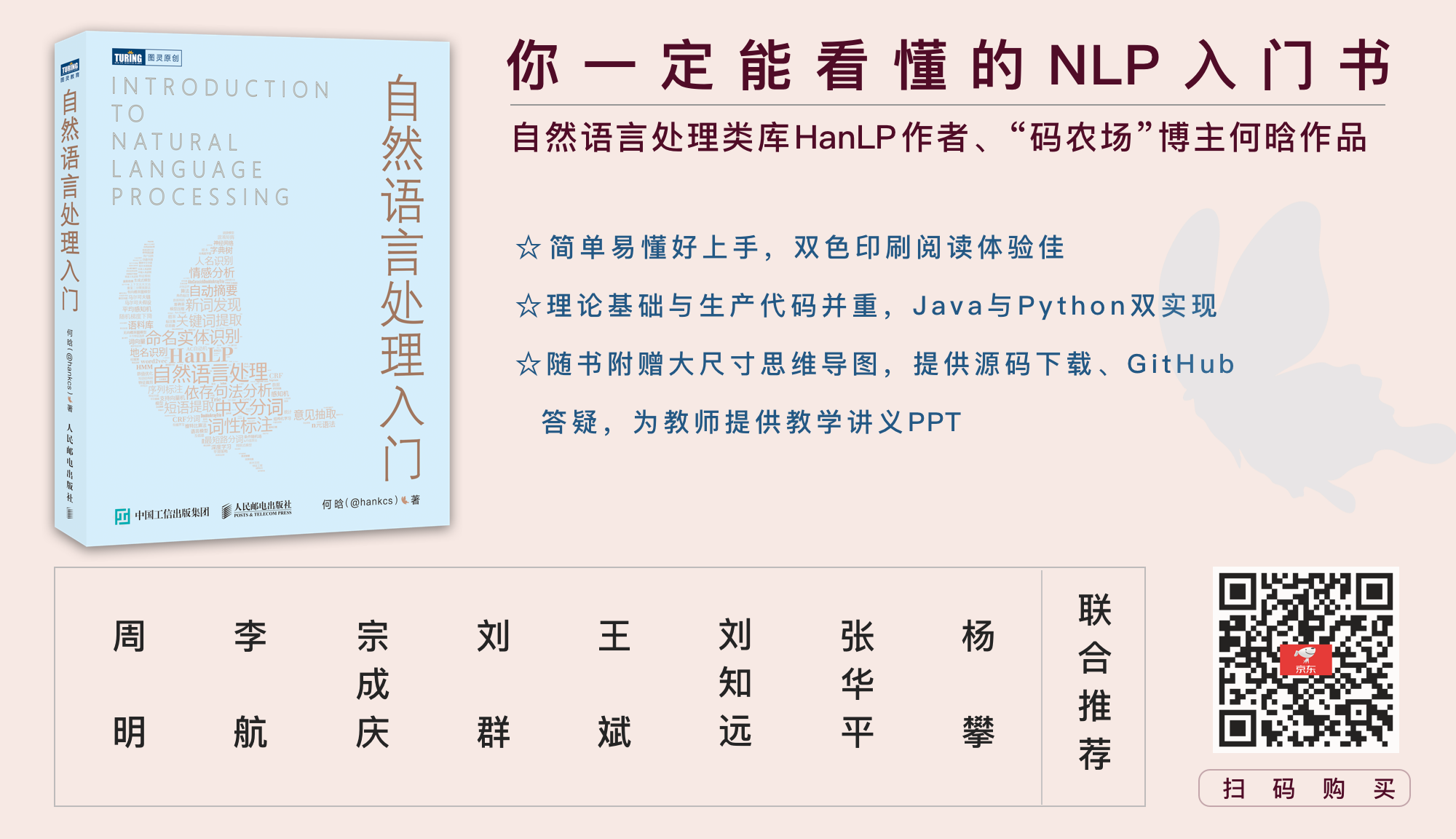
一本配套HanLP的NLP入门书,基础理论与生产代码并重,Python与Java双实现。从基本概念出发,逐步介绍中文分词、词性标注、命名实体识别、信息抽取、文本聚类、文本分类、句法分析这几个热门问题的算法原理与工程实现。书中通过对多种算法的讲解,比较了它们的优缺点和适用场景,同时详细演示生产级成熟代码,助你真正将自然语言处理应用在生产环境中。
[《自然语言处理入门》](http://nlp.hankcs.com/book.php)由南方科技大学数学系创系主任夏志宏、微软亚洲研究院副院长周明、字节跳动人工智能实验室总监李航、华为诺亚方舟实验室语音语义首席科学家刘群、小米人工智能实验室主任兼NLP首席科学家王斌、中国科学院自动化研究所研究员宗成庆、清华大学副教授刘知远、北京理工大学副教授张华平和52nlp作序推荐。感谢各位前辈老师,希望这个项目和这本书能成为大家工程和学习上的“蝴蝶效应”,帮助大家在NLP之路上蜕变成蝶。
## 授权协议
Apache License 2.0
%package -n python3-pyhanlp
Summary: Python wrapper for HanLP: Han Language Processing
Provides: python-pyhanlp
BuildRequires: python3-devel
BuildRequires: python3-setuptools
BuildRequires: python3-pip
%description -n python3-pyhanlp
# pyhanlp: Python interfaces for HanLP1.x
 [](https://pepy.tech/project/pyhanlp) [](https://github.com/hankcs/pyhanlp/blob/master/LICENSE) [](https://play.hanlp.ml/run/pyhanlp) [](https://mybinder.org/v2/gh/hankcs/pyhanlp.git/master?filepath=tests%2Fbook%2Findex.ipynb)
[HanLP1.x](https://github.com/hankcs/HanLP/tree/1.x)的Python接口,支持自动下载与升级[HanLP1.x](https://github.com/hankcs/HanLP/tree/1.x),兼容Python<=3.8。内部算法经过工业界和学术界考验,配套书籍[《自然语言处理入门》](http://nlp.hankcs.com/book.php)已经出版,欢迎查阅[随书代码](https://github.com/hankcs/pyhanlp/tree/master/tests/book)或点击[](https://mybinder.org/v2/gh/hankcs/pyhanlp.git/master?filepath=tests%2Fbook%2Findex.ipynb)在线运行。基于深度学习的[HanLP2.x](https://github.com/hankcs/HanLP/tree/doc-zh)已于2020年初发布,次世代最先进的多语种NLP技术,与1.x相辅相成,平行发展。
## 安装
**懒人**请点击[](https://play.hanlp.ml/run/pyhanlp);**非IT人士**可直接使用[傻瓜虚拟机](https://od.hankcs.com/book/intro_nlp/%E5%82%BB%E7%93%9C%E8%99%9A%E6%8B%9F%E6%9C%BA/);**工程师**请先安装[conda](https://docs.conda.io/en/latest/miniconda.html),然后执行:
```bash
conda install -c conda-forge openjdk python=3.8 jpype1=0.7.0 -y
pip install pyhanlp
```
使用命令`hanlp`来验证安装,如因网络等原因自动安装失败,可参考[手动配置](https://github.com/hankcs/pyhanlp/wiki/%E6%89%8B%E5%8A%A8%E9%85%8D%E7%BD%AE)或[Windows指南](https://github.com/hankcs/pyhanlp/wiki/Windows)。
## 命令行
### 中文分词
使用命令`hanlp segment`进入交互分词模式,输入一个句子并回车,[HanLP1.x](https://github.com/hankcs/HanLP/tree/1.x)会输出分词结果:
```python
$ hanlp segment
商品和服务
商品/n 和/cc 服务/vn
当下雨天地面积水分外严重
当/p 下雨天/n 地面/n 积水/n 分外/d 严重/a
龚学平等领导说,邓颖超生前杜绝超生
龚学平/nr 等/udeng 领导/n 说/v ,/w 邓颖超/nr 生前/t 杜绝/v 超生/vi
```
还可以重定向输入输出到文件等:
```python
$ hanlp segment <<< '欢迎新老师生前来就餐'
欢迎/v 新/a 老/a 师生/n 前来/vi 就餐/vi
```
### 依存句法分析
命令为`hanlp parse`,同样支持交互模式和重定向:
```python
$ hanlp parse <<< '徐先生还具体帮助他确定了把画雄鹰、松鼠和麻雀作为主攻目标。'
1 徐先生 徐先生 nh nr _ 4 主谓关系 _ _
2 还 还 d d _ 4 状中结构 _ _
3 具体 具体 a a _ 4 状中结构 _ _
4 帮助 帮助 v v _ 0 核心关系 _ _
5 他 他 r rr _ 4 兼语 _ _
6 确定 确定 v v _ 4 动宾关系 _ _
7 了 了 u ule _ 6 右附加关系 _ _
8 把 把 p pba _ 15 状中结构 _ _
9 画 画 v v _ 8 介宾关系 _ _
10 雄鹰 雄鹰 n n _ 9 动宾关系 _ _
11 、 、 wp w _ 12 标点符号 _ _
12 松鼠 松鼠 n n _ 10 并列关系 _ _
13 和 和 c cc _ 14 左附加关系 _ _
14 麻雀 麻雀 n n _ 10 并列关系 _ _
15 作为 作为 p p _ 6 动宾关系 _ _
16 主攻 主攻 v vn _ 17 定中关系 _ _
17 目标 目标 n n _ 15 动宾关系 _ _
18 。 。 wp w _ 4 标点符号 _ _
```
### 服务器
通过`hanlp serve`来启动内置的http服务器,默认本地访问地址为:http://localhost:8765 ;也可以访问官网演示页面:http://hanlp.hankcs.com/ 。
### 升级
通过`hanlp update`命令来将[HanLP1.x](https://github.com/hankcs/HanLP/tree/1.x)升级到最新版。该命令会获取[HanLP主项目最新版本](https://github.com/hankcs/HanLP/releases)并自动下载安装。
欢迎通过`hanlp --help`查看最新帮助手册。
## API
通过工具类[`HanLP`](https://github.com/hankcs/HanLP/blob/1.x/src/main/java/com/hankcs/hanlp/HanLP.java#L55)调用常用接口:
```python
from pyhanlp import *
print(HanLP.segment('你好,欢迎在Python中调用HanLP的API'))
for term in HanLP.segment('下雨天地面积水'):
print('{}\t{}'.format(term.word, term.nature)) # 获取单词与词性
testCases = [
"商品和服务",
"结婚的和尚未结婚的确实在干扰分词啊",
"买水果然后来世博园最后去世博会",
"中国的首都是北京",
"欢迎新老师生前来就餐",
"工信处女干事每月经过下属科室都要亲口交代24口交换机等技术性器件的安装工作",
"随着页游兴起到现在的页游繁盛,依赖于存档进行逻辑判断的设计减少了,但这块也不能完全忽略掉。"]
for sentence in testCases: print(HanLP.segment(sentence))
# 关键词提取
document = "水利部水资源司司长陈明忠9月29日在国务院新闻办举行的新闻发布会上透露," \
"根据刚刚完成了水资源管理制度的考核,有部分省接近了红线的指标," \
"有部分省超过红线的指标。对一些超过红线的地方,陈明忠表示,对一些取用水项目进行区域的限批," \
"严格地进行水资源论证和取水许可的批准。"
print(HanLP.extractKeyword(document, 2))
# 自动摘要
print(HanLP.extractSummary(document, 3))
# 依存句法分析
print(HanLP.parseDependency("徐先生还具体帮助他确定了把画雄鹰、松鼠和麻雀作为主攻目标。"))
```
### 更多功能
更多功能,包括但不限于:
- 自定义词典
- 极速词典分词
- 索引分词
- CRF分词
- 感知机词法分析
- 臺灣正體、香港繁體
- 关键词提取、自动摘要
- 文本分类、情感分析
请阅读[HanLP主项目文档](https://github.com/hankcs/HanLP/blob/1.x/README.md)和[demos目录](https://github.com/hankcs/pyhanlp/tree/master/tests/demos)以了解更多。调用更底层的API需要参考Java语法用JClass引入更深的类路径。以感知机词法分析器为例,这个类位于包名[`com.hankcs.hanlp.model.perceptron.PerceptronLexicalAnalyzer`](https://github.com/hankcs/HanLP/blob/1.x/src/main/java/com/hankcs/hanlp/model/perceptron/PerceptronLexicalAnalyzer.java)下,所以先用`JClass`得到类,然后就可以调用了:
```
PerceptronLexicalAnalyzer = JClass('com.hankcs.hanlp.model.perceptron.PerceptronLexicalAnalyzer')
analyzer = PerceptronLexicalAnalyzer()
print(analyzer.analyze("上海华安工业(集团)公司董事长谭旭光和秘书胡花蕊来到美国纽约现代艺术博物馆参观"))
```
输出:
```
[上海/ns 华安/nz 工业/n (/w 集团/n )/w 公司/n]/nt 董事长/n 谭旭光/nr 和/c 秘书/n 胡花蕊/nr 来到/v [美国/ns 纽约/ns 现代/t 艺术/n 博物馆/n]/ns 参观/v
```
如果你需要多线程安全性,可使用`SafeJClass`;如果你需要延迟加载,可使用`LazyLoadingJClass`。如果你经常使用某个类,欢迎将其写入`pyhanlp/__init__.py`中并提交pull request,谢谢!
## 与其他项目共享data
[HanLP1.x](https://github.com/hankcs/HanLP/tree/1.x)具备高度可自定义的特点,所有模型和词典都可以自由替换。如果你希望与别的项目共享同一套data,只需将该项目的配置文件`hanlp.properties`拷贝到pyhanlp的安装目录下即可。本机安装目录可以通过`hanlp --version`获取。
同时,还可以通过`--config`临时加载另一个配置文件:
```
hanlp segment --config path/to/another/hanlp.properties
```
## 测试
```
git clone https://github.com/hankcs/pyhanlp.git
cd pyhanlp
pip install -e .
python tests/test_hanlp.py
```
## 反馈
任何bug,请前往[HanLP issue区](https://github.com/hankcs/HanLP/issues)。提问请上[论坛](https://bbs.hankcs.com/)反馈,谢谢。
## [《自然语言处理入门》](http://nlp.hankcs.com/book.php)
自然语言处理是一门博大精深的学科,掌握理论才能发挥出工具的全部性能。新手可考虑这本入门书:

一本配套HanLP的NLP入门书,基础理论与生产代码并重,Python与Java双实现。从基本概念出发,逐步介绍中文分词、词性标注、命名实体识别、信息抽取、文本聚类、文本分类、句法分析这几个热门问题的算法原理与工程实现。书中通过对多种算法的讲解,比较了它们的优缺点和适用场景,同时详细演示生产级成熟代码,助你真正将自然语言处理应用在生产环境中。
[《自然语言处理入门》](http://nlp.hankcs.com/book.php)由南方科技大学数学系创系主任夏志宏、微软亚洲研究院副院长周明、字节跳动人工智能实验室总监李航、华为诺亚方舟实验室语音语义首席科学家刘群、小米人工智能实验室主任兼NLP首席科学家王斌、中国科学院自动化研究所研究员宗成庆、清华大学副教授刘知远、北京理工大学副教授张华平和52nlp作序推荐。感谢各位前辈老师,希望这个项目和这本书能成为大家工程和学习上的“蝴蝶效应”,帮助大家在NLP之路上蜕变成蝶。
## 授权协议
Apache License 2.0
%package help
Summary: Development documents and examples for pyhanlp
Provides: python3-pyhanlp-doc
%description help
# pyhanlp: Python interfaces for HanLP1.x
 [](https://pepy.tech/project/pyhanlp) [](https://github.com/hankcs/pyhanlp/blob/master/LICENSE) [](https://play.hanlp.ml/run/pyhanlp) [](https://mybinder.org/v2/gh/hankcs/pyhanlp.git/master?filepath=tests%2Fbook%2Findex.ipynb)
[HanLP1.x](https://github.com/hankcs/HanLP/tree/1.x)的Python接口,支持自动下载与升级[HanLP1.x](https://github.com/hankcs/HanLP/tree/1.x),兼容Python<=3.8。内部算法经过工业界和学术界考验,配套书籍[《自然语言处理入门》](http://nlp.hankcs.com/book.php)已经出版,欢迎查阅[随书代码](https://github.com/hankcs/pyhanlp/tree/master/tests/book)或点击[](https://mybinder.org/v2/gh/hankcs/pyhanlp.git/master?filepath=tests%2Fbook%2Findex.ipynb)在线运行。基于深度学习的[HanLP2.x](https://github.com/hankcs/HanLP/tree/doc-zh)已于2020年初发布,次世代最先进的多语种NLP技术,与1.x相辅相成,平行发展。
## 安装
**懒人**请点击[](https://play.hanlp.ml/run/pyhanlp);**非IT人士**可直接使用[傻瓜虚拟机](https://od.hankcs.com/book/intro_nlp/%E5%82%BB%E7%93%9C%E8%99%9A%E6%8B%9F%E6%9C%BA/);**工程师**请先安装[conda](https://docs.conda.io/en/latest/miniconda.html),然后执行:
```bash
conda install -c conda-forge openjdk python=3.8 jpype1=0.7.0 -y
pip install pyhanlp
```
使用命令`hanlp`来验证安装,如因网络等原因自动安装失败,可参考[手动配置](https://github.com/hankcs/pyhanlp/wiki/%E6%89%8B%E5%8A%A8%E9%85%8D%E7%BD%AE)或[Windows指南](https://github.com/hankcs/pyhanlp/wiki/Windows)。
## 命令行
### 中文分词
使用命令`hanlp segment`进入交互分词模式,输入一个句子并回车,[HanLP1.x](https://github.com/hankcs/HanLP/tree/1.x)会输出分词结果:
```python
$ hanlp segment
商品和服务
商品/n 和/cc 服务/vn
当下雨天地面积水分外严重
当/p 下雨天/n 地面/n 积水/n 分外/d 严重/a
龚学平等领导说,邓颖超生前杜绝超生
龚学平/nr 等/udeng 领导/n 说/v ,/w 邓颖超/nr 生前/t 杜绝/v 超生/vi
```
还可以重定向输入输出到文件等:
```python
$ hanlp segment <<< '欢迎新老师生前来就餐'
欢迎/v 新/a 老/a 师生/n 前来/vi 就餐/vi
```
### 依存句法分析
命令为`hanlp parse`,同样支持交互模式和重定向:
```python
$ hanlp parse <<< '徐先生还具体帮助他确定了把画雄鹰、松鼠和麻雀作为主攻目标。'
1 徐先生 徐先生 nh nr _ 4 主谓关系 _ _
2 还 还 d d _ 4 状中结构 _ _
3 具体 具体 a a _ 4 状中结构 _ _
4 帮助 帮助 v v _ 0 核心关系 _ _
5 他 他 r rr _ 4 兼语 _ _
6 确定 确定 v v _ 4 动宾关系 _ _
7 了 了 u ule _ 6 右附加关系 _ _
8 把 把 p pba _ 15 状中结构 _ _
9 画 画 v v _ 8 介宾关系 _ _
10 雄鹰 雄鹰 n n _ 9 动宾关系 _ _
11 、 、 wp w _ 12 标点符号 _ _
12 松鼠 松鼠 n n _ 10 并列关系 _ _
13 和 和 c cc _ 14 左附加关系 _ _
14 麻雀 麻雀 n n _ 10 并列关系 _ _
15 作为 作为 p p _ 6 动宾关系 _ _
16 主攻 主攻 v vn _ 17 定中关系 _ _
17 目标 目标 n n _ 15 动宾关系 _ _
18 。 。 wp w _ 4 标点符号 _ _
```
### 服务器
通过`hanlp serve`来启动内置的http服务器,默认本地访问地址为:http://localhost:8765 ;也可以访问官网演示页面:http://hanlp.hankcs.com/ 。
### 升级
通过`hanlp update`命令来将[HanLP1.x](https://github.com/hankcs/HanLP/tree/1.x)升级到最新版。该命令会获取[HanLP主项目最新版本](https://github.com/hankcs/HanLP/releases)并自动下载安装。
欢迎通过`hanlp --help`查看最新帮助手册。
## API
通过工具类[`HanLP`](https://github.com/hankcs/HanLP/blob/1.x/src/main/java/com/hankcs/hanlp/HanLP.java#L55)调用常用接口:
```python
from pyhanlp import *
print(HanLP.segment('你好,欢迎在Python中调用HanLP的API'))
for term in HanLP.segment('下雨天地面积水'):
print('{}\t{}'.format(term.word, term.nature)) # 获取单词与词性
testCases = [
"商品和服务",
"结婚的和尚未结婚的确实在干扰分词啊",
"买水果然后来世博园最后去世博会",
"中国的首都是北京",
"欢迎新老师生前来就餐",
"工信处女干事每月经过下属科室都要亲口交代24口交换机等技术性器件的安装工作",
"随着页游兴起到现在的页游繁盛,依赖于存档进行逻辑判断的设计减少了,但这块也不能完全忽略掉。"]
for sentence in testCases: print(HanLP.segment(sentence))
# 关键词提取
document = "水利部水资源司司长陈明忠9月29日在国务院新闻办举行的新闻发布会上透露," \
"根据刚刚完成了水资源管理制度的考核,有部分省接近了红线的指标," \
"有部分省超过红线的指标。对一些超过红线的地方,陈明忠表示,对一些取用水项目进行区域的限批," \
"严格地进行水资源论证和取水许可的批准。"
print(HanLP.extractKeyword(document, 2))
# 自动摘要
print(HanLP.extractSummary(document, 3))
# 依存句法分析
print(HanLP.parseDependency("徐先生还具体帮助他确定了把画雄鹰、松鼠和麻雀作为主攻目标。"))
```
### 更多功能
更多功能,包括但不限于:
- 自定义词典
- 极速词典分词
- 索引分词
- CRF分词
- 感知机词法分析
- 臺灣正體、香港繁體
- 关键词提取、自动摘要
- 文本分类、情感分析
请阅读[HanLP主项目文档](https://github.com/hankcs/HanLP/blob/1.x/README.md)和[demos目录](https://github.com/hankcs/pyhanlp/tree/master/tests/demos)以了解更多。调用更底层的API需要参考Java语法用JClass引入更深的类路径。以感知机词法分析器为例,这个类位于包名[`com.hankcs.hanlp.model.perceptron.PerceptronLexicalAnalyzer`](https://github.com/hankcs/HanLP/blob/1.x/src/main/java/com/hankcs/hanlp/model/perceptron/PerceptronLexicalAnalyzer.java)下,所以先用`JClass`得到类,然后就可以调用了:
```
PerceptronLexicalAnalyzer = JClass('com.hankcs.hanlp.model.perceptron.PerceptronLexicalAnalyzer')
analyzer = PerceptronLexicalAnalyzer()
print(analyzer.analyze("上海华安工业(集团)公司董事长谭旭光和秘书胡花蕊来到美国纽约现代艺术博物馆参观"))
```
输出:
```
[上海/ns 华安/nz 工业/n (/w 集团/n )/w 公司/n]/nt 董事长/n 谭旭光/nr 和/c 秘书/n 胡花蕊/nr 来到/v [美国/ns 纽约/ns 现代/t 艺术/n 博物馆/n]/ns 参观/v
```
如果你需要多线程安全性,可使用`SafeJClass`;如果你需要延迟加载,可使用`LazyLoadingJClass`。如果你经常使用某个类,欢迎将其写入`pyhanlp/__init__.py`中并提交pull request,谢谢!
## 与其他项目共享data
[HanLP1.x](https://github.com/hankcs/HanLP/tree/1.x)具备高度可自定义的特点,所有模型和词典都可以自由替换。如果你希望与别的项目共享同一套data,只需将该项目的配置文件`hanlp.properties`拷贝到pyhanlp的安装目录下即可。本机安装目录可以通过`hanlp --version`获取。
同时,还可以通过`--config`临时加载另一个配置文件:
```
hanlp segment --config path/to/another/hanlp.properties
```
## 测试
```
git clone https://github.com/hankcs/pyhanlp.git
cd pyhanlp
pip install -e .
python tests/test_hanlp.py
```
## 反馈
任何bug,请前往[HanLP issue区](https://github.com/hankcs/HanLP/issues)。提问请上[论坛](https://bbs.hankcs.com/)反馈,谢谢。
## [《自然语言处理入门》](http://nlp.hankcs.com/book.php)
自然语言处理是一门博大精深的学科,掌握理论才能发挥出工具的全部性能。新手可考虑这本入门书:

一本配套HanLP的NLP入门书,基础理论与生产代码并重,Python与Java双实现。从基本概念出发,逐步介绍中文分词、词性标注、命名实体识别、信息抽取、文本聚类、文本分类、句法分析这几个热门问题的算法原理与工程实现。书中通过对多种算法的讲解,比较了它们的优缺点和适用场景,同时详细演示生产级成熟代码,助你真正将自然语言处理应用在生产环境中。
[《自然语言处理入门》](http://nlp.hankcs.com/book.php)由南方科技大学数学系创系主任夏志宏、微软亚洲研究院副院长周明、字节跳动人工智能实验室总监李航、华为诺亚方舟实验室语音语义首席科学家刘群、小米人工智能实验室主任兼NLP首席科学家王斌、中国科学院自动化研究所研究员宗成庆、清华大学副教授刘知远、北京理工大学副教授张华平和52nlp作序推荐。感谢各位前辈老师,希望这个项目和这本书能成为大家工程和学习上的“蝴蝶效应”,帮助大家在NLP之路上蜕变成蝶。
## 授权协议
Apache License 2.0
%prep
%autosetup -n pyhanlp-0.1.84
%build
%py3_build
%install
%py3_install
install -d -m755 %{buildroot}/%{_pkgdocdir}
if [ -d doc ]; then cp -arf doc %{buildroot}/%{_pkgdocdir}; fi
if [ -d docs ]; then cp -arf docs %{buildroot}/%{_pkgdocdir}; fi
if [ -d example ]; then cp -arf example %{buildroot}/%{_pkgdocdir}; fi
if [ -d examples ]; then cp -arf examples %{buildroot}/%{_pkgdocdir}; fi
pushd %{buildroot}
if [ -d usr/lib ]; then
find usr/lib -type f -printf "/%h/%f\n" >> filelist.lst
fi
if [ -d usr/lib64 ]; then
find usr/lib64 -type f -printf "/%h/%f\n" >> filelist.lst
fi
if [ -d usr/bin ]; then
find usr/bin -type f -printf "/%h/%f\n" >> filelist.lst
fi
if [ -d usr/sbin ]; then
find usr/sbin -type f -printf "/%h/%f\n" >> filelist.lst
fi
touch doclist.lst
if [ -d usr/share/man ]; then
find usr/share/man -type f -printf "/%h/%f.gz\n" >> doclist.lst
fi
popd
mv %{buildroot}/filelist.lst .
mv %{buildroot}/doclist.lst .
%files -n python3-pyhanlp -f filelist.lst
%dir %{python3_sitelib}/*
%files help -f doclist.lst
%{_docdir}/*
%changelog
* Fri May 05 2023 Python_Bot <Python_Bot@openeuler.org> - 0.1.84-1
- Package Spec generated
|
