
diff options
| author | CoprDistGit <infra@openeuler.org> | 2023-05-15 03:41:27 +0000 |
|---|---|---|
| committer | CoprDistGit <infra@openeuler.org> | 2023-05-15 03:41:27 +0000 |
| commit | db731abcb30204527a90853158d93376da59da62 (patch) | |
| tree | d23b609b4ae6920b371607d53faeb99893a8f073 /python-rare.spec | |
| parent | d9663588d1fccb68ada69e2c8eae934be3a5c58d (diff) | |
automatic import of python-rare
Diffstat (limited to 'python-rare.spec')
| -rw-r--r-- | python-rare.spec | 521 |
1 files changed, 521 insertions, 0 deletions
diff --git a/python-rare.spec b/python-rare.spec new file mode 100644 index 0000000..b6caf4d --- /dev/null +++ b/python-rare.spec @@ -0,0 +1,521 @@ +%global _empty_manifest_terminate_build 0 +Name: python-Rare +Version: 1.10.1 +Release: 1 +Summary: A gui for Legendary +License: GPL-3 +URL: https://github.com/Dummerle/Rare +Source0: https://mirrors.nju.edu.cn/pypi/web/packages/83/c3/28c9bcc5f368eb955add4db586d35b20dfe572d9b07eaa991bbaf91b4ce4/Rare-1.10.1.tar.gz +BuildArch: noarch + +Requires: python3-requests +Requires: python3-legendary-gl +Requires: python3-setuptools +Requires: python3-wheel +Requires: python3-PyQt5 +Requires: python3-QtAwesome +Requires: python3-typing-extensions +Requires: python3-pywin32 +Requires: python3-pypresence +Requires: python3-pywebview[gtk] +Requires: python3-pywebview[cef] + +%description +# Rare +[](https://discord.gg/YvmABK9YSk) + +## A frontend for legendary, the open source Epic Games Launcher alternative + +Rare is a graphical interface for Legendary, a command line alternative to Epic Games launcher, based on PyQt5 + +<div align="center"> + <img src="https://github.com/Dummerle/Rare/blob/main/rare/resources/images/Rare_nonsquared.png?raw=true" alt="Logo" width="200"/> + <p><i>Logo by <a href="https://github.com/MultisampledNight">@MultisampledNight</a> available + <a href="https://github.com/Dummerle/Rare/blob/main/rare/resources/images/">here</a>, + licensed under CC BY-SA 4.0</i></p> +</div> + +## Why Rare? + +- Runs natively, and supports most of the major platforms +- Gets out of your way when you don't need it, allowing you to enjoy your games +- Tries to be as lightweight as we can make it while still offering a feature-full experience +- Integrates seamlessly with legendary as both projects are developed in Python +- Packages, packages everywhere + +## Issues + +If you run into any issues, please report it by creating an issue on GitHub or on Discord: https://discord.gg/YvmABK9YSk + +## Installation + +### Linux + +#### Flatpak + +Rare is available as a flatpak. See [rare](https://flathub.org/apps/details/io.github.dummerle.rare). + +Install it via: + +`flatpak install flathub io.github.dummerle.rare` + +Run it via: + +`flatpak run io.github.dummerle.rare` + +#### Arch based + +There are some AUR packages available: + +- [rare](https://aur.archlinux.org/packages/rare) - for stable releases +- [rare-git](https://aur.archlinux.org/packages/rare-git) - for the latest features, which are not in a stable release + +#### Debian based + +- DUR package: [rare](https://mpr.hunterwittenborn.com/packages/rare) +- .deb file in [releases page](https://github.com/Dummerle/Rare/releases) + +**Note**: + +- pypresence is an optional package. You can install it + from [DUR](https://mpr.hunterwittenborn.com/packages/python3-pypresence) or with pip. +- Do not wonder if some icons look strange, because the official python3-qtawesome package is too old. Many icons were + replaced. + + +### macOS + +There is a .dmg file available in [releases page](https://github.com/Dummerle/Rare/releases). + +**Note**: When you launch it, you will see an error, that the package is from an unknown source. You have to enable it +manually in `Settings -> Security and Privacy`. Otherwise, Gatekeeper will block Rare from running. + +You can also use `pip`. + +### Windows + +- There is a small beta tool for Windows: [Rare Updater](https://github.com/Dummerle/RareUpdater), which installs and updates rare with a single click + +- Rare is available as a [Chocolatey package](https://community.chocolatey.org/packages/rare) on Windows. +You can install rare with the following one-liner: + + `choco install rare` + +### Packages + +In [releases page](https://github.com/Dummerle/Rare/releases), AppImages are available for Linux, a .msi file for windows and a .dmg +file for macOS. + +### Latest packages + +In the [actions](https://github.com/Dummerle/Rare/actions) tab you can find packages for the latest commits. + +**Note**: They might be unstable. + +### Installation via pip (platform independent) + +Execute `pip install Rare` for all users, or `pip install Rare --user` for the current user only. + +Linux and Mac: execute `rare` in your terminal. + +Windows: execute `pythonw -m rare` in cmd + +It is possible to create a desktop link, or a start menu link. Execute the command above with `--desktop-shortcut` +or `--startmenu-shortcut` option, alternatively you can create them in the settings. + +**Note about $PATH**: + +On Linux: + +`/home/user/.local/bin` must be in your PATH. + +On Windows: + +`PythonInstallationDirectory\Scripts` must be in your PATH. + +On Mac: + +`/Users/user/Library/Python/3.x/bin` must be in your PATH. + + +### Run from source + +1. Clone the repo: `git clone https://github.com/Dummerle/Rare +2. Change your working directory to the project folder: `cd Rare` +3. Run `pip install -r requirements.txt` to install all required dependencies. + If you want to be able to use the automatic login, run `pip install -r optional_requirements.txt` + If you are on Arch you can + run `sudo pacman --needed -S python-wheel python-setuptools python-pyqt5 python-qtawesome python-requests python-psutil` +4. Run `python3 -m rare` + +## Contributing + +There are several options to contribute. + +- If you know Python and PyQt, you can implement new features (Some ideas are in the projects tab). +- You can translate the application in your language: Check our [transifex](https://www.transifex.com/rare-1/rare) page + for that. + +More information is available in CONTRIBUTING.md. + +## Images + + + +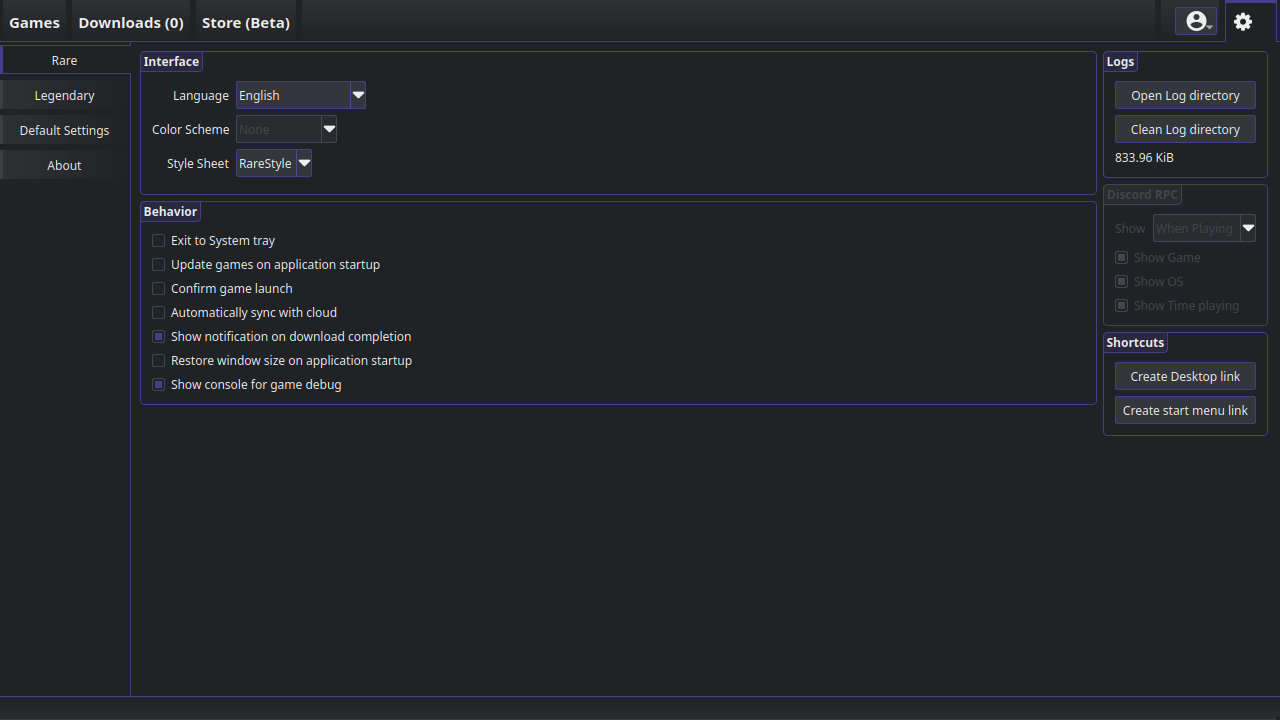 +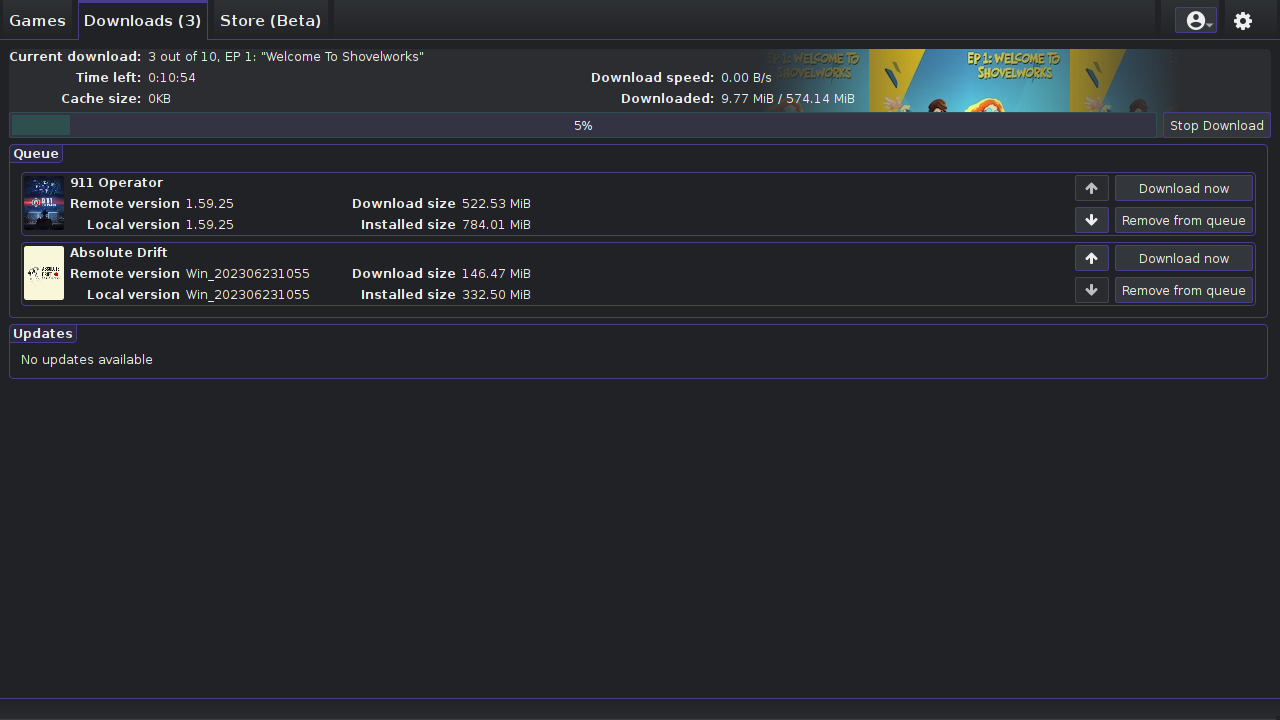 + + + + + +%package -n python3-Rare +Summary: A gui for Legendary +Provides: python-Rare +BuildRequires: python3-devel +BuildRequires: python3-setuptools +BuildRequires: python3-pip +%description -n python3-Rare +# Rare +[](https://discord.gg/YvmABK9YSk) + +## A frontend for legendary, the open source Epic Games Launcher alternative + +Rare is a graphical interface for Legendary, a command line alternative to Epic Games launcher, based on PyQt5 + +<div align="center"> + <img src="https://github.com/Dummerle/Rare/blob/main/rare/resources/images/Rare_nonsquared.png?raw=true" alt="Logo" width="200"/> + <p><i>Logo by <a href="https://github.com/MultisampledNight">@MultisampledNight</a> available + <a href="https://github.com/Dummerle/Rare/blob/main/rare/resources/images/">here</a>, + licensed under CC BY-SA 4.0</i></p> +</div> + +## Why Rare? + +- Runs natively, and supports most of the major platforms +- Gets out of your way when you don't need it, allowing you to enjoy your games +- Tries to be as lightweight as we can make it while still offering a feature-full experience +- Integrates seamlessly with legendary as both projects are developed in Python +- Packages, packages everywhere + +## Issues + +If you run into any issues, please report it by creating an issue on GitHub or on Discord: https://discord.gg/YvmABK9YSk + +## Installation + +### Linux + +#### Flatpak + +Rare is available as a flatpak. See [rare](https://flathub.org/apps/details/io.github.dummerle.rare). + +Install it via: + +`flatpak install flathub io.github.dummerle.rare` + +Run it via: + +`flatpak run io.github.dummerle.rare` + +#### Arch based + +There are some AUR packages available: + +- [rare](https://aur.archlinux.org/packages/rare) - for stable releases +- [rare-git](https://aur.archlinux.org/packages/rare-git) - for the latest features, which are not in a stable release + +#### Debian based + +- DUR package: [rare](https://mpr.hunterwittenborn.com/packages/rare) +- .deb file in [releases page](https://github.com/Dummerle/Rare/releases) + +**Note**: + +- pypresence is an optional package. You can install it + from [DUR](https://mpr.hunterwittenborn.com/packages/python3-pypresence) or with pip. +- Do not wonder if some icons look strange, because the official python3-qtawesome package is too old. Many icons were + replaced. + + +### macOS + +There is a .dmg file available in [releases page](https://github.com/Dummerle/Rare/releases). + +**Note**: When you launch it, you will see an error, that the package is from an unknown source. You have to enable it +manually in `Settings -> Security and Privacy`. Otherwise, Gatekeeper will block Rare from running. + +You can also use `pip`. + +### Windows + +- There is a small beta tool for Windows: [Rare Updater](https://github.com/Dummerle/RareUpdater), which installs and updates rare with a single click + +- Rare is available as a [Chocolatey package](https://community.chocolatey.org/packages/rare) on Windows. +You can install rare with the following one-liner: + + `choco install rare` + +### Packages + +In [releases page](https://github.com/Dummerle/Rare/releases), AppImages are available for Linux, a .msi file for windows and a .dmg +file for macOS. + +### Latest packages + +In the [actions](https://github.com/Dummerle/Rare/actions) tab you can find packages for the latest commits. + +**Note**: They might be unstable. + +### Installation via pip (platform independent) + +Execute `pip install Rare` for all users, or `pip install Rare --user` for the current user only. + +Linux and Mac: execute `rare` in your terminal. + +Windows: execute `pythonw -m rare` in cmd + +It is possible to create a desktop link, or a start menu link. Execute the command above with `--desktop-shortcut` +or `--startmenu-shortcut` option, alternatively you can create them in the settings. + +**Note about $PATH**: + +On Linux: + +`/home/user/.local/bin` must be in your PATH. + +On Windows: + +`PythonInstallationDirectory\Scripts` must be in your PATH. + +On Mac: + +`/Users/user/Library/Python/3.x/bin` must be in your PATH. + + +### Run from source + +1. Clone the repo: `git clone https://github.com/Dummerle/Rare +2. Change your working directory to the project folder: `cd Rare` +3. Run `pip install -r requirements.txt` to install all required dependencies. + If you want to be able to use the automatic login, run `pip install -r optional_requirements.txt` + If you are on Arch you can + run `sudo pacman --needed -S python-wheel python-setuptools python-pyqt5 python-qtawesome python-requests python-psutil` +4. Run `python3 -m rare` + +## Contributing + +There are several options to contribute. + +- If you know Python and PyQt, you can implement new features (Some ideas are in the projects tab). +- You can translate the application in your language: Check our [transifex](https://www.transifex.com/rare-1/rare) page + for that. + +More information is available in CONTRIBUTING.md. + +## Images + + + + + + + + + + +%package help +Summary: Development documents and examples for Rare +Provides: python3-Rare-doc +%description help +# Rare +[](https://discord.gg/YvmABK9YSk) + +## A frontend for legendary, the open source Epic Games Launcher alternative + +Rare is a graphical interface for Legendary, a command line alternative to Epic Games launcher, based on PyQt5 + +<div align="center"> + <img src="https://github.com/Dummerle/Rare/blob/main/rare/resources/images/Rare_nonsquared.png?raw=true" alt="Logo" width="200"/> + <p><i>Logo by <a href="https://github.com/MultisampledNight">@MultisampledNight</a> available + <a href="https://github.com/Dummerle/Rare/blob/main/rare/resources/images/">here</a>, + licensed under CC BY-SA 4.0</i></p> +</div> + +## Why Rare? + +- Runs natively, and supports most of the major platforms +- Gets out of your way when you don't need it, allowing you to enjoy your games +- Tries to be as lightweight as we can make it while still offering a feature-full experience +- Integrates seamlessly with legendary as both projects are developed in Python +- Packages, packages everywhere + +## Issues + +If you run into any issues, please report it by creating an issue on GitHub or on Discord: https://discord.gg/YvmABK9YSk + +## Installation + +### Linux + +#### Flatpak + +Rare is available as a flatpak. See [rare](https://flathub.org/apps/details/io.github.dummerle.rare). + +Install it via: + +`flatpak install flathub io.github.dummerle.rare` + +Run it via: + +`flatpak run io.github.dummerle.rare` + +#### Arch based + +There are some AUR packages available: + +- [rare](https://aur.archlinux.org/packages/rare) - for stable releases +- [rare-git](https://aur.archlinux.org/packages/rare-git) - for the latest features, which are not in a stable release + +#### Debian based + +- DUR package: [rare](https://mpr.hunterwittenborn.com/packages/rare) +- .deb file in [releases page](https://github.com/Dummerle/Rare/releases) + +**Note**: + +- pypresence is an optional package. You can install it + from [DUR](https://mpr.hunterwittenborn.com/packages/python3-pypresence) or with pip. +- Do not wonder if some icons look strange, because the official python3-qtawesome package is too old. Many icons were + replaced. + + +### macOS + +There is a .dmg file available in [releases page](https://github.com/Dummerle/Rare/releases). + +**Note**: When you launch it, you will see an error, that the package is from an unknown source. You have to enable it +manually in `Settings -> Security and Privacy`. Otherwise, Gatekeeper will block Rare from running. + +You can also use `pip`. + +### Windows + +- There is a small beta tool for Windows: [Rare Updater](https://github.com/Dummerle/RareUpdater), which installs and updates rare with a single click + +- Rare is available as a [Chocolatey package](https://community.chocolatey.org/packages/rare) on Windows. +You can install rare with the following one-liner: + + `choco install rare` + +### Packages + +In [releases page](https://github.com/Dummerle/Rare/releases), AppImages are available for Linux, a .msi file for windows and a .dmg +file for macOS. + +### Latest packages + +In the [actions](https://github.com/Dummerle/Rare/actions) tab you can find packages for the latest commits. + +**Note**: They might be unstable. + +### Installation via pip (platform independent) + +Execute `pip install Rare` for all users, or `pip install Rare --user` for the current user only. + +Linux and Mac: execute `rare` in your terminal. + +Windows: execute `pythonw -m rare` in cmd + +It is possible to create a desktop link, or a start menu link. Execute the command above with `--desktop-shortcut` +or `--startmenu-shortcut` option, alternatively you can create them in the settings. + +**Note about $PATH**: + +On Linux: + +`/home/user/.local/bin` must be in your PATH. + +On Windows: + +`PythonInstallationDirectory\Scripts` must be in your PATH. + +On Mac: + +`/Users/user/Library/Python/3.x/bin` must be in your PATH. + + +### Run from source + +1. Clone the repo: `git clone https://github.com/Dummerle/Rare +2. Change your working directory to the project folder: `cd Rare` +3. Run `pip install -r requirements.txt` to install all required dependencies. + If you want to be able to use the automatic login, run `pip install -r optional_requirements.txt` + If you are on Arch you can + run `sudo pacman --needed -S python-wheel python-setuptools python-pyqt5 python-qtawesome python-requests python-psutil` +4. Run `python3 -m rare` + +## Contributing + +There are several options to contribute. + +- If you know Python and PyQt, you can implement new features (Some ideas are in the projects tab). +- You can translate the application in your language: Check our [transifex](https://www.transifex.com/rare-1/rare) page + for that. + +More information is available in CONTRIBUTING.md. + +## Images + + + + + + + + + + +%prep +%autosetup -n Rare-1.10.1 + +%build +%py3_build + +%install +%py3_install +install -d -m755 %{buildroot}/%{_pkgdocdir} +if [ -d doc ]; then cp -arf doc %{buildroot}/%{_pkgdocdir}; fi +if [ -d docs ]; then cp -arf docs %{buildroot}/%{_pkgdocdir}; fi +if [ -d example ]; then cp -arf example %{buildroot}/%{_pkgdocdir}; fi +if [ -d examples ]; then cp -arf examples %{buildroot}/%{_pkgdocdir}; fi +pushd %{buildroot} +if [ -d usr/lib ]; then + find usr/lib -type f -printf "/%h/%f\n" >> filelist.lst +fi +if [ -d usr/lib64 ]; then + find usr/lib64 -type f -printf "/%h/%f\n" >> filelist.lst +fi +if [ -d usr/bin ]; then + find usr/bin -type f -printf "/%h/%f\n" >> filelist.lst +fi +if [ -d usr/sbin ]; then + find usr/sbin -type f -printf "/%h/%f\n" >> filelist.lst +fi +touch doclist.lst +if [ -d usr/share/man ]; then + find usr/share/man -type f -printf "/%h/%f.gz\n" >> doclist.lst +fi +popd +mv %{buildroot}/filelist.lst . +mv %{buildroot}/doclist.lst . + +%files -n python3-Rare -f filelist.lst +%dir %{python3_sitelib}/* + +%files help -f doclist.lst +%{_docdir}/* + +%changelog +* Mon May 15 2023 Python_Bot <Python_Bot@openeuler.org> - 1.10.1-1 +- Package Spec generated |