
diff options
Diffstat (limited to 'python-sap-xssec.spec')
| -rw-r--r-- | python-sap-xssec.spec | 484 |
1 files changed, 484 insertions, 0 deletions
diff --git a/python-sap-xssec.spec b/python-sap-xssec.spec new file mode 100644 index 0000000..dffcc38 --- /dev/null +++ b/python-sap-xssec.spec @@ -0,0 +1,484 @@ +%global _empty_manifest_terminate_build 0 +Name: python-sap-xssec +Version: 4.0.0 +Release: 1 +Summary: SAP Python Security Library +License: Apache Software License +URL: https://github.com/SAP/cloud-pysec +Source0: https://mirrors.nju.edu.cn/pypi/web/packages/8b/3b/5de30698e865b41cbfcc892d238970535453c4b697305359cd82624b521e/sap_xssec-4.0.0.tar.gz +BuildArch: noarch + +Requires: python3-deprecation +Requires: python3-httpx +Requires: python3-urllib3 +Requires: python3-six +Requires: python3-pyjwt +Requires: python3-cachetools +Requires: python3-cryptography + +%description +[](https://api.reuse.software/info/github.com/SAP/cloud-pysec) + +# Description +This project is a python client library called *sap_xssec* for validation of *OAuth access tokens* issued by the *XSUAA*. + +### OAuth Authorization Code Flow +The typical web application use the OAuth authorization code flow for authentication, which is described as follows: +1. A user accesses the web application using a browser. +2. The web application (in typical SAP Cloud Platform applications, this is an application router) acts as OAuth client and redirects +to the OAuth server for authorization. +3. Upon authentication, the web application uses the code issued by the authorization server to request an access token. +4. The web application uses the access token to request data from the OAuth resource server. +The OAuth resource server validates the token using online or offline validation. +For this validation libraries like sap_xssec are used. + + +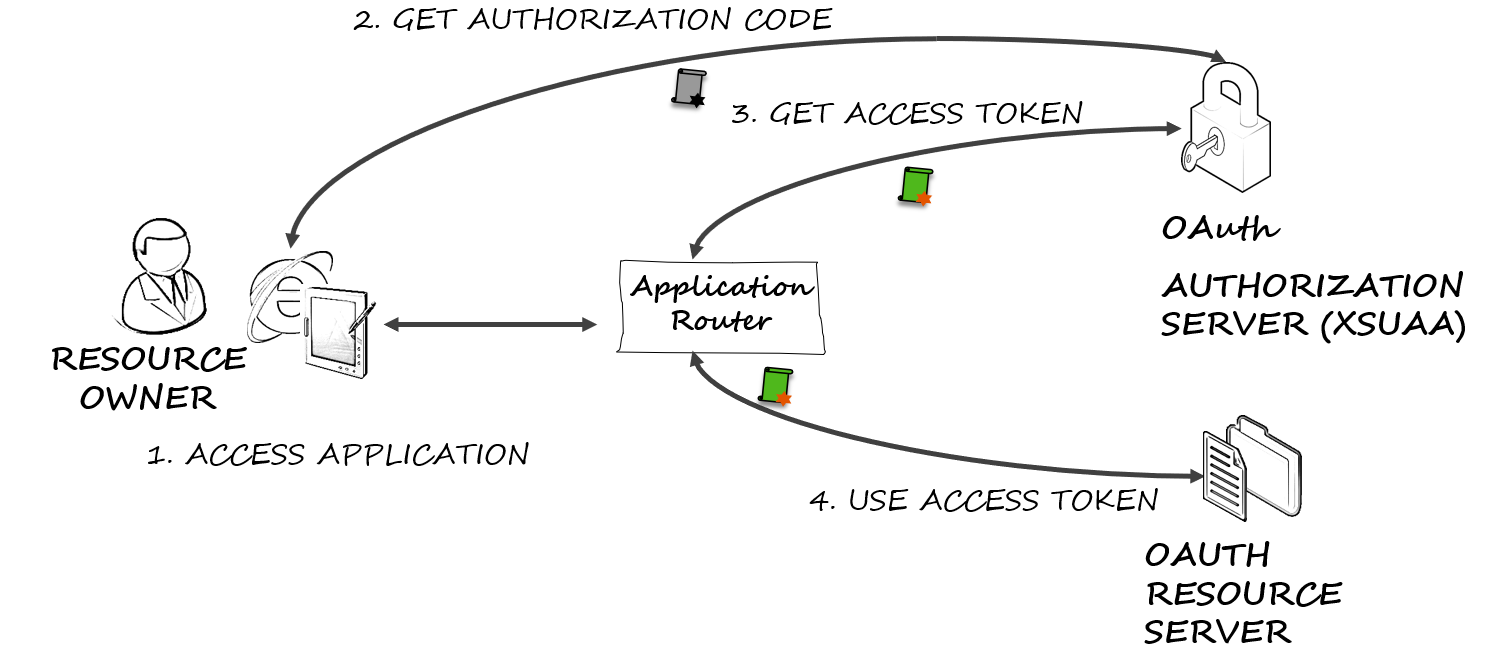 + + +### Usage + +For the usage of this library it is necessary to pass a JWT access token that should be validated to the library. +The examples below rely on users and credentials that you should substitute with the ones in your context. + +The typical use case for calling this API lies from within a container when an HTTP request is received and it must +be checked if the requester is authorized to execute this method. +In this case, the access token is contained in the authorization header (with keyword `bearer`). +You can remove the prefix `bearer` and pass the remaining string (just as in the following example as `access_token`) to the API. + +```python +from sap import xssec +from cfenv import AppEnv + +env = AppEnv() +uaa_service = env.get_service(name='<uaa_service_name>').credentials + +security_context = xssec.create_security_context(access_token, uaa_service) +``` + +**Note:** That the example above uses module [`cfenv`](https://pypi.python.org/pypi/cfenv) to retrieve the configuration of the uaa +service instance. +`uaa_service` is a dict that contains the necessary client information and looks like: +``` +{ + 'clientid' : 'example_clientid' // the id of the client + 'clientsecret': 'example_clientsecret' // the secret of the client + 'url': 'example_url' // the url of the uaa + 'uaadomain': 'example_uaadomain' // the domain of the uaa + 'verificationkey': 'example_verification key' // (optional) the key used for the verfication of the token +} + +``` +If the `uaadomain` is set in the `uaa_service` and the `jku` and `kid` are set in the incomming token, the key is requested from the uaa. As a fallback, the `verificationkey` configured in `uaa_service` is used for offline validation. Requested keys are cached for 15 minutes to avoid extensive load on the uaa. + +The creation function `xssec.create_security_context` is to be used for an end-user token (e.g. for grant_type `password` + or grant_type `authorization_code`) where user information is expected to be available within the token and thus within the security context. + +`create_security_context` also accepts a token of grant_type `client_credentials`. +This leads to the creation of a limited *SecurityContext* where certain functions are not available. +For more details please consult the API description in the wiki. + +For example, the `security_context` object can then be used to check if a user has a required scope: + +``` +security_context.check_scope('uaa.user') +``` + +or to receive the client id of a user: + +``` +security_context.get_clientid() +``` + +More details on the API can be found in the [wiki](https://github.com/SAP/cloud-pysec/wiki). +### Offline Validation + +sap_xssec offers offline validation of the access token, which requires no additional call to the UAA. +The trust for this offline validation is created by binding the XS UAA service instance to your application. +Inside the credentials section in the environment variable `VCAP_SERVICES`, the key for validation of tokens is included. +By default, the offline validation check will only accept tokens intended for the same OAuth2 client in the same UAA identity zone. +This makes sense and will cover the vast majority of use cases. + +~~However, if an application absolutely wants to consume token that were issued for either different OAuth2 clients or different identity zones, + an *Access Control List (ACL)* entry for this can be specified in an environment variable named `SAP_JWT_TRUST_ACL`. + The name of the OAuth client has then the prefix `sb-`, the content is a JSON String, containing an array of identity zones and OAuth2 clients. + To trust any OAuth2 client and/or identity zones, an * can be used.~~ + +⚠️From version 2.1.0, the `SAP_JWT_TRUST_ACL` environment variable is no longer supported. + + +If you want to enable another (foreign) application to use some of your application's scopes, you can add a ```granted-apps``` marker to your scope in the ```xs-security.json``` file (as in the following example). The value of the marker is a list of applications that is allowed to request a token with the denoted scope. + +```JSON +{ + "xsappname" : "sample-leave-request-app", + "description" : "This sample application demos leave requests", + "scopes" : [ { "name" : "$XSAPPNAME.createLR", + "description" : "create leave requests" }, + { "name" : "$XSAPPNAME.approveLR", + "description" : "approve leave requests", + "granted-apps" : ["MobileApprovals"] } + ], + "attributes" : [ { "name" : "costcenter", + "description" : "costcenter", + "valueType" : "string" + } ], + "role-templates": [ { "name" : "employee", + "description" : "Role for creating leave requests", + "scope-references" : [ "$XSAPPNAME.createLR","JobScheduler.scheduleJobs" ], + "attribute-references": [ "costcenter"] }, + { "name" : "manager", + "description" : "Role for creating and approving leave requests", + "scope-references" : [ "$XSAPPNAME.createLR","$XSAPPNAME.approveLR","JobScheduler.scheduleJobs" ], + "attribute-references": [ "costcenter" ] } + ] +} +``` + +# Configuration +~~To configure whether the *sap-jwt* or the *py-jwt* library should be used for validation of the jwt token, +change the `USE_SAP_PY_JWT` environment variable to `true`.~~ + +⚠️From version 4.0.0, the `USE_SAP_PY_JWT` environment variable is no longer supported and therefore only *py-jwt* is supported. + +# Requirements +*sap_xssec* requires *python 3.6* or newer. + + +# Download and Installation +As this package is deployed to PyPI, you can simply add `sap_xssec` as a dependency to your python project or +install this package by running `pip install sap_xssec`. + +# Known Issues +# How to obtain support +Open an issue in GitHub. + + +%package -n python3-sap-xssec +Summary: SAP Python Security Library +Provides: python-sap-xssec +BuildRequires: python3-devel +BuildRequires: python3-setuptools +BuildRequires: python3-pip +%description -n python3-sap-xssec +[](https://api.reuse.software/info/github.com/SAP/cloud-pysec) + +# Description +This project is a python client library called *sap_xssec* for validation of *OAuth access tokens* issued by the *XSUAA*. + +### OAuth Authorization Code Flow +The typical web application use the OAuth authorization code flow for authentication, which is described as follows: +1. A user accesses the web application using a browser. +2. The web application (in typical SAP Cloud Platform applications, this is an application router) acts as OAuth client and redirects +to the OAuth server for authorization. +3. Upon authentication, the web application uses the code issued by the authorization server to request an access token. +4. The web application uses the access token to request data from the OAuth resource server. +The OAuth resource server validates the token using online or offline validation. +For this validation libraries like sap_xssec are used. + + + + + +### Usage + +For the usage of this library it is necessary to pass a JWT access token that should be validated to the library. +The examples below rely on users and credentials that you should substitute with the ones in your context. + +The typical use case for calling this API lies from within a container when an HTTP request is received and it must +be checked if the requester is authorized to execute this method. +In this case, the access token is contained in the authorization header (with keyword `bearer`). +You can remove the prefix `bearer` and pass the remaining string (just as in the following example as `access_token`) to the API. + +```python +from sap import xssec +from cfenv import AppEnv + +env = AppEnv() +uaa_service = env.get_service(name='<uaa_service_name>').credentials + +security_context = xssec.create_security_context(access_token, uaa_service) +``` + +**Note:** That the example above uses module [`cfenv`](https://pypi.python.org/pypi/cfenv) to retrieve the configuration of the uaa +service instance. +`uaa_service` is a dict that contains the necessary client information and looks like: +``` +{ + 'clientid' : 'example_clientid' // the id of the client + 'clientsecret': 'example_clientsecret' // the secret of the client + 'url': 'example_url' // the url of the uaa + 'uaadomain': 'example_uaadomain' // the domain of the uaa + 'verificationkey': 'example_verification key' // (optional) the key used for the verfication of the token +} + +``` +If the `uaadomain` is set in the `uaa_service` and the `jku` and `kid` are set in the incomming token, the key is requested from the uaa. As a fallback, the `verificationkey` configured in `uaa_service` is used for offline validation. Requested keys are cached for 15 minutes to avoid extensive load on the uaa. + +The creation function `xssec.create_security_context` is to be used for an end-user token (e.g. for grant_type `password` + or grant_type `authorization_code`) where user information is expected to be available within the token and thus within the security context. + +`create_security_context` also accepts a token of grant_type `client_credentials`. +This leads to the creation of a limited *SecurityContext* where certain functions are not available. +For more details please consult the API description in the wiki. + +For example, the `security_context` object can then be used to check if a user has a required scope: + +``` +security_context.check_scope('uaa.user') +``` + +or to receive the client id of a user: + +``` +security_context.get_clientid() +``` + +More details on the API can be found in the [wiki](https://github.com/SAP/cloud-pysec/wiki). +### Offline Validation + +sap_xssec offers offline validation of the access token, which requires no additional call to the UAA. +The trust for this offline validation is created by binding the XS UAA service instance to your application. +Inside the credentials section in the environment variable `VCAP_SERVICES`, the key for validation of tokens is included. +By default, the offline validation check will only accept tokens intended for the same OAuth2 client in the same UAA identity zone. +This makes sense and will cover the vast majority of use cases. + +~~However, if an application absolutely wants to consume token that were issued for either different OAuth2 clients or different identity zones, + an *Access Control List (ACL)* entry for this can be specified in an environment variable named `SAP_JWT_TRUST_ACL`. + The name of the OAuth client has then the prefix `sb-`, the content is a JSON String, containing an array of identity zones and OAuth2 clients. + To trust any OAuth2 client and/or identity zones, an * can be used.~~ + +⚠️From version 2.1.0, the `SAP_JWT_TRUST_ACL` environment variable is no longer supported. + + +If you want to enable another (foreign) application to use some of your application's scopes, you can add a ```granted-apps``` marker to your scope in the ```xs-security.json``` file (as in the following example). The value of the marker is a list of applications that is allowed to request a token with the denoted scope. + +```JSON +{ + "xsappname" : "sample-leave-request-app", + "description" : "This sample application demos leave requests", + "scopes" : [ { "name" : "$XSAPPNAME.createLR", + "description" : "create leave requests" }, + { "name" : "$XSAPPNAME.approveLR", + "description" : "approve leave requests", + "granted-apps" : ["MobileApprovals"] } + ], + "attributes" : [ { "name" : "costcenter", + "description" : "costcenter", + "valueType" : "string" + } ], + "role-templates": [ { "name" : "employee", + "description" : "Role for creating leave requests", + "scope-references" : [ "$XSAPPNAME.createLR","JobScheduler.scheduleJobs" ], + "attribute-references": [ "costcenter"] }, + { "name" : "manager", + "description" : "Role for creating and approving leave requests", + "scope-references" : [ "$XSAPPNAME.createLR","$XSAPPNAME.approveLR","JobScheduler.scheduleJobs" ], + "attribute-references": [ "costcenter" ] } + ] +} +``` + +# Configuration +~~To configure whether the *sap-jwt* or the *py-jwt* library should be used for validation of the jwt token, +change the `USE_SAP_PY_JWT` environment variable to `true`.~~ + +⚠️From version 4.0.0, the `USE_SAP_PY_JWT` environment variable is no longer supported and therefore only *py-jwt* is supported. + +# Requirements +*sap_xssec* requires *python 3.6* or newer. + + +# Download and Installation +As this package is deployed to PyPI, you can simply add `sap_xssec` as a dependency to your python project or +install this package by running `pip install sap_xssec`. + +# Known Issues +# How to obtain support +Open an issue in GitHub. + + +%package help +Summary: Development documents and examples for sap-xssec +Provides: python3-sap-xssec-doc +%description help +[](https://api.reuse.software/info/github.com/SAP/cloud-pysec) + +# Description +This project is a python client library called *sap_xssec* for validation of *OAuth access tokens* issued by the *XSUAA*. + +### OAuth Authorization Code Flow +The typical web application use the OAuth authorization code flow for authentication, which is described as follows: +1. A user accesses the web application using a browser. +2. The web application (in typical SAP Cloud Platform applications, this is an application router) acts as OAuth client and redirects +to the OAuth server for authorization. +3. Upon authentication, the web application uses the code issued by the authorization server to request an access token. +4. The web application uses the access token to request data from the OAuth resource server. +The OAuth resource server validates the token using online or offline validation. +For this validation libraries like sap_xssec are used. + + + + + +### Usage + +For the usage of this library it is necessary to pass a JWT access token that should be validated to the library. +The examples below rely on users and credentials that you should substitute with the ones in your context. + +The typical use case for calling this API lies from within a container when an HTTP request is received and it must +be checked if the requester is authorized to execute this method. +In this case, the access token is contained in the authorization header (with keyword `bearer`). +You can remove the prefix `bearer` and pass the remaining string (just as in the following example as `access_token`) to the API. + +```python +from sap import xssec +from cfenv import AppEnv + +env = AppEnv() +uaa_service = env.get_service(name='<uaa_service_name>').credentials + +security_context = xssec.create_security_context(access_token, uaa_service) +``` + +**Note:** That the example above uses module [`cfenv`](https://pypi.python.org/pypi/cfenv) to retrieve the configuration of the uaa +service instance. +`uaa_service` is a dict that contains the necessary client information and looks like: +``` +{ + 'clientid' : 'example_clientid' // the id of the client + 'clientsecret': 'example_clientsecret' // the secret of the client + 'url': 'example_url' // the url of the uaa + 'uaadomain': 'example_uaadomain' // the domain of the uaa + 'verificationkey': 'example_verification key' // (optional) the key used for the verfication of the token +} + +``` +If the `uaadomain` is set in the `uaa_service` and the `jku` and `kid` are set in the incomming token, the key is requested from the uaa. As a fallback, the `verificationkey` configured in `uaa_service` is used for offline validation. Requested keys are cached for 15 minutes to avoid extensive load on the uaa. + +The creation function `xssec.create_security_context` is to be used for an end-user token (e.g. for grant_type `password` + or grant_type `authorization_code`) where user information is expected to be available within the token and thus within the security context. + +`create_security_context` also accepts a token of grant_type `client_credentials`. +This leads to the creation of a limited *SecurityContext* where certain functions are not available. +For more details please consult the API description in the wiki. + +For example, the `security_context` object can then be used to check if a user has a required scope: + +``` +security_context.check_scope('uaa.user') +``` + +or to receive the client id of a user: + +``` +security_context.get_clientid() +``` + +More details on the API can be found in the [wiki](https://github.com/SAP/cloud-pysec/wiki). +### Offline Validation + +sap_xssec offers offline validation of the access token, which requires no additional call to the UAA. +The trust for this offline validation is created by binding the XS UAA service instance to your application. +Inside the credentials section in the environment variable `VCAP_SERVICES`, the key for validation of tokens is included. +By default, the offline validation check will only accept tokens intended for the same OAuth2 client in the same UAA identity zone. +This makes sense and will cover the vast majority of use cases. + +~~However, if an application absolutely wants to consume token that were issued for either different OAuth2 clients or different identity zones, + an *Access Control List (ACL)* entry for this can be specified in an environment variable named `SAP_JWT_TRUST_ACL`. + The name of the OAuth client has then the prefix `sb-`, the content is a JSON String, containing an array of identity zones and OAuth2 clients. + To trust any OAuth2 client and/or identity zones, an * can be used.~~ + +⚠️From version 2.1.0, the `SAP_JWT_TRUST_ACL` environment variable is no longer supported. + + +If you want to enable another (foreign) application to use some of your application's scopes, you can add a ```granted-apps``` marker to your scope in the ```xs-security.json``` file (as in the following example). The value of the marker is a list of applications that is allowed to request a token with the denoted scope. + +```JSON +{ + "xsappname" : "sample-leave-request-app", + "description" : "This sample application demos leave requests", + "scopes" : [ { "name" : "$XSAPPNAME.createLR", + "description" : "create leave requests" }, + { "name" : "$XSAPPNAME.approveLR", + "description" : "approve leave requests", + "granted-apps" : ["MobileApprovals"] } + ], + "attributes" : [ { "name" : "costcenter", + "description" : "costcenter", + "valueType" : "string" + } ], + "role-templates": [ { "name" : "employee", + "description" : "Role for creating leave requests", + "scope-references" : [ "$XSAPPNAME.createLR","JobScheduler.scheduleJobs" ], + "attribute-references": [ "costcenter"] }, + { "name" : "manager", + "description" : "Role for creating and approving leave requests", + "scope-references" : [ "$XSAPPNAME.createLR","$XSAPPNAME.approveLR","JobScheduler.scheduleJobs" ], + "attribute-references": [ "costcenter" ] } + ] +} +``` + +# Configuration +~~To configure whether the *sap-jwt* or the *py-jwt* library should be used for validation of the jwt token, +change the `USE_SAP_PY_JWT` environment variable to `true`.~~ + +⚠️From version 4.0.0, the `USE_SAP_PY_JWT` environment variable is no longer supported and therefore only *py-jwt* is supported. + +# Requirements +*sap_xssec* requires *python 3.6* or newer. + + +# Download and Installation +As this package is deployed to PyPI, you can simply add `sap_xssec` as a dependency to your python project or +install this package by running `pip install sap_xssec`. + +# Known Issues +# How to obtain support +Open an issue in GitHub. + + +%prep +%autosetup -n sap-xssec-4.0.0 + +%build +%py3_build + +%install +%py3_install +install -d -m755 %{buildroot}/%{_pkgdocdir} +if [ -d doc ]; then cp -arf doc %{buildroot}/%{_pkgdocdir}; fi +if [ -d docs ]; then cp -arf docs %{buildroot}/%{_pkgdocdir}; fi +if [ -d example ]; then cp -arf example %{buildroot}/%{_pkgdocdir}; fi +if [ -d examples ]; then cp -arf examples %{buildroot}/%{_pkgdocdir}; fi +pushd %{buildroot} +if [ -d usr/lib ]; then + find usr/lib -type f -printf "/%h/%f\n" >> filelist.lst +fi +if [ -d usr/lib64 ]; then + find usr/lib64 -type f -printf "/%h/%f\n" >> filelist.lst +fi +if [ -d usr/bin ]; then + find usr/bin -type f -printf "/%h/%f\n" >> filelist.lst +fi +if [ -d usr/sbin ]; then + find usr/sbin -type f -printf "/%h/%f\n" >> filelist.lst +fi +touch doclist.lst +if [ -d usr/share/man ]; then + find usr/share/man -type f -printf "/%h/%f.gz\n" >> doclist.lst +fi +popd +mv %{buildroot}/filelist.lst . +mv %{buildroot}/doclist.lst . + +%files -n python3-sap-xssec -f filelist.lst +%dir %{python3_sitelib}/* + +%files help -f doclist.lst +%{_docdir}/* + +%changelog +* Mon May 15 2023 Python_Bot <Python_Bot@openeuler.org> - 4.0.0-1 +- Package Spec generated |