
diff options
| author | CoprDistGit <infra@openeuler.org> | 2023-04-11 15:27:34 +0000 |
|---|---|---|
| committer | CoprDistGit <infra@openeuler.org> | 2023-04-11 15:27:34 +0000 |
| commit | 8bd6a5aeb42da8bd3395a7267392c9d91b3fafd9 (patch) | |
| tree | 0e518a89310f734a652a8818a98c600e39e4fa88 /python-simple-term-menu.spec | |
| parent | d36121a3d188fae65b8d39839d3787acf68a26a9 (diff) | |
automatic import of python-simple-term-menu
Diffstat (limited to 'python-simple-term-menu.spec')
| -rw-r--r-- | python-simple-term-menu.spec | 2112 |
1 files changed, 2112 insertions, 0 deletions
diff --git a/python-simple-term-menu.spec b/python-simple-term-menu.spec new file mode 100644 index 0000000..4ef1111 --- /dev/null +++ b/python-simple-term-menu.spec @@ -0,0 +1,2112 @@ +%global _empty_manifest_terminate_build 0 +Name: python-simple-term-menu +Version: 1.6.1 +Release: 1 +Summary: A Python package which creates simple interactive menus on the command line. +License: MIT +URL: https://github.com/IngoMeyer441/simple-term-menu +Source0: https://mirrors.nju.edu.cn/pypi/web/packages/2d/69/31c7d6927338e1deac36e62be5a122e109a0a835a9bf2e30d422c0f3ccc3/simple-term-menu-1.6.1.tar.gz +BuildArch: noarch + + +%description +# Simple Terminal Menu + +## Overview + +`simple-term-menu` creates simple menus for interactive command line programs. It can be used to offer a choice of +different options to the user. Menu entries can be selected with the arrow, j/k, or emacs (C-n/C-p) keys. The module +uses the terminfo database to detect terminal features automatically and disables styles that are not available. +Currently, Linux and macOS are supported. + +## Breaking changes + +### From version 0.x to 1.x + +If you update from version 0.x to 1.x, please consider these breaking changes: + +- The `TerminalMenu` constructor now only takes keyword-only arguments (except for the first parameter which contains + the menu entries). This makes it easier to add new parameters in future releases and allows to keep a well-arranged + parameter list. + +- The command line interface was revised. It now uses `-` instead of `_` to separate words consistently and rearranges + short options. Only the most important short options were kept to save free letters for future releases. + +### From version 1.1 to 1.2 + +- The `multi_select_key` parameter is now named `multi_select_keys` and takes an iterable of keys and by default `space` + and`tab` are now used as multi-select keys. This allows to toggle selected items in search mode. + +- The `shortcut_parentheses_highlight_style` parameter is renamed to `shortcut_brackets_highlight_style` to be more + consistent with the new `multi_select_cursor_brackets_style` parameter. + +## Installation + +`simple-term-menu` is available on PyPI for Python 3.5+ and can be installed with `pip`: + +```bash +python3 -m pip install simple-term-menu +``` + +If you use Arch Linux or one of its derivatives, you can also install `simple-term-menu` from the +[AUR](https://aur.archlinux.org/packages/python-simple-term-menu/): + +```bash +yay -S python-simple-term-menu +``` + +You also find self-contained executables for 64-bit Linux distributions and macOS High Sierra and newer on the +[releases page](https://github.com/IngoMeyer441/simple-term-menu/releases/latest). They are created with +[PyInstaller](http://www.pyinstaller.org) and only require glibc >= 2.17 on Linux (should be fine on any recent +Linux system). + +## Usage + +### Create a menu with the default style + +Create an instance of the class `TerminalMenu` and pass the menu entries as a list of strings to the constructor. Call +the `show` method to output the menu and wait for keyboard input: + +```python +#!/usr/bin/env python3 + +from simple_term_menu import TerminalMenu + +def main(): + options = ["entry 1", "entry 2", "entry 3"] + terminal_menu = TerminalMenu(options) + menu_entry_index = terminal_menu.show() + print(f"You have selected {options[menu_entry_index]}!") + +if __name__ == "__main__": + main() +``` + +You will get an output like: + +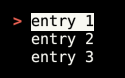 + +You can now select a menu entry with the arrow keys or `j`/`k` (vim motions) and accept your choice by hitting enter or +cancel the menu with escape, `q` or `<Ctrl>-C`. `show` returns the selected menu entry index or `None` if the menu was +canceled. + +Long menus can be scrolled quickly with the page up and page down keys (or `<Ctrl>-f` / `<Ctrl-b>` for vim users). + +You can pass an optional `title` to the `TerminalMenu` constructor which will be placed above the menu. `title` can be a +simple string, a multiline string (with `\n` newlines) or a list of strings. The same applies to the `status_bar` +parameter, which places a status bar below the menu. Moreover, you can use a callable as `status_bar` parameter which +takes the currently selected entry and returns a status bar string. + +### Styling + +You can pass styling arguments to the `TerminalMenu` constructor. Each style is a tuple of keyword strings. Currently +the following keywords are accepted: + +- `bg_black` +- `bg_blue` +- `bg_cyan` +- `bg_gray` +- `bg_green` +- `bg_purple` +- `bg_red` +- `bg_yellow` +- `fg_black` +- `fg_blue` +- `fg_cyan` +- `fg_gray` +- `fg_green` +- `fg_purple` +- `fg_red` +- `fg_yellow` +- `bold` +- `italics` +- `standout` +- `underline` + +You can alter the following styles: + +- `menu_cursor_style`: The style of the shown cursor. The default style is `("fg_red", "bold")`. + +- `menu_highlight_style`: The style of the selected menu entry. The default style is `("standout",)`. + +- `search_highlight_style`: The style of matched search strings. The default style is `("fg_black", "bg_yellow", + "bold")`. + +- `shortcut_key_highlight_style`: The style of shortcut keys. The default style is `("fg_blue",)`. + +- `shortcut_brackets_highlight_style`: The style of brackets enclosing shortcut keys. The default style is + `("fg_gray",)`. + +- `status_bar_style`: The style of the status bar below the menu. The default style is `("fg_yellow", "bg_black")`. + +- `multi_select_cursor_style`: The style of the cursor which pins a selected entry in a multi-selection. The default + style is `("fg_yellow", "bold")`. This style excludes brackets (see below). + +- `multi_select_cursor_brackets_style`: The style of brackets in the `multi_select_cursor` (`([{<)]}>`). The default + style is `("fg_gray",)`. + +By setting `menu_cursor` you can define another cursor or disable it (`None`). The default cursor is `"> "`. +The parameter `multi_select_cursor` customizes the multi-select cursor (the default is `"[*] "`). + +### Searching + +`simple_term_menu` has a built-in search feature to filter shown menu entries. The default key to activate search mode +is `/` (like in Vim, less and other terminal programs). If you prefer another search key, pass a `search_key` parameter +to the `TerminalMenu` constructor. `None` can be passed to activate the search on every letter key. Obviously, `j` and +`k` cannot be used for cursor motions in that mode. Use `<Ctrl-j>` and `<Ctrl-k>` instead. + +The search mode supports Python regex syntax. Visit the +[Python re documentation](https://docs.python.org/3/library/re.html#regular-expression-syntax) for more details. + +String parts of the menu entries which match the given search pattern are highlighted. Use the `search_highlight_style` +parameter to adjust the highlight style to your liking. + +By default, the search is case insensitive. Set `search_case_sensitive` to `True` if you prefer a case sensitive search +line. + +Pass `show_search_hint=True` to the `TerminalMenu` constructor to activate a search hint in the search line (like +`(Press "/" to search)`). + +### Shortcuts + +You can define shortcuts for selected menu entries by prepending a single character enclosed in square brackets (like +`[a]`). Pass `shortcut_key_highlight_style` and/or `shortcut_brackets_highlight_style` to the `TerminalMenu` constructor +to change the default highlight style of the shortcuts. + +By default, the `show` method returns when a shortcut key is pressed. If you only want the selection to jump the +shortcut target, pass `exit_on_shortcut=False` to the `TerminalMenu` constructor. + +If you configured the search to be activated on every letter key, the shortcut feature will be disabled. + +Pass `show_shortcut_hints=True` to the `TerminalMenu` constructor to display shortcut hints in the status bar (useful +for very long menus which need scrolling). Additionally pass `show_shortcut_hints_in_status_bar=False` if you prefer +shortcut hints in the menu title. + +#### Shortcuts example + +Create a menu of some fruits and use the first letter as shortcut key: + +```python +#!/usr/bin/env python3 + +import os +from simple_term_menu import TerminalMenu + + +def main(): + fruits = ["[a] apple", "[b] banana", "[o] orange"] + terminal_menu = TerminalMenu(fruits, title="Fruits") + menu_entry_index = terminal_menu.show() + + +if __name__ == "__main__": + main() +``` + +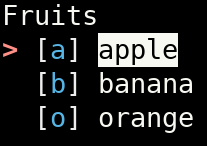 + +### Custom accept keys + +The default key to accept a menu item is `enter`. Pass the `accept_keys` parameter with a tuple of keys (as strings) to +the `TerminalMenu` constructor to use a different set of accept keys. Custom accept keys can be plain ascii letters or +ascii letters with a modifier key (prepend `ctrl-` or `alt-` to an ascii letter). Use the `chosen_accept_key` property +of the `TerminalMenu` instance to query which accept key was pressed by the user. + +Be aware that not all combinations of modifier and ascii keys will work depending on your terminal emulator and +graphical user interface. In addition, some combinations generate other existing keys (e.g. `ctrl-m` is `enter` / +carriage return). + +#### Custom accept keys example + +```python +#!/usr/bin/env python3 + +from simple_term_menu import TerminalMenu + + +def main(): + terminal_menu = TerminalMenu(["entry 1", "entry 2", "entry 3"], accept_keys=("enter", "alt-d", "ctrl-i")) + menu_entry_index = terminal_menu.show() + print(terminal_menu.chosen_accept_key) + + +if __name__ == "__main__": + main() +``` + +### Multi-select + +Pass `multi_select=True` to the `TerminalMenu` constructor to enable the multi-select mode. Press `space` or `tab` on an +arbitrary menu item to add it to your selection. Press `enter` (or any other configured `accept_key`) to add the +currently selected entry as the last item to the selection and to return from the `show` method as usual. In +multi-select mode, the `show` method returns a sorted tuple of all your selected menu indices instead of a single int. +Use the `chosen_menu_entries` property to get a tuple of the menu entry strings instead. By setting `multi_select_keys` +you can define another set of keys to toggle a selected item. By passing `show_multi_select_hint=True` a multi-select +mode hint is shown in the status bar. If you don't want the `accept_key` to also select the last highlighted item you +can pass `multi_select_select_on_accept=False`. If no menu item is explicitly selected, the last highlighted menu item +will still be added to the selection unless you also pass `multi_select_empty_ok=True`. + +An optional list (or any other iterable object) `preselected_entries` can also be passed to have items already selected +when the menu is displayed. This list can be composed of either integers representing indexes of the `menu_entries` +list, or strings matching the elements of `menu_entries`. Integers and strings can be mixed. + +#### Multi-select example + +```python +#!/usr/bin/env python3 + +from simple_term_menu import TerminalMenu + + +def main(): + terminal_menu = TerminalMenu( + ["dog", "cat", "mouse", "squirrel"], + multi_select=True, + show_multi_select_hint=True, + ) + menu_entry_indices = terminal_menu.show() + print(menu_entry_indices) + print(terminal_menu.chosen_menu_entries) + + +if __name__ == "__main__": + main() +``` + + + +### Preview window + +`simple-term-menu` can show a preview for each menu entry. Pass a `preview_command` to the `TerminalMenu` constructor to +activate this optional feature. `preview_command` either takes a command string which will be executed as a subprocess +or a Python callable which converts a given menu entry string into the preview output. If a command string is given, the +pattern `{}` is replaced with the current menu entry string. If a menu entry has an additional data component (separated +by `|`), it is passed instead to the preview command. `\|` can be used for a literal `|`. If you simply append a `|` +(without a data component), the preview window will be disabled for this entry. + +The additional keyword argument `preview_size` can be used to control the height of the preview window. It is given as +fraction of the complete terminal height (default: `0.25`). The width cannot be set, it is always the complete width of +the terminal window. + +Pass `preview_title` with a string of your choice to customize the preview window title (default: `"preview"`) or +`preview_border=False` to deactivate the border around the preview window (also deactivates the title string). + +Preview commands are allowed to generate [ANSI escape color codes](https://en.wikipedia.org/wiki/ANSI_escape_code#SGR). + +#### Preview examples + +- Create a menu for all files in the current directory and preview their contents with the + [`bat`](https://github.com/sharkdp/bat) command: + + ```python + #!/usr/bin/env python3 + + import os + from simple_term_menu import TerminalMenu + + + def list_files(directory="."): + return (file for file in os.listdir(directory) if os.path.isfile(os.path.join(directory, file))) + + + def main(): + terminal_menu = TerminalMenu(list_files(), preview_command="bat --color=always {}", preview_size=0.75) + menu_entry_index = terminal_menu.show() + + + if __name__ == "__main__": + main() + ``` + + 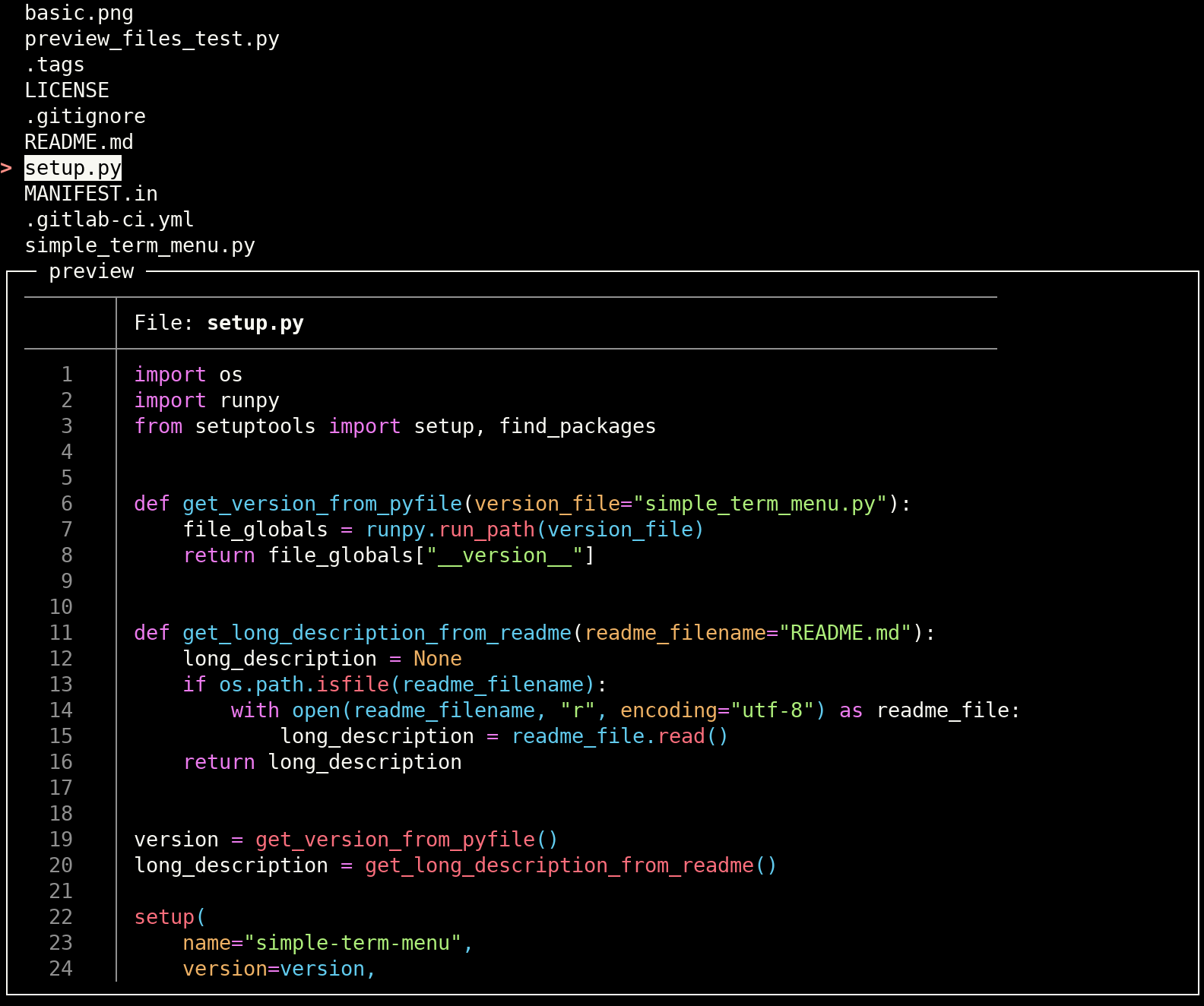 + +- Another file preview example using the [Pygments](https://pygments.org) api: + + ```python + #!/usr/bin/env python3 + + import os + from pygments import formatters, highlight, lexers + from pygments.util import ClassNotFound + from simple_term_menu import TerminalMenu + + + def highlight_file(filepath): + with open(filepath, "r") as f: + file_content = f.read() + try: + lexer = lexers.get_lexer_for_filename(filepath, stripnl=False, stripall=False) + except ClassNotFound: + lexer = lexers.get_lexer_by_name("text", stripnl=False, stripall=False) + formatter = formatters.TerminalFormatter(bg="dark") # dark or light + highlighted_file_content = highlight(file_content, lexer, formatter) + return highlighted_file_content + + + def list_files(directory="."): + return (file for file in os.listdir(directory) if os.path.isfile(os.path.join(directory, file))) + + + def main(): + terminal_menu = TerminalMenu(list_files(), preview_command=highlight_file, preview_size=0.75) + menu_entry_index = terminal_menu.show() + + + if __name__ == "__main__": + main() + ``` + + 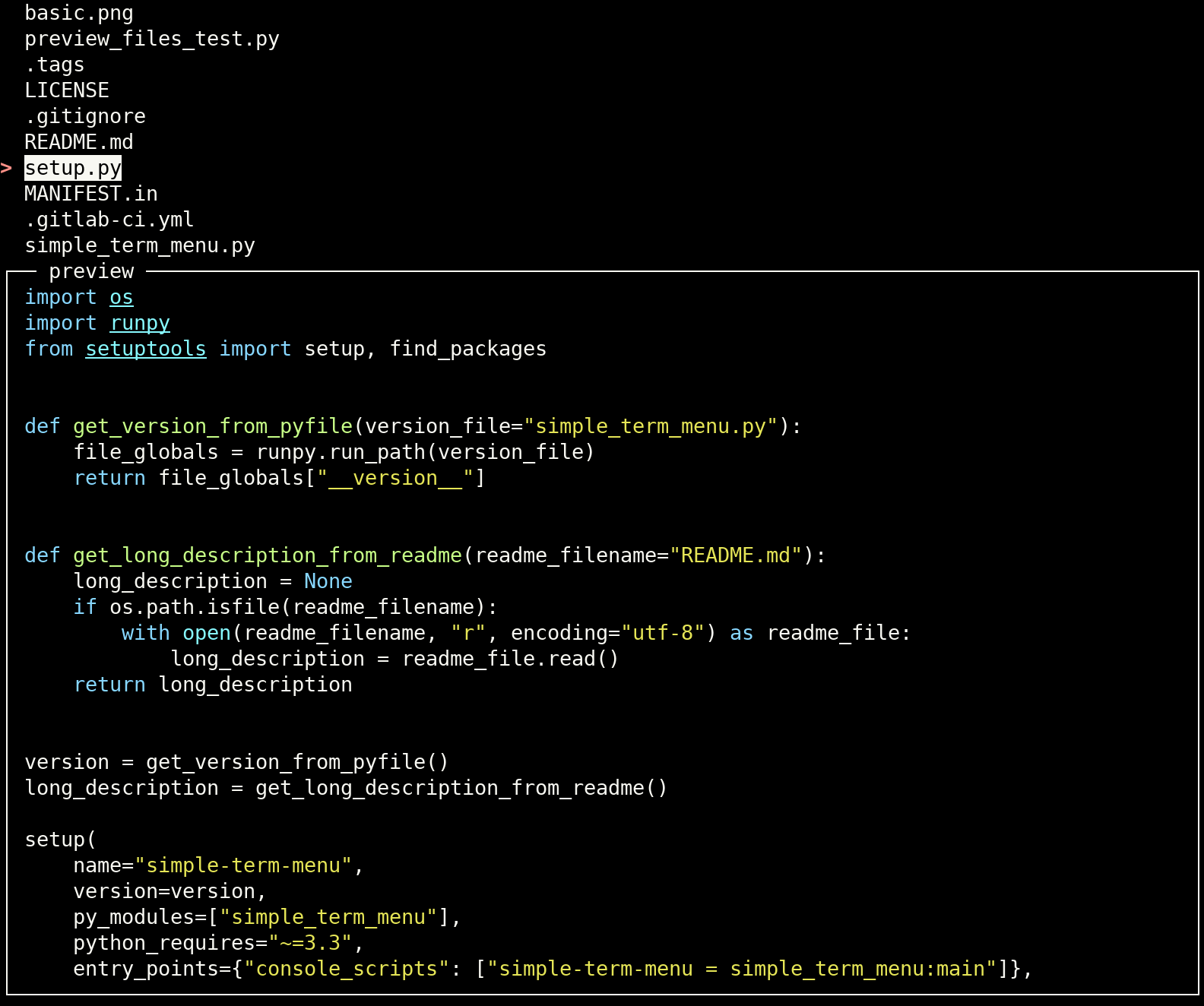 + +- Preview the active pane of each running tmux session (the session ids are appended to the menu entries with the `|` + separator): + + ```python + #!/usr/bin/env python3 + + import subprocess + from simple_term_menu import TerminalMenu + + + def list_tmux_sessions(): + tmux_command_output = subprocess.check_output( + ["tmux", "list-sessions", "-F#{session_id}:#{session_name}"], universal_newlines=True + ) + tmux_sessions = [] + for line in tmux_command_output.split("\n"): + line = line.strip() + if not line: + continue + session_id, session_name = tuple(line.split(":")) + tmux_sessions.append((session_name, session_id)) + return tmux_sessions + + + def main(): + terminal_menu = TerminalMenu( + ("|".join(session) for session in list_tmux_sessions()), + preview_command="tmux capture-pane -e -p -t {}", + preview_size=0.75, + ) + menu_entry_index = terminal_menu.show() + + + if __name__ == "__main__": + main() + ``` + + 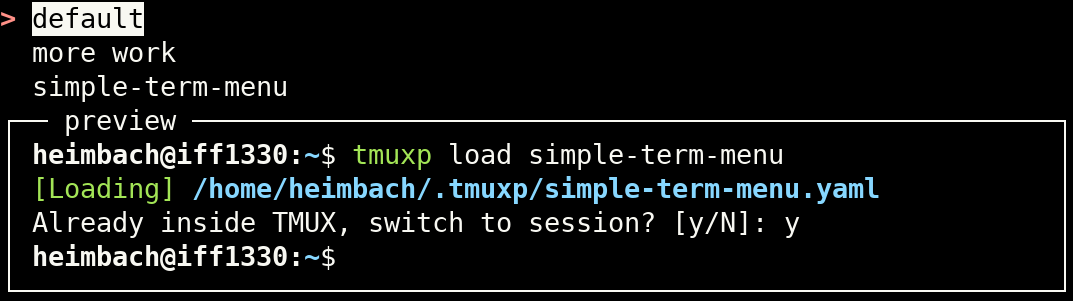 + +### Skipping empty entries + +Use the constructor parameter `skip_empty_entries` or the flag `--skip-empty-entries` to interpret an empty string value +in the menu entries as an empty menu entry (will be skipped when iterating over the entries). A `None` value is always +considered as an empty menu entry independently from the `skip_empty_entries` parameter. + +```python +from simple_term_menu import TerminalMenu + +def main(): # Or use `None` instead of `""`: + options = ["entry 1", "entry 2", "", "add", "edit"] # ["entry 1", "entry 2", None, "add", "edit"] + terminal_menu = TerminalMenu(options, skip_empty_entries=True) # TerminalMenu(options) + menu_entry_index = terminal_menu.show() + print(f"You have selected {options[menu_entry_index]}!") + +if __name__ == "__main__": + main() +``` + +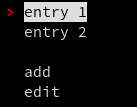 + +### Localization / Text modification + +Use the constructor parameters + +- `show_search_hint_text` and +- `show_multi_select_hint_text` + +to modify the corresponding texts. Use the placeholder `{key}` for the search key in `show_search_hint_text` and both +`{accept_keys}` and `{multi_select_keys}` in `show_multi_select_hint_text` if appropriately. + +### Additional settings + +Furthermore, the `TerminalMenu` constructor takes these additional parameters to change the menu behavior: + +- `clear_menu_on_exit`: A bool value which indicates if the menu will be cleared after the `show` method. Defaults to + `True`. +- `clear_screen`: A bool value which indicates if the screen will be cleared before the menu is shown. Defaults to + `False`. +- `cursor_index`: The initially selected item index. +- `cycle_cursor`: A bool value which indicates if the menu cursor cycles when the end of the menu is reached. Defaults + to `True`. +- `quit_keys`: An iterable of keys which quit the terminal menu. Defaults to `("escape", "q")`. +- `raise_error_on_interrupt`: Set this to `True` to reraise Keyboard interrupts (by pressing `<Ctrl-c>`). Defaults to + `False`. +- `status_bar_below_preview`: Position the status bar below the preview window (default positioning is above). + +### Command line program + +`simple-term-menu` can be used as a terminal program in shell scripts. The exit code of the script is the 1-based index +of the selected menu entry. The exit code 0 reports the cancel action. The following command line arguments are +supported: + +```text +usage: simple-term-menu [-h] [-s] [-X] [-l] [--cursor CURSOR] + [-i CURSOR_INDEX] [--cursor-style CURSOR_STYLE] [-C] + [-E] [--highlight-style HIGHLIGHT_STYLE] [-m] + [--multi-select-cursor MULTI_SELECT_CURSOR] + [--multi-select-cursor-brackets-style MULTI_SELECT_CURSOR_BRACKETS_STYLE] + [--multi-select-cursor-style MULTI_SELECT_CURSOR_STYLE] + [--multi-select-keys MULTI_SELECT_KEYS] + [--multi-select-no-select-on-accept] + [--multi-select-empty-ok] [-p PREVIEW_COMMAND] + [--no-preview-border] [--preview-size PREVIEW_SIZE] + [--preview-title PREVIEW_TITLE] + [--search-highlight-style SEARCH_HIGHLIGHT_STYLE] + [--search-key SEARCH_KEY] + [--shortcut-brackets-highlight-style SHORTCUT_BRACKETS_HIGHLIGHT_STYLE] + [--shortcut-key-highlight-style SHORTCUT_KEY_HIGHLIGHT_STYLE] + [--show-multi-select-hint] + [--show-multi-select-hint-text SHOW_MULTI_SELECT_HINT_TEXT] + [--show-search-hint] + [--show-search-hint-text SHOW_SEARCH_HINT_TEXT] + [--show-shortcut-hints] + [--show-shortcut-hints-in-title] + [--skip-empty-entries] [-b STATUS_BAR] [-d] + [--status-bar-style STATUS_BAR_STYLE] [--stdout] + [-t TITLE] [-V] + [-r PRESELECTED_ENTRIES | -R PRESELECTED_INDICES] + [entries ...] + +simple-term-menu creates simple interactive menus in the terminal and returns the selected entry as exit code. + +positional arguments: + entries the menu entries to show + +options: + -h, --help show this help message and exit + -s, --case-sensitive searches are case sensitive + -X, --no-clear-menu-on-exit + do not clear the menu on exit + -l, --clear-screen clear the screen before the menu is shown + --cursor CURSOR menu cursor (default: "> ") + -i CURSOR_INDEX, --cursor-index CURSOR_INDEX + initially selected item index + --cursor-style CURSOR_STYLE + style for the menu cursor as comma separated list + (default: "fg_red,bold") + -C, --no-cycle do not cycle the menu selection + -E, --no-exit-on-shortcut + do not exit on shortcut keys + --highlight-style HIGHLIGHT_STYLE + style for the selected menu entry as comma separated + list (default: "standout") + -m, --multi-select Allow the selection of multiple entries (implies + `--stdout`) + --multi-select-cursor MULTI_SELECT_CURSOR + multi-select menu cursor (default: "[*] ") + --multi-select-cursor-brackets-style MULTI_SELECT_CURSOR_BRACKETS_STYLE + style for brackets of the multi-select menu cursor as + comma separated list (default: "fg_gray") + --multi-select-cursor-style MULTI_SELECT_CURSOR_STYLE + style for the multi-select menu cursor as comma + separated list (default: "fg_yellow,bold") + --multi-select-keys MULTI_SELECT_KEYS + key for toggling a selected item in a multi-selection + (default: " ,tab", + --multi-select-no-select-on-accept + do not select the currently highlighted menu item when + the accept key is pressed (it is still selected if no + other item was selected before) + --multi-select-empty-ok + when used together with --multi-select-no-select-on- + accept allows returning no selection at all + -p PREVIEW_COMMAND, --preview PREVIEW_COMMAND + Command to generate a preview for the selected menu + entry. "{}" can be used as placeholder for the menu + text. If the menu entry has a data component + (separated by "|"), this is used instead. + --no-preview-border do not draw a border around the preview window + --preview-size PREVIEW_SIZE + maximum height of the preview window in fractions of + the terminal height (default: "0.25") + --preview-title PREVIEW_TITLE + title of the preview window (default: "preview") + --search-highlight-style SEARCH_HIGHLIGHT_STYLE + style of matched search patterns (default: + "fg_black,bg_yellow,bold") + --search-key SEARCH_KEY + key to start a search (default: "/", "none" is treated + a special value which activates the search on any + letter key) + --shortcut-brackets-highlight-style SHORTCUT_BRACKETS_HIGHLIGHT_STYLE + style of brackets enclosing shortcut keys (default: + "fg_gray") + --shortcut-key-highlight-style SHORTCUT_KEY_HIGHLIGHT_STYLE + style of shortcut keys (default: "fg_blue") + --show-multi-select-hint + show a multi-select hint in the status bar + --show-multi-select-hint-text SHOW_MULTI_SELECT_HINT_TEXT + Custom text which will be shown as multi-select hint. + Use the placeholders {multi_select_keys} and + {accept_keys} if appropriately. + --show-search-hint show a search hint in the search line + --show-search-hint-text SHOW_SEARCH_HINT_TEXT + Custom text which will be shown as search hint. Use + the placeholders {key} for the search key if + appropriately. + --show-shortcut-hints + show shortcut hints in the status bar + --show-shortcut-hints-in-title + show shortcut hints in the menu title + --skip-empty-entries Interpret an empty string in menu entries as an empty + menu entry + -b STATUS_BAR, --status-bar STATUS_BAR + status bar text + -d, --status-bar-below-preview + show the status bar below the preview window if any + --status-bar-style STATUS_BAR_STYLE + style of the status bar lines (default: + "fg_yellow,bg_black") + --stdout Print the selected menu index or indices to stdout (in + addition to the exit status). Multiple indices are + separated by ";". + -t TITLE, --title TITLE + menu title + -V, --version print the version number and exit + -r PRESELECTED_ENTRIES, --preselected_entries PRESELECTED_ENTRIES + Comma separated list of strings matching menu items to + start pre-selected in a multi-select menu. + -R PRESELECTED_INDICES, --preselected_indices PRESELECTED_INDICES + Comma separated list of numeric indexes of menu items + to start pre-selected in a multi-select menu. +``` + +#### Example with preview option + +Instead of using the Python api as in the [previous examples](#preview-examples), a file menu with `bat` preview can +also be created from the command line: + +```bash +simple-term-menu -p "bat --color=always {}" \ + --preview-size 0.75 \ + $(find . -maxdepth 1 -type f | awk '{ print substr($0, 3) }') +``` + +### More advanced example + +A more advanced example with sub menus (thanks to [pageauc](https://github.com/pageauc)): + +```python +#!/usr/bin/env python3 +""" +Demonstration example for GitHub Project at +https://github.com/IngoMeyer441/simple-term-menu + +This code only works in python3. Install per + + sudo pip3 install simple-term-menu + +""" +import time + +from simple_term_menu import TerminalMenu + + +def main(): + main_menu_title = " Main Menu.\n Press Q or Esc to quit. \n" + main_menu_items = ["Edit Menu", "Second Item", "Third Item", "Quit"] + main_menu_cursor = "> " + main_menu_cursor_style = ("fg_red", "bold") + main_menu_style = ("bg_red", "fg_yellow") + main_menu_exit = False + + main_menu = TerminalMenu( + menu_entries=main_menu_items, + title=main_menu_title, + menu_cursor=main_menu_cursor, + menu_cursor_style=main_menu_cursor_style, + menu_highlight_style=main_menu_style, + cycle_cursor=True, + clear_screen=True, + ) + + edit_menu_title = " Edit Menu.\n Press Q or Esc to back to main menu. \n" + edit_menu_items = ["Edit Config", "Save Settings", "Back to Main Menu"] + edit_menu_back = False + edit_menu = TerminalMenu( + edit_menu_items, + title=edit_menu_title, + menu_cursor=main_menu_cursor, + menu_cursor_style=main_menu_cursor_style, + menu_highlight_style=main_menu_style, + cycle_cursor=True, + clear_screen=True, + ) + + while not main_menu_exit: + main_sel = main_menu.show() + + if main_sel == 0: + while not edit_menu_back: + edit_sel = edit_menu.show() + if edit_sel == 0: + print("Edit Config Selected") + time.sleep(5) + elif edit_sel == 1: + print("Save Selected") + time.sleep(5) + elif edit_sel == 2 or edit_sel == None: + edit_menu_back = True + print("Back Selected") + edit_menu_back = False + elif main_sel == 1: + print("option 2 selected") + time.sleep(5) + elif main_sel == 2: + print("option 3 selected") + time.sleep(5) + elif main_sel == 3 or main_sel == None: + main_menu_exit = True + print("Quit Selected") + + +if __name__ == "__main__": + main() +``` + +## Similar projects + +- [`bullet`](https://github.com/Mckinsey666/bullet): Creates bullet-lists with multi-selection support. + +## Contributing + +Please open [an issue on GitHub](https://github.com/IngoMeyer441/simple-term-menu/issues/new) if you experience bugs or +miss features. Please consider to send a pull request if you can spend time on fixing the issue yourself. This project +uses [pre-commit](https://pre-commit.com) to ensure code quality and a consistent code style. Run + +```bash +make git-hooks-install +``` + +to install all linters as Git hooks in your local clone of `simple-term-menu`. + + +%package -n python3-simple-term-menu +Summary: A Python package which creates simple interactive menus on the command line. +Provides: python-simple-term-menu +BuildRequires: python3-devel +BuildRequires: python3-setuptools +BuildRequires: python3-pip +%description -n python3-simple-term-menu +# Simple Terminal Menu + +## Overview + +`simple-term-menu` creates simple menus for interactive command line programs. It can be used to offer a choice of +different options to the user. Menu entries can be selected with the arrow, j/k, or emacs (C-n/C-p) keys. The module +uses the terminfo database to detect terminal features automatically and disables styles that are not available. +Currently, Linux and macOS are supported. + +## Breaking changes + +### From version 0.x to 1.x + +If you update from version 0.x to 1.x, please consider these breaking changes: + +- The `TerminalMenu` constructor now only takes keyword-only arguments (except for the first parameter which contains + the menu entries). This makes it easier to add new parameters in future releases and allows to keep a well-arranged + parameter list. + +- The command line interface was revised. It now uses `-` instead of `_` to separate words consistently and rearranges + short options. Only the most important short options were kept to save free letters for future releases. + +### From version 1.1 to 1.2 + +- The `multi_select_key` parameter is now named `multi_select_keys` and takes an iterable of keys and by default `space` + and`tab` are now used as multi-select keys. This allows to toggle selected items in search mode. + +- The `shortcut_parentheses_highlight_style` parameter is renamed to `shortcut_brackets_highlight_style` to be more + consistent with the new `multi_select_cursor_brackets_style` parameter. + +## Installation + +`simple-term-menu` is available on PyPI for Python 3.5+ and can be installed with `pip`: + +```bash +python3 -m pip install simple-term-menu +``` + +If you use Arch Linux or one of its derivatives, you can also install `simple-term-menu` from the +[AUR](https://aur.archlinux.org/packages/python-simple-term-menu/): + +```bash +yay -S python-simple-term-menu +``` + +You also find self-contained executables for 64-bit Linux distributions and macOS High Sierra and newer on the +[releases page](https://github.com/IngoMeyer441/simple-term-menu/releases/latest). They are created with +[PyInstaller](http://www.pyinstaller.org) and only require glibc >= 2.17 on Linux (should be fine on any recent +Linux system). + +## Usage + +### Create a menu with the default style + +Create an instance of the class `TerminalMenu` and pass the menu entries as a list of strings to the constructor. Call +the `show` method to output the menu and wait for keyboard input: + +```python +#!/usr/bin/env python3 + +from simple_term_menu import TerminalMenu + +def main(): + options = ["entry 1", "entry 2", "entry 3"] + terminal_menu = TerminalMenu(options) + menu_entry_index = terminal_menu.show() + print(f"You have selected {options[menu_entry_index]}!") + +if __name__ == "__main__": + main() +``` + +You will get an output like: + + + +You can now select a menu entry with the arrow keys or `j`/`k` (vim motions) and accept your choice by hitting enter or +cancel the menu with escape, `q` or `<Ctrl>-C`. `show` returns the selected menu entry index or `None` if the menu was +canceled. + +Long menus can be scrolled quickly with the page up and page down keys (or `<Ctrl>-f` / `<Ctrl-b>` for vim users). + +You can pass an optional `title` to the `TerminalMenu` constructor which will be placed above the menu. `title` can be a +simple string, a multiline string (with `\n` newlines) or a list of strings. The same applies to the `status_bar` +parameter, which places a status bar below the menu. Moreover, you can use a callable as `status_bar` parameter which +takes the currently selected entry and returns a status bar string. + +### Styling + +You can pass styling arguments to the `TerminalMenu` constructor. Each style is a tuple of keyword strings. Currently +the following keywords are accepted: + +- `bg_black` +- `bg_blue` +- `bg_cyan` +- `bg_gray` +- `bg_green` +- `bg_purple` +- `bg_red` +- `bg_yellow` +- `fg_black` +- `fg_blue` +- `fg_cyan` +- `fg_gray` +- `fg_green` +- `fg_purple` +- `fg_red` +- `fg_yellow` +- `bold` +- `italics` +- `standout` +- `underline` + +You can alter the following styles: + +- `menu_cursor_style`: The style of the shown cursor. The default style is `("fg_red", "bold")`. + +- `menu_highlight_style`: The style of the selected menu entry. The default style is `("standout",)`. + +- `search_highlight_style`: The style of matched search strings. The default style is `("fg_black", "bg_yellow", + "bold")`. + +- `shortcut_key_highlight_style`: The style of shortcut keys. The default style is `("fg_blue",)`. + +- `shortcut_brackets_highlight_style`: The style of brackets enclosing shortcut keys. The default style is + `("fg_gray",)`. + +- `status_bar_style`: The style of the status bar below the menu. The default style is `("fg_yellow", "bg_black")`. + +- `multi_select_cursor_style`: The style of the cursor which pins a selected entry in a multi-selection. The default + style is `("fg_yellow", "bold")`. This style excludes brackets (see below). + +- `multi_select_cursor_brackets_style`: The style of brackets in the `multi_select_cursor` (`([{<)]}>`). The default + style is `("fg_gray",)`. + +By setting `menu_cursor` you can define another cursor or disable it (`None`). The default cursor is `"> "`. +The parameter `multi_select_cursor` customizes the multi-select cursor (the default is `"[*] "`). + +### Searching + +`simple_term_menu` has a built-in search feature to filter shown menu entries. The default key to activate search mode +is `/` (like in Vim, less and other terminal programs). If you prefer another search key, pass a `search_key` parameter +to the `TerminalMenu` constructor. `None` can be passed to activate the search on every letter key. Obviously, `j` and +`k` cannot be used for cursor motions in that mode. Use `<Ctrl-j>` and `<Ctrl-k>` instead. + +The search mode supports Python regex syntax. Visit the +[Python re documentation](https://docs.python.org/3/library/re.html#regular-expression-syntax) for more details. + +String parts of the menu entries which match the given search pattern are highlighted. Use the `search_highlight_style` +parameter to adjust the highlight style to your liking. + +By default, the search is case insensitive. Set `search_case_sensitive` to `True` if you prefer a case sensitive search +line. + +Pass `show_search_hint=True` to the `TerminalMenu` constructor to activate a search hint in the search line (like +`(Press "/" to search)`). + +### Shortcuts + +You can define shortcuts for selected menu entries by prepending a single character enclosed in square brackets (like +`[a]`). Pass `shortcut_key_highlight_style` and/or `shortcut_brackets_highlight_style` to the `TerminalMenu` constructor +to change the default highlight style of the shortcuts. + +By default, the `show` method returns when a shortcut key is pressed. If you only want the selection to jump the +shortcut target, pass `exit_on_shortcut=False` to the `TerminalMenu` constructor. + +If you configured the search to be activated on every letter key, the shortcut feature will be disabled. + +Pass `show_shortcut_hints=True` to the `TerminalMenu` constructor to display shortcut hints in the status bar (useful +for very long menus which need scrolling). Additionally pass `show_shortcut_hints_in_status_bar=False` if you prefer +shortcut hints in the menu title. + +#### Shortcuts example + +Create a menu of some fruits and use the first letter as shortcut key: + +```python +#!/usr/bin/env python3 + +import os +from simple_term_menu import TerminalMenu + + +def main(): + fruits = ["[a] apple", "[b] banana", "[o] orange"] + terminal_menu = TerminalMenu(fruits, title="Fruits") + menu_entry_index = terminal_menu.show() + + +if __name__ == "__main__": + main() +``` + + + +### Custom accept keys + +The default key to accept a menu item is `enter`. Pass the `accept_keys` parameter with a tuple of keys (as strings) to +the `TerminalMenu` constructor to use a different set of accept keys. Custom accept keys can be plain ascii letters or +ascii letters with a modifier key (prepend `ctrl-` or `alt-` to an ascii letter). Use the `chosen_accept_key` property +of the `TerminalMenu` instance to query which accept key was pressed by the user. + +Be aware that not all combinations of modifier and ascii keys will work depending on your terminal emulator and +graphical user interface. In addition, some combinations generate other existing keys (e.g. `ctrl-m` is `enter` / +carriage return). + +#### Custom accept keys example + +```python +#!/usr/bin/env python3 + +from simple_term_menu import TerminalMenu + + +def main(): + terminal_menu = TerminalMenu(["entry 1", "entry 2", "entry 3"], accept_keys=("enter", "alt-d", "ctrl-i")) + menu_entry_index = terminal_menu.show() + print(terminal_menu.chosen_accept_key) + + +if __name__ == "__main__": + main() +``` + +### Multi-select + +Pass `multi_select=True` to the `TerminalMenu` constructor to enable the multi-select mode. Press `space` or `tab` on an +arbitrary menu item to add it to your selection. Press `enter` (or any other configured `accept_key`) to add the +currently selected entry as the last item to the selection and to return from the `show` method as usual. In +multi-select mode, the `show` method returns a sorted tuple of all your selected menu indices instead of a single int. +Use the `chosen_menu_entries` property to get a tuple of the menu entry strings instead. By setting `multi_select_keys` +you can define another set of keys to toggle a selected item. By passing `show_multi_select_hint=True` a multi-select +mode hint is shown in the status bar. If you don't want the `accept_key` to also select the last highlighted item you +can pass `multi_select_select_on_accept=False`. If no menu item is explicitly selected, the last highlighted menu item +will still be added to the selection unless you also pass `multi_select_empty_ok=True`. + +An optional list (or any other iterable object) `preselected_entries` can also be passed to have items already selected +when the menu is displayed. This list can be composed of either integers representing indexes of the `menu_entries` +list, or strings matching the elements of `menu_entries`. Integers and strings can be mixed. + +#### Multi-select example + +```python +#!/usr/bin/env python3 + +from simple_term_menu import TerminalMenu + + +def main(): + terminal_menu = TerminalMenu( + ["dog", "cat", "mouse", "squirrel"], + multi_select=True, + show_multi_select_hint=True, + ) + menu_entry_indices = terminal_menu.show() + print(menu_entry_indices) + print(terminal_menu.chosen_menu_entries) + + +if __name__ == "__main__": + main() +``` + + + +### Preview window + +`simple-term-menu` can show a preview for each menu entry. Pass a `preview_command` to the `TerminalMenu` constructor to +activate this optional feature. `preview_command` either takes a command string which will be executed as a subprocess +or a Python callable which converts a given menu entry string into the preview output. If a command string is given, the +pattern `{}` is replaced with the current menu entry string. If a menu entry has an additional data component (separated +by `|`), it is passed instead to the preview command. `\|` can be used for a literal `|`. If you simply append a `|` +(without a data component), the preview window will be disabled for this entry. + +The additional keyword argument `preview_size` can be used to control the height of the preview window. It is given as +fraction of the complete terminal height (default: `0.25`). The width cannot be set, it is always the complete width of +the terminal window. + +Pass `preview_title` with a string of your choice to customize the preview window title (default: `"preview"`) or +`preview_border=False` to deactivate the border around the preview window (also deactivates the title string). + +Preview commands are allowed to generate [ANSI escape color codes](https://en.wikipedia.org/wiki/ANSI_escape_code#SGR). + +#### Preview examples + +- Create a menu for all files in the current directory and preview their contents with the + [`bat`](https://github.com/sharkdp/bat) command: + + ```python + #!/usr/bin/env python3 + + import os + from simple_term_menu import TerminalMenu + + + def list_files(directory="."): + return (file for file in os.listdir(directory) if os.path.isfile(os.path.join(directory, file))) + + + def main(): + terminal_menu = TerminalMenu(list_files(), preview_command="bat --color=always {}", preview_size=0.75) + menu_entry_index = terminal_menu.show() + + + if __name__ == "__main__": + main() + ``` + +  + +- Another file preview example using the [Pygments](https://pygments.org) api: + + ```python + #!/usr/bin/env python3 + + import os + from pygments import formatters, highlight, lexers + from pygments.util import ClassNotFound + from simple_term_menu import TerminalMenu + + + def highlight_file(filepath): + with open(filepath, "r") as f: + file_content = f.read() + try: + lexer = lexers.get_lexer_for_filename(filepath, stripnl=False, stripall=False) + except ClassNotFound: + lexer = lexers.get_lexer_by_name("text", stripnl=False, stripall=False) + formatter = formatters.TerminalFormatter(bg="dark") # dark or light + highlighted_file_content = highlight(file_content, lexer, formatter) + return highlighted_file_content + + + def list_files(directory="."): + return (file for file in os.listdir(directory) if os.path.isfile(os.path.join(directory, file))) + + + def main(): + terminal_menu = TerminalMenu(list_files(), preview_command=highlight_file, preview_size=0.75) + menu_entry_index = terminal_menu.show() + + + if __name__ == "__main__": + main() + ``` + +  + +- Preview the active pane of each running tmux session (the session ids are appended to the menu entries with the `|` + separator): + + ```python + #!/usr/bin/env python3 + + import subprocess + from simple_term_menu import TerminalMenu + + + def list_tmux_sessions(): + tmux_command_output = subprocess.check_output( + ["tmux", "list-sessions", "-F#{session_id}:#{session_name}"], universal_newlines=True + ) + tmux_sessions = [] + for line in tmux_command_output.split("\n"): + line = line.strip() + if not line: + continue + session_id, session_name = tuple(line.split(":")) + tmux_sessions.append((session_name, session_id)) + return tmux_sessions + + + def main(): + terminal_menu = TerminalMenu( + ("|".join(session) for session in list_tmux_sessions()), + preview_command="tmux capture-pane -e -p -t {}", + preview_size=0.75, + ) + menu_entry_index = terminal_menu.show() + + + if __name__ == "__main__": + main() + ``` + +  + +### Skipping empty entries + +Use the constructor parameter `skip_empty_entries` or the flag `--skip-empty-entries` to interpret an empty string value +in the menu entries as an empty menu entry (will be skipped when iterating over the entries). A `None` value is always +considered as an empty menu entry independently from the `skip_empty_entries` parameter. + +```python +from simple_term_menu import TerminalMenu + +def main(): # Or use `None` instead of `""`: + options = ["entry 1", "entry 2", "", "add", "edit"] # ["entry 1", "entry 2", None, "add", "edit"] + terminal_menu = TerminalMenu(options, skip_empty_entries=True) # TerminalMenu(options) + menu_entry_index = terminal_menu.show() + print(f"You have selected {options[menu_entry_index]}!") + +if __name__ == "__main__": + main() +``` + + + +### Localization / Text modification + +Use the constructor parameters + +- `show_search_hint_text` and +- `show_multi_select_hint_text` + +to modify the corresponding texts. Use the placeholder `{key}` for the search key in `show_search_hint_text` and both +`{accept_keys}` and `{multi_select_keys}` in `show_multi_select_hint_text` if appropriately. + +### Additional settings + +Furthermore, the `TerminalMenu` constructor takes these additional parameters to change the menu behavior: + +- `clear_menu_on_exit`: A bool value which indicates if the menu will be cleared after the `show` method. Defaults to + `True`. +- `clear_screen`: A bool value which indicates if the screen will be cleared before the menu is shown. Defaults to + `False`. +- `cursor_index`: The initially selected item index. +- `cycle_cursor`: A bool value which indicates if the menu cursor cycles when the end of the menu is reached. Defaults + to `True`. +- `quit_keys`: An iterable of keys which quit the terminal menu. Defaults to `("escape", "q")`. +- `raise_error_on_interrupt`: Set this to `True` to reraise Keyboard interrupts (by pressing `<Ctrl-c>`). Defaults to + `False`. +- `status_bar_below_preview`: Position the status bar below the preview window (default positioning is above). + +### Command line program + +`simple-term-menu` can be used as a terminal program in shell scripts. The exit code of the script is the 1-based index +of the selected menu entry. The exit code 0 reports the cancel action. The following command line arguments are +supported: + +```text +usage: simple-term-menu [-h] [-s] [-X] [-l] [--cursor CURSOR] + [-i CURSOR_INDEX] [--cursor-style CURSOR_STYLE] [-C] + [-E] [--highlight-style HIGHLIGHT_STYLE] [-m] + [--multi-select-cursor MULTI_SELECT_CURSOR] + [--multi-select-cursor-brackets-style MULTI_SELECT_CURSOR_BRACKETS_STYLE] + [--multi-select-cursor-style MULTI_SELECT_CURSOR_STYLE] + [--multi-select-keys MULTI_SELECT_KEYS] + [--multi-select-no-select-on-accept] + [--multi-select-empty-ok] [-p PREVIEW_COMMAND] + [--no-preview-border] [--preview-size PREVIEW_SIZE] + [--preview-title PREVIEW_TITLE] + [--search-highlight-style SEARCH_HIGHLIGHT_STYLE] + [--search-key SEARCH_KEY] + [--shortcut-brackets-highlight-style SHORTCUT_BRACKETS_HIGHLIGHT_STYLE] + [--shortcut-key-highlight-style SHORTCUT_KEY_HIGHLIGHT_STYLE] + [--show-multi-select-hint] + [--show-multi-select-hint-text SHOW_MULTI_SELECT_HINT_TEXT] + [--show-search-hint] + [--show-search-hint-text SHOW_SEARCH_HINT_TEXT] + [--show-shortcut-hints] + [--show-shortcut-hints-in-title] + [--skip-empty-entries] [-b STATUS_BAR] [-d] + [--status-bar-style STATUS_BAR_STYLE] [--stdout] + [-t TITLE] [-V] + [-r PRESELECTED_ENTRIES | -R PRESELECTED_INDICES] + [entries ...] + +simple-term-menu creates simple interactive menus in the terminal and returns the selected entry as exit code. + +positional arguments: + entries the menu entries to show + +options: + -h, --help show this help message and exit + -s, --case-sensitive searches are case sensitive + -X, --no-clear-menu-on-exit + do not clear the menu on exit + -l, --clear-screen clear the screen before the menu is shown + --cursor CURSOR menu cursor (default: "> ") + -i CURSOR_INDEX, --cursor-index CURSOR_INDEX + initially selected item index + --cursor-style CURSOR_STYLE + style for the menu cursor as comma separated list + (default: "fg_red,bold") + -C, --no-cycle do not cycle the menu selection + -E, --no-exit-on-shortcut + do not exit on shortcut keys + --highlight-style HIGHLIGHT_STYLE + style for the selected menu entry as comma separated + list (default: "standout") + -m, --multi-select Allow the selection of multiple entries (implies + `--stdout`) + --multi-select-cursor MULTI_SELECT_CURSOR + multi-select menu cursor (default: "[*] ") + --multi-select-cursor-brackets-style MULTI_SELECT_CURSOR_BRACKETS_STYLE + style for brackets of the multi-select menu cursor as + comma separated list (default: "fg_gray") + --multi-select-cursor-style MULTI_SELECT_CURSOR_STYLE + style for the multi-select menu cursor as comma + separated list (default: "fg_yellow,bold") + --multi-select-keys MULTI_SELECT_KEYS + key for toggling a selected item in a multi-selection + (default: " ,tab", + --multi-select-no-select-on-accept + do not select the currently highlighted menu item when + the accept key is pressed (it is still selected if no + other item was selected before) + --multi-select-empty-ok + when used together with --multi-select-no-select-on- + accept allows returning no selection at all + -p PREVIEW_COMMAND, --preview PREVIEW_COMMAND + Command to generate a preview for the selected menu + entry. "{}" can be used as placeholder for the menu + text. If the menu entry has a data component + (separated by "|"), this is used instead. + --no-preview-border do not draw a border around the preview window + --preview-size PREVIEW_SIZE + maximum height of the preview window in fractions of + the terminal height (default: "0.25") + --preview-title PREVIEW_TITLE + title of the preview window (default: "preview") + --search-highlight-style SEARCH_HIGHLIGHT_STYLE + style of matched search patterns (default: + "fg_black,bg_yellow,bold") + --search-key SEARCH_KEY + key to start a search (default: "/", "none" is treated + a special value which activates the search on any + letter key) + --shortcut-brackets-highlight-style SHORTCUT_BRACKETS_HIGHLIGHT_STYLE + style of brackets enclosing shortcut keys (default: + "fg_gray") + --shortcut-key-highlight-style SHORTCUT_KEY_HIGHLIGHT_STYLE + style of shortcut keys (default: "fg_blue") + --show-multi-select-hint + show a multi-select hint in the status bar + --show-multi-select-hint-text SHOW_MULTI_SELECT_HINT_TEXT + Custom text which will be shown as multi-select hint. + Use the placeholders {multi_select_keys} and + {accept_keys} if appropriately. + --show-search-hint show a search hint in the search line + --show-search-hint-text SHOW_SEARCH_HINT_TEXT + Custom text which will be shown as search hint. Use + the placeholders {key} for the search key if + appropriately. + --show-shortcut-hints + show shortcut hints in the status bar + --show-shortcut-hints-in-title + show shortcut hints in the menu title + --skip-empty-entries Interpret an empty string in menu entries as an empty + menu entry + -b STATUS_BAR, --status-bar STATUS_BAR + status bar text + -d, --status-bar-below-preview + show the status bar below the preview window if any + --status-bar-style STATUS_BAR_STYLE + style of the status bar lines (default: + "fg_yellow,bg_black") + --stdout Print the selected menu index or indices to stdout (in + addition to the exit status). Multiple indices are + separated by ";". + -t TITLE, --title TITLE + menu title + -V, --version print the version number and exit + -r PRESELECTED_ENTRIES, --preselected_entries PRESELECTED_ENTRIES + Comma separated list of strings matching menu items to + start pre-selected in a multi-select menu. + -R PRESELECTED_INDICES, --preselected_indices PRESELECTED_INDICES + Comma separated list of numeric indexes of menu items + to start pre-selected in a multi-select menu. +``` + +#### Example with preview option + +Instead of using the Python api as in the [previous examples](#preview-examples), a file menu with `bat` preview can +also be created from the command line: + +```bash +simple-term-menu -p "bat --color=always {}" \ + --preview-size 0.75 \ + $(find . -maxdepth 1 -type f | awk '{ print substr($0, 3) }') +``` + +### More advanced example + +A more advanced example with sub menus (thanks to [pageauc](https://github.com/pageauc)): + +```python +#!/usr/bin/env python3 +""" +Demonstration example for GitHub Project at +https://github.com/IngoMeyer441/simple-term-menu + +This code only works in python3. Install per + + sudo pip3 install simple-term-menu + +""" +import time + +from simple_term_menu import TerminalMenu + + +def main(): + main_menu_title = " Main Menu.\n Press Q or Esc to quit. \n" + main_menu_items = ["Edit Menu", "Second Item", "Third Item", "Quit"] + main_menu_cursor = "> " + main_menu_cursor_style = ("fg_red", "bold") + main_menu_style = ("bg_red", "fg_yellow") + main_menu_exit = False + + main_menu = TerminalMenu( + menu_entries=main_menu_items, + title=main_menu_title, + menu_cursor=main_menu_cursor, + menu_cursor_style=main_menu_cursor_style, + menu_highlight_style=main_menu_style, + cycle_cursor=True, + clear_screen=True, + ) + + edit_menu_title = " Edit Menu.\n Press Q or Esc to back to main menu. \n" + edit_menu_items = ["Edit Config", "Save Settings", "Back to Main Menu"] + edit_menu_back = False + edit_menu = TerminalMenu( + edit_menu_items, + title=edit_menu_title, + menu_cursor=main_menu_cursor, + menu_cursor_style=main_menu_cursor_style, + menu_highlight_style=main_menu_style, + cycle_cursor=True, + clear_screen=True, + ) + + while not main_menu_exit: + main_sel = main_menu.show() + + if main_sel == 0: + while not edit_menu_back: + edit_sel = edit_menu.show() + if edit_sel == 0: + print("Edit Config Selected") + time.sleep(5) + elif edit_sel == 1: + print("Save Selected") + time.sleep(5) + elif edit_sel == 2 or edit_sel == None: + edit_menu_back = True + print("Back Selected") + edit_menu_back = False + elif main_sel == 1: + print("option 2 selected") + time.sleep(5) + elif main_sel == 2: + print("option 3 selected") + time.sleep(5) + elif main_sel == 3 or main_sel == None: + main_menu_exit = True + print("Quit Selected") + + +if __name__ == "__main__": + main() +``` + +## Similar projects + +- [`bullet`](https://github.com/Mckinsey666/bullet): Creates bullet-lists with multi-selection support. + +## Contributing + +Please open [an issue on GitHub](https://github.com/IngoMeyer441/simple-term-menu/issues/new) if you experience bugs or +miss features. Please consider to send a pull request if you can spend time on fixing the issue yourself. This project +uses [pre-commit](https://pre-commit.com) to ensure code quality and a consistent code style. Run + +```bash +make git-hooks-install +``` + +to install all linters as Git hooks in your local clone of `simple-term-menu`. + + +%package help +Summary: Development documents and examples for simple-term-menu +Provides: python3-simple-term-menu-doc +%description help +# Simple Terminal Menu + +## Overview + +`simple-term-menu` creates simple menus for interactive command line programs. It can be used to offer a choice of +different options to the user. Menu entries can be selected with the arrow, j/k, or emacs (C-n/C-p) keys. The module +uses the terminfo database to detect terminal features automatically and disables styles that are not available. +Currently, Linux and macOS are supported. + +## Breaking changes + +### From version 0.x to 1.x + +If you update from version 0.x to 1.x, please consider these breaking changes: + +- The `TerminalMenu` constructor now only takes keyword-only arguments (except for the first parameter which contains + the menu entries). This makes it easier to add new parameters in future releases and allows to keep a well-arranged + parameter list. + +- The command line interface was revised. It now uses `-` instead of `_` to separate words consistently and rearranges + short options. Only the most important short options were kept to save free letters for future releases. + +### From version 1.1 to 1.2 + +- The `multi_select_key` parameter is now named `multi_select_keys` and takes an iterable of keys and by default `space` + and`tab` are now used as multi-select keys. This allows to toggle selected items in search mode. + +- The `shortcut_parentheses_highlight_style` parameter is renamed to `shortcut_brackets_highlight_style` to be more + consistent with the new `multi_select_cursor_brackets_style` parameter. + +## Installation + +`simple-term-menu` is available on PyPI for Python 3.5+ and can be installed with `pip`: + +```bash +python3 -m pip install simple-term-menu +``` + +If you use Arch Linux or one of its derivatives, you can also install `simple-term-menu` from the +[AUR](https://aur.archlinux.org/packages/python-simple-term-menu/): + +```bash +yay -S python-simple-term-menu +``` + +You also find self-contained executables for 64-bit Linux distributions and macOS High Sierra and newer on the +[releases page](https://github.com/IngoMeyer441/simple-term-menu/releases/latest). They are created with +[PyInstaller](http://www.pyinstaller.org) and only require glibc >= 2.17 on Linux (should be fine on any recent +Linux system). + +## Usage + +### Create a menu with the default style + +Create an instance of the class `TerminalMenu` and pass the menu entries as a list of strings to the constructor. Call +the `show` method to output the menu and wait for keyboard input: + +```python +#!/usr/bin/env python3 + +from simple_term_menu import TerminalMenu + +def main(): + options = ["entry 1", "entry 2", "entry 3"] + terminal_menu = TerminalMenu(options) + menu_entry_index = terminal_menu.show() + print(f"You have selected {options[menu_entry_index]}!") + +if __name__ == "__main__": + main() +``` + +You will get an output like: + + + +You can now select a menu entry with the arrow keys or `j`/`k` (vim motions) and accept your choice by hitting enter or +cancel the menu with escape, `q` or `<Ctrl>-C`. `show` returns the selected menu entry index or `None` if the menu was +canceled. + +Long menus can be scrolled quickly with the page up and page down keys (or `<Ctrl>-f` / `<Ctrl-b>` for vim users). + +You can pass an optional `title` to the `TerminalMenu` constructor which will be placed above the menu. `title` can be a +simple string, a multiline string (with `\n` newlines) or a list of strings. The same applies to the `status_bar` +parameter, which places a status bar below the menu. Moreover, you can use a callable as `status_bar` parameter which +takes the currently selected entry and returns a status bar string. + +### Styling + +You can pass styling arguments to the `TerminalMenu` constructor. Each style is a tuple of keyword strings. Currently +the following keywords are accepted: + +- `bg_black` +- `bg_blue` +- `bg_cyan` +- `bg_gray` +- `bg_green` +- `bg_purple` +- `bg_red` +- `bg_yellow` +- `fg_black` +- `fg_blue` +- `fg_cyan` +- `fg_gray` +- `fg_green` +- `fg_purple` +- `fg_red` +- `fg_yellow` +- `bold` +- `italics` +- `standout` +- `underline` + +You can alter the following styles: + +- `menu_cursor_style`: The style of the shown cursor. The default style is `("fg_red", "bold")`. + +- `menu_highlight_style`: The style of the selected menu entry. The default style is `("standout",)`. + +- `search_highlight_style`: The style of matched search strings. The default style is `("fg_black", "bg_yellow", + "bold")`. + +- `shortcut_key_highlight_style`: The style of shortcut keys. The default style is `("fg_blue",)`. + +- `shortcut_brackets_highlight_style`: The style of brackets enclosing shortcut keys. The default style is + `("fg_gray",)`. + +- `status_bar_style`: The style of the status bar below the menu. The default style is `("fg_yellow", "bg_black")`. + +- `multi_select_cursor_style`: The style of the cursor which pins a selected entry in a multi-selection. The default + style is `("fg_yellow", "bold")`. This style excludes brackets (see below). + +- `multi_select_cursor_brackets_style`: The style of brackets in the `multi_select_cursor` (`([{<)]}>`). The default + style is `("fg_gray",)`. + +By setting `menu_cursor` you can define another cursor or disable it (`None`). The default cursor is `"> "`. +The parameter `multi_select_cursor` customizes the multi-select cursor (the default is `"[*] "`). + +### Searching + +`simple_term_menu` has a built-in search feature to filter shown menu entries. The default key to activate search mode +is `/` (like in Vim, less and other terminal programs). If you prefer another search key, pass a `search_key` parameter +to the `TerminalMenu` constructor. `None` can be passed to activate the search on every letter key. Obviously, `j` and +`k` cannot be used for cursor motions in that mode. Use `<Ctrl-j>` and `<Ctrl-k>` instead. + +The search mode supports Python regex syntax. Visit the +[Python re documentation](https://docs.python.org/3/library/re.html#regular-expression-syntax) for more details. + +String parts of the menu entries which match the given search pattern are highlighted. Use the `search_highlight_style` +parameter to adjust the highlight style to your liking. + +By default, the search is case insensitive. Set `search_case_sensitive` to `True` if you prefer a case sensitive search +line. + +Pass `show_search_hint=True` to the `TerminalMenu` constructor to activate a search hint in the search line (like +`(Press "/" to search)`). + +### Shortcuts + +You can define shortcuts for selected menu entries by prepending a single character enclosed in square brackets (like +`[a]`). Pass `shortcut_key_highlight_style` and/or `shortcut_brackets_highlight_style` to the `TerminalMenu` constructor +to change the default highlight style of the shortcuts. + +By default, the `show` method returns when a shortcut key is pressed. If you only want the selection to jump the +shortcut target, pass `exit_on_shortcut=False` to the `TerminalMenu` constructor. + +If you configured the search to be activated on every letter key, the shortcut feature will be disabled. + +Pass `show_shortcut_hints=True` to the `TerminalMenu` constructor to display shortcut hints in the status bar (useful +for very long menus which need scrolling). Additionally pass `show_shortcut_hints_in_status_bar=False` if you prefer +shortcut hints in the menu title. + +#### Shortcuts example + +Create a menu of some fruits and use the first letter as shortcut key: + +```python +#!/usr/bin/env python3 + +import os +from simple_term_menu import TerminalMenu + + +def main(): + fruits = ["[a] apple", "[b] banana", "[o] orange"] + terminal_menu = TerminalMenu(fruits, title="Fruits") + menu_entry_index = terminal_menu.show() + + +if __name__ == "__main__": + main() +``` + + + +### Custom accept keys + +The default key to accept a menu item is `enter`. Pass the `accept_keys` parameter with a tuple of keys (as strings) to +the `TerminalMenu` constructor to use a different set of accept keys. Custom accept keys can be plain ascii letters or +ascii letters with a modifier key (prepend `ctrl-` or `alt-` to an ascii letter). Use the `chosen_accept_key` property +of the `TerminalMenu` instance to query which accept key was pressed by the user. + +Be aware that not all combinations of modifier and ascii keys will work depending on your terminal emulator and +graphical user interface. In addition, some combinations generate other existing keys (e.g. `ctrl-m` is `enter` / +carriage return). + +#### Custom accept keys example + +```python +#!/usr/bin/env python3 + +from simple_term_menu import TerminalMenu + + +def main(): + terminal_menu = TerminalMenu(["entry 1", "entry 2", "entry 3"], accept_keys=("enter", "alt-d", "ctrl-i")) + menu_entry_index = terminal_menu.show() + print(terminal_menu.chosen_accept_key) + + +if __name__ == "__main__": + main() +``` + +### Multi-select + +Pass `multi_select=True` to the `TerminalMenu` constructor to enable the multi-select mode. Press `space` or `tab` on an +arbitrary menu item to add it to your selection. Press `enter` (or any other configured `accept_key`) to add the +currently selected entry as the last item to the selection and to return from the `show` method as usual. In +multi-select mode, the `show` method returns a sorted tuple of all your selected menu indices instead of a single int. +Use the `chosen_menu_entries` property to get a tuple of the menu entry strings instead. By setting `multi_select_keys` +you can define another set of keys to toggle a selected item. By passing `show_multi_select_hint=True` a multi-select +mode hint is shown in the status bar. If you don't want the `accept_key` to also select the last highlighted item you +can pass `multi_select_select_on_accept=False`. If no menu item is explicitly selected, the last highlighted menu item +will still be added to the selection unless you also pass `multi_select_empty_ok=True`. + +An optional list (or any other iterable object) `preselected_entries` can also be passed to have items already selected +when the menu is displayed. This list can be composed of either integers representing indexes of the `menu_entries` +list, or strings matching the elements of `menu_entries`. Integers and strings can be mixed. + +#### Multi-select example + +```python +#!/usr/bin/env python3 + +from simple_term_menu import TerminalMenu + + +def main(): + terminal_menu = TerminalMenu( + ["dog", "cat", "mouse", "squirrel"], + multi_select=True, + show_multi_select_hint=True, + ) + menu_entry_indices = terminal_menu.show() + print(menu_entry_indices) + print(terminal_menu.chosen_menu_entries) + + +if __name__ == "__main__": + main() +``` + + + +### Preview window + +`simple-term-menu` can show a preview for each menu entry. Pass a `preview_command` to the `TerminalMenu` constructor to +activate this optional feature. `preview_command` either takes a command string which will be executed as a subprocess +or a Python callable which converts a given menu entry string into the preview output. If a command string is given, the +pattern `{}` is replaced with the current menu entry string. If a menu entry has an additional data component (separated +by `|`), it is passed instead to the preview command. `\|` can be used for a literal `|`. If you simply append a `|` +(without a data component), the preview window will be disabled for this entry. + +The additional keyword argument `preview_size` can be used to control the height of the preview window. It is given as +fraction of the complete terminal height (default: `0.25`). The width cannot be set, it is always the complete width of +the terminal window. + +Pass `preview_title` with a string of your choice to customize the preview window title (default: `"preview"`) or +`preview_border=False` to deactivate the border around the preview window (also deactivates the title string). + +Preview commands are allowed to generate [ANSI escape color codes](https://en.wikipedia.org/wiki/ANSI_escape_code#SGR). + +#### Preview examples + +- Create a menu for all files in the current directory and preview their contents with the + [`bat`](https://github.com/sharkdp/bat) command: + + ```python + #!/usr/bin/env python3 + + import os + from simple_term_menu import TerminalMenu + + + def list_files(directory="."): + return (file for file in os.listdir(directory) if os.path.isfile(os.path.join(directory, file))) + + + def main(): + terminal_menu = TerminalMenu(list_files(), preview_command="bat --color=always {}", preview_size=0.75) + menu_entry_index = terminal_menu.show() + + + if __name__ == "__main__": + main() + ``` + +  + +- Another file preview example using the [Pygments](https://pygments.org) api: + + ```python + #!/usr/bin/env python3 + + import os + from pygments import formatters, highlight, lexers + from pygments.util import ClassNotFound + from simple_term_menu import TerminalMenu + + + def highlight_file(filepath): + with open(filepath, "r") as f: + file_content = f.read() + try: + lexer = lexers.get_lexer_for_filename(filepath, stripnl=False, stripall=False) + except ClassNotFound: + lexer = lexers.get_lexer_by_name("text", stripnl=False, stripall=False) + formatter = formatters.TerminalFormatter(bg="dark") # dark or light + highlighted_file_content = highlight(file_content, lexer, formatter) + return highlighted_file_content + + + def list_files(directory="."): + return (file for file in os.listdir(directory) if os.path.isfile(os.path.join(directory, file))) + + + def main(): + terminal_menu = TerminalMenu(list_files(), preview_command=highlight_file, preview_size=0.75) + menu_entry_index = terminal_menu.show() + + + if __name__ == "__main__": + main() + ``` + +  + +- Preview the active pane of each running tmux session (the session ids are appended to the menu entries with the `|` + separator): + + ```python + #!/usr/bin/env python3 + + import subprocess + from simple_term_menu import TerminalMenu + + + def list_tmux_sessions(): + tmux_command_output = subprocess.check_output( + ["tmux", "list-sessions", "-F#{session_id}:#{session_name}"], universal_newlines=True + ) + tmux_sessions = [] + for line in tmux_command_output.split("\n"): + line = line.strip() + if not line: + continue + session_id, session_name = tuple(line.split(":")) + tmux_sessions.append((session_name, session_id)) + return tmux_sessions + + + def main(): + terminal_menu = TerminalMenu( + ("|".join(session) for session in list_tmux_sessions()), + preview_command="tmux capture-pane -e -p -t {}", + preview_size=0.75, + ) + menu_entry_index = terminal_menu.show() + + + if __name__ == "__main__": + main() + ``` + +  + +### Skipping empty entries + +Use the constructor parameter `skip_empty_entries` or the flag `--skip-empty-entries` to interpret an empty string value +in the menu entries as an empty menu entry (will be skipped when iterating over the entries). A `None` value is always +considered as an empty menu entry independently from the `skip_empty_entries` parameter. + +```python +from simple_term_menu import TerminalMenu + +def main(): # Or use `None` instead of `""`: + options = ["entry 1", "entry 2", "", "add", "edit"] # ["entry 1", "entry 2", None, "add", "edit"] + terminal_menu = TerminalMenu(options, skip_empty_entries=True) # TerminalMenu(options) + menu_entry_index = terminal_menu.show() + print(f"You have selected {options[menu_entry_index]}!") + +if __name__ == "__main__": + main() +``` + + + +### Localization / Text modification + +Use the constructor parameters + +- `show_search_hint_text` and +- `show_multi_select_hint_text` + +to modify the corresponding texts. Use the placeholder `{key}` for the search key in `show_search_hint_text` and both +`{accept_keys}` and `{multi_select_keys}` in `show_multi_select_hint_text` if appropriately. + +### Additional settings + +Furthermore, the `TerminalMenu` constructor takes these additional parameters to change the menu behavior: + +- `clear_menu_on_exit`: A bool value which indicates if the menu will be cleared after the `show` method. Defaults to + `True`. +- `clear_screen`: A bool value which indicates if the screen will be cleared before the menu is shown. Defaults to + `False`. +- `cursor_index`: The initially selected item index. +- `cycle_cursor`: A bool value which indicates if the menu cursor cycles when the end of the menu is reached. Defaults + to `True`. +- `quit_keys`: An iterable of keys which quit the terminal menu. Defaults to `("escape", "q")`. +- `raise_error_on_interrupt`: Set this to `True` to reraise Keyboard interrupts (by pressing `<Ctrl-c>`). Defaults to + `False`. +- `status_bar_below_preview`: Position the status bar below the preview window (default positioning is above). + +### Command line program + +`simple-term-menu` can be used as a terminal program in shell scripts. The exit code of the script is the 1-based index +of the selected menu entry. The exit code 0 reports the cancel action. The following command line arguments are +supported: + +```text +usage: simple-term-menu [-h] [-s] [-X] [-l] [--cursor CURSOR] + [-i CURSOR_INDEX] [--cursor-style CURSOR_STYLE] [-C] + [-E] [--highlight-style HIGHLIGHT_STYLE] [-m] + [--multi-select-cursor MULTI_SELECT_CURSOR] + [--multi-select-cursor-brackets-style MULTI_SELECT_CURSOR_BRACKETS_STYLE] + [--multi-select-cursor-style MULTI_SELECT_CURSOR_STYLE] + [--multi-select-keys MULTI_SELECT_KEYS] + [--multi-select-no-select-on-accept] + [--multi-select-empty-ok] [-p PREVIEW_COMMAND] + [--no-preview-border] [--preview-size PREVIEW_SIZE] + [--preview-title PREVIEW_TITLE] + [--search-highlight-style SEARCH_HIGHLIGHT_STYLE] + [--search-key SEARCH_KEY] + [--shortcut-brackets-highlight-style SHORTCUT_BRACKETS_HIGHLIGHT_STYLE] + [--shortcut-key-highlight-style SHORTCUT_KEY_HIGHLIGHT_STYLE] + [--show-multi-select-hint] + [--show-multi-select-hint-text SHOW_MULTI_SELECT_HINT_TEXT] + [--show-search-hint] + [--show-search-hint-text SHOW_SEARCH_HINT_TEXT] + [--show-shortcut-hints] + [--show-shortcut-hints-in-title] + [--skip-empty-entries] [-b STATUS_BAR] [-d] + [--status-bar-style STATUS_BAR_STYLE] [--stdout] + [-t TITLE] [-V] + [-r PRESELECTED_ENTRIES | -R PRESELECTED_INDICES] + [entries ...] + +simple-term-menu creates simple interactive menus in the terminal and returns the selected entry as exit code. + +positional arguments: + entries the menu entries to show + +options: + -h, --help show this help message and exit + -s, --case-sensitive searches are case sensitive + -X, --no-clear-menu-on-exit + do not clear the menu on exit + -l, --clear-screen clear the screen before the menu is shown + --cursor CURSOR menu cursor (default: "> ") + -i CURSOR_INDEX, --cursor-index CURSOR_INDEX + initially selected item index + --cursor-style CURSOR_STYLE + style for the menu cursor as comma separated list + (default: "fg_red,bold") + -C, --no-cycle do not cycle the menu selection + -E, --no-exit-on-shortcut + do not exit on shortcut keys + --highlight-style HIGHLIGHT_STYLE + style for the selected menu entry as comma separated + list (default: "standout") + -m, --multi-select Allow the selection of multiple entries (implies + `--stdout`) + --multi-select-cursor MULTI_SELECT_CURSOR + multi-select menu cursor (default: "[*] ") + --multi-select-cursor-brackets-style MULTI_SELECT_CURSOR_BRACKETS_STYLE + style for brackets of the multi-select menu cursor as + comma separated list (default: "fg_gray") + --multi-select-cursor-style MULTI_SELECT_CURSOR_STYLE + style for the multi-select menu cursor as comma + separated list (default: "fg_yellow,bold") + --multi-select-keys MULTI_SELECT_KEYS + key for toggling a selected item in a multi-selection + (default: " ,tab", + --multi-select-no-select-on-accept + do not select the currently highlighted menu item when + the accept key is pressed (it is still selected if no + other item was selected before) + --multi-select-empty-ok + when used together with --multi-select-no-select-on- + accept allows returning no selection at all + -p PREVIEW_COMMAND, --preview PREVIEW_COMMAND + Command to generate a preview for the selected menu + entry. "{}" can be used as placeholder for the menu + text. If the menu entry has a data component + (separated by "|"), this is used instead. + --no-preview-border do not draw a border around the preview window + --preview-size PREVIEW_SIZE + maximum height of the preview window in fractions of + the terminal height (default: "0.25") + --preview-title PREVIEW_TITLE + title of the preview window (default: "preview") + --search-highlight-style SEARCH_HIGHLIGHT_STYLE + style of matched search patterns (default: + "fg_black,bg_yellow,bold") + --search-key SEARCH_KEY + key to start a search (default: "/", "none" is treated + a special value which activates the search on any + letter key) + --shortcut-brackets-highlight-style SHORTCUT_BRACKETS_HIGHLIGHT_STYLE + style of brackets enclosing shortcut keys (default: + "fg_gray") + --shortcut-key-highlight-style SHORTCUT_KEY_HIGHLIGHT_STYLE + style of shortcut keys (default: "fg_blue") + --show-multi-select-hint + show a multi-select hint in the status bar + --show-multi-select-hint-text SHOW_MULTI_SELECT_HINT_TEXT + Custom text which will be shown as multi-select hint. + Use the placeholders {multi_select_keys} and + {accept_keys} if appropriately. + --show-search-hint show a search hint in the search line + --show-search-hint-text SHOW_SEARCH_HINT_TEXT + Custom text which will be shown as search hint. Use + the placeholders {key} for the search key if + appropriately. + --show-shortcut-hints + show shortcut hints in the status bar + --show-shortcut-hints-in-title + show shortcut hints in the menu title + --skip-empty-entries Interpret an empty string in menu entries as an empty + menu entry + -b STATUS_BAR, --status-bar STATUS_BAR + status bar text + -d, --status-bar-below-preview + show the status bar below the preview window if any + --status-bar-style STATUS_BAR_STYLE + style of the status bar lines (default: + "fg_yellow,bg_black") + --stdout Print the selected menu index or indices to stdout (in + addition to the exit status). Multiple indices are + separated by ";". + -t TITLE, --title TITLE + menu title + -V, --version print the version number and exit + -r PRESELECTED_ENTRIES, --preselected_entries PRESELECTED_ENTRIES + Comma separated list of strings matching menu items to + start pre-selected in a multi-select menu. + -R PRESELECTED_INDICES, --preselected_indices PRESELECTED_INDICES + Comma separated list of numeric indexes of menu items + to start pre-selected in a multi-select menu. +``` + +#### Example with preview option + +Instead of using the Python api as in the [previous examples](#preview-examples), a file menu with `bat` preview can +also be created from the command line: + +```bash +simple-term-menu -p "bat --color=always {}" \ + --preview-size 0.75 \ + $(find . -maxdepth 1 -type f | awk '{ print substr($0, 3) }') +``` + +### More advanced example + +A more advanced example with sub menus (thanks to [pageauc](https://github.com/pageauc)): + +```python +#!/usr/bin/env python3 +""" +Demonstration example for GitHub Project at +https://github.com/IngoMeyer441/simple-term-menu + +This code only works in python3. Install per + + sudo pip3 install simple-term-menu + +""" +import time + +from simple_term_menu import TerminalMenu + + +def main(): + main_menu_title = " Main Menu.\n Press Q or Esc to quit. \n" + main_menu_items = ["Edit Menu", "Second Item", "Third Item", "Quit"] + main_menu_cursor = "> " + main_menu_cursor_style = ("fg_red", "bold") + main_menu_style = ("bg_red", "fg_yellow") + main_menu_exit = False + + main_menu = TerminalMenu( + menu_entries=main_menu_items, + title=main_menu_title, + menu_cursor=main_menu_cursor, + menu_cursor_style=main_menu_cursor_style, + menu_highlight_style=main_menu_style, + cycle_cursor=True, + clear_screen=True, + ) + + edit_menu_title = " Edit Menu.\n Press Q or Esc to back to main menu. \n" + edit_menu_items = ["Edit Config", "Save Settings", "Back to Main Menu"] + edit_menu_back = False + edit_menu = TerminalMenu( + edit_menu_items, + title=edit_menu_title, + menu_cursor=main_menu_cursor, + menu_cursor_style=main_menu_cursor_style, + menu_highlight_style=main_menu_style, + cycle_cursor=True, + clear_screen=True, + ) + + while not main_menu_exit: + main_sel = main_menu.show() + + if main_sel == 0: + while not edit_menu_back: + edit_sel = edit_menu.show() + if edit_sel == 0: + print("Edit Config Selected") + time.sleep(5) + elif edit_sel == 1: + print("Save Selected") + time.sleep(5) + elif edit_sel == 2 or edit_sel == None: + edit_menu_back = True + print("Back Selected") + edit_menu_back = False + elif main_sel == 1: + print("option 2 selected") + time.sleep(5) + elif main_sel == 2: + print("option 3 selected") + time.sleep(5) + elif main_sel == 3 or main_sel == None: + main_menu_exit = True + print("Quit Selected") + + +if __name__ == "__main__": + main() +``` + +## Similar projects + +- [`bullet`](https://github.com/Mckinsey666/bullet): Creates bullet-lists with multi-selection support. + +## Contributing + +Please open [an issue on GitHub](https://github.com/IngoMeyer441/simple-term-menu/issues/new) if you experience bugs or +miss features. Please consider to send a pull request if you can spend time on fixing the issue yourself. This project +uses [pre-commit](https://pre-commit.com) to ensure code quality and a consistent code style. Run + +```bash +make git-hooks-install +``` + +to install all linters as Git hooks in your local clone of `simple-term-menu`. + + +%prep +%autosetup -n simple-term-menu-1.6.1 + +%build +%py3_build + +%install +%py3_install +install -d -m755 %{buildroot}/%{_pkgdocdir} +if [ -d doc ]; then cp -arf doc %{buildroot}/%{_pkgdocdir}; fi +if [ -d docs ]; then cp -arf docs %{buildroot}/%{_pkgdocdir}; fi +if [ -d example ]; then cp -arf example %{buildroot}/%{_pkgdocdir}; fi +if [ -d examples ]; then cp -arf examples %{buildroot}/%{_pkgdocdir}; fi +pushd %{buildroot} +if [ -d usr/lib ]; then + find usr/lib -type f -printf "/%h/%f\n" >> filelist.lst +fi +if [ -d usr/lib64 ]; then + find usr/lib64 -type f -printf "/%h/%f\n" >> filelist.lst +fi +if [ -d usr/bin ]; then + find usr/bin -type f -printf "/%h/%f\n" >> filelist.lst +fi +if [ -d usr/sbin ]; then + find usr/sbin -type f -printf "/%h/%f\n" >> filelist.lst +fi +touch doclist.lst +if [ -d usr/share/man ]; then + find usr/share/man -type f -printf "/%h/%f.gz\n" >> doclist.lst +fi +popd +mv %{buildroot}/filelist.lst . +mv %{buildroot}/doclist.lst . + +%files -n python3-simple-term-menu -f filelist.lst +%dir %{python3_sitelib}/* + +%files help -f doclist.lst +%{_docdir}/* + +%changelog +* Tue Apr 11 2023 Python_Bot <Python_Bot@openeuler.org> - 1.6.1-1 +- Package Spec generated |