
diff options
| -rw-r--r-- | .gitignore | 1 | ||||
| -rw-r--r-- | python-snvis.spec | 353 | ||||
| -rw-r--r-- | sources | 1 |
3 files changed, 355 insertions, 0 deletions
@@ -0,0 +1 @@ +/snvis-0.1.12.tar.gz diff --git a/python-snvis.spec b/python-snvis.spec new file mode 100644 index 0000000..1ea9946 --- /dev/null +++ b/python-snvis.spec @@ -0,0 +1,353 @@ +%global _empty_manifest_terminate_build 0 +Name: python-snvis +Version: 0.1.12 +Release: 1 +Summary: Social network visualising tool +License: MIT +URL: https://github.com/Callum-Irving/snvis +Source0: https://mirrors.nju.edu.cn/pypi/web/packages/b0/cf/4575017fe55e78b152a173a998da9bfe9bc0bd7d314fe8b5333cc96dbcf2/snvis-0.1.12.tar.gz +BuildArch: noarch + +Requires: python3-thefuzz +Requires: python3-igraph +Requires: python3-Levenshtein +Requires: python3-cairocffi +Requires: python3-pyvis + +%description +# Social Network Visualiser (snvis) + +This is a tool to visualise social networks from a spreadsheet of connections. +It creates an svg image and then displays is with the default system tool. + +Example: + +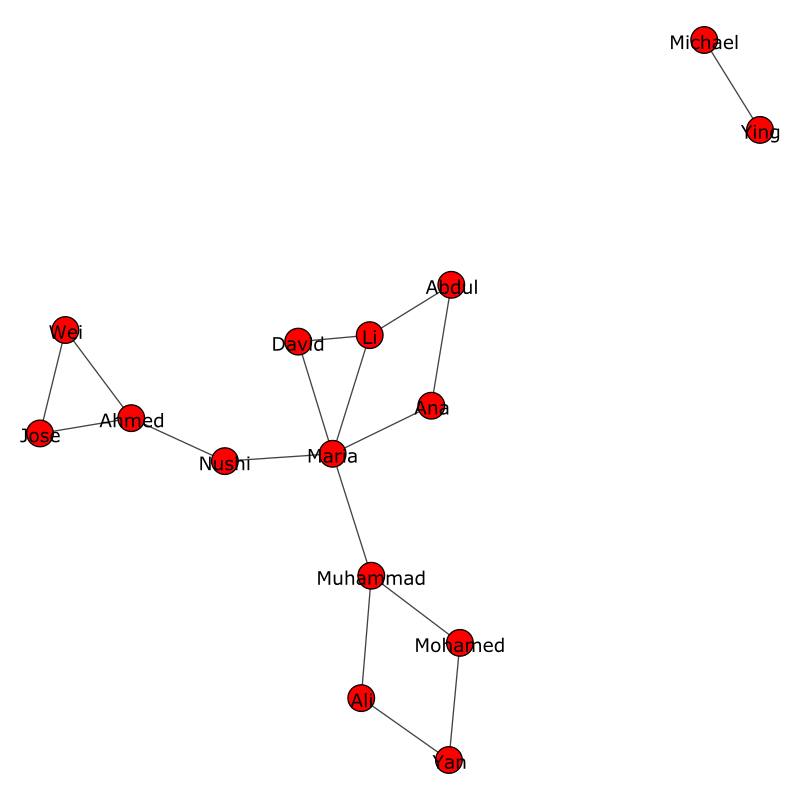 + +## Installing + +Requirements: +* xdg-open (Linux only) +* Python 3.9 or greater + +``` +pip install snvis +``` + +or if you want the latest development version (recommended): + +``` +pip install git+https://github.com/Callum-Irving/snvis.git#egg=snvis +``` + +## Usage + +Once you have installed `snvis`, you can run it using `snvis` as long as you +have added the directory it was installed to to your path. If this doesn't work, +you can run: + +``` +python -m snvis +``` + +The only required argument is the spreadsheet to parse, in tab-separated values +format. + +An example usage would be: + +``` +snvis data.tsv --view +``` + +This runs on the file `data.tsv` in verbose mode so that you can see what the +program is doing. + +To see all options, run: + +``` +snvis -h +``` + +### Data Structure + +The data for the network should be in a *.tsv file. In this file, one column +should contain the name for each person in the network and a second column +should contain the names of all other people that the person is connected to. +Connections can go both ways or just one, right now they are the same. + +Example spreadsheet: + +| name | connections | +| ----- | ------------- | +| James | Robert, John | +| Michael | Wiliam, David | +| Roberf | John | +| William | David, Robert | +| David | Michael | +| John | James, roberf | + +Notice that there are some typos in this spreadsheet. The program can detect +minor typos like "Roberf". The program uses the names in the "name" column as +the correct names. In this example "Robert" would actually get corrected to +"Roberf" because "Robert" is only in the "connections" column and "Roberf" is in +the "name" column. + +## Contributing + +### Commits + +When writing commit messages, please use conventional commits. + +### Building + +To build a release, run + +``` +python setup.py sdist bdist_wheel +``` + + + + +%package -n python3-snvis +Summary: Social network visualising tool +Provides: python-snvis +BuildRequires: python3-devel +BuildRequires: python3-setuptools +BuildRequires: python3-pip +%description -n python3-snvis +# Social Network Visualiser (snvis) + +This is a tool to visualise social networks from a spreadsheet of connections. +It creates an svg image and then displays is with the default system tool. + +Example: + + + +## Installing + +Requirements: +* xdg-open (Linux only) +* Python 3.9 or greater + +``` +pip install snvis +``` + +or if you want the latest development version (recommended): + +``` +pip install git+https://github.com/Callum-Irving/snvis.git#egg=snvis +``` + +## Usage + +Once you have installed `snvis`, you can run it using `snvis` as long as you +have added the directory it was installed to to your path. If this doesn't work, +you can run: + +``` +python -m snvis +``` + +The only required argument is the spreadsheet to parse, in tab-separated values +format. + +An example usage would be: + +``` +snvis data.tsv --view +``` + +This runs on the file `data.tsv` in verbose mode so that you can see what the +program is doing. + +To see all options, run: + +``` +snvis -h +``` + +### Data Structure + +The data for the network should be in a *.tsv file. In this file, one column +should contain the name for each person in the network and a second column +should contain the names of all other people that the person is connected to. +Connections can go both ways or just one, right now they are the same. + +Example spreadsheet: + +| name | connections | +| ----- | ------------- | +| James | Robert, John | +| Michael | Wiliam, David | +| Roberf | John | +| William | David, Robert | +| David | Michael | +| John | James, roberf | + +Notice that there are some typos in this spreadsheet. The program can detect +minor typos like "Roberf". The program uses the names in the "name" column as +the correct names. In this example "Robert" would actually get corrected to +"Roberf" because "Robert" is only in the "connections" column and "Roberf" is in +the "name" column. + +## Contributing + +### Commits + +When writing commit messages, please use conventional commits. + +### Building + +To build a release, run + +``` +python setup.py sdist bdist_wheel +``` + + + + +%package help +Summary: Development documents and examples for snvis +Provides: python3-snvis-doc +%description help +# Social Network Visualiser (snvis) + +This is a tool to visualise social networks from a spreadsheet of connections. +It creates an svg image and then displays is with the default system tool. + +Example: + + + +## Installing + +Requirements: +* xdg-open (Linux only) +* Python 3.9 or greater + +``` +pip install snvis +``` + +or if you want the latest development version (recommended): + +``` +pip install git+https://github.com/Callum-Irving/snvis.git#egg=snvis +``` + +## Usage + +Once you have installed `snvis`, you can run it using `snvis` as long as you +have added the directory it was installed to to your path. If this doesn't work, +you can run: + +``` +python -m snvis +``` + +The only required argument is the spreadsheet to parse, in tab-separated values +format. + +An example usage would be: + +``` +snvis data.tsv --view +``` + +This runs on the file `data.tsv` in verbose mode so that you can see what the +program is doing. + +To see all options, run: + +``` +snvis -h +``` + +### Data Structure + +The data for the network should be in a *.tsv file. In this file, one column +should contain the name for each person in the network and a second column +should contain the names of all other people that the person is connected to. +Connections can go both ways or just one, right now they are the same. + +Example spreadsheet: + +| name | connections | +| ----- | ------------- | +| James | Robert, John | +| Michael | Wiliam, David | +| Roberf | John | +| William | David, Robert | +| David | Michael | +| John | James, roberf | + +Notice that there are some typos in this spreadsheet. The program can detect +minor typos like "Roberf". The program uses the names in the "name" column as +the correct names. In this example "Robert" would actually get corrected to +"Roberf" because "Robert" is only in the "connections" column and "Roberf" is in +the "name" column. + +## Contributing + +### Commits + +When writing commit messages, please use conventional commits. + +### Building + +To build a release, run + +``` +python setup.py sdist bdist_wheel +``` + + + + +%prep +%autosetup -n snvis-0.1.12 + +%build +%py3_build + +%install +%py3_install +install -d -m755 %{buildroot}/%{_pkgdocdir} +if [ -d doc ]; then cp -arf doc %{buildroot}/%{_pkgdocdir}; fi +if [ -d docs ]; then cp -arf docs %{buildroot}/%{_pkgdocdir}; fi +if [ -d example ]; then cp -arf example %{buildroot}/%{_pkgdocdir}; fi +if [ -d examples ]; then cp -arf examples %{buildroot}/%{_pkgdocdir}; fi +pushd %{buildroot} +if [ -d usr/lib ]; then + find usr/lib -type f -printf "/%h/%f\n" >> filelist.lst +fi +if [ -d usr/lib64 ]; then + find usr/lib64 -type f -printf "/%h/%f\n" >> filelist.lst +fi +if [ -d usr/bin ]; then + find usr/bin -type f -printf "/%h/%f\n" >> filelist.lst +fi +if [ -d usr/sbin ]; then + find usr/sbin -type f -printf "/%h/%f\n" >> filelist.lst +fi +touch doclist.lst +if [ -d usr/share/man ]; then + find usr/share/man -type f -printf "/%h/%f.gz\n" >> doclist.lst +fi +popd +mv %{buildroot}/filelist.lst . +mv %{buildroot}/doclist.lst . + +%files -n python3-snvis -f filelist.lst +%dir %{python3_sitelib}/* + +%files help -f doclist.lst +%{_docdir}/* + +%changelog +* Wed May 10 2023 Python_Bot <Python_Bot@openeuler.org> - 0.1.12-1 +- Package Spec generated @@ -0,0 +1 @@ +e1d5a84e069afac6d9e49055b8ee4ad3 snvis-0.1.12.tar.gz |