1
2
3
4
5
6
7
8
9
10
11
12
13
14
15
16
17
18
19
20
21
22
23
24
25
26
27
28
29
30
31
32
33
34
35
36
37
38
39
40
41
42
43
44
45
46
47
48
49
50
51
52
53
54
55
56
57
58
59
60
61
62
63
64
65
66
67
68
69
70
71
72
73
74
75
76
77
78
79
80
81
82
83
84
85
86
87
88
89
90
91
92
93
94
95
96
97
98
99
100
101
102
103
104
105
106
107
108
109
110
111
112
113
114
115
116
117
118
119
120
121
122
123
124
125
126
127
128
129
130
131
132
133
134
135
136
137
138
139
140
141
142
143
144
145
146
147
148
149
150
151
152
153
154
155
156
157
158
159
160
161
162
163
164
165
166
167
168
169
170
171
172
173
174
175
176
177
178
179
180
181
182
183
184
185
186
187
188
189
190
191
192
193
194
195
196
197
198
199
200
201
202
203
204
205
206
207
208
209
210
211
212
213
214
215
216
217
218
219
220
221
222
223
224
225
226
227
228
229
230
231
232
233
234
235
236
237
238
239
240
241
242
243
244
245
246
247
248
249
250
251
252
253
254
255
256
257
258
259
|
%global _empty_manifest_terminate_build 0
Name: python-tokendito
Version: 2.0.0
Release: 1
Summary: Get AWS STS tokens from Okta SSO
License: Apache 2.0
URL: https://github.com/dowjones/tokendito
Source0: https://mirrors.nju.edu.cn/pypi/web/packages/5c/6e/f8f840f25a134744a6e666f6b3fb614f21e08cdbd336c3d88761c38bc39b/tokendito-2.0.0.tar.gz
BuildArch: noarch
Requires: python3-beautifulsoup4
Requires: python3-botocore
Requires: python3-platformdirs
Requires: python3-requests
%description
<p align="center">
<img src="https://raw.githubusercontent.com/dowjones/tokendito/main/docs/tokendito.png"/>
</p>
## Generate temporary AWS credentials via Okta.
[](https://github.com/dowjones/tokendito/actions)
[](https://pypi.org/project/tokendito/)
[](https://github.com/dowjones/tokendito/actions)
[](https://github.com/dowjones/tokendito/blob/main/LICENSE.txt)
[](https://github.com/dowjones/tokendito/)
[](https://coveralls.io/github/dowjones/tokendito) [](https://pypistats.org/packages/tokendito)
#
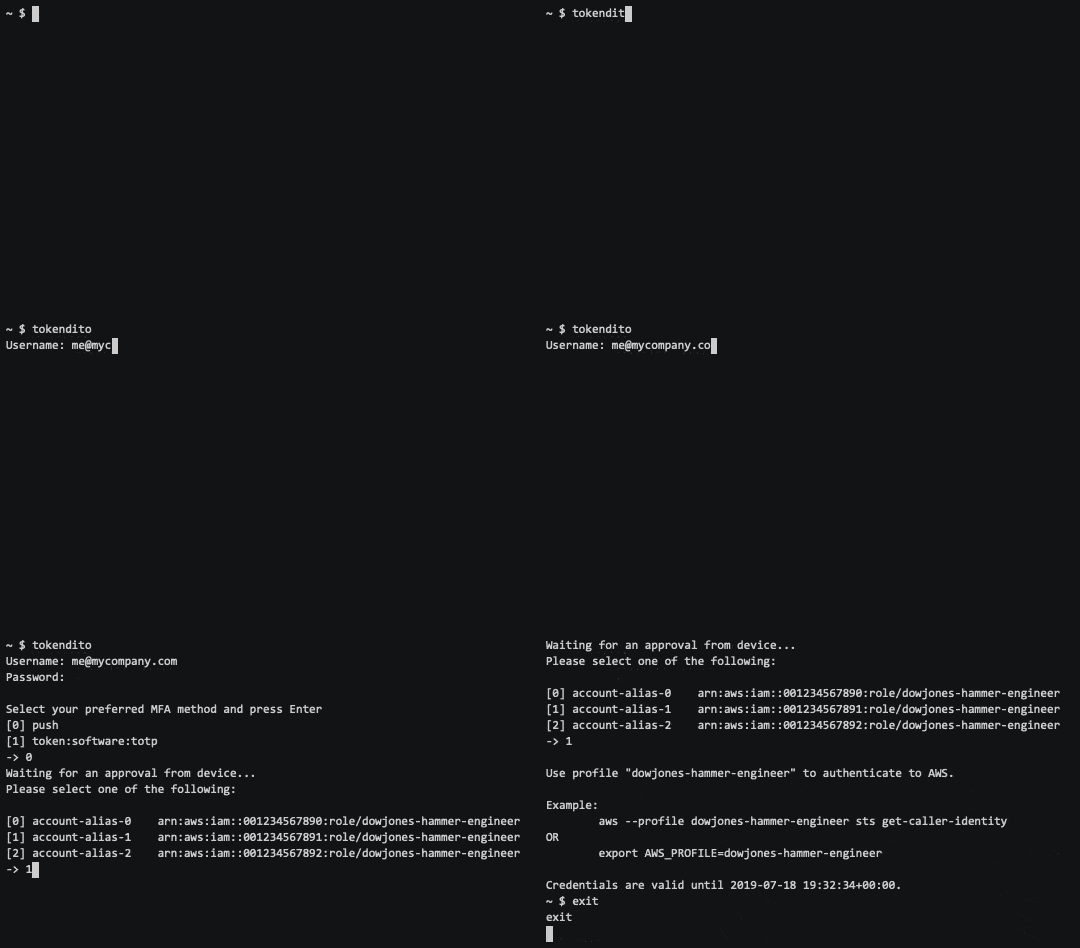
Use `tokendito` to generate temporary AWS credentials via Okta for
programmatic authentication to AWS. Tokendito signs you into Okta and
uses your existing AWS integration to broker a SAML assertion into
your AWS accounts, returning
[STS](https://docs.aws.amazon.com/IAM/latest/UserGuide/id_credentials_temp.html)
tokens into your local `~/.aws/credentials` file.
## What's new
With the release of tokendito 2.0, many changes and fixes were introduced. It is a breaking release: your configuration needs to be updated, the command line arguments have changed, and support for python < 3.7 has been removed.
The following changes are part of this release:
- Set the config file to be platform dependent, and follow the XDG standard.
- Extend configuration capabilities.
- Modernize output.
- Change the MFA method from strict match to partial match.
- Mask secrets from output logs.
- Automatically discover AWS URLs.
- Fix authentication with DUO.
- Add support for setting the logging level via both the INI file and ENV vars.
- Add support for Python 3.9 and 3.10.
- And many fixes.
Consult [additional notes](docs/README.md) for how to use tokendito.
## Requirements
- Python 3.7+
- AWS account(s) federated with Okta
Tokendito is compatible with Python 3 and can be installed with either
pip or pip3.
## Getting started
1. Install (via PyPi): `pip install tokendito`
2. Run `tokendito --configure`.
3. Run `tokendito`.
**NOTE**: Advanced users may shorten the `tokendito` interaction to a [single
command](docs/README.md#single-command-usage).
Have multiple Okta tiles to switch between? View our [multi-tile
guide](docs/README.md#multi-tile-guide).
### Tips, tricks, troubleshooting, examples, and more docs are [here](docs/README.md)! Also, [contributions are welcome](docs/CONTRIBUTING.md)!
%package -n python3-tokendito
Summary: Get AWS STS tokens from Okta SSO
Provides: python-tokendito
BuildRequires: python3-devel
BuildRequires: python3-setuptools
BuildRequires: python3-pip
%description -n python3-tokendito
<p align="center">
<img src="https://raw.githubusercontent.com/dowjones/tokendito/main/docs/tokendito.png"/>
</p>
## Generate temporary AWS credentials via Okta.
[](https://github.com/dowjones/tokendito/actions)
[](https://pypi.org/project/tokendito/)
[](https://github.com/dowjones/tokendito/actions)
[](https://github.com/dowjones/tokendito/blob/main/LICENSE.txt)
[](https://github.com/dowjones/tokendito/)
[](https://coveralls.io/github/dowjones/tokendito) [](https://pypistats.org/packages/tokendito)
#

Use `tokendito` to generate temporary AWS credentials via Okta for
programmatic authentication to AWS. Tokendito signs you into Okta and
uses your existing AWS integration to broker a SAML assertion into
your AWS accounts, returning
[STS](https://docs.aws.amazon.com/IAM/latest/UserGuide/id_credentials_temp.html)
tokens into your local `~/.aws/credentials` file.
## What's new
With the release of tokendito 2.0, many changes and fixes were introduced. It is a breaking release: your configuration needs to be updated, the command line arguments have changed, and support for python < 3.7 has been removed.
The following changes are part of this release:
- Set the config file to be platform dependent, and follow the XDG standard.
- Extend configuration capabilities.
- Modernize output.
- Change the MFA method from strict match to partial match.
- Mask secrets from output logs.
- Automatically discover AWS URLs.
- Fix authentication with DUO.
- Add support for setting the logging level via both the INI file and ENV vars.
- Add support for Python 3.9 and 3.10.
- And many fixes.
Consult [additional notes](docs/README.md) for how to use tokendito.
## Requirements
- Python 3.7+
- AWS account(s) federated with Okta
Tokendito is compatible with Python 3 and can be installed with either
pip or pip3.
## Getting started
1. Install (via PyPi): `pip install tokendito`
2. Run `tokendito --configure`.
3. Run `tokendito`.
**NOTE**: Advanced users may shorten the `tokendito` interaction to a [single
command](docs/README.md#single-command-usage).
Have multiple Okta tiles to switch between? View our [multi-tile
guide](docs/README.md#multi-tile-guide).
### Tips, tricks, troubleshooting, examples, and more docs are [here](docs/README.md)! Also, [contributions are welcome](docs/CONTRIBUTING.md)!
%package help
Summary: Development documents and examples for tokendito
Provides: python3-tokendito-doc
%description help
<p align="center">
<img src="https://raw.githubusercontent.com/dowjones/tokendito/main/docs/tokendito.png"/>
</p>
## Generate temporary AWS credentials via Okta.
[](https://github.com/dowjones/tokendito/actions)
[](https://pypi.org/project/tokendito/)
[](https://github.com/dowjones/tokendito/actions)
[](https://github.com/dowjones/tokendito/blob/main/LICENSE.txt)
[](https://github.com/dowjones/tokendito/)
[](https://coveralls.io/github/dowjones/tokendito) [](https://pypistats.org/packages/tokendito)
#

Use `tokendito` to generate temporary AWS credentials via Okta for
programmatic authentication to AWS. Tokendito signs you into Okta and
uses your existing AWS integration to broker a SAML assertion into
your AWS accounts, returning
[STS](https://docs.aws.amazon.com/IAM/latest/UserGuide/id_credentials_temp.html)
tokens into your local `~/.aws/credentials` file.
## What's new
With the release of tokendito 2.0, many changes and fixes were introduced. It is a breaking release: your configuration needs to be updated, the command line arguments have changed, and support for python < 3.7 has been removed.
The following changes are part of this release:
- Set the config file to be platform dependent, and follow the XDG standard.
- Extend configuration capabilities.
- Modernize output.
- Change the MFA method from strict match to partial match.
- Mask secrets from output logs.
- Automatically discover AWS URLs.
- Fix authentication with DUO.
- Add support for setting the logging level via both the INI file and ENV vars.
- Add support for Python 3.9 and 3.10.
- And many fixes.
Consult [additional notes](docs/README.md) for how to use tokendito.
## Requirements
- Python 3.7+
- AWS account(s) federated with Okta
Tokendito is compatible with Python 3 and can be installed with either
pip or pip3.
## Getting started
1. Install (via PyPi): `pip install tokendito`
2. Run `tokendito --configure`.
3. Run `tokendito`.
**NOTE**: Advanced users may shorten the `tokendito` interaction to a [single
command](docs/README.md#single-command-usage).
Have multiple Okta tiles to switch between? View our [multi-tile
guide](docs/README.md#multi-tile-guide).
### Tips, tricks, troubleshooting, examples, and more docs are [here](docs/README.md)! Also, [contributions are welcome](docs/CONTRIBUTING.md)!
%prep
%autosetup -n tokendito-2.0.0
%build
%py3_build
%install
%py3_install
install -d -m755 %{buildroot}/%{_pkgdocdir}
if [ -d doc ]; then cp -arf doc %{buildroot}/%{_pkgdocdir}; fi
if [ -d docs ]; then cp -arf docs %{buildroot}/%{_pkgdocdir}; fi
if [ -d example ]; then cp -arf example %{buildroot}/%{_pkgdocdir}; fi
if [ -d examples ]; then cp -arf examples %{buildroot}/%{_pkgdocdir}; fi
pushd %{buildroot}
if [ -d usr/lib ]; then
find usr/lib -type f -printf "/%h/%f\n" >> filelist.lst
fi
if [ -d usr/lib64 ]; then
find usr/lib64 -type f -printf "/%h/%f\n" >> filelist.lst
fi
if [ -d usr/bin ]; then
find usr/bin -type f -printf "/%h/%f\n" >> filelist.lst
fi
if [ -d usr/sbin ]; then
find usr/sbin -type f -printf "/%h/%f\n" >> filelist.lst
fi
touch doclist.lst
if [ -d usr/share/man ]; then
find usr/share/man -type f -printf "/%h/%f.gz\n" >> doclist.lst
fi
popd
mv %{buildroot}/filelist.lst .
mv %{buildroot}/doclist.lst .
%files -n python3-tokendito -f filelist.lst
%dir %{python3_sitelib}/*
%files help -f doclist.lst
%{_docdir}/*
%changelog
* Tue Apr 11 2023 Python_Bot <Python_Bot@openeuler.org> - 2.0.0-1
- Package Spec generated
|
