
diff options
| author | CoprDistGit <infra@openeuler.org> | 2023-05-10 05:56:34 +0000 |
|---|---|---|
| committer | CoprDistGit <infra@openeuler.org> | 2023-05-10 05:56:34 +0000 |
| commit | f6362acb3d8a3a615d6ac812884679cc0203da09 (patch) | |
| tree | af46e5f8f6d70842a30151789ac226ee7a5426ea | |
| parent | 936c2f1e752ee99e1872a660eef8690ad04b0278 (diff) | |
automatic import of python-ttkbootstrap
| -rw-r--r-- | .gitignore | 1 | ||||
| -rw-r--r-- | python-ttkbootstrap.spec | 271 | ||||
| -rw-r--r-- | sources | 1 |
3 files changed, 273 insertions, 0 deletions
@@ -0,0 +1 @@ +/ttkbootstrap-1.10.1.tar.gz diff --git a/python-ttkbootstrap.spec b/python-ttkbootstrap.spec new file mode 100644 index 0000000..7d6f6c0 --- /dev/null +++ b/python-ttkbootstrap.spec @@ -0,0 +1,271 @@ +%global _empty_manifest_terminate_build 0 +Name: python-ttkbootstrap +Version: 1.10.1 +Release: 1 +Summary: A supercharged theme extension for tkinter that enables on-demand modern flat style themes inspired by Bootstrap. +License: MIT License +URL: https://github.com/israel-dryer/ttkbootstrap +Source0: https://mirrors.nju.edu.cn/pypi/web/packages/e7/9e/22845f8e68415f4246342f3eccc5939991445098e8c1c0cf60c459755d22/ttkbootstrap-1.10.1.tar.gz +BuildArch: noarch + +Requires: python3-pillow + +%description +
+
+[](https://pepy.tech/project/ttkbootstrap)
+[](https://pepy.tech/project/ttkbootstrap)
+
+
+
+
+
+
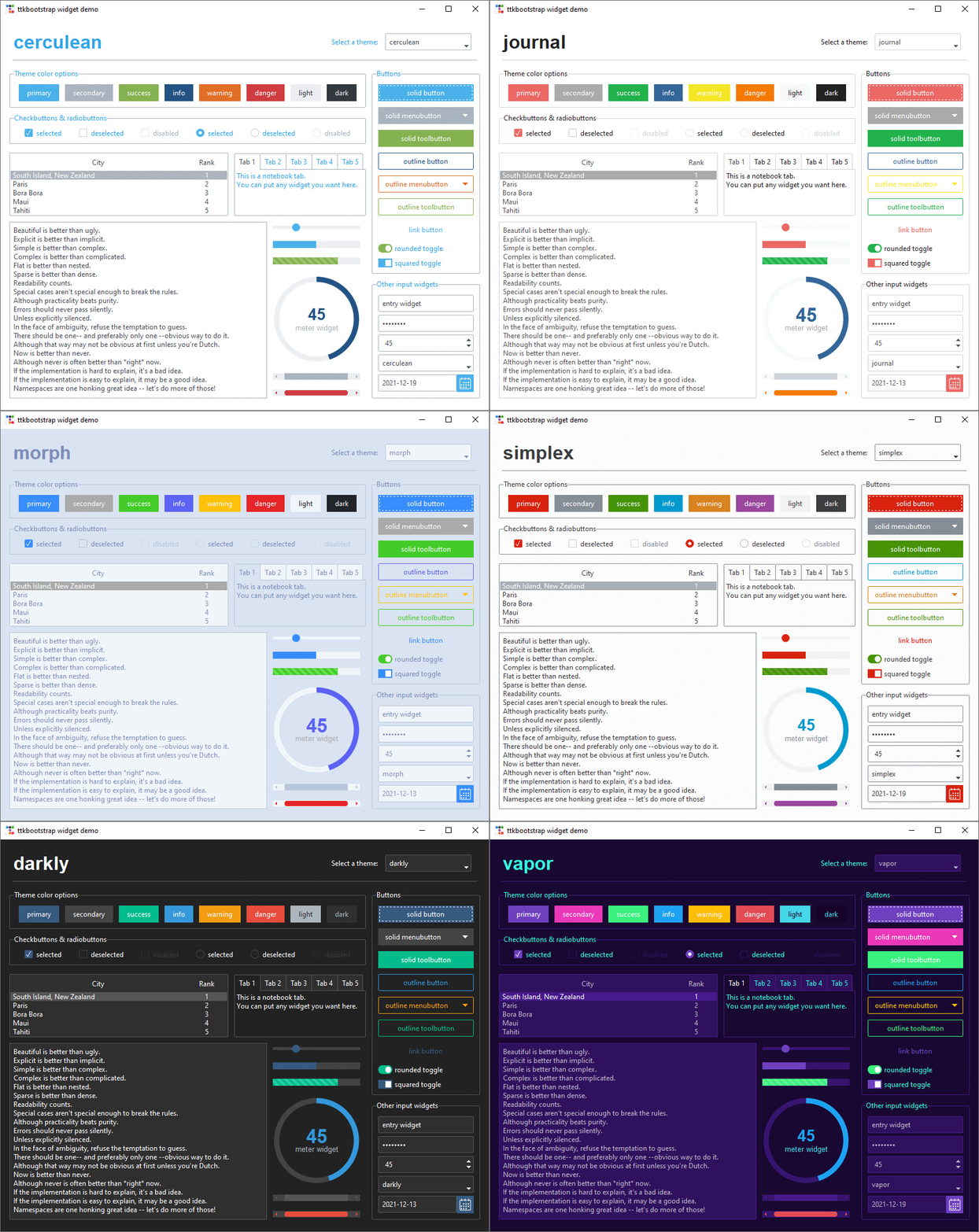
+A supercharged theme extension for tkinter that enables on-demand modern flat style themes inspired by Bootstrap.
+
+👀 Check out the [documentation](https://ttkbootstrap.readthedocs.io/en/latest/).
+
+
+
+## Features
+
+✔️ [**Built-in Themes**](https://ttkbootstrap.readthedocs.io/en/latest/themes/)
+Over a dozen curated dark and light themes.
+
+✔️ [**Pre-defined Styles:**](https://ttkbootstrap.readthedocs.io/en/latest/styleguide/)
+Loads of beautiful pre-defined widget styles such as **outline** and **round toggle** buttons.
+
+✔️ [**Simple keyword API:**](https://ttkbootstrap.readthedocs.io/en/latest/gettingstarted/tutorial/#use-themed-widgets)
+Apply colors and types using simple keywords such as **primary** and **striped** instead of the legacy approach of **primary.Striped.Horizontal.TProgressbar**. If you've used Bootstrap for web development, you are already familiar with this approach using css classes.
+
+✔️ [**Lots of new Widgets:**](https://ttkbootstrap.readthedocs.io/en/latest/api/widgets/dateentry/)
+ttkbootstrap comes with several new beautifully designed widgets such as **Meter**, **DateEntry**, and **Floodgauge**. Additionally, **dialogs** are now themed and fully customizable.
+
+✔️ [**Built-in Theme Creator:**](https://ttkbootstrap.readthedocs.io/en/latest/themes/themecreator/)
+Want to create your own theme? Easy! ttkboostrap includes a built-in **theme creator** that enables you to easily build, load, expore, and apply your own custom themes.
+
+## Installation
+
+```python
+python -m pip install ttkbootstrap
+```
+
+## Simple Usage
+Instead of using long, complicated ttk style classes, you can use simple keywords with the "bootstyle" parameter.
+
+```python
+import ttkbootstrap as ttk
+from ttkbootstrap.constants import *
+
+root = ttk.Window(themename="superhero")
+
+b1 = ttk.Button(root, text="Submit", bootstyle="success")
+b1.pack(side=LEFT, padx=5, pady=10)
+
+b2 = ttk.Button(root, text="Submit", bootstyle="info-outline")
+b2.pack(side=LEFT, padx=5, pady=10)
+
+root.mainloop()
+```
+
+The new keyword API is very flexible. The following examples all produce the same result:
+- `bootstyle="info-outline"`
+- `bootstyle="info outline"`
+- `bootstyle=("info", "outline")`
+- `bootstyle=(INFO, OUTLINE)`
+
+## Links
+- **Documentation:** https://ttkbootstrap.readthedocs.io/en/latest/
+- **GitHub:** https://github.com/israel-dryer/ttkbootstrap
+ + +%package -n python3-ttkbootstrap +Summary: A supercharged theme extension for tkinter that enables on-demand modern flat style themes inspired by Bootstrap. +Provides: python-ttkbootstrap +BuildRequires: python3-devel +BuildRequires: python3-setuptools +BuildRequires: python3-pip +%description -n python3-ttkbootstrap +
+
+[](https://pepy.tech/project/ttkbootstrap)
+[](https://pepy.tech/project/ttkbootstrap)
+
+
+
+
+
+
+A supercharged theme extension for tkinter that enables on-demand modern flat style themes inspired by Bootstrap.
+
+👀 Check out the [documentation](https://ttkbootstrap.readthedocs.io/en/latest/).
+
+
+
+## Features
+
+✔️ [**Built-in Themes**](https://ttkbootstrap.readthedocs.io/en/latest/themes/)
+Over a dozen curated dark and light themes.
+
+✔️ [**Pre-defined Styles:**](https://ttkbootstrap.readthedocs.io/en/latest/styleguide/)
+Loads of beautiful pre-defined widget styles such as **outline** and **round toggle** buttons.
+
+✔️ [**Simple keyword API:**](https://ttkbootstrap.readthedocs.io/en/latest/gettingstarted/tutorial/#use-themed-widgets)
+Apply colors and types using simple keywords such as **primary** and **striped** instead of the legacy approach of **primary.Striped.Horizontal.TProgressbar**. If you've used Bootstrap for web development, you are already familiar with this approach using css classes.
+
+✔️ [**Lots of new Widgets:**](https://ttkbootstrap.readthedocs.io/en/latest/api/widgets/dateentry/)
+ttkbootstrap comes with several new beautifully designed widgets such as **Meter**, **DateEntry**, and **Floodgauge**. Additionally, **dialogs** are now themed and fully customizable.
+
+✔️ [**Built-in Theme Creator:**](https://ttkbootstrap.readthedocs.io/en/latest/themes/themecreator/)
+Want to create your own theme? Easy! ttkboostrap includes a built-in **theme creator** that enables you to easily build, load, expore, and apply your own custom themes.
+
+## Installation
+
+```python
+python -m pip install ttkbootstrap
+```
+
+## Simple Usage
+Instead of using long, complicated ttk style classes, you can use simple keywords with the "bootstyle" parameter.
+
+```python
+import ttkbootstrap as ttk
+from ttkbootstrap.constants import *
+
+root = ttk.Window(themename="superhero")
+
+b1 = ttk.Button(root, text="Submit", bootstyle="success")
+b1.pack(side=LEFT, padx=5, pady=10)
+
+b2 = ttk.Button(root, text="Submit", bootstyle="info-outline")
+b2.pack(side=LEFT, padx=5, pady=10)
+
+root.mainloop()
+```
+
+The new keyword API is very flexible. The following examples all produce the same result:
+- `bootstyle="info-outline"`
+- `bootstyle="info outline"`
+- `bootstyle=("info", "outline")`
+- `bootstyle=(INFO, OUTLINE)`
+
+## Links
+- **Documentation:** https://ttkbootstrap.readthedocs.io/en/latest/
+- **GitHub:** https://github.com/israel-dryer/ttkbootstrap
+ + +%package help +Summary: Development documents and examples for ttkbootstrap +Provides: python3-ttkbootstrap-doc +%description help +
+
+[](https://pepy.tech/project/ttkbootstrap)
+[](https://pepy.tech/project/ttkbootstrap)
+
+
+
+
+
+
+A supercharged theme extension for tkinter that enables on-demand modern flat style themes inspired by Bootstrap.
+
+👀 Check out the [documentation](https://ttkbootstrap.readthedocs.io/en/latest/).
+
+
+
+## Features
+
+✔️ [**Built-in Themes**](https://ttkbootstrap.readthedocs.io/en/latest/themes/)
+Over a dozen curated dark and light themes.
+
+✔️ [**Pre-defined Styles:**](https://ttkbootstrap.readthedocs.io/en/latest/styleguide/)
+Loads of beautiful pre-defined widget styles such as **outline** and **round toggle** buttons.
+
+✔️ [**Simple keyword API:**](https://ttkbootstrap.readthedocs.io/en/latest/gettingstarted/tutorial/#use-themed-widgets)
+Apply colors and types using simple keywords such as **primary** and **striped** instead of the legacy approach of **primary.Striped.Horizontal.TProgressbar**. If you've used Bootstrap for web development, you are already familiar with this approach using css classes.
+
+✔️ [**Lots of new Widgets:**](https://ttkbootstrap.readthedocs.io/en/latest/api/widgets/dateentry/)
+ttkbootstrap comes with several new beautifully designed widgets such as **Meter**, **DateEntry**, and **Floodgauge**. Additionally, **dialogs** are now themed and fully customizable.
+
+✔️ [**Built-in Theme Creator:**](https://ttkbootstrap.readthedocs.io/en/latest/themes/themecreator/)
+Want to create your own theme? Easy! ttkboostrap includes a built-in **theme creator** that enables you to easily build, load, expore, and apply your own custom themes.
+
+## Installation
+
+```python
+python -m pip install ttkbootstrap
+```
+
+## Simple Usage
+Instead of using long, complicated ttk style classes, you can use simple keywords with the "bootstyle" parameter.
+
+```python
+import ttkbootstrap as ttk
+from ttkbootstrap.constants import *
+
+root = ttk.Window(themename="superhero")
+
+b1 = ttk.Button(root, text="Submit", bootstyle="success")
+b1.pack(side=LEFT, padx=5, pady=10)
+
+b2 = ttk.Button(root, text="Submit", bootstyle="info-outline")
+b2.pack(side=LEFT, padx=5, pady=10)
+
+root.mainloop()
+```
+
+The new keyword API is very flexible. The following examples all produce the same result:
+- `bootstyle="info-outline"`
+- `bootstyle="info outline"`
+- `bootstyle=("info", "outline")`
+- `bootstyle=(INFO, OUTLINE)`
+
+## Links
+- **Documentation:** https://ttkbootstrap.readthedocs.io/en/latest/
+- **GitHub:** https://github.com/israel-dryer/ttkbootstrap
+ + +%prep +%autosetup -n ttkbootstrap-1.10.1 + +%build +%py3_build + +%install +%py3_install +install -d -m755 %{buildroot}/%{_pkgdocdir} +if [ -d doc ]; then cp -arf doc %{buildroot}/%{_pkgdocdir}; fi +if [ -d docs ]; then cp -arf docs %{buildroot}/%{_pkgdocdir}; fi +if [ -d example ]; then cp -arf example %{buildroot}/%{_pkgdocdir}; fi +if [ -d examples ]; then cp -arf examples %{buildroot}/%{_pkgdocdir}; fi +pushd %{buildroot} +if [ -d usr/lib ]; then + find usr/lib -type f -printf "/%h/%f\n" >> filelist.lst +fi +if [ -d usr/lib64 ]; then + find usr/lib64 -type f -printf "/%h/%f\n" >> filelist.lst +fi +if [ -d usr/bin ]; then + find usr/bin -type f -printf "/%h/%f\n" >> filelist.lst +fi +if [ -d usr/sbin ]; then + find usr/sbin -type f -printf "/%h/%f\n" >> filelist.lst +fi +touch doclist.lst +if [ -d usr/share/man ]; then + find usr/share/man -type f -printf "/%h/%f.gz\n" >> doclist.lst +fi +popd +mv %{buildroot}/filelist.lst . +mv %{buildroot}/doclist.lst . + +%files -n python3-ttkbootstrap -f filelist.lst +%dir %{python3_sitelib}/* + +%files help -f doclist.lst +%{_docdir}/* + +%changelog +* Wed May 10 2023 Python_Bot <Python_Bot@openeuler.org> - 1.10.1-1 +- Package Spec generated @@ -0,0 +1 @@ +12bafb4412daef43343b914f7df702ba ttkbootstrap-1.10.1.tar.gz |