
diff options
| author | CoprDistGit <infra@openeuler.org> | 2023-05-18 05:17:30 +0000 |
|---|---|---|
| committer | CoprDistGit <infra@openeuler.org> | 2023-05-18 05:17:30 +0000 |
| commit | b3248ce3708ca6c41b80088e213522ff706e9db7 (patch) | |
| tree | 5b1fb8ec9919e7486bdc9941fa1d0c42dcad3e2e /python-voicefixer.spec | |
| parent | 0968763aa83733f0cd2483ccc515f91725bcf9fa (diff) | |
automatic import of python-voicefixer
Diffstat (limited to 'python-voicefixer.spec')
| -rw-r--r-- | python-voicefixer.spec | 742 |
1 files changed, 742 insertions, 0 deletions
diff --git a/python-voicefixer.spec b/python-voicefixer.spec new file mode 100644 index 0000000..0eaf061 --- /dev/null +++ b/python-voicefixer.spec @@ -0,0 +1,742 @@ +%global _empty_manifest_terminate_build 0 +Name: python-voicefixer +Version: 0.1.2 +Release: 1 +Summary: This package is written for the restoration of degraded speech +License: MIT +URL: https://github.com/haoheliu/voicefixer +Source0: https://mirrors.nju.edu.cn/pypi/web/packages/f1/ee/56f925d5aa7827d637f6ff94cd05400c8e5ad63473d6b4eb60206d270f8c/voicefixer-0.1.2.tar.gz +BuildArch: noarch + +Requires: python3-librosa +Requires: python3-matplotlib +Requires: python3-torch +Requires: python3-progressbar +Requires: python3-torchlibrosa +Requires: python3-GitPython +Requires: python3-streamlit + +%description + +[](https://arxiv.org/abs/2109.13731) [](https://colab.research.google.com/drive/1HYYUepIsl2aXsdET6P_AmNVXuWP1MCMf?usp=sharing) [](https://badge.fury.io/py/voicefixer) [](https://haoheliu.github.io/demopage-voicefixer)[](https://huggingface.co/spaces/akhaliq/VoiceFixer) + +- [VoiceFixer](#voicefixer) + - [Demo](#demo) + - [Usage](#usage) + - [Desktop App](#desktop-app) + - [Command line](#command-line) + - [Python Examples](#python-examples) + - [Others Features](#others-features) + - [Materials](#materials) + - [Change log](#change-log) + +# VoiceFixer + +*Voicefixer* aims at the restoration of human speech regardless how serious its degraded. It can handle noise, reveberation, low resolution (2kHz~44.1kHz) and clipping (0.1-1.0 threshold) effect within one model. + +This package provides: +- A pretrained *Voicefixer*, which is build based on neural vocoder. +- A pretrained 44.1k universal speaker-independent neural vocoder. + + + +- If you found this repo helpful, please consider citing + +```bib + @misc{liu2021voicefixer, + title={VoiceFixer: Toward General Speech Restoration With Neural Vocoder}, + author={Haohe Liu and Qiuqiang Kong and Qiao Tian and Yan Zhao and DeLiang Wang and Chuanzeng Huang and Yuxuan Wang}, + year={2021}, + eprint={2109.13731}, + archivePrefix={arXiv}, + primaryClass={cs.SD} + } +``` + +## Demo + +Please visit [demo page](https://haoheliu.github.io/demopage-voicefixer/) to view what voicefixer can do. + +## Usage +### Desktop App + +First, install voicefixer via pip: +```shell script +pip install voicefixer==0.1.2 +``` + +You can test audio samples on your desktop by running website (powered by [streamlit](https://streamlit.io/)) + +1. Clone the repo first. +```shell script +git clone https://github.com/haoheliu/voicefixer.git +cd voicefixer +``` +:warning: **For windows users**, please make sure you have installed [WGET](https://eternallybored.org/misc/wget) and added the wget command to the system path (thanks @justinjohn0306). + + +1. Initialize and start web page. +```shell script +# Run streamlit +streamlit run test/streamlit.py +``` + +- If you run for the first time: the web page may leave blank for several minutes for downloading models. You can checkout the terminal for downloading progresses. + +- You can use [this low quality speech file](https://github.com/haoheliu/voicefixer/blob/main/test/utterance/original/original.wav) we provided for a test run. The page after processing will look like the following. + +<p align="center"><img src="test/streamlit.png" alt="figure" width="400"/></p> + +- For users from main land China, if you experience difficulty on downloading checkpoint. You can access them alternatively on [百度网盘](https://pan.baidu.com/s/194ufkUR_PYf1nE1KqkEZjQ) (提取密码: qis6). Please download the two checkpoints inside and place them in the following folder. + - Place **vf.ckpt** inside *~/.cache/voicefixer/analysis_module/checkpoints*. (The "~" represents your home directory) + - Place **model.ckpt-1490000_trimed.pt** inside *~/.cache/voicefixer/synthesis_module/44100*. (The "~" represents your home directory) + +### Command line + +First, install voicefixer via pip: +```shell +pip install voicefixer==0.1.2 +``` + +Process a file: +```shell +# Specify the input .wav file. Output file is outfile.wav. +voicefixer --infile test/utterance/original/original.wav +# Or specify a output path +voicefixer --infile test/utterance/original/original.wav --outfile test/utterance/original/original_processed.wav +``` + +Process files in a folder: +```shell +voicefixer --infolder /path/to/input --outfolder /path/to/output +``` + +Change mode (The default mode is 0): +```shell +voicefixer --infile /path/to/input.wav --outfile /path/to/output.wav --mode 1 +``` + +Run all modes: +```shell +# output file saved to `/path/to/output-modeX.wav`. +voicefixer --infile /path/to/input.wav --outfile /path/to/output.wav --mode all +``` + +For more helper information please run: + +```shell +voicefixer -h +``` + +### Python Examples + +First, install voicefixer via pip: +```shell script +pip install voicefixer==0.1.2 +``` + +Then run the following scripts for a test run: + +```shell script +git clone https://github.com/haoheliu/voicefixer.git; cd voicefixer +python3 test/test.py # test script +``` +We expect it will give you the following output: +```shell script +Initializing VoiceFixer... +Test voicefixer mode 0, Pass +Test voicefixer mode 1, Pass +Test voicefixer mode 2, Pass +Initializing 44.1kHz speech vocoder... +Test vocoder using groundtruth mel spectrogram... +Pass +``` +*test/test.py* mainly contains the test of the following two APIs: +- voicefixer.restore +- vocoder.oracle + +```python +... + +# TEST VOICEFIXER +## Initialize a voicefixer +print("Initializing VoiceFixer...") +voicefixer = VoiceFixer() +# Mode 0: Original Model (suggested by default) +# Mode 1: Add preprocessing module (remove higher frequency) +# Mode 2: Train mode (might work sometimes on seriously degraded real speech) +for mode in [0,1,2]: + print("Testing mode",mode) + voicefixer.restore(input=os.path.join(git_root,"test/utterance/original/original.flac"), # low quality .wav/.flac file + output=os.path.join(git_root,"test/utterance/output/output_mode_"+str(mode)+".flac"), # save file path + cuda=False, # GPU acceleration + mode=mode) + if(mode != 2): + check("output_mode_"+str(mode)+".flac") + print("Pass") + +# TEST VOCODER +## Initialize a vocoder +print("Initializing 44.1kHz speech vocoder...") +vocoder = Vocoder(sample_rate=44100) + +### read wave (fpath) -> mel spectrogram -> vocoder -> wave -> save wave (out_path) +print("Test vocoder using groundtruth mel spectrogram...") +vocoder.oracle(fpath=os.path.join(git_root,"test/utterance/original/p360_001_mic1.flac"), + out_path=os.path.join(git_root,"test/utterance/output/oracle.flac"), + cuda=False) # GPU acceleration + +... +``` + +You can clone this repo and try to run test.py inside the *test* folder. + +### Others Features + +- How to use your own vocoder, like pre-trained HiFi-Gan? + +First you need to write a following helper function with your model. Similar to the helper function in this repo: https://github.com/haoheliu/voicefixer/blob/main/voicefixer/vocoder/base.py#L35 + +```shell script + def convert_mel_to_wav(mel): + """ + :param non normalized mel spectrogram: [batchsize, 1, t-steps, n_mel] + :return: [batchsize, 1, samples] + """ + return wav +``` + +Then pass this function to *voicefixer.restore*, for example: +``` +voicefixer.restore(input="", # input wav file path + output="", # output wav file path + cuda=False, # whether to use gpu acceleration + mode = 0, + your_vocoder_func = convert_mel_to_wav) +``` + +Note: +- For compatibility, your vocoder should working on 44.1kHz wave with mel frequency bins 128. +- The input mel spectrogram to the helper function should not be normalized by the width of each mel filter. + +## Materials +- Voicefixer training: https://github.com/haoheliu/voicefixer_main.git +- Demo page: https://haoheliu.github.io/demopage-voicefixer/ + +[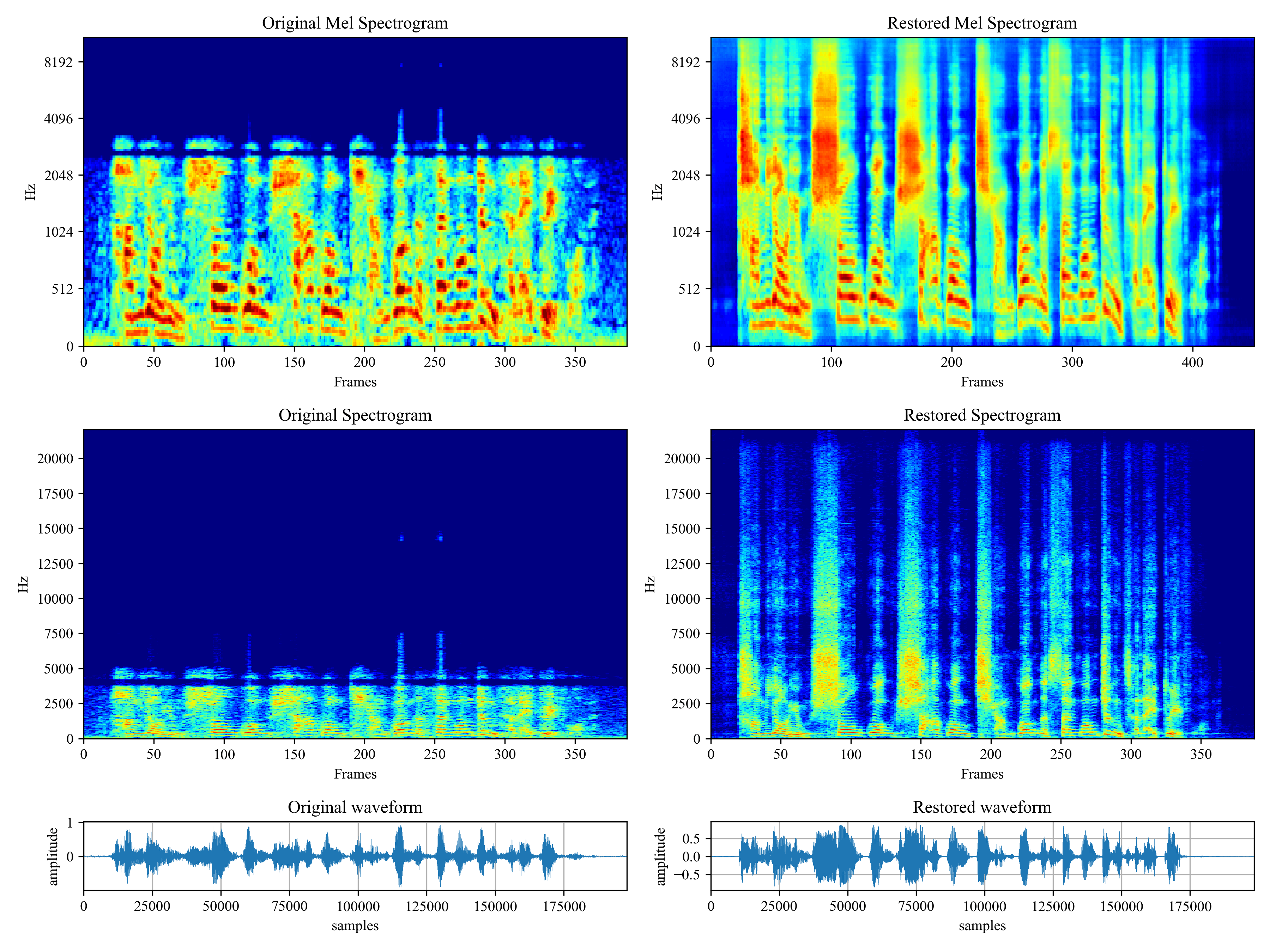](https://imgtu.com/i/46dnPO) +[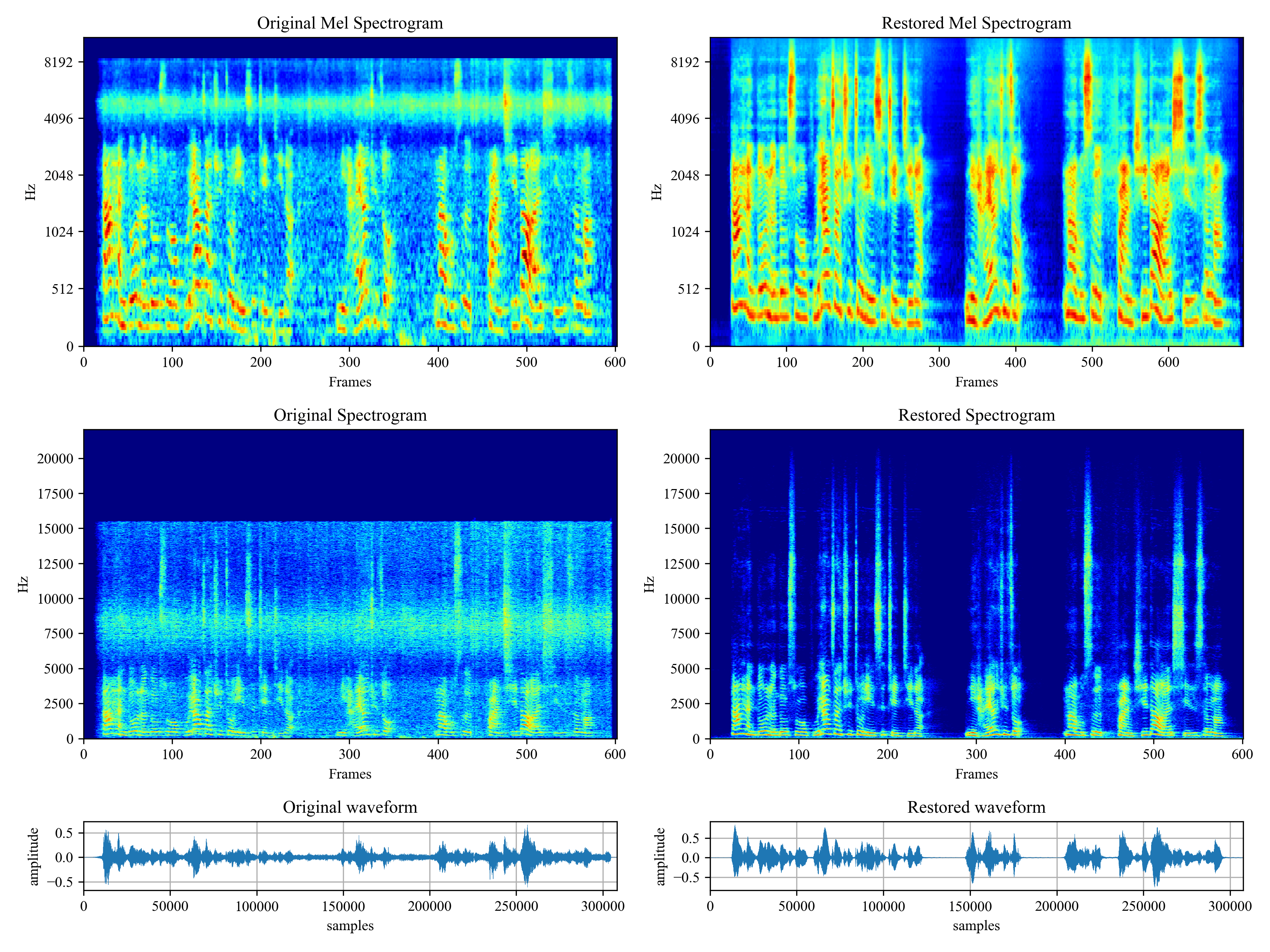](https://imgtu.com/i/46dMxH) + + +## Change log +- 2022-09-03: Fix bugs on commandline voicefixer for windows users. +- 2022-08-18: Add commandline voicefixer tool to the pip package. + + + + + + + + + + +%package -n python3-voicefixer +Summary: This package is written for the restoration of degraded speech +Provides: python-voicefixer +BuildRequires: python3-devel +BuildRequires: python3-setuptools +BuildRequires: python3-pip +%description -n python3-voicefixer + +[](https://arxiv.org/abs/2109.13731) [](https://colab.research.google.com/drive/1HYYUepIsl2aXsdET6P_AmNVXuWP1MCMf?usp=sharing) [](https://badge.fury.io/py/voicefixer) [](https://haoheliu.github.io/demopage-voicefixer)[](https://huggingface.co/spaces/akhaliq/VoiceFixer) + +- [VoiceFixer](#voicefixer) + - [Demo](#demo) + - [Usage](#usage) + - [Desktop App](#desktop-app) + - [Command line](#command-line) + - [Python Examples](#python-examples) + - [Others Features](#others-features) + - [Materials](#materials) + - [Change log](#change-log) + +# VoiceFixer + +*Voicefixer* aims at the restoration of human speech regardless how serious its degraded. It can handle noise, reveberation, low resolution (2kHz~44.1kHz) and clipping (0.1-1.0 threshold) effect within one model. + +This package provides: +- A pretrained *Voicefixer*, which is build based on neural vocoder. +- A pretrained 44.1k universal speaker-independent neural vocoder. + + + +- If you found this repo helpful, please consider citing + +```bib + @misc{liu2021voicefixer, + title={VoiceFixer: Toward General Speech Restoration With Neural Vocoder}, + author={Haohe Liu and Qiuqiang Kong and Qiao Tian and Yan Zhao and DeLiang Wang and Chuanzeng Huang and Yuxuan Wang}, + year={2021}, + eprint={2109.13731}, + archivePrefix={arXiv}, + primaryClass={cs.SD} + } +``` + +## Demo + +Please visit [demo page](https://haoheliu.github.io/demopage-voicefixer/) to view what voicefixer can do. + +## Usage +### Desktop App + +First, install voicefixer via pip: +```shell script +pip install voicefixer==0.1.2 +``` + +You can test audio samples on your desktop by running website (powered by [streamlit](https://streamlit.io/)) + +1. Clone the repo first. +```shell script +git clone https://github.com/haoheliu/voicefixer.git +cd voicefixer +``` +:warning: **For windows users**, please make sure you have installed [WGET](https://eternallybored.org/misc/wget) and added the wget command to the system path (thanks @justinjohn0306). + + +1. Initialize and start web page. +```shell script +# Run streamlit +streamlit run test/streamlit.py +``` + +- If you run for the first time: the web page may leave blank for several minutes for downloading models. You can checkout the terminal for downloading progresses. + +- You can use [this low quality speech file](https://github.com/haoheliu/voicefixer/blob/main/test/utterance/original/original.wav) we provided for a test run. The page after processing will look like the following. + +<p align="center"><img src="test/streamlit.png" alt="figure" width="400"/></p> + +- For users from main land China, if you experience difficulty on downloading checkpoint. You can access them alternatively on [百度网盘](https://pan.baidu.com/s/194ufkUR_PYf1nE1KqkEZjQ) (提取密码: qis6). Please download the two checkpoints inside and place them in the following folder. + - Place **vf.ckpt** inside *~/.cache/voicefixer/analysis_module/checkpoints*. (The "~" represents your home directory) + - Place **model.ckpt-1490000_trimed.pt** inside *~/.cache/voicefixer/synthesis_module/44100*. (The "~" represents your home directory) + +### Command line + +First, install voicefixer via pip: +```shell +pip install voicefixer==0.1.2 +``` + +Process a file: +```shell +# Specify the input .wav file. Output file is outfile.wav. +voicefixer --infile test/utterance/original/original.wav +# Or specify a output path +voicefixer --infile test/utterance/original/original.wav --outfile test/utterance/original/original_processed.wav +``` + +Process files in a folder: +```shell +voicefixer --infolder /path/to/input --outfolder /path/to/output +``` + +Change mode (The default mode is 0): +```shell +voicefixer --infile /path/to/input.wav --outfile /path/to/output.wav --mode 1 +``` + +Run all modes: +```shell +# output file saved to `/path/to/output-modeX.wav`. +voicefixer --infile /path/to/input.wav --outfile /path/to/output.wav --mode all +``` + +For more helper information please run: + +```shell +voicefixer -h +``` + +### Python Examples + +First, install voicefixer via pip: +```shell script +pip install voicefixer==0.1.2 +``` + +Then run the following scripts for a test run: + +```shell script +git clone https://github.com/haoheliu/voicefixer.git; cd voicefixer +python3 test/test.py # test script +``` +We expect it will give you the following output: +```shell script +Initializing VoiceFixer... +Test voicefixer mode 0, Pass +Test voicefixer mode 1, Pass +Test voicefixer mode 2, Pass +Initializing 44.1kHz speech vocoder... +Test vocoder using groundtruth mel spectrogram... +Pass +``` +*test/test.py* mainly contains the test of the following two APIs: +- voicefixer.restore +- vocoder.oracle + +```python +... + +# TEST VOICEFIXER +## Initialize a voicefixer +print("Initializing VoiceFixer...") +voicefixer = VoiceFixer() +# Mode 0: Original Model (suggested by default) +# Mode 1: Add preprocessing module (remove higher frequency) +# Mode 2: Train mode (might work sometimes on seriously degraded real speech) +for mode in [0,1,2]: + print("Testing mode",mode) + voicefixer.restore(input=os.path.join(git_root,"test/utterance/original/original.flac"), # low quality .wav/.flac file + output=os.path.join(git_root,"test/utterance/output/output_mode_"+str(mode)+".flac"), # save file path + cuda=False, # GPU acceleration + mode=mode) + if(mode != 2): + check("output_mode_"+str(mode)+".flac") + print("Pass") + +# TEST VOCODER +## Initialize a vocoder +print("Initializing 44.1kHz speech vocoder...") +vocoder = Vocoder(sample_rate=44100) + +### read wave (fpath) -> mel spectrogram -> vocoder -> wave -> save wave (out_path) +print("Test vocoder using groundtruth mel spectrogram...") +vocoder.oracle(fpath=os.path.join(git_root,"test/utterance/original/p360_001_mic1.flac"), + out_path=os.path.join(git_root,"test/utterance/output/oracle.flac"), + cuda=False) # GPU acceleration + +... +``` + +You can clone this repo and try to run test.py inside the *test* folder. + +### Others Features + +- How to use your own vocoder, like pre-trained HiFi-Gan? + +First you need to write a following helper function with your model. Similar to the helper function in this repo: https://github.com/haoheliu/voicefixer/blob/main/voicefixer/vocoder/base.py#L35 + +```shell script + def convert_mel_to_wav(mel): + """ + :param non normalized mel spectrogram: [batchsize, 1, t-steps, n_mel] + :return: [batchsize, 1, samples] + """ + return wav +``` + +Then pass this function to *voicefixer.restore*, for example: +``` +voicefixer.restore(input="", # input wav file path + output="", # output wav file path + cuda=False, # whether to use gpu acceleration + mode = 0, + your_vocoder_func = convert_mel_to_wav) +``` + +Note: +- For compatibility, your vocoder should working on 44.1kHz wave with mel frequency bins 128. +- The input mel spectrogram to the helper function should not be normalized by the width of each mel filter. + +## Materials +- Voicefixer training: https://github.com/haoheliu/voicefixer_main.git +- Demo page: https://haoheliu.github.io/demopage-voicefixer/ + +[](https://imgtu.com/i/46dnPO) +[](https://imgtu.com/i/46dMxH) + + +## Change log +- 2022-09-03: Fix bugs on commandline voicefixer for windows users. +- 2022-08-18: Add commandline voicefixer tool to the pip package. + + + + + + + + + + +%package help +Summary: Development documents and examples for voicefixer +Provides: python3-voicefixer-doc +%description help + +[](https://arxiv.org/abs/2109.13731) [](https://colab.research.google.com/drive/1HYYUepIsl2aXsdET6P_AmNVXuWP1MCMf?usp=sharing) [](https://badge.fury.io/py/voicefixer) [](https://haoheliu.github.io/demopage-voicefixer)[](https://huggingface.co/spaces/akhaliq/VoiceFixer) + +- [VoiceFixer](#voicefixer) + - [Demo](#demo) + - [Usage](#usage) + - [Desktop App](#desktop-app) + - [Command line](#command-line) + - [Python Examples](#python-examples) + - [Others Features](#others-features) + - [Materials](#materials) + - [Change log](#change-log) + +# VoiceFixer + +*Voicefixer* aims at the restoration of human speech regardless how serious its degraded. It can handle noise, reveberation, low resolution (2kHz~44.1kHz) and clipping (0.1-1.0 threshold) effect within one model. + +This package provides: +- A pretrained *Voicefixer*, which is build based on neural vocoder. +- A pretrained 44.1k universal speaker-independent neural vocoder. + + + +- If you found this repo helpful, please consider citing + +```bib + @misc{liu2021voicefixer, + title={VoiceFixer: Toward General Speech Restoration With Neural Vocoder}, + author={Haohe Liu and Qiuqiang Kong and Qiao Tian and Yan Zhao and DeLiang Wang and Chuanzeng Huang and Yuxuan Wang}, + year={2021}, + eprint={2109.13731}, + archivePrefix={arXiv}, + primaryClass={cs.SD} + } +``` + +## Demo + +Please visit [demo page](https://haoheliu.github.io/demopage-voicefixer/) to view what voicefixer can do. + +## Usage +### Desktop App + +First, install voicefixer via pip: +```shell script +pip install voicefixer==0.1.2 +``` + +You can test audio samples on your desktop by running website (powered by [streamlit](https://streamlit.io/)) + +1. Clone the repo first. +```shell script +git clone https://github.com/haoheliu/voicefixer.git +cd voicefixer +``` +:warning: **For windows users**, please make sure you have installed [WGET](https://eternallybored.org/misc/wget) and added the wget command to the system path (thanks @justinjohn0306). + + +1. Initialize and start web page. +```shell script +# Run streamlit +streamlit run test/streamlit.py +``` + +- If you run for the first time: the web page may leave blank for several minutes for downloading models. You can checkout the terminal for downloading progresses. + +- You can use [this low quality speech file](https://github.com/haoheliu/voicefixer/blob/main/test/utterance/original/original.wav) we provided for a test run. The page after processing will look like the following. + +<p align="center"><img src="test/streamlit.png" alt="figure" width="400"/></p> + +- For users from main land China, if you experience difficulty on downloading checkpoint. You can access them alternatively on [百度网盘](https://pan.baidu.com/s/194ufkUR_PYf1nE1KqkEZjQ) (提取密码: qis6). Please download the two checkpoints inside and place them in the following folder. + - Place **vf.ckpt** inside *~/.cache/voicefixer/analysis_module/checkpoints*. (The "~" represents your home directory) + - Place **model.ckpt-1490000_trimed.pt** inside *~/.cache/voicefixer/synthesis_module/44100*. (The "~" represents your home directory) + +### Command line + +First, install voicefixer via pip: +```shell +pip install voicefixer==0.1.2 +``` + +Process a file: +```shell +# Specify the input .wav file. Output file is outfile.wav. +voicefixer --infile test/utterance/original/original.wav +# Or specify a output path +voicefixer --infile test/utterance/original/original.wav --outfile test/utterance/original/original_processed.wav +``` + +Process files in a folder: +```shell +voicefixer --infolder /path/to/input --outfolder /path/to/output +``` + +Change mode (The default mode is 0): +```shell +voicefixer --infile /path/to/input.wav --outfile /path/to/output.wav --mode 1 +``` + +Run all modes: +```shell +# output file saved to `/path/to/output-modeX.wav`. +voicefixer --infile /path/to/input.wav --outfile /path/to/output.wav --mode all +``` + +For more helper information please run: + +```shell +voicefixer -h +``` + +### Python Examples + +First, install voicefixer via pip: +```shell script +pip install voicefixer==0.1.2 +``` + +Then run the following scripts for a test run: + +```shell script +git clone https://github.com/haoheliu/voicefixer.git; cd voicefixer +python3 test/test.py # test script +``` +We expect it will give you the following output: +```shell script +Initializing VoiceFixer... +Test voicefixer mode 0, Pass +Test voicefixer mode 1, Pass +Test voicefixer mode 2, Pass +Initializing 44.1kHz speech vocoder... +Test vocoder using groundtruth mel spectrogram... +Pass +``` +*test/test.py* mainly contains the test of the following two APIs: +- voicefixer.restore +- vocoder.oracle + +```python +... + +# TEST VOICEFIXER +## Initialize a voicefixer +print("Initializing VoiceFixer...") +voicefixer = VoiceFixer() +# Mode 0: Original Model (suggested by default) +# Mode 1: Add preprocessing module (remove higher frequency) +# Mode 2: Train mode (might work sometimes on seriously degraded real speech) +for mode in [0,1,2]: + print("Testing mode",mode) + voicefixer.restore(input=os.path.join(git_root,"test/utterance/original/original.flac"), # low quality .wav/.flac file + output=os.path.join(git_root,"test/utterance/output/output_mode_"+str(mode)+".flac"), # save file path + cuda=False, # GPU acceleration + mode=mode) + if(mode != 2): + check("output_mode_"+str(mode)+".flac") + print("Pass") + +# TEST VOCODER +## Initialize a vocoder +print("Initializing 44.1kHz speech vocoder...") +vocoder = Vocoder(sample_rate=44100) + +### read wave (fpath) -> mel spectrogram -> vocoder -> wave -> save wave (out_path) +print("Test vocoder using groundtruth mel spectrogram...") +vocoder.oracle(fpath=os.path.join(git_root,"test/utterance/original/p360_001_mic1.flac"), + out_path=os.path.join(git_root,"test/utterance/output/oracle.flac"), + cuda=False) # GPU acceleration + +... +``` + +You can clone this repo and try to run test.py inside the *test* folder. + +### Others Features + +- How to use your own vocoder, like pre-trained HiFi-Gan? + +First you need to write a following helper function with your model. Similar to the helper function in this repo: https://github.com/haoheliu/voicefixer/blob/main/voicefixer/vocoder/base.py#L35 + +```shell script + def convert_mel_to_wav(mel): + """ + :param non normalized mel spectrogram: [batchsize, 1, t-steps, n_mel] + :return: [batchsize, 1, samples] + """ + return wav +``` + +Then pass this function to *voicefixer.restore*, for example: +``` +voicefixer.restore(input="", # input wav file path + output="", # output wav file path + cuda=False, # whether to use gpu acceleration + mode = 0, + your_vocoder_func = convert_mel_to_wav) +``` + +Note: +- For compatibility, your vocoder should working on 44.1kHz wave with mel frequency bins 128. +- The input mel spectrogram to the helper function should not be normalized by the width of each mel filter. + +## Materials +- Voicefixer training: https://github.com/haoheliu/voicefixer_main.git +- Demo page: https://haoheliu.github.io/demopage-voicefixer/ + +[](https://imgtu.com/i/46dnPO) +[](https://imgtu.com/i/46dMxH) + + +## Change log +- 2022-09-03: Fix bugs on commandline voicefixer for windows users. +- 2022-08-18: Add commandline voicefixer tool to the pip package. + + + + + + + + + + +%prep +%autosetup -n voicefixer-0.1.2 + +%build +%py3_build + +%install +%py3_install +install -d -m755 %{buildroot}/%{_pkgdocdir} +if [ -d doc ]; then cp -arf doc %{buildroot}/%{_pkgdocdir}; fi +if [ -d docs ]; then cp -arf docs %{buildroot}/%{_pkgdocdir}; fi +if [ -d example ]; then cp -arf example %{buildroot}/%{_pkgdocdir}; fi +if [ -d examples ]; then cp -arf examples %{buildroot}/%{_pkgdocdir}; fi +pushd %{buildroot} +if [ -d usr/lib ]; then + find usr/lib -type f -printf "/%h/%f\n" >> filelist.lst +fi +if [ -d usr/lib64 ]; then + find usr/lib64 -type f -printf "/%h/%f\n" >> filelist.lst +fi +if [ -d usr/bin ]; then + find usr/bin -type f -printf "/%h/%f\n" >> filelist.lst +fi +if [ -d usr/sbin ]; then + find usr/sbin -type f -printf "/%h/%f\n" >> filelist.lst +fi +touch doclist.lst +if [ -d usr/share/man ]; then + find usr/share/man -type f -printf "/%h/%f.gz\n" >> doclist.lst +fi +popd +mv %{buildroot}/filelist.lst . +mv %{buildroot}/doclist.lst . + +%files -n python3-voicefixer -f filelist.lst +%dir %{python3_sitelib}/* + +%files help -f doclist.lst +%{_docdir}/* + +%changelog +* Thu May 18 2023 Python_Bot <Python_Bot@openeuler.org> - 0.1.2-1 +- Package Spec generated |