
diff options
| author | CoprDistGit <infra@openeuler.org> | 2023-05-05 09:48:10 +0000 |
|---|---|---|
| committer | CoprDistGit <infra@openeuler.org> | 2023-05-05 09:48:10 +0000 |
| commit | df06e2b905a419f6776b797cdfee09b47783c39f (patch) | |
| tree | 0bafc461567dd0941e1fe9cd1cb85c256f0f7a68 | |
| parent | 52fb1375d016c028cfe4edc7a5938545b0936c85 (diff) | |
automatic import of python-wavedromopeneuler20.03
| -rw-r--r-- | .gitignore | 1 | ||||
| -rw-r--r-- | python-wavedrom.spec | 387 | ||||
| -rw-r--r-- | sources | 1 |
3 files changed, 389 insertions, 0 deletions
@@ -0,0 +1 @@ +/wavedrom-2.0.3.post3.tar.gz diff --git a/python-wavedrom.spec b/python-wavedrom.spec new file mode 100644 index 0000000..d3f3ca2 --- /dev/null +++ b/python-wavedrom.spec @@ -0,0 +1,387 @@ +%global _empty_manifest_terminate_build 0 +Name: python-wavedrom +Version: 2.0.3.post3 +Release: 1 +Summary: WaveDrom compatible python command line +License: MIT License +URL: https://github.com/wallento/wavedrompy +Source0: https://mirrors.nju.edu.cn/pypi/web/packages/be/71/6739e3abac630540aaeaaece4584c39f88b5f8658ce6ca517efec455e3de/wavedrom-2.0.3.post3.tar.gz +BuildArch: noarch + + +%description +# WaveDromPy + +This is a python module and command line fully compatible with [WaveDrom](https://wavedrom.com/), which is originally implemented in JavaScript. It is useful if you want to generate wavedrom diagrams from a python environment or simply don't want to install the _Node.js_ environment just to use WaveDrom as simple command line. + +WaveDromPy is for example used in [sphinxcontrib-wavedrom](https://pypi.org/project/sphinxcontrib-wavedrom/) to render wavedrom for Sphinx documentation. While the original project renders the diagrams in JavaScript in the browser, WaveDromPy renders them to SVG files. + +This tool is a direct translation of original Javascript file _WaveDrom.js_ to Python. No extra feature added. We seek to have it fully compatible. + +The tool _WaveDromPy_ directly converts _WaveDrom_ compatible JSON files into SVG format. + +[](https://travis-ci.org/wallento/wavedrompy) +[](https://badge.fury.io/py/wavedrom) + +## Installation + +It is most easy to just install wavedrom via pip/pypi: + + pip install wavedrom + +Alternatively you can install the latest version from this repository: + + pip install git+https://github.com/wallento/wavedrompy + +or from your local copy: + + pip install . + +## Usage + +You can either use the tool from Python: + + import wavedrom + svg = wavedrom.render(""" + { "signal": [ + { "name": "CK", "wave": "P.......", "period": 2 }, + { "name": "CMD", "wave": "x.3x=x4x=x=x=x=x", "data": "RAS NOP CAS NOP NOP NOP NOP", "phase": 0.5 }, + { "name": "ADDR", "wave": "x.=x..=x........", "data": "ROW COL", "phase": 0.5 }, + { "name": "DQS", "wave": "z.......0.1010z." }, + { "name": "DQ", "wave": "z.........5555z.", "data": "D0 D1 D2 D3" } + ]}""") + svg.saveas("demo1.svg") + +This will render a waveform as: + +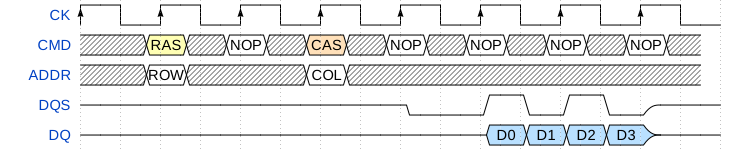 + +You can find more examples [in the WaveDrom tutorial](https://wavedrom.com/tutorial.html). + +A second feature is that WaveDrom can render logic circuit diagrams: + + import wavedrom + svg = wavedrom.render(""" + { "assign":[ + ["out", + ["|", + ["&", ["~", "a"], "b"], + ["&", ["~", "b"], "a"] + ] + ] + ]}""") + svg.saveas("demo2.svg") + +This will render a as: + +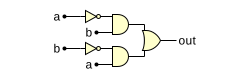 + +You can find more examples [in the WaveDrom tutorial2](https://wavedrom.com/tutorial2.html). + +Finally, wavedrom can draw registers as bitfields: + + import wavedrom + svg = wavedrom.render(""" + {"reg": [ + { "name": "IPO", "bits": 8, "attr": "RO" }, + { "bits": 7 }, + { "name": "<o>B</o><b>R<i>K</i></b>", "bits": 5, "attr": "RW", "type": 4 }, + { "name": "CPK", "bits": 1 }, + { "name": "Clear", "bits": 3 }, + { "bits": 8 } + ] + ]}""") + svg.saveas("demo3.svg") + + +This will render as: + +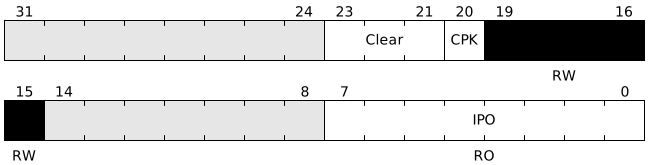 + +This mode is documented as part of the [bit-field](https://www.npmjs.com/package/bit-field) JavaScript package. + +Alternatively, WaveDromPy can be called from the command line: + + wavedrompy --input input.json --svg output.svg + +## Important notice + +The command line uses Python's JSON interpreter that is more restrictive (coherent with the JSOC spec), while the JavaScript json is more relaxed: + + * All strings have to be written between quotes (""), + * Extra comma (,) not supported at end of lists or dictionaries + +## AsciiDoctor example + +An _AsciiDoctor_ example is provided to directly generate timing diagrams from _AsciiDoctor_ formatted documents. + + + +%package -n python3-wavedrom +Summary: WaveDrom compatible python command line +Provides: python-wavedrom +BuildRequires: python3-devel +BuildRequires: python3-setuptools +BuildRequires: python3-pip +%description -n python3-wavedrom +# WaveDromPy + +This is a python module and command line fully compatible with [WaveDrom](https://wavedrom.com/), which is originally implemented in JavaScript. It is useful if you want to generate wavedrom diagrams from a python environment or simply don't want to install the _Node.js_ environment just to use WaveDrom as simple command line. + +WaveDromPy is for example used in [sphinxcontrib-wavedrom](https://pypi.org/project/sphinxcontrib-wavedrom/) to render wavedrom for Sphinx documentation. While the original project renders the diagrams in JavaScript in the browser, WaveDromPy renders them to SVG files. + +This tool is a direct translation of original Javascript file _WaveDrom.js_ to Python. No extra feature added. We seek to have it fully compatible. + +The tool _WaveDromPy_ directly converts _WaveDrom_ compatible JSON files into SVG format. + +[](https://travis-ci.org/wallento/wavedrompy) +[](https://badge.fury.io/py/wavedrom) + +## Installation + +It is most easy to just install wavedrom via pip/pypi: + + pip install wavedrom + +Alternatively you can install the latest version from this repository: + + pip install git+https://github.com/wallento/wavedrompy + +or from your local copy: + + pip install . + +## Usage + +You can either use the tool from Python: + + import wavedrom + svg = wavedrom.render(""" + { "signal": [ + { "name": "CK", "wave": "P.......", "period": 2 }, + { "name": "CMD", "wave": "x.3x=x4x=x=x=x=x", "data": "RAS NOP CAS NOP NOP NOP NOP", "phase": 0.5 }, + { "name": "ADDR", "wave": "x.=x..=x........", "data": "ROW COL", "phase": 0.5 }, + { "name": "DQS", "wave": "z.......0.1010z." }, + { "name": "DQ", "wave": "z.........5555z.", "data": "D0 D1 D2 D3" } + ]}""") + svg.saveas("demo1.svg") + +This will render a waveform as: + + + +You can find more examples [in the WaveDrom tutorial](https://wavedrom.com/tutorial.html). + +A second feature is that WaveDrom can render logic circuit diagrams: + + import wavedrom + svg = wavedrom.render(""" + { "assign":[ + ["out", + ["|", + ["&", ["~", "a"], "b"], + ["&", ["~", "b"], "a"] + ] + ] + ]}""") + svg.saveas("demo2.svg") + +This will render a as: + + + +You can find more examples [in the WaveDrom tutorial2](https://wavedrom.com/tutorial2.html). + +Finally, wavedrom can draw registers as bitfields: + + import wavedrom + svg = wavedrom.render(""" + {"reg": [ + { "name": "IPO", "bits": 8, "attr": "RO" }, + { "bits": 7 }, + { "name": "<o>B</o><b>R<i>K</i></b>", "bits": 5, "attr": "RW", "type": 4 }, + { "name": "CPK", "bits": 1 }, + { "name": "Clear", "bits": 3 }, + { "bits": 8 } + ] + ]}""") + svg.saveas("demo3.svg") + + +This will render as: + + + +This mode is documented as part of the [bit-field](https://www.npmjs.com/package/bit-field) JavaScript package. + +Alternatively, WaveDromPy can be called from the command line: + + wavedrompy --input input.json --svg output.svg + +## Important notice + +The command line uses Python's JSON interpreter that is more restrictive (coherent with the JSOC spec), while the JavaScript json is more relaxed: + + * All strings have to be written between quotes (""), + * Extra comma (,) not supported at end of lists or dictionaries + +## AsciiDoctor example + +An _AsciiDoctor_ example is provided to directly generate timing diagrams from _AsciiDoctor_ formatted documents. + + + +%package help +Summary: Development documents and examples for wavedrom +Provides: python3-wavedrom-doc +%description help +# WaveDromPy + +This is a python module and command line fully compatible with [WaveDrom](https://wavedrom.com/), which is originally implemented in JavaScript. It is useful if you want to generate wavedrom diagrams from a python environment or simply don't want to install the _Node.js_ environment just to use WaveDrom as simple command line. + +WaveDromPy is for example used in [sphinxcontrib-wavedrom](https://pypi.org/project/sphinxcontrib-wavedrom/) to render wavedrom for Sphinx documentation. While the original project renders the diagrams in JavaScript in the browser, WaveDromPy renders them to SVG files. + +This tool is a direct translation of original Javascript file _WaveDrom.js_ to Python. No extra feature added. We seek to have it fully compatible. + +The tool _WaveDromPy_ directly converts _WaveDrom_ compatible JSON files into SVG format. + +[](https://travis-ci.org/wallento/wavedrompy) +[](https://badge.fury.io/py/wavedrom) + +## Installation + +It is most easy to just install wavedrom via pip/pypi: + + pip install wavedrom + +Alternatively you can install the latest version from this repository: + + pip install git+https://github.com/wallento/wavedrompy + +or from your local copy: + + pip install . + +## Usage + +You can either use the tool from Python: + + import wavedrom + svg = wavedrom.render(""" + { "signal": [ + { "name": "CK", "wave": "P.......", "period": 2 }, + { "name": "CMD", "wave": "x.3x=x4x=x=x=x=x", "data": "RAS NOP CAS NOP NOP NOP NOP", "phase": 0.5 }, + { "name": "ADDR", "wave": "x.=x..=x........", "data": "ROW COL", "phase": 0.5 }, + { "name": "DQS", "wave": "z.......0.1010z." }, + { "name": "DQ", "wave": "z.........5555z.", "data": "D0 D1 D2 D3" } + ]}""") + svg.saveas("demo1.svg") + +This will render a waveform as: + + + +You can find more examples [in the WaveDrom tutorial](https://wavedrom.com/tutorial.html). + +A second feature is that WaveDrom can render logic circuit diagrams: + + import wavedrom + svg = wavedrom.render(""" + { "assign":[ + ["out", + ["|", + ["&", ["~", "a"], "b"], + ["&", ["~", "b"], "a"] + ] + ] + ]}""") + svg.saveas("demo2.svg") + +This will render a as: + + + +You can find more examples [in the WaveDrom tutorial2](https://wavedrom.com/tutorial2.html). + +Finally, wavedrom can draw registers as bitfields: + + import wavedrom + svg = wavedrom.render(""" + {"reg": [ + { "name": "IPO", "bits": 8, "attr": "RO" }, + { "bits": 7 }, + { "name": "<o>B</o><b>R<i>K</i></b>", "bits": 5, "attr": "RW", "type": 4 }, + { "name": "CPK", "bits": 1 }, + { "name": "Clear", "bits": 3 }, + { "bits": 8 } + ] + ]}""") + svg.saveas("demo3.svg") + + +This will render as: + + + +This mode is documented as part of the [bit-field](https://www.npmjs.com/package/bit-field) JavaScript package. + +Alternatively, WaveDromPy can be called from the command line: + + wavedrompy --input input.json --svg output.svg + +## Important notice + +The command line uses Python's JSON interpreter that is more restrictive (coherent with the JSOC spec), while the JavaScript json is more relaxed: + + * All strings have to be written between quotes (""), + * Extra comma (,) not supported at end of lists or dictionaries + +## AsciiDoctor example + +An _AsciiDoctor_ example is provided to directly generate timing diagrams from _AsciiDoctor_ formatted documents. + + + +%prep +%autosetup -n wavedrom-2.0.3.post3 + +%build +%py3_build + +%install +%py3_install +install -d -m755 %{buildroot}/%{_pkgdocdir} +if [ -d doc ]; then cp -arf doc %{buildroot}/%{_pkgdocdir}; fi +if [ -d docs ]; then cp -arf docs %{buildroot}/%{_pkgdocdir}; fi +if [ -d example ]; then cp -arf example %{buildroot}/%{_pkgdocdir}; fi +if [ -d examples ]; then cp -arf examples %{buildroot}/%{_pkgdocdir}; fi +pushd %{buildroot} +if [ -d usr/lib ]; then + find usr/lib -type f -printf "/%h/%f\n" >> filelist.lst +fi +if [ -d usr/lib64 ]; then + find usr/lib64 -type f -printf "/%h/%f\n" >> filelist.lst +fi +if [ -d usr/bin ]; then + find usr/bin -type f -printf "/%h/%f\n" >> filelist.lst +fi +if [ -d usr/sbin ]; then + find usr/sbin -type f -printf "/%h/%f\n" >> filelist.lst +fi +touch doclist.lst +if [ -d usr/share/man ]; then + find usr/share/man -type f -printf "/%h/%f.gz\n" >> doclist.lst +fi +popd +mv %{buildroot}/filelist.lst . +mv %{buildroot}/doclist.lst . + +%files -n python3-wavedrom -f filelist.lst +%dir %{python3_sitelib}/* + +%files help -f doclist.lst +%{_docdir}/* + +%changelog +* Fri May 05 2023 Python_Bot <Python_Bot@openeuler.org> - 2.0.3.post3-1 +- Package Spec generated @@ -0,0 +1 @@ +1fa386c34d9b6b59ba5e0b0556d5939b wavedrom-2.0.3.post3.tar.gz |