
diff options
| -rw-r--r-- | .gitignore | 1 | ||||
| -rw-r--r-- | python-discord-logger.spec | 845 | ||||
| -rw-r--r-- | sources | 1 |
3 files changed, 847 insertions, 0 deletions
@@ -0,0 +1 @@ +/discord-logger-1.2.3.tar.gz diff --git a/python-discord-logger.spec b/python-discord-logger.spec new file mode 100644 index 0000000..674406f --- /dev/null +++ b/python-discord-logger.spec @@ -0,0 +1,845 @@ +%global _empty_manifest_terminate_build 0 +Name: python-discord-logger +Version: 1.2.3 +Release: 1 +Summary: Discord Logger is a custom message logger to Discord for Python 3 +License: MIT License +URL: https://github.com/chinnichaitanya/python-discord-logger +Source0: https://mirrors.nju.edu.cn/pypi/web/packages/78/a4/00ff06490b22bc9cfece34f80ce2d3e43603d8efbf8ac4c74a228c819dc6/discord-logger-1.2.3.tar.gz +BuildArch: noarch + +Requires: python3-discord-webhook +Requires: python3-pyyaml + +%description +# Python Discord Logger + +A custom message logger to Discord for Python 3. +This project was inspired from [`winston-discord-transport`](https://github.com/sidhantpanda/winston-discord-transport) for NodeJS +and built using [discord-webhook](https://github.com/lovvskillz/python-discord-webhook), which offers an easy interface for +constructing and sending messages through a Discord webhook. + +If you are looking for a Slack alternative, please check [python-slack-logger](https://github.com/chinnichaitanya/python-slack-logger). + +<a href="https://pypi.org/project/discord-logger/"><img alt="PyPI - Python Version" src="https://img.shields.io/pypi/pyversions/discord-logger"></a> +[](https://badge.fury.io/py/discord-logger) +<a href="https://pepy.tech/project/discord-logger"><img alt="Downloads" src="https://static.pepy.tech/badge/discord-logger"></a> +<a href="https://pypi.org/project/discord-logger/#files"><img alt="PyPI - Wheel" src="https://img.shields.io/pypi/wheel/discord-logger"></a> +[](https://github.com/chinnichaitanya/python-discord-logger/blob/master/LICENSE) +[](https://github.com/python/black) + +## Install + +Install via pip: `pip install discord-logger` + +## Basic Usage + +```python +from discord_logger import DiscordLogger + +options = { + "application_name": "My Server", + "service_name": "Backend API", + "service_icon_url": "your icon url", + "service_environment": "Production", + "display_hostname": True, + "default_level": "info", +} + +logger = DiscordLogger(webhook_url="your discord webhook url", **options) +logger.construct(title="Health Check", description="All services are running normally!") + +response = logger.send() +``` + +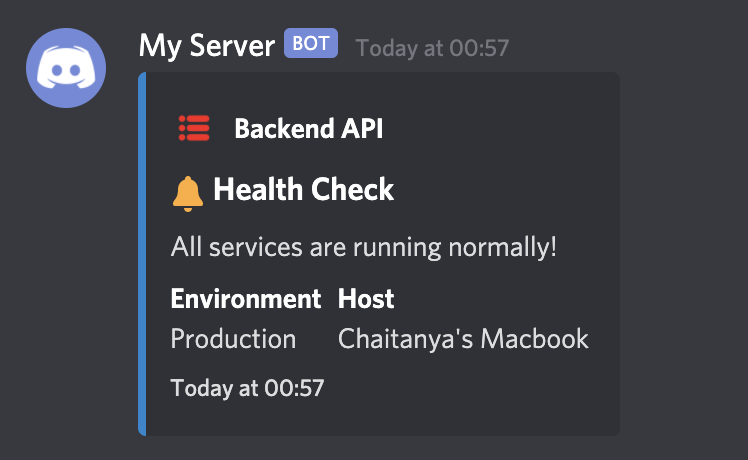 + +## Configure various options + +There are numerous configurations available to customise the bot. + +```python +options = { + # Application name would replace the webhook name set during creating of the webhook + # It would appear as the name of the bot + # If unset, the default value would be "Application" + "application_name": "My Server", + + # Service name would be the name of the service sending the message to your Discord channel + # This would usually be the name of the application sending the notification + # If unset, the default value would be "Status Bot" + "service_name": "Backend API", + + # Service icon URL is the icon image for your application + # This field accepts a URL to the icon image + # If unspecified, the icon wouldn't be set + # If misconfigured, the icon wouldn't load and a blank space would appear before the service name + "service_icon_url": "your icon url", + + # Usually services would run in staging and production environments + # This field is to specify the environment from which the application is reponding for easy identification + # If unset, this block would not appear in the message + "service_environment": "Production", + + # An option to specify whether or not to display the hostname in the messages + # The hostname is set by default, but it could be disabled by specifically setting this to `False` + "display_hostname": True, + + # The default importance level of the message + # The left bar color of the message would change depending on this + # Available options are + # - default: 2040357 + # - error: 14362664 + # - warn: 16497928 + # - info: 2196944 + # - verbose: 6559689 + # - debug: 2196944 + # - success: 2210373 + # If the `error` field is set during the construction of the message, the `level` is automatically set to `error` + # If nothing is specified, `default` color would be used + "default_level": "info", +} +``` + +## Emojis inbuilt! 😃 + +An appropriate emoji is automatically added before the title depending on the `level`. + +Following is the map between `level` and the emoji added. + +- default = `:loudspeaker:` 📢 +- error = `:x:` ❌ +- warn = `:warning:` ⚠️ +- info = `:bell:` 🔔 +- verbose = `:mega:` 📣 +- debug = `:microscope:` 🔬 +- success = `:rocket:` 🚀 + +## Examples + +### Set Service Name, Icon and Environment for easy identification + +You can configure the log message with service name, icon and environment for easy identification. The `Host` field which is the hostname of the server is automatically added for every message. + +You can even send any meta information like the data in the variables, module names, metrics etc with the `metadata` field while constructing the message. +These data should be passed as a dictionary. + +```python +from discord_logger import DiscordLogger + +webhook_url = "your discord webhook url" +options = { + "application_name": "My Server", + "service_name": "Backend API", + "service_icon_url": "your icon url", + "service_environment": "Production", + "default_level": "info", +} + +logger = DiscordLogger(webhook_url=webhook_url, **options) +logger.construct( + title="Health Check", + description="Issue in establishing DB connections!", + error="Traceback (most recent call last):\n ValueError: Database connect accepts only string as a parameter!", + metadata={"module": "DBConnector", "host": 123.332}, +) + +response = logger.send() +``` + +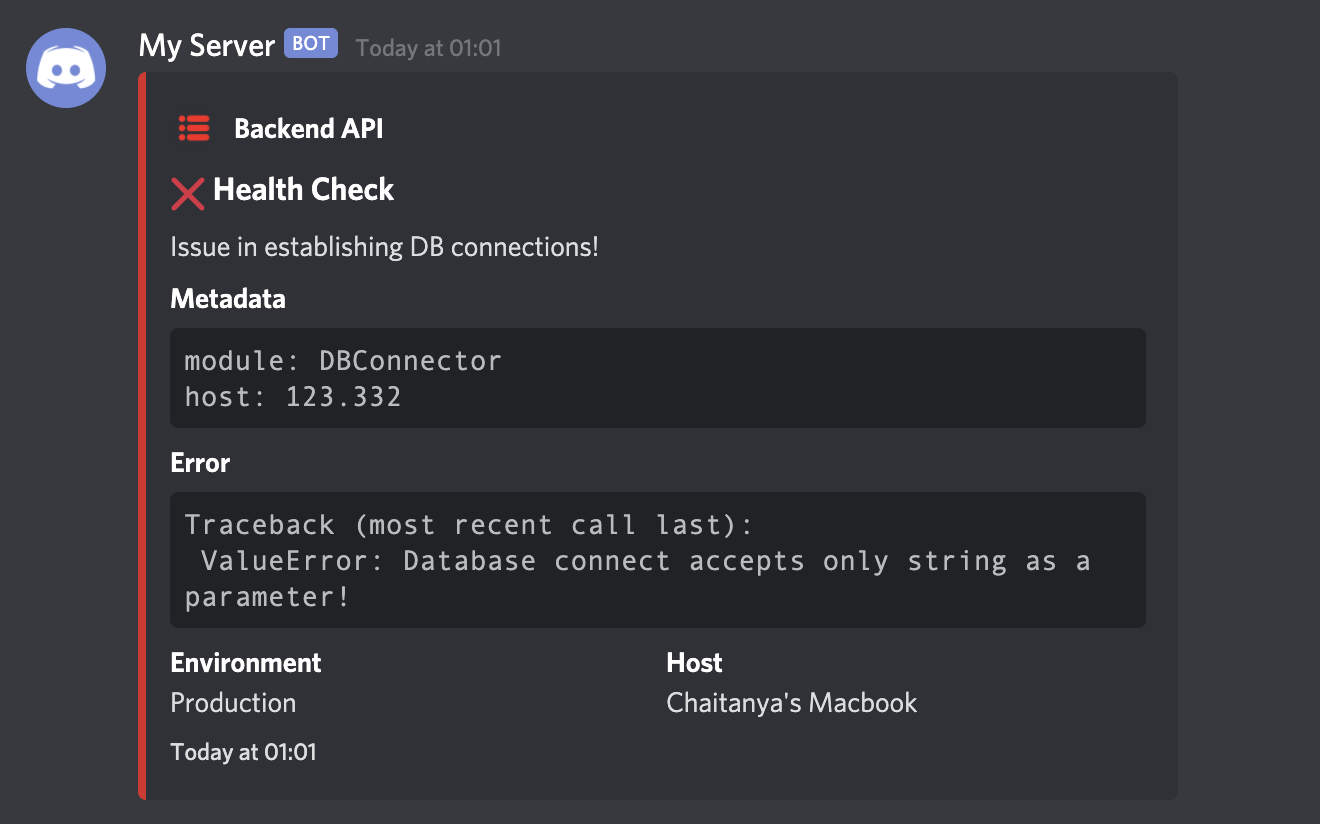 + +### Send messages without Hostname + +In case you do not want the hostname to be displayed in the message, disable it by setting `"display_hostname": False` in the `options` as follows. + +```python +from discord_logger import DiscordLogger + +webhook_url = "your discord webhook url" +options = { + "application_name": "My Server", + "service_name": "Backend API", + "service_icon_url": "your icon url", + "service_environment": "Production", + "default_level": "info", + "display_hostname": False, +} + +logger = DiscordLogger(webhook_url=webhook_url, **options) +logger.construct(title="Health Check", description="All services are running normally!") + +response = logger.send() +``` + +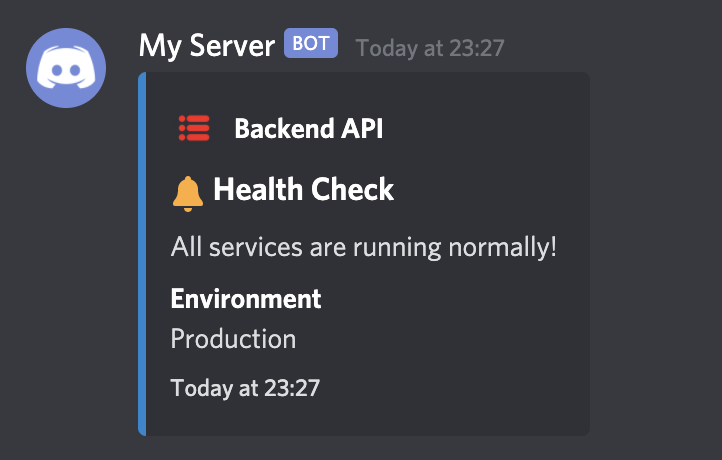 + +### Send messages with different log-levels + +The log-level indicates the importance of the message. It changes the color of the discord message in particular. Currently supported levels are, + +- `error` +- `warn` +- `info` +- `verbose` +- `debug` +- `success` + +The log-level can be set during construction of the message like through the parameter `level`. + +If the parameter isn't provided, it'll be set to the one given in `default_level`. Any invalid input would be ignored and the log-level would be automatically be set to `default`. + +Any complicated nested dictionary can be passed to the `metadata` field and the message gets forrmatted accordingly for easy reading. + +```python +from discord_logger import DiscordLogger + +webhook_url = "your discord webhook url" +options = { + "application_name": "My Server", + "service_name": "Backend API", + "service_icon_url": "your icon url", + "service_environment": "Production", + "default_level": "info", +} + +logger = DiscordLogger(webhook_url=webhook_url, **options) +logger.construct( + title="Celery Task Manager", + description="Successfully completed training job for model v1.3.3!", + level="success", + metadata={ + "Metrics": { + "Accuracy": 78.9, + "Inference time": "0.8 sec", + "Model size": "32 MB", + }, + "Deployment status": "progress", + }, +) + +response = logger.send() +``` + +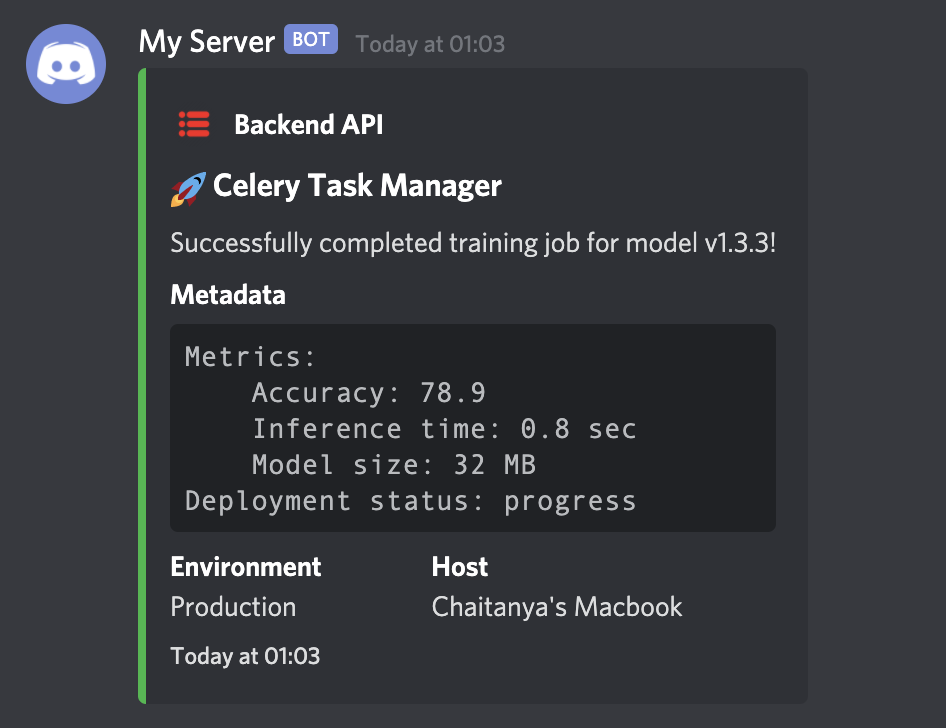 + +### Send complete error traceback + +The `error` field can contain any error message. It will be automatically be formatted in the final message. For example, you can send a complete traceback of an error message to debug faster! + +```python +import traceback + +from discord_logger import DiscordLogger + + +def get_traceback(e): + tb = ( + "Traceback (most recent call last):\n" + + "".join(traceback.format_list(traceback.extract_tb(e.__traceback__))) + + type(e).__name__ + + ": " + + str(e) + ) + return tb + + +webhook_url = "your discord webhook url" +options = { + "application_name": "My Server", + "service_name": "Backend API", + "service_icon_url": "your icon url", + "service_environment": "Production", + "default_level": "info", +} + +err = KeyError("`email` field cannot be None") + +logger = DiscordLogger(webhook_url=webhook_url, **options) +logger.construct( + title="Runtime Exception", + description=err.__str__(), + error=get_traceback(err), + metadata={"email": None, "module": "auth", "method": "POST"}, +) + +response = logger.send() +``` + +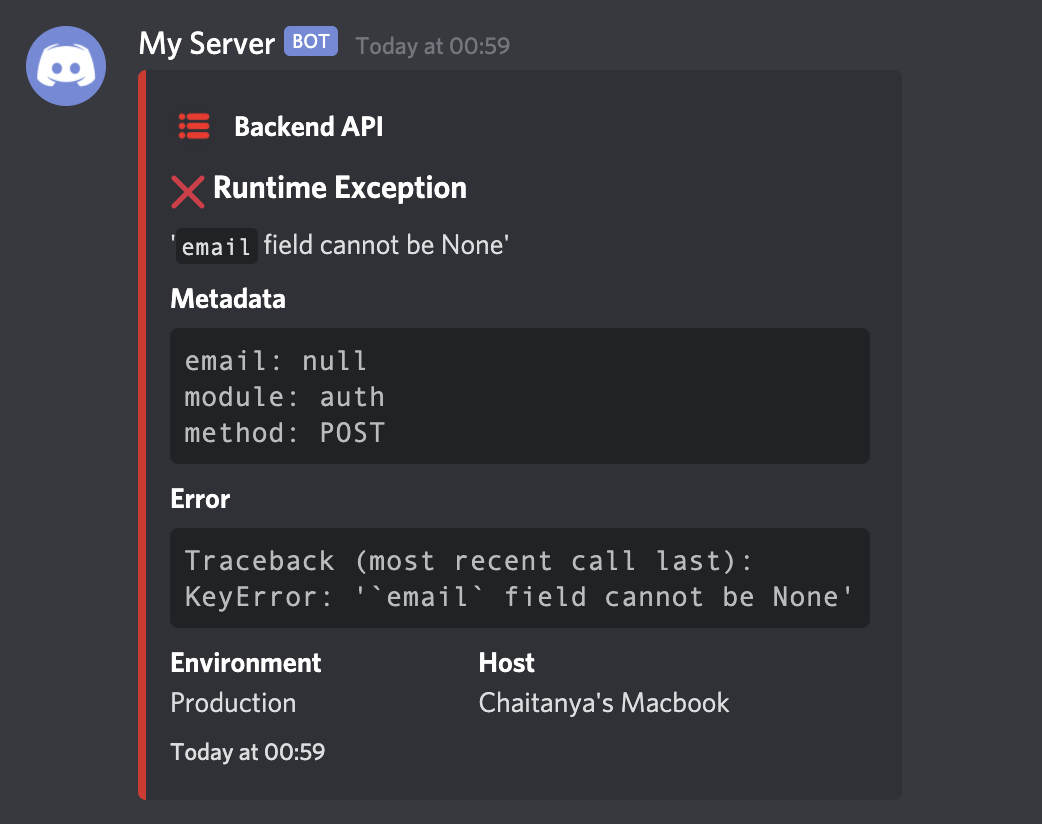 + + + + +%package -n python3-discord-logger +Summary: Discord Logger is a custom message logger to Discord for Python 3 +Provides: python-discord-logger +BuildRequires: python3-devel +BuildRequires: python3-setuptools +BuildRequires: python3-pip +%description -n python3-discord-logger +# Python Discord Logger + +A custom message logger to Discord for Python 3. +This project was inspired from [`winston-discord-transport`](https://github.com/sidhantpanda/winston-discord-transport) for NodeJS +and built using [discord-webhook](https://github.com/lovvskillz/python-discord-webhook), which offers an easy interface for +constructing and sending messages through a Discord webhook. + +If you are looking for a Slack alternative, please check [python-slack-logger](https://github.com/chinnichaitanya/python-slack-logger). + +<a href="https://pypi.org/project/discord-logger/"><img alt="PyPI - Python Version" src="https://img.shields.io/pypi/pyversions/discord-logger"></a> +[](https://badge.fury.io/py/discord-logger) +<a href="https://pepy.tech/project/discord-logger"><img alt="Downloads" src="https://static.pepy.tech/badge/discord-logger"></a> +<a href="https://pypi.org/project/discord-logger/#files"><img alt="PyPI - Wheel" src="https://img.shields.io/pypi/wheel/discord-logger"></a> +[](https://github.com/chinnichaitanya/python-discord-logger/blob/master/LICENSE) +[](https://github.com/python/black) + +## Install + +Install via pip: `pip install discord-logger` + +## Basic Usage + +```python +from discord_logger import DiscordLogger + +options = { + "application_name": "My Server", + "service_name": "Backend API", + "service_icon_url": "your icon url", + "service_environment": "Production", + "display_hostname": True, + "default_level": "info", +} + +logger = DiscordLogger(webhook_url="your discord webhook url", **options) +logger.construct(title="Health Check", description="All services are running normally!") + +response = logger.send() +``` + + + +## Configure various options + +There are numerous configurations available to customise the bot. + +```python +options = { + # Application name would replace the webhook name set during creating of the webhook + # It would appear as the name of the bot + # If unset, the default value would be "Application" + "application_name": "My Server", + + # Service name would be the name of the service sending the message to your Discord channel + # This would usually be the name of the application sending the notification + # If unset, the default value would be "Status Bot" + "service_name": "Backend API", + + # Service icon URL is the icon image for your application + # This field accepts a URL to the icon image + # If unspecified, the icon wouldn't be set + # If misconfigured, the icon wouldn't load and a blank space would appear before the service name + "service_icon_url": "your icon url", + + # Usually services would run in staging and production environments + # This field is to specify the environment from which the application is reponding for easy identification + # If unset, this block would not appear in the message + "service_environment": "Production", + + # An option to specify whether or not to display the hostname in the messages + # The hostname is set by default, but it could be disabled by specifically setting this to `False` + "display_hostname": True, + + # The default importance level of the message + # The left bar color of the message would change depending on this + # Available options are + # - default: 2040357 + # - error: 14362664 + # - warn: 16497928 + # - info: 2196944 + # - verbose: 6559689 + # - debug: 2196944 + # - success: 2210373 + # If the `error` field is set during the construction of the message, the `level` is automatically set to `error` + # If nothing is specified, `default` color would be used + "default_level": "info", +} +``` + +## Emojis inbuilt! 😃 + +An appropriate emoji is automatically added before the title depending on the `level`. + +Following is the map between `level` and the emoji added. + +- default = `:loudspeaker:` 📢 +- error = `:x:` ❌ +- warn = `:warning:` ⚠️ +- info = `:bell:` 🔔 +- verbose = `:mega:` 📣 +- debug = `:microscope:` 🔬 +- success = `:rocket:` 🚀 + +## Examples + +### Set Service Name, Icon and Environment for easy identification + +You can configure the log message with service name, icon and environment for easy identification. The `Host` field which is the hostname of the server is automatically added for every message. + +You can even send any meta information like the data in the variables, module names, metrics etc with the `metadata` field while constructing the message. +These data should be passed as a dictionary. + +```python +from discord_logger import DiscordLogger + +webhook_url = "your discord webhook url" +options = { + "application_name": "My Server", + "service_name": "Backend API", + "service_icon_url": "your icon url", + "service_environment": "Production", + "default_level": "info", +} + +logger = DiscordLogger(webhook_url=webhook_url, **options) +logger.construct( + title="Health Check", + description="Issue in establishing DB connections!", + error="Traceback (most recent call last):\n ValueError: Database connect accepts only string as a parameter!", + metadata={"module": "DBConnector", "host": 123.332}, +) + +response = logger.send() +``` + + + +### Send messages without Hostname + +In case you do not want the hostname to be displayed in the message, disable it by setting `"display_hostname": False` in the `options` as follows. + +```python +from discord_logger import DiscordLogger + +webhook_url = "your discord webhook url" +options = { + "application_name": "My Server", + "service_name": "Backend API", + "service_icon_url": "your icon url", + "service_environment": "Production", + "default_level": "info", + "display_hostname": False, +} + +logger = DiscordLogger(webhook_url=webhook_url, **options) +logger.construct(title="Health Check", description="All services are running normally!") + +response = logger.send() +``` + + + +### Send messages with different log-levels + +The log-level indicates the importance of the message. It changes the color of the discord message in particular. Currently supported levels are, + +- `error` +- `warn` +- `info` +- `verbose` +- `debug` +- `success` + +The log-level can be set during construction of the message like through the parameter `level`. + +If the parameter isn't provided, it'll be set to the one given in `default_level`. Any invalid input would be ignored and the log-level would be automatically be set to `default`. + +Any complicated nested dictionary can be passed to the `metadata` field and the message gets forrmatted accordingly for easy reading. + +```python +from discord_logger import DiscordLogger + +webhook_url = "your discord webhook url" +options = { + "application_name": "My Server", + "service_name": "Backend API", + "service_icon_url": "your icon url", + "service_environment": "Production", + "default_level": "info", +} + +logger = DiscordLogger(webhook_url=webhook_url, **options) +logger.construct( + title="Celery Task Manager", + description="Successfully completed training job for model v1.3.3!", + level="success", + metadata={ + "Metrics": { + "Accuracy": 78.9, + "Inference time": "0.8 sec", + "Model size": "32 MB", + }, + "Deployment status": "progress", + }, +) + +response = logger.send() +``` + + + +### Send complete error traceback + +The `error` field can contain any error message. It will be automatically be formatted in the final message. For example, you can send a complete traceback of an error message to debug faster! + +```python +import traceback + +from discord_logger import DiscordLogger + + +def get_traceback(e): + tb = ( + "Traceback (most recent call last):\n" + + "".join(traceback.format_list(traceback.extract_tb(e.__traceback__))) + + type(e).__name__ + + ": " + + str(e) + ) + return tb + + +webhook_url = "your discord webhook url" +options = { + "application_name": "My Server", + "service_name": "Backend API", + "service_icon_url": "your icon url", + "service_environment": "Production", + "default_level": "info", +} + +err = KeyError("`email` field cannot be None") + +logger = DiscordLogger(webhook_url=webhook_url, **options) +logger.construct( + title="Runtime Exception", + description=err.__str__(), + error=get_traceback(err), + metadata={"email": None, "module": "auth", "method": "POST"}, +) + +response = logger.send() +``` + + + + + + +%package help +Summary: Development documents and examples for discord-logger +Provides: python3-discord-logger-doc +%description help +# Python Discord Logger + +A custom message logger to Discord for Python 3. +This project was inspired from [`winston-discord-transport`](https://github.com/sidhantpanda/winston-discord-transport) for NodeJS +and built using [discord-webhook](https://github.com/lovvskillz/python-discord-webhook), which offers an easy interface for +constructing and sending messages through a Discord webhook. + +If you are looking for a Slack alternative, please check [python-slack-logger](https://github.com/chinnichaitanya/python-slack-logger). + +<a href="https://pypi.org/project/discord-logger/"><img alt="PyPI - Python Version" src="https://img.shields.io/pypi/pyversions/discord-logger"></a> +[](https://badge.fury.io/py/discord-logger) +<a href="https://pepy.tech/project/discord-logger"><img alt="Downloads" src="https://static.pepy.tech/badge/discord-logger"></a> +<a href="https://pypi.org/project/discord-logger/#files"><img alt="PyPI - Wheel" src="https://img.shields.io/pypi/wheel/discord-logger"></a> +[](https://github.com/chinnichaitanya/python-discord-logger/blob/master/LICENSE) +[](https://github.com/python/black) + +## Install + +Install via pip: `pip install discord-logger` + +## Basic Usage + +```python +from discord_logger import DiscordLogger + +options = { + "application_name": "My Server", + "service_name": "Backend API", + "service_icon_url": "your icon url", + "service_environment": "Production", + "display_hostname": True, + "default_level": "info", +} + +logger = DiscordLogger(webhook_url="your discord webhook url", **options) +logger.construct(title="Health Check", description="All services are running normally!") + +response = logger.send() +``` + + + +## Configure various options + +There are numerous configurations available to customise the bot. + +```python +options = { + # Application name would replace the webhook name set during creating of the webhook + # It would appear as the name of the bot + # If unset, the default value would be "Application" + "application_name": "My Server", + + # Service name would be the name of the service sending the message to your Discord channel + # This would usually be the name of the application sending the notification + # If unset, the default value would be "Status Bot" + "service_name": "Backend API", + + # Service icon URL is the icon image for your application + # This field accepts a URL to the icon image + # If unspecified, the icon wouldn't be set + # If misconfigured, the icon wouldn't load and a blank space would appear before the service name + "service_icon_url": "your icon url", + + # Usually services would run in staging and production environments + # This field is to specify the environment from which the application is reponding for easy identification + # If unset, this block would not appear in the message + "service_environment": "Production", + + # An option to specify whether or not to display the hostname in the messages + # The hostname is set by default, but it could be disabled by specifically setting this to `False` + "display_hostname": True, + + # The default importance level of the message + # The left bar color of the message would change depending on this + # Available options are + # - default: 2040357 + # - error: 14362664 + # - warn: 16497928 + # - info: 2196944 + # - verbose: 6559689 + # - debug: 2196944 + # - success: 2210373 + # If the `error` field is set during the construction of the message, the `level` is automatically set to `error` + # If nothing is specified, `default` color would be used + "default_level": "info", +} +``` + +## Emojis inbuilt! 😃 + +An appropriate emoji is automatically added before the title depending on the `level`. + +Following is the map between `level` and the emoji added. + +- default = `:loudspeaker:` 📢 +- error = `:x:` ❌ +- warn = `:warning:` ⚠️ +- info = `:bell:` 🔔 +- verbose = `:mega:` 📣 +- debug = `:microscope:` 🔬 +- success = `:rocket:` 🚀 + +## Examples + +### Set Service Name, Icon and Environment for easy identification + +You can configure the log message with service name, icon and environment for easy identification. The `Host` field which is the hostname of the server is automatically added for every message. + +You can even send any meta information like the data in the variables, module names, metrics etc with the `metadata` field while constructing the message. +These data should be passed as a dictionary. + +```python +from discord_logger import DiscordLogger + +webhook_url = "your discord webhook url" +options = { + "application_name": "My Server", + "service_name": "Backend API", + "service_icon_url": "your icon url", + "service_environment": "Production", + "default_level": "info", +} + +logger = DiscordLogger(webhook_url=webhook_url, **options) +logger.construct( + title="Health Check", + description="Issue in establishing DB connections!", + error="Traceback (most recent call last):\n ValueError: Database connect accepts only string as a parameter!", + metadata={"module": "DBConnector", "host": 123.332}, +) + +response = logger.send() +``` + + + +### Send messages without Hostname + +In case you do not want the hostname to be displayed in the message, disable it by setting `"display_hostname": False` in the `options` as follows. + +```python +from discord_logger import DiscordLogger + +webhook_url = "your discord webhook url" +options = { + "application_name": "My Server", + "service_name": "Backend API", + "service_icon_url": "your icon url", + "service_environment": "Production", + "default_level": "info", + "display_hostname": False, +} + +logger = DiscordLogger(webhook_url=webhook_url, **options) +logger.construct(title="Health Check", description="All services are running normally!") + +response = logger.send() +``` + + + +### Send messages with different log-levels + +The log-level indicates the importance of the message. It changes the color of the discord message in particular. Currently supported levels are, + +- `error` +- `warn` +- `info` +- `verbose` +- `debug` +- `success` + +The log-level can be set during construction of the message like through the parameter `level`. + +If the parameter isn't provided, it'll be set to the one given in `default_level`. Any invalid input would be ignored and the log-level would be automatically be set to `default`. + +Any complicated nested dictionary can be passed to the `metadata` field and the message gets forrmatted accordingly for easy reading. + +```python +from discord_logger import DiscordLogger + +webhook_url = "your discord webhook url" +options = { + "application_name": "My Server", + "service_name": "Backend API", + "service_icon_url": "your icon url", + "service_environment": "Production", + "default_level": "info", +} + +logger = DiscordLogger(webhook_url=webhook_url, **options) +logger.construct( + title="Celery Task Manager", + description="Successfully completed training job for model v1.3.3!", + level="success", + metadata={ + "Metrics": { + "Accuracy": 78.9, + "Inference time": "0.8 sec", + "Model size": "32 MB", + }, + "Deployment status": "progress", + }, +) + +response = logger.send() +``` + + + +### Send complete error traceback + +The `error` field can contain any error message. It will be automatically be formatted in the final message. For example, you can send a complete traceback of an error message to debug faster! + +```python +import traceback + +from discord_logger import DiscordLogger + + +def get_traceback(e): + tb = ( + "Traceback (most recent call last):\n" + + "".join(traceback.format_list(traceback.extract_tb(e.__traceback__))) + + type(e).__name__ + + ": " + + str(e) + ) + return tb + + +webhook_url = "your discord webhook url" +options = { + "application_name": "My Server", + "service_name": "Backend API", + "service_icon_url": "your icon url", + "service_environment": "Production", + "default_level": "info", +} + +err = KeyError("`email` field cannot be None") + +logger = DiscordLogger(webhook_url=webhook_url, **options) +logger.construct( + title="Runtime Exception", + description=err.__str__(), + error=get_traceback(err), + metadata={"email": None, "module": "auth", "method": "POST"}, +) + +response = logger.send() +``` + + + + + + +%prep +%autosetup -n discord-logger-1.2.3 + +%build +%py3_build + +%install +%py3_install +install -d -m755 %{buildroot}/%{_pkgdocdir} +if [ -d doc ]; then cp -arf doc %{buildroot}/%{_pkgdocdir}; fi +if [ -d docs ]; then cp -arf docs %{buildroot}/%{_pkgdocdir}; fi +if [ -d example ]; then cp -arf example %{buildroot}/%{_pkgdocdir}; fi +if [ -d examples ]; then cp -arf examples %{buildroot}/%{_pkgdocdir}; fi +pushd %{buildroot} +if [ -d usr/lib ]; then + find usr/lib -type f -printf "/%h/%f\n" >> filelist.lst +fi +if [ -d usr/lib64 ]; then + find usr/lib64 -type f -printf "/%h/%f\n" >> filelist.lst +fi +if [ -d usr/bin ]; then + find usr/bin -type f -printf "/%h/%f\n" >> filelist.lst +fi +if [ -d usr/sbin ]; then + find usr/sbin -type f -printf "/%h/%f\n" >> filelist.lst +fi +touch doclist.lst +if [ -d usr/share/man ]; then + find usr/share/man -type f -printf "/%h/%f.gz\n" >> doclist.lst +fi +popd +mv %{buildroot}/filelist.lst . +mv %{buildroot}/doclist.lst . + +%files -n python3-discord-logger -f filelist.lst +%dir %{python3_sitelib}/* + +%files help -f doclist.lst +%{_docdir}/* + +%changelog +* Fri May 05 2023 Python_Bot <Python_Bot@openeuler.org> - 1.2.3-1 +- Package Spec generated @@ -0,0 +1 @@ +c2cb2a0354abaf24bc0bd4f8d022e04d discord-logger-1.2.3.tar.gz |