
diff options
| author | CoprDistGit <infra@openeuler.org> | 2023-05-29 10:35:00 +0000 |
|---|---|---|
| committer | CoprDistGit <infra@openeuler.org> | 2023-05-29 10:35:00 +0000 |
| commit | ed2c32c3386c5d45b8635a3f186644e9f51c1f98 (patch) | |
| tree | 45bd1163a3e9aa82a0ea148aa1d07f539aa8fd04 | |
| parent | 6194bf5152c8456ea5543abd9a09c6afbe1c72f2 (diff) | |
automatic import of python-django-log-reader
| -rw-r--r-- | .gitignore | 1 | ||||
| -rw-r--r-- | python-django-log-reader.spec | 363 | ||||
| -rw-r--r-- | sources | 1 |
3 files changed, 365 insertions, 0 deletions
@@ -0,0 +1 @@ +/django-log-reader-1.1.5.tar.gz diff --git a/python-django-log-reader.spec b/python-django-log-reader.spec new file mode 100644 index 0000000..37fa18c --- /dev/null +++ b/python-django-log-reader.spec @@ -0,0 +1,363 @@ +%global _empty_manifest_terminate_build 0 +Name: python-django-log-reader +Version: 1.1.5 +Release: 1 +Summary: Read & Download log files on the admin page +License: MIT License +URL: https://github.com/imankarimi/django-log-reader +Source0: https://mirrors.nju.edu.cn/pypi/web/packages/fb/43/9d03a3e07a2ca665f531fdeeb5b3952bc5998620c3e66399acfc36503996/django-log-reader-1.1.5.tar.gz +BuildArch: noarch + + +%description +# Django Log Reader +**Django Log Reader** allows you to read & download log files on the admin page. + +> This version designed for the Linux operating system and uses Linux commands to read files faster. + +<br /> + +## Why Django Log Reader? + +- Reading files based on Linux commands speeds up the display of file content +- Download the result of the content +- Display all files according to the pattern defined in the `settings.py` +- Simple interface +- Easy integration + +<br /> + +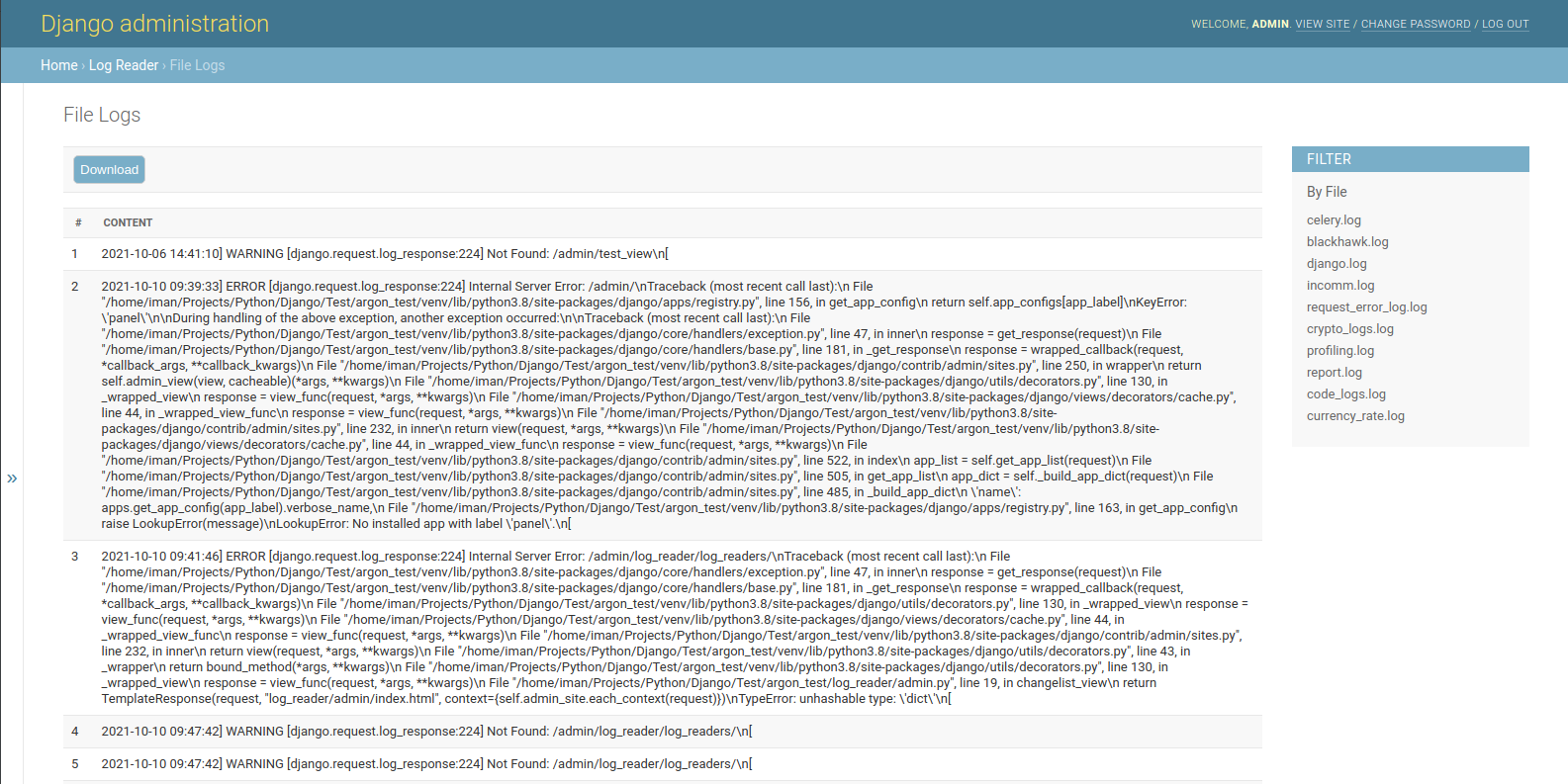 + + +<br> + +## How to use it + +<br /> + +* Download and install latest version of Django Log Reader: + +```bash +$ pip install django-log-reader +# or +$ easy_install django-log-reader +``` + +<br /> + +* Add `log_reader` application to the `INSTALLED_APPS` setting of your Django project `settings.py` file: + +```python +INSTALLED_APPS = ( +# ... +"log_reader.apps.LogReaderConfig", +) +``` + +<br /> + +* You can Add the following value In your `settings.py` file: + +```python +# This value specifies the folder for the files. The default value is 'logs' +LOG_READER_DIR_PATH = 'logs' + +# This value specifies the file extensions. The default value is '*.log' +LOG_READER_FILES_PATTERN = '*.log' + +# This value specifies the default file. If there is no filter, the system reads the default file. +LOG_READER_DEFAULT_FILE = 'django.log' + +# The contents of the files are separated based on this pattern. +LOG_READER_SPLIT_PATTERN = "\\n" + +# This value indicates the number of lines of content in the file. Set the number of lines you want to read to this value. +LOG_READER_MAX_READ_LINES = 1000 + +# You can exclude files with this value. +LOG_READER_EXCLUDE_FILES = [] +``` + +<br /> + +* Collect static if you are in production environment: +```bash +$ python manage.py collectstatic +``` + +* Clear your browser cache + +<br /> + +## Start the app + +```bash +# Set up the database +$ python manage.py makemigrations +$ python manage.py migrate + +# Create the superuser +$ python manage.py createsuperuser + +# Start the application (development mode) +$ python manage.py runserver # default port 8000 +``` + +* Access the `admin` section in the browser: `http://127.0.0.1:8000/` + + + + +%package -n python3-django-log-reader +Summary: Read & Download log files on the admin page +Provides: python-django-log-reader +BuildRequires: python3-devel +BuildRequires: python3-setuptools +BuildRequires: python3-pip +%description -n python3-django-log-reader +# Django Log Reader +**Django Log Reader** allows you to read & download log files on the admin page. + +> This version designed for the Linux operating system and uses Linux commands to read files faster. + +<br /> + +## Why Django Log Reader? + +- Reading files based on Linux commands speeds up the display of file content +- Download the result of the content +- Display all files according to the pattern defined in the `settings.py` +- Simple interface +- Easy integration + +<br /> + + + + +<br> + +## How to use it + +<br /> + +* Download and install latest version of Django Log Reader: + +```bash +$ pip install django-log-reader +# or +$ easy_install django-log-reader +``` + +<br /> + +* Add `log_reader` application to the `INSTALLED_APPS` setting of your Django project `settings.py` file: + +```python +INSTALLED_APPS = ( +# ... +"log_reader.apps.LogReaderConfig", +) +``` + +<br /> + +* You can Add the following value In your `settings.py` file: + +```python +# This value specifies the folder for the files. The default value is 'logs' +LOG_READER_DIR_PATH = 'logs' + +# This value specifies the file extensions. The default value is '*.log' +LOG_READER_FILES_PATTERN = '*.log' + +# This value specifies the default file. If there is no filter, the system reads the default file. +LOG_READER_DEFAULT_FILE = 'django.log' + +# The contents of the files are separated based on this pattern. +LOG_READER_SPLIT_PATTERN = "\\n" + +# This value indicates the number of lines of content in the file. Set the number of lines you want to read to this value. +LOG_READER_MAX_READ_LINES = 1000 + +# You can exclude files with this value. +LOG_READER_EXCLUDE_FILES = [] +``` + +<br /> + +* Collect static if you are in production environment: +```bash +$ python manage.py collectstatic +``` + +* Clear your browser cache + +<br /> + +## Start the app + +```bash +# Set up the database +$ python manage.py makemigrations +$ python manage.py migrate + +# Create the superuser +$ python manage.py createsuperuser + +# Start the application (development mode) +$ python manage.py runserver # default port 8000 +``` + +* Access the `admin` section in the browser: `http://127.0.0.1:8000/` + + + + +%package help +Summary: Development documents and examples for django-log-reader +Provides: python3-django-log-reader-doc +%description help +# Django Log Reader +**Django Log Reader** allows you to read & download log files on the admin page. + +> This version designed for the Linux operating system and uses Linux commands to read files faster. + +<br /> + +## Why Django Log Reader? + +- Reading files based on Linux commands speeds up the display of file content +- Download the result of the content +- Display all files according to the pattern defined in the `settings.py` +- Simple interface +- Easy integration + +<br /> + + + + +<br> + +## How to use it + +<br /> + +* Download and install latest version of Django Log Reader: + +```bash +$ pip install django-log-reader +# or +$ easy_install django-log-reader +``` + +<br /> + +* Add `log_reader` application to the `INSTALLED_APPS` setting of your Django project `settings.py` file: + +```python +INSTALLED_APPS = ( +# ... +"log_reader.apps.LogReaderConfig", +) +``` + +<br /> + +* You can Add the following value In your `settings.py` file: + +```python +# This value specifies the folder for the files. The default value is 'logs' +LOG_READER_DIR_PATH = 'logs' + +# This value specifies the file extensions. The default value is '*.log' +LOG_READER_FILES_PATTERN = '*.log' + +# This value specifies the default file. If there is no filter, the system reads the default file. +LOG_READER_DEFAULT_FILE = 'django.log' + +# The contents of the files are separated based on this pattern. +LOG_READER_SPLIT_PATTERN = "\\n" + +# This value indicates the number of lines of content in the file. Set the number of lines you want to read to this value. +LOG_READER_MAX_READ_LINES = 1000 + +# You can exclude files with this value. +LOG_READER_EXCLUDE_FILES = [] +``` + +<br /> + +* Collect static if you are in production environment: +```bash +$ python manage.py collectstatic +``` + +* Clear your browser cache + +<br /> + +## Start the app + +```bash +# Set up the database +$ python manage.py makemigrations +$ python manage.py migrate + +# Create the superuser +$ python manage.py createsuperuser + +# Start the application (development mode) +$ python manage.py runserver # default port 8000 +``` + +* Access the `admin` section in the browser: `http://127.0.0.1:8000/` + + + + +%prep +%autosetup -n django-log-reader-1.1.5 + +%build +%py3_build + +%install +%py3_install +install -d -m755 %{buildroot}/%{_pkgdocdir} +if [ -d doc ]; then cp -arf doc %{buildroot}/%{_pkgdocdir}; fi +if [ -d docs ]; then cp -arf docs %{buildroot}/%{_pkgdocdir}; fi +if [ -d example ]; then cp -arf example %{buildroot}/%{_pkgdocdir}; fi +if [ -d examples ]; then cp -arf examples %{buildroot}/%{_pkgdocdir}; fi +pushd %{buildroot} +if [ -d usr/lib ]; then + find usr/lib -type f -printf "/%h/%f\n" >> filelist.lst +fi +if [ -d usr/lib64 ]; then + find usr/lib64 -type f -printf "/%h/%f\n" >> filelist.lst +fi +if [ -d usr/bin ]; then + find usr/bin -type f -printf "/%h/%f\n" >> filelist.lst +fi +if [ -d usr/sbin ]; then + find usr/sbin -type f -printf "/%h/%f\n" >> filelist.lst +fi +touch doclist.lst +if [ -d usr/share/man ]; then + find usr/share/man -type f -printf "/%h/%f.gz\n" >> doclist.lst +fi +popd +mv %{buildroot}/filelist.lst . +mv %{buildroot}/doclist.lst . + +%files -n python3-django-log-reader -f filelist.lst +%dir %{python3_sitelib}/* + +%files help -f doclist.lst +%{_docdir}/* + +%changelog +* Mon May 29 2023 Python_Bot <Python_Bot@openeuler.org> - 1.1.5-1 +- Package Spec generated @@ -0,0 +1 @@ +a42b2b1eb8b13cb245d9b3d4b1067648 django-log-reader-1.1.5.tar.gz |