
diff options
Diffstat (limited to 'python-greenpass.spec')
| -rw-r--r-- | python-greenpass.spec | 791 |
1 files changed, 791 insertions, 0 deletions
diff --git a/python-greenpass.spec b/python-greenpass.spec new file mode 100644 index 0000000..9aadeec --- /dev/null +++ b/python-greenpass.spec @@ -0,0 +1,791 @@ +%global _empty_manifest_terminate_build 0 +Name: python-greenpass +Version: 4.3.1 +Release: 1 +Summary: Scriptable green pass verifier +License: LGPLv3 +URL: https://github.com/berdav/greenpass +Source0: https://mirrors.nju.edu.cn/pypi/web/packages/cd/ec/f7a60e5af5cacd0caf168259ccc01be249a7e6b4ee3d3a620bc746205162/greenpass-4.3.1.tar.gz +BuildArch: noarch + +Requires: python3-Pillow +Requires: python3-PyMuPDF +Requires: python3-base45 +Requires: python3-bs4 +Requires: python3-cbor2 +Requires: python3-colorama +Requires: python3-cose +Requires: python3-pyOpenSSL +Requires: python3-pyasn1 +Requires: python3-pytz +Requires: python3-pyzbar +Requires: python3-requests +Requires: python3-termcolor +Requires: python3-tzlocal + +%description +# Green Pass Verifier +[](https://www.codacy.com/gh/berdav/greenpass/dashboard?utm_source=github.com&utm_medium=referral&utm_content=berdav/greenpass&utm_campaign=Badge_Grade) +[](https://www.codacy.com/gh/berdav/greenpass/dashboard?utm_source=github.com&utm_medium=referral&utm_content=berdav/greenpass&utm_campaign=Badge_Coverage) + +[](https://pypi.org/project/greenpass/) +[](https://hub.docker.com/r/berdav/greenpass) + +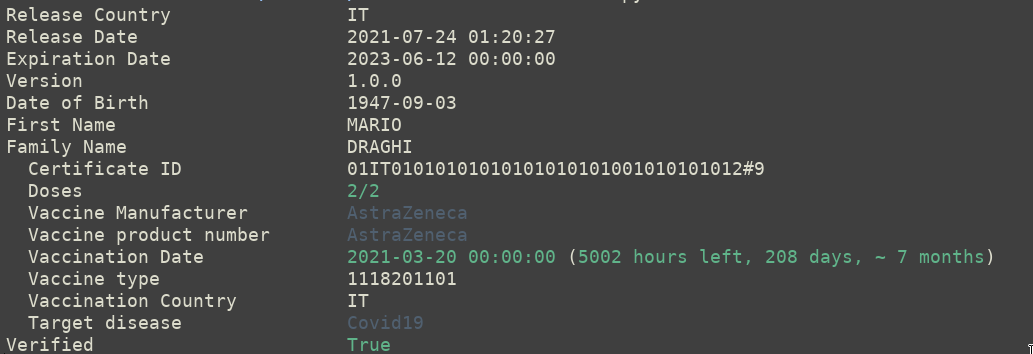 + +Scriptable green pass verifier. +With this application you can automatize accesses based on green pass validity. +It can also be used to analyze your digital certification (e.g. to print +which key was used to sign the certificate, `--verbose`). + +It is compatibile with EU certificates (DGC) and UK certificate (NHS). + +## Installation +You need to have pip and libzbar to install the application. + +You can install it using your favorite package manager, for instance in Ubuntu: + +```bash +sudo apt install python3-pip libzbar0 +``` + +You can just install the application using pip: +```bash +pip install greenpass +``` + +If you want to install it from sources, install the python3 requirements +using the following command: +```bash +pip3 install -r requirements.txt +``` + +You can also use it through the pre-built Docker image, you can find it +[here](https://hub.docker.com/r/berdav/greenpass). You can easily use +it using: +```bash +sudo docker run --rm -ti berdav/greenpass --settings +``` + +## Usage +You can feed the application with different file formats, for instance: + +Green pass official PDFs +```bash +greenpass --pdf greenpass.pdf +``` + +QRCode images in PNG +```bash +greenpass --qr greenpass.png +``` + +Txt files with the content of the qrcode +```bash +greenpass --txt greenpass.txt +``` + +Standard input and pipes +```bash +zbarimg --raw greenpass.png | greenpass --txt - +``` + +On a side note, you can verify camera-acquired images if your scanner +prints the raw content of the QRcode on stdout +```bash +zbarcam --raw -q1 | greenpass --txt - +``` + +The application returns an UNIX compatible code, therefore you can +concatenate commands that will be executed only if the green pass is +verified. +```bash +greenpass --qr greenpass.png && echo "green pass ok" +``` + +You can also get the expiration configuration using `--settings` without +other inputs. +```bash +greenpass --settings +``` +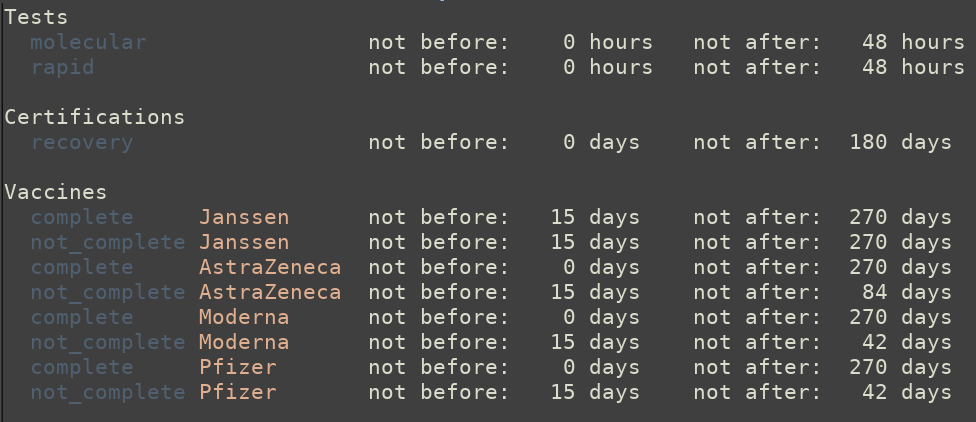 + +Debug the cryptographic part of your greenpass +```bash +greenpass --qr greenpass.png --dump-sign +``` + +Print the key which the greenpass was signed with +```bash +greenpass --qr greenpass.png --verbose --no-cache +``` + +Check if a greenpass was valid or will be valid on a certain date +```bash +greenpass --qr greenpass.png --at-date '2021-10-30 18:34' +``` + +## Switches +```bash +-h --help +``` +Help, print the help message + +You need to use one of: + +```bash +--settings +``` +Dump the settings used by the Italian application + +```bash +--qr QR +``` +Analyze the qrcode QR + +```bash +--pdf PDF +``` +Analyze the pdf file PDF + +```bash +--txt TXT +``` +Analyze the txt file TXT + +Caching options: +```bash +--cachedir CACHEDIR +``` +Use CACHEDIR as the cache directory, by default the cache is placed in `$HOME/.local/greenpass`. + +Miscellaneous switches: +```bash +--raw +``` +Print the raw content (JSON) of the certificate + +```bash +--no-color +``` +Disable colored output. + +```bash +--force-color +``` +Force colored output. (useful in CMD on Windows) + +```bash +--no-cache +``` +Disable cache, download everything without saving it. + +```bash +--clear-cache +``` +Redownload the entire cache, useful to update settings. + +```bash +--key KEY +``` +Use the content of the file KEY as the public certificate (DGC) or the public key (NHS) to +verify the certificate. + +```bash +--verbose +``` +Print more information (e.g. which key verifies the certificate). + +```bash +--dump-sign +``` +Print details on the headers and signature of the certificate. + +```bash +--at-date AT_DATE +``` +Use AT_DATE instead of the current date + +```bash +--recovery-expiration +``` +The recovery certification contains an expiration date. By +default this date is ignored, this switch re-enables the check +and consider this date (in addition to the settings date). + +```bash +--batch +``` +Remove all the outputs. + +```bash +--language LANGUAGE +``` +Localize the output in LANGUAGE. Currently the following languages are +available: +* English +* Italian +* German + +## Docker Container +The docker image shipped with the program can be used in the following +way: + +```bash +zbarimg --raw qrcode.png | sudo docker -i greenpass +``` +Read a PNG greenpass qrcode + +```bash +sudo docker -i greenpass --settings +``` +To read the settings + +And virtually with all the switches you can find in the previous +section. At the moment, files are not easily passed in the container, +therefore it is better to process the qrcode or the pdf outside of the +container and extract the qrcode text to pass in the application. + +## Pointers +If you want more information on the green pass certification and how +to parse or verify it you can refer to the following resources: + +[Greenpass Encoding documentation](https://github.com/ehn-dcc-development/hcert-spec) + +[Official Italian Android application](https://github.com/ministero-salute/it-dgc-verificaC19-android ) + +[JSON schema and specifications](https://ec.europa.eu/health/sites/default/files/ehealth/docs/covid-certificate_json_specification_en.pdf) + +[A very detailed blog post on how decode the pass](https://gir.st/blog/greenpass.html) + + + + +%package -n python3-greenpass +Summary: Scriptable green pass verifier +Provides: python-greenpass +BuildRequires: python3-devel +BuildRequires: python3-setuptools +BuildRequires: python3-pip +%description -n python3-greenpass +# Green Pass Verifier +[](https://www.codacy.com/gh/berdav/greenpass/dashboard?utm_source=github.com&utm_medium=referral&utm_content=berdav/greenpass&utm_campaign=Badge_Grade) +[](https://www.codacy.com/gh/berdav/greenpass/dashboard?utm_source=github.com&utm_medium=referral&utm_content=berdav/greenpass&utm_campaign=Badge_Coverage) + +[](https://pypi.org/project/greenpass/) +[](https://hub.docker.com/r/berdav/greenpass) + + + +Scriptable green pass verifier. +With this application you can automatize accesses based on green pass validity. +It can also be used to analyze your digital certification (e.g. to print +which key was used to sign the certificate, `--verbose`). + +It is compatibile with EU certificates (DGC) and UK certificate (NHS). + +## Installation +You need to have pip and libzbar to install the application. + +You can install it using your favorite package manager, for instance in Ubuntu: + +```bash +sudo apt install python3-pip libzbar0 +``` + +You can just install the application using pip: +```bash +pip install greenpass +``` + +If you want to install it from sources, install the python3 requirements +using the following command: +```bash +pip3 install -r requirements.txt +``` + +You can also use it through the pre-built Docker image, you can find it +[here](https://hub.docker.com/r/berdav/greenpass). You can easily use +it using: +```bash +sudo docker run --rm -ti berdav/greenpass --settings +``` + +## Usage +You can feed the application with different file formats, for instance: + +Green pass official PDFs +```bash +greenpass --pdf greenpass.pdf +``` + +QRCode images in PNG +```bash +greenpass --qr greenpass.png +``` + +Txt files with the content of the qrcode +```bash +greenpass --txt greenpass.txt +``` + +Standard input and pipes +```bash +zbarimg --raw greenpass.png | greenpass --txt - +``` + +On a side note, you can verify camera-acquired images if your scanner +prints the raw content of the QRcode on stdout +```bash +zbarcam --raw -q1 | greenpass --txt - +``` + +The application returns an UNIX compatible code, therefore you can +concatenate commands that will be executed only if the green pass is +verified. +```bash +greenpass --qr greenpass.png && echo "green pass ok" +``` + +You can also get the expiration configuration using `--settings` without +other inputs. +```bash +greenpass --settings +``` + + +Debug the cryptographic part of your greenpass +```bash +greenpass --qr greenpass.png --dump-sign +``` + +Print the key which the greenpass was signed with +```bash +greenpass --qr greenpass.png --verbose --no-cache +``` + +Check if a greenpass was valid or will be valid on a certain date +```bash +greenpass --qr greenpass.png --at-date '2021-10-30 18:34' +``` + +## Switches +```bash +-h --help +``` +Help, print the help message + +You need to use one of: + +```bash +--settings +``` +Dump the settings used by the Italian application + +```bash +--qr QR +``` +Analyze the qrcode QR + +```bash +--pdf PDF +``` +Analyze the pdf file PDF + +```bash +--txt TXT +``` +Analyze the txt file TXT + +Caching options: +```bash +--cachedir CACHEDIR +``` +Use CACHEDIR as the cache directory, by default the cache is placed in `$HOME/.local/greenpass`. + +Miscellaneous switches: +```bash +--raw +``` +Print the raw content (JSON) of the certificate + +```bash +--no-color +``` +Disable colored output. + +```bash +--force-color +``` +Force colored output. (useful in CMD on Windows) + +```bash +--no-cache +``` +Disable cache, download everything without saving it. + +```bash +--clear-cache +``` +Redownload the entire cache, useful to update settings. + +```bash +--key KEY +``` +Use the content of the file KEY as the public certificate (DGC) or the public key (NHS) to +verify the certificate. + +```bash +--verbose +``` +Print more information (e.g. which key verifies the certificate). + +```bash +--dump-sign +``` +Print details on the headers and signature of the certificate. + +```bash +--at-date AT_DATE +``` +Use AT_DATE instead of the current date + +```bash +--recovery-expiration +``` +The recovery certification contains an expiration date. By +default this date is ignored, this switch re-enables the check +and consider this date (in addition to the settings date). + +```bash +--batch +``` +Remove all the outputs. + +```bash +--language LANGUAGE +``` +Localize the output in LANGUAGE. Currently the following languages are +available: +* English +* Italian +* German + +## Docker Container +The docker image shipped with the program can be used in the following +way: + +```bash +zbarimg --raw qrcode.png | sudo docker -i greenpass +``` +Read a PNG greenpass qrcode + +```bash +sudo docker -i greenpass --settings +``` +To read the settings + +And virtually with all the switches you can find in the previous +section. At the moment, files are not easily passed in the container, +therefore it is better to process the qrcode or the pdf outside of the +container and extract the qrcode text to pass in the application. + +## Pointers +If you want more information on the green pass certification and how +to parse or verify it you can refer to the following resources: + +[Greenpass Encoding documentation](https://github.com/ehn-dcc-development/hcert-spec) + +[Official Italian Android application](https://github.com/ministero-salute/it-dgc-verificaC19-android ) + +[JSON schema and specifications](https://ec.europa.eu/health/sites/default/files/ehealth/docs/covid-certificate_json_specification_en.pdf) + +[A very detailed blog post on how decode the pass](https://gir.st/blog/greenpass.html) + + + + +%package help +Summary: Development documents and examples for greenpass +Provides: python3-greenpass-doc +%description help +# Green Pass Verifier +[](https://www.codacy.com/gh/berdav/greenpass/dashboard?utm_source=github.com&utm_medium=referral&utm_content=berdav/greenpass&utm_campaign=Badge_Grade) +[](https://www.codacy.com/gh/berdav/greenpass/dashboard?utm_source=github.com&utm_medium=referral&utm_content=berdav/greenpass&utm_campaign=Badge_Coverage) + +[](https://pypi.org/project/greenpass/) +[](https://hub.docker.com/r/berdav/greenpass) + + + +Scriptable green pass verifier. +With this application you can automatize accesses based on green pass validity. +It can also be used to analyze your digital certification (e.g. to print +which key was used to sign the certificate, `--verbose`). + +It is compatibile with EU certificates (DGC) and UK certificate (NHS). + +## Installation +You need to have pip and libzbar to install the application. + +You can install it using your favorite package manager, for instance in Ubuntu: + +```bash +sudo apt install python3-pip libzbar0 +``` + +You can just install the application using pip: +```bash +pip install greenpass +``` + +If you want to install it from sources, install the python3 requirements +using the following command: +```bash +pip3 install -r requirements.txt +``` + +You can also use it through the pre-built Docker image, you can find it +[here](https://hub.docker.com/r/berdav/greenpass). You can easily use +it using: +```bash +sudo docker run --rm -ti berdav/greenpass --settings +``` + +## Usage +You can feed the application with different file formats, for instance: + +Green pass official PDFs +```bash +greenpass --pdf greenpass.pdf +``` + +QRCode images in PNG +```bash +greenpass --qr greenpass.png +``` + +Txt files with the content of the qrcode +```bash +greenpass --txt greenpass.txt +``` + +Standard input and pipes +```bash +zbarimg --raw greenpass.png | greenpass --txt - +``` + +On a side note, you can verify camera-acquired images if your scanner +prints the raw content of the QRcode on stdout +```bash +zbarcam --raw -q1 | greenpass --txt - +``` + +The application returns an UNIX compatible code, therefore you can +concatenate commands that will be executed only if the green pass is +verified. +```bash +greenpass --qr greenpass.png && echo "green pass ok" +``` + +You can also get the expiration configuration using `--settings` without +other inputs. +```bash +greenpass --settings +``` + + +Debug the cryptographic part of your greenpass +```bash +greenpass --qr greenpass.png --dump-sign +``` + +Print the key which the greenpass was signed with +```bash +greenpass --qr greenpass.png --verbose --no-cache +``` + +Check if a greenpass was valid or will be valid on a certain date +```bash +greenpass --qr greenpass.png --at-date '2021-10-30 18:34' +``` + +## Switches +```bash +-h --help +``` +Help, print the help message + +You need to use one of: + +```bash +--settings +``` +Dump the settings used by the Italian application + +```bash +--qr QR +``` +Analyze the qrcode QR + +```bash +--pdf PDF +``` +Analyze the pdf file PDF + +```bash +--txt TXT +``` +Analyze the txt file TXT + +Caching options: +```bash +--cachedir CACHEDIR +``` +Use CACHEDIR as the cache directory, by default the cache is placed in `$HOME/.local/greenpass`. + +Miscellaneous switches: +```bash +--raw +``` +Print the raw content (JSON) of the certificate + +```bash +--no-color +``` +Disable colored output. + +```bash +--force-color +``` +Force colored output. (useful in CMD on Windows) + +```bash +--no-cache +``` +Disable cache, download everything without saving it. + +```bash +--clear-cache +``` +Redownload the entire cache, useful to update settings. + +```bash +--key KEY +``` +Use the content of the file KEY as the public certificate (DGC) or the public key (NHS) to +verify the certificate. + +```bash +--verbose +``` +Print more information (e.g. which key verifies the certificate). + +```bash +--dump-sign +``` +Print details on the headers and signature of the certificate. + +```bash +--at-date AT_DATE +``` +Use AT_DATE instead of the current date + +```bash +--recovery-expiration +``` +The recovery certification contains an expiration date. By +default this date is ignored, this switch re-enables the check +and consider this date (in addition to the settings date). + +```bash +--batch +``` +Remove all the outputs. + +```bash +--language LANGUAGE +``` +Localize the output in LANGUAGE. Currently the following languages are +available: +* English +* Italian +* German + +## Docker Container +The docker image shipped with the program can be used in the following +way: + +```bash +zbarimg --raw qrcode.png | sudo docker -i greenpass +``` +Read a PNG greenpass qrcode + +```bash +sudo docker -i greenpass --settings +``` +To read the settings + +And virtually with all the switches you can find in the previous +section. At the moment, files are not easily passed in the container, +therefore it is better to process the qrcode or the pdf outside of the +container and extract the qrcode text to pass in the application. + +## Pointers +If you want more information on the green pass certification and how +to parse or verify it you can refer to the following resources: + +[Greenpass Encoding documentation](https://github.com/ehn-dcc-development/hcert-spec) + +[Official Italian Android application](https://github.com/ministero-salute/it-dgc-verificaC19-android ) + +[JSON schema and specifications](https://ec.europa.eu/health/sites/default/files/ehealth/docs/covid-certificate_json_specification_en.pdf) + +[A very detailed blog post on how decode the pass](https://gir.st/blog/greenpass.html) + + + + +%prep +%autosetup -n greenpass-4.3.1 + +%build +%py3_build + +%install +%py3_install +install -d -m755 %{buildroot}/%{_pkgdocdir} +if [ -d doc ]; then cp -arf doc %{buildroot}/%{_pkgdocdir}; fi +if [ -d docs ]; then cp -arf docs %{buildroot}/%{_pkgdocdir}; fi +if [ -d example ]; then cp -arf example %{buildroot}/%{_pkgdocdir}; fi +if [ -d examples ]; then cp -arf examples %{buildroot}/%{_pkgdocdir}; fi +pushd %{buildroot} +if [ -d usr/lib ]; then + find usr/lib -type f -printf "/%h/%f\n" >> filelist.lst +fi +if [ -d usr/lib64 ]; then + find usr/lib64 -type f -printf "/%h/%f\n" >> filelist.lst +fi +if [ -d usr/bin ]; then + find usr/bin -type f -printf "/%h/%f\n" >> filelist.lst +fi +if [ -d usr/sbin ]; then + find usr/sbin -type f -printf "/%h/%f\n" >> filelist.lst +fi +touch doclist.lst +if [ -d usr/share/man ]; then + find usr/share/man -type f -printf "/%h/%f.gz\n" >> doclist.lst +fi +popd +mv %{buildroot}/filelist.lst . +mv %{buildroot}/doclist.lst . + +%files -n python3-greenpass -f filelist.lst +%dir %{python3_sitelib}/* + +%files help -f doclist.lst +%{_docdir}/* + +%changelog +* Fri May 05 2023 Python_Bot <Python_Bot@openeuler.org> - 4.3.1-1 +- Package Spec generated |