blob: 5bbb61a13d5f2071051b96bfb0f817f18e95d3c6 (
plain)
1
2
3
4
5
6
7
8
9
10
11
12
13
14
15
16
17
18
19
20
21
22
23
24
25
26
27
28
29
30
31
32
33
34
35
36
37
38
39
40
41
42
43
44
45
46
47
48
49
50
51
52
53
54
55
56
57
58
59
60
61
62
63
64
65
66
67
68
69
70
71
72
73
74
75
76
77
78
79
80
81
82
83
84
85
86
87
88
89
90
91
92
93
94
95
96
97
98
99
100
101
102
103
104
105
106
107
108
109
110
111
112
113
114
115
116
117
118
119
120
121
122
123
124
125
126
127
128
129
130
131
132
133
134
135
136
137
138
139
140
141
142
143
144
145
146
147
148
149
150
151
152
153
154
155
156
157
158
159
160
161
162
163
164
165
166
167
168
169
170
171
172
173
174
175
176
177
178
179
180
181
182
183
184
185
186
187
188
189
190
191
192
|
%global _empty_manifest_terminate_build 0
Name: python-nbgitpuller
Version: 1.1.1
Release: 1
Summary: Notebook Extension to do one-way synchronization of git repositories
License: 3-clause BSD
URL: https://github.com/jupyterhub/nbgitpuller
Source0: https://mirrors.nju.edu.cn/pypi/web/packages/ae/71/4b7d9c2c396a8165b877563d0617a8df3ac919829f32260f8610f3860956/nbgitpuller-1.1.1.tar.gz
BuildArch: noarch
Requires: python3-notebook
Requires: python3-jupyter-server
Requires: python3-tornado
%description
# [nbgitpuller](https://github.com/jupyterhub/nbgitpuller)
[](https://github.com/jupyterhub/nbgitpuller/actions)
[](https://circleci.com/gh/jupyterhub/nbgitpuller)
[](https://pypi.python.org/pypi/nbgitpuller)
[](https://github.com/jupyterhub/nbgitpuller/issues)
[](https://discourse.jupyter.org/c/jupyterhub)
[](https://gitter.im/jupyterhub/jupyterhub)
`nbgitpuller` lets you distribute content in a git repository to your students
by having them click a simple link. [Automatic
merging](https://jupyterhub.github.io/nbgitpuller/topic/automatic-merging.html)
ensures that your students are never exposed to `git` directly. It is primarily
used with a JupyterHub, but can also work on students' local computers.
See [the documentation](https://jupyterhub.github.io/nbgitpuller) for more
information.
## Installation
```shell
pip install nbgitpuller
```
## Example
This example shows how to use the [nbgitpuller link generator](https://jupyterhub.github.io/nbgitpuller/link)
to create an nbgitpuller link, which a user then clicks.
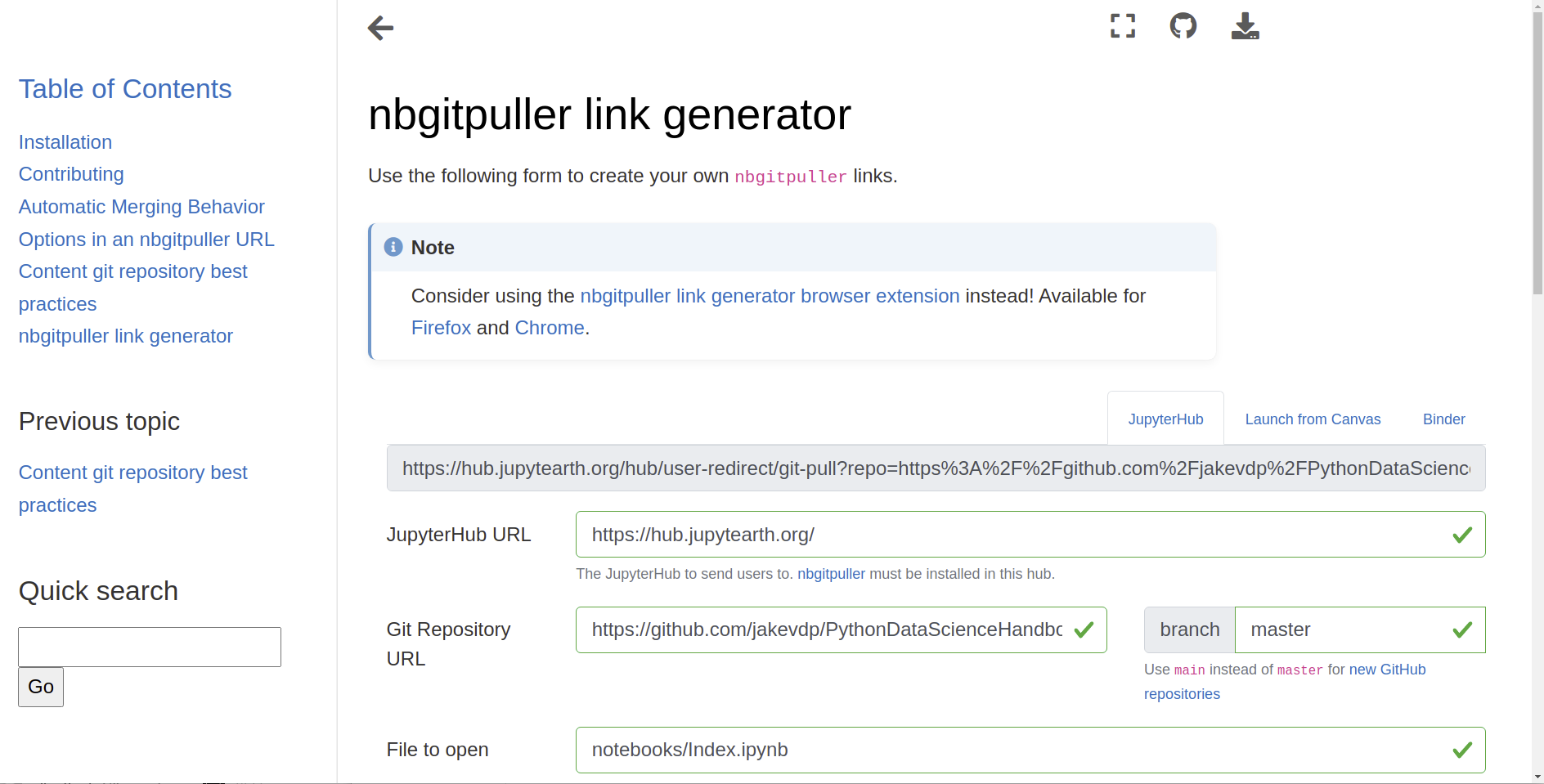
1. The [nbgitpuller link generator GUI](https://jupyterhub.github.io/nbgitpuller/link) is used to create a
link.
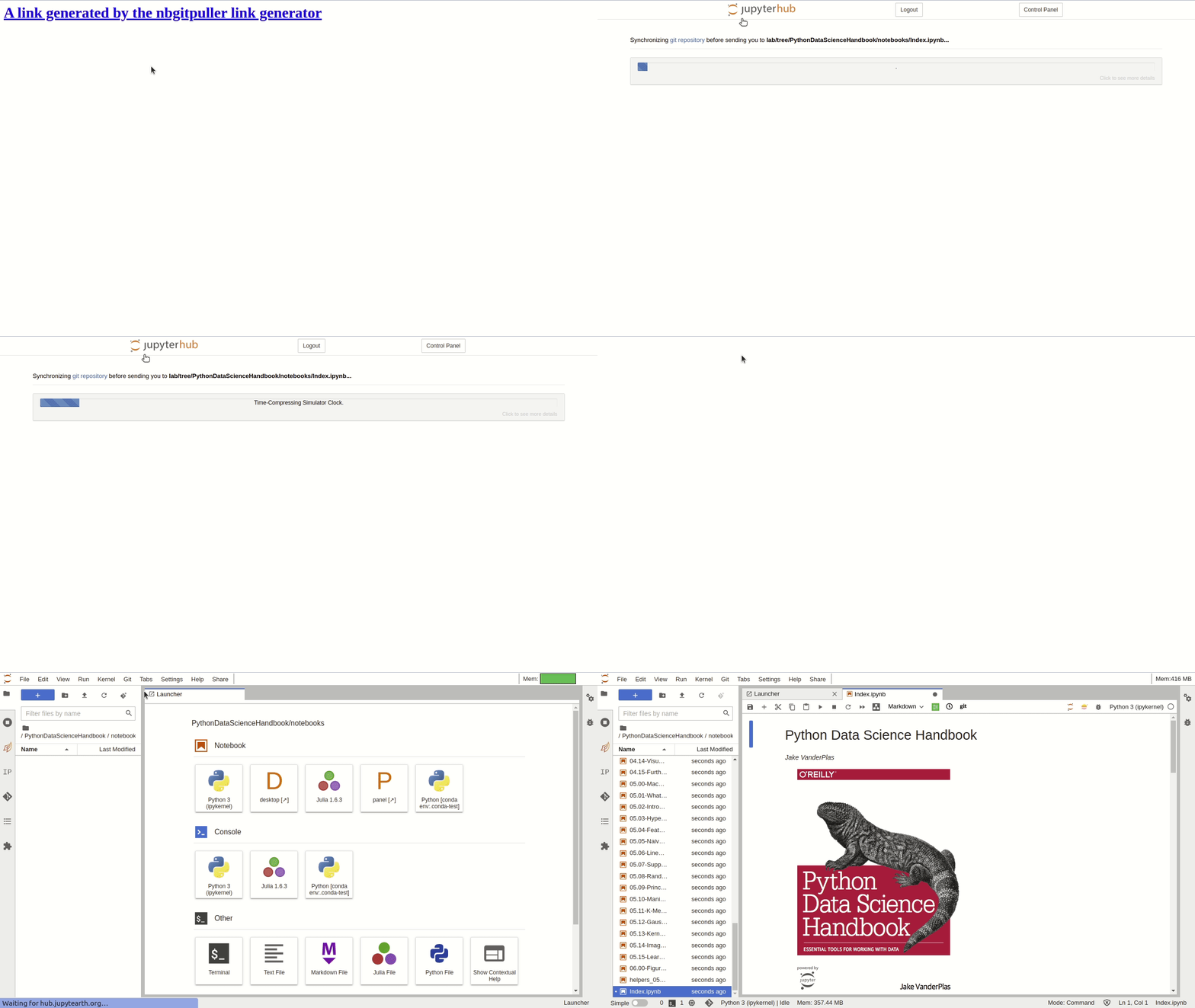
2. This link is clicked, and the content is pulled into a live Jupyter session.
%package -n python3-nbgitpuller
Summary: Notebook Extension to do one-way synchronization of git repositories
Provides: python-nbgitpuller
BuildRequires: python3-devel
BuildRequires: python3-setuptools
BuildRequires: python3-pip
%description -n python3-nbgitpuller
# [nbgitpuller](https://github.com/jupyterhub/nbgitpuller)
[](https://github.com/jupyterhub/nbgitpuller/actions)
[](https://circleci.com/gh/jupyterhub/nbgitpuller)
[](https://pypi.python.org/pypi/nbgitpuller)
[](https://github.com/jupyterhub/nbgitpuller/issues)
[](https://discourse.jupyter.org/c/jupyterhub)
[](https://gitter.im/jupyterhub/jupyterhub)
`nbgitpuller` lets you distribute content in a git repository to your students
by having them click a simple link. [Automatic
merging](https://jupyterhub.github.io/nbgitpuller/topic/automatic-merging.html)
ensures that your students are never exposed to `git` directly. It is primarily
used with a JupyterHub, but can also work on students' local computers.
See [the documentation](https://jupyterhub.github.io/nbgitpuller) for more
information.
## Installation
```shell
pip install nbgitpuller
```
## Example
This example shows how to use the [nbgitpuller link generator](https://jupyterhub.github.io/nbgitpuller/link)
to create an nbgitpuller link, which a user then clicks.
1. The [nbgitpuller link generator GUI](https://jupyterhub.github.io/nbgitpuller/link) is used to create a
link.

2. This link is clicked, and the content is pulled into a live Jupyter session.

%package help
Summary: Development documents and examples for nbgitpuller
Provides: python3-nbgitpuller-doc
%description help
# [nbgitpuller](https://github.com/jupyterhub/nbgitpuller)
[](https://github.com/jupyterhub/nbgitpuller/actions)
[](https://circleci.com/gh/jupyterhub/nbgitpuller)
[](https://pypi.python.org/pypi/nbgitpuller)
[](https://github.com/jupyterhub/nbgitpuller/issues)
[](https://discourse.jupyter.org/c/jupyterhub)
[](https://gitter.im/jupyterhub/jupyterhub)
`nbgitpuller` lets you distribute content in a git repository to your students
by having them click a simple link. [Automatic
merging](https://jupyterhub.github.io/nbgitpuller/topic/automatic-merging.html)
ensures that your students are never exposed to `git` directly. It is primarily
used with a JupyterHub, but can also work on students' local computers.
See [the documentation](https://jupyterhub.github.io/nbgitpuller) for more
information.
## Installation
```shell
pip install nbgitpuller
```
## Example
This example shows how to use the [nbgitpuller link generator](https://jupyterhub.github.io/nbgitpuller/link)
to create an nbgitpuller link, which a user then clicks.
1. The [nbgitpuller link generator GUI](https://jupyterhub.github.io/nbgitpuller/link) is used to create a
link.

2. This link is clicked, and the content is pulled into a live Jupyter session.

%prep
%autosetup -n nbgitpuller-1.1.1
%build
%py3_build
%install
%py3_install
install -d -m755 %{buildroot}/%{_pkgdocdir}
if [ -d doc ]; then cp -arf doc %{buildroot}/%{_pkgdocdir}; fi
if [ -d docs ]; then cp -arf docs %{buildroot}/%{_pkgdocdir}; fi
if [ -d example ]; then cp -arf example %{buildroot}/%{_pkgdocdir}; fi
if [ -d examples ]; then cp -arf examples %{buildroot}/%{_pkgdocdir}; fi
pushd %{buildroot}
if [ -d usr/lib ]; then
find usr/lib -type f -printf "/%h/%f\n" >> filelist.lst
fi
if [ -d usr/lib64 ]; then
find usr/lib64 -type f -printf "/%h/%f\n" >> filelist.lst
fi
if [ -d usr/bin ]; then
find usr/bin -type f -printf "/%h/%f\n" >> filelist.lst
fi
if [ -d usr/sbin ]; then
find usr/sbin -type f -printf "/%h/%f\n" >> filelist.lst
fi
touch doclist.lst
if [ -d usr/share/man ]; then
find usr/share/man -type f -printf "/%h/%f.gz\n" >> doclist.lst
fi
popd
mv %{buildroot}/filelist.lst .
mv %{buildroot}/doclist.lst .
%files -n python3-nbgitpuller -f filelist.lst
%dir %{python3_sitelib}/*
%files help -f doclist.lst
%{_docdir}/*
%changelog
* Tue Apr 11 2023 Python_Bot <Python_Bot@openeuler.org> - 1.1.1-1
- Package Spec generated
|
