1
2
3
4
5
6
7
8
9
10
11
12
13
14
15
16
17
18
19
20
21
22
23
24
25
26
27
28
29
30
31
32
33
34
35
36
37
38
39
40
41
42
43
44
45
46
47
48
49
50
51
52
53
54
55
56
57
58
59
60
61
62
63
64
65
66
67
68
69
70
71
72
73
74
75
76
77
78
79
80
81
82
83
84
85
86
87
88
89
90
91
92
93
94
95
96
97
98
99
100
101
102
103
104
105
106
107
108
109
110
111
112
113
114
115
116
117
118
119
120
121
122
123
124
125
126
127
128
129
130
131
132
133
134
135
136
137
138
139
140
141
142
143
144
145
146
147
148
149
150
151
152
153
154
155
156
157
158
159
160
161
|
%global _empty_manifest_terminate_build 0
Name: python-pyawscp
Version: 0.6.11
Release: 1
Summary: A simple 'Python Shell' environment that you can use to 'talk' with your AWS account...
License: MIT
URL: https://ualter.github.io/pyawscp/
Source0: https://mirrors.aliyun.com/pypi/web/packages/d9/f9/b8ba94b8fabdb0a30a560c2a3087d531425ca00278e220b43fe21ed186a0/pyawscp-0.6.11.tar.gz
BuildArch: noarch
Requires: python3-Pygments
Requires: python3-XlsxWriter
Requires: python3-arnparse
Requires: python3-boto3
Requires: python3-botocore
Requires: python3-clipboard
Requires: python3-pyreadline
Requires: python3-requests
Requires: python3-svglib
Requires: python3-tinydb
Requires: python3-websockets
%description

### What is this about?
This tool is a simple result, a "collateral-effect", born from the need of boring and repetitive tasks during interaction with AWS, while I was working on my duties.
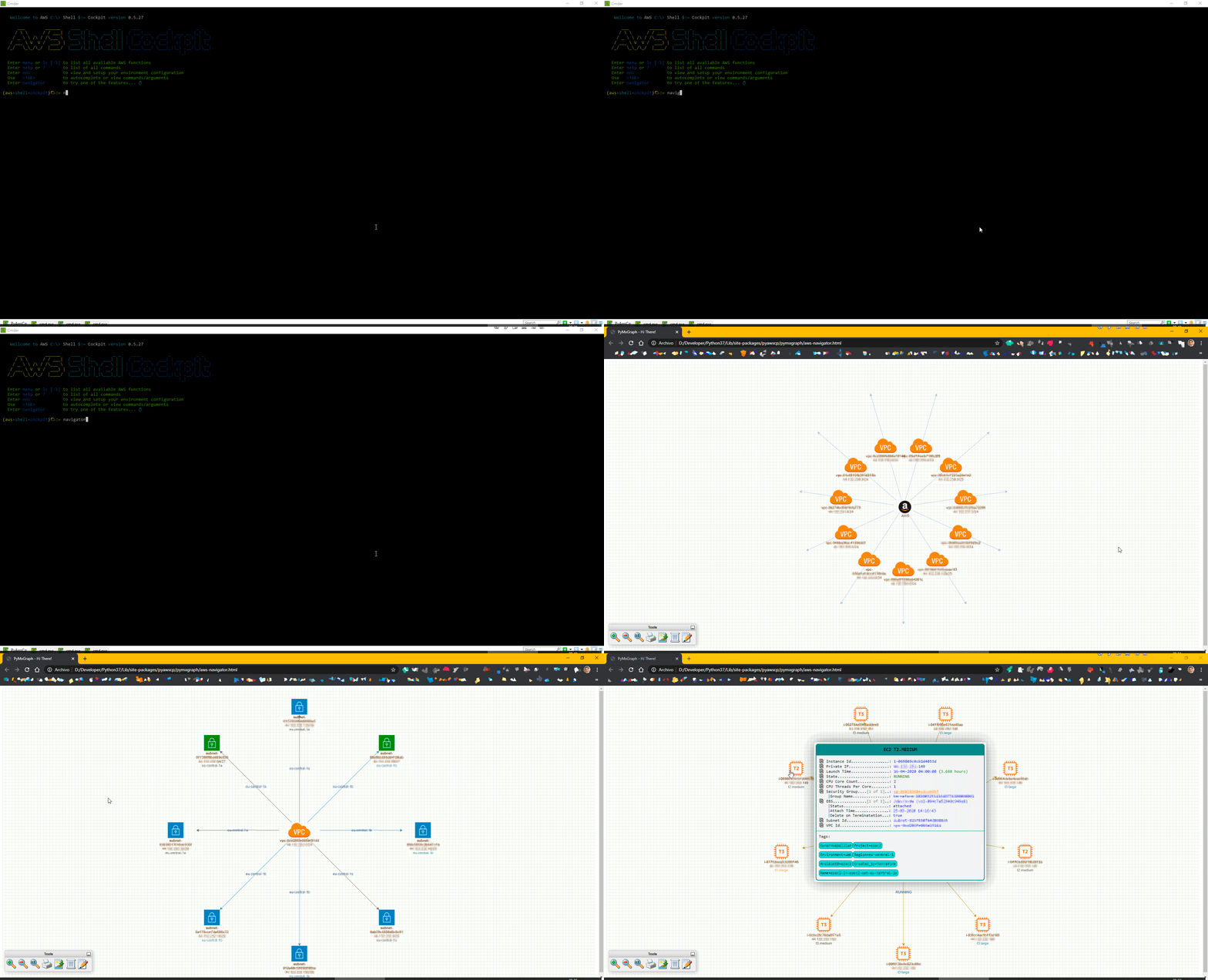
It's a Shell that has collection of pre-built commands that basically extracts informations: ASCII Views and also Visual Graphics from the AWS resources and their relationships.
In a ordinary working day with Cloud, questions like below always poppup (frequently and recurrently):
- Which ELB is pointing to this EC2 Instance? Actually, is there any one?
- Which ELB or EC2 Instance it is the target of the DNS myproject.lof.middle.earth.org ?
- Is this Subnet is Public or Private after all?
- How many IP Addresses still left in all my VPCs? Or... only tell me for this one here vpc-0123456789abcdef?
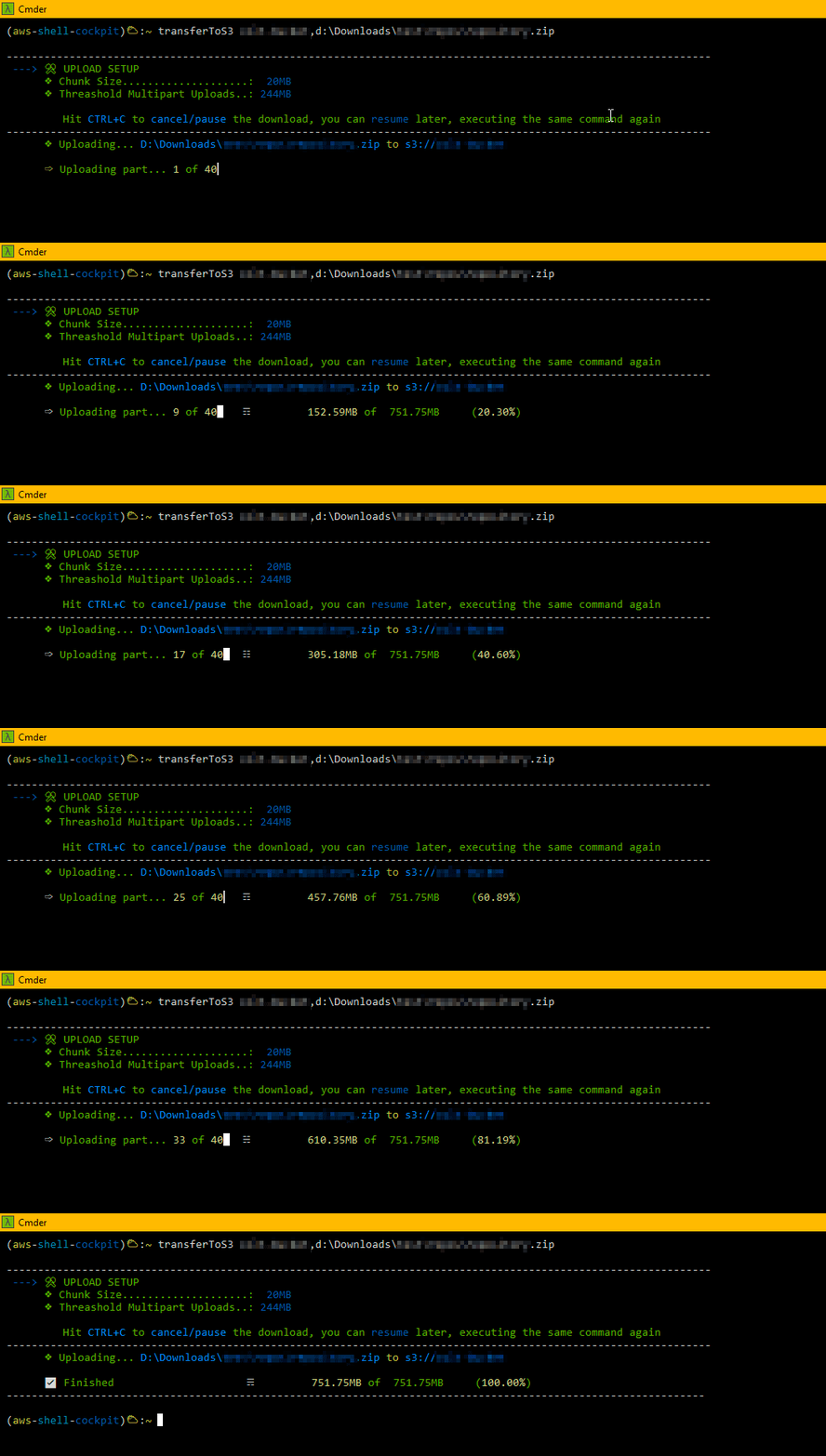
- Is there any S3 Multipart Uploads unfinished? So, let's abort it... (this costs money and I cannot see them on AWS Console)
- Give me a List of all my VPC's Subnet, tell me also which one is Public
### So What?
So, we could just use AWS Console, AWS CLI + Bash Script, Boto3, right? Well, pretty much it is what I was doing all the day around. But, I realized that:
- Interact with AWS Console it's counterproductive (boring, slow, ...)
- Manage to get the answers with AWS CLI (although more flexible than AWS Console), very often you have to run two, three commands to reach to the final answer.
- Besides, using AWS CLI, you have to mantain the used commands saved in some place (well commented) and available, like your library.
As Python Boto3 is far most powerful than AWS CLI, it can offers you tons of features to interact with AWS *(it's not by chance that tools like Ansible Red Hat, after all, use it)*. I came up with the idea of build this sort-of "Shell" AWS utility to my day-to-day tasks, to help me, make the *repetition* less boring and bring some agility as well. That's where was born this idea *(well, also something to do on my spare time when I am bored)*
All the commands (that were and still are useful to me) are pre-packaged inside this Python Shell, now I only need to install the Python package and have everything available and documented to use it.
All the commands (that were/are useful to me) are pre-packaged inside this Python Shell, I only need to install the Python package with everything available and use it.
While working on this, some other ideas were popping up, like:
- Generate some visual graphs (exportable to DrawIO) as vision of the AWS resources and their relationships.
- An online navigator, where you can view (graphically and export also) your AWS Networking resources (online - a live view).
I am always trying to add new features, when new needs or ideas are raising (of course when I have some off-time to dedicate to it).
I am sharing the result of this, perhaps can be useful to somone else. Feel free to reach out to me with new ideas/suggestions, I will be glad to hear you.
More at: https://ualter.github.io/pyawscp/
%package -n python3-pyawscp
Summary: A simple 'Python Shell' environment that you can use to 'talk' with your AWS account...
Provides: python-pyawscp
BuildRequires: python3-devel
BuildRequires: python3-setuptools
BuildRequires: python3-pip
%description -n python3-pyawscp



### What is this about?
This tool is a simple result, a "collateral-effect", born from the need of boring and repetitive tasks during interaction with AWS, while I was working on my duties.
It's a Shell that has collection of pre-built commands that basically extracts informations: ASCII Views and also Visual Graphics from the AWS resources and their relationships.
In a ordinary working day with Cloud, questions like below always poppup (frequently and recurrently):
- Which ELB is pointing to this EC2 Instance? Actually, is there any one?
- Which ELB or EC2 Instance it is the target of the DNS myproject.lof.middle.earth.org ?
- Is this Subnet is Public or Private after all?
- How many IP Addresses still left in all my VPCs? Or... only tell me for this one here vpc-0123456789abcdef?
- Is there any S3 Multipart Uploads unfinished? So, let's abort it... (this costs money and I cannot see them on AWS Console)
- Give me a List of all my VPC's Subnet, tell me also which one is Public
### So What?
So, we could just use AWS Console, AWS CLI + Bash Script, Boto3, right? Well, pretty much it is what I was doing all the day around. But, I realized that:
- Interact with AWS Console it's counterproductive (boring, slow, ...)
- Manage to get the answers with AWS CLI (although more flexible than AWS Console), very often you have to run two, three commands to reach to the final answer.
- Besides, using AWS CLI, you have to mantain the used commands saved in some place (well commented) and available, like your library.
As Python Boto3 is far most powerful than AWS CLI, it can offers you tons of features to interact with AWS *(it's not by chance that tools like Ansible Red Hat, after all, use it)*. I came up with the idea of build this sort-of "Shell" AWS utility to my day-to-day tasks, to help me, make the *repetition* less boring and bring some agility as well. That's where was born this idea *(well, also something to do on my spare time when I am bored)*
All the commands (that were and still are useful to me) are pre-packaged inside this Python Shell, now I only need to install the Python package and have everything available and documented to use it.
All the commands (that were/are useful to me) are pre-packaged inside this Python Shell, I only need to install the Python package with everything available and use it.
While working on this, some other ideas were popping up, like:
- Generate some visual graphs (exportable to DrawIO) as vision of the AWS resources and their relationships.
- An online navigator, where you can view (graphically and export also) your AWS Networking resources (online - a live view).
I am always trying to add new features, when new needs or ideas are raising (of course when I have some off-time to dedicate to it).
I am sharing the result of this, perhaps can be useful to somone else. Feel free to reach out to me with new ideas/suggestions, I will be glad to hear you.
More at: https://ualter.github.io/pyawscp/
%package help
Summary: Development documents and examples for pyawscp
Provides: python3-pyawscp-doc
%description help



### What is this about?
This tool is a simple result, a "collateral-effect", born from the need of boring and repetitive tasks during interaction with AWS, while I was working on my duties.
It's a Shell that has collection of pre-built commands that basically extracts informations: ASCII Views and also Visual Graphics from the AWS resources and their relationships.
In a ordinary working day with Cloud, questions like below always poppup (frequently and recurrently):
- Which ELB is pointing to this EC2 Instance? Actually, is there any one?
- Which ELB or EC2 Instance it is the target of the DNS myproject.lof.middle.earth.org ?
- Is this Subnet is Public or Private after all?
- How many IP Addresses still left in all my VPCs? Or... only tell me for this one here vpc-0123456789abcdef?
- Is there any S3 Multipart Uploads unfinished? So, let's abort it... (this costs money and I cannot see them on AWS Console)
- Give me a List of all my VPC's Subnet, tell me also which one is Public
### So What?
So, we could just use AWS Console, AWS CLI + Bash Script, Boto3, right? Well, pretty much it is what I was doing all the day around. But, I realized that:
- Interact with AWS Console it's counterproductive (boring, slow, ...)
- Manage to get the answers with AWS CLI (although more flexible than AWS Console), very often you have to run two, three commands to reach to the final answer.
- Besides, using AWS CLI, you have to mantain the used commands saved in some place (well commented) and available, like your library.
As Python Boto3 is far most powerful than AWS CLI, it can offers you tons of features to interact with AWS *(it's not by chance that tools like Ansible Red Hat, after all, use it)*. I came up with the idea of build this sort-of "Shell" AWS utility to my day-to-day tasks, to help me, make the *repetition* less boring and bring some agility as well. That's where was born this idea *(well, also something to do on my spare time when I am bored)*
All the commands (that were and still are useful to me) are pre-packaged inside this Python Shell, now I only need to install the Python package and have everything available and documented to use it.
All the commands (that were/are useful to me) are pre-packaged inside this Python Shell, I only need to install the Python package with everything available and use it.
While working on this, some other ideas were popping up, like:
- Generate some visual graphs (exportable to DrawIO) as vision of the AWS resources and their relationships.
- An online navigator, where you can view (graphically and export also) your AWS Networking resources (online - a live view).
I am always trying to add new features, when new needs or ideas are raising (of course when I have some off-time to dedicate to it).
I am sharing the result of this, perhaps can be useful to somone else. Feel free to reach out to me with new ideas/suggestions, I will be glad to hear you.
More at: https://ualter.github.io/pyawscp/
%prep
%autosetup -n pyawscp-0.6.11
%build
%py3_build
%install
%py3_install
install -d -m755 %{buildroot}/%{_pkgdocdir}
if [ -d doc ]; then cp -arf doc %{buildroot}/%{_pkgdocdir}; fi
if [ -d docs ]; then cp -arf docs %{buildroot}/%{_pkgdocdir}; fi
if [ -d example ]; then cp -arf example %{buildroot}/%{_pkgdocdir}; fi
if [ -d examples ]; then cp -arf examples %{buildroot}/%{_pkgdocdir}; fi
pushd %{buildroot}
if [ -d usr/lib ]; then
find usr/lib -type f -printf "\"/%h/%f\"\n" >> filelist.lst
fi
if [ -d usr/lib64 ]; then
find usr/lib64 -type f -printf "\"/%h/%f\"\n" >> filelist.lst
fi
if [ -d usr/bin ]; then
find usr/bin -type f -printf "\"/%h/%f\"\n" >> filelist.lst
fi
if [ -d usr/sbin ]; then
find usr/sbin -type f -printf "\"/%h/%f\"\n" >> filelist.lst
fi
touch doclist.lst
if [ -d usr/share/man ]; then
find usr/share/man -type f -printf "\"/%h/%f.gz\"\n" >> doclist.lst
fi
popd
mv %{buildroot}/filelist.lst .
mv %{buildroot}/doclist.lst .
%files -n python3-pyawscp -f filelist.lst
%dir %{python3_sitelib}/*
%files help -f doclist.lst
%{_docdir}/*
%changelog
* Fri Jun 09 2023 Python_Bot <Python_Bot@openeuler.org> - 0.6.11-1
- Package Spec generated
|
