
diff options
| -rw-r--r-- | .gitignore | 1 | ||||
| -rw-r--r-- | python-qsapi.spec | 389 | ||||
| -rw-r--r-- | sources | 1 |
3 files changed, 391 insertions, 0 deletions
@@ -0,0 +1 @@ +/qsAPI-2.2.0.tar.gz diff --git a/python-qsapi.spec b/python-qsapi.spec new file mode 100644 index 0000000..471f2a2 --- /dev/null +++ b/python-qsapi.spec @@ -0,0 +1,389 @@ +%global _empty_manifest_terminate_build 0 +Name: python-qsAPI +Version: 2.2.0 +Release: 1 +Summary: qsAPI - a client for Qlik Sense QPS and QRS interfaces +License: MIT License +URL: https://github.com/rafael-sanz/qsAPI +Source0: https://mirrors.nju.edu.cn/pypi/web/packages/8f/58/5127ab0965890f90e134f4fe5df83fd3752f35e7968c46ba3a6e47cff386/qsAPI-2.2.0.tar.gz +BuildArch: noarch + +Requires: python3-requests +Requires: python3-requests-ntlm + +%description +## About +qsAPI is a client for Qlik Sense QPS and QRS interfaces written in python that provides an environment for managing a Qlik Sense site via programming or interactive console. The module provides a set of commands for viewing and editing configuration settings, as well as managing tasks and other features available through APIs. + +## Installation + +You could use your preferred IDE (Eclipse, Visual Code, NetBeans, etc.) with the python interpreter 3.x or directly in console. Take a look at (https://www.python.org). Once the module is loaded you can view a list of available commands with the autocomplete tooltips. + +Just execute in the command line (libraries and dependencies will be installed): + +```python +pip install qsAPI +``` + +Optionally, if you plan connect using NTLM authentication, then append optional target. + +```python +pip install qsAPI[ntlm] +``` + +Now, the module can be used just importing qsAPI.py at the beginning of your python script or console, the module will then be loaded and ready to use. +```python +>>> import qsAPI +``` + +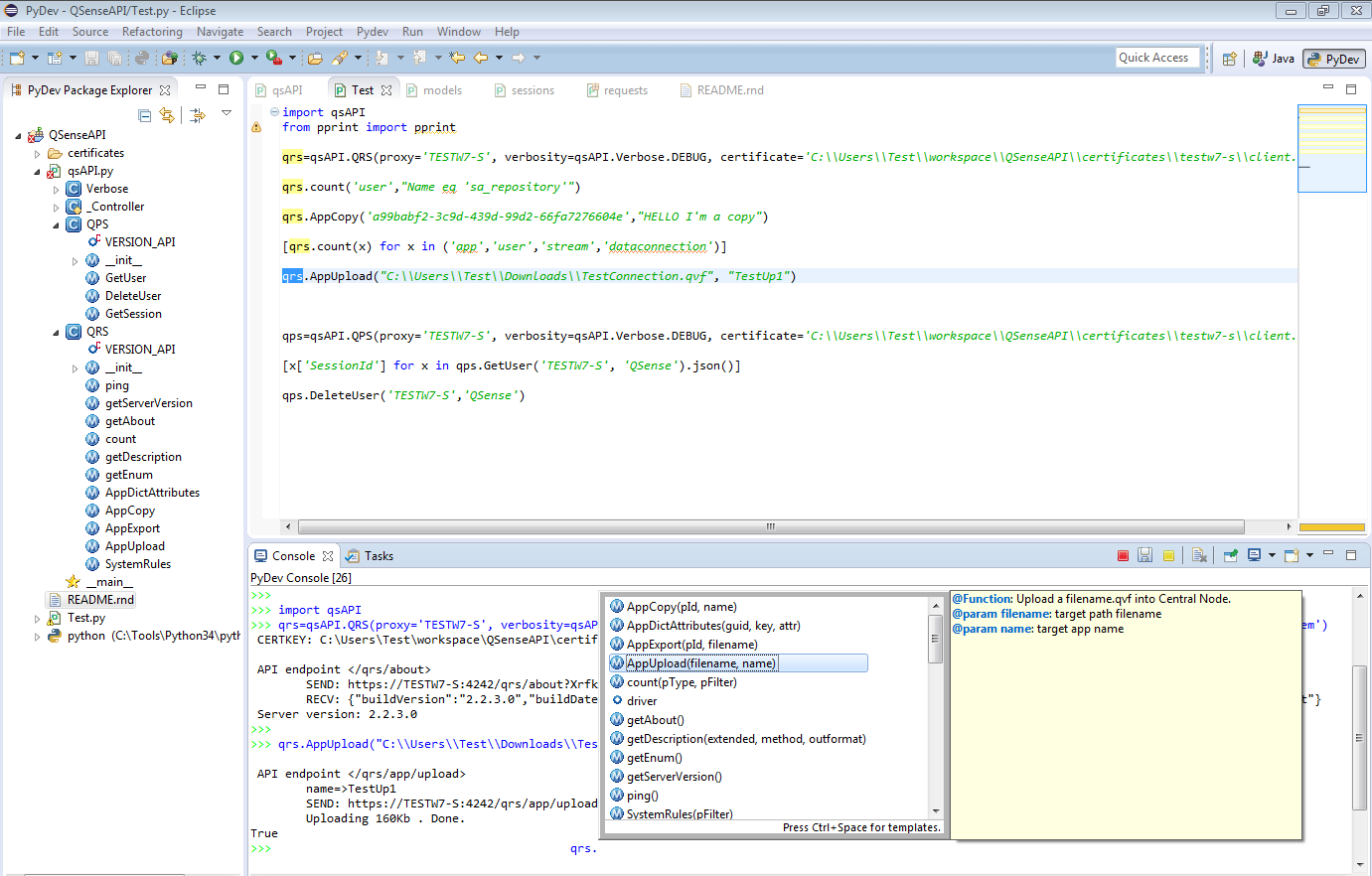 + + +Or just a simple command line console if complex scripts are no needed: +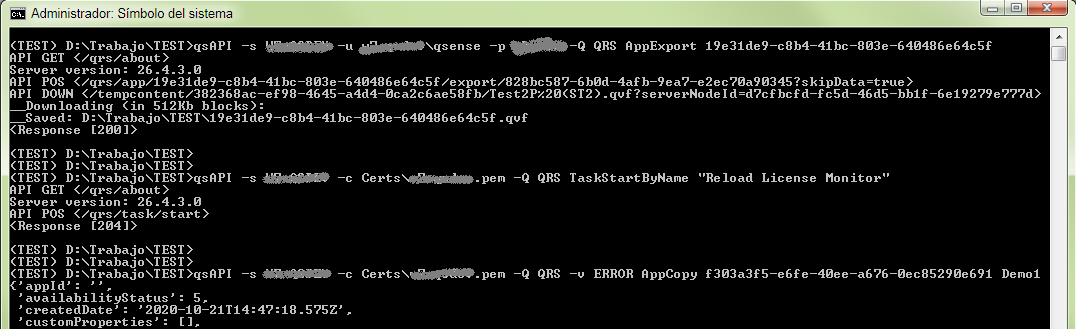 + + +## Usage +### Connecting with certificates +The first step is to build a handler invoking the constructor of the class you will use containing the host parameters, this will attempt to connect to the Qlik Sense server. Just export previously from QlikSense console the certificate in portable format and copy the folder in your machine: +```python +>>> qrs=qsAPI.QRS(proxy='hostname', certificate='path\\client.pem') +``` + +### Connecting with windows credentials (NTLM) +Alternatively, the constructor accept user credentials via arguments. +```python +>>> qrs=qsAPI.QRS(proxy='hostname', user=('yor_domain','username','password')) +``` + +## Examples +#### Count users using a filter +```python +qrs.count('user',"Name eq 'sa_repository'") +``` +#### Duplicate an application in the server +```python +qrs.AppCopy('a99babf2-3c9d-439d-99d2-66fa7276604e',"HELLO world") +``` +#### Export an application +```python +qrs.AppExport('a99babf2-3c9d-439d-99d2-66fa7276604e',"c:\\path\\myAppName.qvf") +``` + +#### Export all published applications to directories +```python +for app in qrs.AppGet(pFilter="stream.name ne 'None'"): + os.makedirs(app['stream']['name'], exist_ok=True) + qrs.AppExport(app['id'], app['stream']['name']+'\\'+app['name']) +``` + +#### Retrieve security rules using a filter +```python +qrs.SystemRulesGet("type eq 'Custom'") +``` + +#### Retrieve a list of sessions for a user +```python +[x['SessionId'] for x in qps.GetUser('DIR', 'name').json()] +``` + +#### teardown of all connections for the user and related sessions +```python +qps.DeleteUser('DIR','name') +``` + +##### More examples +Take a look at the Wiki area: (https://github.com/rafael-sanz/qsAPI/wiki) + + +## Command Line +Alternative use as command line is available too, examples: + +``` +qsAPI --help +qsAPI -s myServer -c dir/client.pem -Q QRS TaskStartbyName "Reload License Monitor" +qsAPI -s myServer -c dir/client.pem -Q QRS -v INFO AppExport d8b120d7-a6e4-42ff-90b2-2ac6a3d92233 +qsAPI -s myServer -c dir/client.pem -Q QRS -v INFO AppReload 79f0c591-67de-4ded-91ae-4865934a5746 +``` + +## TODO +The module is in progress, a subset of methods are implemented. But all the endpoints could be implemented through the inner class `driver` and the methods `get, post, put, delete`. + +```python +qps.driver.get('/qrs/about/api/enums') +``` + +## License +This software is made available "AS IS" without warranty of any kind. Qlik support agreement does not cover support for this software. + + + + +%package -n python3-qsAPI +Summary: qsAPI - a client for Qlik Sense QPS and QRS interfaces +Provides: python-qsAPI +BuildRequires: python3-devel +BuildRequires: python3-setuptools +BuildRequires: python3-pip +%description -n python3-qsAPI +## About +qsAPI is a client for Qlik Sense QPS and QRS interfaces written in python that provides an environment for managing a Qlik Sense site via programming or interactive console. The module provides a set of commands for viewing and editing configuration settings, as well as managing tasks and other features available through APIs. + +## Installation + +You could use your preferred IDE (Eclipse, Visual Code, NetBeans, etc.) with the python interpreter 3.x or directly in console. Take a look at (https://www.python.org). Once the module is loaded you can view a list of available commands with the autocomplete tooltips. + +Just execute in the command line (libraries and dependencies will be installed): + +```python +pip install qsAPI +``` + +Optionally, if you plan connect using NTLM authentication, then append optional target. + +```python +pip install qsAPI[ntlm] +``` + +Now, the module can be used just importing qsAPI.py at the beginning of your python script or console, the module will then be loaded and ready to use. +```python +>>> import qsAPI +``` + + + + +Or just a simple command line console if complex scripts are no needed: + + + +## Usage +### Connecting with certificates +The first step is to build a handler invoking the constructor of the class you will use containing the host parameters, this will attempt to connect to the Qlik Sense server. Just export previously from QlikSense console the certificate in portable format and copy the folder in your machine: +```python +>>> qrs=qsAPI.QRS(proxy='hostname', certificate='path\\client.pem') +``` + +### Connecting with windows credentials (NTLM) +Alternatively, the constructor accept user credentials via arguments. +```python +>>> qrs=qsAPI.QRS(proxy='hostname', user=('yor_domain','username','password')) +``` + +## Examples +#### Count users using a filter +```python +qrs.count('user',"Name eq 'sa_repository'") +``` +#### Duplicate an application in the server +```python +qrs.AppCopy('a99babf2-3c9d-439d-99d2-66fa7276604e',"HELLO world") +``` +#### Export an application +```python +qrs.AppExport('a99babf2-3c9d-439d-99d2-66fa7276604e',"c:\\path\\myAppName.qvf") +``` + +#### Export all published applications to directories +```python +for app in qrs.AppGet(pFilter="stream.name ne 'None'"): + os.makedirs(app['stream']['name'], exist_ok=True) + qrs.AppExport(app['id'], app['stream']['name']+'\\'+app['name']) +``` + +#### Retrieve security rules using a filter +```python +qrs.SystemRulesGet("type eq 'Custom'") +``` + +#### Retrieve a list of sessions for a user +```python +[x['SessionId'] for x in qps.GetUser('DIR', 'name').json()] +``` + +#### teardown of all connections for the user and related sessions +```python +qps.DeleteUser('DIR','name') +``` + +##### More examples +Take a look at the Wiki area: (https://github.com/rafael-sanz/qsAPI/wiki) + + +## Command Line +Alternative use as command line is available too, examples: + +``` +qsAPI --help +qsAPI -s myServer -c dir/client.pem -Q QRS TaskStartbyName "Reload License Monitor" +qsAPI -s myServer -c dir/client.pem -Q QRS -v INFO AppExport d8b120d7-a6e4-42ff-90b2-2ac6a3d92233 +qsAPI -s myServer -c dir/client.pem -Q QRS -v INFO AppReload 79f0c591-67de-4ded-91ae-4865934a5746 +``` + +## TODO +The module is in progress, a subset of methods are implemented. But all the endpoints could be implemented through the inner class `driver` and the methods `get, post, put, delete`. + +```python +qps.driver.get('/qrs/about/api/enums') +``` + +## License +This software is made available "AS IS" without warranty of any kind. Qlik support agreement does not cover support for this software. + + + + +%package help +Summary: Development documents and examples for qsAPI +Provides: python3-qsAPI-doc +%description help +## About +qsAPI is a client for Qlik Sense QPS and QRS interfaces written in python that provides an environment for managing a Qlik Sense site via programming or interactive console. The module provides a set of commands for viewing and editing configuration settings, as well as managing tasks and other features available through APIs. + +## Installation + +You could use your preferred IDE (Eclipse, Visual Code, NetBeans, etc.) with the python interpreter 3.x or directly in console. Take a look at (https://www.python.org). Once the module is loaded you can view a list of available commands with the autocomplete tooltips. + +Just execute in the command line (libraries and dependencies will be installed): + +```python +pip install qsAPI +``` + +Optionally, if you plan connect using NTLM authentication, then append optional target. + +```python +pip install qsAPI[ntlm] +``` + +Now, the module can be used just importing qsAPI.py at the beginning of your python script or console, the module will then be loaded and ready to use. +```python +>>> import qsAPI +``` + + + + +Or just a simple command line console if complex scripts are no needed: + + + +## Usage +### Connecting with certificates +The first step is to build a handler invoking the constructor of the class you will use containing the host parameters, this will attempt to connect to the Qlik Sense server. Just export previously from QlikSense console the certificate in portable format and copy the folder in your machine: +```python +>>> qrs=qsAPI.QRS(proxy='hostname', certificate='path\\client.pem') +``` + +### Connecting with windows credentials (NTLM) +Alternatively, the constructor accept user credentials via arguments. +```python +>>> qrs=qsAPI.QRS(proxy='hostname', user=('yor_domain','username','password')) +``` + +## Examples +#### Count users using a filter +```python +qrs.count('user',"Name eq 'sa_repository'") +``` +#### Duplicate an application in the server +```python +qrs.AppCopy('a99babf2-3c9d-439d-99d2-66fa7276604e',"HELLO world") +``` +#### Export an application +```python +qrs.AppExport('a99babf2-3c9d-439d-99d2-66fa7276604e',"c:\\path\\myAppName.qvf") +``` + +#### Export all published applications to directories +```python +for app in qrs.AppGet(pFilter="stream.name ne 'None'"): + os.makedirs(app['stream']['name'], exist_ok=True) + qrs.AppExport(app['id'], app['stream']['name']+'\\'+app['name']) +``` + +#### Retrieve security rules using a filter +```python +qrs.SystemRulesGet("type eq 'Custom'") +``` + +#### Retrieve a list of sessions for a user +```python +[x['SessionId'] for x in qps.GetUser('DIR', 'name').json()] +``` + +#### teardown of all connections for the user and related sessions +```python +qps.DeleteUser('DIR','name') +``` + +##### More examples +Take a look at the Wiki area: (https://github.com/rafael-sanz/qsAPI/wiki) + + +## Command Line +Alternative use as command line is available too, examples: + +``` +qsAPI --help +qsAPI -s myServer -c dir/client.pem -Q QRS TaskStartbyName "Reload License Monitor" +qsAPI -s myServer -c dir/client.pem -Q QRS -v INFO AppExport d8b120d7-a6e4-42ff-90b2-2ac6a3d92233 +qsAPI -s myServer -c dir/client.pem -Q QRS -v INFO AppReload 79f0c591-67de-4ded-91ae-4865934a5746 +``` + +## TODO +The module is in progress, a subset of methods are implemented. But all the endpoints could be implemented through the inner class `driver` and the methods `get, post, put, delete`. + +```python +qps.driver.get('/qrs/about/api/enums') +``` + +## License +This software is made available "AS IS" without warranty of any kind. Qlik support agreement does not cover support for this software. + + + + +%prep +%autosetup -n qsAPI-2.2.0 + +%build +%py3_build + +%install +%py3_install +install -d -m755 %{buildroot}/%{_pkgdocdir} +if [ -d doc ]; then cp -arf doc %{buildroot}/%{_pkgdocdir}; fi +if [ -d docs ]; then cp -arf docs %{buildroot}/%{_pkgdocdir}; fi +if [ -d example ]; then cp -arf example %{buildroot}/%{_pkgdocdir}; fi +if [ -d examples ]; then cp -arf examples %{buildroot}/%{_pkgdocdir}; fi +pushd %{buildroot} +if [ -d usr/lib ]; then + find usr/lib -type f -printf "/%h/%f\n" >> filelist.lst +fi +if [ -d usr/lib64 ]; then + find usr/lib64 -type f -printf "/%h/%f\n" >> filelist.lst +fi +if [ -d usr/bin ]; then + find usr/bin -type f -printf "/%h/%f\n" >> filelist.lst +fi +if [ -d usr/sbin ]; then + find usr/sbin -type f -printf "/%h/%f\n" >> filelist.lst +fi +touch doclist.lst +if [ -d usr/share/man ]; then + find usr/share/man -type f -printf "/%h/%f.gz\n" >> doclist.lst +fi +popd +mv %{buildroot}/filelist.lst . +mv %{buildroot}/doclist.lst . + +%files -n python3-qsAPI -f filelist.lst +%dir %{python3_sitelib}/* + +%files help -f doclist.lst +%{_docdir}/* + +%changelog +* Fri May 05 2023 Python_Bot <Python_Bot@openeuler.org> - 2.2.0-1 +- Package Spec generated @@ -0,0 +1 @@ +35035740eadbaa10bf9d8db20e6535a9 qsAPI-2.2.0.tar.gz |